
SSG-5150GB - 3D Glasses SAMSUNG - Free user manual and instructions
Find the device manual for free SSG-5150GB SAMSUNG in PDF.


| Product Type | 3D Active Shutter Glasses |
| Model | SSG-5150GB |
| Brand | Samsung |
| Dimensions (W x H x D) | 167.5 x 44.5 x 185.2 mm |
| Weight | 26 g |
| Power Source | 1 x CR1620 3V battery |
| Battery Life | Approximately 150 hours of continuous use |
| Sync Type | Infrared (IR) |
| Operating Range | Up to 6 meters from the TV |
| Functionality | Active shutter 3D viewing, auto power on/off, auto sleep |
| Compatibility | Samsung 3D TVs (2011-2012 models) with IR sync |
| Frame Material | Lightweight plastic with rubber nose pads |
| Cleaning Instructions | Wipe with a soft, dry cloth. Do not use liquids. |
| Storage | Keep in a cool, dry place away from direct sunlight |
| Safety Warnings | Not suitable for children under 3 years. Do not disassemble. |
| Spare Parts Availability | Not available separately; non-repairable |
| Packaging Contents | 1 x 3D glasses, 1 x cleaning cloth, 1 x user manual |
Frequently Asked Questions - SSG-5150GB SAMSUNG
User questions about SSG-5150GB SAMSUNG
0 question about this device. Answer the ones you know or ask your own.
Ask a new question about this device
Download the instructions for your 3D Glasses in PDF format for free! Find your manual SSG-5150GB - SAMSUNG and take your electronic device back in hand. On this page are published all the documents necessary for the use of your device. SSG-5150GB by SAMSUNG.
USER MANUAL SSG-5150GB SAMSUNG
SSG-5150GB User's Guide
The TV user guide's description of this product may not be accurate, so always refer to this guide.
Features
Samsung's SSG-5150GB 3D glasses enable you to view 3D images on your 3D TV. The Samsung 3D glasses communicate with Samsung 3D TVs via the 2.4GHz RF band.
- The Samsung 3D glasses are only compatible with Samsung D, E, ES, F, FH, H, HU, J, JU, and JS series 3D TVs that were released in 2011, 2012, 2013, 2014, and 2015. These 3D glasses cannot be connected to other Bluetooth devices.
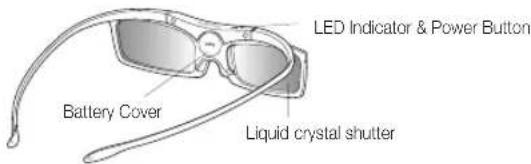
Parts
Replacing the Batteries
If the red LED blinks every two seconds continually, replace the battery with a new one.
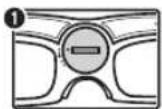
Find the battery holder on the inside of the glasses.
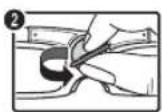
Replace a new battery in the battery holder and insert it into the glasses.
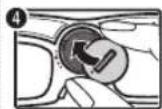
Insert a coin into the groove and turn the battery holder counterclockwise.
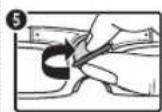
Insert a coin into the groove and turn the battery holder clockwise to lock it.
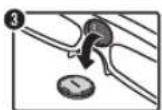
Tilt the glasses downwards to separate the battery from the glasses.
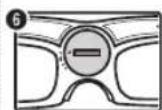
Make sure that the battery is held firmly in place.
- Use a coin when changing batteries. Using other tools may damage the groove on the battery holder.
- Insert the "+" side of the battery into the side marked with "+" in the battery compartment.
- To check the remaining battery capacity, refer to the pairing section in this manual.
Pairing 3D Active Glasses
What is Pairing?
Pairing is the process of connecting 3D glasses and a 3D TV so that the two devices can exchange data.
Ensure your Samsung TV and 3D glasses are no farther than 19.5 in (50 cm) apart from each other while pairing is in progress.
Turning the glasses on
Press the power button briefly. The green LED turns on for 3 seconds. (Make sure that 3D is activated on the TV before using the 3D glasses.)
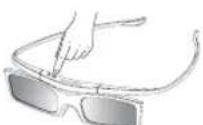
Turning the glasses off
Press the power button briefly. The red LED turns on for 3 seconds.
Performing the pairing process
Turn the TV on and let it power up completely. Press and hold the Power button on the glasses. The green and the red LEDs blink alternately for 2 seconds.
Operating range
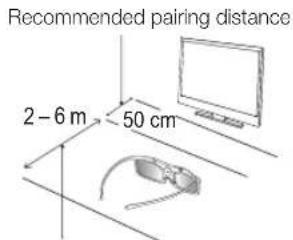
Recommended viewing distance
Recommended viewing distance
2 - 6 m (6 to 19.5 ft)
Recommended pairing distance
50 cm or less (about 20 in)
Once the 3D glasses are paired, the remaining battery capacity is displayed on the TV screen. (This feature only applies to Samsung F series 3D TVs and 3D glasses that have been available since 2013.)
If you keep trying to pair the glasses and the TV after pairing has failed, the battery level will decrease significantly. However, the battery level will recover to a certain degree in about a minute.
The working distance is affected by the presence of obstacles (a person, metal, walls, etc.) between the glasses and the TV and the strength of the Bluetooth signal.
Turn off the 3D glasses when they are not in use. If you leave the 3D glasses on, the battery lifespan decreases.
Pairing steps
- Turn on the TV, and then move the glasses within 19.5 inches of the TV.
- Press the power button on the 3D glasses briefly. The 3D glasses will power on and pairing will start.
- The message "3D glasses are connected to TV." will be displayed on the TV screen when the pairing is successfully completed.
- If pairing fails, the 3D glasses will power off.
- If the first attempt to pair fails, power the TV off and on again and perform step 2.
- How to pair again: Press the power button on the 3D glasses for more than 1 second.
Pairing is needed again in the following situations:
If the 3D glasses do not function, even when the power button is pressed, especially if the TV has just been repaired.
If you want to play 3D content on another Samsung 3D TV model that belongs to the D, E, ES, F, FH, H, HU, J, JU or JS series released in 2011 through 2015. You must pair the glasses with the other TV.
Viewing guidelines
In 3D view mode, the screen may flicker under fluorescent lighting (50Hz \~ 60Hz) or three-wave lighting.
- In this case, it is advisable to turn off the lighting or adjust it to a low level. When switching the picture mode from 3D view, the 3D view mode turns off, and the 3D glasses fail to operate, resulting in the display not operating properly.
- Then, the 3D glasses turn off.
If you lie on your side while watching TV with the 3D glasses, the picture may look darker or may not be visible.
If the 3D glasses are defective or damaged, they cannot be repaired and should be exchanged for a new pair. The repair service is free of charge within the warranty period, which, however, does not cover damage from the user's fault.
The actual 3D effect may be experienced differently depending on the viewer. The 3D effect may not be experienced by a person who has a great difference of vision in the left and right eyes.
In 3D view mode, it is advisable to watch TV within the recommended distance.
- The 3D function of the glasses may not work properly if you are out of the recommended distance for about 3 seconds.
- If you stay out of the recommended range, the 3D glasses lose the wireless communications with the TV, and then the display turns off in few seconds before the glasses turn off.
The 3D glasses may not work properly if there are any nearby active 3D devices or electronic or wireless communication devices (for example, a device that uses the 2.4GHz or 5GHz frequency range such as a microwave or AP). In this case, move the devices away from the 3D glasses.
The 3D Glasses may not work properly near metal objects or in an electromagnetic field. In this case, move the metal objects or the electromagnetic device away from the 3D glasses.
The vividness of the image may be deteriorated if you watch TV in a location that is exposed to direct sunlight or illumination.
CAUTION!
IMPORTANT HEALTH AND SAFETY INFORMATION FOR 3D IMAGES. READ THE FOLLOWING CAUTIONS BEFORE YOU OR YOUR CHILD USE THE 3D FUNCTION.
Adults should frequently check on children who are using the 3D function. If there are any complaints of tired eyes, headaches, dizziness or nausea, stop the child from viewing the 3D TV and ensure that they rest.
Do not use the 3D glasses for any purpose other than the intended purpose, such as general eyeglasses, sunglasses, protective goggles.
Some viewers may experience discomfort such as dizziness, nausea and headaches while viewing 3D TV. If you experience any of these symptoms, stop watching the 3D content, remove the 3D glasses, and take a rest.
An extended period of watching TV in 3D view mode may cause eye fatigue. In this case, stop watching the 3D content immediately, take off the 3D glasses and allow your eyes to rest.
Do not use the 3D function or the 3D glasses while walking or moving around. Wearing the 3D glasses while moving around may result in injury due to running into objects, tripping and/or falling.
If you sleep with the 3D glasses on, the temples on the glasses may become broken.
The temples of the 3D glasses are unfolded. Do not attempt to fold the temples with excessive force. Folding the temples with excessive force may damage the 3D glasses.
There is a danger of explosion if the battery is incorrectly replaced.
Make sure to replace the battery with the same type.
SAFETY PRECAUTIONS
The following safety instructions are to ensure your personal safety and prevent property damage. Please read them to ensure the proper use of the product.
Do not place the product in a location exposed to direct sunlight, heat, fire, or water. Exposure may result in a product malfunction or fire.
Do not apply force to the lenses of the 3D glasses. Do not drop or bend the product. Applying force, dropping, or bending may result in a product malfunction.
Keep components of the 3D glasses out of reach of children, and especially ensure children do not swallow one of the components. If your child swallowed a component, consult your doctor immediately.
When cleaning the product, do not spray water or cleaner directly onto the surface of the product. Spraying water or cleaner directly onto the glasses may result in fire or electric shock, damage to the product's surface, or cause the indicator labels on the product's surface to come loose.
Do not apply chemicals containing alcohol, solvent, or surfactant such as wax, benzene, thinner, pesticide, air freshener, lubricant, or cleaner to the product. These chemicals may cause the product's exterior to be discolored or cracked, or labels or instructions to be removed. Use only a soft cloth such as superfine fibers or cotton flannels for cleaning the product as the surface or the lenses easily cracks. Because the product can be easily scratched with foreign substances, make sure to dust off the cloth before using.
Do not sleep while wearing the 3D glasses. Wearing the 3D glasses while sleeping may damage them.
Do not disassemble, repair, or modify the 3D glasses by yourself. Do not use a product that is damaged.
Take care that you do not injure your eyes with the edges of the frame of the 3D glasses when wearing them.
Put the 3D glasses on and take them off with both hands.
Use only approved batteries, and make sure to insert the batteries in the correct polarities. If the batteries are replaced in the wrong polarities, the batteries may implode or leak its internal chemicals, which may cause fire, inflict injury on users, or contaminate (damage) its environment.
Keep the removed batteries out of children's reach to prevent children from swallowing them. If they swallow them, consult with a doctor immediately.
Swallowing the cylindrical (button type) battery can cause serious damage to your internal organs. If this happens, contact a doctor immediately.
Troubleshooting
| If you encounter... Try this... | |
| My 3D glasses do not work. | Replace the battery.The 3D glasses should be close to the TV. Make sure that the distance between the TV and your 3D glasses is less than 19.5 feet (6m) in a straight line.Check the 3D function settings of your TV. |
| The LED keeps blinking | The battery is dead. Replace the battery. |
Specifications (Model Number: SSG-5150GB)
| Optics | Shutters Liquid | crystal Transmittance 36 ± 2% | ||
| Recommended viewing distance | 6.5 to 19.5 ft (2 - 6 m) | Field Rate | 120 fields / s | |
| Weight Glasses | 21g / 0.74 oz. (including the battery: 22 g ± 0.5 g / 0.77 ± 018 oz.) | |||
| Power Glasses | One 3 V lithium / manganese dioxide battery 3 V (CR1620) | |||
| Power Consumption | Glasses 0.85 mA | (Average) | ||
| Battery | Type 70 mAh, 3.0 V (CR1620) | |||
| Operating time when On | 70 hours | |||
| Operating Conditions | Operating Temperature | 50°F - 104°F (10°C - 40°C) | ||
| Custody Temperature | -4°F - 113°F (-20°C - 45°C) | |||
- Product specifications may be changed without notice in order to enhance product performance.
- The continuous operating time may differ depending on the wireless communication environment and usage conditions.
[Recommendation] - EU ONLY
![SAMSUNG SSG-5150GB - [Recommendation] - EU ONLY - 1](/content/2026/05/947944/images/9ff5b7f8761a6a5dfdd00a6f7a39eaaa0b9dfc2d70f8a28a543220901bf36362.jpg)
Hereby, Samsung Electronics, declares that this equipment is in compliance with the essential requirements and other relevant provisions of Directive 1999/5/EC.
The official Declaration of Conformity may be found at http://www.samsung.com, go to Support > Search Product Support and enter the model name.
This equipment may be operated in all EU countries.
WARNING
DO NOT INGEST BATTERY, CHEMICAL BURN HAZARD
[The 3D Glasses Supplied with] This product contains a coin/button cell battery. If the coin/button cell battery is swallowed, it can cause severe internal burns in just 2 hours and can lead to death. Keep new and used batteries away from children. If the battery compartment does not close securely, stop using the product and keep it away from children.
If you think batteries might have been swallowed or placed inside any part of the body, seek immediate medical attention.
CAUTION
RISK OF EXPLOSION IF BATTERY IS REPLACED BY AN INCORRECT TYPE. DISPOSE OF USED BATTERIES ACCORDING TO THE INSTRUCTIONS
Active 3D Glasses
2 - 6 m (6 - 19.5 ft)
This page is intentionally left blank.
Declaration of Conformity
Manufacturer
Samsung Electronics Co., Ltd.
Product details
For the following
Declaration & Applicable standards
We hereby declare that the product above is in compliance with the essential requirements of R&TTE Directive (1999/5/EC) by application of
EN 60950-1:2006+A11:2009+A1:2010+A12:2011+A2:2013
EN 62311:2008
and the Directive (2011/65/EU) on the restriction of the use of certain hazardous substances in electrical and electronic equipment by application of EN 50581:2012.
Representative
Representative in the EU
Samsung Electronics Euro QA Lab.
Blackbushe Business Park
Saxony Way, Yateley, Hampshire
GU46 6GG, UK
2016-03-16 Stephen Colclough / EU Representative
(Place and date of issue) (Name and signature of authorized person)
* It is not the address of Samsung Service Centre. Please see the address or the phone number of Samsung Service Centre in the warranty card or contact the retailer where you purchased your product.
- SSG-5150GB USER'S GUIDE
- FEATURES
- PARTS
- REPLACING THE BATTERIES
- PAIRING 3D ACTIVE GLASSES
- WHAT IS PAIRING
- TURNING THE GLASSES ON
- TURNING THE GLASSES OFF
- PERFORMING THE PAIRING PROCESS
- OPERATING RANGE
- PAIRING STEPS
- PAIRING IS NEEDED AGAIN IN THE FOLLOWING SITUATIONS
- VIEWING GUIDELINES
- CAUTION
- IMPORTANT HEALTH AND SAFETY INFORMATION FOR 3D IMAGES. READ THE FOLLOWING CAUTIONS BEFORE YOU OR YOUR CHILD USE THE 3D FUNCTION
- SAFETY PRECAUTIONS
- THE FOLLOWING SAFETY INSTRUCTIONS ARE TO ENSURE YOUR PERSONAL SAFETY AND PREVENT PROPERTY DAMAGE. PLEASE READ THEM TO ENSURE THE PROPER USE OF THE PRODUCT
- [RECOMMENDATION] - EU ONLY
- WARNING
- DO NOT INGEST BATTERY, CHEMICAL BURN HAZARD
- ACTIVE 3D GLASSES
- THIS PAGE IS INTENTIONALLY LEFT BLANK
- DECLARATION OF CONFORMITY
- MANUFACTURER
- PRODUCT DETAILS
- DECLARATION & APPLICABLE STANDARDS
- REPRESENTATIVE
Brand : SAMSUNG
Model : SSG-5150GB
Category : 3D Glasses