PWIRBBQ80 - Thermomètre alimentaire Nutrichef - Free user manual and instructions
Find the device manual for free PWIRBBQ80 Nutrichef in PDF.


| Product Type | Wireless Food Thermometer |
| Brand | Nutrichef |
| Model | PWIRBBQ80 |
| Power Source | 2 AAA batteries (not included) |
| Temperature Range | -4°F to 572°F (-20°C to 300°C) |
| Accuracy | ±1°F (±0.5°C) |
| Probe Type | Stainless steel food-grade probe |
| Wireless Range | Up to 300 feet (90 meters) |
| Display | LCD with backlight |
| Timer | Countdown and count-up timer |
| Alarm | High/low temperature alert with audible beep |
| Preset Temperatures | Pre-programmed settings for beef, poultry, pork, fish, etc. |
| Dimensions | 7.5 x 3.5 x 1.2 inches |
| Weight | 6.4 oz (181 g) |
| Material | Plastic housing, stainless steel probe |
| Water Resistance | IPX4 splash-proof |
| Included Accessories | 2 probes, AA batteries, instruction manual |
| Warranty | 1 year limited warranty |
| Care & Cleaning | Wipe probe with damp cloth; do not immerse in water |
| Safety | Do not leave probe in oven during self-cleaning |
Frequently Asked Questions - PWIRBBQ80 Nutrichef
User questions about PWIRBBQ80 Nutrichef
0 question about this device. Answer the ones you know or ask your own.
Ask a new question about this device
Download the instructions for your Thermomètre alimentaire in PDF format for free! Find your manual PWIRBBQ80 - Nutrichef and take your electronic device back in hand. On this page are published all the documents necessary for the use of your device. PWIRBBQ80 by Nutrichef.
USER MANUAL PWIRBBQ80 Nutrichef
natural_image
Digital blood glucose meter with a digital display showing 80% humidity, alongside two test probes (yellow and red) on a surface.This thermometer is not a standard bluetooth device, please do not try to connect it in the Wireless BT device list of the smart phone OS. If a PIN code is required, just cancel it and pair it in the app of the thermometer.
Get to know the device
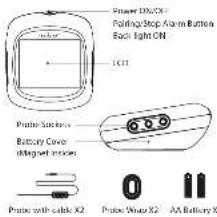
The device provides 6 Sockets for probes, which enable you to monitor 5 items at once. If you need more probes besides these 2 in the standard package, please contact the reader.
Put in the Battery
-
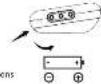
All slice batteries are needed for this device. Make sure to put the batteries in the night direction by following the lines on the unit:
-
Press the lock of the battery cover and rotate to open
-
Put in helberies, noticing the icons which show directions
- Put back the battery cover
Install the Probes
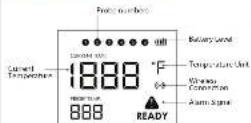
The desire will keep scanning the sockets when the power is switched ON. The probe icons on the LCD will display one by one from 1-8 where probes are plugged in. Then, after the probes into the food, make sure the front tip of the probe is in the center of the food to get an arcuate temperature.
Download the app
Search the keyword "easyBBO" in A postore or Google Play, or scan the following QR code with your phone.
Download and install it for free.
Make sure your phone meets the requirements:
- iPod touch 5th, iPad 3rd generation and later models; all iPod mini; Android devices running version 4.3 or later with BT 4.0 module.
POWER ON/OFF
Press and hold the button for more than 3 seconds when it is in CH made in power DN. The ICH display will show DN with a soap sound. Hard the button again to turn off. When there is no probe inserted in the device it will automatically shot off.
PAIR WITH YOUR PHONE
-
Watch on your device and the 101 of your phone.
-
Launch the app and follow involumes to pair and activate the device:
From the parony/stop element (up top of the theory) 3. Corrected successfully.
Once paired the device with your phone, you don't need to do it again unless you change to other phones.

Enjoy your barbecue time
Choose food type and preference for the food where each probe is marked, the app and the flavor val display its current and barrel temperature.
When the food is ready, the age and the device will alarm.
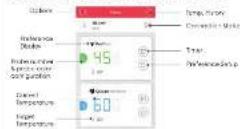
The user interface at the app may change when upgraded. Please follow the app instructions.
Probe color configuration
It will be difficult for you to distinguish different processes when you have several processes in use.
The app provides 6 colors for each channel, which or sole users to set them to be identical to the color probes. The probes comes in 6 color as well.
WARNING
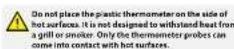
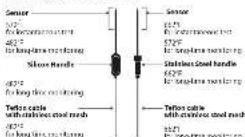
The heat resistance varies in different components of the probe. - DD NOT put the probes directly in the fine flame. - DD NOT put the warm iron the men, or it will melt.
• Products are NOT dishwashers safe.

Operation is subject to the following two conditions:
-
This device may not cause interference and
-
This device must recover, and therefore since that may cause unclarated corralation of this device.
FC CE HUHS FDIA I
App Select a square mask of Apple Inc. Google Play based market of Google Inc. We are here to help Phone (1)718-535-1000 Email: support@pyfouca.com
Brand : Nutrichef
Model : PWIRBBQ80
Category : Thermomètre alimentaire