
RPDS32 - Radio Sunstech - Free user manual and instructions
Find the device manual for free RPDS32 Sunstech in PDF.


| Product Type | Portable Radio |
| Brand | Sunstech |
| Model | RPDS32 |
| Dimensions (approx) | 200 x 130 x 70 mm |
| Weight (approx) | 0.5 kg |
| Power Source | 3 x AA batteries (not included) or DC 5V via USB |
| Frequency Bands | AM (520-1710 kHz), FM (87.5-108 MHz) |
| Speaker | Built-in, 3W |
| Headphone Jack | 3.5 mm stereo |
| Antenna | Telescopic for FM, built-in ferrite for AM |
| Controls | Rotary tuning, volume knob, on/off switch |
| Power Indicator | LED |
| Carry Handle | Built-in |
| User Interface | Analog dial |
| Cleaning | Wipe with a soft, dry cloth. Do not use solvents. |
| Safety | Keep away from water and high temperatures. |
| Repairability | Contact authorized service center for repairs. |
| Spare Parts | Available through Sunstech support. |
| User Manual | Downloadable from notice-facile.com |
Frequently Asked Questions - RPDS32 Sunstech
User questions about RPDS32 Sunstech
0 question about this device. Answer the ones you know or ask your own.
Ask a new question about this device
Download the instructions for your Radio in PDF format for free! Find your manual RPDS32 - Sunstech and take your electronic device back in hand. On this page are published all the documents necessary for the use of your device. RPDS32 by Sunstech.
USER MANUAL RPDS32 Sunstech
natural_image
Abstract illustration with a white sphere, a gray book, and a small circle against a dark background (no text or symbols)RPDS32
DIGITAL AM/FM RADIO
USER GUIDE
ENGLISH
User guide
RPDS32
CONTENT
CONTROL LOCATION 1
Input Radio Station 3
Sleep function 3
USB & MicroSD/SD/MMC Card playback 3
AUX input 3
SPECIFICATIONS 4
WARNINGS 4
ENGLISH
User guide
RPDS32
CONTROL LOCATION
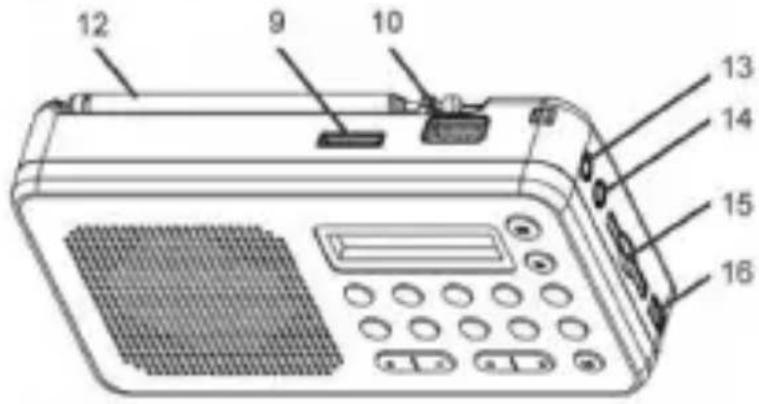

- Display
- Power button ON/OFF
- MP3/AM/FM Radio.
- Mem/Play-Pause/Scan.
- Previous.
- Next,
- Volume Control
- Numerical Keys "0"/Adj Function.
9 Micro SD slot. - USB Connector.
- Numerical Keys
- FM Antenna.
- Aux-in Jack.
- Headphone Jack.
- SD/MMC Card Slot
- DC 5V USB Cable connector.
- Sleep function.
ENGLISH
User guide
RPDS32
Open the battery compartment and insert as indicated in the compartment, one Rechargeable Batteries, Li-ion 3.7V
Battery Charging
Connect the unit by inserting the USB cable into DC 5V IN jack, and inserting the other end into the USB interface or USB charger (is an optional accessory). The charging time is around 2 hours. The charging indicator will flash during battery charging. To use 5V AC/DC adapter for external DC charging, plug the connecting cable to the DC jack (voltage adapter is an optional accessory. Do not charge the battery with the AC/DC adapter for more than 12 hours).
Important: If the unit has not been used for a long period of time, the rechargeable battery can stay completely discharged. This is characteristic in all the rechargeable batteries. For the first time recharging (to wake up) the battery, it is recommended to charge for a period of 5 hours but not to exceed 24 hours.
Radio
- Press Power button for 2 seconds to switch on the unit.
- Press Next or Previous button during a second to start radio scanning.
- Press Adj.Function button for 2 seconds, and then press Next or Previous button for adjust the radio frequency
- Adjust the sound volume by pressing Vol & Vol+.
- Press Power button for 2 seconds to turn off the unit.
Radio Preset (Auto-Scan):
- Press Mem/Play-Pause/Scan for 2 seconds to start Auto-Scan preset stations.
It will auto-stop when all the stations have been found. - Press Next or Previous button to select preset stations.
Radio Preset (Programming):
- Tune to desire radio frequency.
- Press Mem/Play-Pause/Scan once to program mode. The "P01" will be shown on the display. Press Next or Previous button to select stored position "P02" "P03", and press Mem/Play-Pause/Scan once to confirm.
- Press Next or Previous button to select preset stations.
ENGLISH
User guide
RPDS32
Input Radio Station
Press the number Keys to directly enter a set Radio Station. To improve FM reception pull out the antenna, incline it and turn the aerial, reduce its length if the FM-signal is too strong (very close to a transmitter).
Sleep function
This function It's controlled by the numerical key "5" Sleep. Press the numerical key "S" for 2 seconds. The LCD display will flash with the sleeping time selection 90 / 75 / 60 / 45 / 30 / 15 minutes. Will show on screen the minutes and the letter "S" and then press the sleep function "number 5" to select the desired minutes. After the sleeping time selected, don't touch any button then the LCD display will back to normal. The time of sleep function is set and showing the letter "S" in the screen. Press the numerical key "S" for 2 seconds then press the sleep function "number 5" to select off for cancel the setting of sleep function.
USB & MicroSD/SD/MMC Card playback
This unit is able to decode and playback all MP3 files which stored in the memory media with USB connector or MicroSD/SD/MMC Card slot.
- Press MP3/Radio once to MP3 mode.
- Before connecting the USB media to the unit, make sure the port is in correct direction and will connect. Or insert SD/MMC/TF Card straightly without bending.
- The system will automatically start reading the MP3 files in the USB Storage Media or MicroSD/SD/MMC Card.
- Press Next/Previous/Play buttons for Next/Previous/Play function.
- Press Number Keys to direct enter the sound track sequence. Wrongly connecting the USB Storage Media, or MicroSD/SD/MMC Card upside down could damage the unit or the USB Storage Media or MicroSD/SD/MMC card. A locked MicroSD/SD/MMC card cannot be detected or playback.
AUX input
Connect a Jack 3,5 mm Stereo in the auxiliary input to Listening the audio of others devices as Smartphone, MP3.
Warning: An excessive signal in the auxiliary input can damage the device.
ENGLISH
User guide
RPDS32
SPECIFICATIONS
Sleep function: 15, 30, 45, 60, 75 and 90 minutes.
Digital display (red color).
AM/FM radio PLL
FM: up to 50 presets.
AM: up to 15 presets.
Adj Function.
Slot Micro SD Card up to 32GB.
Slot SD/MMC Card up to 32GB
Slot USB up to 32GB.
Aux Input.
DC in Mini USB.
Power Output: 1 W RMS.
Input Power: DC 5V Mini USB
Rechargeable Battery: DC Li-ion 3.7 V 400 mAh.
WARNINGS
 | Correct disposal of this Product(Waste Electrical & Electronic Equipment)(WEEE)Your product is designed and manufactured with high quality materials and components which can be recycled and reused.This symbol means that electrical and electronic equipment, at their end of life should be disposed of separately from your household waste.Please dispose of this equipment at your local community waste collection/recycling centre.In the European Union there are separate collection systems for used electrical and electronic products. Please help us to conserve the environment we live in: |
 | DO NOT place objects on top of the device, as objects may scratch the device. |
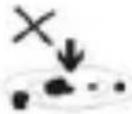 | DO NOT expose the device to dirty or dusty environments. |
ENGLISH
User guide
RPDS32
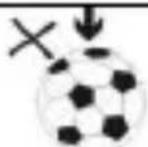 | DO NOT place the device on an uneven or unstable surface. |
 | DO NOT insert any foreign objects into the device. |
 | DO NOT expose the device to strong magnetic or electrical field. |
 | DO NOT expose the device to direct sunlight as it can damage the device. Keep it away from heat sources. |
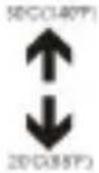 | DO NOT store your device in temperatures higher than 40°C (104°F). The internal operating temperature for this device is from 20°C (68°F) to 60°C (140°F). |
 | DO NOT use the device in the rain. |
 | Please check with your Local Authority or retailer for proper disposal of electronic products. |
 | The device and adaptor may product some heat during normal operation of charging. To prevent discomfort or injury from heat exposure, DO NOT leave the device on your lap. |
 | POWER INPUT RATING: Refer to the rating label on the device and be sure that the power adaptor complies with the rating. Only use accessories specified by the manufacturer. |
 | Clean the device with a soft cloth. If needed, damp on the cloth slightly before cleaning. Never use abrasives or cleaning solutions. |
 | Always power off the device to install or remove external devices that do not support hot-plug. |
ENGLISH
User guide
RPDS32
 | Disconnect the device from an electrical outlet and power off before cleaning the device. |
 | DO NOT disassemble the device. Only a certified service technician should perform repair. |
 | The device has apertures to disperse heat. DO NOT be lock the device ventilation, the device may become hot and malfunction as a result. |
 | Risk of explosion if battery replaced by an incorrect type. Dispose of used batteries according to the instruction. |
 | PLUGGABLE EQUIPMENT; the socket-outlet shall be installed near the equipment and shall be easily accessible. |
 | European Union: Disposal Information.This symbol means that according to local laws and regulations your product and/or its battery shall be disposed of separately from household waste. When this product reaches its end of life, take it to a collection point designated by local authorities. The separate collection and recycling of your product and/or its battery at the time of disposal will help conserve natural resources and ensure that it is recycled in a manner that protects human health and the environment. |
| MADE IN CHINA | |

natural_image
Abstract illustration of a book with two white circles and a crescent moon against a dark background (no text or symbols)RPDS32
RADIO DIGITAL AM/FM
GUÍA DE USUARIO
CONTENIDO
natural_image
Abstract illustration with a white sphere, a gray book, and a small circle against a dark background (no text or symbols)RPDS32
RADIO AM/FM DIGITAL
GUIDE DE L'UTILISATEUR
FRANÇAIS
Préréglage Radio (programmation):
natural_image
Abstract geometric design with a white sphere, a gray book, and a small circle against a dark background (no text or symbols)RPDS32
RÁDIO DIGITAL AM/FM
GUIA DO UTILIZADOR
PORTUGUÊS
Guia do utilizador
RPDS32
CONTEÚDO
For you. For everyone.
Brand : Sunstech
Model : RPDS32
Category : Radio