
AMW50US - Mouse TARGUS - Free user manual and instructions
Find the device manual for free AMW50US TARGUS in PDF.


| Product Type | Cordless Optical Mouse |
| Brand | Targus |
| Model | AMW50US |
| Connection Type | RF 2.402 – 2.482 GHz |
| Interface | USB 1.1 (receiver) |
| Battery Type | 2 x AA Alkaline |
| Power Consumption | 9.34 mA max |
| RF Output Power | 1.5 mW max |
| Operating Range | Up to 10 meters |
| Operating System Compatibility | Windows 2000, XP, Vista; Mac OS X 10.4+ |
| Warranty | 1 Year Limited |
| Low Battery Indicator | Yes (light between left and right buttons) |
| Plug and Play | Yes |
| Scroll Wheel Programming | Downloadable driver from Targus |
| Receiver Storage | Integrated in mouse bottom |
| Battery Safety Clip | Yes (must be locked before replacing cover) |
| Regulatory Compliance | FCC Part 15, Class B; CE |
| Included Accessories | Mouse, 2 AA batteries, mini USB receiver, user guide |
Frequently Asked Questions - AMW50US TARGUS
User questions about AMW50US TARGUS
0 question about this device. Answer the ones you know or ask your own.
Ask a new question about this device
Download the instructions for your Mouse in PDF format for free! Find your manual AMW50US - TARGUS and take your electronic device back in hand. On this page are published all the documents necessary for the use of your device. AMW50US by TARGUS.
USER MANUAL AMW50US TARGUS
1 YEAR LIMITED WARRANTY: We pride ourselves on the quality of our products. For complete warranty details and a list of our worldwide offices, please visit www.targus.com. Features and specifications are subject to change without notice. All trademarks and registered trademarks are the property of their respective owners. All rights reserved. ©2009. Manufactured or imported by Targus Group International, Inc. (for U.S. sales: 1211 North Miller Street, Anaheim, CA 92806 USA) whose Australian sales representative is Targus Australia Pty. Ltd., 117-119 Bowdon Street, Meadowbank, NSW 2114 Australia
Targus®
Cordless Optical Mouse

N2953

FCC
User Guide
Targus Cordless Optical Mouse
Introduction
Thank you for your purchase of the Targus Cordless Optical Mouse. The USB receiver conveniently attaches to the mouse for ease of use while traveling or on the go. This is a plug-n-play device so no additional software is required.
Contents
• Targus Cordless Optical Mouse
- 2 x AA batteries
- Mini USB receiver
- User guide
System Requirements
Hardware
- USB port
Operating System
• Microsoft Windows® 2000
- Microsoft Windows® XP
• Microsoft Windows Vista®
• Mac OS® X 10.4 or later
Targus Cordless Optical Mouse
Installing the Batteries
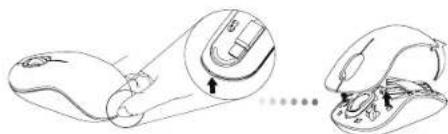
- Remove the battery cover from the top of the mouse by using the notch on the back. Carefully lift the cover up as shown in the diagram.
natural_image
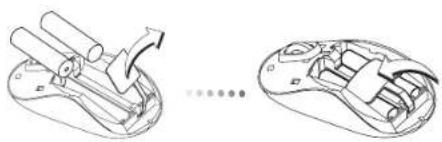
Line drawing of a computer mouse with an open grip and internal components, showing no text or symbols- Remove the battery safety clip by squeezing the center of the clip and sliding it back, towards the rear of the mouse. Lift up and rotate the clip out of the way.
natural_image
Technical line drawings of a mechanical device with internal components, shown from two different angles (no text or symbols present)
NOTE: THE BATTERY SAFETY CLIP WILL NEED TO BE IN THE SECURE. LOCKED POSITION BEFORE THE BATTERY COVER CAN BE PUT BACK IN PLACE.
Targus Cordless Optical Mouse
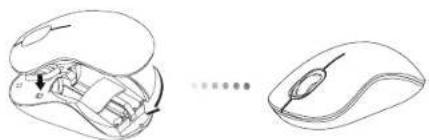
- Insert two AA-size batteries, making sure that the positive (+) and negative (-) ends of each battery match the polarity indicators inside the battery compartment.
natural_image
Line drawing of a computer mouse and its internal components, showing the left side with a magnified view of internal structure (no text or symbols)- Replace the battery cover, carefully fit the cover until it clicks into place.
Establishing the Connection
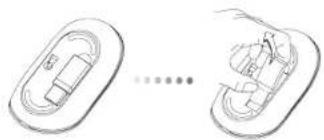
(A) Remove the USB receiver from the bottom of the mouse.
natural_image
Diagram showing two views of a device with internal components, connected by a line (no text or symbols)Targus Cordless Optical Mouse
(B) Plug the USB receiver into an available USB port on your computer.
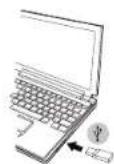
(C) This mouse is a plug-n-play device. It will automatically operate when the USB receiver is connected to the computer.
Low Battery Power Indicator
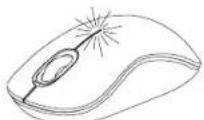
The light illuminates from the seam between the left and right buttons. It will turn on when the power is low and batteries need to be replaced.
Targus Cordless Optical Mouse
Programming Your Mouse
Visit www.targus.com to download and install the driver.
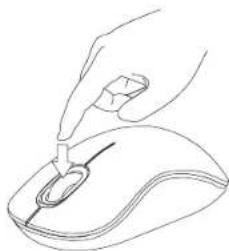
Once installation is complete, open the driver software and select the desired setting for the scroll-wheel button. Close the driver software application and you're ready to go. Activate your selected feature by pressing down on the scroll wheel.
natural_image
Line drawing of a hand using a pen to press or install a computer mouse (no text or symbols present)Targus Cordless Optical Mouse
Product Specification Transmitter
| RF 2.402GHz-2.482GHz | |
| Battery Type Alkaline battery AA | |
| Effective RF Communication Range | 10 meters max |
| RF output power 1.5 mW max | |
| Power Consumption 9.34 mA max | |
USB Receiver
| RF 2.402GHz-2.482GHz | |
| Interface USB 1.1 | |
| Power USB Bus Powered SV DC | |
Technical Support
For technical questions, please visit:
US Internet: www.targus.com/support.asp
Australia Internet: www.targus.com/au
Email: infoaust@targus.com
Telephone: 1800-641-645
New Zealand Telephone: 0800-633-222
Product Registration
Targus recommends that you register your Targus accessory shortly after purchasing it. Go to:
http://www.targus.com/registration.asp
You will need to provide your full name, email address, country of residence and product information.
Warranty
Targus warrants this product to be free from defects in materials and workmanship for one year. If your Targus accessory is found to be defective within that time, we will promptly repair or replace it. This warranty does not cover accidental damage, wear and tear, or consequential or incidental loss. Under no conditions is Targus liable for loss of, or damage to devices; nor loss of, or damage to, programs, records, or data; nor any consequential or incidental damages, even if Targus has been informed of their possibility. This warranty does not affect your statutory rights.
Regulatory Compliance
This device complies with Part 15 of the FCC Rules. Operation is subject to the following two conditions: (1) This device may not cause harmful interference, and (2) This device must accept any interference received, including interference that may cause undesired operation.
FCC Statement
Tested to Comply
This equipment has been tested and found to comply with the limits of a Class B digital device, pursuant to Part 15 of the FCC Rules. These limits are designed to provide reasonable protection against harmful interference in a residential installation. This equipment generates, uses, and can radiate radio frequency energy and if not installed and used in accordance with the instructions, may cause harmful interference to radio communications. However, there is no guarantee that interference will not occur in a particular installation. If this equipment does cause harmful interference to radio or television reception, which can be determined by turning the equipment off and on, the user is encouraged to try to correct the interference by one or more of the following measures:
• Reorient or relocate the receiving antenna;
- Increase the separation between the equipment and receiver;
- Connect the equipment into an outlet on a circuit different from that to which the receiver is connected;
- Consult the dealer or an experienced radio/TV technician for help.
Changes or modifications not authorized by the party responsible for compliance could void the user's authority to operate this product.
Declaration of Conformity
Hereby, Targus, declares that this device is in compliance with the essential requirements and other relevant provisions of Directive 1999/5/EC.
Microsoft, Windows, and Windows Vista are either registered trademarks or trademarks of Microsoft Corporation in the United States and/or other countries. All trademarks and registered trademarks are the property of their respective owners. All rights reserved. Features and specifications are subject to change without notice. © 2009. Targus Group International, Inc. and Targus, Inc., Anaheim, CA 92806 USA
- Targus®
- Cordless Optical Mouse
- User Guide
- Introduction
- Contents
- System Requirements
- Installing the Batteries
- Targus Cordless Optical Mouse
- Establishing the Connection
- Low Battery Power Indicator
- Programming Your Mouse
- Technical Support
- Product Registration
- Warranty
- Regulatory Compliance
- FCC Statement
- Tested to Comply
- Declaration of Conformity
Brand : TARGUS
Model : AMW50US
Category : Mouse