
MXABMC2BT - Hi-Fi System Memphis Audio - Free user manual and instructions
Find the device manual for free MXABMC2BT Memphis Audio in PDF.


| Product Type | Powersports speaker system with Bluetooth |
| Model | MXABMC2BT |
| Brand | Memphis Audio |
| Speaker Configuration | 2 speakers |
| Bluetooth Streaming | Yes, A2DP |
| Bluetooth Controller | Included (MXABTR) |
| Mounting Options | Bar mount (up to 1.25") or post/surface mount |
| Water Resistance | Bluetooth controller is sealed and waterproof; speakers resistant to elements |
| Power Input | 12V DC (vehicle battery) |
| Amplifier | Integrated (Pulse 7.5A fuse) |
| Controls | Power, play/pause, volume up/down, track up/down, source (Bluetooth only) |
| LED Indicator | Blue LED for Bluetooth pairing status |
| Wiring | Speaker wires: Gray, Gray/White, White, White/Black; Power: Black/Blue/Yellow |
| Warranty | Limited warranty; contact dealer or Memphis Audio for service |
| FCC Compliance | Part 15 Class B |
| Recommended Use | Motorcycles, side-by-sides, golf carts, and other vehicles |
Frequently Asked Questions - MXABMC2BT Memphis Audio
User questions about MXABMC2BT Memphis Audio
0 question about this device. Answer the ones you know or ask your own.
Ask a new question about this device
Download the instructions for your Hi-Fi System in PDF format for free! Find your manual MXABMC2BT - Memphis Audio and take your electronic device back in hand. On this page are published all the documents necessary for the use of your device. MXABMC2BT by Memphis Audio.
USER MANUAL MXABMC2BT Memphis Audio
natural_image
Circular logo with stylized letter M in yellow and black, enclosed in a segmented ring (no text or symbols)MEMPHIS
AUDIO SINCE 1965
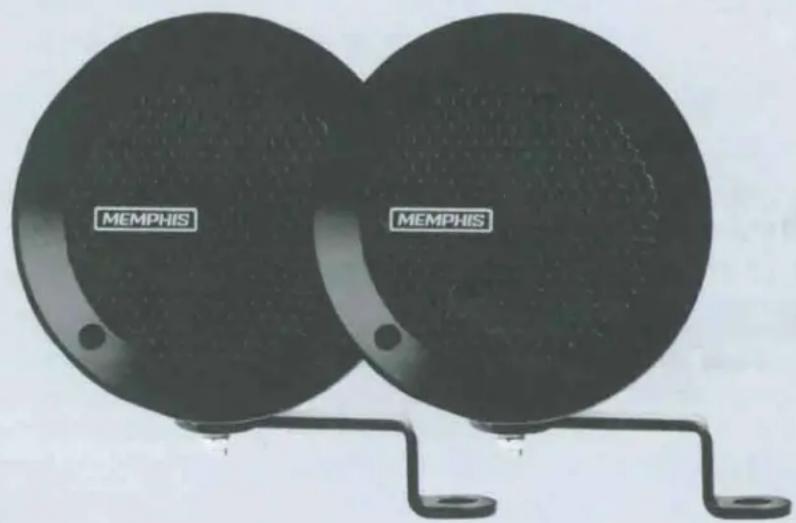


Memphis Audio built a 50 year legacy in the audio industry by engineering the highest quality products to produce the best possible listening experience for our fans and loyal supporters. To fully appreciate our products we recommend taking the time to read and follow the instructions in this manual. As always, we recommend all installations and services be performed by an authorized Memphis Audio dealer.

For the best possible performance, Memphis recommends using only Memphis Connection accessories. Outfitting a system with properly sized Memphis Connection wire and accessories will dramatically boost your listening experience and increase the durability of Memphis Audio products.
Memphis Audio's Powersports Speaker kits are available in both 2 speaker and 4 speaker configurations. Both configurations are available with or without Bluetooth controllers. Speaker kits are sold in matte black and chrome trim to match your motorcycle, side by side, golf cart or any other toy that needs quality sound.

Want to add Bluetooth to a non-Bluetooth kit? No problem. The MXABTR Bluetooth controller can be purchased separately and add to any non Bluetooth kit for easy reliable streaming.
Memphis Audio recommends the installation of our products to be performed by an authorized dealer. Attempting an installation project on your own or through an unauthorized source may result in damage to you product and may potentially void your warranty.
MOUNTING INSTRUCTIONS
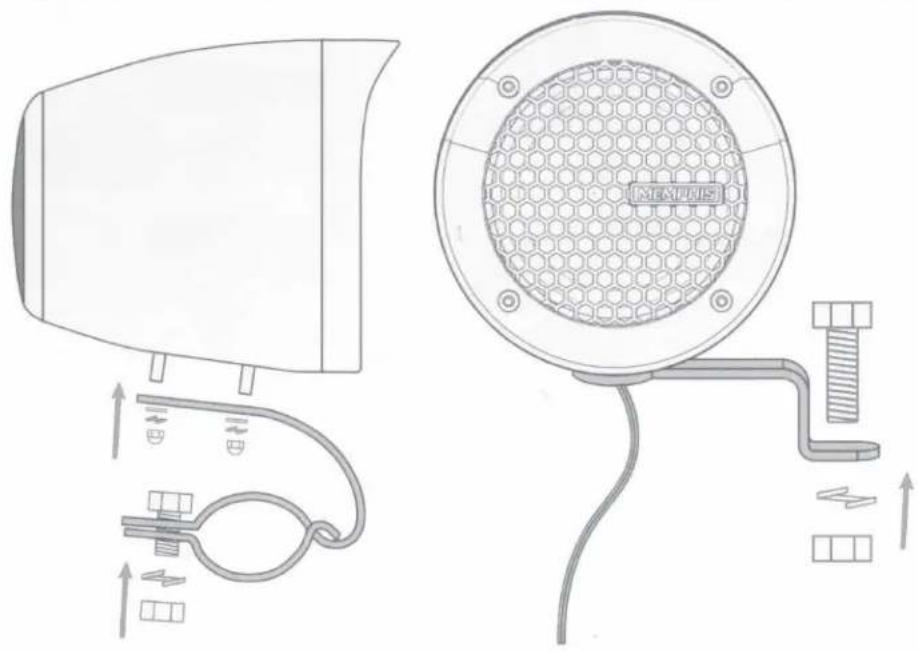
MXA Powersports Kits include 2 mounting options. The bar mount brackets allow you to mount onto bars up to 1.25" in diameter. If you elect to surface/post mount the units, you can use the included post mount brackets for a secure fit. Make sure all connections are tight and secure before operating your machine.

CAUTION: When selecting a mounting location make certain your handlebar, steering wheel or other any other items are not being impacted by the speakers. All components of the machine should move freely. Cars should not be mounted anywhere that can harm a passenger or driver. Be certain your mounting is free from all electric, fuel and hydraulic lines.
natural_image
Technical line drawing of a hair dryer and its internal components (no text or symbols)WIRING INSTRUCTIONS
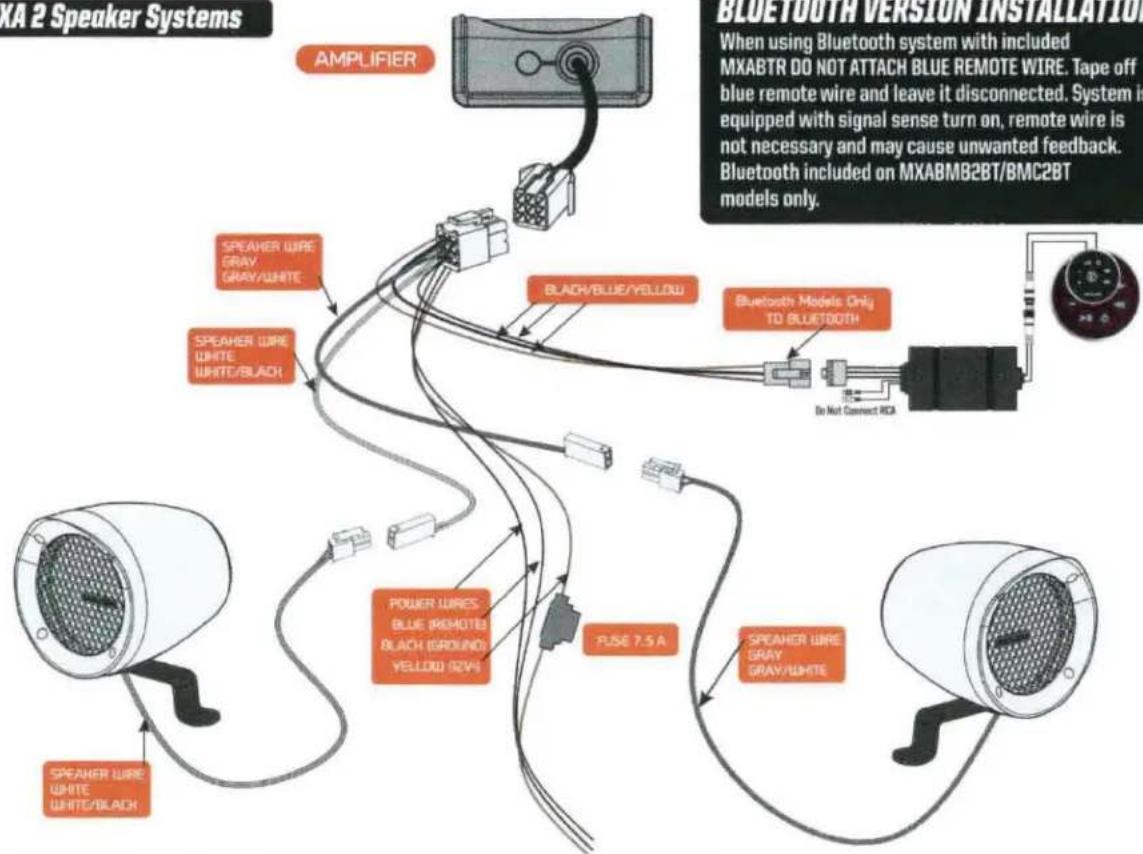
MXA 2 Speaker Systems
MXA 4 Speaker Systems
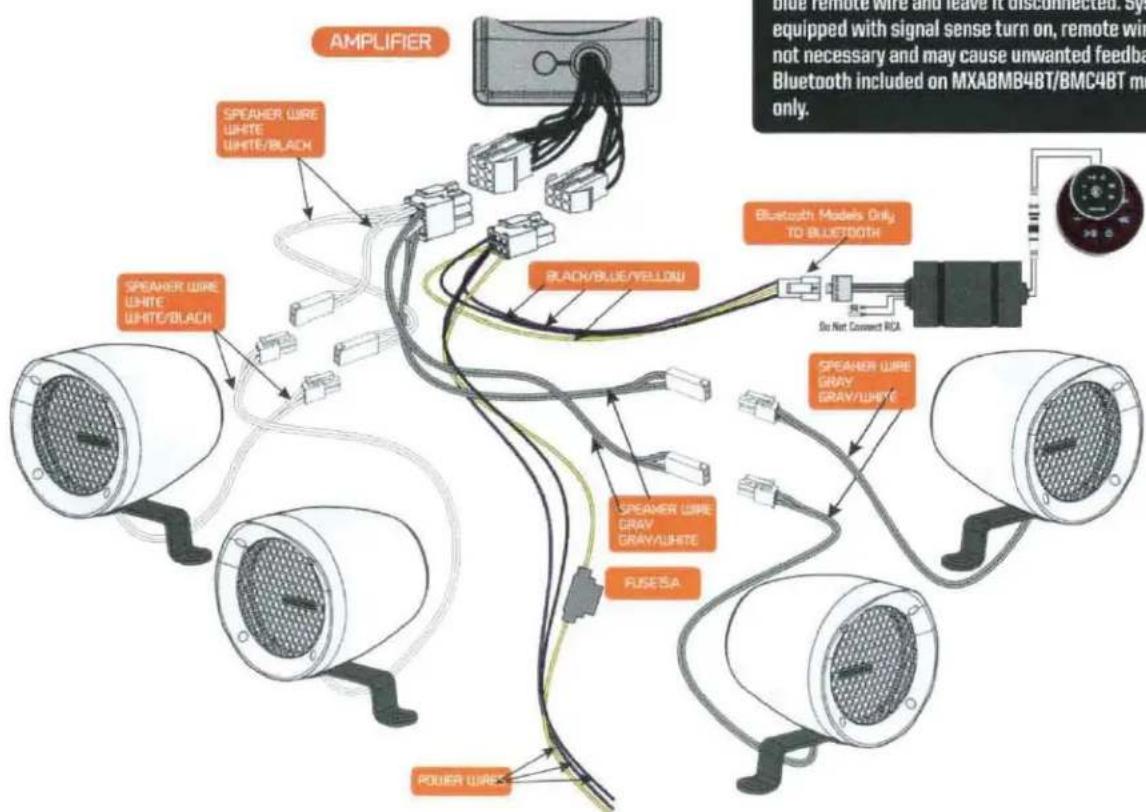
BLUETOOTH VERSION INSTALLATION
When using Bluetooth system with included MXABTR DO NOT ATTACH BLUE REMOTE WIRE. Tape off blue remote wire and leave it disconnected. System is equipped with signal sense turn on, remote wire is not necessary and may cause unwanted feedback. Bluetooth included on MXABMB4BT/BMC4BT models only.
MXABTR PAIRING INSTRUCTIONS
Before starting, confirm your Bluetooth device is capable of streaming A2DP Bluetooth signals and that the Bluetooth is ENABLED on the device. Typically that function is available by entering the settings menu, then finding the 'Bluetooth' controls on your device.

Bluetooth functions are typically depicted by a Bluetooth symbol. Look for the Bluetooth symbol on your device when attempting to enable Bluetooth functionality.
OPERATION:
Long press and hold the power button ⏻ for 1.5 seconds, the unit will turn on and the buttons will illuminate. The BT LED will flash rapidly when the unit is powered on. When the MXABTR is successfully paired, the BT indicator will be lit blue continuously.
Make sure your phone is in pairing" or "discoverable" mode. Within a few seconds you should see "MEMPHISBTR appear on your phone's Bluetooth menu. Clicking the MXABTR name will authorize your phone to connect with the MXABTR.
Once the MXABTR is connected, be certain the volume on your phone is set at a reasonably high level (at least 3/4 of max volume) Adjusting the volume of the system can be done on the MXABTR when your phone is paired.
Long press the power button to turn off the unit.
CONTROL FUNCTIONS:
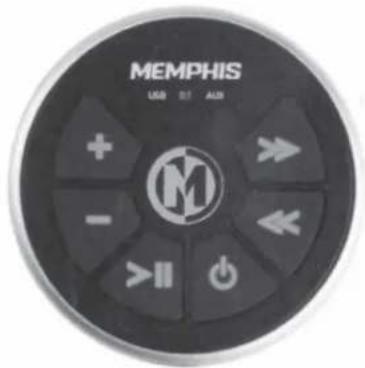
The controls will allow you to perform the following functions: track up, track down, volume up, volume down, play/pause in bluetooth mode.

play/pause

power

track back

track back

volume down

track back
This device complies with part 15 of the FCC Rules. Operation is subject to the following two conditions: (1) this device may not cause harmful interference, and (2) this device must accept any interference received, including interference that may cause undesired operation.
This equipment has been tested and found to comply with the limits for a Class B digital device, pursuant to part 15 of the FCC Rules. These limits are designed to provide reasonable protection against harmful interference in a residential installation. This equipment generates, uses and can radiate radio frequency energy, and if not installed and used in accordance with the instructions, may cause harmful interference to radio communications. However, there is no guarantee that interference will not occur in a particular installation. If this equipment does cause harmful interference to radio or television reception, which can be determined by turning the equipment OFF and ON, the user is encouraged to try to correct the interference by one or more of the following measures.
- Reorient or relocate the receiving antenna
- Increase the separation between the equipment and receiver.
-Connect the equipment to an outlet or a circuit different from that to which the receiver is connected
-Consult with the dealer or experienced radio/TV technician for help.
The manufacturer is not responsible for any radio or TV interference caused by unauthorized modifications to this equipment. Such modifications could void the user's authority to operate the equipment.
FCC RF Safety Caution Statement
To satisfy FCC RF exposure requirements for mobile and base station transmission devices, a separation distance of 20cm or more should be maintained between the antenna of this device and persons during operation. To ensure compliance operation at closer than this distance is not recommended. The antennas used for this transmitter must not be co-located or operating in conjunction with any other antenna or transmitter.
WARRANTY
Should your MXABTR require service, please consult with the dealer from which it was purchased, or contact Memphis Audio customer service: 800-489-2300, or email techsupport@memphiscaraudio.com. Do not attempt to return your amplifier directly to us without first calling for a Return Authorization number. Units received without an accompanying Return Authorization number will be returned unopened. Additionally, you must include a copy of your purchase receipt from an authorized dealer for consideration of in-warranty service; otherwise, repair charges will apply. Units received without a receipt will be held for 30 days allowing us time to contact you and obtain a copy of the receipt. After 30 days, all units will be returned to you unrepaired.

CONTACT INFO
122 GAYOSO AVE
MEMPHIS, TN USA 38101
TECH SUPPORT
800-903-6979
SHOW US YOUR INSTALL

WWW.MEMPHISCARAUDIO.USA

@MEMPHISCARAUDIO

@MEMPHISCARAUDIOUSA

natural_image
Circular emblem with a stylized letter M, no text or symbols presentMEMPHIS
AUDIO SINCE 1965
PRODUCT GUIDE AND INSTALLATION MANUAL


ENGINEERED TO RESIST
WATER & ELEMENTS
MXABTRX/MXABTR
Bluetooth Controllers
READY TO TURN IT UP? READ THIS FIRST!
Memphis Audio built a 50 year legacy in the audio industry by engineering the highest quality products to produce the best possible listening experience for our fans and loyal supporters. To fully appreciate our products we recommend taking the time to read and follow the instructions in this manual. As always, we recommend all installations and services be performed by an authorized Memphis Audio dealer.

For optimal performance, Memphis recommends using only Memphis Connection accessories. Outfitting your system with properly sized Memphis Connection wire and accessories will dramatically boost your listening experience and increase the durability of your Memphis Audio products.
Memphis Audio's MXABTRX & MXABTR Bluetooth streaming accessories allow you to wirelessly connect to any Bluetooth device providing a complete Bluetooth solution wherever you need it. To keep this piece as bulletproof as possible, we sealed the unit making it waterproof in the event of submersion and resistant to the elements.

Combine with our Memphis Xtreme Speakers and ultra-compact amplifiers for the perfect rugged go-anywhere solution!
Memphis Audio recommends the installation of our products to be performed by an authorized dealer. Attempting an installation project on your own or through an unauthorized source may result in damage to you product and may potentially void your warranty.
MOUNTING OPTIONS
MXABTRX & MXABTR accessories are specifically designed to be used in applications where water, rain or snow may come in direct contact with the unit. The sealed case allows it to withstand these types of demanding uses. These units have 2 mounting options and can easily be flush mounted in a 3" cut out hole or bar mounted with the included handlebar bracket allowing for unlimited mounting possibilities.
PAIRING INSTRUCTIONS
Before starting, confirm your Bluetooth device is capable of streaming A2DP Bluetooth signals and that the Bluetooth is ENABLED on the device. Typically that function is available by entering the settings menu, then finding the 'Bluetooth' controls on your device.

Bluetooth functions are typically depicted by a Bluetooth symbol. Look for the Bluetooth symbol on your device when attempting to enable Bluetooth functionality.
OPERATION:
Long press and hold the power button ⏻ for 1.5 seconds, the unit will turn on and the buttons will illuminate. The BT LED will flash rapidly when the unit is powered on. When the MXABTRX/MXABTR is successfully paired, the BT indicator will be lit blue continuously.
Make sure your phone is in pairing" or "discoverable" mode. Within a few seconds you should see "MEMPHIS MXABTRX (or MEMPHIS MXABTR) appear on your phone's Bluetooth menu. Clicking the MEMPHIS MXABTRX/ MEMPHIS MXABTR name will authorize your phone to connect with the MXABTRX/ MXABTR.
Once the MXABTRX/MXABTR is connected, be certain the volume on your phone is set at a reasonably high level (at least 3/4 of max volume) Adjusting the volume of the system can be done on the MXABTRX/MXABTR when your phone is paired.
Long press the power button to turn off the unit.
CONTROL FUNCTIONS:
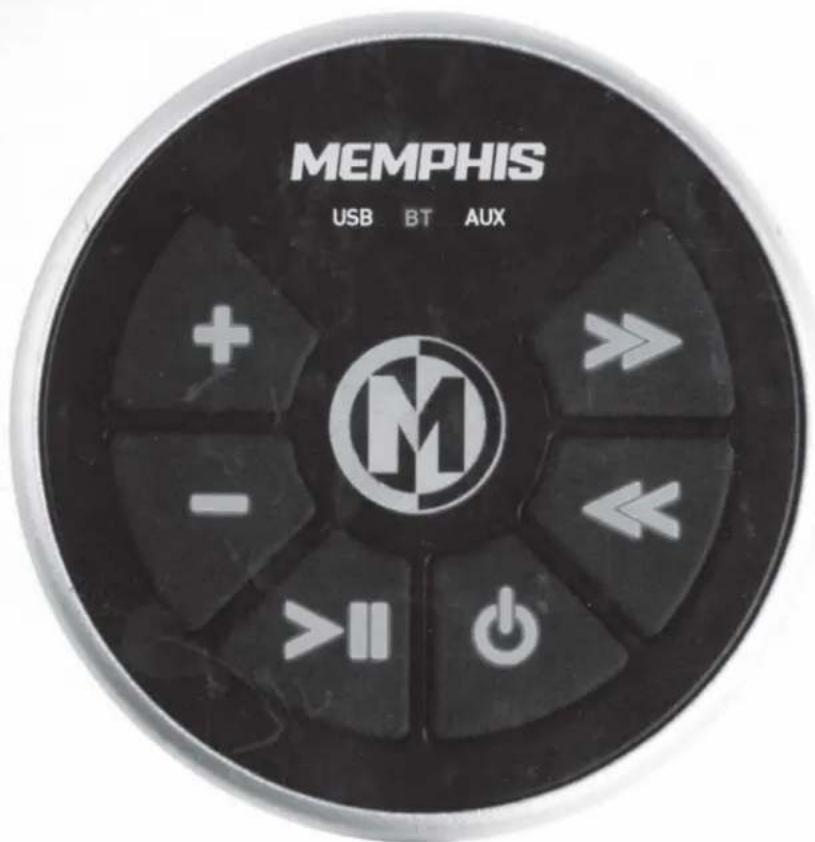
The controls will allow you to perform the following functions: track up, track down, volume up, volume down, play/pause in bluetooth mode.
Changing source (MXABTRX only) After power is on, short pressing the power button will change the sources: Bluetooth, AUX, and USB. The related indicator will illuminate showing which selection is active.
AUXILIARY INPUT FUNCTIONS - MXABTRX only
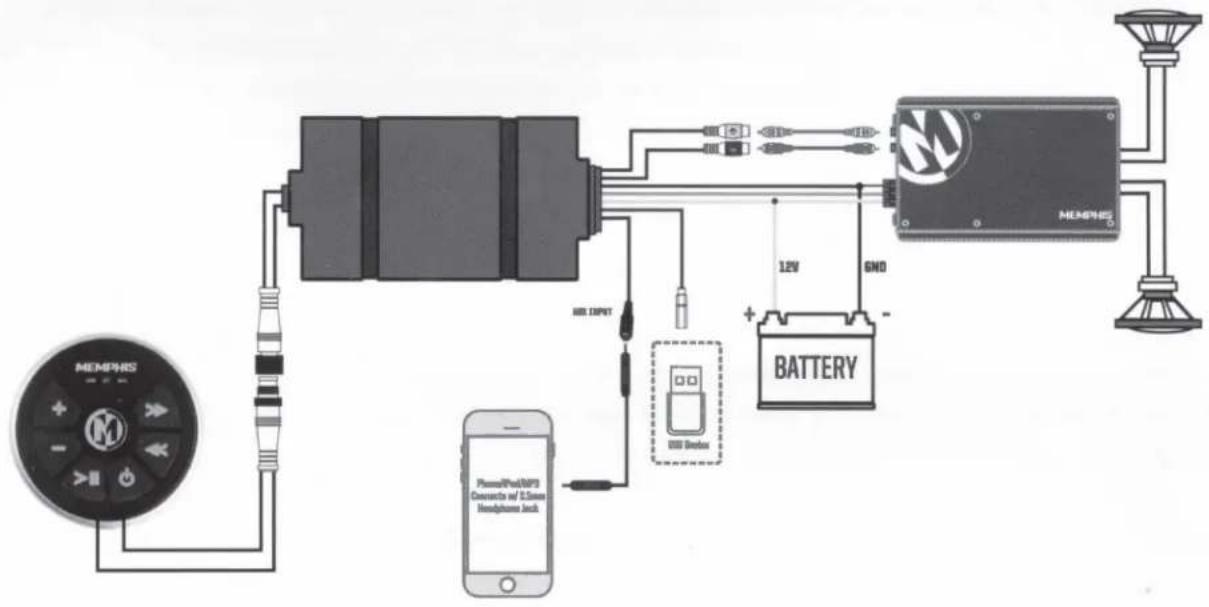
Short pressing the power button will illuminate the "AUX" on the face of the MXABTRX. This will then play the source that is plugged into the 3.5mm jack on the wiring harness. When in auxiliary mode, only volume controls will be used and this volume will not control the volume of the source. The volume will only control the max of the source volume down to mute.
USB FUNCTIONS - MXABRX ONLY
Short pressing the power button again will illuminate the "USB" on the face of the MXABTRX. This will then play the .MP3 or .WAV files stored on a USB flash drive. Volume, fwd/back track and play pause will work under this source. While the MXABTRX is in other modes, the USB will still charge a device even if that device does not have playable files stored on it.

play/pause

power

track up

track down

volume down

volume up
MXABTRX - Bluetooth, AUX and USB Controller
flowchart
graph TD
    A["MEMSRS"] --> B["Motor"]
    B --> C["12V"]
    C --> D["BATTERY"]
    D --> E["Speaker with 1.5mm microphone and 800 decoupling device"]
    E --> F["Ground"]
    G["Phone/Photo/MPD"] --> H["Mobile Phone"]
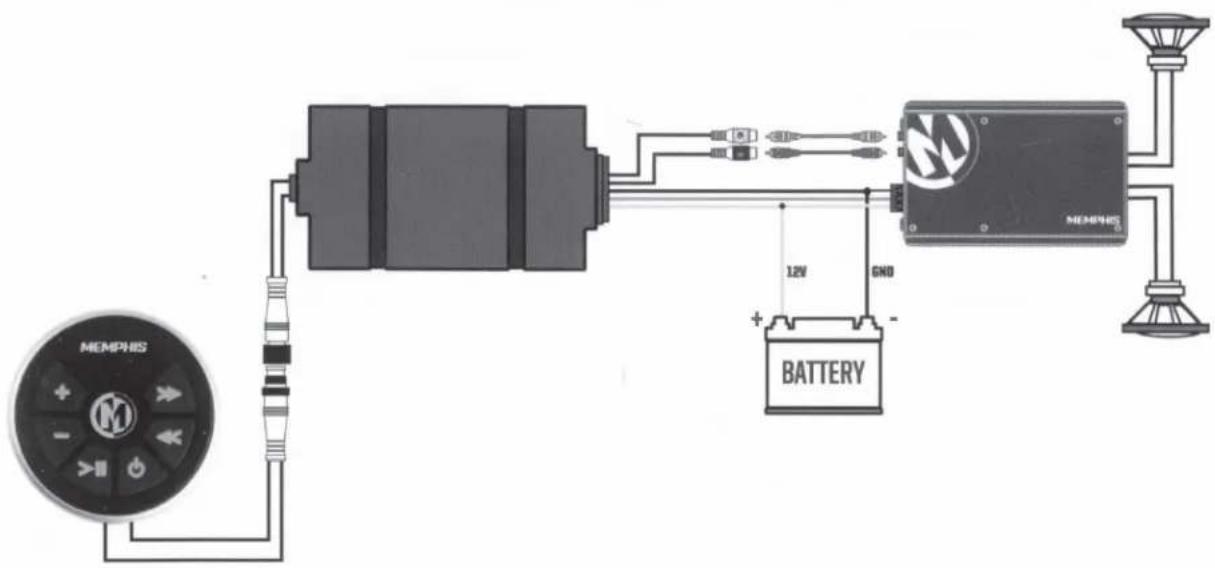
MXABTR - Bluetooth Only Controller
This device complies with part 15 of the FCC Rules. Operation is subject to the following two conditions: (1) this device may not cause harmful interference, and (2) this device must accept any interference received, including interference that may cause undesired operation.
This equipment has been tested and found to comply with the limits for a Class B digital device, pursuant to part 15 of the FCC Rules. These limits are designed to provide reasonable protection against harmful interference in a residential installation. This equipment generates, uses and can radiate radio frequency energy, and if not installed and used in accordance with the instructions, may cause harmful interference to radio communications. However, there is no guarantee that interference will not occur in a particular installation. If this equipment does cause harmful interference to radio or television reception, which can be determined by turning the equipment OFF and ON, the user is encouraged to try to correct the interference by one or more of the following measures.
- Reorient or relocate the receiving antenna
- Increase the separation between the equipment and receiver.
-Connect the equipment to an outlet or a circuit different from that to which the receiver is connected
-Consult with the dealer or experienced radio/TV technician for help.
The manufacturer is not responsible for any radio or TV interference caused by unauthorized modifications to this equipment. Such modifications could void the user's authority to operate the equipment.
FCC RF Safety Caution Statement
To satisfy FCC RF exposure requirements for mobile and base station transmission devices, a separation distance of 20cm or more should be maintained between the antenna of this device and persons during operation. To ensure compliance operation at closer than this distance is not recommended. The antennas used for this transmitter must not be co-located or operating in conjunction with any other antenna or transmitter.
WARRANTY
Should your MXABTRX or MXABTR require service, please consult with the dealer from which it was purchased, or contact Memphis Audio customer service: 800-489-2300, or email techsupport@memphiscaraudio.com. Do not attempt to return your amplifier directly to us without first calling for a Return Authorization number. Units received without an accompanying Return Authorization number will be returned unopened. Additionally, you must include a copy of your purchase receipt from an authorized dealer for consideration of in-warranty service; otherwise, repair charges will apply. Units received without a receipt will be held for 30 days allowing us time to contact you and obtain a copy of the receipt. After 30 days, all units will be returned to you unrepaired.

MEMPHIS
XTREME AUDIO
CONTACT INFO

122 GAYOSO AVE, MEMPHIS TN 38101

TECH SUPPORT 800-903-6979
SHOW US YOUR INSTALL & FOLLOW US TODAY!

WWW.MEMPHISCARAUDIO.COM

@MEMPHISCARAUDIO

@MEMPHISCARAUDIOUSA

MEMPHIS
A U D I O S I N G E 1 9 A 5
THIS CARD MUST ACCOMPANY YOUR SHIPMENT SHOULD SERVICE BE REQUIRED
MODEL# SERIAL#
STREET ADDRESS
DEALER NAME
PURCHASER NAME
CITY STATE ZIP
DATE PURCHASED
DESCRIBE PROBLEM IN DETAIL
EMAIL
PHONE
Visit WWW.MEMPHISCARAUDIO.COM/REGISTER to register your product with Memphis Audio and receive news updates and a chance to win FREE memphis Gear!
FOLLOW US:

@MEMPHISCARAUDIOUSA

@MEMPHISCARAUDIO
Please call 800-489-2300 to obtain the required Return Authorization number. Include this number in your package along with a copy of your receipt and send to:
AFCO Inc.
Attn: (Insert your Return Authorization Number heere)
300 Regency Drive
Glendale Heights, IL 60139

- MOUNTING INSTRUCTIONS
- WIRING INSTRUCTIONS
- BLUETOOTH VERSION INSTALLATION
- MXABTR PAIRING INSTRUCTIONS
- OPERATION:
- CONTROL FUNCTIONS:
- FCC RF Safety Caution Statement
- WARRANTY
- CONTACT INFO
- MEMPHIS
- AUDIO SINCE 1965
- PRODUCT GUIDE AND INSTALLATION MANUAL
- MXABTRX/MXABTR
- Bluetooth Controllers
- READY TO TURN IT UP? READ THIS FIRST!
- MOUNTING OPTIONS
- PAIRING INSTRUCTIONS
- AUXILIARY INPUT FUNCTIONS - MXABTRX only
- USB FUNCTIONS - MXABRX ONLY
- THIS CARD MUST ACCOMPANY YOUR SHIPMENT SHOULD SERVICE BE REQUIRED
Brand : Memphis Audio
Model : MXABMC2BT
Category : Hi-Fi System