
VX600/6i - Receiver JL Audio - Free user manual and instructions
Find the device manual for free VX600/6i JL Audio in PDF.


User questions about VX600/6i JL Audio
0 question about this device. Answer the ones you know or ask your own.
Ask a new question about this device
Download the instructions for your Receiver in PDF format for free! Find your manual VX600/6i - JL Audio and take your electronic device back in hand. On this page are published all the documents necessary for the use of your device. VX600/6i by JL Audio.
USER MANUAL VX600/6i JL Audio
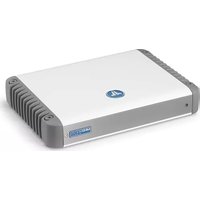
600W Full-Range 6-Channel Class D Amplifier with Integrated DSP


CONNECTION GUIDE
Thank you for purchasing a JL Audio amplifier for your sound system.
Your amplifier has been designed and manufactured to exacting standards in order to ensure years of musical enjoyment. For maximum performance, we highly recommend that you have your new amplifier installed by an authorized JL Audio dealer. Your authorized dealer has the training, expertise and installation equipment to ensure optimum performance from this product. Should you decide to install the amplifier yourself, please take the time to read this manual thoroughly to familiarize yourself with its installation requirements and setup procedures.
If you have any questions regarding the instructions in this manual or any aspect of your amplifier's operation, please contact your authorized JL Audio dealer for assistance. If you need further assistance, please contact the JL Audio Technical Support Department at technical@jlaudio.com or call (954) 443-1100 during business hours.
Installation Applications
This amplifier is designed for operation with 12 volt, negative-ground electrical systems. Using this product in systems with positive ground and/or voltages other than 12V may result in damage to the product and will void the warranty. This product is not certified or approved for use in aircraft.
Product Description
This is a six-channel, full-range Class D amplifier equipped with the second generation of JL Audio's NexD2™ high-speed switching technology. It is engineered to deliver reference-grade audio amplification with outstanding efficiency and unprecedented, built-in processing power. Instead of traditional analog processing controlled by knobs and switches, VXi amplifiers feature an integrated DSP (Digital Signal Processor). The amplifier and its integrated DSP are configured using an external device (PC, Tablet or Phone), with the appropriate JL Audio TuN™ application installed. (See What is TuN? section for more info.)
Planning Your Installation
It is important that you take the time to read this manual thoroughly and that you plan your installation carefully. It is very easy to manage expensive vehicle systems in modern automobiles. Never assume that you have found appropriate wires without consulting a reliable wiring diagram or without analyzing with proper test equipment. If you are uncomfortable or unfamiliar with reading diagrams or testing methods, please enlist the services of your authorized JL Audio dealer to perform the installation. Your authorized dealer has the training, expertise and installation equipment to ensure optimum performance from this product. The following are some considerations that you must take into account when planning your installation.

Safety Considerations
• Install your amplifier in a dry, well-ventilated location that
does not interfere with your vehicle's safety equipment (in hope, cost-holt systems, ABC brake systems, etc).
(air bags, seat belt systems, ABS brake system) Do not mount the amplifier in the engine.
do not mean the amplifier in the engine compartment or in any areas of extreme heat
- Securely mount the amplifier so that it does not come
loose in the event of a collision/sudden jolt or as a result
of repeated vibrations during normal operation.
- Check before drilling to make sure that you will not be drilling into
a fuel tank, gas/brake line, wiring harness, or other vital system.
- Do not run system wiring outside or underneath the vehicle/vessel. This is an extremely dangerous pretia
vehicle/vessel. This is an extremely danger which can result in severe damage/injury.
- Take the necessary precautions when making
connections to the vehicle's battery.
- Protect all system wires from sharp edges by carefully routing them,
tying them down and using grommets and loom where appropriate.
- Secure all wiring as needed, using cable ties or wire clamps
to protect them from moving parts and sharp edges
Cooling Efficiency Considerations
The outer shell of your JL. Audio amplifier is designed to remove heat from the amplifier circuitry. For optimum cooling performance, this outer shell should be exposed to as large a volume of air as possible. Enclosing the amplifier in a small, poorly ventilated chamber can lead to excessive heat build-up and degraded performance. If an installation calls for an enclosure around the amplifier, we recommend that this enclosure be ventilated with the aid of a fan. In normal applications, fan-cooling is not necessary. If mounting the amplifier under a seat, make sure there is at least 1 inch (2.5 cm) of space above the amplifier's outer shell to permit proper cooling.
What is Included
(1) Amplifier (1) Power Connector
(1) Analog Input/Pre-Out Harness (1) Speaker Output Harness
(1) JL Audio Badge (4) Corner Caps
(1) USB A/B Cable (6 ft./1.8 m) (1) Corner Cap Tool
(2) Black Hex Cap Machine Screws (1) 2.5 mm Hex Wrench (3) Silver Thumbcrew (1) 3 mm Hex Wrench
(1) Connection Guide
JL Audio Badge
To complement the amplifier's mounting orientation, the logo badge includes a recessed key feature allowing it to be affixed at 90 degree increments on the amplifier's top. To install, remove the adhesive backing and press the badge at the desired orientation.
1 Power Connector
The VX600/6i's "+12 VDC" and "Ground" connections are designed to accept 4 AWG copper wire. Note: Copper Clad Aluminum (CCA) wire is not recommended. 4 AWG is the required copper wire size for this amplifier
A. Run copper wire from the positive (+12V) battery post to the amplifier mounting location. If additional amplifiers are being installed, run the appropriate gauge copper wire for the combined, maximum current draw, and install a fused distribution block near the amplifiers.
B. An appropriate fuse (sold separately) at the main power wire(s) is vital for vehicle safety. This fuse must be installed within 18 inches (45 cm) of the battery post connection. If this is the only device connected to this main wire, use a 50 A fuse. Do not install the fuse until the power wire has been securely connected to the amplifier.
C. The ground connection should be made to a clean, solid metal grounding point using copper wire, and kept as short as possible. The metal surface of the grounding point should be sanded to create a clean, metal-to-metal connection. For optimal grounding, we recommend using a JL Audio ECS master ground lug (XB-MGLU). All ground connections (source unit and amplifiers) should be made at the same location.
D. The remote connection should be made to the source unit's positive (+12V) remote turn-on output. If your source unit does not have a dedicated remote turn-on output, consider one of the alternative turn-on options. (See Turn-On Mode section for more info.)
2 Analog Input/Pre-Out Harness
The Analog Input Harness accepts the following connections:
Line-Level Analog Inputs: Six female RCA jacks feed a differential-balanced input section, providing a high degree of input flexibility, and retaining superior noise rejection. This type of input architecture also allows the VX600/6i to cleanly accept any analog audio signal up to 16 VRMS, without using a line-output converter.
Preamp Outputs: Two female, RCA jacks deliver line-level, analog audio outputs (Max 4 V RMS) that are compatible with most types of aftermarket equipment. These are configured with the TüN® Software Interface.
Remote: This connection provides a positive (+12V) turn-on voltage (475 mA limit) to activate other aftermarket equipment (similar to an aftermarket head unit's remote turn-on lead).
Valet: When connected to negative ground, this connection activates the Valet Mode Preset and will remain active until the ground connection is removed. This preset is configured using the TüN™ Software Interface and will override any DRC controlled preset.
Corner Cap Installation and Removal
The corner caps are designed to conceal the amplifier's mounting holes and hardware. To install, simply press a corner cap into each mounting hole. To avoid scratching the amplifier's chassis during removal, use the included, plastic corner cap tool and lift below each cap.
Making Connections
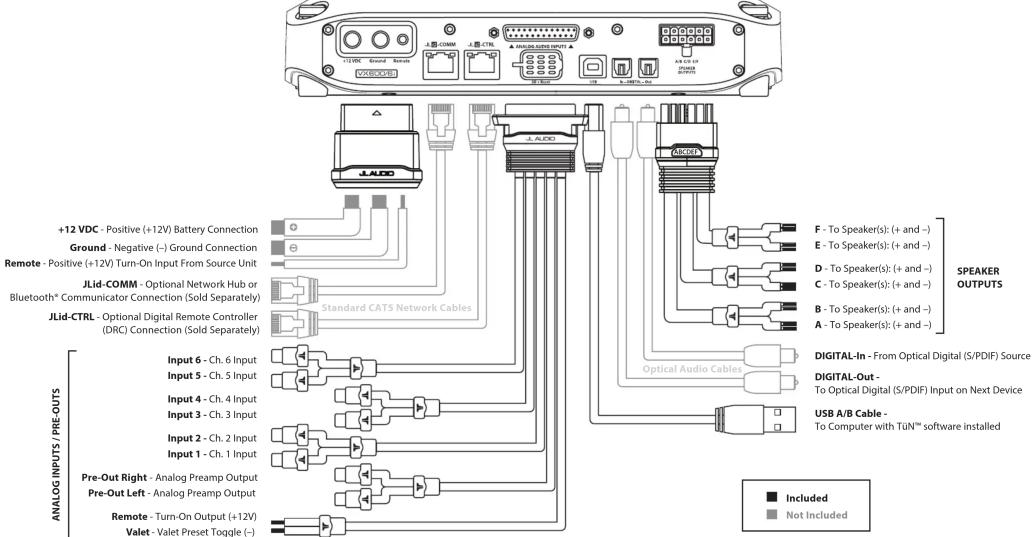
VXi amplifiers utilize removable plugs and harnesses to make the following connections:
•PowerConnector
To connect the power, ground and remote turn-on wires to the amplifier, back out the set screws on the connector using the supplied hex wrenches. Strip back 3/8 inch (10 mm) of insulation from the end of each wire and insert the bare wire into the receptacle on the power connector plug, seating it firmly so that no bare wire is exposed. While holding each wire in place, tighten each set screw firmly, taking care not to strip the head of the screw. Install the power connector by plugging it into the amplifier's power connector receptacle, pushing firmly.
• Analog Input/Pre-Out Harness
This harness includes connections for Signal Input (RCA plugs), Preamp Outputs (RCA plugs), Remote Turn-On Output (wire lead) and Valet Input (wire lead). Select either the included black hex cap machine screws or the silver thumbscrews to secure the Analog Input Harness connector to the amplifier.
• Speaker Output Harness
This harness includes output wire leads to connect with speaker cables.
Turn-On Mode
VXi amplifiers can be switched on and off using one of three methods, configured by the "Turn On Mode" setting in the TüNTM Software Interface. Refer to the table below for detailed info and decide which option is best suited for your specific system.
| Design Mode Function Connection | ||
| Remote | Conventional (Preferred) | Turn-en/off controlled by your source unit. |
| DC Offset | DC Offset Sensing (Auto) | Automatically turns on by detecting the presence of small DC signal in OEM audio outputs and turns off (within 5 minutes after the signal is removed). |
| Signal | Signal Sensing (Auto) | Automatically turns on by detecting full-range OEM audio signals and turns off (within 5 minutes) after the signal is removed, depending on input signal levels). |
3 Speaker Output Harness
Connect the speaker output leads to the corresponding speaker wires.
4 JLid-COMM
Connect optional accessories (VXi-BTC, VXi-HUB, etc.) to this port.
5 JLid-CTRL
Connect optional DRC (Digital Remote Controller) wired controllers to this port.
6 SD + Reset
Lift the dust cover to access the following utility functions:
Reset Buttons: Use a small pin to perform the following:
Reboot Amp - Press and release the right button.
Factory Reset (wipe memory, reboot amp) - Press and hold the left
button for 7 seconds.
Micro SD Slot: For service/future expansion.
7 USB
This USB A/B port permits connection to a computer for configuration and tuning, using the TüNTM Software.
8 DIGITAL-In
Toslink port accepts 2-channel digital audio signal from any optical (S/PDIF) digital output, with a sample rate up to 192 kHz.
9 DIGITAL-Out
Provides a digital audio output (24 bit/96 kHz) that is not susceptible to RF interference or noise-generating electrical conditions. By default, this is a pass-through audio output, with no signal processing applied, and intended for use with other equipment that have an optical (Toslink) digital audio input (S/PDIF) port. Using the TüNT™ Software Interface, you may configure this output's routing, equalization, output level and DRC control functionality.
Wiring Diagram - VX600/6i
LED Status/Condition Reporting
LEDs located on the chassis top and connection panel are used to communicate amplifier status and condition. Refer to the table below for the location and meaning for each behavior.
| LED / Location | Behavior | Status/Condition |
| LED Ring / Amplifier Top | Flashing Blue | Critical Voltage |
| Flashing Red | Critical Temperature | |
| Flashing Yellow | Excessive Current | |
| Upper Left LED / JLid-COMM Port and JLid-CTRL Port | Green | Detecting Jld* Device |
| Blue | JLidTM Connection Success | |
| Yellow | Invalid Jld*Device | |
| Flashing Red | Excessive Current | |
| Upper Right LED / JLid-COMM Port | Flashing Red | Critical Voltage/Temperature |
| Excessive Remote Output Current | ||
| Upper Right LED / JLid-CTRL Port | Green | Active TuhTM Connection |
Connections
| Power Connector | |||
| Connection Wire Capacity Description | |||
| +12 VDC (+) 4 AWG Positive (+) 12V Power Connection to Battery | |||
| Ground (-) 4 AWG Negative (GND) Chassis Ground Connection | |||
| Remote 18 to 10 AWG Positive (+) 12V Remote Turn-On Input from Source Unit | |||
| Analog Input Harness | |||
| Label | Plug/Wire Color | Description | |
| Input 1 White RCA Channel 1 Signal Input | |||
| Input 2 Red RCA Channel 2 Signal Input | |||
| Input 3 White RCA Channel 3 Signal Input | |||
| Input 4 Red RCA Channel 4 Signal Input | |||
| Input 5 White RCA Channel 5 Signal Input | |||
| Input 6 Red RCA Channel 6 Signal Input | |||
| Pre-Out Left White RCA Preamp Signal Output 1 | |||
| Pre-Out Right | Red RCA Preamp Signal Output 2 | ||
| Remote | Blue | Positive (+) 12V Turn-On Output (475 mA limit) | |
| Valet | Green | Negative (SND) Ground Input (activates the Valet Mode Preset) | |
| Speaker Output Harness | |||
| Label | Wire Color | Description | |
| A | White | Ch. 1 | (+) Positive Speaker Output Ch. 1&2 Bridged (+) |
| White/Black | (-) Negative Speaker Output | ||
| B | Gray | Ch. 2 | (+) Positive Speaker Output |
| Gray/Black | (-) Negative Speaker Output Ch. 1&2 Bridged (-) | ||
| C | Green | Ch. 3 | (+) Positive Speaker Output Ch. 3&4 Bridged (+) |
| Green/Black | (-) Negative Speaker Output | ||
| D | Purple | Ch. 4 | (+) Positive Speaker Output |
| Purple/Black | (-) Negative Speaker Output Ch. 3&4 Bridged (-) | ||
| E | Cyan | Ch. 5 | (+) Positive Speaker Output Ch. 5&6 Bridged (+) |
| Cyan/Black | (-) Negative Speaker Output | ||
| F | Magenta | Ch. 6 | (+) Positive Speaker Output |
| Magenta/Black | (-) Negative Speaker Output Ch. 5&6 Bridged (-) | ||
| Data Connections | |||
| Label | Type | Description/Use | |
| JLid-COMM | Ri45 Jack | Optional accessory connections (VIX-BTC, VXI-HUB, etc) | |
| JLid-CTRL | Ri45 Jack | Optional DRC (Digital Remote Controller) connection | |
| USB | USB A/B Port | Computer connection to configure TUNTM Software Interface | |
| DIGITAL-In | S/PDIF Port | 2-channel, optical (Toslink) digital input | |
| DIGITAL-Out | S/PDIF Port | 2-channel, optical (Toslink) digital output | |
| SD + Reset | Reset Buttons | Multifunction use (Reboot/Reset/Device Firmware Update mode) | |
| Micro SD Slot | Used for future expansion | ||
Specifications
| Amplifier Specifications | ||||
| Amplifier Topology | 2nd-Gen NextDTM High Speed Class D | |||
| Power Supply Type | Unregulated MOSFET Switching | |||
| Operating Voltage | 10~15V DC | |||
| Min. Copper Power/GND Wire | 4 AWG | |||
| Recommended Fuse | 50 A | |||
| Standby Current Draw | 2.4 mA | |||
| Input Voltage Range | 200 mV - 16 V RMS | |||
| Rated RMS Power @ 14.4V, <1% THD*N | 75W x 6 @ 4 Ω | 100W x 6 @ 2 Ω | 200W x 3 @ 4 Ω Bridged | |
| Rated RMS Power @ 12.5V, <1% THD*N | 60W x 6 @ 4 Ω | 90W x 6 @ 2 Ω | 180W x 3 @ 4 Ω Bridged | |
| Frequency Response | 12 Hz - 24 kHz (+0, -1)dB | |||
| Analog Input | 5/N Ratio,(A-weighted, 20 kHz noise bandwidth) | 99 dB (Referred to rated power),80 dB (Referred to 1 W) | ||
| Digital Input | 5/N Ratio,(A-weighted, 20 kHz noise bandwidth) | 99 dB (Referred to rated power),80 dB (Referred to 1 W) | ||
| Damping Factor | >100 / 50 Hz @ 4 Ω, >50 / 50 Hz @ 2 Ω | |||
| DSP Specifications | ||||
| Processor | AKM AK7738, processing at 24 bit/96 kHz | |||
| Analog Inputs | Type | Line-Level, Differential-Balanced | ||
| Number of Channels | 6, via harness-mounted female RCA jacks | |||
| Digital Inputs | Type | S/PDIF Optical via chassis-mounted Toslink port | ||
| Bit Depth/Sample Rate | Up to 24 bit/192 kHz | |||
| Analog Outputs | Type | 2 Line-Level, via harness-mounted female RCA jacks | ||
| Max Output Level | 4 V RMS | |||
| Digital Outputs | Type | S/PDIF Optical via chassis-mounted Toslink port | ||
| Bit Depth/Sample Rate | 24 bit/96 kHz | |||
| Dimensions | ||||
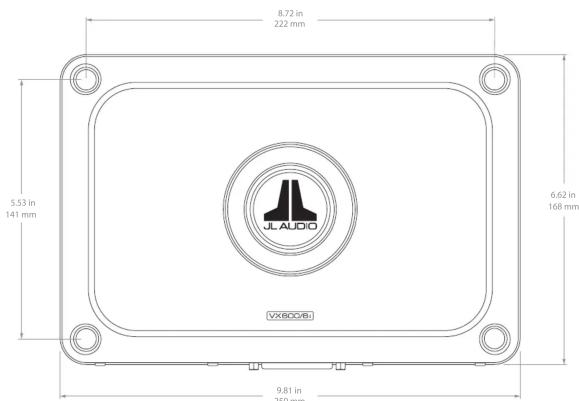
| L x W x H | 9.81 in x 6.62 in x 2.12 in / 250 mm x 168 mm x 54 mm | |||

What is TüN?
TüNTM is software that you use to configure, tune and control your VXi amplifier, and other JL Audio DSP products. TüNTM automatically recognizes what it is connected to, and allows you to make adjustments with a clear interface specifically set up for that product. TüNTM is available for download for free in a variety of applications, for computers and most handheld devices. For more information, visit: jlaudio.com/tun

For Windows® PC or Mac® computers, TüNTM connects via USB and offers complete control and command of the entire VXi feature set from the comfort of your desk or driver's seat. Software also runs in demo mode, without connected amplifiers, for offline setup or demo purposes. Test drive it for free!

For iPad or Android tablets. Enjoy the full-featured TüN™ software experience on your tablet, with the freedom of a wireless connection via Bluetooth*. Requires VXi-BTC Bluetooth* Communicator.

Wireless connection and streamlined options, for fast and simple amplifier setup. Download TüN™ Express for iPhone, iPad and Android phones & tablets. Requires VXi-BTC Bluetooth® Communicator.
Limited Warranty - Amplifiers (USA)
JL Audio warrants this product to be free of defects in materials and workmanship for a period of two (2) years from the original date of purchase. This warranty is not transferable and applies only to the original purchaser from an authorized JL Audio dealer. Should service be necessary under this warranty for any reason due to manufacturing defect or malfunction, JL Audio will (at its discretion), repair or replace the defective product with new or remanufactured product at no charge. Damage caused by the following is not covered under warranty: accident, misuse, abuse, product modification or neglect, failure to follow installation instructions, unauthorized repair attempts, misrepresentations by the seller. This warranty does not cover incidental or consequential damages and does not cover the cost of removing or reinstalling the unit(s). Cosmetic damage due to accident or normal wear and tear is not covered under warranty.
Warranty is void if the product's serial number has been removed or defaced. Any applicable implied warranties are limited in duration to the period of the express warranty as provided herein beginning with the date of the original purchase at retail, and no warranties, whether express or implied, shall apply to this product thereafter. Some states do not allow limitations on implied warranties, therefore these exclusions may not apply to you. This warranty gives you specific legal rights, and you may also have other rights, which vary from state to state.
If you need service on your JL AUDIO product:
All warranty returns should be sent to JL Audio's Amplifier Service Facility freight-prepaid through an authorized JL Audio dealer and must be accompanied by proof of purchase (a copy of the original sales receipt). Direct returns from consumers or non-authorized dealers will be refused unless specifically authorized by JL Audio with a valid return authorization number. Warranty expiration on products returned without proof of purchase will be determined from the manufacturing date code. Coverage may be invalidated as this date is previous to purchase date. Non-defective items received will be returned freight-collect. Customer is responsible for shipping charges and insurance in sending the product to JL Audio. Freight damage on returns is not covered under warranty.
For Service Information in the U.S.A. please call
JL Audio Customer Service:
(954) 443-1100 9:00 AM - 5:30 PM (Eastern Time Zone)
3E Audio, Inc. 10260 North Commerce Blvd: Minster, FL 32025
(Do not send product for repair to this address)
International Warranties:
Products purchased outside the United States of America are covered only by that country's distributor and not by JL Audio, Inc.

- Installation Applications
- Product Description
- Planning Your Installation
- Safety Considerations
- Cooling Efficiency Considerations
- What is Included
- JL Audio Badge
- Power Connector
- Analog Input/Pre-Out Harness
- Corner Cap Installation and Removal
- Making Connections
- • Analog Input/Pre-Out Harness
- • Speaker Output Harness
- Turn-On Mode
- Speaker Output Harness
- JLid-COMM
- JLid-CTRL
- SD + Reset
- USB
- DIGITAL-In
- DIGITAL-Out
Brand : JL Audio
Model : VX600/6i
Category : Receiver