EX618cl - Washing machine Wascomat - Free user manual and instructions
Find the device manual for free EX618cl Wascomat in PDF.


User questions about EX618cl Wascomat
0 question about this device. Answer the ones you know or ask your own.
Ask a new question about this device
Download the instructions for your Washing machine in PDF format for free! Find your manual EX618cl - Wascomat and take your electronic device back in hand. On this page are published all the documents necessary for the use of your device. EX618cl by Wascomat.
USER MANUAL EX618cl Wascomat
Wascomat provides efficient washers, dryers, flatwork ironers and wetcleaning systems in a size and model for every laundry and wetcleaning need!
WASCOMAT CUSTOMER SUPPORT
Whether you need spare parts or technical advice to guide you to the source of a malfunction, our nationwide network of authorized dealers are able and ready to serve your needs, or call the Wascomat Customer Service Hotlines listed below.
SPARE PARTS
516-371-2000
Before ordering parts, refer to the Wascomat spare parts manual (also available on www.wascomat.com) to determine the part number(s) for the item(s) you need.
For quick service, please have the following information available:
- Part Number of the item(s) you need.
- Model of the machine.
- Serial number of the machine.
- Electrical data for the machine:
- 120 or 208-240 Volt?
- Single or three phase?
- 50 or 60 Cycle?
To insure parts order accuracy, only fax or email parts orders are accepted:
- Fax: 516-371-4029
- email: parts@wascomat.com
TECHNICAL SUPPORT
516-371-0700
For service information, first contact your local authorized Wascomat dealer.
Wascomat technical support can assist you or your technician to diagnose and repair your laundry machines over the phone. Please call from the location where the machines are installed (we suggest you use a cellular or cordless phone), and have the following information available:
- Model of the machine.
- Serial number of the machine.
- Electrical data for the machine:
- 120 or 208-240 Volt?
- Single or three phase?
-
50 or 60 Cycle?
-
An accurate description of the malfunction.
To expedite parts order shipment, please use your credit card. We accept: American Express, Mastercard, Visa, Discover, Diner's Club.
WARRANTY CLAIMS
Wescomet's Technical Support staff will honor valid manufacturers' parts warranty claims providing your Wiescomet machines are registered for warranty coverage open installation. If they are not registered, you can validate your warranty claim by providing information about when and where you purchased the Wiescomet machine(s), the model and social number(c). Additional warranty proof may also be required.
Operating manual
EX618cl - EX670cl
SU620cl - 675cl
Clarus
WARNING: ALL OPERATING AND MAINTENANCE PROCEDURES SHOWN ON THE NEXT PAGE OF THIS MANUAL MUST BE FOLLOWED DAILY FOR PROPER OPERATION OF YOUR WASCOMAT MACHINE.
PLEASE ENTER THE FOLLOWING INFORMATION AS IT APPEARS ON THE MACHINE(S) DATA PLATE(S).
| MACHINE TYPE OR MODEL | |
| MACHINE SERIAL NUMBER(S) | |
| ELECTRICAL CHARACTERISTICS:___ VOLTS,___ PHASE,___ HZ. | |
MAKE CERTAIN TO KEEP THIS MANUAL IN A SECURE PLACE FOR FUTURE REFERENCE.
Intentionally blank

SAFETY AND WARNINGS SIGNS
Replace If Missing Or Illegible
One or more of these signs must be affixed on each machine as indicated, when not included as part of the front instruction panel.
LOCATED ON THE OPERATING INSTRUCTION SIGN OF THE MACHINE:
CAUTION
- Do not open washer door until cycle is completed, operating light is off, and wash cylinder has stopped rotating.
- Do not tamper with the door safety switch or door lock.
- Do not attempt to open door or place hands into washer to remove or add clothes during operation. This can cause serious injury.
MACHINE MUST NOT BE USED BY CHILDREN
PRECAUCION
LOCATED AT THE REAR OF THE MACHINE:
INSTALLATION AND
MAINTENANCE WARNINGS - AVERTISSEMENT
- This machine MUST be securely bolted according to the installation instructions, to reduce the risk of fire and to prevent serious injury, or damage to the machine. Pour reduire les risques d'incendie, fixer cet appareil sur un plancher beton sans revetement.
- If installed on a floor of combustible material, the floor area below this machine must be covered by a metal sheet extending to the outer edges of the machine.
- This machine MUST be connected to a dedicated electrical circuit to which no other lightning unit or general purpose receptacle is connected. Use copper conductor only. Utiliser seulement des conducteurs en cuivre.
- This machine MUST be serviced and operated in compliance with manufacturer's instructions. CHECK DOOR LOCK EVERY DAY FOR PROPER OPERATION TO PREVENT INJURY OR DAMAGE. IF THE DOOR LOCK FAILS TO OPERATE PROPERLY, PLACE THE MACHINE OUT OF ORDER UNTIL THE PROBLEM IS CORRECTED.
- Disconnect power prior to servicing of machine. Deconnecter cet appareil del'alimentation avant de proceder a l'entretien.
- To remove top panel, first remove screws at the rear. When remounting the top, reinstall them. To remove the top panel on models on which it is secured by one or two keylocks, use the keys provided in the drum package. Be certain to relock after remounting the top panel.
MANUFACTURED BY WASCATOR
DISTRIBUTED BY WASCOMAT, INWOOD, NEW YORK, USA
471 766202-04
LOCATED ON THE DOOR:
If you need to order more safety or warning signs, call Wascomat's parts department at 516-371-2000, or call your local dealer.
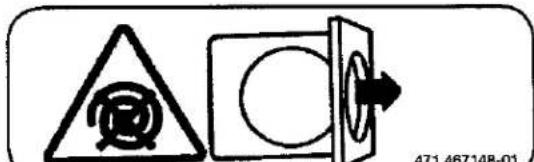

NOTICE TO: OWNERS, OPERATORS AND DEALERS OF WASCOMAT MACHINES
IMPROPER INSTALLATION AND INADEQUATE MAINTENANCE, POOR HOUSEKEEPING AND WILLFUL NEGLECT OR BYPASSING OF SAFETY DEVICES MAY RESULT IN SERIOUS ACCIDENTS OR INJURY. TO ASSURE THE SAFETY OF CUSTOMERS AND/OR OPERATORS OF YOUR MACHINE, THE FOLLOWING MAINTENANCE CHECKS MUST BE PERFORMED ON A DAILY BASIS.
- Prior to operation of the machine, check to make certain that all operating instructions and warning signs are affixed to the machine and legible. (See the following page of this manual for description and location of the signs.) Missing or illegible ones must be replaced immediately. Be sure you have spare signs and labels available at all times. These can be obtained from your dealer or Wascomat.
- Check the door safety interlock, as follows:
(a) OPEN THE DOOR of the machine and attempt to start in the normal manner:
For CLARUS microprocessor models, choose a program and press the START button.
THE MACHINE(S) MUST NOT START!
(b) CLOSE THE DOOR to start machine operation and, while it is operating, attempt to open the door without exerting extreme force on the door handle. The door should remain locked!
If the machine can start with the door open, or can continue to operate with the door unlocked, the door interlock is no longer operating properly. The machine must be placed out of order and the interlock immediately repaired or replaced. (See the door interlock section of the manual.)
- DO NOT UNDER ANY CIRCUMSTANCES ATTEMPT TO BYPASS OR REWIRE ANY OF THE MACHINE'S SAFETY DEVICES, AS THIS CAN RESULT IN SERIOUS ACCIDENTS.
- Be sure to keep the machine(s) in proper working order: Follow all maintenance and safety procedures. Further information regarding machine safety, service and parts can be obtained from your dealer or from Wascomat through its Technical Support Department - 516/371-0700.
All requests for assistance must include the model, serial number and electrical characteristics as they appear on the machine identification plate. Insert this information in the space provided on the previous page of this manual.
- WARNING: DO NOT OPERATE MACHINE(S) WITH SAFETY DEVICES BYPASSED, REWIRED OR INOPERATIVE! DO NOT OPEN MACHINE DOOR UNTIL DRUM HAS STOPPED ROTATING!
Contents
Procedure for use.... 11
General introduction....11
Preparations 12
The "Move back" key 13
To start the wash program.... 13
To start a wash program from the program library....17
To change parameters in the current program step 20
Rapid advance....21
Show weight....23
No water reduction....24
Pause 25
Manual operation during a program....26
Text 32
To change the wash program after program operation has commenced....33
To change temperature....34
Auto restart....35
Manual operation 36
To select manual operation 36
Motor/door 37
Water/drain 38
Heating 39
Detergent signals and water flushing 40
Statistics 41
To select statistics 41
Resetting statistic registers 43
Memory card....59
General indtroduction....59
To select the "Memory card" function 60
To run a wash program straight from a memory card 63
To copy a program from a memory card to the machine's program control unit....64
To copy a program from the program control unit to a memory card... 67
To delete a program on a memory card 70
To delete all programs on a memory card....71
Maintenance....72
Preventive maintenance....73
Intentionally blank

Safety

This machine can only be used with water. Never use dry cleaning agents.
Do not allow children to operate the machine.
Do not hose down or spray the machine with water.
Mechanical and electrical installation must be carried out by qualified personnel.
The machine's door lock must not be bypassed and it should be checked daily to ensure it functions.
Should the machine malfunction, turn off electrical power, mark the machine "out of order", and contact your local authorized Wascomat dealer.
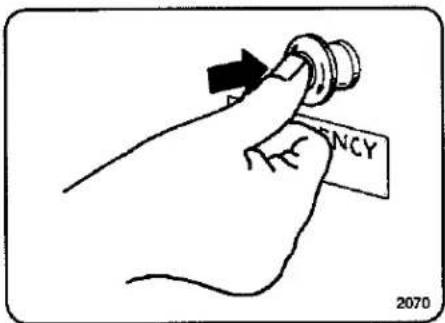
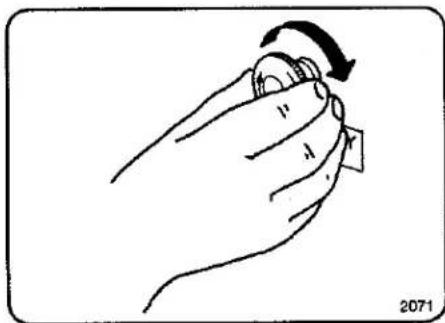
natural_image
Hand holding a knob with an arrow indicating rotation (no text or symbols)Emergency stop
Some models are equipped with an emergency stop button. Press it to turn off power to the drive motor and control circuits. Note that this switch DOES NOT completely disconnect power from the washer, and that some circuits may still be energized. Use appropriate caution.
When necessary measures have been taken, the emergency button can be reset by turning the button clockwise until it is released.
The manufacturer reserves the right to make changes to design and component specifications.
Intentionally blank
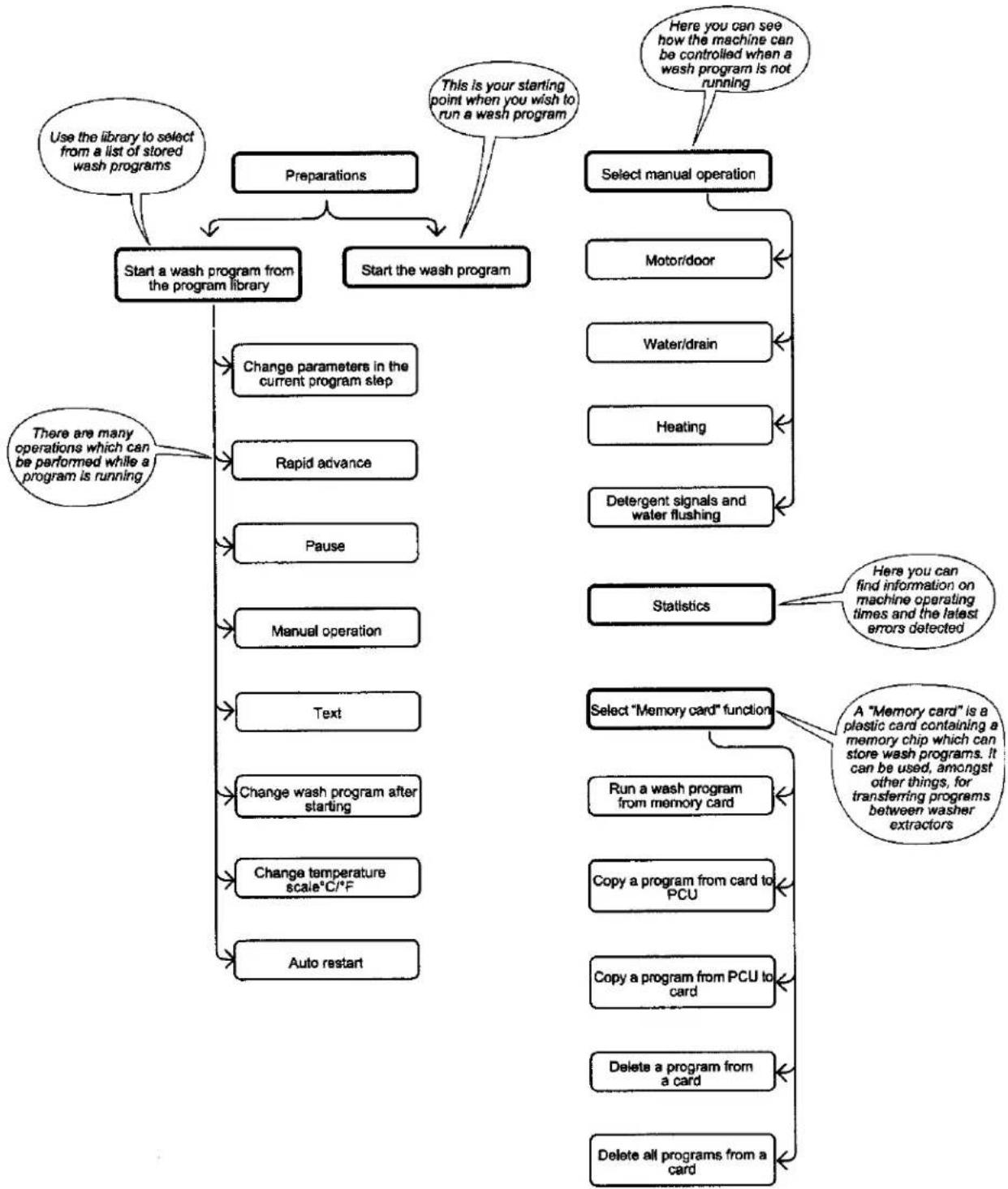
flowchart
graph TD
    A["Preparations"] --> B["Start a wash program from the program library"]
    A --> C["Start the wash program"]
    B --> D["Change parameters in the current program step"]
    B --> E["Rapid advance"]
    B --> F["Pause"]
    B --> G["Manual operation"]
    B --> H["Text"]
    B --> I["Change wash program after starting"]
    B --> J["Change temperature scale°C/°F"]
    B --> K["Auto restart"]
    C --> L["Select manual operation"]
    L --> M["Motor/door"]
    L --> N["Water/drain"]
    L --> O["Heating"]
    L --> P["Detergent signals and water flushing"]
    L --> Q["Statistics"]
    Q --> R["Here you can find information on machine operating times and the latest errors detected"]
    L --> S["Select "Memory card" function"]
    S --> T["Run a wash program from memory card"]
    S --> U["Copy a program from card to PCU"]
    S --> V["Copy a program from PCU to card"]
    S --> W["Delete a program from a card"]
    S --> X["Delete all programs from a card"]
    A --> Y["Use the library to select from a list of stored wash programs"]
    Y --> Z["This is your starting point when you wish to run a wash program"]
    Z --> AA["Here you can see how the machine can be controlled when a wash program is not running"]
    AA --> AB["There are many operations which can be performed while a program is running"]
3657 A
Intentionally blank
General introduction
① This washer extractor is controlled by a microprocessor-based program control unit. There are many advantages to this equipment, including:
- timing, levels, motor speeds and temperatures are controlled with great precision and flexibility
- detailed information on wash programs, machine status and operations, wash times and temperatures can be accessed in plain language on the large display screen
- it is possible for the user to create new wash programs, and to customize programs based on experience to suit various types of textile, degrees of soiling etc.
- a very high level of machine safety through continuous monitoring and built-in safety interlocks
-
the program control unit has a reader for "memory cards". These are cards the size of a credit card which contain a memory chip. Memory cards allow the user to:
-
transfer wash programs between a PC and the washer, or from one washer to another
- run programs straight from a card
- great flexibility during program operation:
- rapid advance both forwards and backwards in the program
- change temperatures, program module lengths and extraction speeds directly, during program operation
- start a different program at any time during program operation.
①
Display screen
Numeric keyboard
Card reader for "memory cards"
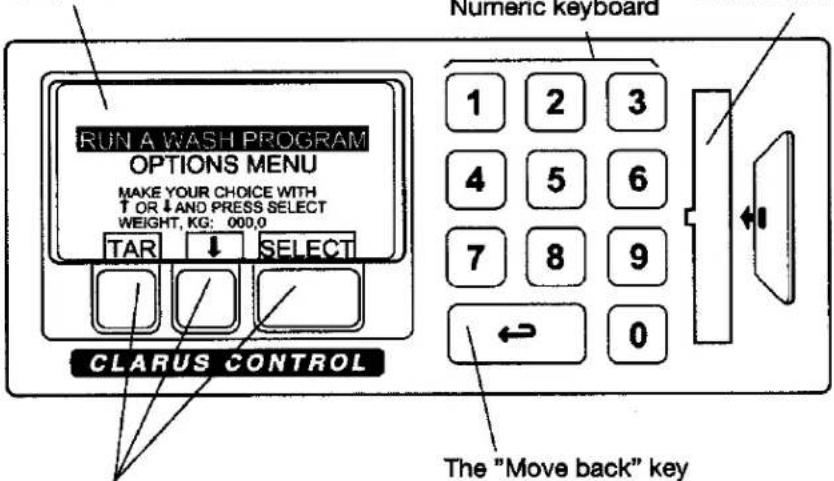
The functions of these keys change, depending on which menu or part of a menu you are using. Their current functions at any time are shown on the display immediately above each key.
The "Move back" key
By pressing this key repeatedly you can move backwards through the menus you have navigated through. This will always bring you back to the main menu shown here.
Preparations
- Sort the load, paying attention to the textile care labels on the items. Empty all pockets and close any zippers.
- Open the machine door, check that the drum is empty, load the items into the machine and close the door.
- Check that the emergency stop button has not been pressed (see "Machine safety").
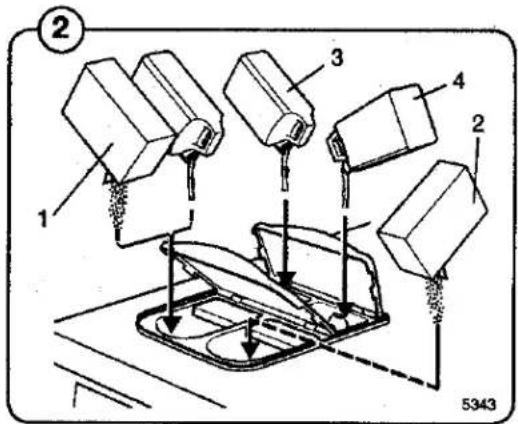
Measuring the detergent
② Compartment 1 – pre wash, powder or liquid detergent
Compartment 2 – main wash, powder detergent
Compartment 3 - softener
Compartment 4 – main wash, liquid detergent
The "Move back" key
3627
If you find you are in the wrong place, or if you want to undo earlier key presses:
Press the "Move back" key one or more times.
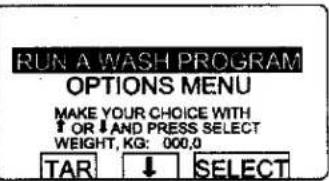
The "Move back" function
Each press of the "Move back" key moves you back one menu, in reverse order. By pressing this key repeatedly you can return to this menu at any time:
3651
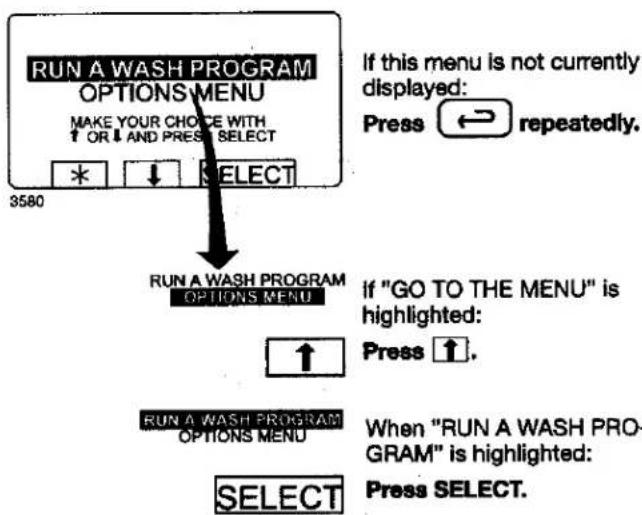
To start the wash program
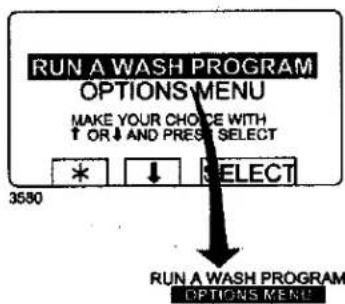
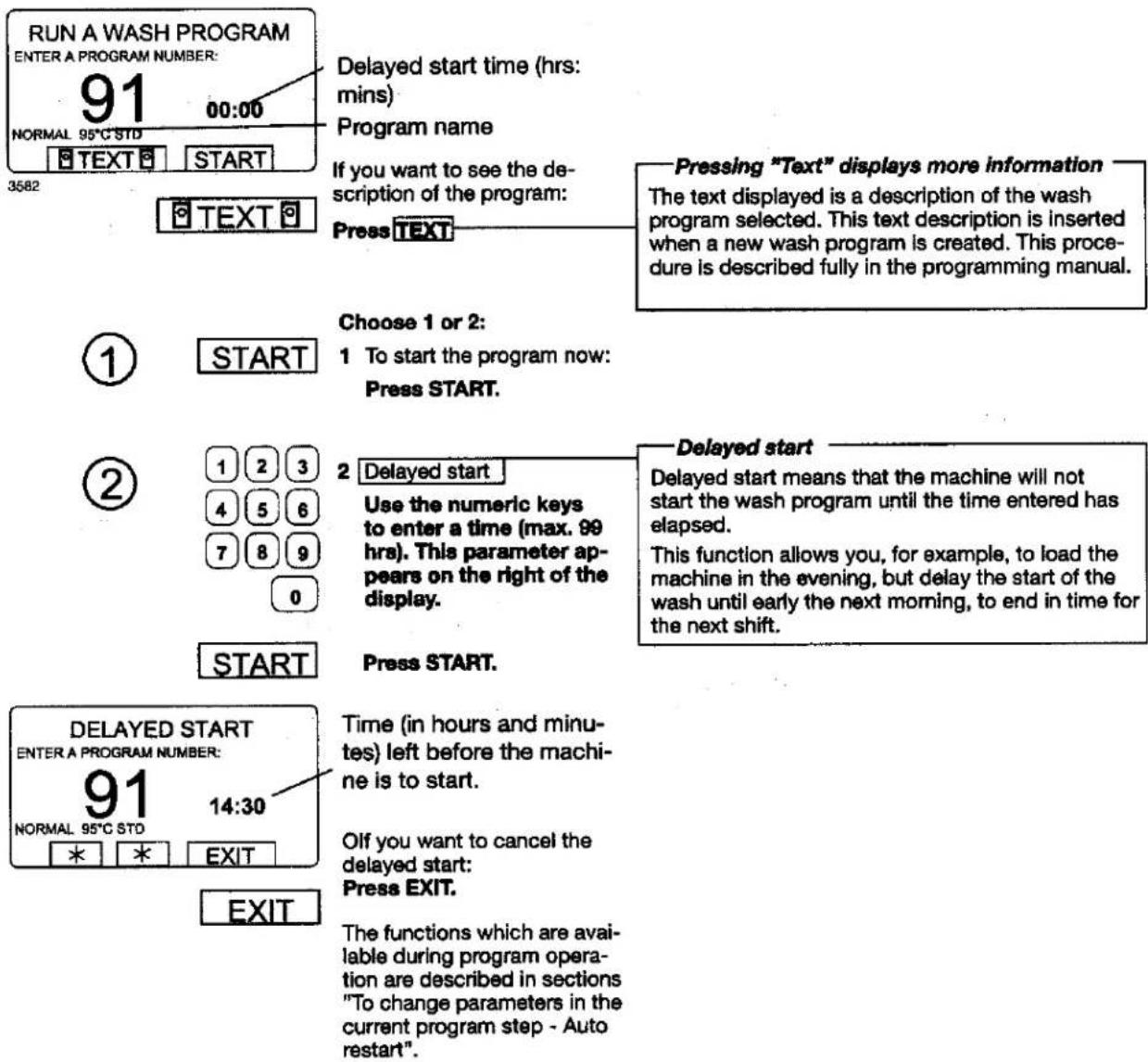
If this menu is not currently displayed:
Press ↔ repeatedly.

If "OPTIONS MENU" is highlighted:
Press 1.
RUN A WASH PROGRAM OPTIONS MENU

When "RUN A WASH PRO-GRAM" is highlighted:
Press SELECT.
Two ways of starting a program
By entering the actual program number
Enter the actual program number if you know it, then press SELECT.
By starting from the program library (see section "To start a wash program from the program library)
If you are unsure about the programs available, you can select a program from the program library, where the programs are listed with their descriptions.
Procedure for use
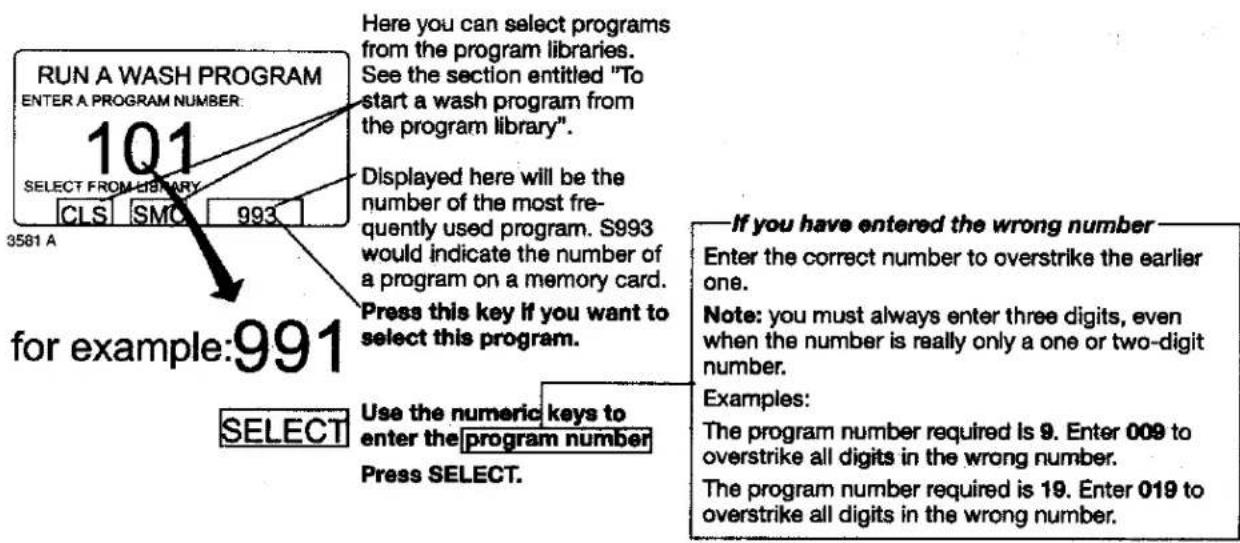
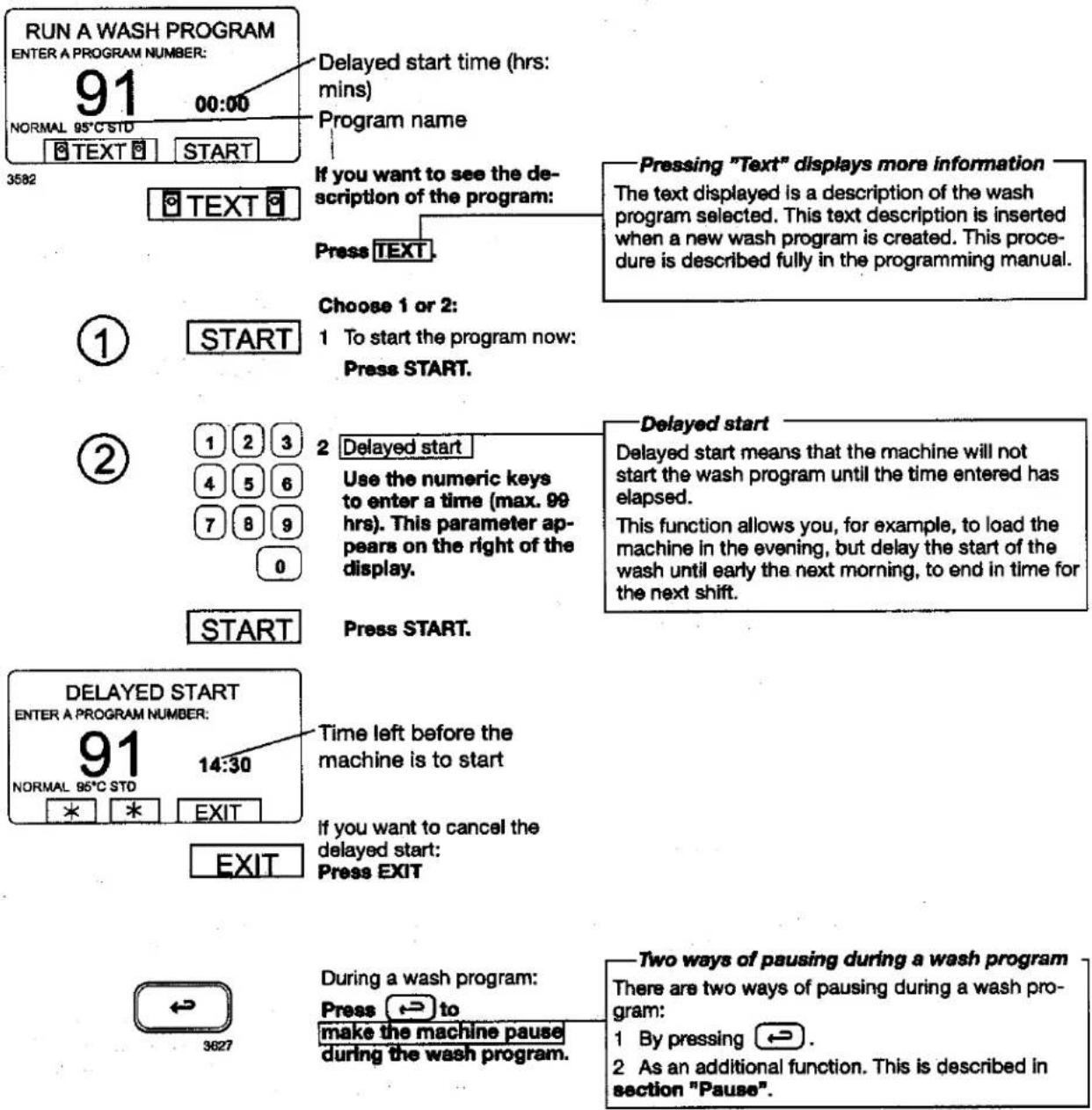
Procedure for use
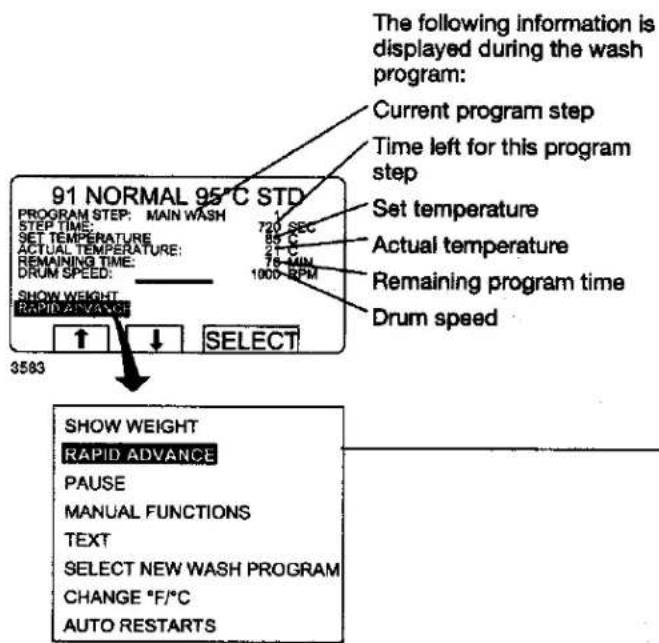
—To terminate a program before it has finished
- Select RAPID ADVANCE and press SELECT. Advance to "END OF PROGRAM" and press SELECT.
- Wait until "THE DOOR IS OPEN" appears on the display.
• Now the door can be opened.
To change parameters in the current program step
See section "To change parameters in the current program step".
Certain program step parameters can be altered during the course of the program. In the example (left), the length of the program step and the heating temperature can be altered.

If required:
Select a function using the cursor keys.

Press SELECT.
Additional functions during the program
Rapid advance (see section "To change parameters in the current program step")
Rapid advance through the program to the program step required. Rapid advance can be used to move both forwards and backwards through the program.
Display weight (see section "Display weight")
The actual load weight is shown in large digits on the display (weight display mode). (On machines with weighing equipment only.)
No water level reduction (see section "No water level reduction")
Machines with weighing equipment installed adjust the water level automatically according to the load weight. This function lets you switch off water level reduction during the current program.
Pause (see section "Pause")
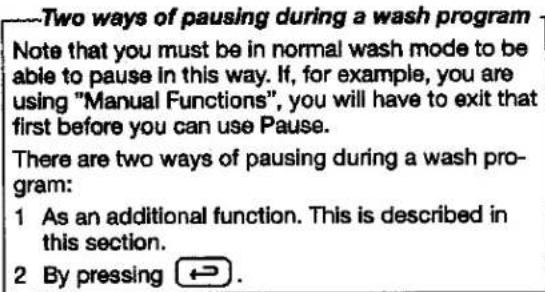
The machine stops. The drain valve remains closed. Another way to pause the program: Press ↩.
Manual functions (see section "Manual operation during a program")
The following functions can be controlled manually during the course of the program:
- all water valves, drain and pumps (where applicable).
- limit highest extraction speed.
- motor on/off after end of wash program.
- flush detergent.
Text (see section "Text")
Display description of wash program (if available).
Select a different wash program (see section "To change the wash program after program operation has commenced")
You can switch to using a different wash program at any stage during the wash. Once this function has been selected, the current step (for example, rinse) of the earlier program will be allowed to finish and then the new program will start (from the beginning).
Change temperature scale °C or °F (see section "To change temperature scale °C/°F")
Auto restart (see section "Auto restart")
Here you enter the number of times you wish the wash program to restart automatically.
To start a wash program from the program library
What is the program library?
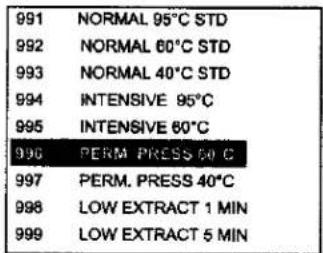
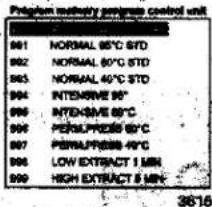
The program library lists all wash programs, both user and standard programs, showing their program numbers and a description, for example:
| 1 | MY OWN 40 °C |
| 2 | MY OWN 60 °C |
| 3 | MY OWN 90 °C |
| 991 | NORMAL 95°C STD |
| 992 | NORMAL 60°C STD |
| 993 | NORMAL 40°C STD |
| 994 | INTENSIVE 95°C |
| 995 | INTENSIVE 60°C |
| 996 | PERM. PRESS 60°C |
| 997 | PERM. PRESS 40°C |
| 998 | LOW EXTRACT 1 MIN |
| 999 | HIGH EXTRACT 5 MIN |
Each time a new program is stored in the machine program memory, its number and description will be inserted automatically into the program library. The program library may be used for starting a wash program, but is also used in programming, when a wash program needs to be modified or if a new program is to be created on the basis of an existing one.
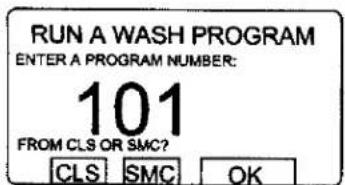
4031 A
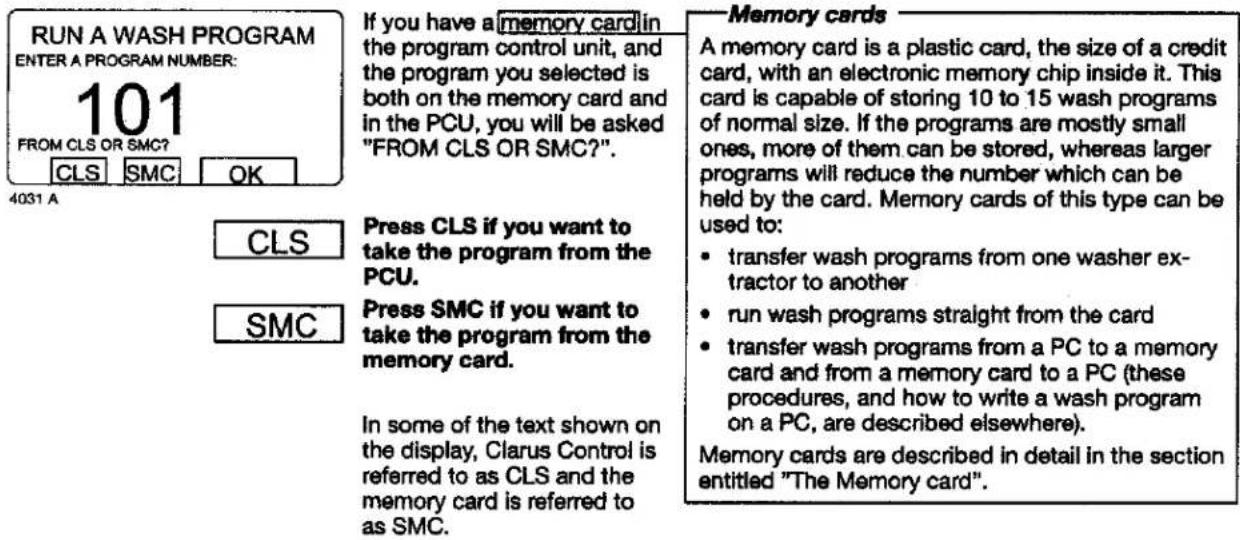
To select a program from the PCU program library:
Press CLS.
If there is a memory card in the PCU and you wish to select a program on that:
Press SMC.
Select library via menu
You can also select the program library via the option "GO TO THE MENU". Then select "WASH PROGRAM LIBRARY".
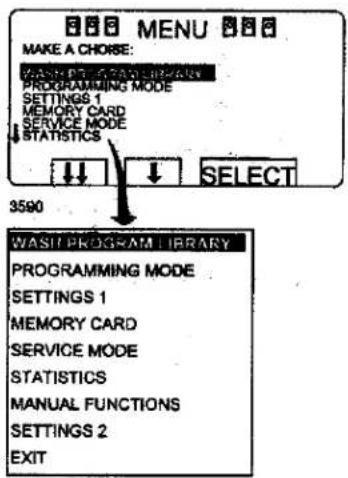
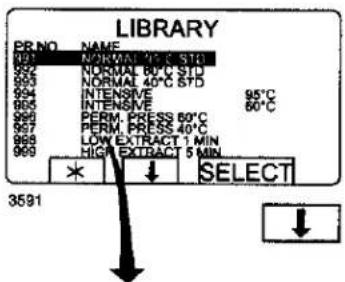
Press ↓ the required number of times...
...to highlight the wash program required.
SELECT
Press SELECT.
To change parameters in the current program step
3584
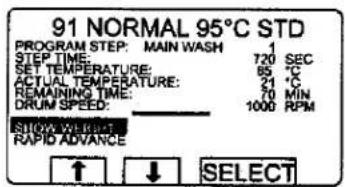
During program operation the display will look like this (see section "To start the wash program").
— You can alter the following program steps:
Prewash, Main wash, Rinse, Drain, Soak Length of program step (max. 9998 seconds), heating temperature (max. 97°C).
Extraction
Length of program step (max. 3599 seconds), extraction speed.

Press one or more times...
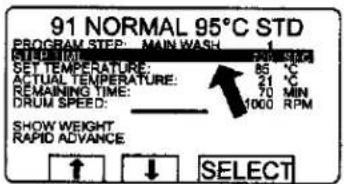
...to highlight the line required.

Press SELECT.
Use the numeric keys to enter the new parameter.


If you have entered the wrong parameter
Continue pressing numeric keys to overstrike the incorrect parameter.
Note: always use the same number of digits as used on the display to overstrike the incorrect parameter.
Example:
To change the time for the program step to 30 seconds, enter 030 to overstrike the earlier parameter.
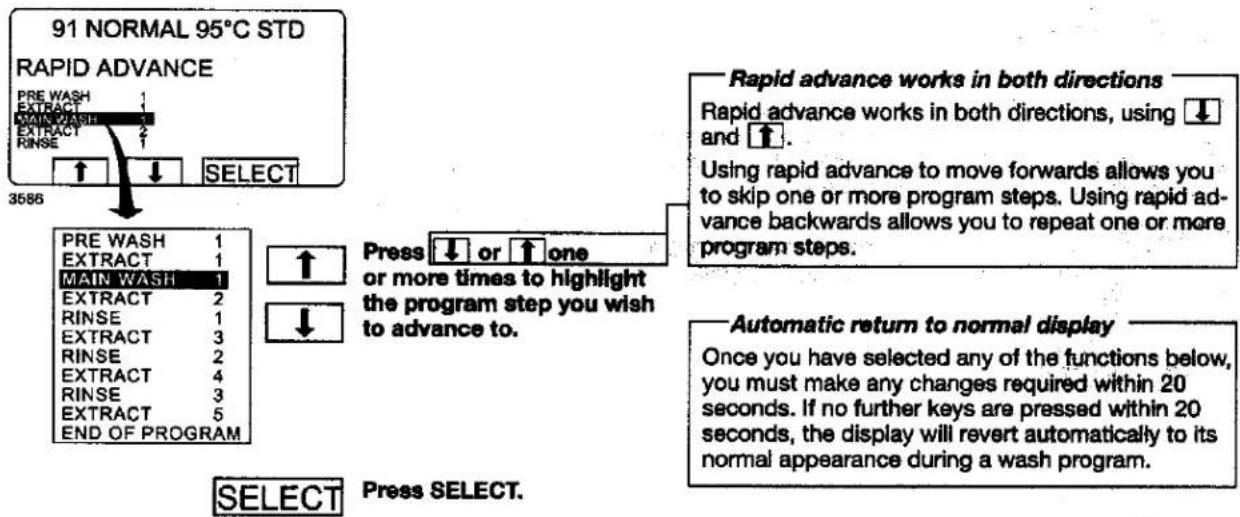
Rapid advance
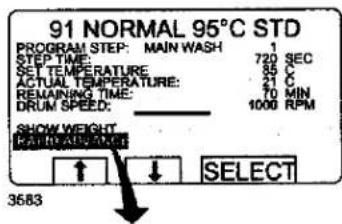
During program operation the display will look like this (see section "To start the wash program").
Check that "RAPID ADVANCE" is highlighted.
To terminate a program before it has finished
- Select RAPID ADVANCE and press SELECT. Advance to "END OF PROGRAM" and press SELECT.
- Wait until "THE DOOR IS UNLOCKED" appears on the display.
• Now the door can be opened.
SHOW WEIGHT
RAPID ADVANCE
PAUSE
MANUAL FUNCTIONS
TEXT
SELECT NEW WASH PROGRAM
CHANGE °F/°C
AUTO RESTARTS


If it is not highlighted:
Press ↑ or ↓ one or more times to highlight "RAPID ADVANCE".

Press SELECT.
Procedure for use
flowchart
graph TD
    A["PRE WASH"] --> B["EXTRACT"]
    B --> C["MAIN WASH"]
    C --> D["RINSE"]
    D --> E["EXTRACT"]
    E --> F["RINSE"]
    F --> G["EXTRACT"]
    G --> H["RINSE"]
    H --> I["EXTRACT"]
    I --> J["END OF PROGRAM"]
    K["Select"] --> L["Press SELECT."]
    M["Select"] --> N["Press SELECT."]
    O["Rapid advance works in both directions"] --> P[" Rapid advance works in both directions, using ↓ and ↑."]
    P --> Q[" Using rapid advance to move forwards allows you to skip one or more program steps. Using rapid advance backwards allows you to repeat one or more program steps."]
    R["Automatic return to normal display"] --> S[" Once you have selected any of the functions below, you must make any changes required within 20 seconds. If no further keys are pressed within 20 seconds, the display will revert automatically to its normal appearance during a wash program."]
For machines with weighing equipment installed only!
Show weight
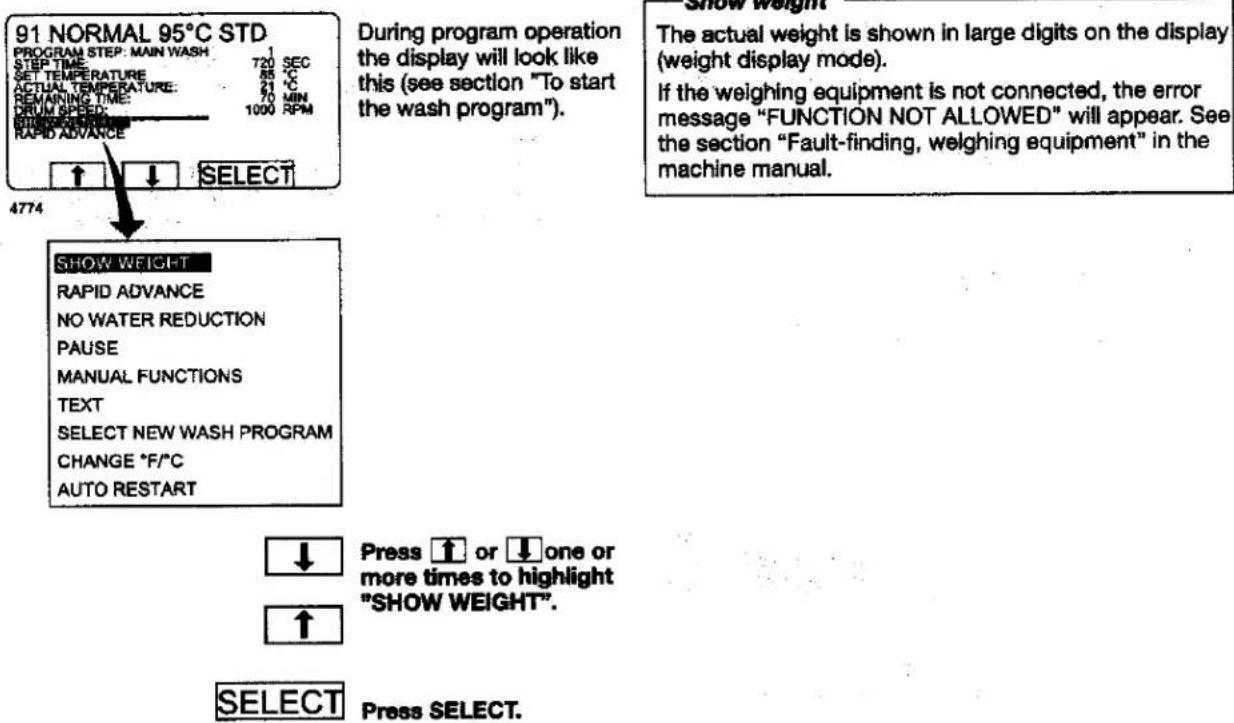
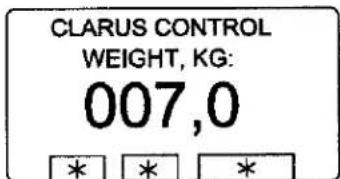
4775
Weight display mode:
The actual net weight is shown in large digits on the display.
Weight display mode:
The actual net weight is shown in large digits on the display.
Return to normal display
The display will return to normal at the end of the "time for weight display" set as a parameter in Settings 1. The manufacturer's default parameter is 20 seconds.
To end weight display sooner
Press ← or use the numeric keys to enter a new program number.
For machines with weighing equipment installed only!
No water reduction
SHOW WEIGHT
RAPID ADVANCE
NO WATER REDUCTION
PAUSE
MANUAL FUNCTIONS
TEXT
SELECT NEW WASH PROGRAM
CHANGE °F/°C
AUTO RESTART
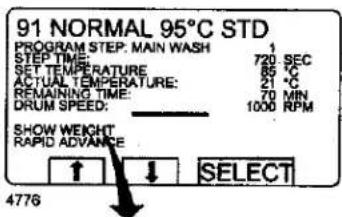
During program operation the display will look like this (see section "To start the wash program").
No water reduction
The wash load is weighed during the program and the water level is adjusted automatically according to its weight. If the load is not a full one, the water level will be reduced according to a water level reduction table. You can switch off water level reduction at any stage of a program.
Note that if you select "NO WATER REDUCTION", this applies only to the program currently running. The next time a program is started, water level reduction will occur automatically again.

Press ↑ or ↓ one or more times to highlight "NO WATER REDUCTION".


Press SELECT.
Pause
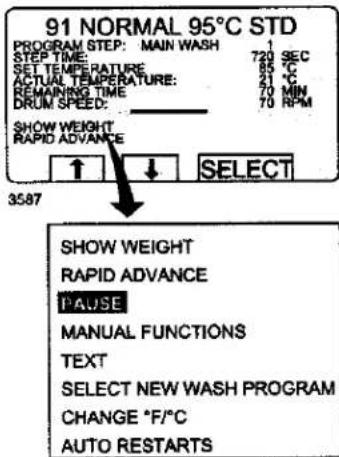
During program operation the display will look like this (see section "To start the wash program").

Press ↑ or ↓ one or more times to highlight "PAUSE".
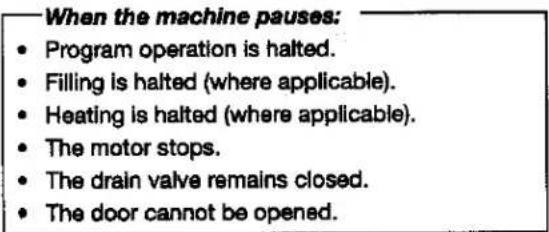


Press SELECT.
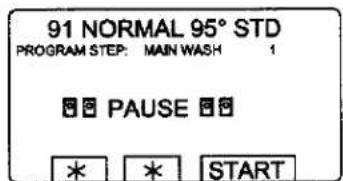
3588
Press START to restart the wash program.
Manual operation during a program
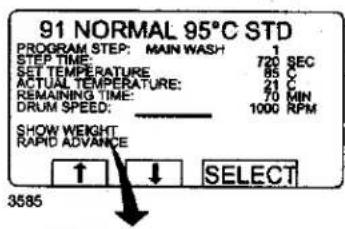
During program operation the display will look like this (see section "To start the wash program").
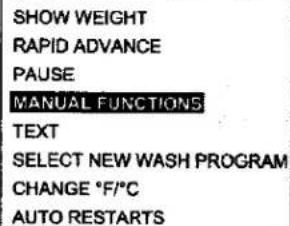
Two types of manual operation
There are two types of manual operation, which should not be confused:
- Manual operation during a program These functions are described in this section.
- Manual operation when no program is running These functions are described in section "Manual operation".

Press ↑ or ↓ one or more times to highlight "MANUAL FUNCTIONS".


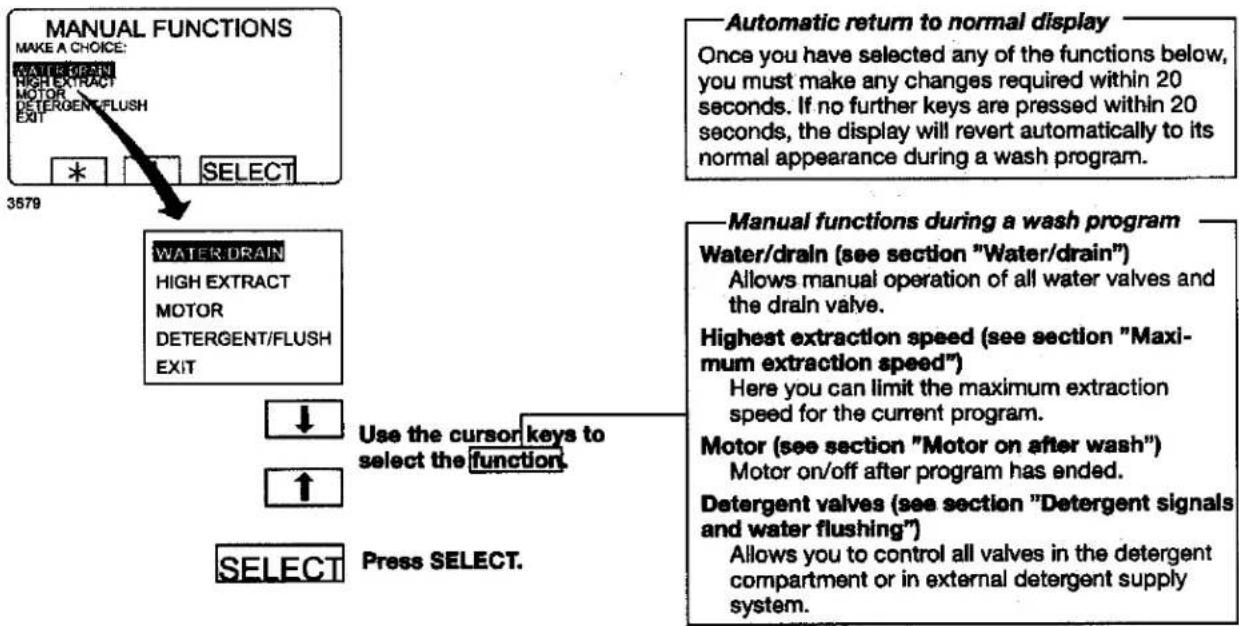
Press SELECT.
flowchart
graph TD
    A["MANUAL FUNCTIONS"] --> B["MAKE A CHOICE: WATER/DRAIN HIGH EXTRACT MOTOR DETERGENT/FLUSH EXIT"]
    B --> C["SELECT"]
    C --> D["3579"]
    E["Automatic return to normal display"] --> F["Once you have selected any of the functions below, you must make any changes required within 20 seconds. If no further keys are pressed within 20 seconds, the display will revert automatically to its normal appearance during a wash program."]
    G["WATER.DRAIN"] --> H["HIGH EXTRACT MOTOR DETERGENT/FLUSH EXIT"]
    H --> I["↓ Use the cursor keys to select the function."]
    I --> J["↑"]
    K["MANUAL FUNCTIONS"] --> L["Use the cursor keys to select the function."]
    L --> M["SELECT Press SELECT."]
    N["Water/drain (see section "Water/drain") Allows manual operation of all water valves and the drain valve. Highest extraction speed (see section "Maximum extraction speed") Here you can limit the maximum extraction speed for the current program. Motor (see section "Motor on after wash") Motor on/off after program has ended. Detergent valves (see section "Detergent signals and water flushing") Allows you to control all valves in the detergent compartment or in external detergent supply system."]
Water/drain
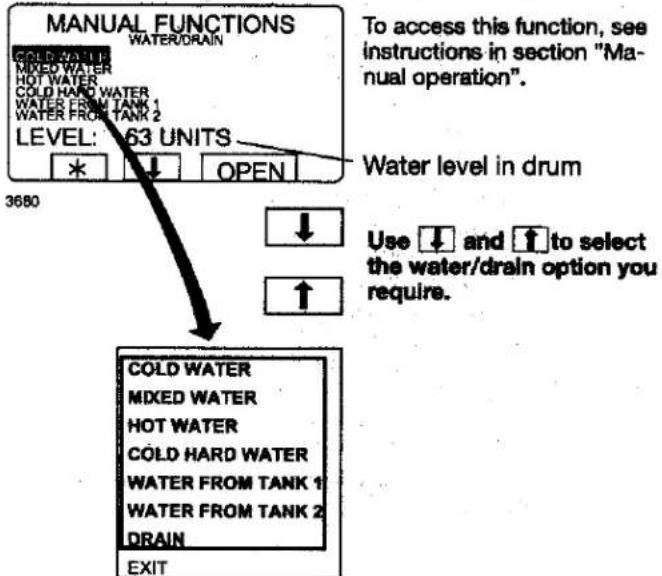
flowchart
graph TD
    A["MANUAL FUNCTIONS"] --> B["COLD WATER"]
    A --> C["MIXED WATER"]
    A --> D["HOT WATER"]
    A --> E["COLD HARD WATER"]
    A --> F["WATER FROM TANK 1"]
    A --> G["WATER FROM TANK 2"]
    A --> H["LEVEL: 63 UNITS"]
    H --> I["*"]
    H --> J["↓"]
    H --> K["OPEN"]
    L["To access this function, see instructions in section "Manual operation"."] --> M["Water level in drum"]
    N["Use ↓ and ↑ to select the water/drain option you require."] --> O["↑"]
    P["COLD WATER"] --> Q["COLD WATER"]
    R["MIXED WATER"] --> S["MIXED WATER"]
    T["HOT WATER"] --> U["HOT WATER"]
    V["COLD HARD WATER"] --> W["COLD HARD WATER"]
    X["WATER FROM TANK 1"] --> Y["WATER FROM TANK 2"]
    Z["DRAIN"] --> AA["DRAIN"]
    AB["EXIT"] --> AC["3680"]

Press OPEN. The function will be activated for as long as you press and hold this key. The function ceases as soon as you release the key.
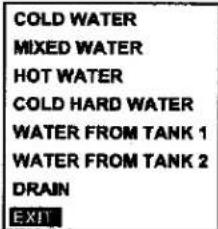
When you have finished: Press ↓ repeatedly to highlight "EXIT".

Press SELECT.
Maximum extraction speed
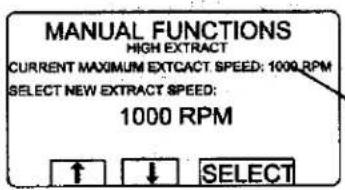
3681
To access this function, see instructions in section "Manual operation".
Maximum extraction speed in current program.
SELECT
Enter the maximum extraction speed you require for this program.
Press SELECT.
-To limit the program's highest extraction speed
This function allows you to modify the highest extraction speed allowed during the program.
Example:
Assume that the highest speed in the program is 1000 rpm and that you have set 700 rpm as the highest speed allowed.
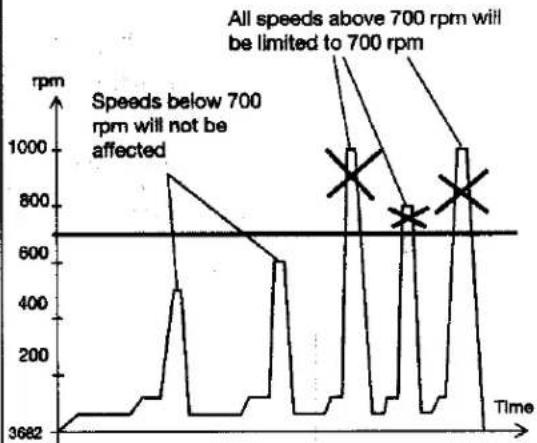
line
| Time | Speed (rpm) | |------|-------------| | 3682 | 3682 | | | 900 | | | 600 | | | 1000 | | | 800 | | | 1000 |This change will affect the current program only. No change will be implemented if extraction is taking place at the time of the (attempted) change. The next time that this program is used, the original maximum speed will apply.
This function does not allow you to set a higher speed than the usual maximum speed for the program.
Motor on after wash
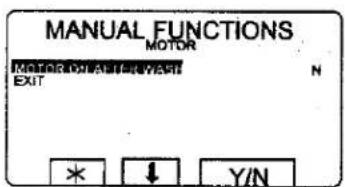
3683
To access this function, see instructions in section "Manual mode".

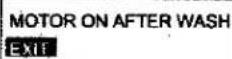
A toggle function: Use Y/N to toggle the function from ON (Yes) to OFF (No).
When you have finished: Press ↓ to highlight "EXIT".

Press SELECT.
Motor to rotate after program has ended If you answer Yes (Y): The motor will continue to rotate in alternative directions after the program has ended. This prevents creasing of the load. When the program has ended, the display will look like this:
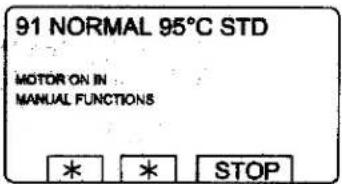
4111
Press STOP to stop the motor.
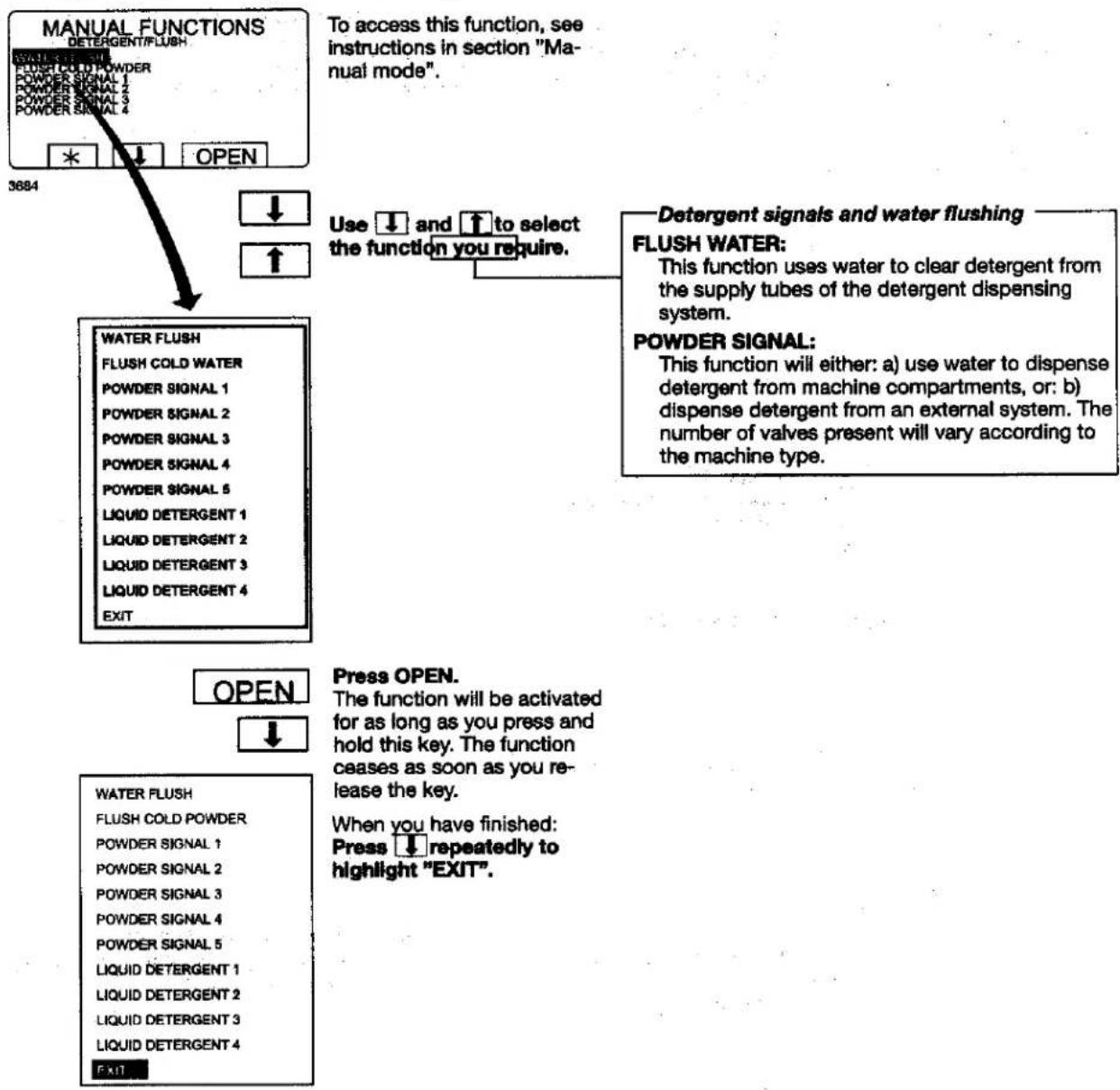
Detergent signals and water flushing
flowchart
graph TD
    A["MANUAL FUNCTIONS"] --> B["3684"]
    B --> C["WATER FLUSH"]
    C --> D["FLUSH COLD WATER"]
    D --> E["POWDER SIGNAL 1"]
    E --> F["POWDER SIGNAL 2"]
    F --> G["POWDER SIGNAL 3"]
    G --> H["POWDER SIGNAL 4"]
    H --> I["POWDER SIGNAL 5"]
    I --> J["LIQUID DETERGENT 1"]
    J --> K["LIQUID DETERGENT 2"]
    K --> L["LIQUID DETERGENT 3"]
    L --> M["LIQUID DETERGENT 4"]
    M --> N["EXIT"]

    O["To access this function, see instructions in section "Manual mode"."] --> P["Use ↓ and ↑ to select the function you require."]
    Q["Detergent signals and water flushing"] --> R["FLUSH WATER: This function uses water to clear detergent from the supply tubes of the detergent dispensing system."]
    R --> S["POWDER SIGNAL: This function will either: a) use water to dispense detergent from machine compartments, or: b) dispense detergent from an external system. The number of valves present will vary according to the machine type."]
    T["OPEN"] --> U["Press OPEN."]
    V["WATER FLUSH"] --> W["FLUSH COLD POWDER"]
    W --> X["POWDER SIGNAL 1"]
    X --> Y["POWDER SIGNAL 2"]
    Y --> Z["POWDER SIGNAL 3"]
    Z --> AA["POWDER SIGNAL 4"]
    AA --> AB["POWDER SIGNAL 5"]
    AB --> AC["LIQUID DETERGENT 1"]
    AC --> AD["LIQUID DETERGENT 2"]
    AD --> AE["LIQUID DETERGENT 3"]
    AE --> AF["LIQUID DETERGENT 4"]
    AF --> AG["EXIT"]

    AH["When you have finished: Press ↓ repeatedly to highlight "EXIT"."] --> AI

Press SELECT.
Procedure for use
Text
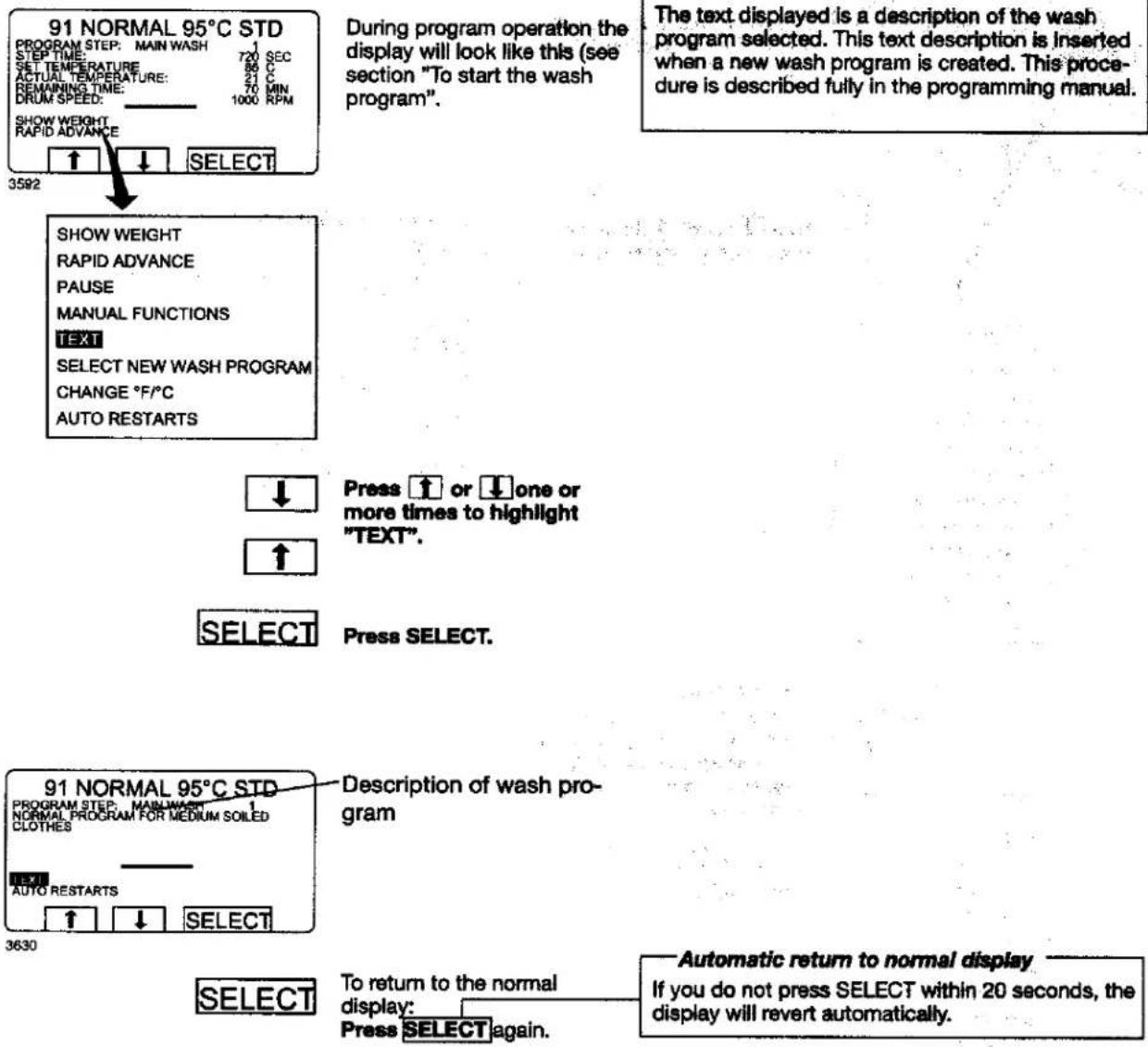
During program operation the display will look like this (see section "To start the wash program".
Pressing "Text" displays more information
The text displayed is a description of the wash program selected. This text description is inserted when a new wash program is created. This procedure is described fully in the programming manual.
Press ↑ or ↓ one or more times to highlight "TEXT".
Press SELECT.
Description of wash pro- gram
3630
To return to the normal display:
Press SELECT again.
Automatic return to normal display
If you do not press SELECT within 20 seconds, the display will revert automatically.
To change the wash program after program operation has commenced
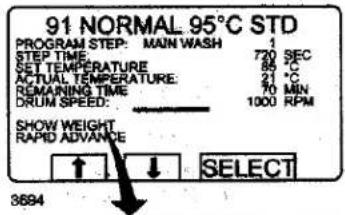
During program operation the display will look like this (see section "To start the wash program".
To change the wash program after program operation has commenced
You can change to a different wash program at any time during program operation. When you do, the current function (for example, rinse) will be interrupted. The new program will start immediately after that (from the beginning).
This function is useful, for example, if you discover that you have started the wrong program.
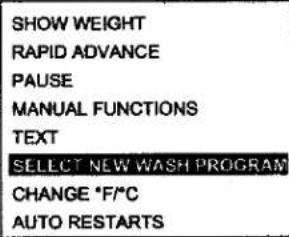


Press ↑ or ↓ one or more times to highlight "SELECT NEW WASH PROGRAM".
Press SELECT.
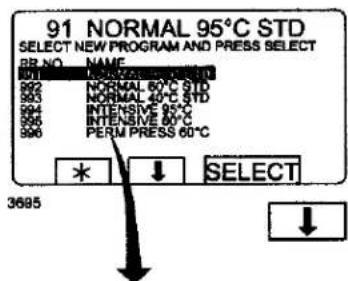
Press ↓ one or more times as required...
Automatic return to normal display If no key is pressed within 20 seconds, the display will revert automatically.
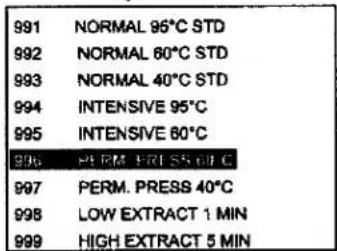
...to highlight the new wash program.

Press SELECT.
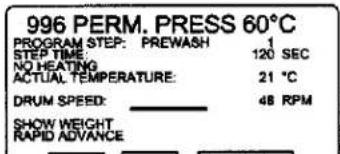
The existing wash program will now be interrupted and the new one will begin.
To change temperature scale °C/°F
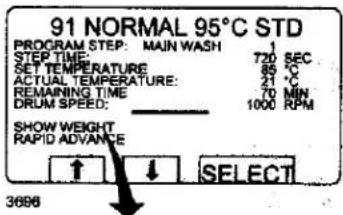
During program operation the display will look like this (see section "To start the wash program".
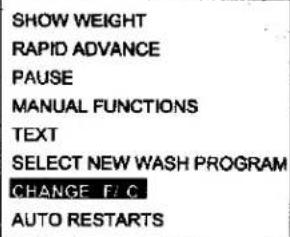
To change temperature scale °C/°F
This function changes the temperature scale used for all temperatures displayed during the wash program.
Please note that this scale change applies only to the current program. The default temperature scale will apply next time you run a program.
To change the default temperature scale for all programs, use the function "SETTINGS", which is described in the Service Manual.

Press ↑ or ↓ one or more times to highlight "CHANGE °C/°F".


Press SELECT.
Auto restart
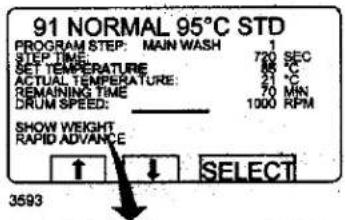
SHOW WEIGHT
RAPID ADVANCE
PAUSE
MANUAL FUNCTIONS
TEXT
SELECT NEW WASH PROGRAM
CHANGE °F/°C
AUTO RE START

Press ↓ one or more times to highlight "AUTO RESTART".


Press SELECT.
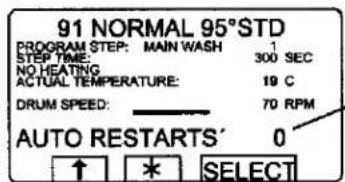
3594
Shows the number of times the program will restart.

If required: Use the numeric keys to change the required number of restarts.
Press SELECT.
What is Auto restart?
Auto restart means that the same program will be repeated one or more times, according to the number set. The program will restart immediately, and the door will remain locked. If you have set auto restart, the display will show the number of restarts left.
This function is used primarily for testing.
Manual operation
To select manual operation
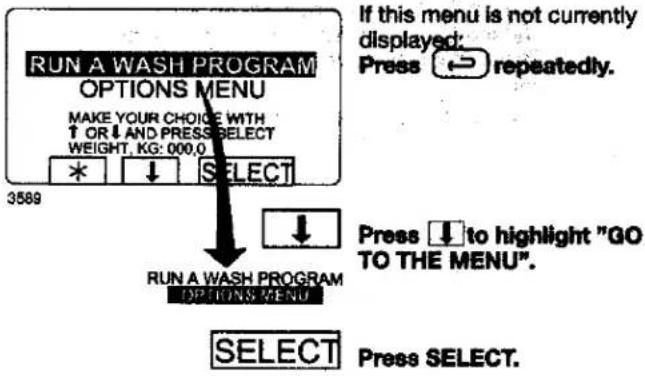
Two types of manual operation
There are two types of manual operation, which should not be confused:
- Manual operation when no program is running
These functions are described in this section.
• Manual operation during a program
These functions are described in section "Manual operation"
Always lock the door first!
You must always close and lock the door first before you can operate the machine manually.
To lock the door, use the submenu MOTOR/DOOR, see section "Motor/door".
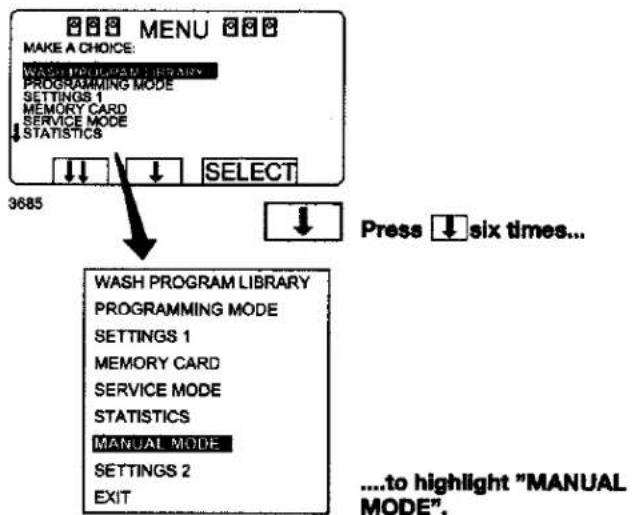
All manual settings are cancelled when you exit manual operation
All manual settings (such as door, motor, temperature, and drain) will be cancelled when you exit manual operation.
The door is unlocked, the motor stops, the drain opens, heating is halted, and the temperature is reset to zero.
SELECT
Press SELECT.
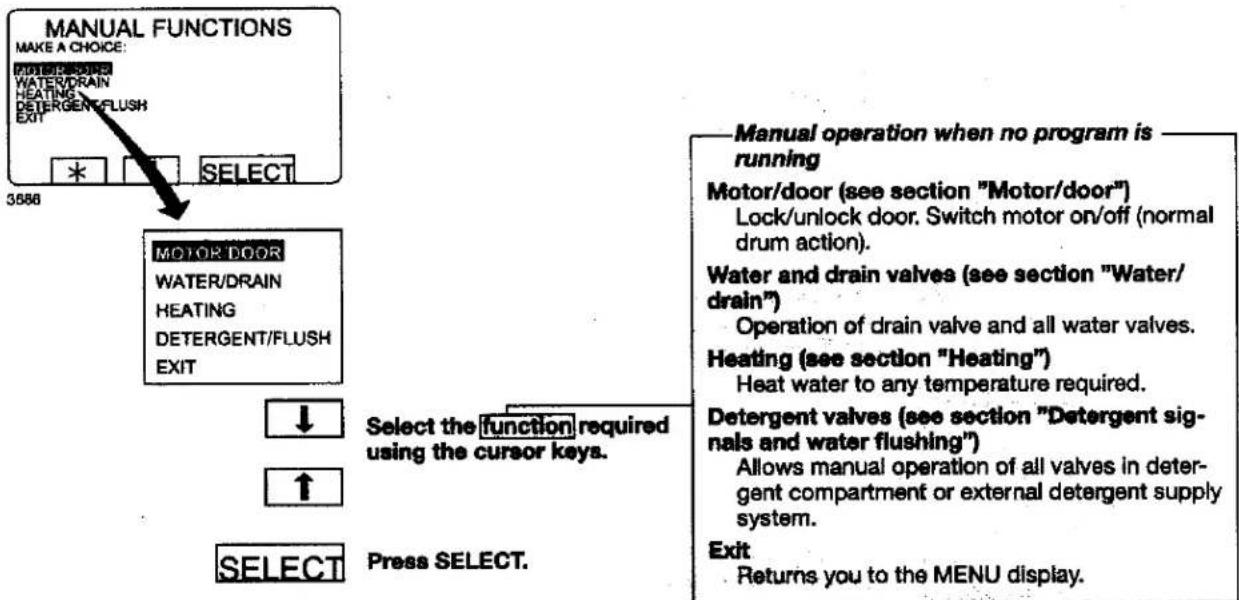
Motor/door
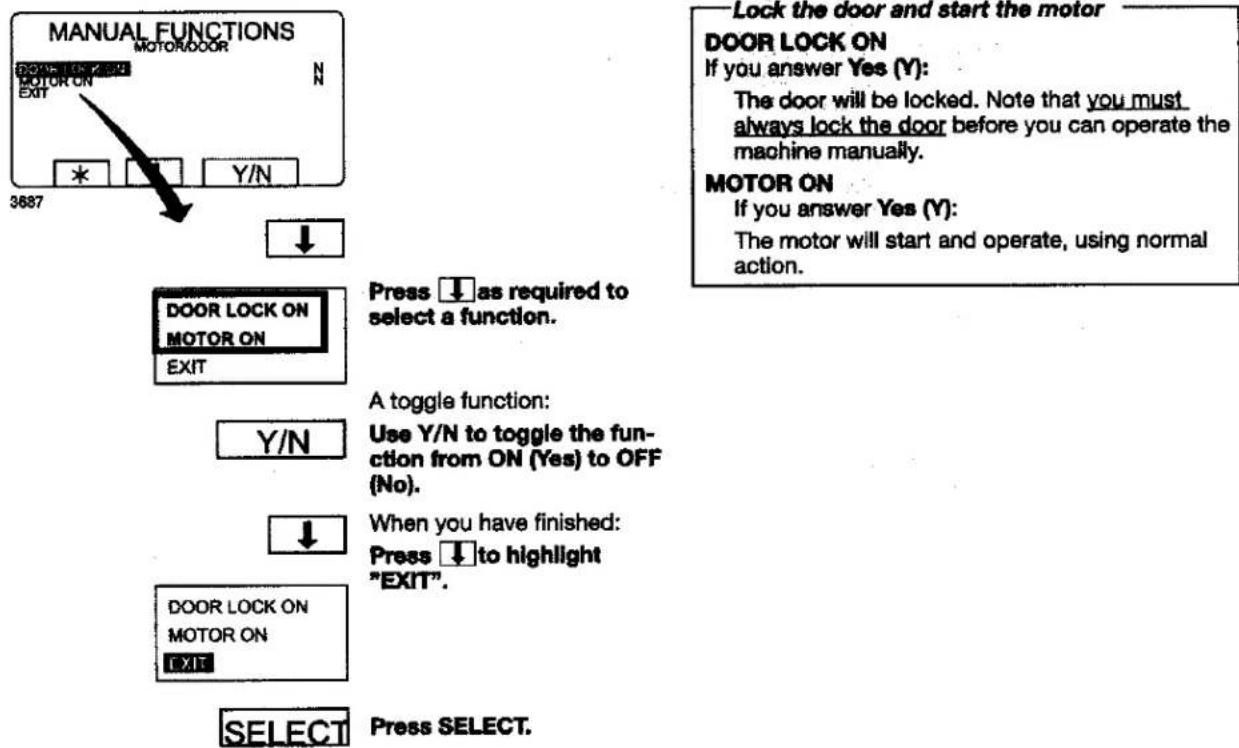
Water/drain
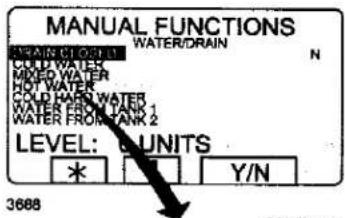
To access this function, see instructions in section "To select manual operation".

Use ↓ or ↑ to select Drain or one of the six Water filling alternatives.

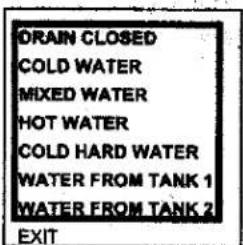
Drain (a toggle function) : Press Y/N to toggle the function from Yes (Y) and No (N).
Water filling: Press OPEN. The function will be activated for as long as you press and hold this key. The function ceases as soon as you re- lease the key.
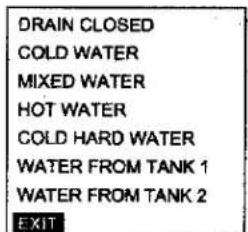
When you have finished: Press ↓ to highlight "EXIT".


Press SELECT.
Heating
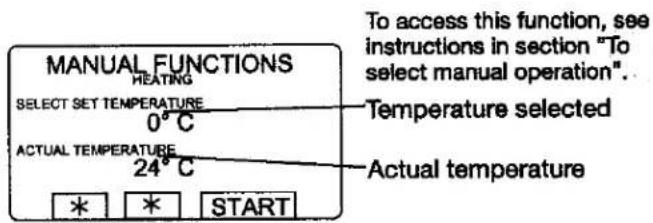
3689
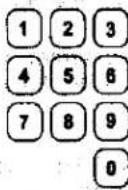
Use the numeric keys to enter the temperature the water is to be heated to.
Press START. Heating will now begin.
If you wish, you can cancel heating before the set temperature is reached: Access this function again and press STOP.
Detergent signals and water flushing
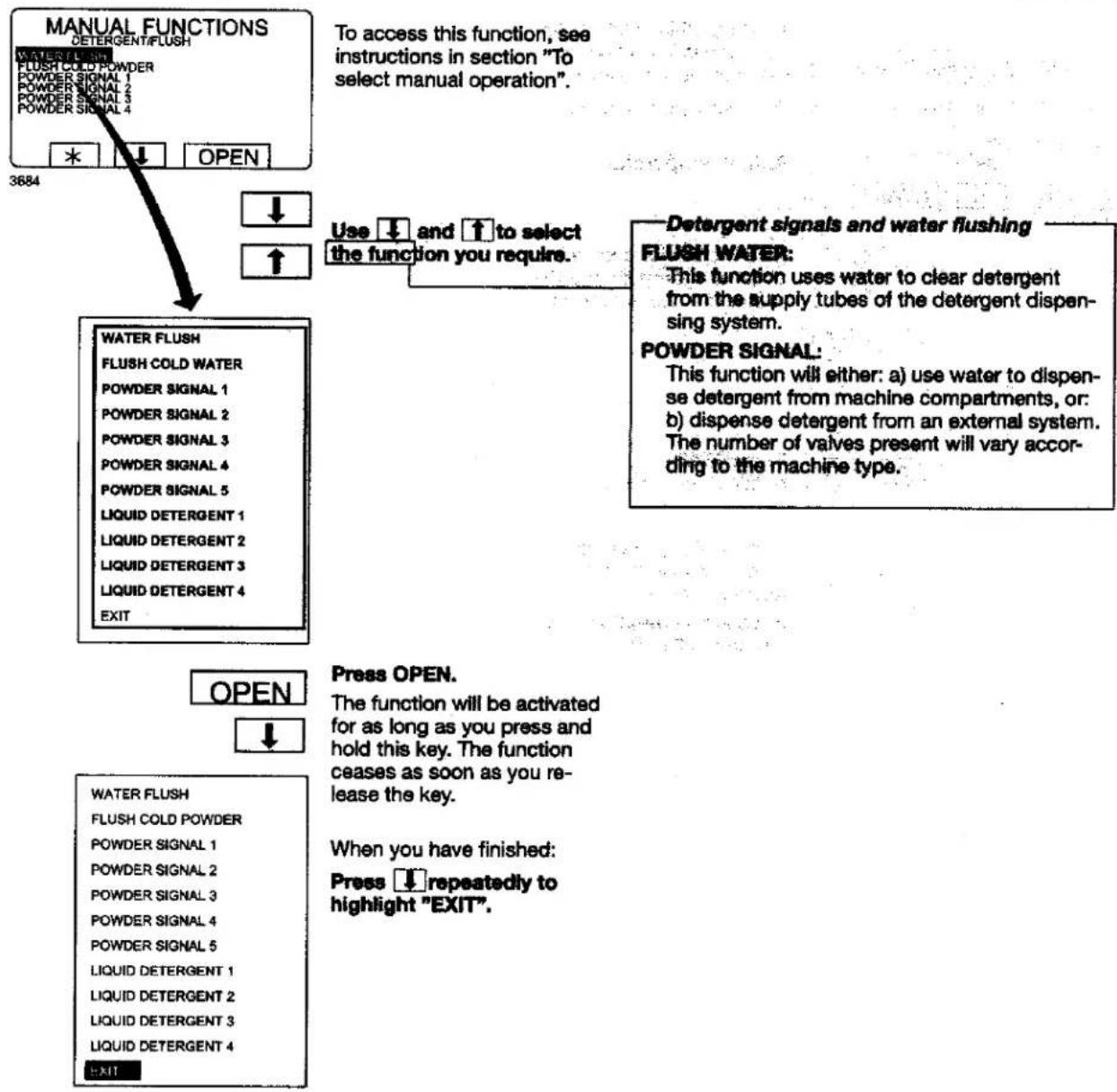
flowchart
graph TD
    A["MANUAL FUNCTIONS"] --> B["WATER FLUSH"]
    B --> C["FLUSH COLD WATER"]
    C --> D["POWDER SIGNAL 1"]
    C --> E["POWDER SIGNAL 2"]
    C --> F["POWDER SIGNAL 3"]
    C --> G["POWDER SIGNAL 4"]
    C --> H["POWDER SIGNAL 5"]
    C --> I["LIQUID DETERGENT 1"]
    C --> J["LIQUID DETERGENT 2"]
    C --> K["LIQUID DETERGENT 3"]
    C --> L["LIQUID DETERGENT 4"]
    C --> M["EXIT"]

    N["To access this function, see instructions in section "To select manual operation"."] --> O["Use ↓ and ↑ to select the function you require."]
    P["Detergent signals and water flushing"] --> Q["FLUSH WATER: This function uses water to clear detergent from the supply tubes of the detergent dispensing system."]
    P --> R["POWDER SIGNAL: This function will either: a) use water to dispense detergent from machine compartments, or: b) dispense detergent from an external system. The number of valves present will vary according to the machine type."]

    S["OPEN"] --> T["Press OPEN."]
    U["WATER FLUSH"] --> V["FLUSH COLD POWDER"]
    V --> W["POWDER SIGNAL 1"]
    V --> X["POWDER SIGNAL 2"]
    V --> Y["POWDER SIGNAL 3"]
    V --> Z["POWDER SIGNAL 4"]
    V --> AA["POWDER SIGNAL 5"]
    V --> AB["LIQUID DETERGENT 1"]
    V --> AC["LIQUID DETERGENT 2"]
    V --> AD["LIQUID DETERGENT 3"]
    V --> AE["LIQUID DETERGENT 4"]
    V --> AF["EXIT"]

    AG["When you have finished: Press ↓ repeatedly to highlight "EXIT"."] --> AH

Press SELECT.
Statistics
To select Statistics
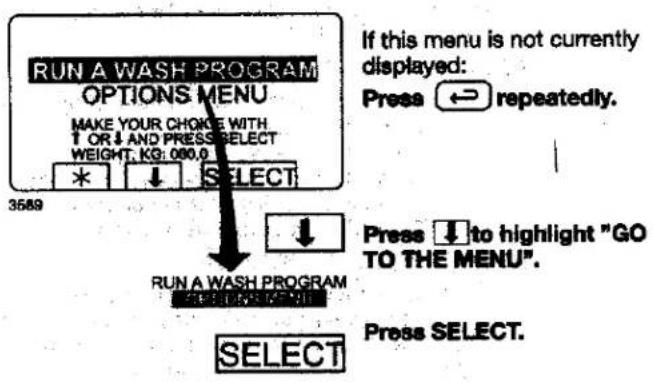
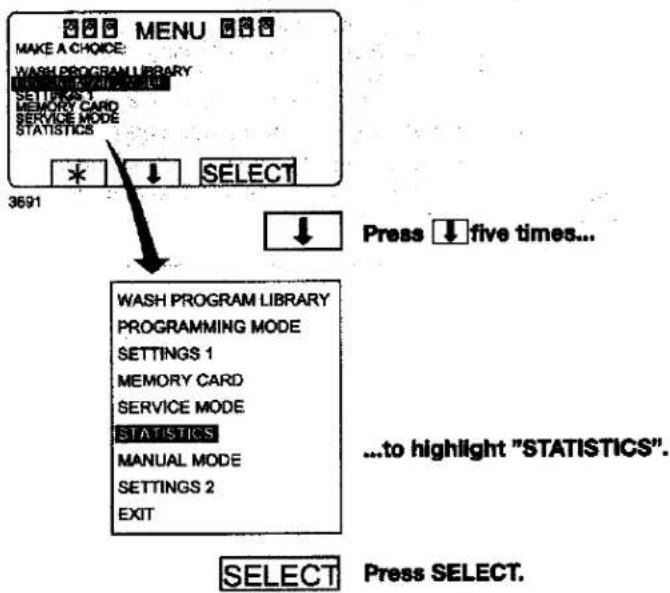
flowchart
graph TD
    A["MAKE A CHOICE: WASH PROGRAM LIBRARY"] --> B["SETTORS 1 MEMORY CARD SERVICE MODE STATISTICS"]
    B --> C["* ↓ SELECT"]
    C --> D["WASH PROGRAM LIBRARY PROGRAMMING MODE SETTINGS 1 MEMORY CARD SERVICE MODE STATISTICS MANUAL MODE SETTINGS 2 EXIT"]
    D --> E["Press five times..."]
    E --> F["...to highlight "STATISTICS""]
    F --> G["SELECT Press SELECT."]
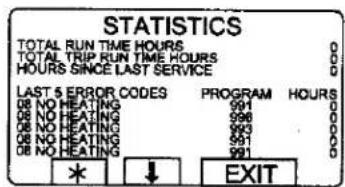
3890

To display the next page of statistics:
Press ↓.
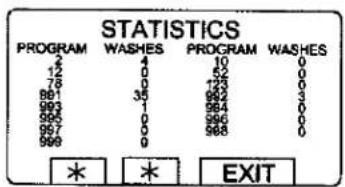
3958

To display the next page of statistics:
Press ↓.
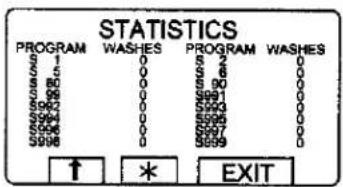
4040
If a memory card is in place in the PCU, the memory card program statistics will be displayed. An "S" before the program number shows that it is a memory card program.
When you want to cancel the display of statistics:
Press EXIT.
The Statistics function
The Statistics function gives you access to the following information:
TOTAL RUN TIME HOURS:
Shows the total operating time for the machine since it was installed.
TOTAL TRIP RUN TIME HOURS:
This register records the total number of operating hours since it was last reset. It can, for example, be used to keep track of operating time since the last machine service. The procedure for resetting it is described in section "To reset 'Total trip run time hours" to zero".
HOURS SINCE LAST SERVICE
This register shows the time elapsed since the last service. The register can also be used to generate a signal on the display to show when service is needed (see the section "Settings 1" in the service manual).
LAST 5 ERROR CODES:
This displays the most recent error codes, and tells which program was operating at the time and during which hour (according to the "total run time" record) the error code was flagged.
NO. OF TIMES EACH PROGRAM USED:
Displays statistics for PCU programs and for programs on any memory card currently in place in the PCU.
Resetting statistic registers
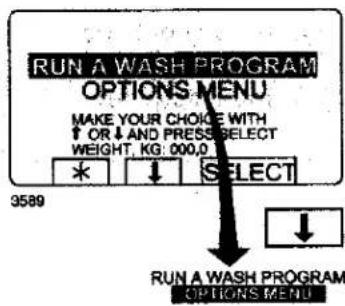
If this menu is not currently displayed:
Press ↔ repeatedly.
Press ↓ to highlight "GO TO THE MENU".
SELECT
Press SELECT.
— Statistics registers which can be reset to zero The following registers in the statistics function can be cleared (reset to zero):
• Total trip run time hours.
• Hours since last service.
- No. of times each program used (PCU programs).
- No. of times each program used (programs on any memory card currently in the PCU).
Procedure for use
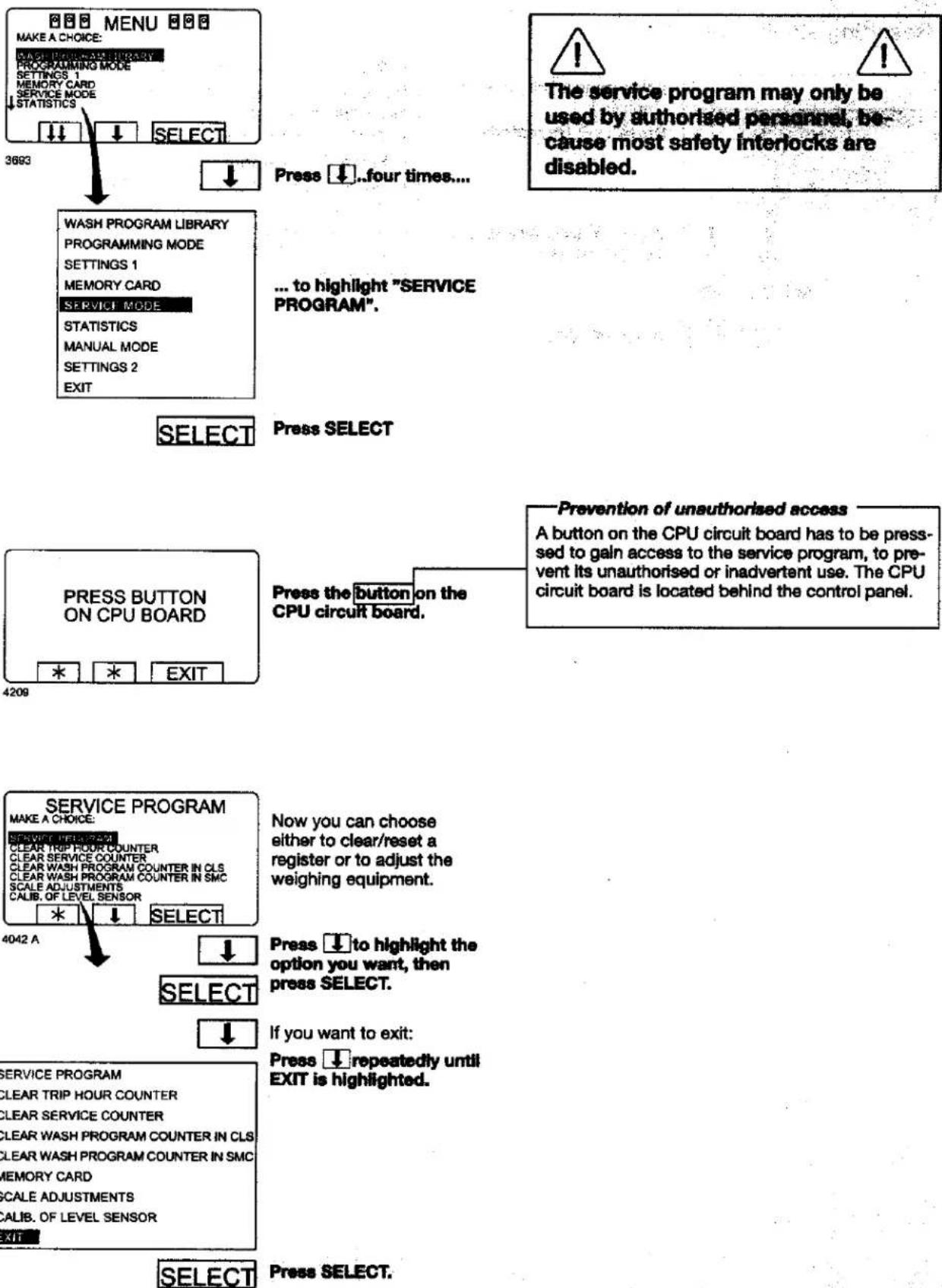
Press ↓..four times...
... to highlight "SERVICE PROGRAM".
SELECT
Press SELECT
Now you can choose either to clear/reset a register or to adjust the weighing equipment.
Press ↓ to highlight the option you want, then press SELECT.
If you want to exit: Press ↓ repeatedly until EXIT is highlighted.
SELECT
Press SELECT.
Time counter, hours after last service
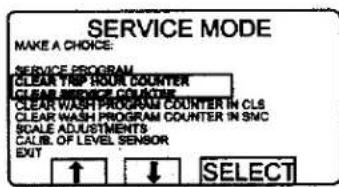
Both counters can be reset in the same way.
Press ↓ so that CLEAR TRIP HOUR COUNTER OR CLEAR SERVICE COUNTER will be marked.
Press SELECT.
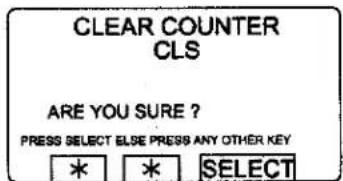
First you have a chance to change your mind.
4043 A
If you do not want to reset the register:
Press any key other than SELECT.
If you want to reset the register: Press SELECT.

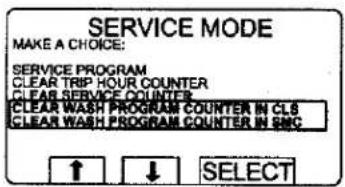
Number of washes for program in timer or memory card
4044 A

You can reset program in both timer and the memory card (if inserted).
Press ↓ so that CLEAR WASH PROGRAM COUNTER IN CLS or CLEAR WASH PROGRAM COUNTER IN SMC will be marked.

Press SELECT.
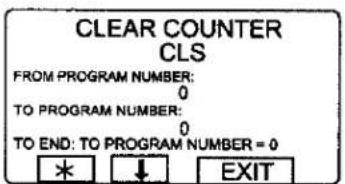
4045 A
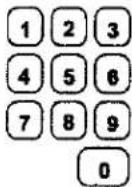
Write from which program number you want to clear wash programs.

Press ↓.
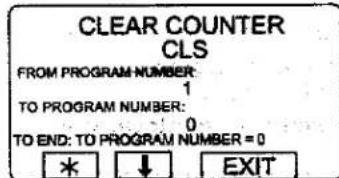
4048 A
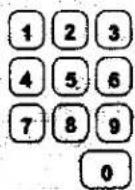
Enter digits corresponding to the program number (inclusive) up to which you wish to clear the total counter.
Press ERASE.
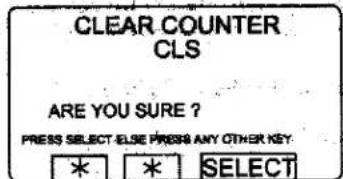
4043 A

First you have the chance to change your mind.
If you do not want to reset the register:
Press any key other than SELECT.
If you do want to reset the register:
Press SELECT.
For machines with weighing equipment installed only!
Scale adjustments
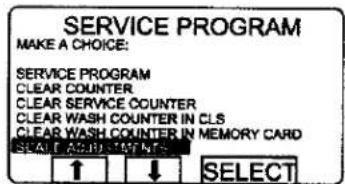
4777 A


Press ↓ repeatedly until SCALE ADJUSTMENTS is highlighted.
Press SELECT.

SERVICE PROGRAM
CLEAR COUNTER
CLEAR SERVICE COUNTER
CLEAR WASH COUNTER IN CLS
CLEAR WASH COUNTER IN MEMORY CARD
SCALE ADJUSTMENTS
EXIT

When you have finished: Press ↓ repeatedly until EXIT is highlighted.
Press SELECT.
Scale adjustments
The following functions are accessed via the SCALE ADJUSTMENTS menu:
Reset scale to zero (see section "Reset scale to zero")
Used to make the weighing equipment display 0 when the machine has no load in it.
Reset tare to zero (see section "Reset tare to zero")
Used to clear a stored tare parameter.
Tare scale (see section "Tare scale")
Used to reset the weighing equipment so that a weight such as a container will not be included when calculating net weight.
Set tare to a certain value (see section "Set tare to a certain value")
Used to enter a value for the tare parameter, a weight in hectograms.
Read tare value (see section "Read tare value") Used to check the value currently stored as the tare parameter.
Calibrate the scale (see section "Calibrate the scale")
This function is used only on installation of a new scale unit.
Zero calibration (see section "Zero calibration") Used to increase the accuracy of the weighing equipment.
Read version number (see section "Read version number")
This is where you find the version number of the weighing equipment.
If the weighing equipment is not connected, the error message "WEIGHING EQUIPMENT NOT CONNECTED" will be displayed. Connect the weighing equipment and try again. If necessary, see the section "Fault-finding, weighing equipment" in the machine manual.
For machines with weighing equipment installed only!
Reset scale to zero
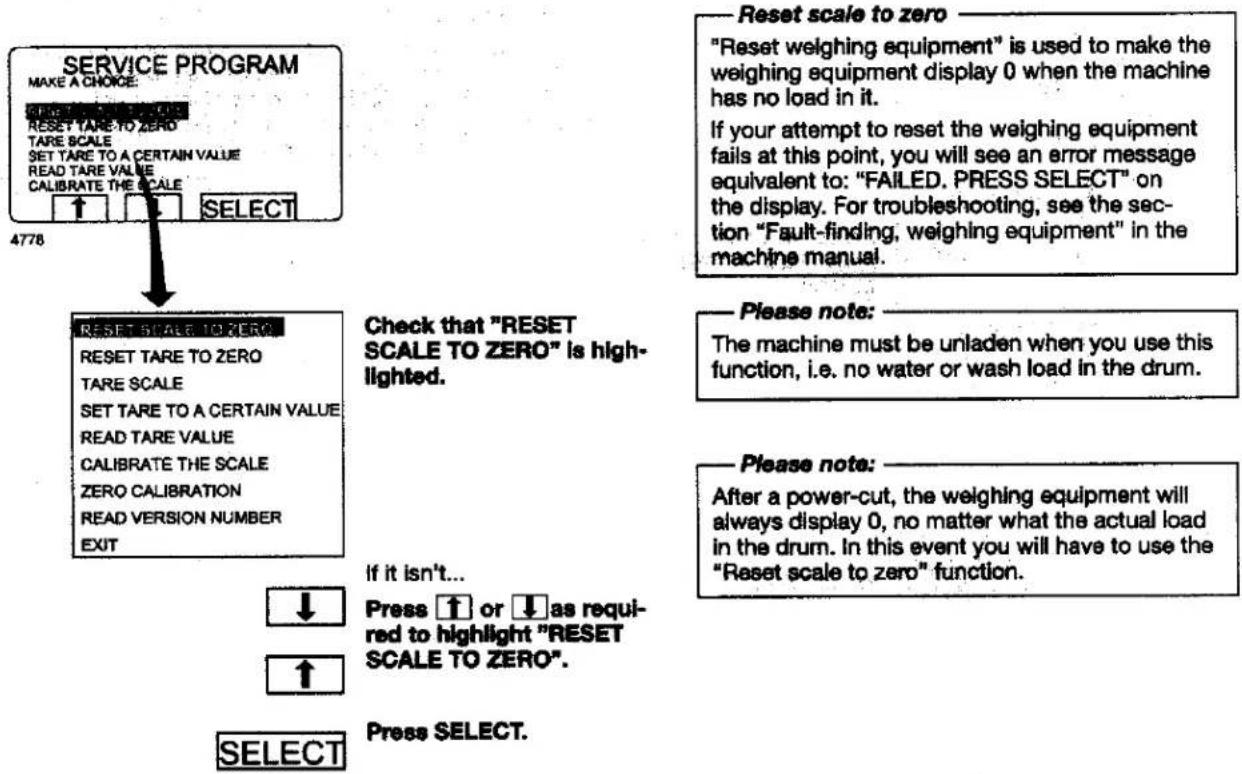
flowchart
graph TD
    A["SERVICE PROGRAM"] --> B["MAKE A CHOICE: RESET TARE TO ZERO"]
    B --> C["TARE SCALE SET TARE TO A CERTAIN VALUE READ TARE VALUE CALIBRATE THE SCALE"]
    C --> D["SELECT"]
    D --> E["4778"]
    E --> F["RESET SCALE TO ZERO"]
    F --> G["RESET TARE TO ZERO"]
    G --> H["TARE SCALE SET TARE TO A CERTAIN VALUE READ TARE VALUE CALIBRATE THE SCALE ZERO CALIBRATION READ VERSION NUMBER EXIT"]
    F --> I["Check that "RESET SCALE TO ZERO" is highlighted."]
    I --> J["If it isn't..."]
    J --> K["↓ Press ↑ or ↓ as required to highlight "RESET SCALE TO ZERO"."]
    K --> L["↑ Select"]
    L --> M["Press SELECT."]
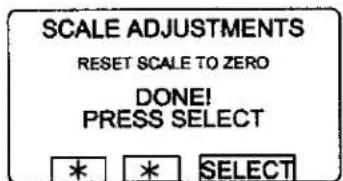
This screen shows that the weighing equipment has been reset to zero.
4779

Press SELECT.
For machines with weighing equipment installed only!
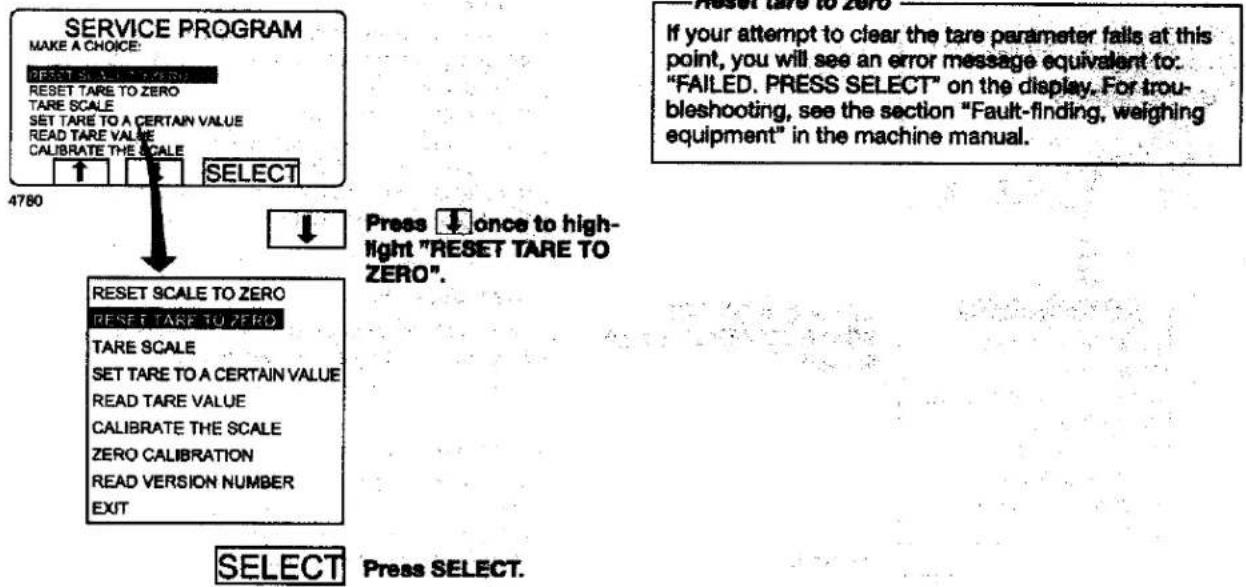
Reset tare to zero
flowchart
graph TD
    A["SERVICE PROGRAM"] --> B["MAKE A CHOICE: RESET SCALE TO ZERO"]
    B --> C["RESET TARE TO ZERO"]
    C --> D["TARE SCALE SET TARE TO A CERTAIN VALUE READ TARE VALUE CALIBRATE THE SCALE CALIBRATE THE SCALE SELECT"]
    D --> E["4780"]
    E --> F["RESET SCALE TO ZERO RESET TARE TO ZERO"]
    F --> G["TARE SCALE SET TARE TO A CERTAIN VALUE READ TARE VALUE CALIBRATE THE SCALE ZERO CALIBRATION READ VERSION NUMBER EXIT"]
    G --> H["SELECT"]
    H --> I["Press SELECT."]
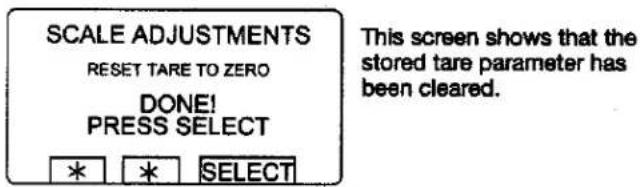
4781

Press SELECT.
For machines with weighing equipment installed only!
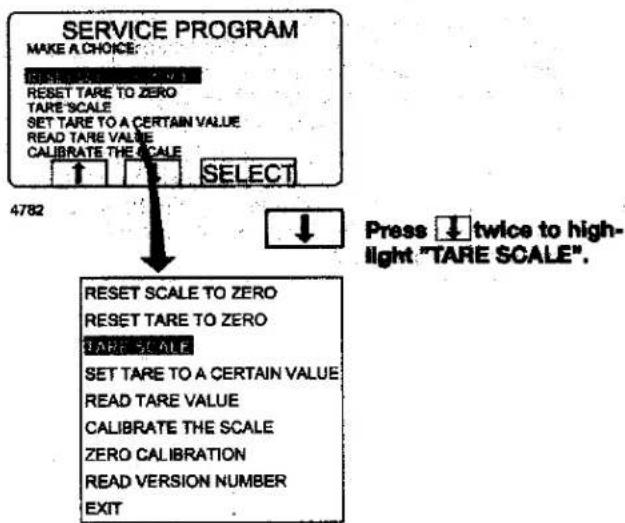
Tare scale
flowchart
graph TD
A["SERVICE PROGRAM"] --> B["MAKE A CHOICE: RESET TARE TO ZERO TARE SCALE SET TARE TO A CERTAIN VALUE READ TARE VALUE CALIBRATE THE SCALE SELECT"]
B --> C["4782"]
C --> D["Press twice to highlight "TARE SCALE".<br> D --> E[RESET SCALE TO ZERO RESET TARE TO ZERO CARE SCALE SET TARE TO A CERTAIN VALUE READ TARE VALUE CALIBRATE THE SCALE ZERO CALIBRATION READ VERSION NUMBER EXIT"]
Taro scale
This function involves first loading the drum with, for example, a container, then taring (resetting) the weighing equipment so that the weight of the container will not be included when calculating net weight.
If your attempt to tare the weighing equipment fails at this point, you will see an error message equivalent to: "FAILED. PRESS SELECT" on the display. For troubleshooting, see the section "Fault-finding, weighing equipment" in the machine manual.
SELECT
Press SELECT.
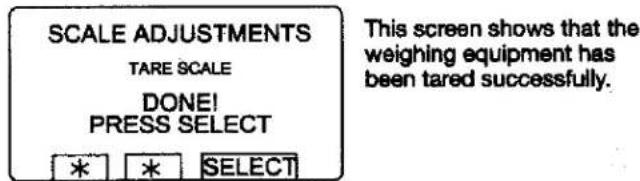
4783
SELECT
Press SELECT.
For machines with weighing equipment installed only!
Set tare to a certain value
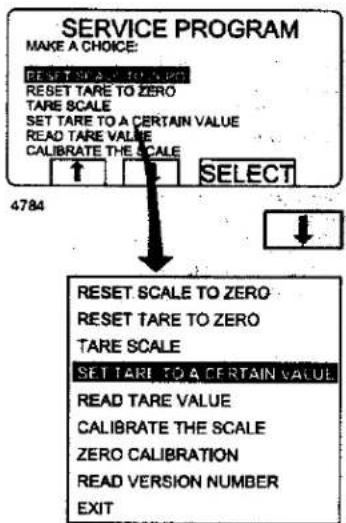
flowchart
graph TD
    A["SERVICE PROGRAM"] --> B["MAKE A CHOICE: RESET SCALE TO ZERO"]
    B --> C["RESET TARE TO ZERO"]
    C --> D["TARE SCALE SET TARE TO A CERTAIN VALUE"]
    D --> E["READ TARE VALUE CALIBRATE THE SCALE"]
    E --> F["SELECT"]
    F --> G["4784"]
    G --> H["RESET SCALE TO ZERO"]
    H --> I["RESET TARE TO ZERO"]
    I --> J["TARE SCALE SET TARE TO A CERTAIN VALUE"]
    J --> K["READ TARE VALUE CALIBRATE THE SCALE"]
    K --> L["ZERO CALIBRATION READ VERSION NUMBER EXIT"]
Press three times to highlight "SET TARE TO A CERTAIN VALUE"
Set tare to a certain value
This function lets you enter a value for the tare parameter, i.e. a weight value which the weighing equipment will disregard when showing a net weight on the display. The function will automatically clear any earlier tare value when you enter a new one.
If your value is not entered successfully at this point, you will see an error message equivalent to: "FAILED. PRESS SELECT" on the display. For troubleshooting, see the section "Fault-finding, weighing equipment" in the machine manual.
SELECT
Press SELECT.
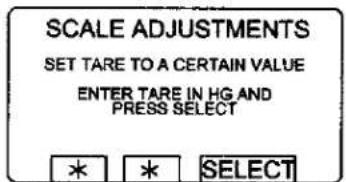
4785
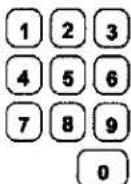
Use the numeric keys to enter the tare you require, unit: hectograms; 1 hectogram = 100 grams).
SELECT
Press SELECT.
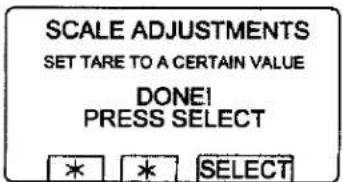
This screen shows that the parameter has been entered successfully.
4786
SELECT
Press SELECT.
For machines with weighing equipment installed only!
Read tare value
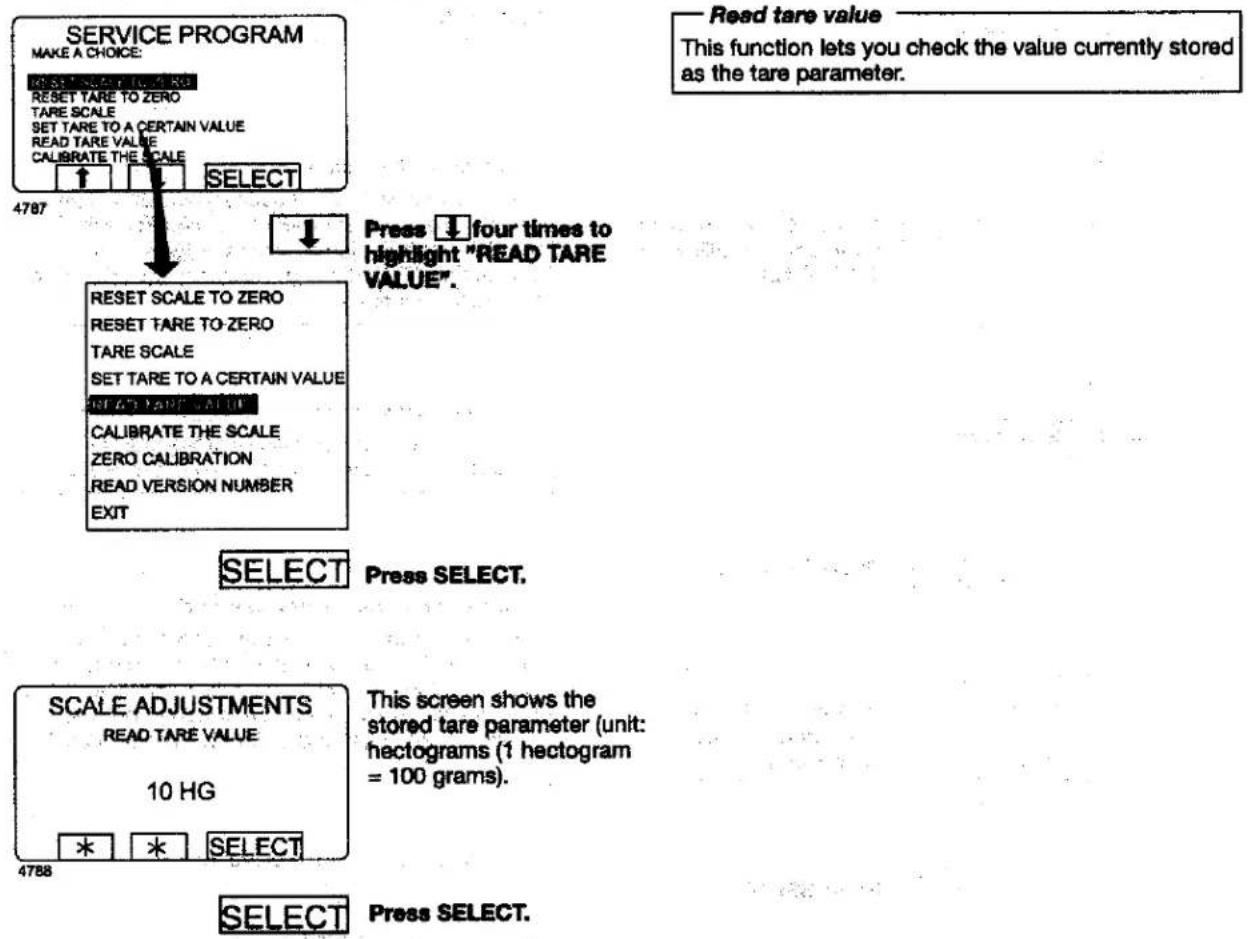
Press ↓ four times to highlight "READ TARE VALUE".
Press SELECT.
This screen shows the stored tare parameter (unit: hectograms (1 hectogram = 100 grams).
Press SELECT.
For machines with weighing equipment installed only!
Calibrate the scale
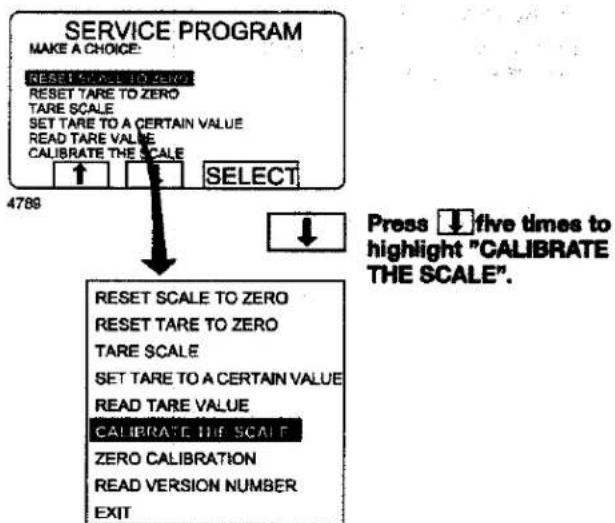
flowchart
graph TD
A["SERVICE PROGRAM"] --> B["MAKE A CHOICE: RESET SCALE TO ZERO\nRESET TARE TO ZERO\nTARE SCALE\nSET TARE TO A CERTAIN VALUE\nREAD TARE VALUE\nCALIBRATE THE SCALE"]
B --> C["SELECT"]
C --> D["4789"]
D --> E["Press five times to highlight "CALIBRATE THE SCALE".<br> E --> F[RESET SCALE TO ZERO\nRESET TARE TO ZERO\nTARE SCALE\nSET TARE TO A CERTAIN VALUE\nREAD TARE VALUE\nCALIBRATE THE SCALE\nZERO CALIBRATION\nREAD VERSION NUMBER\nEXIT"]
Please note:
This function is used only on installation of a new scale unit.
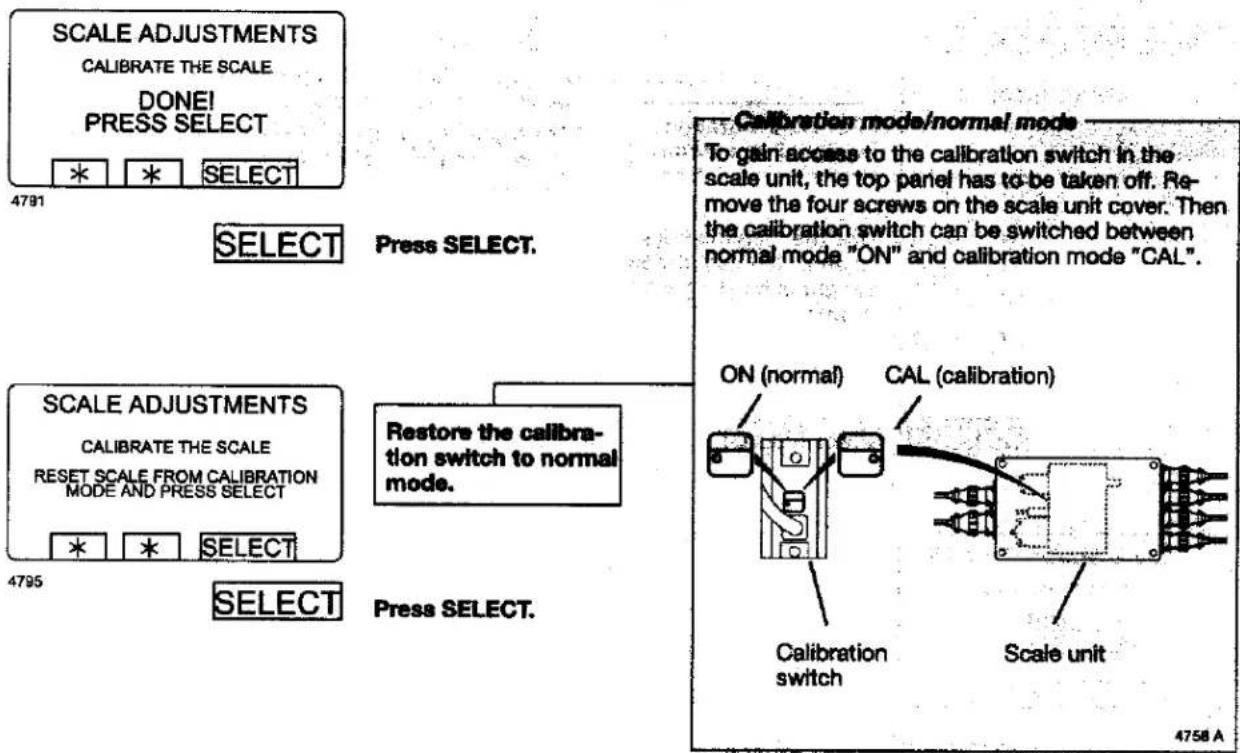
Calibrate the scale
If this calibration has not succeeded you will see an error message equivalent to: "FAILED. PRESS SELECT" on the display. For troubleshooting, see the section "Fault-finding, weighing equipment" in the machine manual.
Please note:
The machine must be unladen at the start of calibration, i.e. no water or wash load in the drum.
Press SELECT.
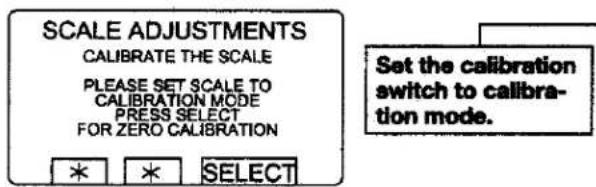
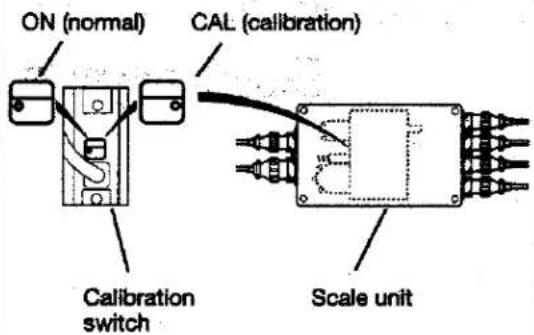
Calibration mode/normal mode
To gain access to the calibration switch in the scale unit, the top panel has to be taken off. Remove the four screws on the scale unit cover. Then the calibration switch can be switched between normal mode "ON" and calibration mode "CAL".

Press SELECT.
4758 A
4791
Press SELECT.
For machines with weighing equipment installed only!
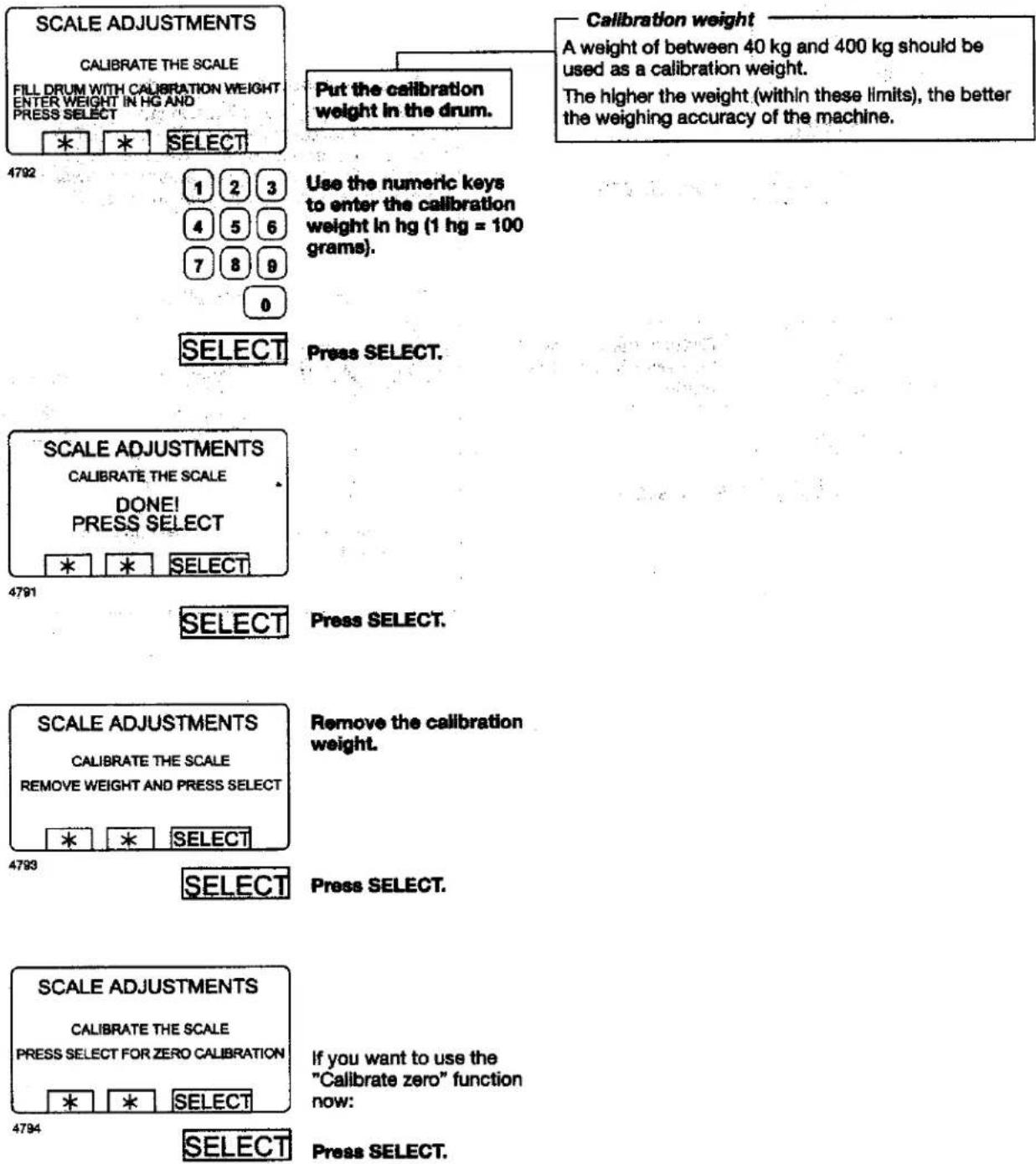
For machines with weighing equipment installed only!
For machines with weighing equipment installed only!
Zero calibration
flowchart
graph TD
    A["SERVICE PROGRAM"] --> B["MAKE A CHOICE"]
    B --> C["RESET TARE TO ZERO"]
    C --> D["TARE SCALE"]
    D --> E["SET TARE TO A CERTAIN VALUE"]
    E --> F["READ TARE VALUE"]
    F --> G["CALIBRATE THE SCALE"]
    G --> H["SELECT"]
    H --> I["4796"]
    I --> J["RESET SCALE TO ZERO"]
    J --> K["RESET TARE TO ZERO"]
    K --> L["TARE SCALE"]
    L --> M["SET TARE TO A CERTAIN VALUE"]
    M --> N["READ TARE VALUE"]
    N --> O["CALIBRATE THE SCALE"]
    O --> P["ZLEG 1A. REGulation"]
    P --> Q["READ VERSION NUMBER"]
    Q --> R["EXIT"]
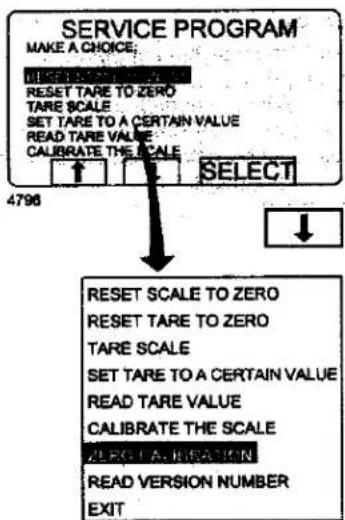
Press ↓ six times to highlight "ZERO CALIBRATION".
Zero calibration
The "Zero calibration" function is used to increase the accuracy of the weighing equipment. This should be done once a month.
If this calibration has not succeeded you will see an error message equivalent to: "FAILED. PRESS SELECT" on the display.
For troubleshooting, see the section "Fault-finding, weighing equipment" in the machine manual.
Please note:
The machine must be unladen during this calibration, i.e. no water or wash load in the drum.
SELECT
Press SELECT.
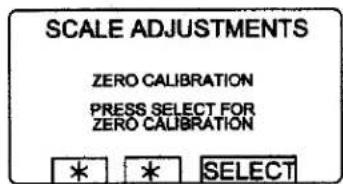
If you wish to calibrate zero for the weighing equipment:
4797
SELECT
Press SELECT.
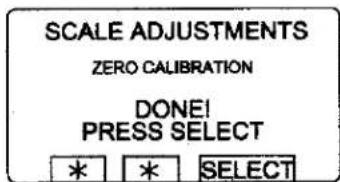
This screen shows you have calibrated zero.
4798
SELECT
Press SELECT.
Procedure for use
For machines with weighing equipment installed only!
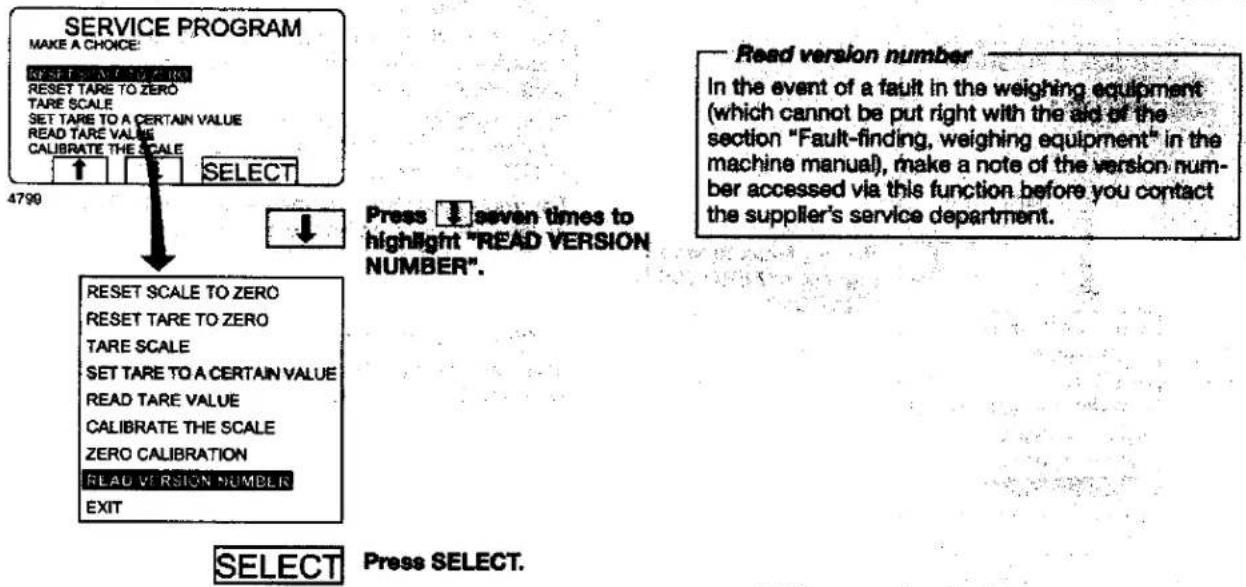
Read version number
flowchart
graph TD
    A["SERVICE PROGRAM"] --> B["MAKE A CHOICE: RESET TARE TO ZERO TARE SCALE SET TARE TO A CERTAIN VALUE READ TARE VALUE CALIBRATE THE SCALE SELECT"]
    B --> C["4790"]
    C --> D["RESET SCALE TO ZERO RESET TARE TO ZERO TARE SCALE SET TARE TO A CERTAIN VALUE READ TARE VALUE CALIBRATE THE SCALE ZERO CALIBRATION READ VERSION NUMBER EXIT"]
    D --> E["SELECT"]
    E --> F["Press SELECT."]
    G["Read version number"] --> H["In the event of a fault in the weighing equipment (which cannot be put right with the aid of the section "Fault-finding, weighing equipment" in the machine manual), make a note of the version number accessed via this function before you contact the supplier's service department."]
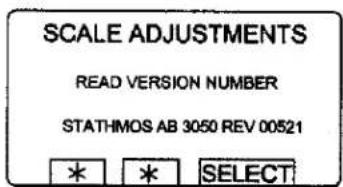
The screen shows the version number.
4800
SELECT
Press SELECT.
Memory card
General introduction
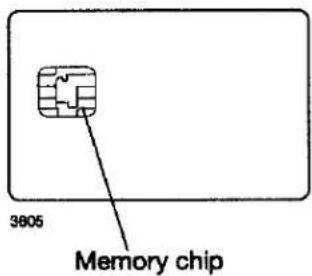
A memory card is a plastic card, the size of a credit card, with an electronic memory chip inside it. This memory card is capable of storing 10 to 15 wash programs of normal size. If the programs are mostly small ones, more of them can be stored, whereas larger programs will reduce the number which can be held by the memory card. Memory cards of this type can be used to:
- transfer wash programs from one machine to another
• run wash programs straight from the memory card - transfer wash programs from a PC to a memory card and from a memory card to a PC (these procedures, and how to write a wash program on a PC, are described elsewhere)
A program stored on a memory card may be given restricted-use status. This means that:
- The program cannot be deleted or copied to the program control unit of a washer extractor.
- You cannot alter the program or inspect the way it is written.
- To run the program you have to have the memory card and to insert it into the program control unit when the program is to be started.
To select the "Memory card" function
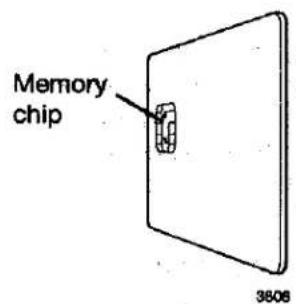
Turn the memory card so its memory chip is at the far end, and on the left of the card...
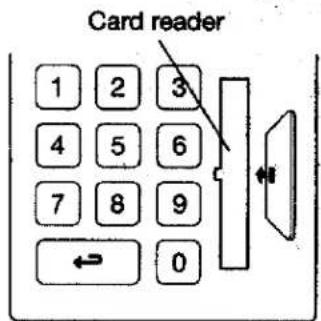
...then insert the memory card into the program control unit.
4115
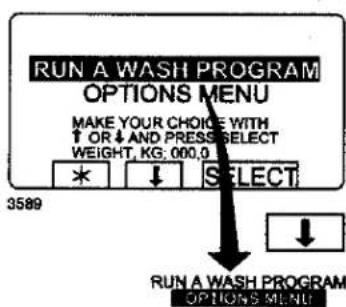
If this menu is not currently displayed:
Press ↔ repeatedly.
Press ↓ to highlight "GO TO THE MENU".
SELECT
Press SELECT.
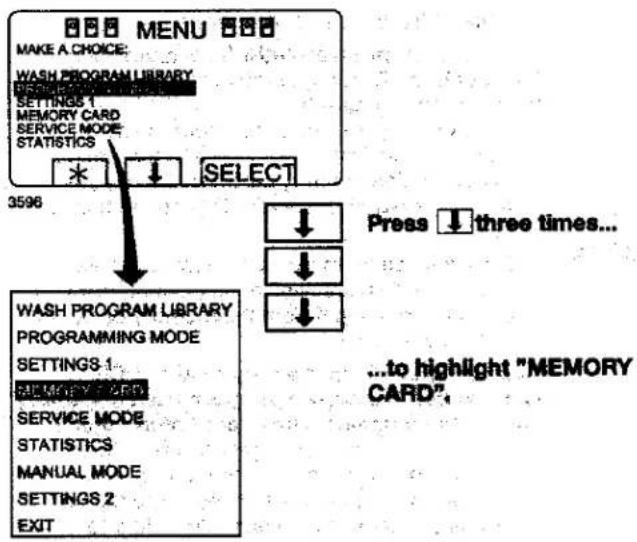
flowchart
graph TD
    A["MAKE A CHOICE: WASH PROGRAM LIBRARY"] --> B["SETTINGS 1"]
    B --> C["MEMORY CARD"]
    C --> D["SERVICE MODE"]
    D --> E["STATISTICS"]
    E --> F["*"]
    F --> G["SELECT"]
    G --> H["WASH PROGRAM LIBRARY PROGRAMMING MODE"]
    H --> I["SETTINGS 1"]
    I --> J["SINEMA 2 OFF"]
    J --> K["SERVICE MODE"]
    K --> L["STATISTICS"]
    L --> M["MANUAL MODE"]
    M --> N["SETTINGS 2"]
    N --> O["EXIT"]
    P["Press ↓ three times..."] --> Q["↓"]
    Q --> R["↓"]
    R --> S["↓"]
    S --> T["...to highlight "MEMORY CARD","]
SELECT
Press SELECT.
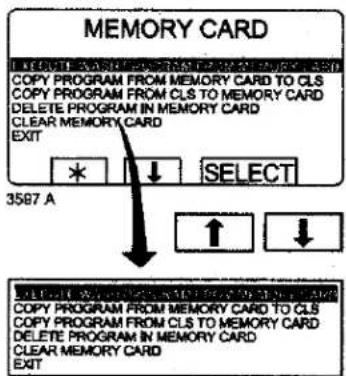
Select the function required using the cursor keys.

Press SELECT.
"The "Memory card" functions
Run wash program straight from memory card (see section "To run a wash program straight from a memory card")
A wash program can be run from the memory card, without first being copied to the washer extractor. The memory card may be removed from the card reader after the program has started.
Programs on memory cards may have "restricted-use" status, which means that they can only be run straight from the memory card, not copied or modified.
Copy program from memory card to PCS (see section "To copy a program from a memory card to the machine's program control unit")
One or more wash programs can be copied from the memory card to the memory chip in the machine's program control unit. Note that programs on the memory card with "restricted-use" status cannot be copied to the machine memory chip.
Copy program from PCS to memory card (see section "To copy a program from the program control unit to a memory card")
One or more wash programs can be copied from the memory chip in the machine's program control unit to the memory card. The memory card can hold 10 to 15 wash programs of normal size.
Delete program on memory card (see section "To delete a program on a memory card")
Clear memory card (see section "To delete all programs on a memory card")
To run a wash program straight from a memory card
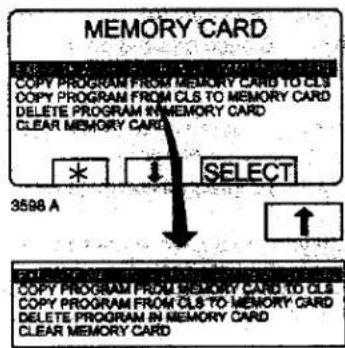
To access this menu, follow the instructions in section "To select the "Memory card" function".
Highlight "EXECUTE WASH PROGRAM FROM MEMORY CARD" (press ↑ if necessary).

Press SELECT.
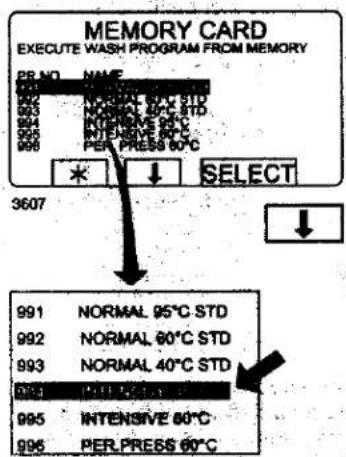
If necessary, use ↓ to...
... highlight the wash pro- gram required.

Press SELECT.
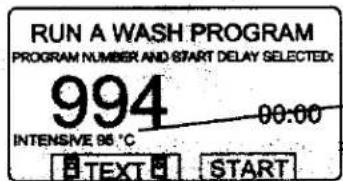
Program name
3608
If you want to see the description of the program (where available): Press TEXT.
To start the program: Press START.
Once the program has started, the memory card may be removed from the card reader.
—To run a program from the memory card — In broad terms, the program control unit has two different memories. One is a "program memory" where all its wash programs are stored, the other is an "operating memory", which is used to hold the program currently in use. The program control unit takes the instructions it needs to run the program from the operating memory.
When a wash program is started, the correct program is retrieved from the program memory and copied into the operating memory.
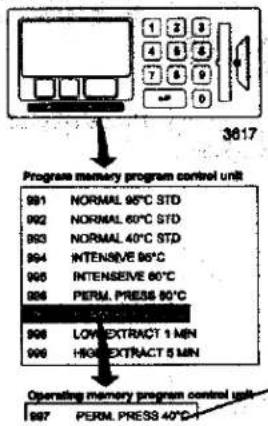
flowchart
graph TD
    A["Program memory program control unit"] --> B["991 NORMAL 95°C STD"]
    A --> C["992 NORMAL 60°C STD"]
    A --> D["993 NORMAL 40°C STD"]
    A --> E["994 INTENSIVE 86°C"]
    A --> F["995 INTENSIVE 60°C"]
    A --> G["996 PERM. PRESS 80°C"]
    A --> H["997 LOW EXTRACT 1 MIN"]
    A --> I["998 HIGH EXTRACT 5 MIN"]
    A --> J["Operating memory program control unit"]
    J --> K["997 PERM. PRESS 40°C"]
Program currently being used
A parallel process takes place when a program is started from a memory card. In other words, the program is copied from the memory card into the operating memory, and the machine runs the program entirely from the set of instructions in the operating memory.
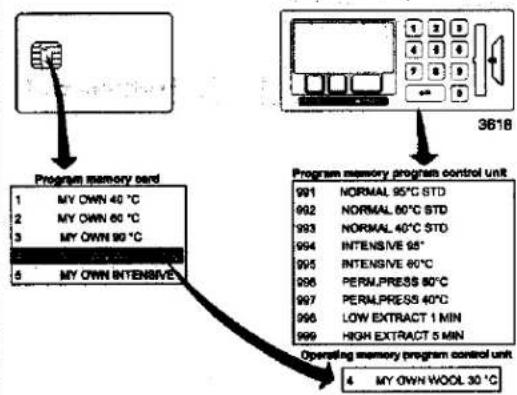
flowchart
graph TD
    A["Program memory card"] --> B["Program memory program control unit"]
    B --> C["Operating memory program control unit"]
    C --> D["4 MY OWN WOOL 30 °C"]
    style A fill:#f9f,stroke:#333
    style B fill:#ccf,stroke:#333
    style C fill:#cfc,stroke:#333
That is why you may remove the memory card from the card reader once the program has started. Once the program has ended it is erased from the operating memory.
To copy a program from a memory card to the machine's program control unit
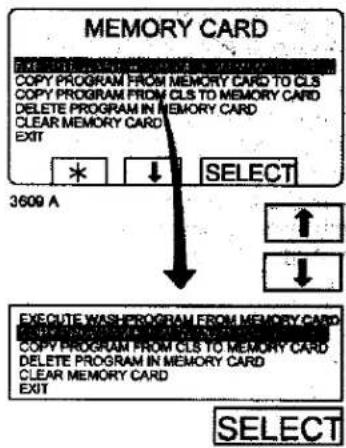
To access this menu, follow the instructions in section "To select the "Memory card" function".
Note that restricted-use programs on a memory card cannot be copied.
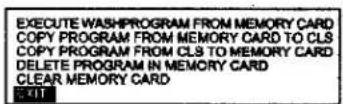
Highlight "COPY PRO- GRAM FROM MEMORY CARD TO CLS" (press ↓ or ↑ if necessary).
Press SELECT.
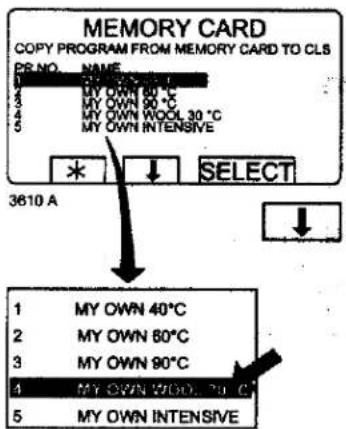
If necessary, use ↓ to...
... highlight the wash pro- gram required.
SELECT
Press SELECT.
-What is a restricted-use program?
A wash program which has been created on a PC can be made a "restricted-use" program. This means that:
- The program cannot be deleted or copied to the program memory of a washer extractor.
- You cannot modify the program or examine its structure.
- To run the program you must have access to the memory card, and insert it into the card reader when the program is to be started.
What happens when a program is copied?
Both the memory card and the program control unit have memory chips capable of storing wash programs. The chip on the card can hold about 10 to 15 programs of normal size, while the chip in the program control unit has a capacity of several hundred programs.
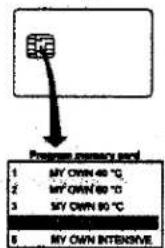
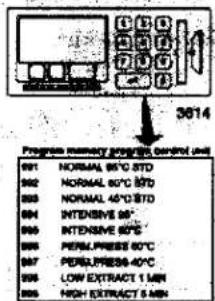
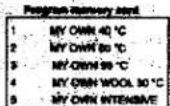
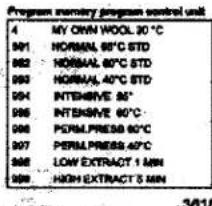
When a program is copied from a memory card to the machine's program control unit, it is copied, not moved (not deleted from the card). A copy is transferred from the chip on the memory card to the storage chip of the machine program control unit.
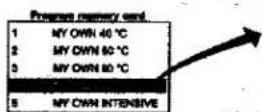
The program remains on the memory card, but another copy of it has now been stored in the program control unit.
3611 A

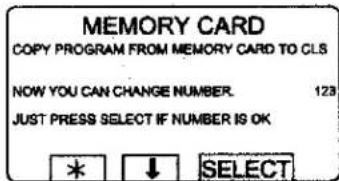
Choose 1 or 2:
1 •If you want to give the program a different program number (from the one it had on the memory card):
Use the numeric keys to enter the new program number, then press SELECT.
2 If the existing number is suitable:
Press SELECT.
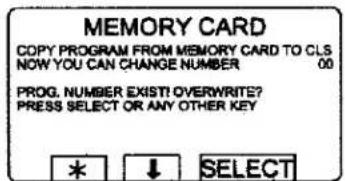
4114A

If the number you have choo- sen is already used:
1 Select another number. Enter the new number and press SELECT.
2 Erase the old program number. Press SELECT.
Procedure for use
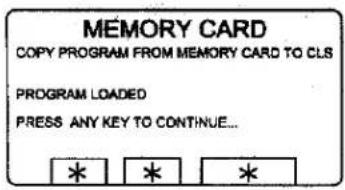
3612 A
After the program has been copied (it takes only a few seconds) the menu will look like this:
If you want to copy more programs:
Press any key to continue.
4210 A
When you have finished: Press ↓ repeatedly to highlight "EXIT".
SELECT
Press SELECT.
To copy a program from the program control unit to a memory card
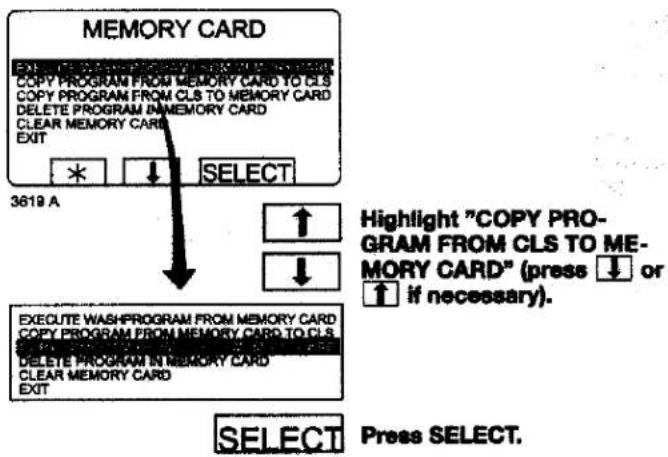
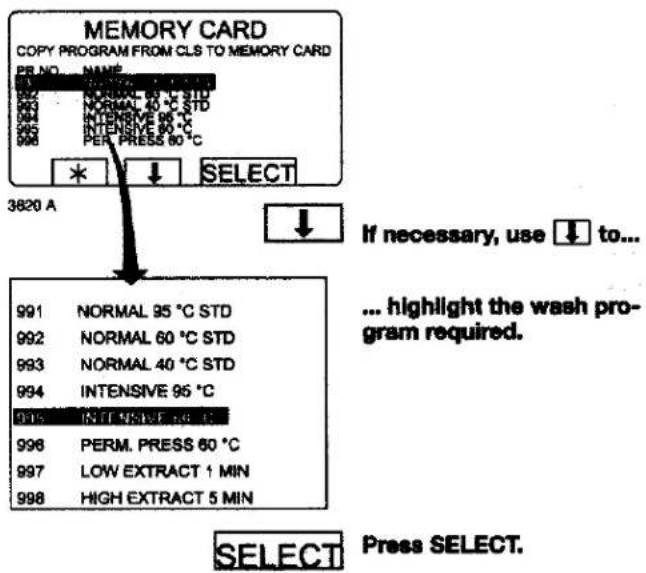
What happens when a program is copied? Both the memory card and the program control unit have memory chips capable of storing wash programs. The chip on the memory card can hold about 10 to 15 programs of normal size, while the chip in the program control unit has a capacity of several hundred programs.
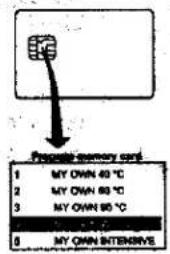
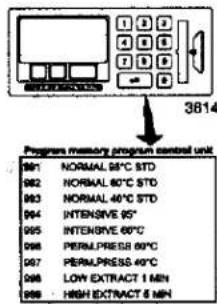
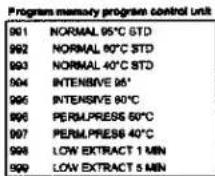
When a program is copied from the machine's program control unit to a memory card, it is copied, not moved (not deleted from the machine). A copy is transferred from the storage chip of the machine program control unit to the chip on the card.
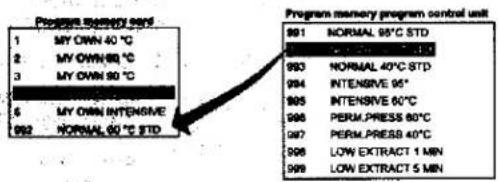
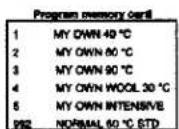
The program remains in the program control unit, but another copy of it has now been stored on the card.
3622
Procedure for use
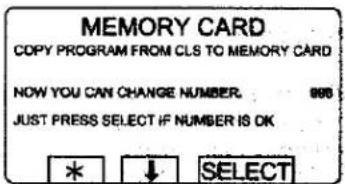
3623 A

Choose 1 or 2:
1 If you want to give the program a different program number (from the one it had on the machine):
Use the numeric keys to enter the new program number, then press SELECT.
2 If the existing number is suitable:
Press SELECT.
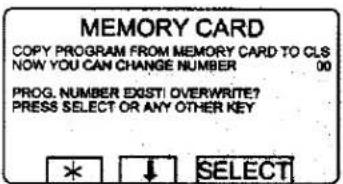
4114A

If the number you have choo- sen is already used:
1 Select another number. Enter the new number and press SELECT.
2 Erase the old program number.
Press SELECT.
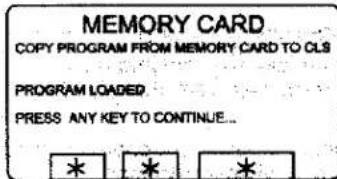
3612 A
After the program has been copied (it takes only a few seconds) the menu will look like this:
If you want to copy more programs:
Press any key to continue.
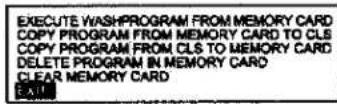
4210 A
When you have finished: Press ↓ repeatedly to highlight "EXIT".
SELECT
Press SELECT.
To delete a program on a memory card
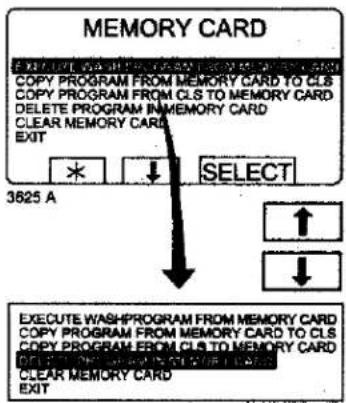
To access this menu, follow the instructions in section "To select the "Memory card" function
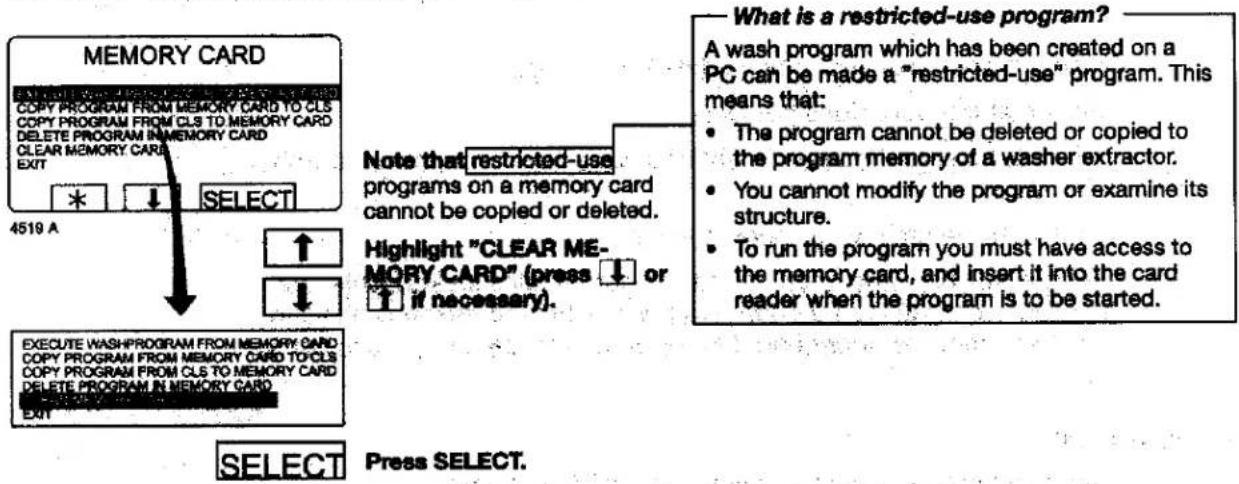
Note that restricted-use programs on a memory card cannot be deleted.
Highlight "DELETE PROGRAM IN MEMORY CARD" (press ↑ or ↓ if necessary).
SELECT
-What is a restricted-use program?
A wash program which has been created on a PC can be made a "restricted-use" program. This means that:
- The program cannot be deleted or copied to the program memory of a washer extractor.
- You cannot modify the program or examine its structure.
- To run the program you must have access to the memory card, and insert it into the card reader when the program is to be started.
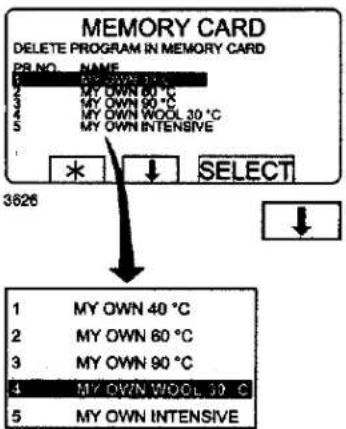
Press SELECT.
If necessary, use ↓ to...
.... highlight the wash pro- gram required.
SELECT
Press SELECT.
The program will now be deleted from the memory card. This takes between 5 and 15 seconds.
If you want to delete more programs:
Continue in the same way as described above.
EXECUTE WASHPROGRAM FROM MEMORY CARD COPY PROGRAM FROM MEMORY CARD TO CLS COPY PROGRAM FROM CLS TO MEMORY CARD DELETE PROGRAM IN MEMORY CARD CLEAR MEMORY CARD
When you have finished:
Press ↓ repeatedly to highlight "EXIT".
4210 A
SELECT
Press SELECT.
To delete all programs on a memory card
flowchart
graph TD
    A["4519 A"] --> B["SELECT"]
    B --> C["WRITE CHECK"]
    C --> D["CREATE COPY PROGRAM FROM MEMORY CARD TO CLS COPY PROGRAM FROM CLS TO MEMORY CARD DELETE PROGRAM IN MEMORY CARD CLEAR MEMORY CARD EXIT"]
    D --> E["SELECT"]
    E --> F["WRITE CHECK"]
    F --> G["CREATE COPY PROGRAM FROM MEMORY CARD COPY PROGRAM FROM MEMORY CARD TO CLS COPY PROGRAM FROM CLS TO MEMORY CARD DELETE PROGRAM IN MEMORY CARD EXIT"]
    G --> H["CREATE COPY PROGRAM FROM MEMORY CARD COPY PROGRAM FROM MEMORY CARD TO CLS COPY PROGRAM FROM CLS TO MEMORY CARD DELETE PROGRAM IN MEMORY CARD EXIT"]
    H --> I["SELECT"]
    I --> J["WRITE CHECK"]
    J --> K["CREATE COPY PROGRAM FROM MEMORY CARD COPY PROGRAM FROM MEMORY CARD TO CLS COPY PROGRAM FROM CLS TO MEMORY CARD DELETE PROGRAM IN MEMORY CARD EXIT"]
    K --> L["CREATE COPY PROGRAM FROM MEMORY CARD COPY PROGRAM FROM MEMORY CARD TO CLS COPY PROGRAM FROM CLS TO MEMORY CARD DELETE PROGRAM IN MEMORY CARD EXIT"]
    L --> M["SELECT"]
    M --> N["WRITE CHECK"]
    N --> O["CREATE COPY PROGRAM FROM MEMORY CARD COPY PROGRAM FROM MEMORY CARD TO CLS COPY PROGRAM FROM CLS TO MEMORY CARD DELETE PROGRAM IN MEMORY CARD EXIT"]
    O --> P["CREATE COPY PROGRAM FROM MEMORY CARD COPY PROGRAM FROM MEMORY CARD TO CLS COPY PROGRAM FROM CLS TO MEMORY CARD DELETE PROGRAM IN MEMORY CARD EXIT"]
    P --> Q["SELECT"]
    Q --> R["WRITE CHECK"]
    R --> S["CREATE COPY PROGRAM FROM MEMORY CARD COPY PROGRAM FROM MEMORY CARD TO CLS COPY PROGRAM FROM CLS TO MEMORY CARD DELETE PROGRAM IN MEMORY CARD EXIT"]
    S --> T["CREATE COPY PROGRAM FROM MEMORY CARD COPY PROGRAM FROM MEMORY CARD TO CLS COPY PROGRAM FROM CLS TO MEMORY CARD DELETE PROGRAM IN MEMORY CARD EXIT"]
    T --> U["SELECT"]
    U --> V["WRITE CHECK"]
    V --> W["CREATE COPY PROGRAM FROM MEMORY CARD COPY PROGRAM FROM MEMORY CARD TO CLS COPY PROGRAM FROM CLS TO MEMORY CARD DELETE PROGRAM IN MEMORY CARD EXIT"]
    W --> X["CREATE COPY PROGRAM FROM MEMORY CARD COPY PROGRAM FROM MEMORY CARD TO CLS COPY PROGRAM FROM CLS TO MEMORY CARD DELETE PROGRAM IN MEMORY CARD EXIT"]
    X --> Y["SELECT"]
    Y --> Z["WRITE CHECK"]
    Z --> AA["CREATE COPY PROGRAM FROM MEMORY CARD COPY PROGRAM FROM MEMORY CARD TO CLS COPY PROGRAM FROM CLS TO MEMORY CARD DELETE PROGRAM IN MEMORY CARD EXIT"]
    AA --> AB["SELECT"]
    AB --> AC["WRITE CHECK"]
    AC --> AD["CREATE COPY PROGRAM FROM MEMORY CARD COPY PROGRAM FROM MEMORY CARD TO CLS COPY PROGRAM FROM CLS TO MEMORY CARD DELETE PROGRAM IN MEMORY CARD EXIT"]
    AD --> AE["SELECT"]
    AE --> AF["WRITE CHECK"]
    AF --> AG["CREATE COPY PROGRAM FROM MEMORY CARD COPY PROGRAM FROM MEMORY CARD TO CLS COPY PROGRAM FROM CLS TO MEMORY CARD DELETE PROGRAM IN MEMORY CARD EXIT"]
    AG --> AH["SELECT"]
    AH --> AI["WRITE CHECK"]
    AI --> AJ["CREATE COPY PROGRAM FROM MEMORY CARD COPY PROGRAM FROM MEMORY CARD TO CLS COPY PROGRAM FROM CLS TO MEMORY CARD DELETE PROGRAM IN MEMORY CARD EXIT"]
    AJ --> AK["SELECT"]
    AK --> AL["WRITE CHECK"]
    AL --> AM["CREATE COPY PROGRAM FROM MEMORY CARD COPY PROGRAM FROM MEMORY CARD TO CLS COPY PROGRAM FROM CLS TO MEMORY CARD DELETE PROGRAM IN MEMORY CARD EXIT"]
    AM --> AN["SELECT"]
    AN --> AO["WRITE CHECK"]
    AO --> AP["CREATE COPY PROGRAM FROM MEMORY CARD COPY PROGRAM FROM MEMORY CARD TO CLS COPY PROGRAM FROM CLS TO MEMORY CARD DELETE PROGRAM IN MEMORY CARD EXIT"]
    AP --> AQ["SELECT"]
    AQ --> AR["WRITE CHECK"]
    AR --> AS["CREATE COPY PROGRAM FROM MEMORY CARD COPY PROGRAM FROM MEMORY CARD TO CLS COPY PROGRAM FROM CLS TO MEMORY CARD DELETE PROGRAM IN MEMORY CARD EXIT"]
    AS --> AT["SELECT"]
    AT --> AU["WRITE CHECK"]
    AU --> AV["CREATE COPY PROGRAM FROM MEMORY CARD COPY PROGRAM FROM MEMORY CARD TO CLS COPY PROGRAM FROM CLS TO MEMORY CARD DELETE PROGRAM IN MEMORY CARD EXIT"]
    AV --> AW["SELECT"]
    AW --> AX["WRITE CHECK"]
    AX --> AY["CREATE COPY PROGRAM FROM MEMORY CARD COPY PROGRAM FROM MEMORY CARD TO CLS COPY PROGRAM FROM CLS TO MEMORY CARD DELETE PROGRAM IN MEMORY CARD EXIT"]
    AY --> AZ["SELECT"]
    AZ --> BA["WRITE CHECK"]
    BA --> BB["CREATE COPY PROGRAM FROM MEMORY CARD COPY PROGRAM FROM MEMORY CARD TO CLS COPY PROGRAM FROM CLS TO MEMORY CARD DELETE PROGRAM IN MEMORY CARD EXIT"]
    BB --> BC["SELECT"]
    BC --> BD["WRITE CHECK"]
    BD --> BE["CREATE COPY PROGRAM FROM MEMORY CARD COPY PROGRAM FROM MEMORY CARD TO CLS COPY PROGRAM FROM CLS TO MEMORY CARD DELETE PROGRAM IN MEMORY CARD EXIT"]
    BE --> BF["SELECT"]
    BF --> BG["WRITE CHECK"]
    BG --> BH["CREATE COPY PROGRAM FROM MEMORY CARD COPY PROGRAM FROM MEMORY CARD TO CLS COPY PROGRAM FROM CLS TO MEMORY CARD DELETE PROGRAM IN MEMORY CARD EXIT"]
    BH --> BI["SELECT"]
    BI --> BJ["WRITE CHECK"]
    BJ --> BK["CREATE COPY PROGRAM FROM MEMORY CARD COPY PROGRAM FROM MEMORY CARD TO CLS COPY PROGRAM FROM CLS TO MEMORY CARD DELETE PROGRAM IN MEMORY CARD EXIT"]
    BK --> BL["SELECT"]
    BL --> BM["WRITE CHECK"]
    BM --> BN["CREATE COPY PROGRAM FROM MEMORY CARD COPY PROGRAM FROM MEMORY CARD TO CLS COPY PROGRAM FROM CLS TO MEMORY CARD DELETE PROGRAM IN MEMORY CARD EXIT"]
    BN --> BO["SELECT"]
    BO --> BP["WRITE CHECK"]
    BP --> BQ["CREATE COPY PROGRAM FROM MEMORY CARD COPY PROGRAM FROM MEMORY CARD TO CLS COPY PROGRAM FROM CLS TO MEMORY CARD DELETE PROGRAM IN MEMORY CARD EXIT"]
    BQ --> BR["SELECT"]
    BR --> BS["WRITE CHECK"]
    BS --> BT["CREATE COPY PROGRAM FROM MEMORY CARD COPY PROGRAM FROM MEMORY CARD TO CLS COPY PROGRAM FROM CLS TO MEMORY CARD DELETE PROGRAM IN MEMORY CARD EXIT"]
    BT --> BU["SELECT"]
        BU --> BV["WRITE CHECK"]
        BV --> BW["CREATE COPY PROGRAM FROM MEMORY CARD COPY PROGRAM FROM MEMORY CARD TO CLS COPY PROGRAM FROM CLS TO MEMORY CARD DELETE PROGRAM IN MEMORY CARD EXIT"]
        BW --> BX["SELECT"]
        BX --> BY["BQ: The program cannot be deleted or copied to the program memory of a washer extractor. You cannot modify the program or examine its structure. To run the program you must have access to the memory card, and insert it into the card reader when the program is to be started."]
        BY --> BZ["A wash program which has been created on a PC can be made a "restricted-use" program. This means that: The program cannot be deleted or copied to the program memory of a washer extractor. You cannot modify the program or examine its structure. To run the program you must have access to the memory card, and insert it into the card reader when the program is to be started."]
        BZ --> CA["A wash program which has been created on a PC can be made a "restricted-use" program. This means that: The program cannot be deleted or copied to the program memory of a washer extractor. You cannot modify the program or examine its structure. To run the program you must have access to the memory card, and insert it into the card reader when the program is to be started."]
        CA --> CB["A wash program which has been created on a PC can be made a "restricted-use" program. This means that: The program cannot be deleted or copied to the program memory of a washer extractor. You cannot modify the program or examine its structure. To run the program you must have access to the memory card, and insert it into the card reader when the program is to be started."]
        CB --> CC["A wash program which has been created on a PC can be made a "restricted-use" program. This means that: The program cannot be deleted or copied to the program memory of a washer extractor. You cannot modify the program or examine its structure. To run the program you must have access to the memory card, and insert it into the card reader when the program is to be started."]
        CC --> CD["A wash program which has been created on a PC can be made a "restricted-use" program. This means that: The program cannot be deleted or copied to the program memory of a washer extractor. You cannot modify the program or examine its structure. To run the program you must have access to the memory card, and insert it into the card reader when the program is to be started."]
        CC --> DEA["A wash program which has been created on a PC can be made a "restricted-use" program. This means that: The program cannot be deleted or copied to the program memory of a washer extractor. You cannot modify the program or examine its structure. To run the program you must have access to the memory card, and insert it into the card reader when the program is to be started."]
        DEA --> DEB["A wash program which has been created on a PC can be made a "restricted-use" program. This means that: The program cannot be deleted or copied to the program memory of a washer extractor. You cannot modify the program or examine its structure. To run the program you must have access to the memory card, and insert it into the card reader when the program is to be started."]
        DEB --> DEC["A wash program which has been created on a PC can be made a "restricted-use" program. This means that: The program cannot be deleted or copied to the program memory of a washer extractor. You cannot modify the program or examine its structure. To run the program you must have access to the memory card, and insert it into the card reader when the program is to be started."]
        DEC --> DEF["A wash program which has been created on a PC can be made a "restricted-use" program. This means that: The program cannot be deleted or copied to the program memory of a washer extractor. You cannot modify the program or examine its structure. To run the program you must have access to the memory card, and insert it into the card reader when the program is to be started."]
        DEF --> DEG["A wash program which has been created on a PC can be made a "restricted-use" program. This means that: The program cannot be deleted or copied to the program memory of a washer extractor. You cannot modify the program or examine its structure. To run the program you must have access to the memory card, and insert it into the card reader when the program is to be started."]
        DEG --> DEH["A wash program which has been created on a PC can be made a "restricted-use" program. This means that: The program cannot be deleted or copied to the program memory of a washer extractor. You cannot modify the program or examine its structure. To run the program you must have access to the memory card, and insert it into the card reader when the program is to be started."]
        DEH --> DEI["A wash program which has been created on a PC can be made a "restricted-use" program. This means that: The program cannot be deleted or copied to the program memory of a washer extractor. You cannot modify the program or examine its structure. To run the program you must have access to the memory card, and insert it into the card reader when the program is to be started."]
        DEI --> DEJ["A wash program which has been created on a PC can be made a "restricted-use" program. This means that: The program cannot be deleted or copied to the program memory of a washer extractor. You cannot modify the program or examine its structure. To run the program you must have access to the memory card, and insert it into the card reader when the program is to be started."]
        DEJ --> DEK["A wash program which has been created on a PC can be made a "restricted-use" program. This means that: The program cannot be deleted or copied to the program memory of a washer extractor. You cannot modify the program or examine its structure. To run the program you must have access to the memory card, and insert it into the card reader when the program is to be started."]
        DEK --> DEL["A wash program which has been created on a PC can be made a "restricted-use" program. This means that: The program cannot be deleted or copied to the program memory of a washer extractor. You cannot modify the program or examine its structure. To run the program you must have access to the memory card, and insert it into the card reader when the program is to be started."]
        DEL --> DEM["A wash program which has been created on a PC can be made a "restricted-use" program. This means that: The program cannot be deleted or copied to the program memory of a washer extractor. You cannot modify the program or examine its structure. To run the program you must have access to the memory card, and insert it into the card reader when the program is to be started."]
        DEM --> DEN["A wash program which has been created on a PC can be made a "restricted-use" program. This means that: The program cannot be deleted or copied to the program memory of a washer extractor. You cannot modify the program or examine its structure. To run the program you must have access to the memory card, and insert it into the card reader when the program is to be started."]
        DEN --> DEO["A wash program which has been created on a PC can be made a "restricted-use" program. This means that: The program cannot be deleted or copied to the program memory of a washer extractor. You cannot modify the program or examine its structure. To run the program you must have access to the memory card, and insert it into the card reader when the program is to be started."]
        DEO --> DEP["A wash program which has been created on a PC can be made a "restricted-use" program. This means that: The program cannot be deleted or copied to the program memory of a washer extractor. You cannot modify the program or examine its structure. To run the program you must have access to the memory card, and insert it into the card reader when the program is to be started."]
        DEP --> DEQ["A wash program which has been created on a PC can be made a "restricted-use" program. This means that: The program cannot be deleted or copied to the program memory of a washer extractor. You cannot modify the program or examine its structure. To run the program you must have access to the memory card, and insert it into the card reader when the program is to be started."]
        DEQ --> DER["A wash program which has been created on a PC can be made a "restricted-use" program. This means that: The program cannot be deleted or copied to the program memory of a washer extractor. You cannot modify the program or examine its structure. To run the program you must have access to the memory card, and insert it into the card reader when the program is to be started."]
        DER --> DEF
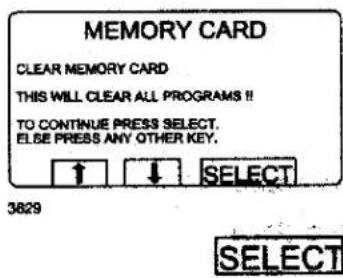
If you change your mind and do not want to delete the entire memory card:
Press any key other than SELECT.
If you want to delete all programs on the memory card (with the exception of any restricted-use programs): Press SELECT.
Maintenance
Maintenance
Daily
- Clean the door seal and remove detergent residue.
- Check that the door does not leak.
- Clean the detergent compartment and wipe down the machine with a damp cloth.
- Check that the drain valve does not leak.
- Start the machine and check that the door remains locked while the machine is operating. Fast forward the machine to the stop position and check that the door cannot be opened until the program is completed.
Every months
- Check that valves, hoses and connections do not leak.
- Remove any textile lint from the drain opening, joints in drain pipes etc.
Every third month
Accumulated chemicals on the panel ledges.
- Disconnect electrical power from the machine.
- Turn off the water supply and bleed the pressure from the supply hoses.
- Remove the water supply hoses from the rear of the machine and clean or replace the inlet screens, as needed.
• Thoroughly clean the detergent dispenser. - Remove the top and front panels from the machine.
- To help prevent corrosion, clean accumulation of detergent and other chemicals from the panels.
- Inspect inside of machine for leaks. Repair as needed.
- Clean the door gasket.
- Reinstall top and front panels.
- Restore power and return the machine to service.
To keep your machine in proper working order, follow the preventive maintenance recommendations provided below.
The maintenance interval should be adjusted according to machine usage. The suggested schedule assumes an 8 hour work day, and a 5 day work week..
Daily
- Check the door and door lock:
- Open the door and try starting the machine. The machine MUST NOT START.
- Close the door, start the machine and try opening the door. It MUST NOT BE POSSIBLE TO OPEN THE DOOR WHILE THE MACHINE IS OPERATING!
- Check that the door does not leak.
-
Clean the door seal, removing any detergent and fluff.
-
Check that the drain valve does not leak during the wash cycle.
- Clean out any detergent remaining in the detergent compartment. Rapid advance through a program and let the water rinse the compartment.
- Inspect liquid chemical tubing and connections for leaks. Repair as necessary.
Every third month (refer this service to qualified personnel)


May only be carried out by authorized personnel.
- Check that the door does not leak.
- Check the drain valve and remove any lint.
-
Inspect the interior of the machine (during an actual wash cycle to ensure that no leaks are noticed) by:
-
Turning of the main power switch of the machine.
- Remove the top cover and the protective front and rear plates.
- Cover the detergent dispenser to prevent water from splashing inside the machine.
- Start a wash program.
-
KEEP CLEAR OF MOVING PARTS WHILE MACHINE IS OPERATING!!
-
Inspect all internal hoses, seals and gaskets for signs of leakage. Repair as necessary.
- Check that water inlet screens are clean of debris. Dirty screens result in longer fill times, which reduce productivity.
- Inspect the drive belt. Adjust the tension or replace if necessary (see section 30. Motor).
- Check that there are no signs of leakage on the floor beneath the machine. Locate and repair any leak.
- On heated machines, if the heating time is unusually long, check the heating elements (see section 40. Heating). If the water is very hard, check whether there are lime deposits on the heating elements. Decalcify the elements if necessary. Adapt the amount of deliming agent to the manufacturer's guidelines.
- Never switch on the heating elements when there is no water in the machine. This will cause the slow-blow fuse to trigger.
- Inspect the shock absorbers and coil springs. (Only EX- and H-model).
When reliable laundry and wetcleaning equipment is desired, the choice is Wascomat!
The world's oldest and leading manufacturer of commercial laundry equipment for coin laundries, hotels, motels, nursing homes and any other institutional laundry use, and the environmentally safe, wetcleaning "dual-use" systems for drycleaners.
WASCOMAT PROVIDES "PEACE OF MIND GUARANTEE"
Backed by a company that's been in the laundry equipment business for over 100 years and has earned a reputation as the standard of quality worldwide, Wascomat dealers provide:
– Free survey of your laundry needs
- Laundry design and layout
– Quality laundry equipment in a size and model for every need
- Installation, start-up and training
– Worldwide parts and service
– Best warranty in the business
- "Lease-a-Laundry Program", which includes the laundry equipment installation and ongoing service
EXPAND, MODERNIZE, RETOOL OR BUILD A NEW LAUNDRY WITH LOW-COST FINANCING OR LEASING FROM WASCOMAT\*
With Wascomat/Viking financing or leasing you can obtain and install durable, efficient, state-of-the-art Wascomat washers, dryers and non-polluting, environmentally-friendly wetcleaning equipment to meet all anti-pollution regulations.
Wascomat provides efficient, quality washers, dryers, flatwork ironers and non-polluting wetcleaning equipment.
FRONT-LOAD WASHER MODELS
Solid and soft-mount, coin operated and commercial laundry washers in standard, high and ultra-high extract models. Designed for long life and efficient water and energy use. Available from 18 to 250 lb. capacities.
SIDE-LOAD WASHER MODELS
Pullman, Side-Load, Barrier and Clean Room washer models with high 300 to 350 G-Force extraction, designed and built for long, trouble-free life and big water and energy savings. Available from 55 to 250 lb. capacities.
Coin operated and commercial energy and gas efficient, user friendly TD dryer models with optional unique Wascomat Residual Moisture Control (RMC). Available in a size and model for every laundry need.
AUTOMATIC FLATWORK IRONERS
A unique one-operator, fully automatic, labor saving, ironer that does it all: feeds, irons, folds, stacks and counts. Also available in fully and semi-automatic
models in a size-and model for every laundry need.

WASCOMAT NON-POLLUTING WETCLEAN EQUIPMENT
The best alternative to Perc, uses water and complies with OSHA, EPA and all other environmental, anti-pollution regulations. Wascomat state-of-the-art wetclean technology eliminates all pollution concerns and provides the best wetcleaning and washing results. Available in a size and model for every wetcleaning need.
With the push of a button, the unique Wascomat "Dual-Use" Wetcleaner converts to an ideal laundry washer for washing shirts, comforters, drapes, all other washable garments and cleaner's wash-dry-fold customer service.

WASCOMAT PROVIDES THE BEST CUSTOMER SERVICE WITH EXPERIENCED WORLDWIDE CUSTOMER SUPPORT, WITH AN OVER 100-YEAR TRACK RECORD.
WASCOMAT/VIKING FINANCIAL SERVICES PROVIDES LOW COST FINANCING AND LEASING* FOR YOUR BUSINESS GROWTH.
For more information call Wascomat at 516-371-4400

natural_image
Completely black image with no visible content or text.- WASCOMAT CUSTOMER SUPPORT
- SPARE PARTS
- 516-371-2000
- TECHNICAL SUPPORT
- 516-371-0700
- WARRANTY CLAIMS
- Operating manual
- EX618cl - EX670cl
- SU620cl - 675cl
- Clarus
- SAFETY AND WARNINGS SIGNS
- Replace If Missing Or Illegible
- LOCATED ON THE OPERATING INSTRUCTION SIGN OF THE MACHINE:
- CAUTION
- PRECAUCION
- INSTALLATION AND
- MAINTENANCE WARNINGS - AVERTISSEMENT
- LOCATED ON THE DOOR:
- NOTICE TO: OWNERS, OPERATORS AND DEALERS OF WASCOMAT MACHINES
- THE MACHINE(S) MUST NOT START!
- Contents
- Safety
- Emergency stop
- General introduction
- Preparations
- Measuring the detergent
- The "Move back" key
- The "Move back" function
- To start the wash program
- Two ways of starting a program
- Procedure for use
- —To terminate a program before it has finished
- To change parameters in the current program step
- Additional functions during the program
- Text (see section "Text")
- To start a wash program from the program library
- What is the program library?
- Select library via menu
- Rapid advance
- To terminate a program before it has finished
- For machines with weighing equipment installed only!
- Return to normal display
- To end weight display sooner
- No water reduction
- Pause
- Manual operation during a program
- Two types of manual operation
- Maximum extraction speed
- -To limit the program's highest extraction speed
- Example:
- Motor on after wash
- Pressing "Text" displays more information
- Automatic return to normal display
- To change the wash program after program operation has commenced
- To change temperature scale °C/°F
- Auto restart
- What is Auto restart?
- Manual operation
- Always lock the door first!
- All manual settings are cancelled when you exit manual operation
- Heating
- Statistics
- The Statistics function
- TOTAL RUN TIME HOURS:
- TOTAL TRIP RUN TIME HOURS:
- HOURS SINCE LAST SERVICE
- LAST 5 ERROR CODES:
- OF TIMES EACH PROGRAM USED:
- Resetting statistic registers
- Scale adjustments
- Reset tare to zero
- Taro scale
- Set tare to a certain value
- Please note:
- Calibrate the scale
- Calibration mode/normal mode
- Zero calibration
- Memory card
- To select the "Memory card" function
- "The "Memory card" functions
- To run a wash program straight from a memory card
- To copy a program from a memory card to the machine's program control unit
- -What is a restricted-use program?
- What happens when a program is copied?
- Choose 1 or 2:
- To copy a program from the program control unit to a memory card
- To delete a program on a memory card
- Press SELECT.
- Maintenance
- Daily
- Every months
- Every third month
- Every third month (refer this service to qualified personnel)
- When reliable laundry and wetcleaning equipment is desired, the choice is Wascomat!
- WASCOMAT PROVIDES "PEACE OF MIND GUARANTEE"
- EXPAND, MODERNIZE, RETOOL OR BUILD A NEW LAUNDRY WITH LOW-COST FINANCING OR LEASING FROM WASCOMAT\*
- Wascomat provides efficient, quality washers, dryers, flatwork ironers and non-polluting wetcleaning equipment.
- FRONT-LOAD WASHER MODELS
- SIDE-LOAD WASHER MODELS
- AUTOMATIC FLATWORK IRONERS
- WASCOMAT NON-POLLUTING WETCLEAN EQUIPMENT
Brand : Wascomat
Model : EX618cl
Category : Washing machine