
AC-406 - Telephone MXL - Free user manual and instructions
Find the device manual for free AC-406 MXL in PDF.


| Product Type | Phone |
| Brand | MXL |
| Model | AC-406 |
| Dimensions (W x D x H) | 22.5 x 18.0 x 9.5 cm |
| Weight | 0.7 kg |
| Power Supply | AC adapter 9V DC, 500mA |
| Display | 1.8-inch LCD with backlight |
| Keypad | Numeric keypad with 12 buttons |
| Speakerphone | Yes, hands-free mode |
| Caller ID | Yes, compatible with FSK/DTMF |
| Speed Dial | Up to 10 memory keys |
| Ringer Volume | Adjustable from low to high |
| Wall Mountable | Yes, included bracket |
| Maintenance | Clean with a dry, soft cloth |
| Safety | Do not expose to moisture or extreme temperatures |
| Spare Parts | AC adapter, handset cord, wall mount bracket available |
| Repairability | Designed for easy disassembly; replaceable handset and base components |
| Operating Temperature | 0°C to 40°C |
| Warranty | 1 year limited warranty |
Frequently Asked Questions - AC-406 MXL
User questions about AC-406 MXL
0 question about this device. Answer the ones you know or ask your own.
Ask a new question about this device
Download the instructions for your Telephone in PDF format for free! Find your manual AC-406 - MXL and take your electronic device back in hand. On this page are published all the documents necessary for the use of your device. AC-406 by MXL.
USER MANUAL AC-406 MXL
natural_image
Woman sitting at a desk with a computer, viewed through a circular frame (no text or symbols visible)Crystal clear audio on Skype, iChat & AIM

natural_image
Woman in business attire holding a folder, framed within a circular border (no text or symbols visible)"Talk and walk" without uncomfortable headsets

Ideal for speech to text recording and e-learning
natural_image
Close-up of a mechanical component with metallic parts, no visible text or symbolsConnects to your computer's USB port—PC and Mac
MXL®
uCHAT

natural_image
Black model of a black audio device with ventilation grille and power button, labeled Model No. AC-406 (no other text or symbols visible)




Introduction
Setup
MXL®
Congratulations on your purchase of the MXL uChat. The MXL uChat connects to your computer's USB port to give you two-way conferencing over the internet via Skype ^™ , AIM, iChat and other web conferencing software programs. The MXL uChat also includes a high quality electromagnetic speaker that can replace bulky computer speakers and delivers outstanding sound quality. Please read the following instructions carefully so you can experience the maximum benefits of this product.
Please note! MXL microphones are the result of world-class engineering and manufacturing capabilities and are designed to provide you with outstanding performance and exceptional value. Although Marshall MXL has tested the following applications at the time of manufacture, quality or results may vary by end user.
Getting Started
Minimum requirements:
▶ PC or Mac with USB audio input
▶ Windows XP Home/Professional
▶ Windows Vista
▶ Mac OSX 10.1 or later
▶ Web Conferencing software
Getting Started
In order to use the MXL uChat, you will need to have web conferencing software like Skype ^™ , AIM, or iChat installed on your computer. Many of these applications are free or low cost. Check the appropriate websites to download the latest version.
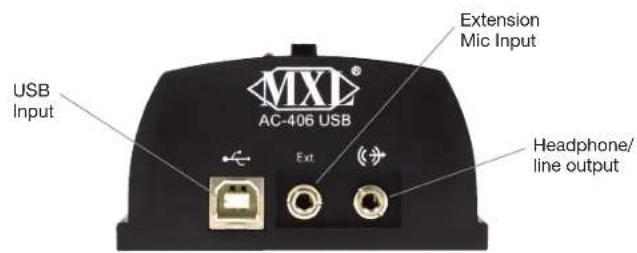
This microphone/speakerphone is a USB (Universal Serial Bus) device, meaning it's a plug and play microphone that will interface with Windows and Macintosh computers without the need for any special drivers. The MXL uChat will operate with both USB 2.0 (high speed USB) and USB 1.1 data buses. We recommend connecting your microphone directly to the computer's USB port as opposed to using a USB hub as USB hubs can interfere with the performance of various USB devices.
In addition to the USB input, the MXL uChat includes a headphone output jack for private conversations and an extension jack that can
be used for additional microphones in a panel setting or to increase your degree of coverage. The MXI. uChat also includes a handy mute button so your side of the conversation can be quickly muted.
When headphones are plugged into the MXL. uChat the speaker automatically mutes. The speaker will regain function as soon as the headphones are unplugged.
The headphone jack accepts most headphones; however, the maximum headphone volume will vary by manufacturer and model so care should always be exercised when first plugging in your headphone.
Setup for Windows Operating System
Setup with Windows Vista Operating System
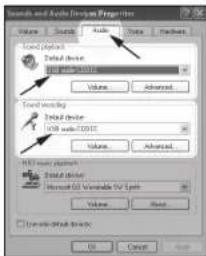
Connect the MXL uChat to an unused USB port on your computer. To select the MXL uChat as the default audio device, go to: Start menu ▶ Control Panel ▶ Sounds and Audio Devices.
Click on the Audio tab and select USB audio
CODEC from the drop-down menu in Sound play-back and Sound Recording.
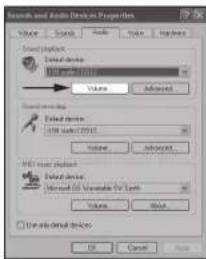
To change the volume of the sound playback from the MXL uChat, click on the Volume button in the Sound play-back section. The playback volume can be changed by moving the Speaker fader up or down. The microphone fader
found in this window adjusts the volume of the microphone signal that is sent directly to the MXL.
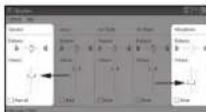
u'hat's built-in speaker. It is best to keep this turned all the way down or muted to avoid undesirable noises such as feedback.
(Note: If your screen does not display a microphone volume control, go to Options, Properties and check the box labeled Microphone.)
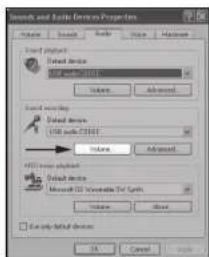
To adjust the volume of the microphone signal to the computer, click on the Volume button in the Sound Recording section. The microphone volume can be changed by moving the microphone fader up or down.
Click on the Apply button for these changes to take effect. Your computer is now setup to use the MXL uChat. Some applications will require additional settings to be changed within the program.
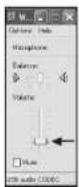
To select the MXL uChat as the default audio device go to the Start Menu and select Control Panel.
Double click the Sound icon.
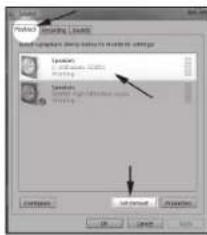
Select the Play-back tab. Highlight the speaker icon labeled as USB audio CODEC and click Set Default. To make further adjustments to the playback volume, double-click on the speaker icon labeled USB audio CODEC.

Click on the tab labeled Levels. The volume of the speaker can be adjusted by moving the fader labeled as Speakers.
To adjust the volume of the microphone signal directly to the speaker, adjust the Microphone fader (this does not affect the volume of the microphone signal being recorded). It is best to keep this turned all the way down or muted to avoid undesirable noises such as feedback. Then click OK.

To set the MXL uChat as the default input, select the Recording tab in the Sound window. Highlight the microphone icon labeled USB audio CODEC and click Set Default.
the microphone volume, double-click on the micro-phone icon labeled USB audio CODEC.

Click on the tab labeled Levels and adjust the Microphone fader.
Click on the Apply button for these changes to take effect. Your computer is now setup to use uChat. Some
applications will require additional settings to be changed within the program.
Setup for Apple Macintosh®
Warranty

After connecting the MXI. uChat to an unused USB port, go to: Apple Icon▶System Preferences▶ Sounds icon.
To use the MXL uChat's built-in speaker as the audio output, click on the Output tab then select the device named USB Audio CODEC. You can adjust the volume by moving the fader labeled Output volume.
Next click on the Input tab and select the device named USB Audio CODEC. You can adjust the microphone volume by moving the Input Volume fader.
Your computer is now setup to use the MX1. uChat. Some applications will require additional settings to be changed within the program.


Marshall Microphones are guaranteed against defects in material and workmanship for one year from date of purchase. Should you encounter any problem with this unit, promptly contact the company you purchased it from for assistance. The original dated sales receipt will be necessary for any warranty claim. Do not send any unit directly to us without prior authorization from our service department! Warranty coverage is limited to repair or replacement (at our option) of the microphone, and does not cover incidental damages due to use of this unit, nor damage caused by accidental misuse of this product.
www.mxlmics.com

For additional information on the MXL uChat, how to contact technical support, as well as information on other products manufactured by MXL, please visit us online at www.mxlmics.com.
Windows is a registered trademark of Microsoft Corporation in the United States and other countries.

Marshall Electronics, Inc. Multimedia Division, El Segundo, CA
Phone: (310) 333-0606 • (800) 800-6608 • Fax: (310) 333-0688
www.mxlmics.com • sales@mxlmics.com
Brand : MXL
Model : AC-406
Category : Telephone