
R0180BR-C - Oven Rival - Free user manual and instructions
Find the device manual for free R0180BR-C Rival in PDF.


| Brand | Rival |
| Model | R0180BR-C |
| Product Type | Countertop Oven |
| Overall Dimensions (W x D x H) | 20 x 16 x 11 inches |
| Weight | 15 lbs |
| Power Supply | 120 V, 60 Hz, 1500 W |
| Capacity | 0.9 cu. ft. |
| Temperature Range | 200°F to 450°F |
| Timer | 60-minute with auto shut-off |
| Functions | Bake, Broil, Toast, Keep Warm |
| Interior Material | Stainless steel |
| Door Type | Drop-down with cool-touch handle |
| Control Type | Mechanical dials |
| Cleaning | Removable crumb tray, non-stick interior |
| Safety Features | Auto shut-off, cool-touch exterior |
| Warranty | 1-year limited |
| Included Accessories | Baking pan, wire rack |
| Color | Black / Stainless steel |
Frequently Asked Questions - R0180BR-C Rival
User questions about R0180BR-C Rival
0 question about this device. Answer the ones you know or ask your own.
Ask a new question about this device
Download the instructions for your Oven in PDF format for free! Find your manual R0180BR-C - Rival and take your electronic device back in hand. On this page are published all the documents necessary for the use of your device. R0180BR-C by Rival.
USER MANUAL R0180BR-C Rival
(Some Assembly Required)
READ AND SAVE THESE INSTRUCTION
IMPORTANT SAFEGUARDS
When using electrical appliances, basic safety precautions should always be followed, including the following:
- Read all instructions before using.
- Do not touch hot surfaces. Use handles or knobs.
- To protect against electrical shock, do not immerse roaster base, cord, or plug in water or other liquid.
- Close supervision is necessary when any appliance is used by or near children.
- Unplug from outlet when not in use and before cleaning. Allow to cool before putting on or taking off parts and before cleaning.
- Do not operate Roaster Oven with a damaged cord or plug or after the appliance malfunctions, or has been damaged in any manner. Return appliance to the manufacturer (see warranty) for examination, repair, or electrical or mechanical adjustment.
- The use of accessory attachments not recommended by the manufacturer may cause injuries.
- Do not use outdoors.
- Do not let cord hang over edge of table or counter, or touch hot surfaces, including the stove.
- Do not place on or near a hot gas or electric burner or in a heated oven.
- Extreme caution must be used when moving an appliance containing hot oil or other hot liquids.
- CAUTION: Steam escaping from under cover or food warming pans is hot and can cause burns.
- Do not use appliance for other than its intended use.
- Use oven mitts to remove the REMOVABLE ROASTING PAN from the Roaster Oven or to remove a baking pan or cooked food from the REMOVABLE ROASTING PAN.
SAVE THESE INSTRUCTIONS
This appliance is for HOUSEHOLD USE ONLY. No user-serviceable parts inside. Do not attempt to service this product. Do not immerse base in water or other liquid.
A short power supply cord is provided to reduce the hazards resulting from entanglement or tripping over a longer cord. AN EXTENSION CORD MAY BE USED WITH CARE; HOWEVER, THE MARKED ELECTRICAL RATING SHOULD BE AT LEAST AS GREAT AS THE ELECTRICAL RATING OF THROASTER OVEN. The extension cord should not be allowed to drape over the counter or tabletop where it can be pulled on by children or tripped over.

POLARIZED PLUG
This appliance has a polarized plug (one blade is wider than the other). To reduce the risk of electric shock, this plug is intended to fit into a polarized outlet only one way. If the plug does not fit fully into the outlet, reverse the plug. If it still does not fit, contact a qualified electrician. Do not attempt to modify the plug in any way. If the plug fits loosely into the AC outlet or if the AC outlet feels warm do not use that outlet.
NOTE: Some countertop and table surfaces, such as Corian® and other surfaces, are not designed to withstand the prolonged heat generated by certain appliances. We recommend placing a hot pad or trivet under your Rival® product to prevent possible damage to the surface.
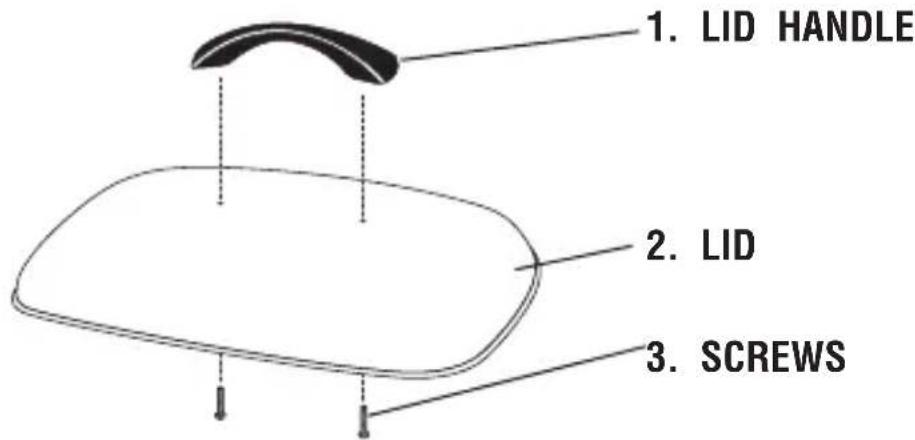
HOW TO ASSEMBLE YOUR LID
- Locate the LID, LID HANDLE.
- Unscrew the SCREWS from the LID HANDLE.
- Use the screw driver to screw one end of the LID HANDLE first.
PREPARING YOUR ROASTER OVEN FOR USE
- Remove all packaging materials.
- Wash the REMOVABLE ROASTING PAN, ROASTING RACK, BUFFET SERVER FRAME, SERVING DISHES and LID in hot, soapy water using a sponge or wash cloth. Rinse thoroughly.
- The outside of the ROASTER OVEN BODY may be cleaned with a soft cloth and warm soapy water. Wipe dry. Do not use abrasive cleaners. Do not immerse the ROASTER OVEN BODY in water.
NOTE: Due to manufacturing process, some smoke and odor may be noticed during the first use. This should disappear after the first heating of the Roaster Oven.
TIPS FOR ROASTING
- Always use the REMOVABLE ROASTING PAN in the roaster oven when cooking.
NOTE: Never place food or liquid directly into the ROASTER OVEN BODY. - Avoid the steam vents when removing or lifting the LID.
- Significant amounts of heat escape whenever the LID is removed; therefore the cooking time must be extended. Avoid frequent removal of the LID for checking cooking progress or stirring.
- To use the LID REST feature, hold the LID upright by the HANDLE and place the edge of the LID under the metal tabs just above either side HANDLE.
- Convenience foods can be baked in the roaster oven. Place container on ROASTING RACK. Follow package directions.
- Meats roasted in your Roaster Oven will be moist and tender. For additional browning, brush oil or butter over the meat before cooking. Lowering temperature and cooking longer will also give meat a crisper, darker brown skin.
- To create a darker roasted, crispier skin poultry, do not add liquids (with the exception of the basting butter or oil) until there are only 30 minutes left of cooking.
- Place the REMOVABLE ROASTING PAN into the ROASTER OVEN BODY.
- Make sure that the TEMPERATURE CONTROL is in the OFF position, then plug cord into a 120 volt AC outlet.
- Turn the Roaster on by turning the TEMPERATURE CONTROL to the desired temperature.
- Preheat for 15 to 20 minutes.
- Place ROASTING RACK into the REMOVABLE ROASTING PAN, put food on the RACK and place the LID on the Roaster Oven. NOTE: Some foods or recipes do not require the ROASTING RACK.
- When finished, turn the TEMPERATURE CONTROL to the OFF position and unplug Roaster Oven from outlet.
- Remove LID and using oven mitts, remove the ROASTING RACK with food and serve.
USING YOUR BUFFET SERVER
- Wash all SERVING DISHES, and BUFFET SERVER FRAME with warm soapy water.
- Fill the REMOVABLE ROASTING PAN from your Roaster Oven with 5 to 6 quarts full of water (or ^1/2 - ^3/4 full) and place inside ROASTER OVEN BODY.
CAUTION: NEVER add water directly inside the ROASTER OVEN BODY. - Place BUFFET SERVER FRAME on top of the REMOVABLE ROASTING PAN. Make sure the frame is secure and level.
- Add empty SERVING DISHES, making sure they are also secure.
- Cover with LID and plug Roaster into a 120V outlet. Preheat on 350°F for 30 minutes or until water is very hot.
- Uncover and carefully add hot, cooked food into SERVING DISHES.
- Cover and turn CONTROL to 250^ F setting to keep foods warm. If necessary, adjust temperature.
- Stir occasionally and keep food covered to maintain temperature.
- Check every hour and carefully add more hot water if necessary.
USING YOUR BUFFET SERVER (CONT.)
CAUTION: Temperature of foods should be kept at 150^ F or above.
- All SERVING DISHES need to be in place when using the BUFFET SERVER.
- Use only to keep cooked foods warm.
- SERVING DISHES and FRAME are not to be used on the stove top, in an oven or in a microwave oven.
- When filling SERVING DISHES with foods that may stick, spray the inside with a non-stick cooking spray.
- If food is dry, add broth, juice, water or wine to help keep warm.
CLEANING YOUR BUFFET SERVER
CAUTION: BUFFET SERVER is hot. Handle Carefully.
- Always allow the BUFFET SERVER to completely cool before cleaning.
- SERVING DISHES and FRAME from BUFFET SERVER may be cleaned in hot soapy water or in dishwasher. Rinse and dry completely.
NOTE: Do not immerse the ROASTER OVEN BODY in water or other liquid. Do not put REMOVABLE ROASTING PAN in dishwasher.
- Turn TEMPERATURE CONTROL to the OFF position.
- Unplug the Roaster Oven from outlet and allow unit to cool.
- Allow the Roaster Oven to cool completely before cleaning.
- Wash the REMOVABLE ROASTING PAN, LID and ROASTING RACK in hot soapy water – using a sponge or cloth. Rinse thoroughly in hot water, then towel dry.
- Wipe the inside and outside of the ROASTER OVEN BODY with a damp cloth.
COOKING GUIDE
DETERMININGMEATDONENESS
It is recommended that you use a meat thermometer to determine doneness when cooking meat and poultry. Insert the thermometer into the center of the thickest portion of the meat. Cook until temperature for desired doneness is reached.
| MEAT RARE MEDIUM WELL DONE | |||
| BEEF | 140°F | 160°F | 170°F |
| PORK | * | 160°F | 170°F |
| LAMB | 140°F | 160°F | 170°F |
| SMOKED HAMCook before eatingFully cooked | * | 160°F140°F | |
| POULTRYRoasting ChickenTurkey | * | 180°F180°F | |
*Rare pork, ham or poultry is not recommended.
ROASTINGMEATSANDPOULTRY
Meats will cook more rapidly than in a conventional oven. Reducing temperature and increasing cooking time will result in a browner, crispier crust. Times indicated below are approximate and should be used as a guideline only.
COOKING GUIDE (CONT.)
| MEAT | WEIGHT (LBS.) | TEMP. | MIN./LB. |
| BEEF ROASTSStanding Rib 4 – 6 Sirloin Tip 3 – 5 350°F 12 to 15Tenderloin 3 Pot Roast 4 – 6 300°F 19 to 26Corned Beef 3 | 325°F 12 to 15 12 - 4 12 - 4 300°F 10 to 15 | 450°F | 5 to 10 |
| LAMBLeg 5 – 8 350°F 14 to 20Shoulder, boneless 3 – 4 350°F 14 to 20 | |||
| PORKLoin Roast 3 – 5 350°F 13 to 19Rolled Shoulder Chops Country-Style Ribs | 4 – 6 350°F 21 to 264 – 5 325°F 10 to 158 – 10 | 450°F to brown and then decrease temp. to 250°F | 10 to 15 |
| SMOKED HAMBone-in, shankBoneless Fully cooked | 10 – 158 – 125 – 10 | 325°F 12 to 15325°F325°F | 10 to 159 to 17 |
| VEALLoinShoulder | 4 – 6 325°F 19 to 253 – 5 325°F 19 to 25 | ||
| POULTRYChicken, wholeChicken, wholeChicken, piecesTurkey, prebastedTurkey, prebastedTurkey, freshTurkey, fresh | 32 - 5 6 – 8 350°F 10 to 156 – 810 – 1414 – 2210 – 1414 - 22 | 350°F350°F375°F375°F350°F350°F | 9 to 145 to 89 to 149 to 149 to 149 to 14 |
RECIPES
LEMONGARLICROASTCHICKEN
4 to 5-lb. chicken 2 tbs. lemon juice
3 cloves garlic, minced
1 tsp. salt
12 tsp. ground black pepper
14 cup butter, softened
Rinse chicken in cold water. Combine remaining ingredients and rub over skin and between skin and meat of chicken. Place roasting rack in cooking pan. Place chicken on roasting rack and cover. Bake at 350^ F for 1½ hours or until chicken is done.
BAKEDPOTATOES
8 to 12 baking potatoes
Wash potatoes and pierce with a fork. Place rack in the pan. Stack potatoes on roasting rack, making sure that they don't touch the sides of cooking pan. Cover and bake at 400^ for 1 to 1 12 hours.
POTLUCKBEEFSTEW
8 -lbs. beef stew meat 15 potatoes, peeled and cubed
2 cups dry bread crumbs 2 tbs. basil
2 tsp. salt 2 cups quick-cooking tapioca
½ tsp. pepper
4 large onions, cut into eighths 15 cans (10
4 lbs. baby carrots
7 stalks celery
8 cans (4 ounces) sliced mushrooms, undrained
12 -oz. each) condensed tomato soup
8 cups beef broth
Toss stew meat with bread crumbs, salt and pepper. Place beef in pan and add remaining ingredients; stir well. Cover and roast at 250^ F for 4 to 5 hours or until meat and vegetables are tender.
RECIPES
CHILIFORACROWD
3 lbs. dry pinto beans, soaked and drained 5 cloves garlic, minced
1 can (28-oz. ) diced tomatoes 2 jalapeno peppers, finely chopped
10 lbs. ground chuck, browned and drained 3 tbs. cumin
12 cups water 34 cup chili powder
2 onions, chopped 3 cups tomato juice
2 green peppers, chopped 3 cans (10
12 -oz. each) tomatoes and chilies
Preheat Roaster to 350°F. Combine first 8 ingredients in roaster. Cover, cookers 2 Add remaining ingredients. Cover and cook an additional 30 minutes to 1 hour.
MEATBALLS
5 lbs. ground beef 1 12 tsp. salt
1 cup Italian seasoned fine, dry bread crumb's tsp. pepper
5 eggs
Preheat Roaster with pan in place to 425°F. Combine all ingredients. Form into 1-inch balls. Place meatballs in pan. Cover; Bake 30 to 45 minutes or until done. Stir occasionally to brown on all sides. Makes approximately 75 meatballs.
PEPPERCRUSTEDBRAISEDSHORTRIBS
6 - 9 lbs. beef short ribs 15 cloves garlic, minced
14 cup freshly cracked black pepper 5 (14
2 tsp. salt
1/2 -oz.) cans beef broth
1 cup red wine, optional
Preheat Roaster to 450^ F. Rub ribs on all sides with pepper and garlic. Sprinkle with salt. Place ribs in cooking pan and cover. Cook 15-30 minutes, turning to brown on all sides. Pour broth over ribs. Cover, reduce heat to 300^ F and cook until tender, 2 to 212 hours.
RECIPES
PORKROAST
4 - 5 lb. pork loin roast
4 cloves garlic, minced
1 tsp. salt
12 tsp. pepper
½ cup Italian dressing
14 cup Worcestershire sauce
Preheat Roaster to 350°F. Place roast on rack. Press minced garlic into surface of the roast. Place rack in Roaster. Combine dressing and Worcestershire sauce. Brush roast with marinade. Cover; cook for 2 to 2½ hours or until done.
SPAGHETTISAUCE
1 can (48-oz.) tomato juice
4 cans (28-oz.) diced tomatoes
2 cans (12-oz.) tomato paste 1
2 tbs. Worcestershire sauce 1 tbs. thyme
6 cups water 1 tbs. salt
5 cloves garlic, minced 1 tsp. pepper
13 cup basil leaves
14 cup oregano leaves
^1/_2 tbs. parsley
Turn Roaster to 350°F. Add all ingredients to an oven-safe baking dish and stir well to combine. Cover, cook 3 to 4 hours until thick, adding meatballs during last 1 to 1½ hours. Stir occasionally.
SPICYBEEFROAST
2 (2½ to 3-lb.) beef tip or rump roast
2 - 3 tbs. cracked black peppercorns 2 tbs.
4 cloves garlic, minced 1
3 tbs. balsamic vinegar
14 cup soy sauce
Worcestershire sauce
12 tsp. dry mustard
12 tsp. salt
Preheat Roaster to 350°F. Make several slits in top of roasts. Place roasts on rack. Set rack in Roaster. Combine vinegar, soy sauce, Worcestershire sauce and mustard. Brush marinade over roasts. Combine cracked pepper and garlic. Rub over meat. Sprinkle with salt. Cover; roast 20 to 25 minutes per lb. or until roast reaches desired doneness.
RECIPES
BAKEDBEANS
2 cans (7-lbs. each) pork and beans
1 ½ cup molasses 2 tbs. dry mustard powder
1¼ cup ketchup
34 cup prepared barbecue sauce
12 cup Worcestershire sauce
1 lb. bacon, cooked until just crisp and cut up
Combine all ingredients in an oven safe dish and place in roaster pan. Place in cookwell. Cover and cook at 300^ F for 2 hours or until heated through. Stir occasionally.
NOTES
NOTES
SERVICEINSTRUCTIONS
- Do NOT attempt to repair or adjust any electrical or mechanical functions on this unit. Doing so will void the Warranty.
- If you need to exchange the unit, please return it in its original carton, with a sales receipt, to the store where you purchased it. If you are returning the unit more than 30 days after the date of purchase, please see the enclosed Warranty.
- If you have any questions or comments regarding this unit's operation or believe any repair is necessary, please write to our Consumer Service Department or visit our website at www.rivalproducts.com
RIVAL
JCS/THG, LLC
CONSUMER SERVICE DEPARTMENT
303 NELSON AVENUE
NEOSHO, MO 64850
ONE (1) YEAR LIMITED WARRANTY
SAVE THIS WARRANTY INFORMATION
A. This Warranty applies only to the original purchaser of this product.
B. This Warranty applies ONLY to repair or replacement of any supplied or manufactured parts of this product that, upon inspection by JCS/THG, LLC authorized personnel, is shown to have failed in normal use due to defects in material or workmanship. JCS/THG, LLC will determine whether to repair or replace the unit. This Warranty does not apply to installation expenses.
C. Operating this unit under conditions other than those recommended or at voltages other than the voltage indicated on the unit, or attempting to service or modify the unit, will render this WARRANTY VOID.
D. Unless otherwise proscribed by law, JCS/THG, LLC shall not be liable for any personal injury, property or any incidental or consequential damage of any kind resulting from malfunctions, defects, misuse, improper installation or alteration of this product.
E. All parts of this product are guaranteed for a period of 1 year as follows:
- Within the first 30 days from date of purchase, the store from which you purchased your product should replace this product if it is defective in material or workmanship (provided the store has in-stock replacement.) * If you intend to assert any claim in connection with the product, please follow the instructions in paragraph F.
- Within the first twelve months from date of purchase, JCS/THG, LLC will repair or replace the product if it is defective in material or workmanship, subject to the conditions in paragraph G.
F. If you have any other problem or claim in connection with this product, please write to our Consumer Service Department.
G. IMPORTANT RETURN INSTRUCTIONS. Your Warranty depends on your following these instructions if you are returning the unit to JCS/THG, LLC:
- Carefully pack the item in its original carton or other suitable box to avoid damage in shipping.
- Before packing your unit for return, be sure to enclose:
a) Your name, full address with zip code and telephone number,
b) A dated sales receipt or PROOF OF PURCHASE,
c) Your \$12.50 (USD) check for return shipping and handling, and
d) The model number of the unit and the problem you are having. (Enclose in an envelope and tape directly to the unit before the box is sealed.)
- JCS/THG, LLC recommends you ship the package U.P.S. ground service for tracking purposes.
- All shipping charges must be prepaid by you.
- Mark the outside of your package:
RIVAL
JCS/THG, LLC
303 NELSON AVENUE
NEOSHO, MO 64850
SHIPPING AND HANDLING CHANGES: \$12.50 (USD)
This Warranty gives you specific legal rights, and you may have other rights may vary by jurisdiction. The provisions of this Warranty are in addition to, and not a modification of, or subtraction from, the statutory warranties and other rights and remedies contained in any applicable legislation. To the extent that any provision of this Warranty is inconsistent with any applicable law, such provision shall be deemed voided or amended, as necessary, to comply with such law.
© 2006 JCS/THG, LLC
Rival and the Rival logcare trademarks of JCS/THG, LLC.
Printed in China
R0180BR-C/188BR/9100150000351
RO180BR-C/188BR06EM2
- IMPORTANT SAFEGUARDS
- SAVE THESE INSTRUCTIONS
- POLARIZED PLUG
- HOW TO ASSEMBLE YOUR LID
- PREPARING YOUR ROASTER OVEN FOR USE
- TIPS FOR ROASTING
- USING YOUR BUFFET SERVER
- USING YOUR BUFFET SERVER (CONT.)
- CAUTION: Temperature of foods should be kept at 150° F or above.
- CLEANING YOUR BUFFET SERVER
- CAUTION: BUFFET SERVER is hot. Handle Carefully.
- NOTE: Do not immerse the ROASTER OVEN BODY in water or other liquid. Do not put REMOVABLE ROASTING PAN in dishwasher.
- COOKING GUIDE
- DETERMININGMEATDONENESS
- ROASTINGMEATSANDPOULTRY
- RECIPES
- LEMONGARLICROASTCHICKEN
- BAKEDPOTATOES
- POTLUCKBEEFSTEW
- CHILIFORACROWD
- MEATBALLS
- PEPPERCRUSTEDBRAISEDSHORTRIBS
- PORKROAST
- SPAGHETTISAUCE
- SPICYBEEFROAST
- BAKEDBEANS
- NOTES
- SERVICEINSTRUCTIONS
- ONE (1) YEAR LIMITED WARRANTY
- SAVE THIS WARRANTY INFORMATION
Brand : Rival
Model : R0180BR-C
Category : Oven