
PT649D - Cassette player Pyle - Free user manual and instructions
Find the device manual for free PT649D Pyle in PDF.


User questions about PT649D Pyle
0 question about this device. Answer the ones you know or ask your own.
Ask a new question about this device
Download the instructions for your Cassette player in PDF format for free! Find your manual PT649D - Pyle and take your electronic device back in hand. On this page are published all the documents necessary for the use of your device. PT649D by Pyle.
USER MANUAL PT649D Pyle
Dynamic Noise Reduction
Adjustable Recording Level
110/200 Volt Switchable
Includes 19 " Rack Mount
Adaptors

1. ON/STANDBY SWITCH
Depress button to switch “ON” the unit. Press release to switch “OFF” unit into “STANDBY MODE”. If the unit is left unattended for long periods, remove the 13 AMP plug from the power socket.
2. CASSETTE HOLDER
3. DYNAMIC NOISE REDUCTION
Switch on Dynamic NR key for better result when tapes with Dynamic Noise reduced are playing.
4. PEAK LEVEL INDICATOR
These indicate the recording level during recording and output level during playback. The LED indication varies with the signal strength during recording and playing.
\* REC
This lights when Deck B is in the recording the record-pause mode.
\* HIGH SPEED
This lights when in the high-speed dubbing.
\* PLAY Cr02/METAL
This lights when the Cr02/metal function is operated.
\* ERC Cr02
This lights when Cr02 function is operated.
5. TAPE COUNTER and RESET button (DECK B)
When recording or playing, you can use the tape counter to count the tape length.
6. REC LEVEL SWITCH
Adjust the record level.
7. CASSETTE OPERATION BUTTONS
• (REC)
▶ (play):
Press to play the tape.
◀◀ (rewind)
Press to rewind the tape.
▶▶ (fast forward)
Press to fast forward the tape.
(stop/eject)
Press to stop the tape. Pressing this button after the tape stops to open the cassette holder. (The tape automatically stops when it reaches the end.)
I I (pause)
Press to temporarily stop the tape in the record or playback mode. Press it again to release the pause mode and restart the tape.
8. REC Cr02 SWITCH
For recording with Cr02 tape.
9. HIGH SPEED DUBBING SWITCH
When you need high dubbing, press this switch and the relative light will be lit.
10. DUBBING SWITCH
Press the DUBBING button when you need Dubbing at normal speed.
11. PLAY Cr02 SWITCH
When play Cro2 tape, press this button.
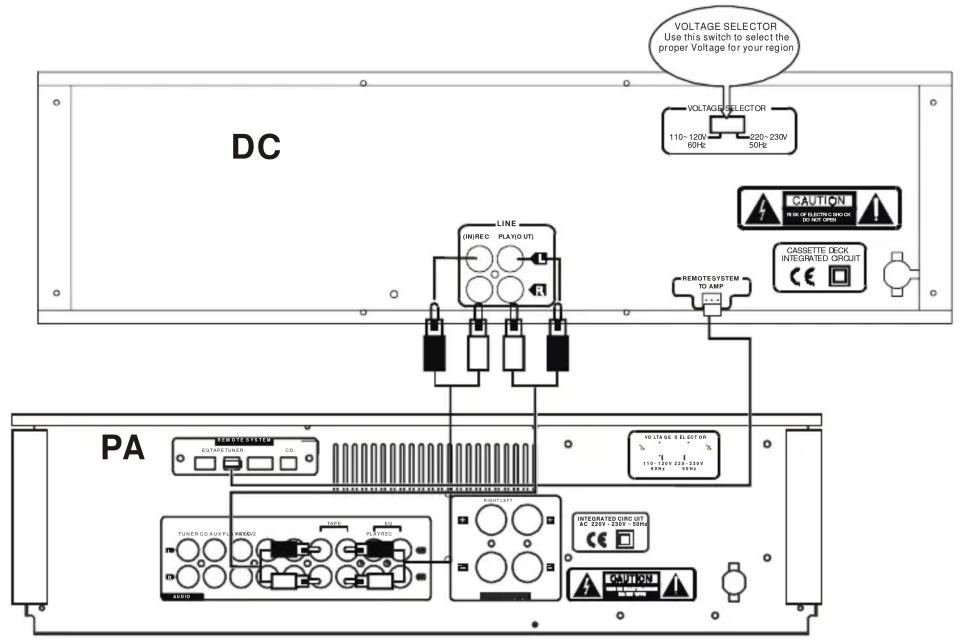
Playback a recorded tape (DECK A or DECK B)
- Switch on the power of the unit.
- Press the STOP/EJECT button and insert a recorded cassette. For Cr02/metal tape, further press the Cr02/metal switch and the light at the indicator will be lit up.
- Press the PLAY button.
- Adjust the AMPLIFIER VOLUME and GRAPHIC EQUALIZER controls for your desired sound level and taste.
- Press the STOP/EJECT button to stop playback at any time.
Fast forward and rewind (DECK A or DECK B)
For fast winding or rewinding the tape, press the FFWD or REW button. Press the STOP/EJECT button when the desired location has been reached. When the end of the tape has been reached, the FFWD or REW button will be released automatically.
Pause (DECK A or DECK B)
Press the PAUSE button to momentarily stop tape travel during playback or recording. Re-press the button for pause release and playback or recording to re-start.
Full automatic stop (DECK A or DECK B)
Press the STOP/EJECT button to stop playback or recording at any time. When the end of the tape has been reached, any of the PLAY, REC, REW or FFWD buttons, if pressed, will be automatically released and the head block completely separates from the tape and capstan. This protects tape and prevents pinch roller wearing out.
RECORDING (DECK B)
When recording, use the DECK B.
Manually level control recording (for external source)
This unit has record level volume to adjust the record level. Usually, the volume has a center click. When it reached the center click position, the tapes can be recorded normally. If the sound source signal is too strong, a red spot will be appeared in the record level indicator. You can adjust the record level volume to the left position and vice versa.
In normal state, the sound source level is between the red and green spots (that's 0dB).
-
Press the TOP/EJECT BUTTON and insert a cassette.
-
When Cr02 tape is used for recording, press the REC Cr02 switch.
- Press the record button. The level meter at the peak level indicator will shift and the REC light will be lit up indicating that recording is underway.
- Press the STOP/EJECT button to stop recording at any time.
Pause
Press this button to momentarily stop tape travel during recording. Re-press this button for pause release and recording restart.
Dubbing operation (DECK A→ DECK B)
This unit enables you to dub a recorded tape to another tape by using the built-in double deck mechanisms. It is performed only one way from DECK A to DECK B.
Preparation
- Insert a cassette for playback in DECK A.
- Select tape DIRECTION button (FFWD or REW) for the desired location of the tape to the beginning.
- Insert a cassette into DECK B.
- Select the dubbing speed by the dubbing High speed switch.
- There are two dubbing speeds: high speed and normal speed.
- For high speed dubbing, press the High speed switch. The light at the indicator will be lit up and high speed dubbing is then activated.
- Normal speed dubbing requires no pressing of the High Speed Switch. No light will be shown at the indicator at all.
- Press the PAUSE button of DECK A.
- Then press the PLAY button of DECK A.
- Press the RECORD button of DECK B.
- Press the PAUSE again of DECK A to release the pause mode. The unit will start the synchronized dubbing operation.
- To stop dubbing operation, press the STOP/EJECT button of DECK B.
Note: Do not change dubbing speed during dubbing operation.
Type....Stereo double cassette deck
Track system.... 4-track 2- channel
Tape speed....4.8 cm/sec
Frequency response
(-20dB recording)
Chrome tape....40-15,000Hz (±3dB)
Normal tape....40-14,000Hz (±3dB)
(0 dB recording)
Chrome tape....40-8,000Hz (±3dB)
Normal tape.....40-8,000Hz (±3dB)
S/N ratio....58dB
Wow and flutter....<0.2% (DIN45500)
Crosstalk....40dB (1 khz)
Harmonic distortion......less than 1%
(at 1 Khz, OVU 3^rd
H.D. Normal tape)
Channel separation....40dB (1 khz)
Head......Deck A
For Playback
Deck B
For recording/playback,
2-gap ferrite head for
erasure
Motor......DC servo motor x 2
Fast Forward/Rewind time..Approx.100 sec
with C-60 cassette
Input terminals
LINE IN X 2......Min. input level:600mV(0dB)
Input impedance: 50 kΩ
Output terminals
LINE OUT X 2....output level: 600mV (0dB)
output impedance: 5 kΩ
Power requirement.....AC220V, 50Hz
power voltage.....230V, 50Hz
For U.K....240V, 50Hz
For U.S.A. & Canada...110V, 60Hz
Power consumption.....watts VA Rated
watts Maximum
Dimensions....360mm x 128m x246mm
(W x H x D)
Weight......4Kg (8.5 Ibs)
ACCESSORIES......Pin plug cord...2
Design and specifications are subject to change without notice.

- ON/STANDBY SWITCH
- CASSETTE HOLDER
- DYNAMIC NOISE REDUCTION
- PEAK LEVEL INDICATOR
- \* REC
- \* HIGH SPEED
- \* PLAY Cr02/METAL
- \* ERC Cr02
- TAPE COUNTER and RESET button (DECK B)
- REC LEVEL SWITCH
- CASSETTE OPERATION BUTTONS
- • (REC)
- I I (pause)
- REC Cr02 SWITCH
- HIGH SPEED DUBBING SWITCH
- DUBBING SWITCH
- PLAY Cr02 SWITCH
- Playback a recorded tape (DECK A or DECK B)
- Fast forward and rewind (DECK A or DECK B)
- Pause (DECK A or DECK B)
- Full automatic stop (DECK A or DECK B)
- RECORDING (DECK B)
- Manually level control recording (for external source)
- Pause
- Dubbing operation (DECK A→ DECK B)
- Preparation
Brand : Pyle
Model : PT649D
Category : Cassette player