VBB-1424 - Battery Valcom - Free user manual and instructions
Find the device manual for free VBB-1424 Valcom in PDF.


| Product Type | Battery Enclosure for UPS System |
| Model | VBB-1424 |
| Brand | Valcom |
| Dimensions (H x W x D) | 10.30" x 3.50" x 2.25" (26.16 cm x 8.89 cm x 5.72 cm) |
| Weight | 2.90 lbs (1.32 kg) without batteries |
| Battery Type | Union Type MX12070 (12V, 7AH) sealed lead-acid |
| Number of Batteries | 4 (supplied with unit) |
| Total Battery Capacity | 14 AH at 24V (series-parallel) |
| Charging Voltage | 27.6 V (13.8 V per battery) |
| Charging Current Limit | 900 mA charging, 100 mA at 27 V final charge |
| Fusing | 1 Amp auto-reset polyswitch; 6 Amps accidental reverse battery polyswitch |
| Recharge Time | 14 hours for fully discharged batteries |
| Run Time at 3 Amps Load | 3 hours |
| Run Time at 6 Amps Full Load | 1.5 hours |
| Low Voltage Shutdown | Below 20 V, reconnects above 25 V |
| Indicator LEDs | Green (charging), Red (low battery), Yellow (battery test) |
| Alarm | Audible beep during power failure, mute button |
| Battery Test Button | Press to test battery voltage; yellow LED if above 24 V |
| Installation | Place on floor within 6 feet of VP-6124-UPS charger |
| Battery Replacement Interval | Every 5 years from date of manufacture |
| Compatible Power Supply | VP-6124/VP-6124-E with VP-6124-UPS charger |
| Safety Warnings | Do not short circuit, dispose of properly, avoid fire |
Frequently Asked Questions - VBB-1424 Valcom
User questions about VBB-1424 Valcom
0 question about this device. Answer the ones you know or ask your own.
Ask a new question about this device
Download the instructions for your Battery in PDF format for free! Find your manual VBB-1424 - Valcom and take your electronic device back in hand. On this page are published all the documents necessary for the use of your device. VBB-1424 by Valcom.
USER MANUAL VBB-1424 Valcom
ADD ON OPTION FOR THE VP-6124/VP-6124-E POWER SUPPLY
INTRODUCTION
The VP-6124-UPS is an optional unit that allows the VP-6124/VP-6124-E to supply power during a power outage.
The VP-6124-UPS is comprised of a VP-6124-UPS (Charger) and a VBB-1424 (Battery Enclosure). The VP-6124-UPS connects to the VP-6124 Power Supply (To receive power to charge the batteries).
Listed below are specifications and recommendations for power sources as well as precautionary instructions.
UPS Float Standby Charging
Charging Voltage: 27.6 Volts (13.8 Volts per battery)
Current Limit: 900mA charging
100mA at 27 Volts final charge
Fusing: 1 Amp auto-reset polyswitch
6 Amps accidental reverse battery polyswitch
Time Required to Recharge Battery
7AH Battery: 14 hours
Length of Time Battery Will Provide Power
| • With four 7AH 12V batteries for 14AH total | |
| 3 Amps load draw: | 3 hours run time |
| 6 Amps full load: | 1.5 hours run time |
Use of batteries greater than 7AH is not recommended since 90% of all power outages are less than an hour in length and the time to evacuate a building is less than an hour.
NOTE: To insure trouble-free UPS back-up operation, five years batteries must be replaced five years from the date of manufacturing.
DIMENSIONS/WEIGHT
• 10.30"H x 3.50"W x 2.25"D
• (26.16cm H x 8.89cm W x 5.72cm D)
2.90 lbs. (1.32 kg)
natural_image
White electronic device with ventilation grilles and indicator lights, no visible text or symbols on the bodyINSTALLATION
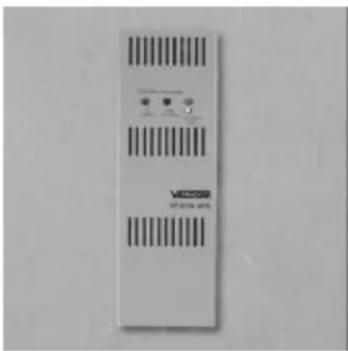
The VP-6124-UPS (Charger) is designed for wall mounting only. Screw the mounting plate to the wall near the VP-6124/VP-6124-E and position the VP-6124-UPS onto the mounting plate.
Attach the UPS unit securely to the bracket lip using the 6-32 x 3/8" long Phillips head self-tapping screw supplied. Place the VBB-1424 on the floor within six feet of the unit.
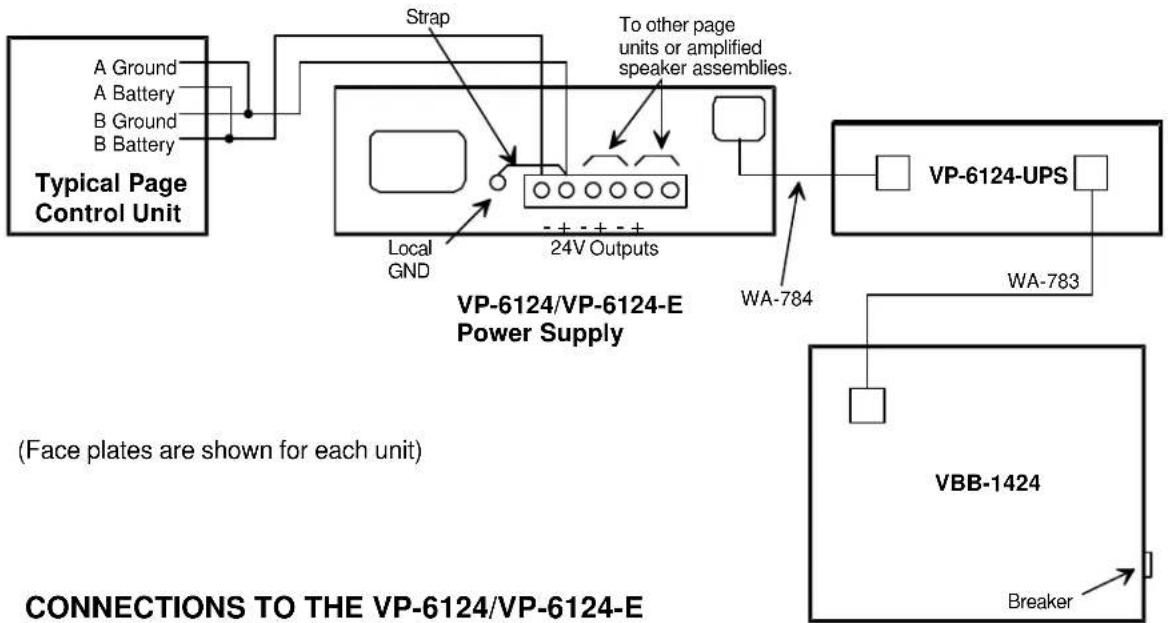
CONNECTIONS
• Disconnect AC power from the power supply.
- Remove plug button from the VP-6124/VP-6124-E.
- Remove wire access cover from the VP-6124/VP-6124-E.
- Using the cable designated by the tag labeled Valcom P/N WA-784 with four positions connector and attached to VP-6124-UPS (Charger), place the Molex connector through the hole on the power supply and connect the charger to the Molex input connector on the VP-6124 Power Supply.
- Snap strain relief into place.
- Replace wire access cover on the VP-6124/VP-6124-E.
- Remove cover from Battery Backup.
- Push cable labeled Valcom P/N WA-783 with two positions connector through the hole on the battery enclosure and snap strain relief into place.
- Attach connector from VP-6124-UPS to battery box.
- Replace access cover.
- Plug power cord from VP-6124/VP-6124-E into AC outlet.
• Turn ON circuit breaker on Battery Backup.
OPERATION
When a power failure occurs, the charger beeps to alert personnel that the supply is operating on the batteries and there is 1.5 hour run time available at 6 Amps full load. Pressing the white button will mute the beeping.
There are three (3) LEDs located on the charger. When the charger is connected to the VP-6124/VP-6124-E power supply, the green LED illuminates signifying the power supply and charger are on line and the batteries are charging.
If the red LED illuminates, this denotes that the batteries have dropped below 20 Volts and the UPS goes into low voltage shutdown to protect the batteries from damage. This disconnects the load. The red LED will turn off and batteries reconnect when power returns and the batteries are charged above 25 Volts.
Pressing the battery test button illuminates the yellow LED if the battery is above 24Volts (Signifies a good battery). The charger will charge the batteries to 27.6 Volts in a 14 hour period assuming completely discharged batteries.
Batteries must be replaced every five years. CAUTION: To reduce the risk of fire or injury to persons, read and follow these instructions.
- Supplied with four (4) Union Type MX12070 batteries. Use only Union Type MX12070 batteries.
- Do not dispose of the batteries in a fire. The cell may explode. Check with local codes for possible special disposal instructions.
- Do not open or mutilate the batteries. Released electrolyte is corrosive and may cause damage to the eyes or skin. It may be toxic if swallowed.
- Exercise care in handling batteries in order not to short the battery with conducting materials such as rings, bracelets, and keys. The battery or conductor may overheat and cause burns.
- Do not attempt to recharge the batteries provided with this or identified for use with this product.
The batteries may leak corrosive electrolyte or explode.
-
Do not attempt to rejuvenate the batteries provided with or identified for use with this product by heating them. Sudden release of the battery electrolyte may occur causing burns or irritation to eyes or skin.
-
When replacing batteries, all batteries should be replaced at the same time. Mixing fresh and discharged batteries could increase internal cell pressure and rupture the discharged batteries (Applies to products employing more than one separately replaceable primary battery).
-
When inserting batteries into this product, the proper polarity or direction must be observed. Reverse insertion of batteries can cause charging, and that may result in leakage or explosion (Applies to products employing more than one separately replaceable primary battery).
-
Remove the batteries from this product if the product will not be used for a long period of time (several months or more) since during this time the battery could leak in the product.
-
Discard "dead" batteries as soon as possible since "dead" batteries are more likely to leak in a product.
-
Do not store this product, or the batteries provided with or identified for use with this product, in high-temperature areas. Batteries that are stored in a freezer or refrigerator for the purpose of extending shelf life should be protected from condensation during storage and defrosting. Batteries should be stabilized at room temperature prior to use after cold storage.
NOTE: The batteries are excluded from the WARRANTY.
TECHNICAL ASSISTANCE
When trouble is reported, verify that the unit is properly connected and there are no broken connections leading to this unit. Assistance in troubleshooting is available from the factory. When calling, you should have a VOM and a telephone test set available and be calling from the job site. Call (540) 563-2000 and ask for Technical Support, or call (540) 767-1555 for Valcom 24-hour Faxback System or visit our website at http://www.valcom.com.
Valcom equipment is not field repairable. Valcom, Inc. maintains service facilities in Roanoke, VA. Should repairs be necessary, attach a tag to the unit clearly stating company name, address, phone number, contact person, and the nature of the problem. Send the unit to:
Repair and Return Dept.
Valcom, Inc.
5614 Hollins Road
Roanoke, VA 24019-5056
flowchart
graph TD
    A["Typical Page Control Unit"] --> B["VP-6124/VP-6124-E Power Supply"]
    B --> C["WP-6124-UPS"]
    B --> D["VBB-1424"]
    B --> E["Breaker"]
    B --> F["Local GND"]
    B --> G["Strap"]
    B --> H["To other page units or amplified speaker assemblies."]
    B --> I["VA-784"]
    B --> J["WA-783"]
    style A fill:#f9f,stroke:#333
    style B fill:#ccf,stroke:#333
    style C fill:#cfc,stroke:#333
    style D fill:#fcc,stroke:#333
    style E fill:#cff,stroke:#333
    style F fill:#ffc,stroke:#333
    style G fill:#cfc,stroke:#333
    style H fill:#fcc,stroke:#333
    style I fill:#ffc,stroke:#333
    style J fill:#fcc,stroke:#333
CONNECTIONS TO THE VP-6124/VP-6124-E
VALCOM LIMITED WARRANTY
Valcom, Inc. warrants its products to be free from defects in materials and workmanship under conditions of normal use and service for a period of one year from the date of shipment. The obligation under this warranty shall be limited to the replacement, repair or refund of any such defective device within the warranty period, provided that:
- inspection by Valcom, Inc. indicates the validity of the claim,
- the defect is not the result of damage, misuse, or negligence after the original shipment,
- the product has not been altered in any way or repaired by others and that factory sealed units are unopened (A service charge plus parts and labor will be applied to units defaced or physically damaged),
- freight charges for the return of products to Valcom are prepaid,
- all units 'out of warranty' are subject to a service charge. The service charge will cover minor repairs (Major repairs will be subject to additional charges for parts and labor).
This warranty is in lieu of and excludes all other warranties, expressed or implied, and in no event shall Valcom, Inc. be liable for any anticipated profits, consequential damages, loss of time or other losses incurred by the buyer in connection with the purchase, operation, or use of the product.
This warranty specifically excludes damage incurred in shipment. In the event a product is received in damaged condition, the carrier should be notified immediately. Claims for such damage should be filed with the carrier involved in accordance with the F.O.B. point.
Headquarters: In Canada
Valcom, Inc. CMX Corporation
5614 Hollins Road 35 Van Kirk Drive #11 and 12
Roanoke, VA 24019-5056
Phone: (540) 563-2000
FAX: (540) 362-9800
Brampton, Ontario L7A1A5
Phone: (905) 456-1072
FAX: (905) 456-2269
- ADD ON OPTION FOR THE VP-6124/VP-6124-E POWER SUPPLY
- INTRODUCTION
- UPS Float Standby Charging
- Time Required to Recharge Battery
- Length of Time Battery Will Provide Power
- DIMENSIONS/WEIGHT
- INSTALLATION
- CONNECTIONS
- OPERATION
- Batteries must be replaced every five years. CAUTION: To reduce the risk of fire or injury to persons, read and follow these instructions.
- NOTE: The batteries are excluded from the WARRANTY.
- TECHNICAL ASSISTANCE
- Repair and Return Dept.
- Valcom, Inc.
- Hollins Road
- Roanoke, VA 24019-5056
- CONNECTIONS TO THE VP-6124/VP-6124-E
- VALCOM LIMITED WARRANTY
- This warranty is in lieu of and excludes all other warranties, expressed or implied, and in no event shall Valcom, Inc. be liable for any anticipated profits, consequential damages, loss of time or other losses incurred by the buyer in connection with the purchase, operation, or use of the product.
Brand : Valcom
Model : VBB-1424
Category : Battery