E561164 - SSD Drive ELO - Free user manual and instructions
Find the device manual for free E561164 ELO in PDF.


| Product Type | Solid State Drive (SSD) |
| Model | E561164 |
| Brand | Elo |
| Form Factor | 2.5 inch |
| Interface | SATA III (6 Gb/s) |
| Storage Capacity | 120 GB |
| Read Speed | Up to 550 MB/s |
| Write Speed | Up to 500 MB/s |
| NAND Flash Type | 3D TLC |
| MTBF | 1,500,000 hours |
| Power Consumption (Active) | 2.5 W (typical) |
| Power Consumption (Idle) | 0.5 W |
| Operating Temperature | 0°C to 70°C |
| Storage Temperature | -40°C to 85°C |
| Shock Resistance | 1500 G / 0.5 ms |
| Weight | 50 g |
| Dimensions (W x H x D) | 100.0 x 69.9 x 7.0 mm |
| Supported Features | TRIM, S.M.A.R.T., NCQ |
| Warranty | 3 years |
| Compatibility | Laptop and desktop computers with SATA port |
Frequently Asked Questions - E561164 ELO
User questions about E561164 ELO
0 question about this device. Answer the ones you know or ask your own.
Ask a new question about this device
Download the instructions for your SSD Drive in PDF format for free! Find your manual E561164 - ELO and take your electronic device back in hand. On this page are published all the documents necessary for the use of your device. E561164 by ELO.
USER MANUAL E561164 ELO
Critical Issue: Installing SSDs on Touchcomputers & IDS Computer Modules: Systems with Microsoft Windows® 7 (or Windows XP/POSReady 2009)
Scenario
If you have ordered an SSD (Solid-State Drive) kit to either replace or supplement the factory-installed HDD (Hard Disk Drive) for your Elo TouchSystems Touchcomputer or IDS Computer Module, you need to take some VERY IMPORTANT steps before using it to ensure that it works properly and to prevent permanent and unrecoverable damage to the SSD.
Critical Action Needed:
By default, Windows 7 schedules weekly defragmentation of the HDD/SSD to occur. However, DEFRAGMENTING an SSD will damage and eventually destroy the device! After installing an SSD in a Windows system, as soon as the system is rebooted, you MUST IMMEDIATELY take the following steps to ensure that you do not permanently damage the SSD module:
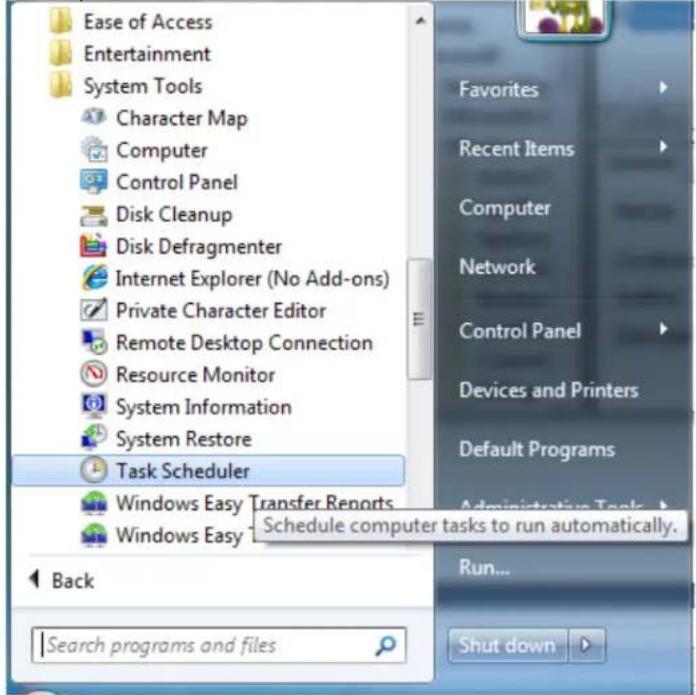
- In Windows 7, go to: Start → All Programs → Accessories → System Tools → Task Scheduler (see below):
- On the left side, navigate to "Task Scheduler Library → Microsoft → Windows → Defrag" and look for the "ScheduledDefrag":
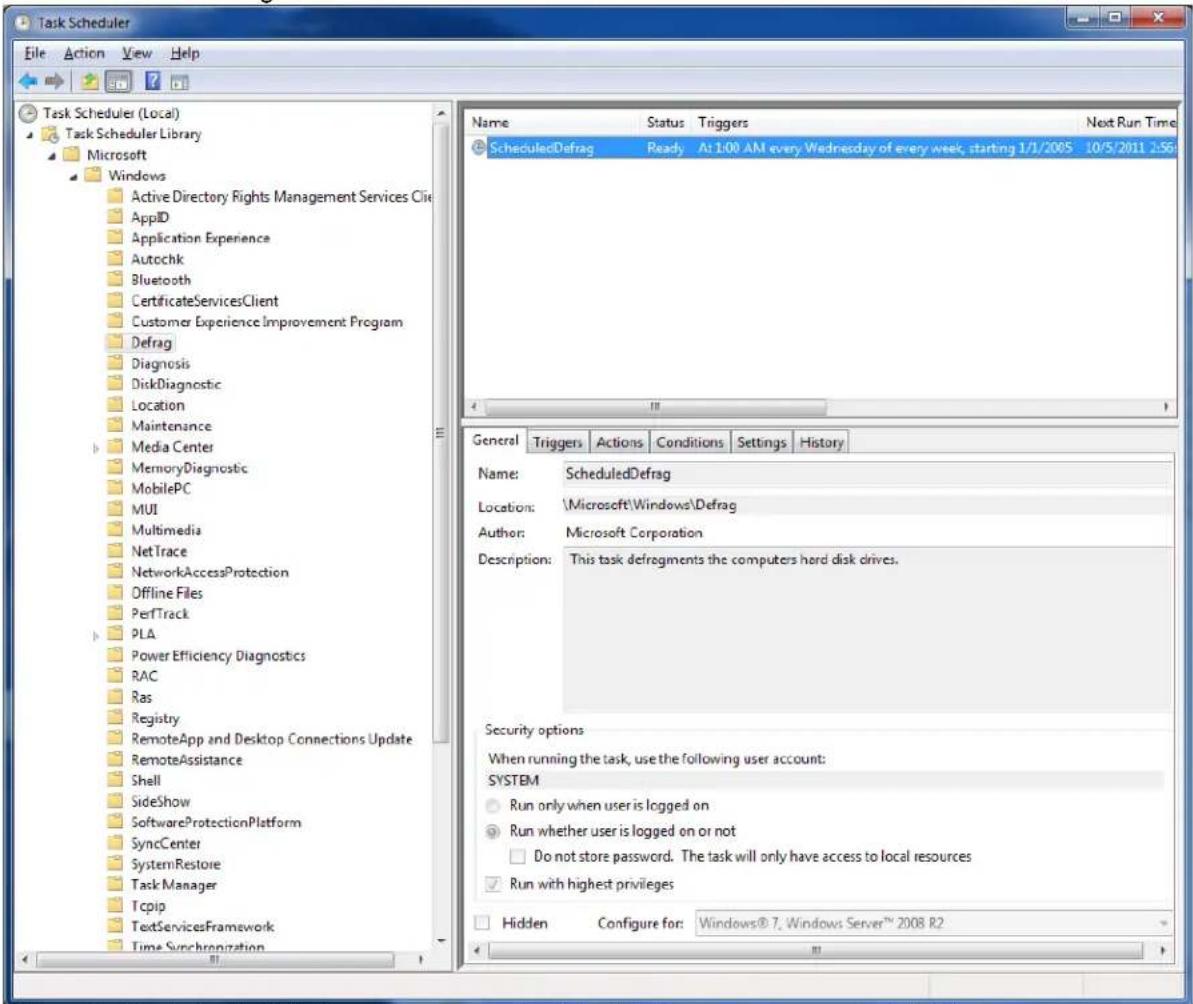
Figure 1. By default, Windows 7 runs a scheduled defrag once a week at 1:00 a.m.
- You must then delete any automatically scheduled defragmentation for the SSD drive!
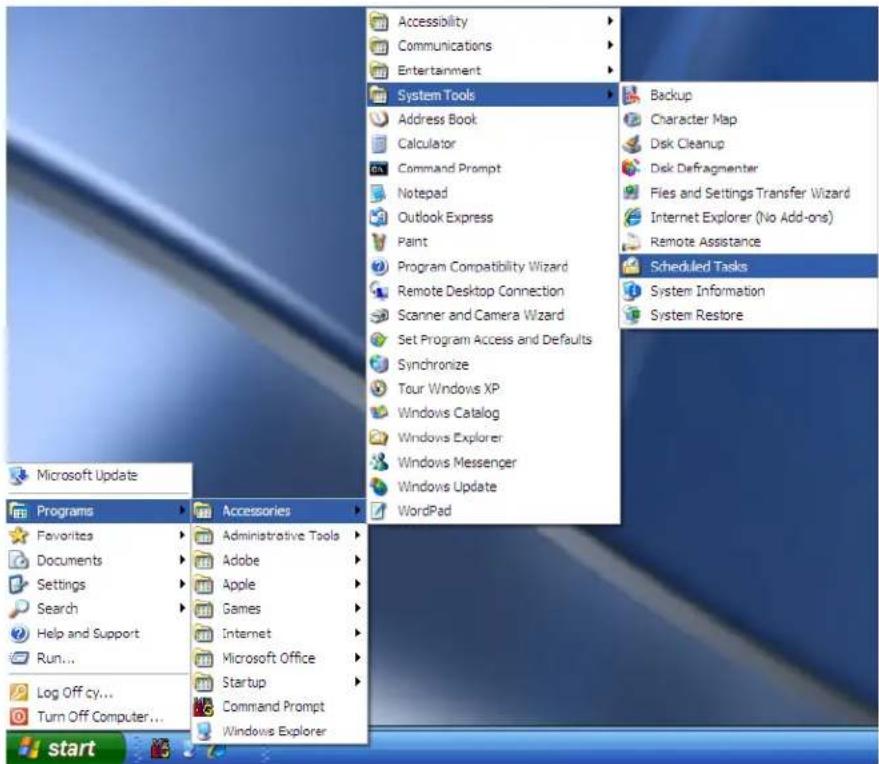
By default, Windows XP and Windows POSReady 2009 do NOT automatically schedule Disk Defragmentation. However, it is strongly recommended that you verify that there are no automatically scheduled occurrences of the DEFRAG program scheduled. To ensure there are no scheduled defragmentation tasks running in Windows XP or Windows POSReady 2009, the procedure is similar to Windows 7 (see below):
- In Windows XP or Windows POSReady 2009, go to: Start → All Programs → Accessories → System Tools → Task Scheduler (see figure below):
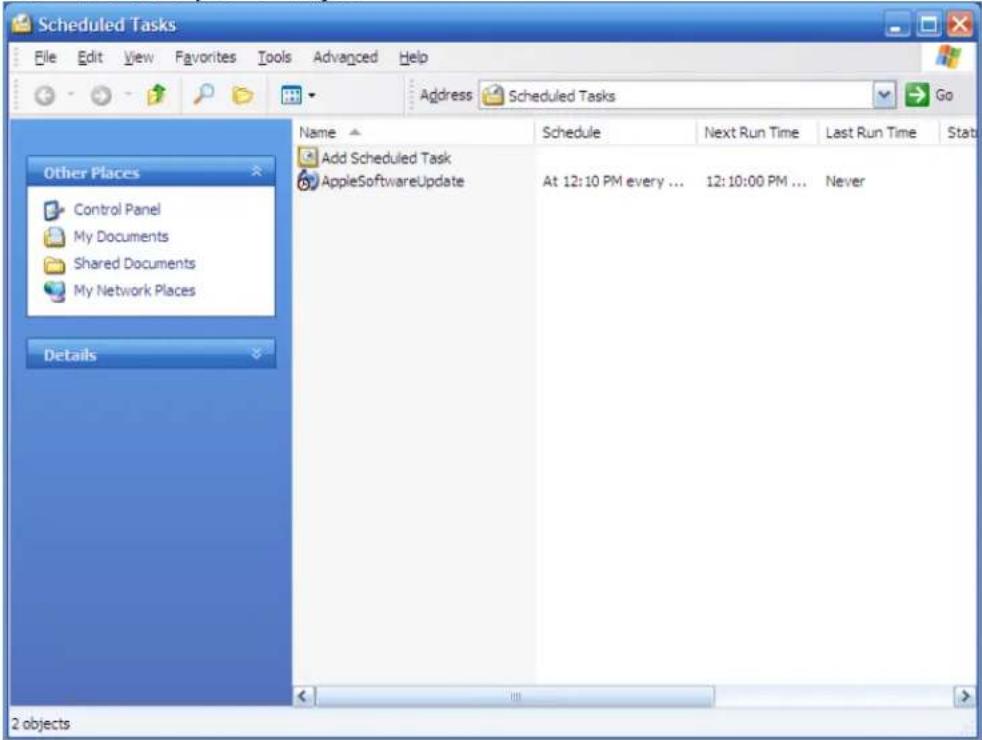
- Now verify that there are NO scheduled tasks for DEFRAG (see below). If there are, delete/remove them and save your changes.
Contacts
For more information please contact Elo Technical Support for your region for assistance: http://www.elotouch.com/Support/TechnicalSupport/tech.asp
North America
TE Touch Solutions
301 Constitution Drive
Menlo Park, CA 94025-1110
Toll 800-ELO-TOUCH
Tel 1-650-361-4800
customerservice@elotouch.com
www.elotouch.com
Europe
Tel +32 (0)16 35 21 00
Fax +32 (0)16 35 21 01
elosales@elotouch.com
www.elotouch.eu
Asia-Pacific
Tel +81 (45) 478-2161
Fax +81 (45) 478-2180
www.tps.co.jp
Latin America
Tel 305-717-6715
Fax 305-717-4909
www.elotouch.com.ar
www.elotouch.com.br
This document can be found online www.elotouch.com/support and search for "IMPORTANT REQUIREMENTS FOR SSD INSTALLATION". Pricing, specifications, and availability of Elo products may change without notice and no length of product life is specified or implied. Taxes and shipping charges are not included, vary, and are not subject to discount.
Elo TouchSystems, Elo TouchSystems (logo), TE Connectivity, TE Connectivity (logo), and TE (logo) are trademarks of the TE Connectivity Ltd. family of companies.
Brand : ELO
Model : E561164
Category : SSD Drive