
SDVD8737 - Portable DVD Player CURTIS - Free user manual and instructions
Find the device manual for free SDVD8737 CURTIS in PDF.


| Product Type | Portable DVD Player |
| Brand | Curtis |
| Model | SDVD8737 |
| Screen Size | 7 inches (diagonal) |
| Resolution | 480 x 234 pixels |
| Disc Compatibility | DVD, DVD±R/RW, CD, CD-R/RW, MP3, JPEG |
| Dimensions (W x H x D) | 200 x 160 x 30 mm |
| Weight | 0.9 kg (including battery) |
| Power Supply | AC adapter (input 100-240V, output 9V/1.5A) or built-in rechargeable battery |
| Battery Type | Lithium-ion, 7.4V, 2200mAh |
| Battery Life | Up to 3 hours of playback |
| Video Outputs | Composite AV output (RCA) |
| Audio Outputs | Headphone jack 3.5mm |
| Other Connectivity | USB port (for media playback), SD/MMC card slot |
| Playback Features | Parental control, zoom, subtitle selection, repeat modes |
| Maintenance | Clean with soft, dry cloth; avoid solvents; lens cleaning recommended periodically |
| Safety Notes | Do not expose to moisture or extreme temperatures; use only supplied adapter; keep away from children |
| Repairability | Battery and lens are replaceable; other components may require professional service |
| Spare Parts | Available through Curtis service centers or authorized dealers |
| Accessories Included | AC adapter, car charger, AV cable, remote control, user manual |
Frequently Asked Questions - SDVD8737 CURTIS
User questions about SDVD8737 CURTIS
0 question about this device. Answer the ones you know or ask your own.
Ask a new question about this device
Download the instructions for your Portable DVD Player in PDF format for free! Find your manual SDVD8737 - CURTIS and take your electronic device back in hand. On this page are published all the documents necessary for the use of your device. SDVD8737 by CURTIS.
USER MANUAL SDVD8737 CURTIS
natural_image
Two black-framed digital TV devices with abstract wave graphics on screens (no visible text or symbols)USER'S MANUAL

Table Of Contents
Safety Precaution 1
Package 3
Main Features 3
Main Unit Controls 4
System Connection 5
The Remote Control 10
Basic operation 12
System Setup 22
Specification 24
Troubleshooting 25
Safety Precaution
Thank you for choosing our portable DVD player. It includes a7" wide screen and a DVD player. The unit applies the latest state of art electronics and is designed for use at home, in hotels and in offices etc for relaxation. The compact size makes carrying easier as well as installation. Please read the manual carefully prior to use and keep it well for later consultation.


Warning: To reduce the risk of fire or electric shock, do not expose this apparatus to rain or moisture.
1) Please read the instruction manual carefully and follow all the requirements of safe operation to operate the device.
2) Do not use this unit near water. Do not place over the unit any container with liquid inside.
3) Do not install near any heat sources such as radiators, heat registers, stoves, or other apparatus (including amplifiers) that produce heat.
4) Unplug this unit during lightning storms or when unused for long time.
5) About Cleaning: Unplug the system, use only wet cloth to clean. Do not use liquid detergent or aerosol.
6) Only use accessories specified by the manufacturer.
7) Refer all servicing to qualified service personnel, servicing is required when the unit has been damaged in any way, such as power supply cord or plug is damaged, liquid has been spilled or objects have fallen into the unit, exposed to moisture, does not operate normally. Don't try to repair the machine by yourself because of the danger of high voltage and electric shock.
8) Do not use irregular shaped discs such as heart or star-shaped discs as they may cause the unit to malfunction.
This device complies with Part 15 of the FCC Rules. Operation is subject to the following two conditions: (1) This device may not cause harmful interference, and (2) This device must accept any interference received, including interference that may cause undesired operation.
Warning: Changes or modifications to this unit not expressly approved by the party responsible for compliance could void the user's authority to operate the equipment.
NOTE: This equipment has been tested and found to comply with the limits for a Class B digital device, pursuant to Part 15 of the FCC Rules. These limits are designed to provide reasonable protection against harmful interference in a residential installation. This equipment generates, uses and can radiate radio frequency energy and, if not installed and used in accordance with the instructions, may cause harmful interference to radio communications.
However, there is no guarantee that interference will not occur in a particular installation. If this equipment does cause harmful interference to radio or television reception, which can be determined by turning the equipment off and on, the user is encouraged to try to correct the interference by one or more of the following measures:
Reorient or relocate the receiving antenna.
Increase the separation between the equipment and receiver.
Connect the equipment into an outlet on a circuit different from that to which the receiver is connected.
Consult the dealer or an experienced radio/TV technician for help.
Package
| 7 " LCD Monitor & DVD Player | 1 |
| Remote Control with battery | 1 |
| Audio/Video Cable | 1 |
| AC/DC Power Adapter | 1 |
| Cigarette Lighter Adapter | 1 |
| User Manual | 1 |
| Earphone | 2 |
| DC+Audio/Video Cable | 1 |
| Carry Bag | 1 |
| Mounting Straps | 2 |
Main Features
● High brightness color 7" LCD screen
● Compatible with disc of DVD, VCD, MP3, MP4, CD, JPEG, etc.
● Built-in stereo speaker
● Support PAL or NTSC system
● Support Multi-language OSD, speed forward/backward, repeat function
- Zoom in/out function
Main Unit Controls

- Open knob
- Power ON/OFF switch
- SETUP button
- MODE button
- 6.OK button Function same as
"ENTER "on Remote control) - Play/Pause
-
STOP button
-
DC IN 9-12V
10.DC OUT - AV OUT
- Earphone jack
- Volume knob
- SD card slot
- USB Port
- Rating Label Position
Monitor View

- Power ON/OFF
- Volume knob
- Earphone jack
4.AVin
5. DC IN 9-12V
6. Brightness Knob
System Connection
Powering and installation
Plug one end of the AC/DC power adaptor into the DC IN 9-12V jack on the right of the main unit, then plug the other end into the AC power receptacle. Please refer to the following illustration.

natural_image
Line drawing of a portable air conditioner unit connected to a wall-mounted power outlet (no text or symbols)If using car cigarette lighter adaptor to connect to the power:
Plug one end of the cigarette lighter adaptor into the DC IN 9-12V jack on the unit, plug the other end into the car cigarette lighter socket. See illustration below.

natural_image
Line drawing of a portable electronic device with ports and cables (no text or symbols)Notice:
1.Car cigarette lighter adaptor is available to use only when the car cigarette lighter with DC 12V negative grounding.
2. The mains plug is used as the disconnect device, the disconnect device should remain readily operable.
Using SD/MMC card
Upon using an SD or MMC card, insert it into the corresponding slot flatly with the label side frontward until you hear a click.

Using USB
Upon using an USB, insert it into the USB slot directly.

5
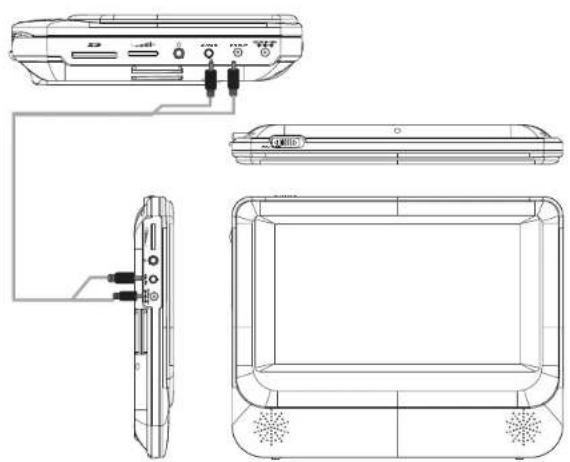
Connecting to the monitor
The unit can also be connected to the external LCD monitor.
Connect the unit to power by AC/DC adapter or cigarette lighter adapter.
Then connect the unit DC OUT jack to DC IN 9-12V Jack of the LCD Monitor by a DC/AV cable. Also use this DC/AV cable to connect the AV OUT jack of the unit to AV IN jack of the Monitor.
Please refer to the illustration below.
natural_image
Technical line drawing of a portable air conditioner unit with labeled ports and connectors (no text or symbols present)Note: You're advised to supply both units the power by the cigarette lighter adapter only. The AC/DC adapter is used to supply power of one unit only and as the charger to charge the main unit if it's with built-in battery.
In Car Installation
- Fit the headrest mount to the DVD Player / Monitor as required.
NOTE: Both the headrest mounts are the same, there is no difference for DVD Player or Monitor.

Turn the headrest and player around so the backs are facing you.

natural_image
Simple line drawing of a mechanical device with labeled 'back' and four connectors (no text or symbols beyond the label)Slide the vertical straps A and B through the strap lock upon the back of the DVD player, or monitor, as shown.
Fold and secure the horizontal straps on to the back of the mount until the velcro attaches. Ensure the DVD player or monitor is mounted centrally.
Turn the headrest and player around so the front is facing you.
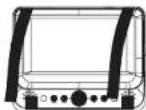
Bring straps C, D, E & F in front of the DVD Player and attach to the velcro as shown.
2. Fitting the Headrest Mount to the headrest

natural_image
Diagram of a device with rotating cables and a screen, no text or symbols presentFit the straps around the headrest and engage the 2 trident clips. Ensure clips are securely fastened.
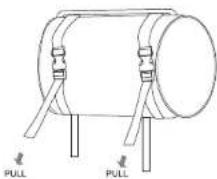
Pull the straps tight using the adjustment. Tuck the loose ends into the strap tidy.
NOTE: For SDV48-AM installation it is recommended that the DVD Player is on the LEFT headrest, to ensure a neat cable run to the monitor, as shown below.

natural_image
Line drawing of two electronic devices connected by a cable, showing signal flow without any text or symbolsConnecting with external Speaker
The unit can be connected with external speaker. Please see the following illustration.

flowchart
graph TD
    A["TV"] --> B["Left front speaker"]
    A --> C["Centerspeaker"]
    A --> D["Right front speaker"]
    A --> E["Subwoofer"]
    A --> F["Left rear speaker"]
    A --> G["Right rear speaker"]
    H["AMPLIFIER"] --> A
    I["Not supplied"] --> A
    J["Power Supply"] --> A
    K["Power Supply"] --> A
    L["Power Supply"] --> A
    M["Power Supply"] --> A
    N["Power Supply"] --> A
Notice: There is no 5.1 channel in the unit, however, after connecting to APM it is available to output audio in 5.1 channel.
The Remote Control
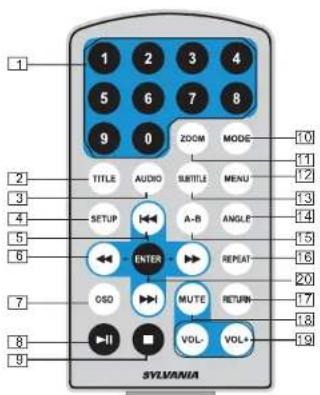
-
Number button
-
TITLE (To display title information)
-
AUDIO (To select audio language)
-
SETUP (To go to or exit setup menu)
-
button (To go to previous/next chapter or scene during playing)
-
◀▶ button (To scan forward/backward at 2, 4, 8, 16, or 32 times)
-
OSD (To display disc information during playing such as elapsed and remaining time)
-
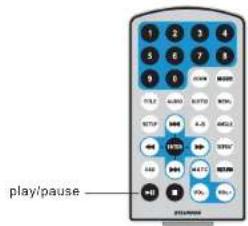
▶ Play/pause
-
■ Stop ( press once to stop playback, then press ▶ to resume playback from the point where you stopped; press stop button twice to stop playback completely)
-
MODE (To select the source refer to P17) ^20 : Enter ( To confirm, function same as "OK" Button on uint)
-
ZOOM(To zoom in/out the image during the playback)
- Menu (To enter or exit menu root)
- Subtitle (To select subtitle language when playing DVD disc)
- Angle (To change viewing angle when playing disc with multi-angle)
- A-B (Repeat a specific portion from point A to B, press it again to cancel repeat playing)
- Repeat (To repeat playing title, chapter or track)
- Return (To return to the main menu)
- MUTE(To turn to mute)
- VOL +/- (To adjust the volume)
The Use of Remote Control
Please put the battery into the remote control as per below illustration.

When using remote control, make sure the infrared window is pointed to infrared receiving window of the machine. The distance between machine and remote control must be within 3 metres. Please refer to the following illustration.

Notice
- To avoid falling off or place near damp environment.
- To avoid infrared receiving window of the unit being under direct sunlight.
- Please use a new battery to replace old one if the remote control doesn't work.
Basic Operation

Playing disc of DVD, MPEG4, SVCD, VCD, CD, Mp3.
- In the Source Mode, you can press "◀", "▶", to select and "ENTER" key to enter the source you want.
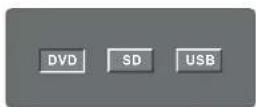
- Open the disc door and insert a disc into the door with the label side facing up.
- Close the disc door. The unit will load the disc and start playing.
- Press ■ to once to stop playback; then press▶ to resume playback from the point where you stopped; press ■ twice to stop playback completely).
- During playback, press ▶ to pause; press it again to resume playback.
- When the playing is finished, please turn off the power by sliding ON/OFF switch to OFF.
- For some DVD disc with Title or Chapter menu, press "MENU" button to enter menu page, and use◀◀◀◀◀◀ to select. Press ENTER to confirm.
Note: Please do not disconnect USB devices or plug out SD/MMC cards while they are working with the unit. Functional failure may occur in case of wrong operations.

Fast forward and fast backward

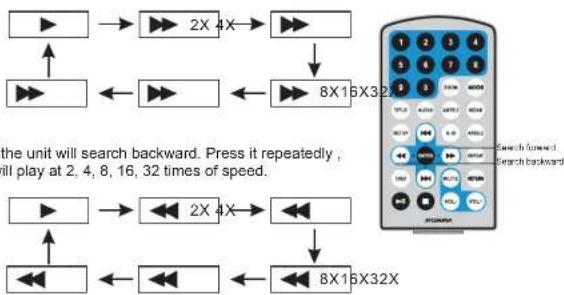
When playing disc of DVD, MPEG4, SVCD, VCD, CD, the unit can search forward or backward.
- Press the unit will search forward. Press it repeatedly, the unit will play at 2, 4, 8, 16, 32 times of speed.
flowchart
graph TD
    A["▶"] --> B["▶ 2X 4X"]
    B --> C["▶"]
    D["▶"] <--> E["▶ 8X16X32X"]
    E --> F["▶"]
    G["▶"] <--> H["▶ 2X 4X"]
    H --> I["▶"]
    J["▶"] <--> K["▶ 8X16X32X"]
    K --> L["▶"]
    M["▶"] <--> N["▶ 8X16X32X"]
    N --> O["▶"]
    P["▶"] <--> Q["▶ 8X16X32X"]
    Q --> R["▶"]
Repeat playing

When playing disc of DVD, MPEG4, SVCD, VCD, CD, user can repeat playing one chapter, title or all the whole disc.
For DVD disc, press "repeat" button, user can repeat playing one Chapter; press it again to repeat playing Title; press it the third time to repeat playing the whole disc.

For MP3 disc, press "repeat" to repeat playing present file; press it again to repeat playing the folder; press it the third time to cancel repeat playing.

Repeat playing of favorite scene

When playing disc of DVD, MPEG4, SVCD, VCD, CD, Mp3, user can repeatedly play a specific section.
During playback, press "A-B" button at a point A, then press this button again in point B, the unit will automatically repeat playing the part between A-B

Press it the third time, the unit will return to normal playback.

Angle
During playing DVD disc with multi-angle, press "Angle" button, the followings will be displayed on screen:

Press number buttons to select the angle you desire

To return to normal playing, please press "Angle". The unit will play the disc in the default angle.

Notice
The function is available only for discs with multi-angle.

Zoom in/ out

When playing disc of DVD, MPEG4, SVCD, VCD, user can zoom in or zoom out the image.
During playback, press "Zoom" button, the image will be enlarged; press it again the image will be enlarged again; press it fourth time, the image will zoom out, press it repeatedly and the image will return to normal status.

When the image is enlarged, user can press to move the image.


Playing JPEG file in data disc
- Place a JPEG disc into the tray, the unit will start reading and play.
- Press "MENU" to browse JPEG files
- PRESS MENU to browse JPEG files.
- Press ◀◀▶ to select a JPEG file and press "ENTER" button to confirm.
Note: you can press MENU to return to the folder list. Press ▶ or *ENTER " to preview the file selected -
To rotate the picture counter-clockwise, press "◀"; Press *▶" to rotate the picture clockwise
-
Press OSD button when viewing pictures, you can select different refresh mode as follows:
①. from top to bottom
②. from bottom to top
③. from left side to right side
④ from right side to left side
④. from right side to left side ⑤. from left top to right bottom
⑤. from left top to right bottom
⑥. from right top to left bottom
①. from left bottom to right top
⑧. from right bottom to left top
⑨. from horizontal center to both sides
⑩. from vertical center to both sides
⑪. From top and bottom to center.
⑫. from right and left to center.
⑬. from four window's top side to bottom side.
H. from four window's left side to right side.
⑮. from 4 edges to center.
-
During viewing files, "①" may appear when pressing "Angle" or "Subtitle" or "Audio" or "A-B" or "Title" etc; in this situation these options are unavailable to operate.
-
When viewing JPEG files, press "■", pictures will be displayed in thumbnail mode, press ◀◀◀◀◀◀◀ or "ENTER" button to select one picture to view
Playing MP3 files in data disc
- Place MP3 disc into the disc door .
Press "◀/◀" or "ENTER" button to choose a MP3 file; Press "▶" or "ENTER" button to play the file selected.
SD/MMC/USB main menu

natural_image
Four abstract 3D-rendered objects on a gradient gray background, no text or symbols visibleAfter Enter the SD/MMC or USB, the system will show Main Menu which includes 4 Function ICONS. You can select them by "◀◀" and press "ENTER" key to confirm.

Browser Mode
Detail explanation please refer to P18

Photo Mode
Detail explanation please refer to P18 -19
Music Mode
Detail explanation please refer to P19

Movie Mode
Detail explanation please refer to P20
Browser mode

In the Browser Mode, the system will show the list of file and folder.
"◀◀", "▶◀", "ENTER" key: select and play
"►": Enter the folder
"◀": Quit the folder
Note: if you want to return to the Main Menu, first, the system must be in List of file and folder status, and you can press"RETURN" KEY to return to the Main Menu.
Photo mode

natural_image
Grid of grayscale landscape photos including mountains, waves, and landscapes (no text or symbols)In the Photo Mode, the System will show the thumbnail Mode first.
“◀”, “▶”, “◀”, “▶”, “ENTER”: select and play.
Slide Show : play the JPEG
Menu : Enter the Help Menu.
Prev: Page Up.
Next: Page Down.
When playing JPEG :
-
To rotate the picture counter-clockwise, press "◀"; Press "▶" to rotate the picture clockwise
-
Press OSD button when viewing pictures, you can select different refresh mode as follows:
①. from top to bottom
②. from bottom to top
③. from left side to right side
④. from right side to left side
⑤. from left top to right bottom
⑥. from right top to left bottom
⑦. from left bottom to right top
⑧. from right bottom to left top
⑨. from horizontal center to both sides
⑩. from vertical center to both sides
⑪. from top and bottom to center
⑫. from right and left to center.
-
from four window's top side to bottom side.
-
from four window's left side to right side.
⑮ . from 4 edges to center
- During viewing files, " ∅ " may appear when pressing " Angle " or "Subtitle" or "Audio"
or "A-B" or "Title" etc; in this situation these options are unavailable to operate.
- When viewing JPG files, press "■" or "RETURN" key, pictures will be displayed in thumbnail mode, press ◀◀◀◀◀◀◀ or "ENTER" button to select one picture to view
Note: If want to return the Main Menu, you can Press "Return" key in the thumbnail mode.
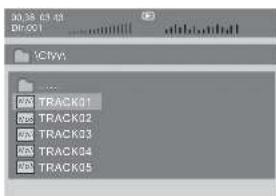
Music mode

In the Music Mode, the system will show the list of music file, like Mp3 and so on.
Press "◀", "▶", "ENTER", select and play.
Press"◄◄/►►" to fastward/backward Mp3 during playing.
Press"◀◀/▶◀" to select the bottom function when in "stop" status.
Page-: Page Up.
:play
Page+:Page Down
Note: Press "Return" Key to Return to the Main Menu
Movie mode
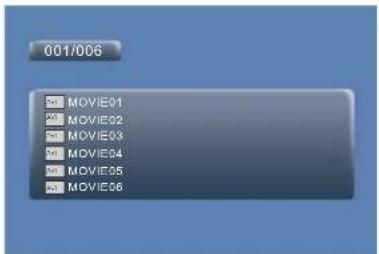
In the Movie Mode, the system will show the list of Movie file, like AVI, Mp4 and so on.
"◀", "▶", "ENTER" Key: Select and Play.
When playing movie you can press "MENU" and "Return" Key to back to the list of movie file status. And if you want to Return to the Main Menu, Please Press "Return" key in list of Movie file status.
CD RIPPING
During playing the CD/HDCD disc, you can enter CD Ripping function. By pressing subtitle button, DVD player will be able to change the CD format into MP3 format, and then store it in the USB.

Speed: In this item, you can set the rip speed: Normal or Fast.
Bitrate: In this item, you can set the bitrate. It has 3 choices, 128Kbps, 96 Kbps and
112 Kbps
Create ID3: In this item, you can create ID3.
Device: This item indicates whether USB is connected with DVD player.
Exit: Exit to the previous menu.
Select all: Select all the files in the disc for changing and storing.
Select none: unselect all the files in the disc.
Start: Move the cursor to the item and press Enter button, the changing begins.

During the changing, you can select CANCEL to stop the changing.
System Setup
| Setup Menu → Main PageGeneral SetupVideo SetupPreference Setup | Press 'Setup' button, the main menu will be displayed on the screen. In the General Setup Page, Press←→ button to highlight this item. Press ENTER button to access. Press ←→ button to select the setting. Press ENTER button to confirm your selection. Press ← button to exit. |
General Setup Page
| TV display:Enter this option, user can set screen display format.(Nomal/PS, Nomal/LB, Wido)The default is "Wido"Note:If the function depends on the display ratio with which the DVD disc is recorded. Please choose "Wide(16.9)*when using a16.9 widescreen TV set | |
| Angle Mark:Enter this option to set the angle during playback.Optional setting. ON, OFFThe default is. ON | |
| OSD Language:In the option user can set OSD menu language(English, French, German, Italian).The default: English | |
| Screen Saver:Enter this option to set whether to activate the screen saver function.The default is ON. |
Video Setup Page
 | TV Type:Enter this option to select TV type(PAL,NTSC)The default is NTSC. |
 | Set the Video Quality of AV OUT |
 | Set the Video Quality of PANEL |
Preference Page
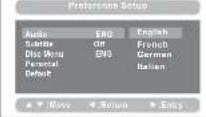 | AudioEnter this option, user can select your preferred audio language for DVDs.The default is English.Note:The audio language depend on the material or each disc.User can also change the audio language during playback by pressing the Audio button. |
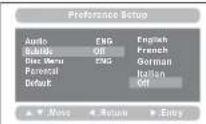 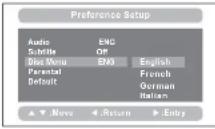 | Subtitle.Select your preferred language to show the subtitles on the screen.The default is OFFThe subtitle languages depend on the information available on each disc.You can also change the subtitle language during playback by press the SUBTITLE button.Disc Menu:This function allows you to choose the menu language stored on the disc.The default is English.Note: the disc menu languages depend on the information available on the disc. |
 | Parental:Enter this option to set the parental control level to some unsuitable disc scenes being watched by the children.Optional parental control levels: KID SAFE, G, PG, PG 13,POR, R, No17, ADULT.The default of this option is ADULT.The default password:8888. |
 | Default:Select this item and press ENTER button to reset all settings to the original factory settings. |
Specification
Compatible disc: DVD/VCD/CD/Mp3/MPEG4
Signal system: PAL/NTSC
Panel size: 7 inch
Frequency response: 20 Hz to 20 kHz
Video output: 1 Vp-p/75 Ohm, unbalanced
Audio output: 1.4Vrms/10kOhm
Audio S/N: Better than 80 dB
Dynamic range: Better than 85 dB
Laser: Semiconductor Laser, Wave Length: 650 nm/795 nm
Power source: DC 9-12V
Power consumption: 10 W
Operating temperature: 0\~40°C
Weight(M:0.0136/DQ:D kgs Player
Dimensions (Monitor/DVD Player) 212x166.5x25
Troubleshooting
| PROBLEM | SOLUTION |
| No sound or distorted sound | Make sure the machine is connected properly.Make sure all cables are securely inserted into the appropriate jacks. |
| Can't advance through a movie | You can't advance through the opening credits and warning information that appears at the beginning of movies because the disc is programmed to prohibit that action. |
| The icon 2 appears on screen | The feature or action cannot be completed at this time because:1. The disc's software restricts it.2. The disc's software doesn't support the feature (e.g., angles)3. The feature is not available at the moment.4. You've requested a title or chapter number that is out of range. |
| Picture is distorted | The disc might be damaged. Try another disc;It is normal for some distortion to appear during forward or reverse scan. |
| No forward or reverse scan | Some discs have sections that prohibit rapid scanning or chapter skip;If you try to skip through the warning information and credits at the beginning of a movie, you won't be able to. This part of the movie is often programmed to prohibit skipping through it. |
Owing to continuous improvement, no prior notice will be given regarding changes on above feature and spec.


- Table Of Contents
- Safety Precaution
- Main Features
- System Connection
- Powering and installation
- Connecting to the monitor
- In Car Installation
- Fitting the Headrest Mount to the headrest
- Connecting with external Speaker
- The Remote Control
- The Use of Remote Control
- Notice
- Basic Operation
- Fast forward and fast backward
- Repeat playing
- Repeat playing of favorite scene
- Angle
- Zoom in/ out
- Playing JPEG file in data disc
- Playing MP3 files in data disc
- SD/MMC/USB main menu
- Movie mode
- CD RIPPING
- Specification
Brand : CURTIS
Model : SDVD8737
Category : Portable DVD Player