
PMUX42 - Audio Interface Pyle - Free user manual and instructions
Find the device manual for free PMUX42 Pyle in PDF.


| Product Type | 2-in 2-out USB Audio Interface / Podcaster |
| Brand | Pyle |
| Model | PMUX42 |
| Dimensions (L x W x H) | 5.91" x 3.94" x 1.75" (150 x 100 x 44 mm) |
| Construction Materials | Aluminum case, ABS, copper |
| Power Supply | DC 5V, 1A via USB Type-C or USB 2.0 (Type B) from computer |
| USB Sound Card | USB 2.0 Type-C |
| Audio Resolution | Up to 24-bit / 192 kHz |
| Frequency Response | 20 Hz – 20 kHz |
| Total Harmonic Distortion (THD) | < 0.5% @ +4 dBu |
| Power Consumption | 2 W |
| Input Channels | 2 (CH1: combo XLR/TRS/TS; CH2: TS line/instrument) |
| Outputs | Main Left/Right (TS), Headphones (1/4" stereo), Phone (1/8" TRRS) |
| Phantom Power | +48V switchable (XLR only, CH1) |
| CH1 Pad Switch | Attenuates input to prevent distortion |
| CH2 Hi-Z Switch | For passive electric guitar/bass |
| Monitor Output Modes | Mix (all inputs), Sub (USB only), or CH1-2 only (switch selectable) |
| Included Accessories | USB cable, 3.5mm to 3.5mm jack cable |
| Compatibility | Windows, Mac, mobile devices with OTG support |
| Intended Use | Recording, songwriting, streaming, podcasting |
Frequently Asked Questions - PMUX42 Pyle
User questions about PMUX42 Pyle
0 question about this device. Answer the ones you know or ask your own.
Ask a new question about this device
Download the instructions for your Audio Interface in PDF format for free! Find your manual PMUX42 - Pyle and take your electronic device back in hand. On this page are published all the documents necessary for the use of your device. PMUX42 by Pyle.
USER MANUAL PMUX42 Pyle
for Recording, Songwriting, Streaming and Podcasting, 2IN 2OUT 24bit/192kHz Podcaster
USER GUIDE
READ ALL INSTRUCTIONS CAREFULLY BEFORE USING THIS PRODUCT. RETAIN THIS OWNER'S MANUAL FOR FUTURE REFERENCE.
Important Safety Instructions
For your own Safety and for the protection of others, please observe the following safety precautions:
- Read these instructions.
- Keep these instructions.
- Heed all warnings.
- Follow all instructions.
- WARNING: To reduce the risk of fire or electric shock, do not expose this apparatus to rain or moisture.
- Clean only with dry cloth.
- Do not block any ventilation openings.
- Do not install near any heat sources such as radiators, heat registers, stoves, or other apparatus (including amplifiers) that produce heat.
- Protect the cord from being walked on or pinched particularly at plugs, convenience receptacles, and the point where they exit from the apparatus.
- Unplug this apparatus during lightning storms or when unused for long periods of time.
- Refer all servicing to qualified service personnel.
Servicing is required when the apparatus has been damaged in any way, such as when liquid has been spilled or objects have fallen into the apparatus, the apparatus has been exposed to rain or moisture, does not operate normally, or has been dropped.
Product Function Guidelines


NOTE: Put the DC +48V phantom power supply in the OFF state before turning ON.
- USB Jack (type C): Power supply input interface, USB power is DC5V 1000mA
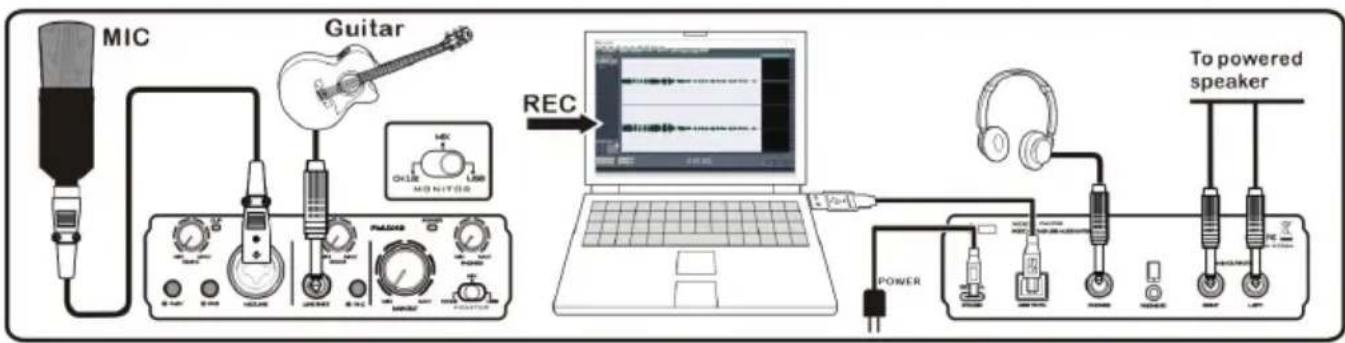
- USB jack (type B 2.0): For connecting to a computer using the included USB 2.0 cable. When connected to a computer, the computer supplies power to the [PLAY 12] and audio data can be sent between the [PLAY 12] and computer.
NOTE: Please do not connect any device to this USB jack other than a personal computer or tablet devices.
- When using power with USB,USB power is DC5V 1000mA.
- Can connect to the mobile phone, when connected to the mobile phone, need to set accordingly, please open the OTG function of the mobile phone, note: Different brand mobile phone settings are different, please refer to the corresponding brand set instructions; use the mobile phone directly, please type C interface auxiliary power supply to [PLAY 12], so as not to affect the normal use.

- PHONES jack (1/4-inch jack): for connection of stereo headphones (minimum impedance 32Ω) for monitoring the sum signal independent of the PHONES control.
- HPONE jack (1/8-inch TRRS): When the headset output interface of the phone passes through the TRRS Jack, the sound of the phone will be output internally, and the sound of the [PLAY 12] external microphone (CH1) is transmitted to the phone through this TRRS jack.
***With the TRRS interface function, the signal of this interface cannot be recorded.

flowchart
graph LR
    A["MIC"] --> B["Guitar"]
    B --> C["REC"]
    C --> D["Laptop"]
    D --> E["Video / voice live streaming"]
    E --> F["PHONE"]
    F --> G["TRRS Cable"]
    G --> H["To powered speaker"]
    H --> I["POWER"]
    I --> J["Radio/Carphone"]
    J --> K["Speaker"]
    style A fill:#f9f,stroke:#333
    style B fill:#ccf,stroke:#333
    style C fill:#cfc,stroke:#333
    style D fill:#fcc,stroke:#333
    style E fill:#cff,stroke:#333
    style F fill:#ffc,stroke:#333
    style G fill:#fcc,stroke:#333
    style H fill:#ffc,stroke:#333
    style I fill:#cfc,stroke:#333
    style J fill:#fcc,stroke:#333
    style K fill:#cfc,stroke:#333
NOTE: Turn on the 48V phantom power supply when the microphone is the condenser microphone.
- MAIN OUTPUT (RIGHT 1/4-inch jack): This is a TS mono (right channel) return interface, and the level size of the return input can be controlled.
- MAIN OUTPUT (LEFT 1/4inch jack): This is a TS mono (left channel) return interface, and the level size of the return input can be controlled.
- +48V PHANTOM SWITCH: When this switch is turned ON, the DC +48V phantom power is supplied to the XLR plug connected the channel 1. Turn this switch ON when using a phantom powered condenser microphone.
NOTE: Be sure to leave this switch OFF if you do not need phantom power. Follow the important precautions below, in order to prevent to prevent noise and possible damage to external devices as well as the [PLAY 12] if you turn this switch ON.
-
CH1 PAD switch: Turning the switch ON will attenuate the sound input to the unit. If you hear distortion or the [PEAK] led light frequently even if the [GAIN] pot is turned fully to the left, turn this switch ON.
-
Be sure to leave this switch off when you connect a device that does not support phantom power to channel 1.
- Make sure to turn this switch OFF when connecting/disconnecting a cable to/from channel.
- Turn the level knob of the channel 1 to "0" (minimum) before turning this switch ON/OFF.
NOTE: Turn the level pot to minimum before toggling the [PAD] switch on and off.
- CH1 INPUT jack: (combined jack XLR, balanced 14 -inch TRS jack or unbalanced 14 -inch TS jack) for channel CH 1, for the connection of a microphone via an XLR plug or microphone via an XLR plug or an audio source with line signal level via a 1/4-inch plug.
MONO INPUT: (combined jack XLR, unbalanced 1/4-inch TS jack unbalanced) for channel CH 1 for the connection of a microphone via an XLR plug or an audio source with line signal level via a Phone plug. CH1
- CH2 LINE/INSTR INPUT jack (1/4-inch TS jack): This interface is mainly specially provided to the external musical instrument signal connection input.
- Hi-Z key (For channel CH 2): Press the button when an electric guitar or an electric bass with passive audio pick-up has been connected to the jack 1/4-inch.
- MONITOR LEVEL knob: This adjusting knob is used to control the main output level (channel right and left) of the [PLAY 12].
- MONITOR OUTPUT selector switch: This switch is mainly switching the main output and the headset output mono or stereo input mode, when the switch is placed in the OFF, closing the direct signal.
- MIX OUTPUT MODE: All the input signals are passed through the [PLAY 12] monitor output(For example, CH1-2 and USB signals)

flowchart
graph LR
    A["MIC"] --> B["Guitar"]
    B --> C["MONITOR"]
    C --> D["Laptop"]
    D --> E["To powered speaker"]
    E --> F["Power"]
    F --> G["AC/DC"]
    G --> H["Headphones"]
    H --> I["Switch"]
    I --> J["Radio"]
    J --> K["Ground"]
- SUB OUTPUT MODE: The USB input signals are passed through the [PLAY 12] monitor output (The CH1-2 signal is turned off).
flowchart
graph LR
    A["MIC"] --> B["Guitar"]
    B --> C["REC"]
    C --> D["Laptop"]
    D --> E["To powered speaker"]
    E --> F["Power"]
    F --> G["Headphones"]
    G --> H["Switch"]
    H --> I["Radio Station"]
    I --> J["Radio Line"]
    J --> K["Audio Receiver"]
    K --> L["Monitor"]
    L --> M["Audio Cable"]
    M --> N["Audio Signal"]
    N --> O["Audio Mask"]
    O --> P["Audio Headset"]
    P --> Q["Audio Radio"]
    Q --> R["Audio Signal"]
- SUB OUTPUT MODE: The CH1-2 input signals are passed through the [PLAY 12] monitor output (The USB signal is turned off, however, USB recording of CH1-2 signal no will will any affected)

flowchart
graph TD
    A["MIC"] --> B["Guitar"]
    B --> C["REC"]
    C --> D["Laptop"]
    D --> E["To powered speaker"]
    E --> F["Power"]
    F --> G["Headphones"]
    G --> H["Switch"]
    H --> I["Radio Station"]
    I --> J["Radio Headset"]
    J --> K["Audio Receiver"]
    K --> L["Audio Cable"]
    L --> M["Audio Signal"]
    M --> N["Audio Mask"]
    N --> O["Audio Marker"]
NOTE: Either mode the switch chooses will not affect the output of the PHONE I/O interface. The PHONE I/O signal defaults to the bypass state.
- CH1 GAIN knob: This adjusting knob is used to control the CH1 input gain of the [PLAY 12].
- CH1 CLIP indicator light: Level Peak Indication for channel CH1.
- CH2 CLIP indicator light: Level Peak Indication for channel CH2.
- CH2 GAIN knob: This adjusting knob is used to control the CH2 input gain of the [PLAY 12].
- POWER indicator light.
- PHONES LEVEL knob: This adjusting knob is used to control the PHONES output level of the [PLAY 12].
Recording Function
- This [PLAY 12] is the recording of external input signal, mainly for CH1 and CH2 signals recorded via [PLAY 12] to USB to computer, internal records between the USB and the computer are not supported.
- Up to 24bit/192KHz of audio signal support.
Features:
- High-fidelity, studio quality recording, and most of all the software you need to record
• Pro-performance with the finest pre-amps - Studio quality recording for music and podcasts
- Low-noise for crystal clear listening
• Dc 5v power supply, or pc power supply - Rugged metal chassis and compact size
• 2in 2out 24bit /192khz asio/podcaster
What's in the box:
- Usb interface
- Usb cable
• 3.5 to 3.5 jack cable
Technical Specs:
- Construction materials: aluminum case, abs, copper
• Power input: dc 5v, 1a
• Voltage: 100-240v - Usb sound card: 2.0 type-c
• Frequency response: 20hz-20khz - Total harmonic distortion: < 0.5% @ + 4 dbu
• Power consumption: 2w - Product dimension (l x w x h): 5.91" x 3.94" x 1.75"-inches
California Prop 65 Warning
! WARNING:
This product can expose you to chemicals, which is known to the state of California to cause cancer birth defects and other reproductive harm. Do not ingest.
For more info go to: www.P65warnings.ca.gov
PYLE
PyleUSA.com
Questions? Comments?
We are here to help!
Phone: (1) 718-535-1800
Email: support@pyleusa.com
Brand : Pyle
Model : PMUX42
Category : Audio Interface