
Titan H2 - Effects machine Froggy's Fog - Free user manual and instructions
Find the device manual for free Titan H2 Froggy's Fog in PDF.


User questions about Titan H2 Froggy's Fog
0 question about this device. Answer the ones you know or ask your own.
Ask a new question about this device
Download the instructions for your Effects machine in PDF format for free! Find your manual Titan H2 - Froggy's Fog and take your electronic device back in hand. On this page are published all the documents necessary for the use of your device. Titan H2 by Froggy's Fog.
USER MANUAL Titan H2 Froggy's Fog
Fluid Consumption Rate @ 100%: 16 hrs / gal
Tank Capacity: 0.8 Gal
N.W.: 13.2 lbs
G.W.: 15.5 lbs
DMX Channel: 2
Empty Fluid Circuitry and Pump Protection Technology
Compatible Fluids – Froggys Fog Faze Haze™ Professional Haze Fluid Froggys Fog Beam Splitter™ Premium Haze Fluid
Important
- Always use a grounded electrical outlet. Turn off or unplug the machine when not using it. - This Machine can be used indoors and outdoors, but it is not water-proof. Please keep it away from moisture and water. If moisture, water or fluid gets inside the housing, stop using it.
- No user serviceable or modifiable parts inside. Do not disassemble the housing and do any modification, otherwise it might cause damage to the unit or hot components may cause burns.
- For adult use only. Fixture must be installed out of the reach of children. Never leave the unit running unattended. Keep it away from fire as well as combustible and flammable materials.
• Position the machine in well-ventilated area.
- Please do not use the fixture under high temperatures.
- Only specifically designed water based scent additives may be added to the haze fluid. Never add flammable liquids of any kind (oil, gas, non-application specific perfumes). Pay attention to all warning labels and instructions printed on the exterior of your machine.
- Use only Froggys Fog Haze Liquids. The fluid's optimal vaporization temperature coincides with the machine's heater core to give you efficient haze production and minimize incomplete vaporization.
- Never drink Haze liquid. If it is ingested, call a doctor immediately for any discomfort. If liquid comes in contact with skin or eyes, rinse thoroughly with water.
Unpacking and inspection
Immediately upon receiving the machine, carefully unpack the carton, check all content to ensure that all parts are present and have been received in good condition. If any parts appear damaged or mishandled from shipping, please do not power on the machine. Contact the manufacturer for further instruction.
What is included:
- 1 x H2 Haze machine and Hanging Bracket
2.1 x Power Cord - 1 x W-4 Wireless Remote Controller
4.1 x User Manual
Installation
- After ensuring all the accessories are intact, position the machine on a flat
- Press the fluid tank's quick connector by thumb and forefinger, and take it out quickly to disconnect the tube and the fluid tank. Take out the tank and uncover the cap. Pour water based haze machine liquid into the tank carefully, then tighten the cap. Put the tank into the machine and push the connector lightly to connect the tube and fluid tank.
- Connect the Neutrik power cord to the machine. Please make sure the required and provided electricity voltage and the electricity outlet is grounded.
- Upon activating the power switch, the unit will immediately start heating up in the standby mode, during this time, the LCD panel will display "HEAT"
OPERATION
MENU button: Different pages can be chosen, there are 4 pages in total.
UP: Increase value set for subpages.
DOWN: Decrease value set for subpages.
Enter: Confirm or exit.

Digital display
1) Machine is heating. After finishing heating, output page will show as default.
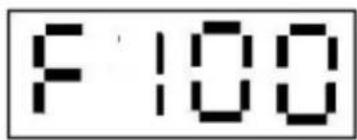
2) Haze output volume can be adjusted by the knob on the operation panel. And the display shows value of output, 0 for off, 100 for max.
3) The fan speed volume can be adjusted by the knob on the operation panel. And the display shows value of output, 0 for off, 100 for max.
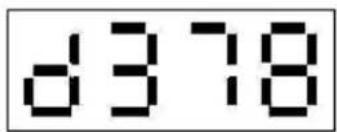
4) DMX Addresses
Press ENTER then UP or DOWN to change address. After setting, press ENTER button again to exit.
5) Wireless Remote controller page
Press ENTER then UP or DOWN to turn Wireless On or Off After setting, press ENTER button again to exit.




Wireless remote control function
- Transmitter
- Use battery: DC 12V
- Working distance: 30 meters (the distance can be influenced by signal interference)
- Receiver:
- The receiver was fixed in the machine body, and tested one by one before shipping.
natural_image
Illustration of a car door lock with a keychain (no text or symbols)Wireless controller (W-4) function and setting:
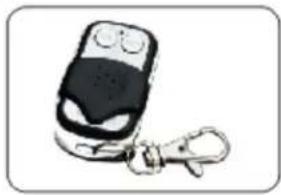
- W-4 can be used directly to control the machine. Press "ON", start working; Press "OFF", stop working.
- A maximum of 5 transmitters can be remembered and stored by the receiver.
• After turning on the machine, within 15 seconds, press the transmitter ON button.
- When the digital display twinkling twice, that means the transmitter matches the machine successfully.
- If no transmitter matched the machine after power in, the receiver will recognize the last one. If new transmitter matched the machine after power in, the receiver will only recognize the new one, all the previous setting will be cleared away.
DMX Function
• Channel 1: Fan output: 0\~5 Off; 11\~255 increase
• Channel 2: Haze output:0\~10 Off; 11\~255 increase
- When the unit is connected to DMX, the digital display will show the DMX address value.
- Pressing UP and DOWN button will change the DMX address.
OTHER FUNCTIONS
- For the channel of haze output, timing function of continuous and interval time can use DMX console programming to achieve, or DMX control software used by dimmer to realize.
- Fluid Sensor Protection Function - In this machine, use the program control to detect whether there is fluid in the tubing to protect the pump.
- Start Fluid sensor - When the smoke output is more than 50%, and the fluid tubing runs dry, the machine will start fluid sensor in 5 minutes. The pump will stop working and the LCD display will be flashing.
- Remove the fluid Sensor Status - In the status of fluid sensor, there is 2 ways to remove the fluid sensor after full of the fluid tank.
OTHER FUNCTIONS (Continued)
- When controlling the volume output with the knob switch, first to adjust the output to 0, then adjust to 100. The machine resume output and exit the fluid sensor in 2 minutes.
- When controlling via DMX, first push channel 2 low (OFF), then push up (ON). The machine resume output and exit the fluid sensor in 2 minutes.
Attention :
If the machine has little or no output or the pump excessively buzzes, please disconnect the power. Check the fluid tank, fuse and power, if all above are fine, resume power and hold the wireless controller "ON" for 30 seconds and see if haze is emitted. In the case of no haze output, check the tube connected to the fluid tank and make sure fluid is present. If the issue still persists, please contact the manufacturer for further instruction.
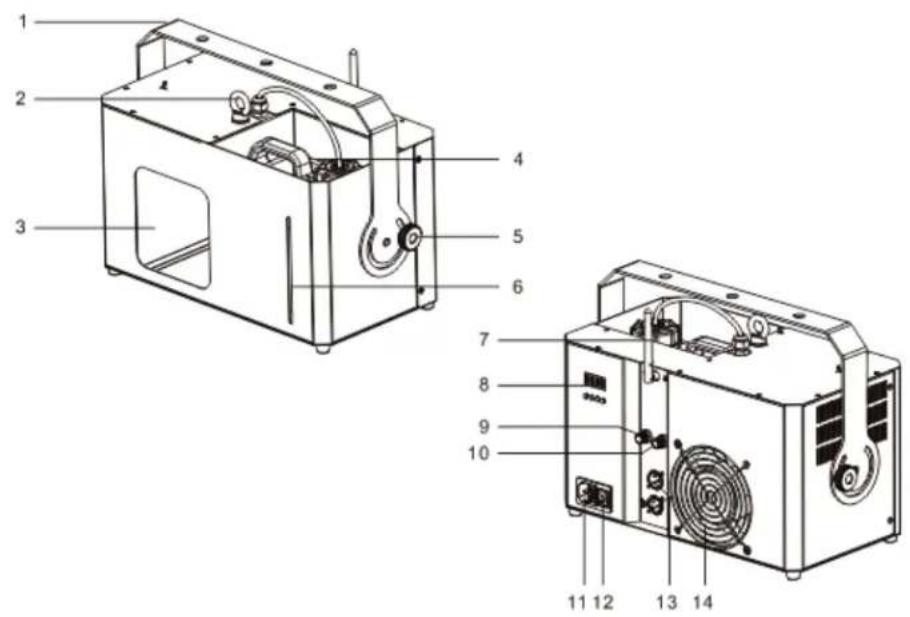
Product Overview
- Hanging Bracket
- Safty ring
- Nozzle
- Fluid container
- Bracket Knob
- Fluid level indicator
- Antenna
- Digital display
- Fan adjustment
- Haze adjustment
- Power Socket
- Power switch
- 3-pin DMX socket
- Fan
MAINTENANCE
Cleaning your Haze machine regularly will help reduce costly parts replacement and repair charges.
Please follow these instructions for safely cleaning your haze machine if output become noticeably decreased. High Quality fluid recommended by the manufacturer lengthens the amount of time between periods of maintenance as described below.
Tools: Clean lint free cloth, coffee filter or similar fine mesh filter cloth, plastic or glass container larger than the reservoir size (do not use metal), distilled water and Froggys Haze fluid.
- Allow the machine to cool down before handling.
- Drain any Haze solution that remains in the tank into a container through the filter mesh for reuse.
- Add distilled water to fill the Haze fluid reservoir approximately 1/3.
- Run machine for 10 minutes. Haze will come out the first few cycles, followed by distilled water vapor.
- Turn off the machine and allow to cool down, then drain the distilled water from the reservoir.
- Refill the reservoir approximately 1/3 with good quality haze solution.
- Turn the machine on, run for 10-15 minutes. Water vapor steam will come out the first few cycles, followed by Haze. Continue steaming the machine for 5-10 cycles.
- Turn off the machine and allow to cool, then wipe machine clean with clean lint free cloth.
- Leave the haze solution in the reservoir. The solution acts a lubricant and conditioner for the plastic and rubber parts in the fluid pump.
- Store the machine in a cool, dry place when not in use. Avoid freezing temperatures, high heat above 120 degrees and humid/damp locations which may cause control board failure.
- If possible, remove from storage after 6 months and operate the machine for 15 minutes or more, then repeat step 8 – 10.
Save these instructions. 2 Year Limited Warranty: Valid from the date of purchase. Warranty covers manufacturing defects only and does not cover misuse or abuse of the machine. Serial number, place of purchase with dated valid receipt must be submitted at time of service. Warranty is only valid with-in the United States. Buyer may be responsible for shipping fees associated with repairs.

Brand : Froggy's Fog
Model : Titan H2
Category : Effects machine