
Titan 1200 - Effects machine Froggy's Fog - Free user manual and instructions
Find the device manual for free Titan 1200 Froggy's Fog in PDF.


| Product Type | Fog Machine |
| Brand | Froggy's Fog |
| Model | Titan 1200 |
| Power Consumption | 1300 W |
| Heating Technology | Quick Ready Fog Technology (QRFT) – ready to fog in less than 10 seconds after full cycle |
| Heater Core | Oversized for increased run times |
| Max Output Volume | 20,000 CFM |
| Max Output Height | 15 ft (4.6 m) |
| Fluid Tank Capacity | 1.3 gal (5 L) |
| Output Duration (Full Tank) | 60 min |
| Fluid Consumption (100% Output) | 80 ml/min |
| Heat-Up Time | 4 minutes |
| Input Voltage | 120 V, 60 Hz |
| Power Connection | IEC 320 C13 |
| Nozzle Type | 3-inch Venturi Style |
| Control Modes | On-device manual, wired timer remote (included), optional wireless remote (RF 433 MHz) |
| Low Fluid Sensor | Advanced Low Fluid Sensing – shuts down machine to protect heater core |
| Dimensions (L x W x H) | 21.3 x 12 x 11.5 in (54 x 30.5 x 29.2 cm) |
| Net Weight | 20 lb (9.1 kg) |
| Mounting Options | Horizontal, inclined, vertical; built-in hanging bracket |
| Warranty | 2-year limited warranty (valid in the US only) |
| Recommended Fluid | Froggy's Fog Water Based Fog Fluid only |
| Maintenance | Clean with distilled water and fog fluid; monthly test run recommended |
| Safety Features | Grounded circuit required; overheat protection; do not cover ventilation or nozzle |
Frequently Asked Questions - Titan 1200 Froggy's Fog
User questions about Titan 1200 Froggy's Fog
0 question about this device. Answer the ones you know or ask your own.
Ask a new question about this device
Download the instructions for your Effects machine in PDF format for free! Find your manual Titan 1200 - Froggy's Fog and take your electronic device back in hand. On this page are published all the documents necessary for the use of your device. Titan 1200 by Froggy's Fog.
USER MANUAL Titan 1200 Froggy's Fog

TITAN
1200
Froggys Fog
302 Rutherford Lane
Columbia, TN 38401
615.469.4906
sales@froggysfog.com
CONTENTS
1 BEFORE YOU BEGIN 1
1.1 What Is Included .... 1
1.2 Unpacking Instructions .... 1
1.3 Symbols....1
1.4 Disclaimer .... 1
1.5 Safety Notes.... 1
1.5.1 Personal Safety....1
1.5.2 Mounting and Rigging 1
1.5.3 Power and Wiring....2
1.5.4 Operation....2
2 INTRODUCTION....2
2.1 Description 2
2.2 Features....3
3 TECHNICAL SPECIFICATIONS 3
4 SETUP 3
4.1 AC Power 3
4.2 AC Plug....4
4.3 Mounting 4
4.3.1 Orientation 4
4.3.2 Rigging 4
5 OPERATION....4
5.1 Preparing for Operation....4
5.2 On-device Control Mode & Operation 4
5.3 Timer Remote Control Mode & Operation 5
5.3.1 Timer Mode....5
5.3.2 Continuous Mode 5
5.3.3 Manual Mode 5
5.4 Wireless Remote-Control Mode & Operation (Optional) 6
5.5 Fluid Sensor....6
6 TECHNICAL INFORMATION.... 6
6.1 Maintenance 6
6.2 Storage 7
6.2.1 Machine Storage 7
7 WARRANTY INFORMATION....7
7.1.1 7
1 BEFORE YOU BEGIN
1.1 What Is Included
- Machine
- Timer Remote Control
- Hanging Bracket
- Power Cord
- User Manual
1.2 Unpacking Instructions
Carefully unpack the product immediately and check the container to make sure all the parts are in the package and are in good condition.
If the box or the contents (the product and included accessories) appear damaged from shipping, or show signs of mishandling, notify the carrier or dealer/seller immediately. In addition, keep the box and contents for inspection.
1.3 Symbols
| Symbol | Meaning |
| CautionCritical installation, configuration, or operation information. Not following these instructions may make the product not work, cause damage to the product, or cause harm to the operator. | |
| ImportantImportant installation or configuration information. Failure to comply with this information may keep the product from working correctly. | |
| InformationUseful information. |
1.4 Disclaimer
The information and specifications contained in this User Manual are subject to change without notice. FROGGYS FOG assumes no responsibility or liability for any errors or omissions and reserves the right to revise or to create this manual at any time.
Copyright © 2018 FROGGYS FOG. All rights reserved.
1.5 Safety Notes
Please read the following Safety Notes carefully before working with the product. The notes include important safety information about installation, usage, and maintenance.
1.5.1 Personal Safety
• Always connect the product to a grounded circuit to avoid the risk of electrocution.
• During heating up and operation, the housing will be scalding hot. Do not touch.
- The product is very hot during operation and it remains hot for a long time after operation has stopped. Do not touch the product's nozzle.
• Make sure that children, unauthorised people and animals do not obtain access to the machine.
1.5.2 Mounting and Rigging
• To prevent risk of fire or shock, do not expose the product to rain or moisture.
- CAUTION: When transferring product from extreme temperature environments, (e.g. cold truck to warm humid ballroom) condensation may form on the internal electronics of the product. To avoid causing a failure, allow product to fully acclimate to the surrounding environment before connecting it to power.
• Do not mount the product on a flammable surface (linoleum, carpet, wood, paper, carton, plastic, etc.). - Do not use in a confined space. Always install the product in a location with adequate ventilation, at least 20 in (50 cm) from adjacent surfaces.
- When hanging this product, always secure to a fastening device using a safety cable.
- Be sure that no ventilation slots on the product's housing are blocked or clogged by dust. If necessary, remove the dust.
1.5.3 Power and Wiring
- Always make sure that the voltage of the outlet to which you are connecting the product is within the range stated on the decal or rear panel of the product.
• Make sure the power cord is not crimped or damaged.
• Never connect this product to a dimmer pack or rheostat.
• Never disconnect the product from power cord by pulling or tugging on the cord. - To eliminate unnecessary wear and improve its lifespan, during periods of non-use completely disconnect the product from power via breaker or by unplugging it
1.5.4 Operation
- Do not operate this product if you see damage to the housing or cables. Have the damaged parts replaced by an authorized technician at once.
- Do not use the product as a space heater.
• Make sure there are no flammable materials close to this product while it is operating.
• The maximum ambient temperature is 104\ °F ( 40\ °C ). Do not operate the product at higher temperatures. - Do not cover the ventilation slots when operating to avoid internal overheating.
• Do not cover or plug the output nozzle during operation. - Wipe up any fluid accumulation immediately. Moisture – also fluid – can damage the electrical components.
• You may hear a loud popping sound during operation. This is normal.
• Never carry the product by the power cord or any moving part. Always use the handles of the machine. - Drain the tank before transporting the product.
• Always disconnect the product from the power source before cleaning.
• In the event of a serious operating problem, stop using the product immediately. - This product contains no user-serviceable parts. Any reference to servicing in this User Manual will only apply to properly trained, certified technicians. Do not open the housing or attempt any repairs which can lead to damage or malfunction.
• Use only FROGGYS FOG Water Based Fog Fluid.

Keep this User Manual for future use. If you sell the product, be sure that the purchaser receives this document.
2 INTRODUCTION
2.1 Description
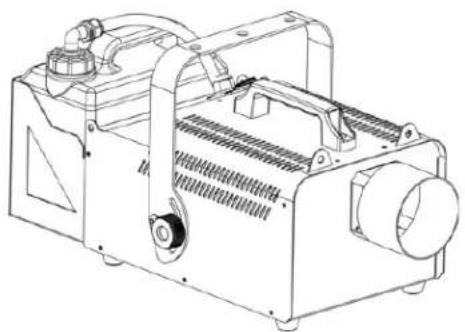
The Titan 1200 is a powerful 1300W Fog Machine with over 20,000CFM. The efficient heater core increases run times, Quick Ready Fog Technology (QRFT) has you ready to fog in less than 10 seconds after full cycle and it is ready to fog, and Advanced Low Fluid Sensing shuts down the machine when you run out of fluid to protect the heater core.
2.2 Features
• 1300W
• 20,000 CFM
- Oversized Heater Core for increased run times
- Quick Ready Fog Technology (QRFT) - Less than 10 seconds after full cycle and it is ready to fog
• Advanced Low Fluid Sensing
• IEC 320 C13 Power Connection
• 3" Venturi Style Nozzle Connection
• Durable 5 Liter Fluid Tank
• Built-In Hanging Bracket
- Timer Control Included (Wireless Optional)
• Electronics Compartment to keep all fluid related components away from boards
- Removable Fluid Tank Bracket for tight install applications
- Rubberized Fee
3 TECHNICAL SPECIFICATIONS
| AC Power | Input Voltage & Rate | 120 V, 60 Hz |
| Current Limiter Type | Fuse | |
| Current Limiter Specifications | 250V/15A | |
| Total Power Consumption | 1,300 W | |
| Heating | Heat Up Time | 4 Mins |
| Capacity | Fluid Tank Capacity | 1.3 Gal |
| Output Duration with Fluid Tank Full | 60 min | |
| Output | Adjustable Output | YES |
| Max Output Volume | 20,000 cfm | |
| Max Output Height | 15 Ft | |
| Fluid Consumption (100% Output) | 80 ml/min | |
| Maximum Continuous Duration (100% Output) | 40+secs | |
| Continuous Output | @ 30% maximum output | |
| Placement & Mounting | Horizontal | YES |
| Inclined | YES | |
| Vertical | YES | |
| Hang Upside Down | N/A | |
| Rigging & Trussing | Hanging Bracket | |
| Control | On-device Manual Control | Green Illuminated Fog Button |
| Wireless Control | Optional FFM-RM-WR5 / RF 433MHz | |
| Wired Control | Included | |
| Certification | CE | N/A |
| RoHS | N/A | |
| Consumable | Consumable | Water Based Fog Fluid |
| Weight & Dimensions | Net Weight | 20 lbs |
| Gross Weight | 25.5 lbs | |
| Machine Dimensions | 21.3 x 12 x 11.5 in | |
| Packing Dimensions | 25.5 x 14.4 x 13.6 in |
4 SETUP
4.1 AC Power
The machine has a fixed voltage power supply and can work with an input voltage of AC 120 V, 60 Hz, depending on the specific model.
To determine the product's power requirements (circuit breaker, power outlet, and wiring), use the current value listed on the label affixed to the product's back panel, or refer to the product's specifications chart. The listed current rating indicates the product's average current draw under normal conditions.

Always connect the product to a protected circuit (circuit breaker or fuse). Make sure the product has an appropriate electrical ground to avoid the risk of electrocution or fire.

Never connect the product to a rheostat (variable resistor) or dimmer circuit, even if the rheostat or dimmer channel serves only as a 0 to 100% switch.
4.2 AC Plug
The FFM-TITAN-1200 comes with a power input cord terminated with an IEC connector on one end and an US plug on the other.
Fuse Replacement
- Disconnect the product from power
- Wedge the tip of a flat-head screwdriver into the slot of the fuse holder.
- Pry the safety cap out of the housing
- Remove the blown fuse from the clip on the front of the safety cap and replace with a fuse of the exact same type and rating.
- Re-insert the fuse holder and reconnect power.

Disconnect the product from power before replacing the fuse.
4.3 Mounting
Before mounting the product, read and follow the safety recommendations indicated in the Safety Notes.
4.3.1 Orientation
Always mount this product in a safe position and make sure there is adequate room for ventilation, configuration, and maintenance.
4.3.2 Rigging
FROGGYS FOG recommends using the following general guidelines when mounting this product.
• Before deciding on a location for the product, make sure there is easy access to the product for maintenance and programming purposes.
- Make sure that the structure or surface onto which you are mounting the product can support the product's weight (see the Technical Specifications).
- When mounting the product on the floor, make sure that the product and cables are away from people and vehicles.
5 OPERATION
5.1 Preparing for Operation
To prepare the FFM-TITAN-1200 for operation, perform the following steps.
• After checking that all the parts are intact and complete, position the machine on a flat surface.
- Withdraw the fluid tank from its compartment and remove its cap.
• Verify that the two plastic hoses attached to the cap are in place and in good condition.
• Fill the tank with fog fluid and return the tank back to its compartment in the FFM-TITAN-1200.
• Make sure the plastic hose entering the FFM-TITAN-1200 from the fluid tank cap is not bent or kinked.
• Always connect the product to a grounded circuit. Before power on, make sure it is connected with the rated voltage.
5.2 On-device Control Mode & Operation
The machine can be operated manually.
• The machine will begin heating once the unit has been turned on.
- When the Green button is illuminated, the machine has come up to temperature.
• Press the illuminated button to trigger fog output.
5.3 Timer Remote Control Mode & Operation
The wired timer controller allows you to automatically trigger fog output by setting interval and duration times. LED indicator lights display the machine and controller's current state. Rotary knobs set interval time, output, and duration time, while manual and continuous buttons allow overriding control.
- Plug in the fog machine to power.
• Plug in the wired timer controller to the Manual Remote Connector socket on the back of the fog machine. (See the product Overview.) - Allow the FFM-TITAN-1200 4 minutes to heat up before continuing. (See Fluid Tank Indicator Lights.)
The wired timer controller has three modes of operation: timer, continuous, and manual.
5.3.1 Timer Mode
To trigger the machine with the timer function, follow the instructions below:
- Set the desired output level with the OUTPUT knob.

- Set the INTERVAL and DURATION knobs to the desired positions.
The INTERVAL knob sets the amount of time in between bursts of fog.
The DURATION knob sets the length of time that the fog machine will run during the burst.
- Press the
latching button. The LED indicator above the button will light up. The timer will now run as set by the INTERVAL, DURATION, and OUTPUT knobs. - Press the
button again to turn off the timer.

The
5.3.2 Continuous Mode
To trigger the machine to continuously cycle fog, follow the instructions below:
- Set the desired output level with the OUTPUT knob.
- Press the
- Press the

In order for Continuous mode to run uninterrupted, without the machine stopping to reheat, set the OUTPUT knob no higher than 30%. At Output levels above 30%, the fogger will cycle through intermittent bursts of fog during its reheating program.

The duration of Continuous fog output is based on the capacity of the tank.
Fluid consumption will be significantly increased during Continuous mode.
5.3.3 Manual Mode
To trigger the machine manually, do the following:
• Set the desired output level with the OUTPUT knob.
- Press and hold the
- Release the

The duration of manual fog at any given output setting is based on the capability of the fog machine.
5.4 Wireless Remote-Control Mode & Operation (Optional)
The FFM-TITAN-1500-DMX allows for the optional wireless remote receiver to plug into the remote port on the fog machine. The fog output can be activated by pressing the "On" button on the remote and deactivated by pressing the "Off" button.
5.5 Fluid Sensor
This machine uses software-based fluid sensor to detect whether there is fluid inside the tube so as to protect the pump from being damaged.
• Fog output will be paused when fluid absence is detected.
• To restore operation, refill the tank, then press and hold the green fog button until the unit resumes producing fog.
6 TECHNICAL INFORMATION
6.1 Maintenance
Do not allow the FFM-TITAN-1200 to become clogged. Please follow these instructions for safely cleaning your fog machine if output become noticeably decreased. High Quality fluid recommended by the manufacturer lengthens the amount of time between periods of maintenance as described below.
Tools: Clean lint free cloth, coffee filter or similar fine mesh filter cloth, plastic or glass container larger than the reservoir size (do not use metal), distilled water and Froggys Fog fluid.
- Allow the machine to cool down before handling.
- Drain any Fog solution that remains in the tank into a container through the filter mesh for reuse.
- Add distilled water to fill the Fog fluid reservoir approximately 1/3.
- Run machine for 10 minutes. Fog will come out the first few cycles, followed by distilled water vapor.
- Turn off the machine and allow to cool down, then drain the distilled water from the reservoir.
- Refill the reservoir approximately 1/3 with good quality fog solution.
- Turn the machine on, run for 10-15 minutes. Water vapor steam will come out the first few cycles, followed by fog. Continue cycling the machine for 5-10 fog cycles.
- Turn off the machine and allow to cool, then wipe machine clean with clean lint free cloth.
- The excess fog fluid is best stored in a sealable container. The solution in the tubing acts a lubricant and conditioner for the plastic and rubber parts in the fluid pump.
- Store the machine in a cool, dry place when not in use. Avoid freezing temperatures and high heat above 120 degrees and humid/damp locations which may cause control board failure.
- If possible, remove from storage after 6 months and operate the machine for 15 minutes or more, then repeat step 8 – 10.

Test-run your FROGGYS FOG® FFM-TITAN-1200 on a monthly basis to achieve the best performance.
6.2 Storage
6.2.1 Machine Storage
Before storing the machine, clean it as described in the cleaning procedure above; however, only follow steps 1 through 5. Do not refill the tank with fog fluid if storing the machine. Cleaning the system prior to storage will help prevent any particles from condensing inside the pump or heater while not in use.
7 WARRANTY INFORMATION
7.1.1
Save these instructions. 2 Year Limited Warranty: Valid from the date of purchase. Warranty covers manufacturing defects only and does not cover misuse or abuse of the machine. Serial number, place of purchase with dated valid receipt must be submitted at time of service. Warranty is only valid with-in the United States. Buyer may be responsible for shipping fees associated with repairs.

- TITAN
- 1200
- CONTENTS
- 1 BEFORE YOU BEGIN 1
- 2 INTRODUCTION....2
- 3 TECHNICAL SPECIFICATIONS 3
- 4 SETUP 3
- 4.3 MOUNTING 4
- 5 OPERATION....4
- 5.3 TIMER REMOTE CONTROL MODE & OPERATION 5
- 6 TECHNICAL INFORMATION.... 6
- 7 WARRANTY INFORMATION....7
- 1 BEFORE YOU BEGIN
- 1.1 WHAT IS INCLUDED
- 1.2 UNPACKING INSTRUCTIONS
- 1.3 SYMBOLS
- 1.4 DISCLAIMER
- 1.5 SAFETY NOTES
- 1.5.1 PERSONAL SAFETY
- 1.5.2 MOUNTING AND RIGGING
- 1.5.3 POWER AND WIRING
- 1.5.4 OPERATION
- 2 INTRODUCTION
- 2.1 DESCRIPTION
- 2.2 FEATURES
- 3 TECHNICAL SPECIFICATIONS
- 4 SETUP
- 4.1 AC POWER
- 4.2 AC PLUG
- 4.3 MOUNTING
- 4.3.1 ORIENTATION
- 4.3.2 RIGGING
- 5 OPERATION
- 5.1 PREPARING FOR OPERATION
- 5.2 ON-DEVICE CONTROL MODE & OPERATION
- 5.3 TIMER REMOTE CONTROL MODE & OPERATION
- 5.3.1 TIMER MODE
- 5.3.2 CONTINUOUS MODE
- 5.3.3 MANUAL MODE
- 5.4 WIRELESS REMOTE-CONTROL MODE & OPERATION (OPTIONAL)
- 5.5 FLUID SENSOR
- 6 TECHNICAL INFORMATION
- 6.1 MAINTENANCE
- 6.2 STORAGE
- 6.2.1 MACHINE STORAGE
- 7 WARRANTY INFORMATION
- 7.1.1
Brand : Froggy's Fog
Model : Titan 1200
Category : Effects machine