
Touch Control Tower KCE480 - Heating Kambrook - Free user manual and instructions
Find the device manual for free Touch Control Tower KCE480 Kambrook in PDF.


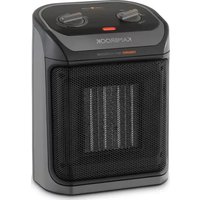
| Product Type | Ceramic Tower Heater |
| Model | Touch Control Tower KCE480 |
| Brand | Kambrook |
| Power Supply | 230-240 V ~ 50 Hz |
| Power Consumption (High) | 2000 W (estimated) |
| Power Consumption (Low) | 1000 W (estimated) |
| Heating Element | Ceramic |
| Operating Modes | Low Heat, High Heat, Smart Eco, Fan Only |
| Timer | 12-hour auto-off, adjustable in 1-hour increments |
| Oscillation | 60° side-to-side |
| Remote Control | Included (CR2025 3V lithium battery) |
| Control Panel | Touch buttons with LED display (dim after 15 sec) |
| Temperature Setting Range (Smart Eco) | 10-35°C |
| Safety Features | Tip-over switch, ThermoGuard overheat protection |
| Filter | Removable dust filter, clean regularly |
| Memory Function | Returns to last mode (except timer) after power off, if not disconnected |
| Clearance Requirements | Front 1.7 m, rear/top/sides 0.5 m |
| Dimensions (approx.) | 20 x 20 x 60 cm |
| Weight (approx.) | 3.5 kg |
| Warranty | Covered by Kambrook (see website or contact customer service) |
| Customer Service (Australia) | 1300 139 798 |
| Customer Service (New Zealand) | 0800 273 845 |
Frequently Asked Questions - Touch Control Tower KCE480 Kambrook
User questions about Touch Control Tower KCE480 Kambrook
0 question about this device. Answer the ones you know or ask your own.
Ask a new question about this device
Download the instructions for your Heating in PDF format for free! Find your manual Touch Control Tower KCE480 - Kambrook and take your electronic device back in hand. On this page are published all the documents necessary for the use of your device. Touch Control Tower KCE480 by Kambrook.
USER MANUAL Touch Control Tower KCE480 Kambrook
natural_image
Two KAMBROOK smartphones with digital display and mesh backouts, no visible text or symbols on the devices themselves.Important
Please retain your instruction book for future use.
In the event that you need some assistance with your Kambrook appliance, please contact our Customer Service Department on 1300 139 798 (Australia) or 0800 2738 45 (New Zealand). Alternatively, visit us on our website at www.kambrook.com.au or www.kambrook.co.nz
Contents
Kambrook Recommends Safety First p4
Components
p8
Control Panel p10
Using Your Kambrook Ceramic Heater p11
Care, Cleaning and Storage p17
Troubleshooting Guide p18
Limited Product Warranty
Kambrook's warranty for this product covers the repair or replacement if it's found to be defective due to faulty materials, workmanship, or function within the warranty period.
All legal warranty rights under applicable national legislation will be respected and will not be impaired by our warranty. For details on the length of the warranty, to obtain a printed copy, or to read the full terms and conditions, please scan the QR code or visit the following websites:
Australia: https://kambrook.com.au/
New Zealand: https://kambrook.co.nz/
Alternatively, call the Kambrook Service Centre (see back cover for contact details).

IMPORTANT: PLEASE RETAIN YOUR INSTRUCTION BOOK FOR FUTURE USE.
At Kambrook, we believe that safe performance is the first priority in any consumer product, so that you, our valued customer, can confidently use and trust our products. We ask that any electrical appliance that you use be operated in a sensible fashion with due care and attention placed on the following important operating instructions.
IMPORTANT SAFEGUARDS Read all instructions before use and save for future reference
- Carefully read all instructions before operating the ceramic heater for the first time and save for future reference.
• Always ensure the ceramic heater is properly assembled before use. Follow the instructions provide in this instruction book. - Remove and safely discard any packaging material and promotional labels before using the ceramic heater for the first time.
- To eliminate a choking hazard for young children, remove and safely discard the protective cover fitted to the power plug of this ceramic heater, where applicable.
- Avoid touching the ceramic heater body while it is operating as some parts of the ceramic
heater are hot. When moving the ceramic heater, switch off and let the heater cool down before attempting to move it.
- When moving the ceramic heater, always carry by the handle. Do not attempt to move the ceramic heater by the power cord.
- Keep combustible materials such as drapes and other furnishings at least 1.7 metres from the front, sides and rear of the ceramic heater.
- Extreme caution and supervision are necessary when this ceramic heater is used by or near children, invalids or animals.
• Children should be supervised to ensure that they do not play with the ceramic heater.
- Do not use this ceramic heater in the immediate surroundings of a bath, a shower or a swimming pool. Do not immerse or allow liquids to be spilt on the ceramic heater.
- Do not drape material over the ceramic heater such as to dry laundry.
- This ceramic heater is not intended for use in wet or moist locations.
- This ceramic heater has hot and arcing or sparking parts inside. Do not use in areas where aerosols or other flammable substances are used or stored.
- Do not allow materials that have been in contact with oil, petroleum-based products or drying fluids to come in contact with the ceramic heater.
- Do not operate the ceramic heater on an incline plane.
- Only use the ceramic heater on a horizontal and stable surface.
- Do not operate the ceramic heater on a sink or drain board.
- Do not leave the ceramic heater unattended. Always switch the ceramic heater off on the control panel, then switch off at the power outlet and remove the plug from the power outlet when not in use.
- Do not operate the ceramic heater with a damaged cord or plug, or if the ceramic heater has been dropped or damaged in any matter. Return the ceramic heater to your nearest Kambrook service centre for examination, electrical or mechanical adjustment or repair.
- Do not operate the ceramic heater with the power cord damaged, frayed or split, wound around any part of the ceramic heater, or in contact with heated
surfaces of the heater.
- Do not run the cord under carpeting or cover the cord with rugs, runner of the like. Arrange the cord away from traffic areas and where it will not be tripped over.
- Do not locate the ceramic heater immediately below a socket outlet when in use.
- Do not insert or allow foreign objects to pass through the inlet or outlet openings. This may cause an electric shock, fire or damage the ceramic heater.
- To prevent a possible fire or heat damage, allow ample space around the ceramic heater (at least 1.7 metres at the front, 0.5 metres at the rear, top and sides) and do not totally or partially block the air inlet or outlets in any manner. Check the openings from time to time for accumulated dust. Ensure long shag carpet does not obstruct airflow under the unit.
- Do not touch hot surfaces or the front grill when in operation or for some time after, as these surfaces may be hot.
- To avoid an electrical overload, it is recommended that no other appliances are plugged into the same circuit as your ceramic heater when it is in use.
- Do not move the ceramic heater when it is operating.
-
The ceramic heater is equipped with a safety tip-over switch on the base. In the event that the switch is activated, such as if the heater is knocked over or picked up, operation will cease. Once the ceramic heater is set upright or set down on a flat surface, the ceramic heater will need to be restarted.
-
Some high-pile carpets may cause the tip-over switch to activate and stop operation. Place the ceramic heater on a hard, flat surface and restart.
- Do not use outdoors. This ceramic heater is not intended for commercial use such as construction sites.
- Use this ceramic heater only as described in this instruction manual. Any other use is not recommended by the manufacturer as it may cause fire, electric shock or injury and void all warranties.
- Regularly inspect the power cord, plug, control settings, air inlets and outlets and main housing for any damage. If found damaged in any way, immediately cease use of the ceramic heater and return to Kambrook or an authorized service agent for inspection or repair.
- To disconnect the ceramic heater, switch the heater off on the control panel and then switch off at the power outlet and remove the plug from the power outlet. Allow the ceramic heater to cool down before cleaning and storing.
- Do not unplug the ceramic heater by pulling on the power cord. Always unplug using the power plug.
- Keep the ceramic heater clean. Follow the cleaning instructions provided in this book.
Important Safeguards For All Electrical Appliances
- Fully unwind the power cord before use.
-
Connect only to a 230V or 240V power outlet.
-
Do not let the power cord hang over the edge of a bench or table, touch hot surfaces or become knotted.
- To protect against electric shock, do not immerse the power cord, power plug or appliance in water or any other liquid or allow moisture to come in contact with the part, unless it is recommended in the cleaning instructions.
- The appliance is not intended for use by persons (including children) with reduced physical, sensory or mental capabilities, or lack of experience and knowledge, unless they have been given supervision or instruction concerning use of the appliance by a person responsible for their safety.
• Children should be supervised to ensure that they do not play with the appliance. - It is recommended to regularly inspect the appliance. To avoid a hazard, do not use the appliance if power cord, power plug or appliance becomes damaged in any way. Return the entire appliance to the nearest authorized Kambrook service centre for examination and / or repair.
- Any maintenance other than cleaning should be performed at an authorised Kambrook Service Centre
-
This appliance is for household use only. Do not use this appliance for anything other than its intended use. Do not use in moving vehicles or boats. Do not use outdoors. Misuse may cause injury.
-
The installation of a residual current device (safety switch) is recommended to provide additional safety protection when using electrical appliances. It is advisable that a safety switch with a rated residual operating current not exceeding 30mA be installed in the electrical circuit supplying the appliance. See your electrician for professional advice.
- During electrical storms, the appliance should be disconnected from the power source at the wall socked to prevent any electrical surges that may arise during the storm, and which may inadvertently cause damage to the appliance and its electronic componentry.
• Always turn the appliance to the OFF position, switch off at the power outlet and unplug at the power outlet when the appliance is not in use. - Before cleaning, always turn the appliance to the OFF position, switch off at the power outlet, unplug at the power outlet and remove the power cord, if detachable, from the appliance and allow all parts to cool.
- Do not place this appliance on or near a heat source, such as hot plate, oven or heaters.
- Position the appliance at a minimum distance of 1m away from walls, curtains and other heat or steam sensitive materials and provide adequate space above and on all sides for air circulation.
WARNING
(For model KCE480 only)
Do not use the remote control if the battery compartment does not close securely.
- Remove the button battery and keep it away from children.
- The button battery shall be disposed of properly, including keeping away from children.
- Even a used battery may cause injury.
FOR HOUSEHOLD USE ONLY SAVE THESE INSTRUCTIONS
KCE180 Components
- ControlPanel
2 LED Display Screen - Front Grille
-
Heater Housing
-
Oscillating Base
- Handle
- Back Fan Grille
- Power Cord

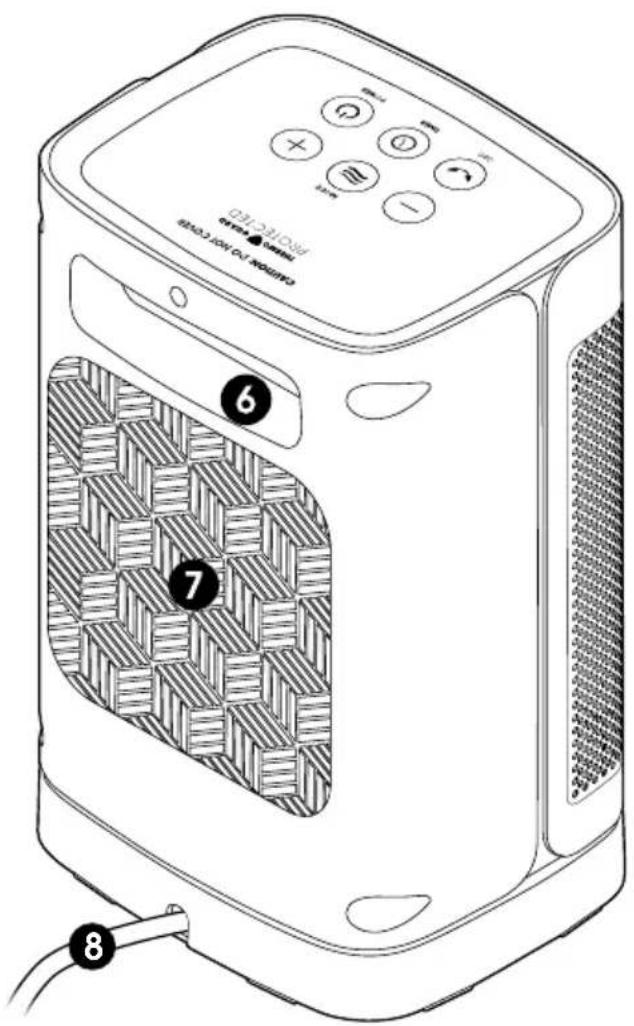
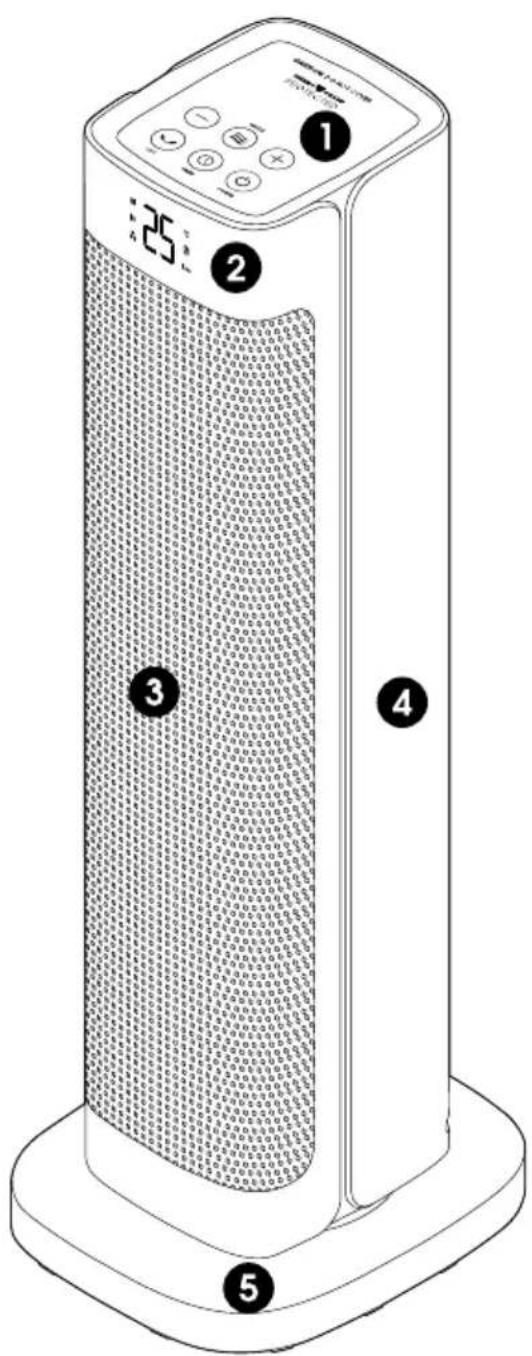
KCE480 Components
- ControlPanel
2 LED Display Screen - Front Grille
- Heater Housing
-
Oscillating Base
-
Handle
- Removable Dust Filter
- Power Cord
Not Shown
- Back Fan Grille
- Remote Control
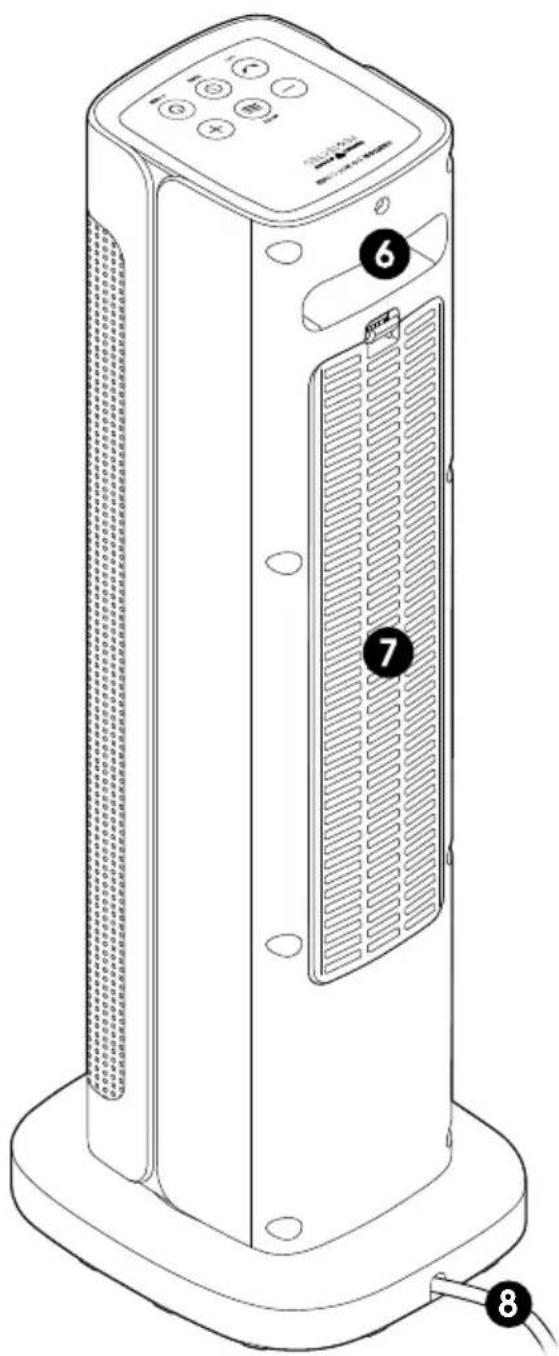
Controls for KCE180 & KCE480
CONTROL PANEL BUTTONS
- Power (On/Off)
2 Mode - Timer
- Oscillation
- Minus
- Plus

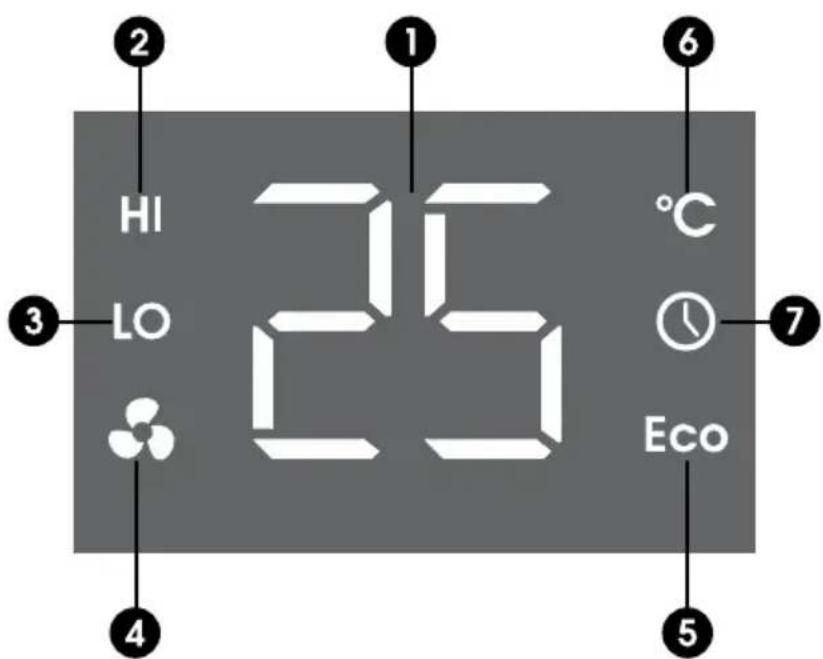
LED DISPLAY SCREEN FUNCTION ICONS
- Room Temperature
2 High Heat - Low Heat
- Fan Only
- Smart Eco
- Temperature Degree Celsius
- Timer
Using Your Kambrook Ceramic Heater
SAFETY FEATURES
Safety Tip-Over Cut-Out Switch
This heater is designed with a tip-over switch fitted to the base of the heater. If accidentally tipped over or picked up and moved, the heater will stop operating. Once placed back into an upright position, the heater will return to standby mode. Touch the POWER ⏻ button to resume operation.

NOTE
Lifting and moving the ceramic heater will activate the tip-over switch, disrupting the power to the heater.

NOTE
The heater will revert back to the LO default setting once POWER is pressed.
ThermoGuard Overheat Safety Device
Your heater is fitted with a safety device that switches off the heater in the event of overheating. Should this heater stop working, turn off at the power outlet and inspect the air inlet and outlet for any blockages. Wait until the heater is fully cooled allowing for the protection system to reset before attempting to restart the heater.
If the heater fails to operate or the safety device switches off again, return the heater to your nearest service centre for examination or repair.
Before First Use
Before using your Kambrook ceramic heater for the first time, remove all packaging material and promotional labels.

WARNING
To reduce the risk of fire, keep textiles, curtains, or any other flammable material a minimum distance of 1m from the air outlet.

NOTE
If operating on high-pile carpet, the tip over switch may activate, stopping the heater from working. Move the heater to a flat, hard surface.
Using Your Kambrook Ceramic Heater
NOTE
The current temperature display is an indication of the room temperature in the immediate surroundings from the inbuilt sensor. Actual temperature may vary depending on the location of the ceramic heater in the room, such as closeness to walls or in drafty areas.
Operating Your Ceramic Heater
- Place the ceramic heater upright on a flat surface.
- Insert the power plug into a 230V or 240V power outlet and switch the outlet on. The LED display will illuminate "00" before the current room temperature will display. The ceramic heater is now on standby.
- Touch the POWER ⏻ button to turn on the heater. The heater will automatically start on Low Heat mode when first turned on.
- Touch the MODE ≈ button to toggle between the 4 operating modes: LOW HEATLO, HIGH HEATHI, SMART ECO E&FAN ONLY. A beep will sound after each press and the operating mode icon will illuminate on the display screen. The selected mode will start automatically.
IMPORTANT
When moving the ceramic heater, lift using the built-in handle and set down gently on a flat and level surface.
- To return to standby at any time during operation, touch the POWER ⏻ button.
A 30 second cool down timer will begin counting down on the display and the heater will operate in Fan Only mode. Once the timer reaches '0', the fan will stop and the heater will return to standby.
NOTE
The LED display will dim to a comfortable level after 15 seconds if no buttons on the control panel are touched. For ease in programming, the display will return to full illumination when any operating button on the control panel is touched.
Operating Modes
Low & High Heat Settings - Lo, Hi
Select between Low (Lo) and High (Hi) heat settings.
- High Heat mode will heat the room faster.
- Low Heat mode turns on only half the heating elements and uses less power than High. LO is the default operating mode when the ceramic heater is first used
Smart Eco Mode - Eco
Smart Eco mode allows you to select a preferred temperature, then automatically adjusts the operating mode based on the set room temperature to operate both for efficiency and comfort.
- The temperature can be set between 10-35 degrees on Smart Eco mode.
- The default temperature setting on Smart Eco mode is 25 degrees unless manually adjusted.
Using Your Kambrook Ceramic Heater
- The unit will stop heating once the set temperature is reached and return to standby mode.
- Once the room temperature falls below the set temperature, the heater will begin heating again.
NOTE
The Fan may operate after the temperature has been reached for a period of time and before entering standby to cool down the heater.
NOTE
The temperature can only be set when using Smart Eco mode.
Fan Only Mode -
- Fan Only mode helps to circulate the air without heating and operates automatically to cool down the heater after use.
WARNING
Do not use this heater in small rooms when occupied by persons not capable of leaving the room on their own, unless constant supervision is provided.
WARNING
To avoid overheating, do not cover the heater.
Setting the Temperature
- Setting the temperature can be used to maintain your desired room temperature.
- The temperature on this ceramic heater can be manually set between 10 – 35 degrees Celsius on Smart Eco mode.
- When the set temperature is higher than the current room temperature by 2 degrees, low heat mode will activate.
-
When the set temperature is higher than the current room temperature by 4 degrees, the high heat mode will activate.
-
Touch the MODE ≈ button until the Eco icon illuminates on the display screen.
-
Touch the "-" & "+" buttons to select a desired temperature between 10 - 35 degrees. The set temperature will flash twice, then return to the current room temperature reading. The heater will operate in Hi and Lo heat modes to achieve the set temperature.
-
To view the set temperature during operation, press "-" or "+" once and the set temperature will flash on the screen before reverting back to the current room temperature.
-
Once the temperature is reached, the ceramic heater will switch to standby mode. If the current room temperature falls below the set temperature, heating will recommence.
NOTE
The temperature can only be set on SMART ECO mode.
Using Your Kambrook Ceramic Heater
Setting the Auto-off Timer
The ceramic heater comes with a 12-hour auto-off Timer that can be set in 1-hour intervals.
Once the timer reaches '0', the ceramic heater will switch off and return to standby mode. The Timer can be set when using any operating mode.
- To set the timer, select the heating mode. Touch the TIMER Ⓤ button, and the Timer icon will appear on the display screen. Touch "-" or "+" buttons until the desired number of hours is displayed. The Timer hours will flash twice, start to countdown, then return to the current room temperature.
- The heater will automatically return to standby when the time has elapsed.
- To check the remaining time on the LED screen, touch the TIMER Ⓤ button once. The remaining time will flash twice, then revert to the current room temperature.
- To change or cancel the Timer at any time, touch the TIMER Ⓤ button, then the "-" or "+" buttons. Select a new Timer hour or select '0' to cancel the Timer. The Timer symbol will disappear from the display when cancelled.
NOTE
- To run the ceramic heater continuously, do not set the temperature on Smart Eco mode, and/or do not set the timer.
- All operating modes can be adjusted at any time after the timer is set.
Oscillation
Setting the Oscillation
- 60-degree side to side oscillation can be activated in any mode. Touch the OSCILLATION😊 button to activate.
- Touch the OSCILLATION 😊 button again to pause oscillation.
Room Ambient Temperature
Your Kambrook ceramic heater is fitted with a sensor that detects the current room temperature, which is then displayed on the LED screen. The number displayed is an indication of the room temperature in the immediate surroundings from the inbuilt sensor. Actual temperature may vary depending on the location of the ceramic heater in the room, such as closeness to walls or in drafty areas.
Memory Function
The ceramic heater has a memory function and will return to the last mode selected before it was turned off, except for the timer function. Memory will only occur if the ceramic heater is not disconnected from the power supply. The memory function is available on all modes.
Using Your Kambrook Ceramic Heater
Using the Remote Control
A remote control is included with the KCE480 Ceramic Tower Heater only. The remote control buttons operate in the same way as those on the heater control panel.
The remote control includes 1 x CR2025 3V Lithium battery. This Lithium battery is protected by an isolating slip. Before first using the remote control, remove the battery isolating slip by pulling the slip outwards away from the remote control.
To check and/or to replace the battery, refer to the directions below.
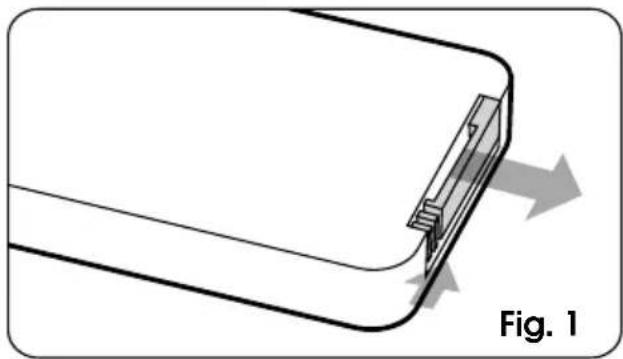
- Open the battery compartment at the back of the remote, pushing the small arched groove to the right and simultaneously pulling out the battery compartment cover by pushing the rectangular groove (Fig. 1).
natural_image
Diagram of a device with a clip and directional arrows indicating movement, labeled 'Fig. 1' (no text or symbols on the diagram itself)- If required, remove the old battery and insert the new battery, paying attention to the polarity (+ and -). Reinsert the battery compartment into the remote control ensuring that the + symbol is facing upwards when inserted (Fig 2). Make sure the battery compartment is correctly secured.

- To use the remote control, point it at the display screen on the heater and used within five meters.
HINT: When correctly inserted, the text on the battery will be facing the bottom of the remote and the compartment is fitted correctly when it slides in all the way.
WARNING: KEEP BATTERIES OUT OF REACH OF CHILDREN
Swallowing may lead to serious injury in as little as 2 hours or death, due to chemical burns and potential perforation of the oesophagus.
If you suspect your child has swallowed or inserted a button battery immediately call the 24-hour Poisons Information Centre on 13 11 26 for fast, expert advice. Examine devices and make sure the battery compartment is correctly secured, e.g. that the screw or other mechanical fastener is tightened. Do not use if compartment is not secure. Dispose of used button batteries immediately and safely. Flat batteries can still be dangerous. Tell others about the risk associated with button batteries and how to their children safe. Check regulated terms.
Using Your Kambrook Ceramic Heater
Hints & Tips
- Don't overheat your home. The temperature of a heated room in winter should be 18-21°C.
- Your heater will work more efficiently if you stick to Kambrook's recommended clearance spaces.
- Zone off unoccupied rooms by closing doors and only heat the main living areas. Fit window coverings, like curtains, to halve winter heat loss.
- Put draft stoppers, such as a rolled-up towel, at the bottom of outside doorways to keep out cold air.
- Avoid placing items too close to the heater (both at the front and back) for optimal air flow.

WARNING
Never cover the heater or dry clothes over the heater.
Care, Cleaning & Storage
- Always switch off the heater at the power outlet and unplug prior to cleaning the filter, housing, base and grilles.
- To clean the external housing of the ceramic heater, wipe with a clean, dry cloth. Never use an abrasive cleaner.
• To clean the grilles and remove dust that may have accumulated, use a soft, damp cloth or a vacuum cleaner using the brush attachment. - If the heater has collected dust or dirt inside the unit or around any elements, have the unit cleaned by a qualified service agent. Do not operate the heater in this condition.
Cleaning the Filter
- Your Kambrook Ceramic Tower Heater (KCE480) comes with a mesh dust filter located at the rear of the heater to help keep dust and debris away from the working parts. It is recommended to regularly check your heaters filter for clogging and dust build up. The filter should be checked after every use to ensure efficient heating performance.
• Always switch the heater off at the power outlet, then disconnect from the power outlet prior to removing the filter for cleaning. - To remove the dust filter, ensure the heater is in the upright position. Using a Philips head screwdriver, remove the screw located near the top of the filter. Keep the screw in a safe place until ready to reassemble.
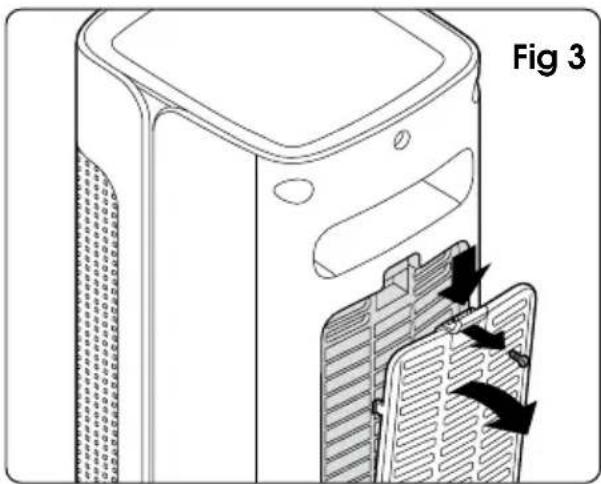
- Press downwards on the tab located at the top of the filter panel (Fig.3) then pull the filter bracket away from the heater.
natural_image
Technical line drawing of a device with internal components and directional arrows, labeled Fig 3 (no text or symbols on the diagram itself)
natural_image
Diagram of a device with a labeled component, showing internal structure and a black arrow indicating a specific area (no text or symbols present)- Shake the dust filter into a rubbish receptacle until all fine dust particles and debris are removed.
- If required, wipe over with a soft, dry cloth to remove stubborn particles or use the brush attachment on a vacuum to remove dust and debris.
- Re-attach the dust filter to the heater by aligning the grooves located on the bottom of the unit with the tabs on the filter, then push the dust filter in until you hear a "click".
- Replace the screw on the back of the heater (Fig. 4).
STORAGE
When not in use, store the ceramic heater upright in a cool, clean and dry location.
Troubleshooting
POSSIBLE PROBLEM POSSIBLE REASON EASY SOLUTION
| The heater does not turn on. | The heater is not plugged in. | Insert the plug into a 230V or 240V power outlet and turn the power on. |
| Power button was not pressed after being plugged in. | Press power button. | |
| Heater set on an uneven surface and the tip-over safety switch has engaged. | Ensure heater is upright on levelled surface. | |
| The heater will not turn off. | Power button was not pressed. Press power button. | |
| Oscillation does not operate properly. | There is a foreign object between the base and the body of the heater. | Remove any foreign objects found. |
| Heater has stopped heating | The room temperature is greater than, or equal to the programmed temperature (if applicable) or the default temperature of 25°C. | Press the + button to increase the default or programmed temperature |
| The timer has finished counting down. | Reset the timer. | |
| Heating or fan power is weak. | Dust has collected on the back of the heater or the air grilles are blocked | Turn off and unplug from the outlet. Clean the rear grille as per the cleaning section in this booklet and check for any blockages in the grilles |
| The remote control does not work. | The battery is too weak. Replace the battery. | |
| The remote is too far away from the device. | Operate the remote control closer to the heater. |
Kambrook - Australia
Locked Bag 2000
Botany NSW 1455
Customer Service Line/
1300 139 798
www.kambrook.com.au
Kambrook - New Zealand
PO Box 99027,
Newmarket,
Auckland 1149, New Zealand
Customer Service Line/
0800 273 845
www.kambrook.co.nz

- Important
- Please retain your instruction book for future use.
- Contents
- Limited Product Warranty
- IMPORTANT: PLEASE RETAIN YOUR INSTRUCTION BOOK FOR FUTURE USE.
- IMPORTANT SAFEGUARDS Read all instructions before use and save for future reference
- Important Safeguards For All Electrical Appliances
- WARNING
- FOR HOUSEHOLD USE ONLY SAVE THESE INSTRUCTIONS
- KCE180 Components
- KCE480 Components
- Not Shown
- Controls for KCE180 & KCE480
- CONTROL PANEL BUTTONS
- LED DISPLAY SCREEN FUNCTION ICONS
- Using Your Kambrook Ceramic Heater
- SAFETY FEATURES
- Safety Tip-Over Cut-Out Switch
- NOTE
- ThermoGuard Overheat Safety Device
- Before First Use
- Operating Your Ceramic Heater
- Operating Modes
- Low & High Heat Settings - Lo, Hi
- Smart Eco Mode - Eco
- Fan Only Mode -
- Setting the Temperature
- Setting the Auto-off Timer
- Oscillation
- Setting the Oscillation
- Room Ambient Temperature
- Memory Function
- Using the Remote Control
- WARNING: KEEP BATTERIES OUT OF REACH OF CHILDREN
- Hints & Tips
- Care, Cleaning & Storage
- Cleaning the Filter
- STORAGE
- Troubleshooting
Brand : Kambrook
Model : Touch Control Tower KCE480
Category : Heating