
APBMC1-0125 - Power strip Bauhn - Free user manual and instructions
Find the device manual for free APBMC1-0125 Bauhn in PDF.


| Product Type | 8-Way Surge Protector with Wi-Fi & Meter Reading |
| Brand | Bauhn |
| Model | APBMC1-0125 |
| Input | 230-240 V AC, 50 Hz, 10 A |
| Total Loading Maximum | 2400 W |
| Surge Protection Energy Rating | 175 J |
| Surge Protection Limit | 6,000 A |
| USB-C Output | 5 V / 3 A |
| USB-A Output | 5 V / 2.4 A |
| Total USB Output | 5 V / 4.5 A |
| Number of AC Sockets | 8 |
| Wi-Fi Connectivity | 2.4 GHz only |
| Compatible Apps | Tuya Smart, Smart Life |
| Overload Protection | Resettable circuit breaker (10 A) |
| Power Cable Length | 1.5 m |
| Weight | 568 g |
| Dimensions (W x H x D) | 310 x 120 x 33 mm |
| Indoor Use Only | Yes |
| Warranty | 1 year |
| Cleaning Instructions | Use a soft, dry cloth only; no chemicals |
| Safety Compliance | AS/NZS 3105, AS/NZS 3112, AS/NZS 61558.2.16 |
Frequently Asked Questions - APBMC1-0125 Bauhn
User questions about APBMC1-0125 Bauhn
0 question about this device. Answer the ones you know or ask your own.
Ask a new question about this device
Download the instructions for your Power strip in PDF format for free! Find your manual APBMC1-0125 - Bauhn and take your electronic device back in hand. On this page are published all the documents necessary for the use of your device. APBMC1-0125 by Bauhn.
USER MANUAL APBMC1-0125 Bauhn
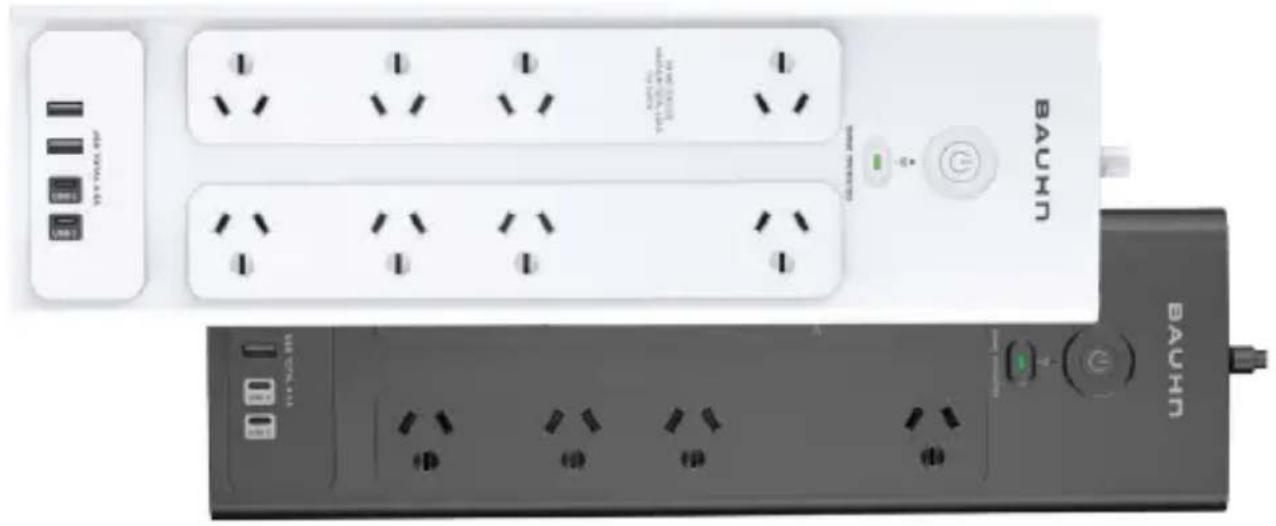
8-Way Surge Protector with Wi-Fi & Meter Reading
natural_image
Exterior view of a BAUHN air conditioner unit with multiple white and black power outlets (no text or symbols visible)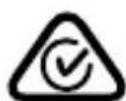
1
Have you got everything?


natural_image
White electrical outlet with multiple socket switches and a BACH-branded terminal (no visible text or symbols on main components)
natural_image
Front view of a BAUN air conditioner unit with multiple outlets and a control switch (no visible text or symbols)Note: only one power board
(white/black) is supplied.

natural_image
Yellow document icon with white lowercase 'i' and circular 'B' symbol (no text or data)
natural_image
Generic document icon with a large 'W' and a yellow circular symbol (no text or symbols present)Unpack the box and make sure all of these items are there:
A. 8-Way Surge Protector with Wi-Fi & Meter Reading
B. User Guide
C. Warranty Certificate

natural_image
Cartoon illustration of a smiling yellow 3D letter with glasses and arms, waving (no text or symbols)2 Product Overview
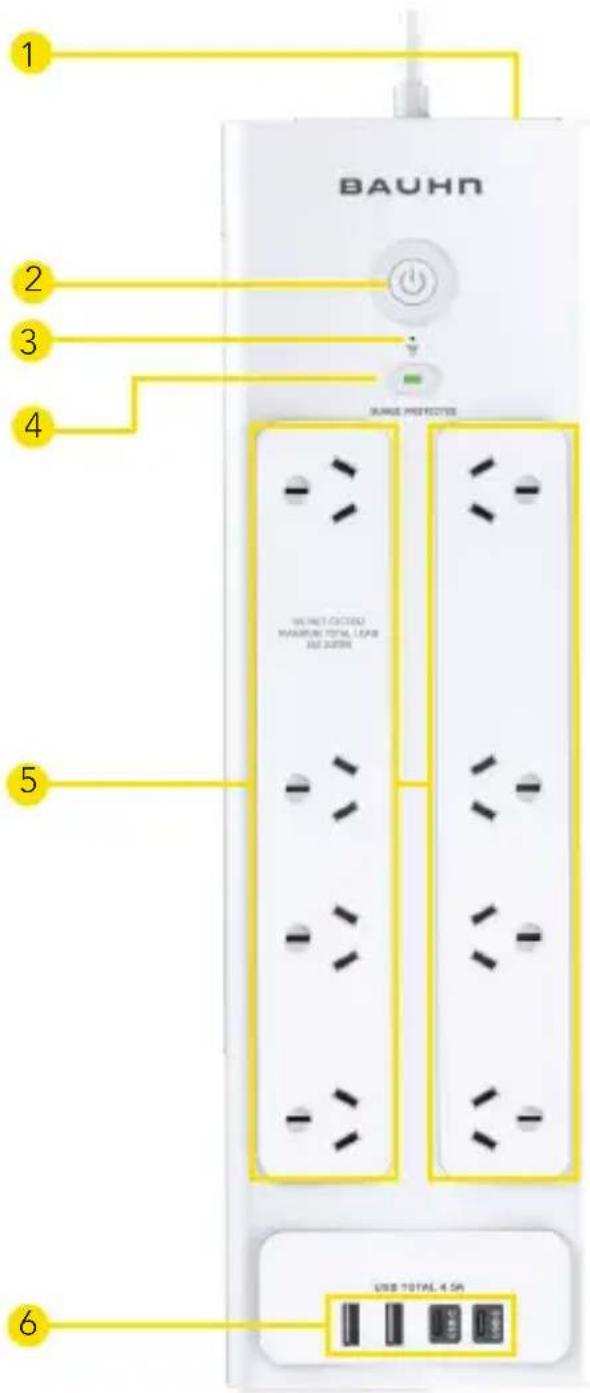
1 Overload Circuit Breaker (Resettable)
Protects against current overload at 10 amp
2 Power On/Off Switch
Press to supply/cut off power to the outlets.
3 Wi-Fi LED Indicator
When lit, the blue light indicates the status of the Wi-Fi connection.
4 Surge Protected LED Indicator
When lit, the green light indicates that all connected devices are surge protected.
5 AC Sockets
All 8 sockets are the same protected sockets and can be used interchangeably.
6 USB-C and USB Charging Ports
For charging phones, tablets or other devices.

Tuya Smart App
The smart Wi-Fi power board connects your home Wi-Fi network to your appliances for easy control of home automation, as well as saving energy and providing home security.
The “Tuya Smart” or “Smart Life” application along with your smart power board controls any connected electrical appliances via your smart device. Giving you full control to be able to switch devices On / Off, set timers and combine devices into group. Operates with both IOS and Android systems.
Getting Started



Use your phone to scan the QR code or search for "Tuya Smart" or "Smart Life" in your applications store to download and install the APP.

Open the APP and follow the procedure to register your account.
Connecting your Power Board to Wi-Fi
- Ensure your smart phone has connected using 2.4G Wi-Fi before starting the connection process.
Note: The smart power board supports 2.4G only.
-
Go to the app, tap "Home" and then tap "+" in the upper right corner and tape "Add Device".
-
Select "Electrical" catalog and "Power Strip (Wi-Fi)" from the list of possible devices in the app menu.
-
Enter the password of your home 2.4G Wi-Fi to the app. Ensure the network shown on the page is the correct 2.4G Wi-Fi SSID and then tap "Next".
-
After a moment the App will ask you to confirm the connection mode "Easy Mode" (the LED blinks quickly) and in "AP Mode" (the LED blinks slowly).

Easy Mode
-
Plug the power board into a power outlet, press and hold the On / Off button for 5 seconds or until the blue LED blinks quickly (twice per second), the power board is reset and it is ready to connect in Easy Mode.
-
In Easy Mode, the app will search for the power board and transfer your home 2.4G Wi-Fi SSID and password to the power board.
AP Mode
-
In the event you are unable to connect to your router in Easy Mode, another option is to connect via AP mode.
-
Plug the power board into a power outlet, press and hold the On / Off button for 5 seconds or until the blue LED blink quickly (twice per second), the power board is reset and ready to connect in Easy Mode. Press and hold the On / Off button for 5 seconds again, the blue LED will now blink slowly (every 3 seconds). the power board is now ready to connect in AP mode.
Connect your mobile phone to the device's hotspot
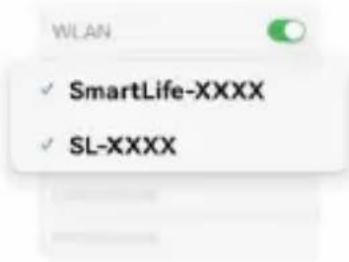
① Connect your phone to the hotspot shown below:
② Go back and add devices.
Go to Connect
- In AP mode your smart phone can connect directly to the power board through the temporary Wi-Fi hotspot named "SmartLife-xxxx". Once connected, return to the app screen and the app will automatically transfer your home 2.4G Wi-Fi SSID and password to the power board.
- Now your power board is connected to the network and it can be controlled using the app.
Add auto discovered device
- To accelerate pairing, the app supports the automatic discovery of nearby devices. Go to the app, tap "Home" and then tap "+" in the upper right corner and tape "Add Device". The app will automatically search the nearby devices pending pairing.


Controlling the Outlet with the App
Controlling the Outlet with the App:
- In the Apps main screen: Select the connected smart power board.
On the following screens, you can control the power boards on/off Switch as well as the Schedule, Timer and Electrical quantity statistics.
Note: The electrical quantity statistics includes the power consumption of the switches inside the power board.
Note: USB A and USB C output are always on.
- The App supports creating scenes which include the Automation and Tap-To-Run features. Scene is for device control and status synchronisation. Please check your Apps and the other smart devices which are connected in same App and network.


Troubleshooting
LED status Indicator flashes slowly
- Power Board should be put into connection mode. (AP Mode)
- Follow the procedure above on connecting your Power Board to Wi-Fi.
- When the connection is successful, the LED will stay ON.
LED status Indicator flashes quickly
- Power Board should be put into connection mode. (Easy Mode)
- Follow the procedure above on connecting your Power Board to Wi-Fi.
- When the connection is successful, the LED will stay ON.
The Power Board is not pairing or connecting with my device
- Check the device is switched on.
- Your phone needs to be connected to a 2.4G Wi-Fi network, so you may need to turn off 5G on the router.
- Make sure the Wi-Fi network is connected to the internet.
- Unplug the device for 20 seconds, then plug it back in. Press and hold the button for 5 seconds to reset the device.
The connected device is not responding
- Unplug the device for 20 seconds, then plug it back in. Press and hold the powerr button for 5 seconds to reset the device.
| No power output from one of the sockets | Try other sockets. If the other sockets have power output, it's probably the contact of one faulty socket that is loose or not connected; avoid using that socket. |
| No power output from any of the sockets | Check that the power switch is turned on (you can try to turn it on and off a few times to make sure it's switched on)Check the overload circuit breaker button to see whether it's tripping, push it down to reset the circuit breaker.Make sure the input socket for the power board has power output. |
| No output from the USB ports | Check that the USB cable is connected securely to the USB port and/or try a different USB port.The total output current for the USB ports are 4.5A. Remove devices using the other USB ports.Use another USB cable. |
| Power board is not turning on | Check that there is no visible damage to the plug or cord.Ensure that the devices connected do not exceed the total maximum load (2400W, 10A).If exceeded, unplug the devices and press the overload reset button. |
| Wi-Fi | To access the Smart Wi-Fi features. Please see the Tuya Smart App setup instructions. |
| Energy saving tips | The relays inside the power board will consume a small amount of power when the socket is powered on, regardless of connected devices. To save power, switch off unused sockets.Note: Leaving unused sockets on may cause the cover of the power board to heat slightly. |

Specifications
Input
Input: 230-240Vac, 50Hz 10A
USB-C Output: 5V/3A
USB-A Output: 5V/2.4A
USB Output: total 5V/4.5A
Total Loading Max. 2400W
Maximum Energy 175J
Surge Protection Limit 6,000A
USB Output DC 5V, 4.5A
Power Cable 1.5m
Mass 568g
Dimensions (W x H x D) 310 x 120 x 33 mm

General Safety Warnings
For the safety of yourself and others, follow all instructions and take notice of all the warnings. When adhered to, these safety precautions can reduce the risk of fire, electric shock and injury.
This product complies with Australian Safety standard AS/NZS 3105, AS/NZS 3112& AS/NZS 61558.2.16 to ensure the safety of the product.

The RCM is a visible indication of a product's compliance with all applicable ACMA regulatory arrangements, including all technical and record-keeping requirements.
IMPORTANT
- Damage: If the power board or cord is damaged, contact the After Sales Support line for advice. Do not attempt to open the board or replace the cord. The cord must be replaced by appropriately qualified personnel.
- Repair: If the power board requires repair, contact the After Sales Support line; never disassemble or modify the power board or attempt to service it yourself.
- Run the power supply cord in such a way that there will be no risk of anyone pulling it inadvertently or tripping over it.
-
If power supply cord is damaged, it must be replaced by an authorised service agent or similarly qualified person to avoid a hazard.
-
The power board is not intended for use by persons (including children) with reduced physical, sensory or mental capabilities, or lack of experience and knowledge, unless they have been given supervision or instruction by a person responsible for their safety.
- Young children should be supervised to ensure they do not play with the power board. Close supervision is always necessary when any appliance is used by or near children.
- The product is not suitable for use in locations where children are likely to be present.
- The surge power board is designed for indoor use in dry places only.
- Do not exceed a maximum loading of 2400 watts.
- For safety reasons, always use earth connections.
- Only use the power board with the power supply cord fully unwound.
- Before installing the power board, make sure to place it away from: heat sources, radiators or other products that produce heat; areas with high temperatures, high humidity or direct sunlight; excess dirt and dust; open windows and any place where water may get to the unit.
- Do not immerse the cord, plug or the surge power board in water or other liquid, or expose the electrical connections to water or other liquid.
General Safety Warnings
- Unpack the power board and keep the original packaging carton and materials in a safe place. It will help prevent any damage if the power board needs to be transported in the future, and you can use it to store the power board when it is not in use.
- The power board should always be repacked in its original packaging whenever transporting to prevent any possible damage to the product.
- When not in use: Disconnect from the power source and store in a cool, dry and well ventilated location out of direct sunlight, and not subject to humidity.
- Warning: The socket outlet should be located near the equipment and should be easily accessible.
Responsible disposal of the product
At the end of its working life, do not throw this product out with your household rubbish. An environmentally friendly method of disposal will ensure that valuable raw materials can be recycled. Contact your local authority for your nearest recycling centre. Electrical and electronic items contain materials and substances which, if handled or disposed of incorrectly, could potentially be hazardous to the environment and human health.
Responsible disposal of the packaging
The packaging of the product has been selected from environmentally friendly materials and can usually be recycled. Please ensure these are disposed of correctly. Plastic wrapping can be a suffocation hazard for babies and young children, please ensure all packaging materials are out of reach and are safely disposed of. Please ensure they are offered for recycling rather than throwing these materials away.
Cleaning the product
Only use a soft, dry cloth for cleaning the product; do not use a damp cloth. Never clean with industrial strength polish, wax, benzene, paint thinner, air freshener, lubricant, detergent or other chemicals. Wipe off any moisture, dirt or dust on the power sockets and plug pins with a clean, dry cloth.

BAUHN ^
Warranty Information
The product is guaranteed to be free from defects in workmanship and parts for a period of 12 months from the date of purchase. Defects that occur within this warranty period, under normal use and care, will be repaired, replaced or refunded at our discretion, solely at our option with no charge for parts and labour. The benefits conferred by this warranty are in addition to all rights and remedies in respect of the product that the consumer has under the Competition and Consumer Act 2010 and similar state and territory laws.
Our goods come with guarantees that cannot be excluded under the Australian Consumer Law. You are entitled to a replacement or refund for a major failure and to compensation for any other reasonably foreseeable loss or damage. You are also entitled to have the goods repaired or replaced if the goods fail to be of acceptable quality and the failure does not amount to a major failure.

BAUHN ^
Repair and Refurbished Goods or Parts Notice
Unfortunately, sometimes faulty products are manufactured, which need to be returned to the supplier for repair.
Please be aware that if your product is capable of retaining user-generated data (such as files stored on a computer hard drive, telephone numbers stored on a mobile telephone, songs stored on a portable media player, games saved on a games console or files stored on a USB memory stick) during the process of repair, some or all of your stored data may be lost. We recommend you save this data elsewhere prior to sending the product for repair.
You should also be aware that rather than repairing goods, we may replace them with refurbished goods of the same type or use refurbished parts in the repair process.
Please be assured though, refurbished parts or replacements are only used where they meet ALDI's stringent quality specifications.
If at any time you feel your repair is being handled unsatisfactorily, you may escalate your complaint. Please telephone us on 1300 002 534 or write to us at:
Tempo (Aust) Pty Ltd ABN 70 106 100 252
PO BOX 6097, North Sydney NSW 2059
Telephone: 1300 002 534 (Aust) Fax: (02) 8977 3765
Tempo Help Desk: 1300 002 534 (Aust)
(Operating Hours: Mon-Fri 8:30am-6pm; Sat 9am-6pm AEST)
Email: tempo.org/support
NOTES
NOTES

Give us a call
What? You mean this User Guide didn't have ALL the
!si
We'd love to help you get up and running as quickly as possible.
Call our After Sales Support on 1300 002 534.
Operating hours: Monday-Friday, 8:30am-6pm;
Saturday, 9am-6pm AEST

tempo.org/support
Well done, you made it.
Now sit back and relax... your Power Board is automatically covered by a 1-year warranty.
How nice!

natural_image
Cartoon illustration of a smiling yellow character with arms raised (no text or symbols)- 1
- Have you got everything?
- Product Overview
- Tuya Smart App
- Getting Started
- Connecting your Power Board to Wi-Fi
- Easy Mode
- AP Mode
- Connect your mobile phone to the device's hotspot
- Add auto discovered device
- Controlling the Outlet with the App
- Controlling the Outlet with the App:
- Troubleshooting
- Specifications
- General Safety Warnings
- IMPORTANT
- Responsible disposal of the product
- Responsible disposal of the packaging
- Cleaning the product
- BAUHN °
- Warranty Information
- Repair and Refurbished Goods or Parts Notice
- NOTES
- Give us a call
Brand : Bauhn
Model : APBMC1-0125
Category : Power strip