
the PopFan LFA100 - Household Fan BREVILLE - Free user manual and instructions
Find the device manual for free the PopFan LFA100 BREVILLE in PDF.


| Brand | Breville |
| Model | the PopFan LFA100 |
| Product Type | Household fan |
| Power Source | USB (DC 5V, 2A minimum 10W) with internal rechargeable battery |
| Fan Speeds | 4 speeds (Speed 1 to Speed 4) |
| Battery Life | Approx. 15 hours at Speed 1, approx. 4 hours at Speed 4 |
| Rotating Front Grille | Yes, activated by turning louvre knob counter-clockwise 0.5-1.5 turns |
| Angle Adjustment | Adjustable fan head from horizontal to vertical via angle adjusting pivot |
| Collapsible Design | Yes, folds flat for storage and wall hanging |
| Hanging Capability | Yes, using carry strap (requires picture hook, not included; weight limit 0.70kg) |
| Carry Strap | Included for portability |
| USB Cable Length | Provided (exact length not specified) |
| Weight | Less than 0.70 kg (suitable for hanging on a hook rated for 0.70 kg) |
| Dimensions (Approximate) | Not specified in manual; compact desktop size |
| Materials | Plastic and metal components |
| Safety Features | Overcharge protection, automatic shut-off on low battery, safety instructions for children |
| Cleaning | Wipe with soft damp cloth; vacuum blades with brush attachment; do not use abrasive cleaners |
| Storage | Fold compactly, store in cool, dry place away from children |
| Included Components | Fan base, tube, fan head (with grilles and blade), USB cable, carry strap |
| Battery Type | Non-replaceable internal lithium-ion battery (assumed) |
| Warranty | Not specified; Breville customer service contact provided |
Frequently Asked Questions - the PopFan LFA100 BREVILLE
User questions about the PopFan LFA100 BREVILLE
0 question about this device. Answer the ones you know or ask your own.
Ask a new question about this device
Download the instructions for your Household Fan in PDF format for free! Find your manual the PopFan LFA100 - BREVILLE and take your electronic device back in hand. On this page are published all the documents necessary for the use of your device. the PopFan LFA100 by BREVILLE.
USER MANUAL the PopFan LFA100 BREVILLE
natural_image
Modern black-and-white photo of a desktop fan with a circular head and adjustable arm, mounted on a base (no visible text or symbols)Breville®

Contents
2 Breville Recommends Safety First
6 Components
7 Control Panel
8 Operation
10 Care, Cleaning & Storage
BREVILLE RECOMMENDS SAFETY FIRST
At Breville we are very safety conscious. We design and manufacture consumer products with the safety of you, our valued customer, foremost in mind. In addition, we ask that you exercise a degree of care and adhere to the following precautions.
IMPORTANT SAFEGUARDS
READ ALL INSTRUCTIONS BEFORE USE AND SAVE FOR FUTURE REFERENCE
- Carefully read all instructions before operating the fan for the first time and save for future reference.
- Remove and safely discard any packaging material and promotional labels before using the fan for the first time.
• To eliminate a choking hazard for young children, remove and safely discard the protective cover fitted to the power plug of this fan. - When unpacking the fan, check to see you have received all the items listed in the parts list, before discarding the packaging.
- Do not place the fan near the edge of a bench or table during operation. Ensure that the surface is level, stable, clean and free of water and other substances.
- Do not place this fan on or near a heat source, such as hot plate, oven or heaters.
-
Position the fan at a minimum distance of 20cm away from walls, curtains and other heat or steam sensitive materials and provide adequate space above and on all sides for air circulation.
-
Do not let the USB cable hang over the edge of a bench or table, touch hot surfaces or become knotted.
- This fan is for household use only. Do not use this fan for anything other than its intended use. Do not use in moving vehicles or boats. Do not use outdoors.
Misuse may cause injury.
- The fan is not intended for use by persons (including children) with reduced physical, sensory or mental capabilities, or lack of experience and knowledge, unless they have been given supervision or instruction concerning use of the appliance by a person responsible for their safety.
• Children should be supervised to ensure that they do not play with the appliance.
• Always ensure the fan is properly assembled before use. Follow the instructions provided in this book. - This fan is intended for household use only and not for commercial or industrial use.
-
Disconnect the USB cable before assembling or before cleaning and when the fan is not in use.
-
Avoid touching moving parts of the fan. When adjusting the movement of the front grille, ensure the louvre knob is the part being rotated. Ensure to only rotate the louvre knob for 0.5 to 1.5 turn in counterclockwise direction as the front grille may disassemble.
- Never insert fingers, pencils or any other objects through the guards whenever the power plug is connected, in particular while the fan is switched on.
- Do not operate in the presence of explosives and/or flammable fumes or liquids.
• Always turn the fan OFF when the fan is not in use. - Do not unplug the fan by pulling on the USB cable.
- Never carry the fan by the USB cable. Use the carry strap provided.
- Never yank the USB connector to disconnect the USB cable from the USB port; instead, grasp the USB connector and pull to disconnect. Do not twist or pull the USB cable around sharp edges or corners.
- Please ensure the fan is in collapsible format if hanging on the wall. The fan will not be balanced if hung on the wall in
another format. Please ensure to use a picture hanging hook that can withstand a weight of at least 0.70kg.
- Allow the fan blade to stop completely before cleaning and maintenance unless otherwise specified in this booklet.
• The battery is non-replaceable.
• To prevent damage to the fan, do not use alkaline cleaning agents when cleaning, uses a soft cloth and mild detergent. - Do not place anything, on top of the fan when assembled, when in use and when stored.
- Any maintenance other than cleaning should be performed at an authorised Breville Service Centre.
- Store the unit out of reach of children.
- Keep the fan clean. Follow the cleaning instructions provided in this book.
PLEASE READ THE FOLLOWING WHEN CHARGING THE FAN WITH USB POWER ADAPTOR
- Use only an electrical safety compliant, DC 5V 2A (or a minimum of 10W), USB power adaptor.
- Fully unwind the USB cable before attaching to the fan and the USB power adaptor prior to charging.
- Connect the fan to the USB power adaptor with the USB cable provided.
- Do not, under any circumstances, modify the USB power adapter. Follow the safety instructions provided by the USB power adaptor.
-
To protect against electric shock, do not immerse the USB cable, USB power adaptor or fan in water or any other liquid or allow moisture to come in contact with the part, unless it is recommended in the cleaning instructions.
-
It is recommended to regularly inspect the fan, USB cable and USB power adaptor. To avoid a hazard, do not use the fan, USB cable and power adaptor if they become damaged in any way. If the fan is faulty, return the fan and the USB cable provided to the nearest authorized Breville service centre for examination and / or repair.
- During electrical storms, while charging, the USB adaptor should be disconnected from the power source at the wall socket to prevent any electrical surges that may arise during the storm and which may inadvertently cause damage to the USB adaptor and electronic componentry inside the fan.

Components
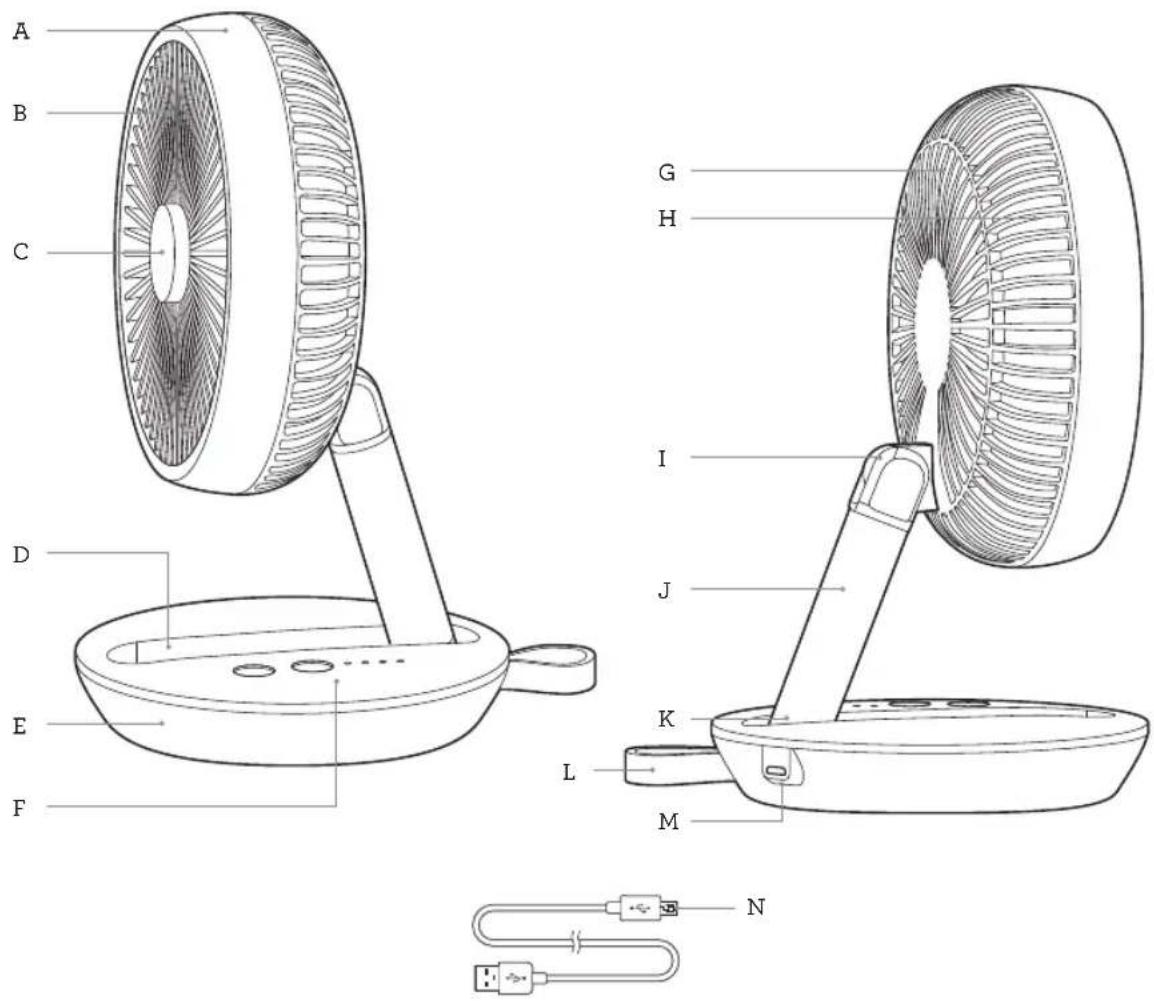
A. Front grille frame
B. Rotating front grille
C. Louvre knob
D. Tube storage groove
E. Base
F. Control panel with LED indicator lights
G. Rear grille
H. Fan blade
I. Angle adjusting pivot
J. Tube
K. Collapsible stand pivot
L. Carry strap
M. USB Port
N. USB Cable

Control Panel
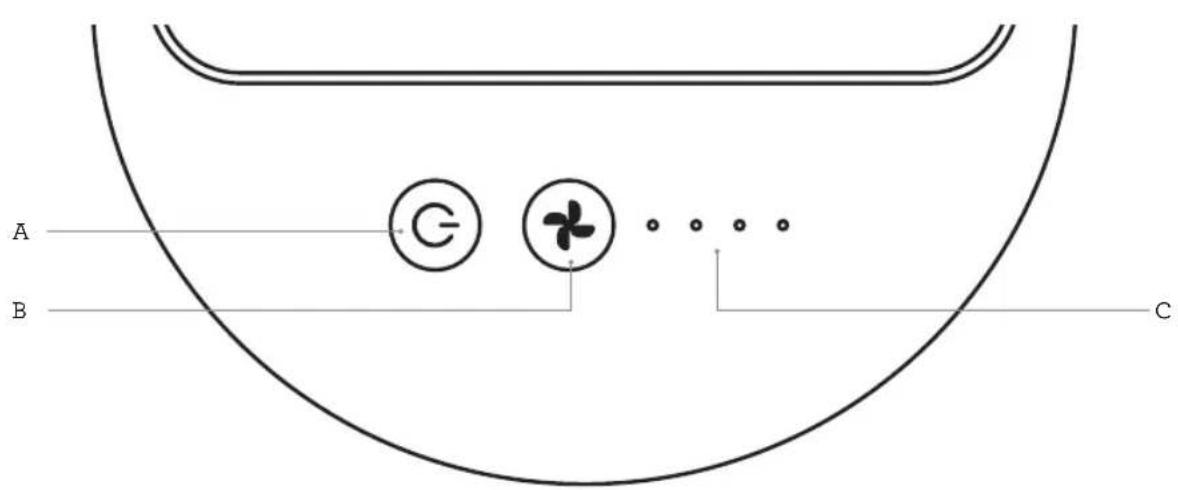
A. POWER ON/OFF button
B. FAN SPEED button
C. FAN SPEED and CHARGING LIGHTS

Operation
OPERATING YOUR BREVILLE FAN
BEFORE FIRST USE
Before using your Breville fan for the first time, remove all packaging material and promotional labels. Check for any missing or damaged parts as per the components list.
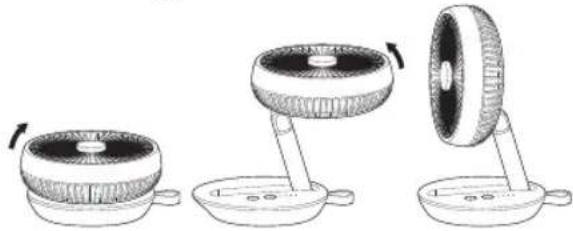
The fan can be used in a collapsible format or in any angle up to an upright position. The angle of the fan head can also be adjusted from horizontal to vertical positions. To unfold, pull the top half of the fan up towards the carry strap found on the back of the base, then use the angle adjusting pivot and collapsible stand pivot to adjust the angle of the tube and the fan head based on preference. Position the fan accordingly.
natural_image
Diagram showing three stages of a device with rotating components, no text or symbols presentHANGING YOUR FAN
When fully collapsed, the fan can hang on the wall using the carry strap provided. The fan can be hung to be used and stored. Install a picture hanging hook (not provided) that can withstand a weight of at least 0.70kg. Ensure the hanging hook is positioned at least 20cm away from other appliances or objects that may damage the fan.

NOTE:
- If the fan is hung for the purpose of operation, it will need to be turned ON first, before it is then collapsed and hung onto the wall.
- If the fan is in use while hanging, the breeze will be reduced considerably, due to the compact position.
- Ensure the fan is fully collapsed when hung on the wall. The fan will not be balanced if hung on the wall incorrectly.

CHARGING YOUR FAN
The fan can be charged using the USB cable provided and a compatible electronic device or DC 5V 2A (or a minimum of 10W) USB power adaptor.
- Place the fan on a flat surface, close to a USB power outlet port.
- Connect the fan to the USB power outlet port by using the USB cable supplied.
- The indicator lights on the fan will start to flash to indicate the fan is charging.
- Once all indicator lights illuminate and no lights remain flashing, the fan has fully charged.
- Disconnect the USB cable from the USB power outlet and the fan once charged. If using a USB power adaptor, switch off the power from the power point and unplug the USB power adaptor prior to disconnecting the USB cable. To check the battery life while the fan is OFF, press and hold the button for 2 seconds and the LED lights will illuminate to show the current charging level of the battery.

NOTE:
- If the ON/OFF button is pressed and the fan does not turn on, all LED indicator lights will simultaneously flash 5 times, and the fan will need to be recharged.
- To prolong the life of the battery, it is not recommended to operate the fan while the fan is charging.
RUNNING TIME ON BATTERY
| Fan Speed Duration | |
| Speed 1 Approx. 15 | Hours |
| Speed 4 Approx. 4 | Hours |
ADJUSTING THE FAN SPEED
The fan speed can be adjusted from Speed 1 to Speed 4.
- Press the ⏻ button and the fan will start on the lowest setting, Speed 1.
- To change the fan speed, press the button repeatedly, the light/s corresponding with the selected speed will illuminate. The fan will start automatically.

NOTE:
The fan is fitted with a power saving feature. Lights will turn off after 60 seconds if no control buttons are touched. Touching any button will turn the lights on.

NOTE:
If the battery is not sufficiently charged while the fan is in operation, it will simultaneously flash 5 times before turning off automatically.
- To switch the fan off at any time during operation, press the ⏻ button.
USING THE ROTATING FRONT GRILLE
To use the rotating front grille, turn the louvre knob counter-clockwise 0.5 - 1.5 times and let go. The front grille should start to rotate clockwise on its own. To stop the front grille from rotating, turn the louvre knob clockwise 0.5 - 1.5 times.

NOTE:
Do not rotate the louvre knob more than recommended (0.5 to 1.5 times) as the rotating front grille may swing loudly or disassemble.

Care,Cleaning & Storage
Always turn the Breville fan off and ensure the fan is not connected to the USB cable prior to cleaning. As dust build up can cause performance issues, it is recommended you clean the fan at least once a month, depending on use.
To clean the outside of the fan, wipe the exterior with a soft, damp cloth. Never use an abrasive cleaner.
To clean the fan blades and remove dust that may have accumulated, use a soft, damp cloth or a vacuum cleaner using the brush attachment.
STORAGE
When not in use, fold the fan to its compact position. Store the fan and the USB cable in a cool, clean and dry location.

Note
Breville Customer Service Centre
Australian Customers
Phone: 1300 139 798
Web: www.breville.com
New Zealand Customers
Phone: 0800 273 845
Web: www.breville.com
Breville®
Breville, the Breville logo and PopFan are trademarks of Breville Pty. Ltd.
All other brands may be trademarks of their respective owners.
Breville's products are distributed in New Zealand under license. A.B.N. 98 000 092 928.
Due to continued product improvement, the products illustrated/photographed in this booklet
may vary slightly from the actual product.
LFA100 ANZ - C20
- Contents
- BREVILLE RECOMMENDS SAFETY FIRST
- IMPORTANT SAFEGUARDS
- Misuse may cause injury.
- PLEASE READ THE FOLLOWING WHEN CHARGING THE FAN WITH USB POWER ADAPTOR
- Operation
- OPERATING YOUR BREVILLE FAN
- BEFORE FIRST USE
- HANGING YOUR FAN
- NOTE:
- CHARGING YOUR FAN
- ADJUSTING THE FAN SPEED
- USING THE ROTATING FRONT GRILLE
- Care,Cleaning & Storage
- STORAGE
- Breville Customer Service Centre
- Breville®
Brand : BREVILLE
Model : the PopFan LFA100
Category : Household Fan