RM-12XFRJ45 - AV Extender Kopul - Free user manual and instructions
Find the device manual for free RM-12XFRJ45 Kopul in PDF.


| Brand | Kopul |
| Model | RM-12XFRJ45 |
| Product Type | AV Extender |
| Number of Ports | 12 RJ45 |
| Max Supported Resolution | 4K@60Hz |
| Max Transmission Distance | 100 meters (CAT6) |
| Bandwidth | 18 Gbps |
| HDCP Support | HDCP 2.2 |
| Audio Support | Multi-channel digital audio |
| Power Supply | External adapter, 12V DC |
| Power Consumption | 10W (typical) |
| Dimensions (W x D x H) | 19 x 6.5 x 1.75 inches (rackmount 1U) |
| Weight | 5.5 lbs |
| Operating Temperature | 32°F to 104°F (0°C to 40°C) |
| Mounting | 19" rack mountable |
| Connector Type | RJ45 for input/output |
| LED Indicators | Power, Link, Signal |
| Housing Material | Metal |
| Included Accessories | Power adapter, mounting ears, user manual |
| Warranty | 2 years |
| CE/FCC Certification | Yes |
Frequently Asked Questions - RM-12XFRJ45 Kopul
User questions about RM-12XFRJ45 Kopul
0 question about this device. Answer the ones you know or ask your own.
Ask a new question about this device
Download the instructions for your AV Extender in PDF format for free! Find your manual RM-12XFRJ45 - Kopul and take your electronic device back in hand. On this page are published all the documents necessary for the use of your device. RM-12XFRJ45 by Kopul.
USER MANUAL RM-12XFRJ45 Kopul
12 Channel XLR Network Extender
User Manual

kopul®
RM-12XMRJ45 RM-12XFRJ45

natural_image
Abstract red geometric shape with white and black edges (no text or symbols)Thank you for choosing Kopul.
Kopul's 12-Channel XLR to RJ45 Network Cable Extenders are a simple and economical solution to replace heavy, bulky, and costly XLR and DMX snakes with thin, lightweight ethernet or etherCON cables. Link sound boards, PA systems, multitrack recorders, and DMX-equipped lights with clean and interference-free signals. Send all 12 channels to a single location, or create a customized audio snake to connect multiple destinations.
Each ethernet cable provides four channels of balanced mic-level analog, AES/EBU, and DMX signals and extends the length of your cable runs without interference, signal loss, or added coloration. These passive network extenders require no external power to operate, and there's no digital audio conversion.
Precautions⚠️
- Please read and follow these instructions, and keep this manual in a safe place.
- Do not attempt to disassemble or repair the equipment—doing so will void the warranty, and Kopul will not be responsible for any damage.
-
Clean the unit with only a soft, dry cloth.
-
Turn volume levels down or turn audio systems off before making connections to and from the Extender.
- A shielded Cat cable must be used in order to pass 48 V phantom power for a condenser microphone.
• All images are for illustrative purposes only.
Setting Up
The extenders fit into any standard 19-inch instrument rack.
Reversible Rack Ears
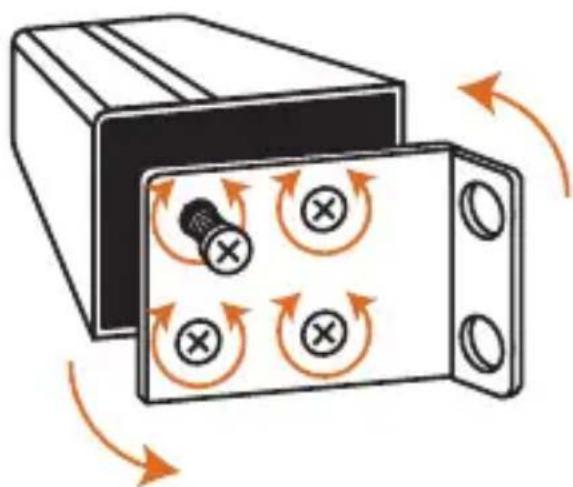
The rack ears are reversible, so either side can be accessible from the front of your rack.
Unscrew the four screws on both sides of the extenders and reverse the rack ears. Replace the four screws. Don't overtighten.
natural_image
Diagram of a battery pack with four circular components and magnetic field lines, showing rotational motion (no text or symbols)Connections
Connect the RM-12XMRJ45 and RM-12XFRJ45 with a Cat 5, 5e, 6, or 7 ethernet cable. EtherCON cables provide a locking metal shell that protects the RJ45 connector.
The RM-12XMRJ45 and RM-12XFRJ45 work with dynamic and condenser microphones.
Condenser microphones can receive phantom power only over shielded Cat 5e, Cat 6, or Cat 7 ethernet cables. Check the cable's specs to ensure they're shielded.
The RM-12XMRJ45 and RM-12XFRJ45 are compatible with DMX lights and controllers, as well as pro audio components that output AES/EBU and analog audio signals.
Ethernet Ports
Each extender has one input and one through connector for each bank of four XLRs.

The INPUT port can be connected to any of Kopul's XLR network extenders to transfer the signal over an ethernet cable. This makes it possible to link the bank of XLRF connectors to the corresponding bank of XLRM connectors. Analog audio, AES/EBU, and DMX signals can be transferred simultaneously on a single ethernet cable.
The THRU port is a passthrough connector, which allows you to feed the bank of XLR connectors to an additional destination. See Expanding Your Setup with the THRU Port below.
Studio and Live Concert Applications
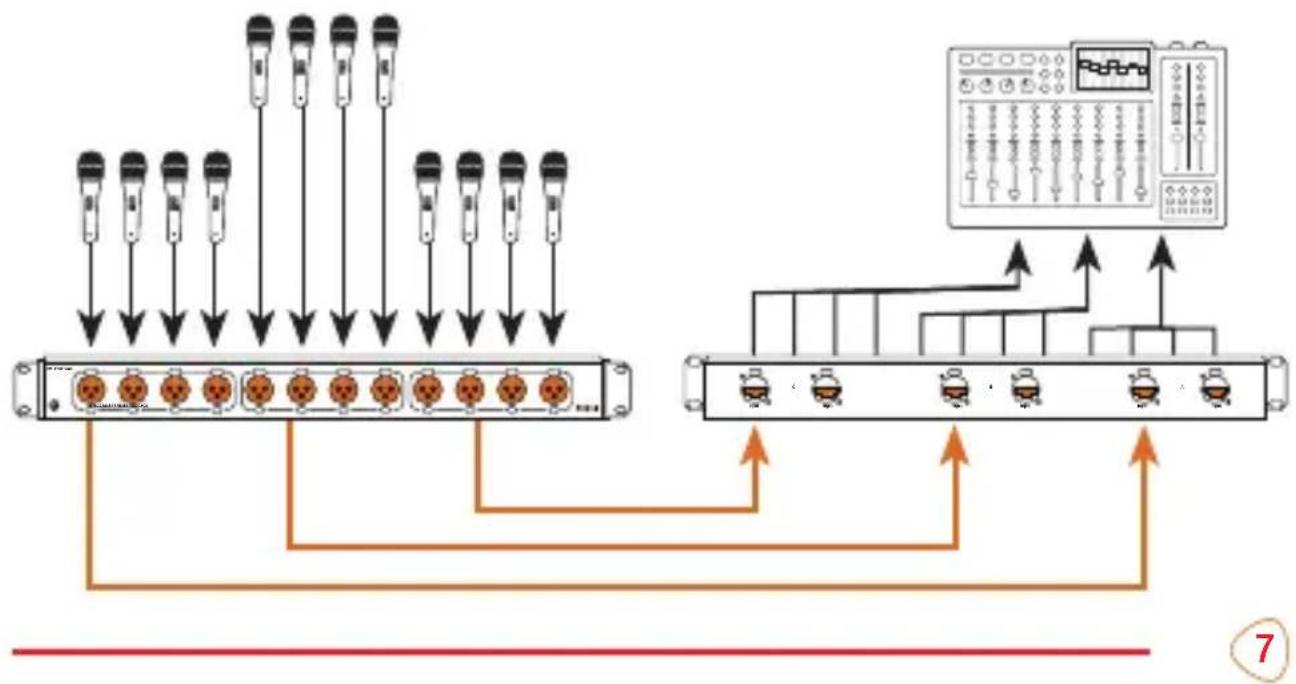
The male and female network extenders can be used as simple inputs and outputs to transfer signals from a stage or studio to a mixing board, multitrack recorder, floor monitor, or PA system.
flowchart
graph TD
    A["Device 1"] -->|Signal Flow Down| B["Central Network Interface"]
    C["Device 2"] -->|Signal Flow Up| B
    D["Device 3"] -->|Signal Flow Down| B
    E["Device 4"] -->|Signal Flow Up| B
    F["Device 5"] -->|Signal Flow Down| B
    G["Device 6"] -->|Signal Flow Up| B
    H["Device 7"] -->|Signal Flow Down| B
    I["Device 8"] -->|Signal Flow Up| B
    J["Device 9"] -->|Signal Flow Down| B
    K["Device 10"] -->|Signal Flow Up| B
    L["Device 11"] -->|Signal Flow Down| B
    M["Device 12"] -->|Signal Flow Up| B
    N["Device 13"] -->|Signal Flow Down| B
    O["Device 14"] -->|Signal Flow Up| B
    P["Device 15"] -->|Signal Flow Down| B
    Q["Device 16"] -->|Signal Flow Up| B
    R["Device 17"] -->|Signal Flow Down| B
    S["Device 18"] -->|Signal Flow Up| B
    T["Device 19"] -->|Signal Flow Down| B
    U["Device 20"] -->|Signal Flow Up| B
    V["Device 21"] -->|Signal Flow Down| B
    W["Device 22"] -->|Signal Flow Up| B
    X["Device 23"] -->|Signal Flow Down| B
    Y["Device 24"] -->|Signal Flow Up| B
    Z["Device 25"] -->|Signal Flow Down| B
    AA["Device 26"] -->|Signal Flow Up| B
    AB["Device 27"] -->|Signal Flow Down| B
    AC["Device 28"] -->|Signal Flow Up| B
    AD["Device 29"] -->|Signal Flow Down| B
    AE["Device 30"] -->|Signal Flow Up| B
    AF["Device 31"] -->|Signal Flow Down| B
    AG["Device 32"] -->|Signal Flow Up| B
    AH["Device 33"] -->|Signal Flow Down| B
    AI["Device 34"] -->|Signal Flow Up| B
    AJ["Device 35"] -->|Signal Flow Down| B
    AK["Device 36"] -->|Signal Flow Up| B
    AL["Device 37"] -->|Signal Flow Down| B
    AM["Device 38"] -->|Signal Flow Up| B
    AN["Device 39"] -->|Signal Flow Down| B
    AO["Device 40"] -->|Signal Flow Up| B
    AP["Device 41"] -->|Signal Flow Down| B
    AQ["Device 42"] -->|Signal Flow Up| B
    AR["Device 43"] -->|Signal Flow Down| B
    AS["Device 44"] -->|Signal Flow Up| B
    AT["Device 45"] -->|Signal Flow Down| B
    AU["Device 46"] -->|Signal Flow Up| B
    AV["Device 47"] -->|Signal Flow Down| B
    AW["Device 48"] -->|Signal Flow Up| B
    AX["Device 49"] -->|Signal Flow Down| B
    AY["Device 50"] -->|Signal Flow Up| B
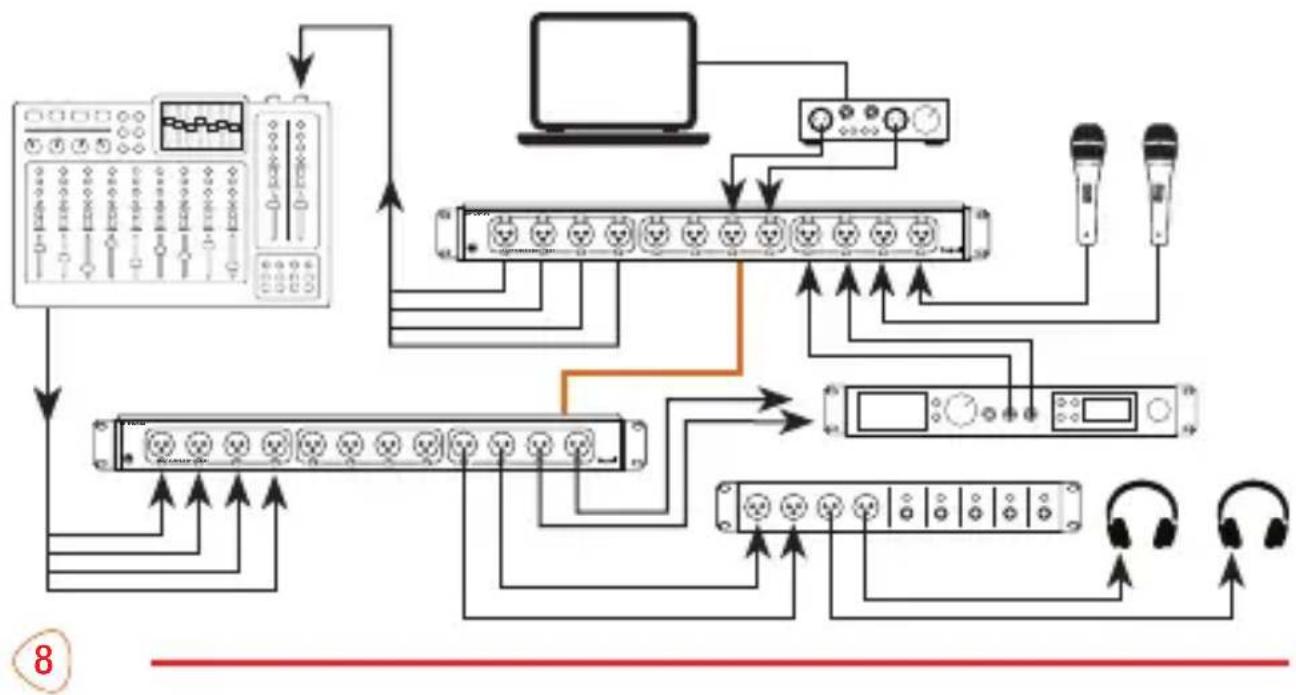
The extenders can be used for multiple purposes at once.
Note: Analog audio, AES/EBU, and DMX signals can be simultaneously transmitted on the same ethernet cable.
flowchart
graph TD
    A["Audio Device"] --> B["Channel 1"]
    A --> C["Channel 2"]
    B --> D["Laptop"]
    C --> E["Radio Station"]
    D --> F["Speaker"]
    E --> G["Speaker"]
    F --> H["Headphones"]
    G --> I["Headphones"]
    style A fill:#f9f,stroke:#333
    style B fill:#ccf,stroke:#333
    style C fill:#ccf,stroke:#333
    style D fill:#dfd,stroke:#333
    style E fill:#dfd,stroke:#333
    style F fill:#dfd,stroke:#333
    style G fill:#dfd,stroke:#333
    style H fill:#dfd,stroke:#333
    style I fill:#dfd,stroke:#333
DMX Lighting Applications
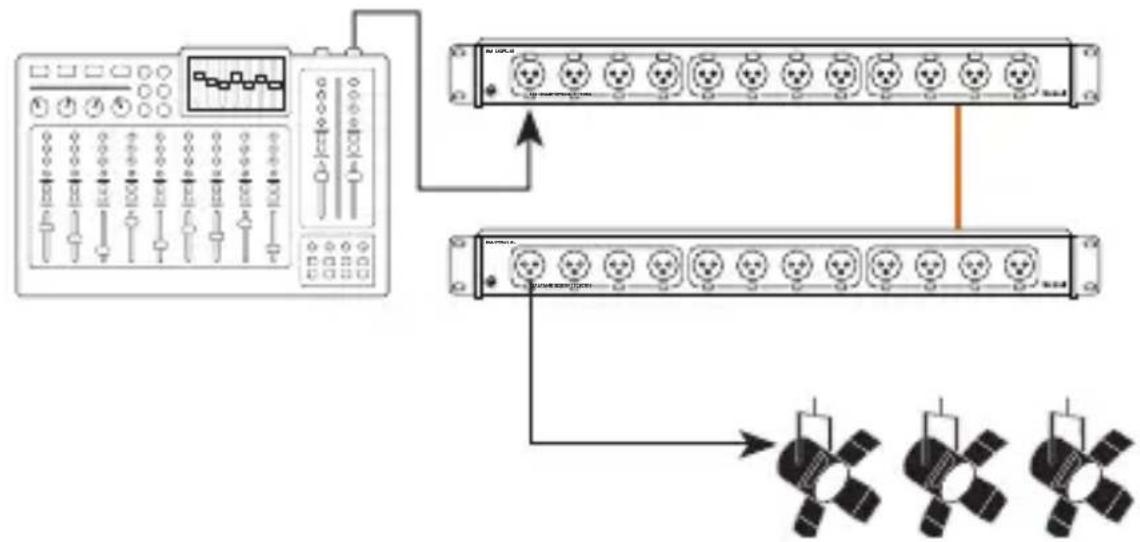
Connect a DMX controller to multiple DJ or theater lights.
Note: The network extenders accept multiple signal types. Run DMX controls and transfer AES/EBU and analog audio signals at the same time.
flowchart
graph TD
    A["Control Panel"] --> B["Signal Analyzer"]
    B --> C["Output Module 1"]
    B --> D["Output Module 2"]
    C --> E["Star-shaped Control Unit"]
    D --> F["Star-shaped Control Unit"]
    style A fill:#f9f,stroke:#333
    style C fill:#ccf,stroke:#333
    style D fill:#ccf,stroke:#333
Expanding Your Setup with the THRU Port
The THRU port adds additional XLR ports to your setup. THRU ports allow you to create different regions on the stage or in the studio. Connect any of Kopul's XLR Network Extenders with CAT cables to options and versatility to your setup.
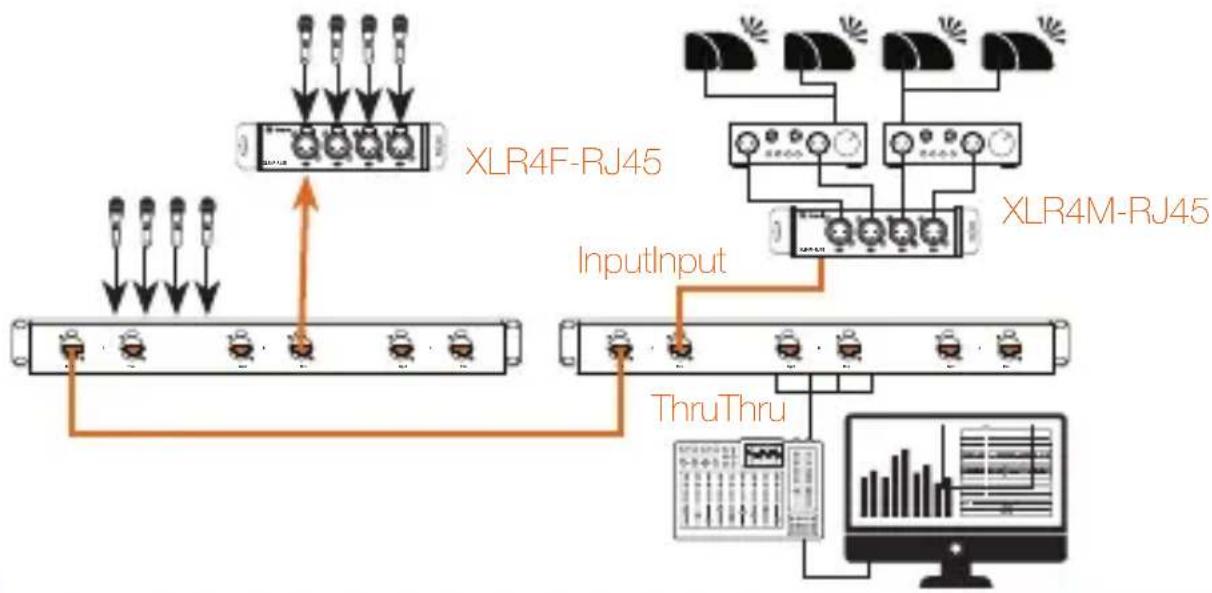
flowchart
graph TD
    A["InputInput"] --> B["XLR4F-RJ45"]
    A --> C["XLR4M-RJ45"]
    B --> D["Central Network Interface"]
    C --> D
    D --> E["ThruThru"]
    E --> F["Computer Interface"]
Preexisting Cat Wiring
Send audio from one room to another in a building that has pre-wired Cat 5, 5e, 6, or 7 cabling.
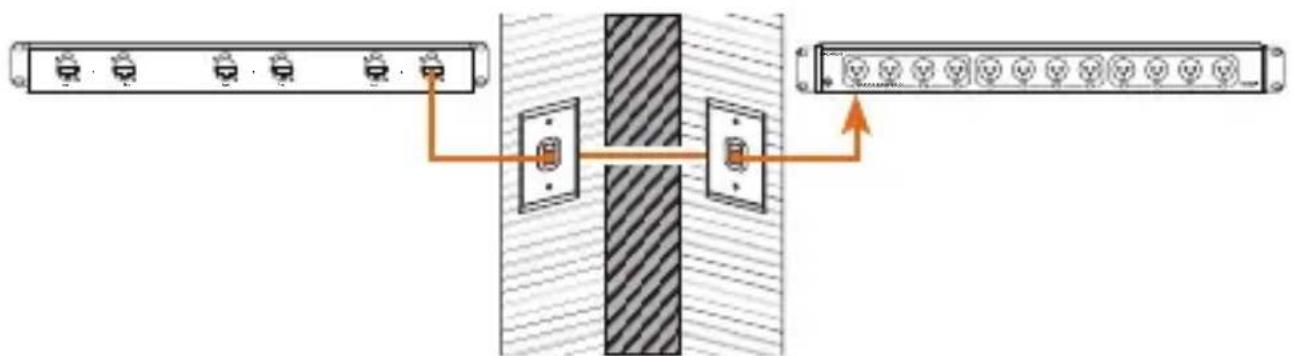
flowchart
graph LR
    A["Server Rack 1"] -->|Switch| B["Switch"]
    C["Server Rack 2"] -->|Switch| B
    D["Server Rack 3"] -->|Switch| B
    B --> E["Switch"]
    style A fill:#f9f,stroke:#333
    style C fill:#f9f,stroke:#333
    style D fill:#f9f,stroke:#333
    style E fill:#ccf,stroke:#333
Note: Buildings with unshielded cabling will not pass phantom power and may be susceptible to interference.
Specifications
Number of Channels 12
I/O RM-12XMRJ45: 3-pin XLR Male (×12) RM-12XFRJ45: 3-pin XLR Female (×12)
Link RJ45 (in/out ×3) RJ45 (through ×3)
Power Source Passive
Signal Analog Audio, AES/EBU, DMX
Supported Cable Types RM-12XMRJ45: 3-pin XLR Male RM-12XFRJ45: 3-pin XLR Female Cat 5, Cat 5e, Cat 6, Cat 7
Material Steel
Color Black
Dimensions 1.75 × 19 × 3.5 in. ( 4.4 × 48.3 × 8.9 cm)
Weight 2.7 lb. (1.2 kg)
One-Year Limited Warranty
This Kopul product is warranted to the original purchaser to be free from defects in materials and workmanship under normal consumer use for a period of one (1) year from the original purchase date or thirty (30) days after replacement, whichever occurs later. The warranty provider's responsibility with respect to this limited warranty shall be limited solely to repair or replacement, at the provider's discretion, of any product that fails during normal use of this product in its intended manner and in its intended environment. Inoperability of the product or part(s) shall be determined by the warranty provider. If the product has been discontinued, the warranty provider reserves the right to replace it with a model of equivalent quality and function.
This warranty does not cover damage or defect caused by misuse, neglect, accident, alteration, abuse, improper installation or maintenance. EXCEPT AS PROVIDED HEREIN, THE WARRANTY PROVIDER MAKES NEITHER ANY EXPRESS WARRANTIES NOR ANY IMPLIED WARRANTIES, INCLUDING BUT NOT LIMITED TO ANY IMPLIED WARRANTY
OF MERCHANTABILITY OR FITNESS FOR A PARTICULAR PURPOSE. This warranty provides you with specific legal rights, and you may also have additional rights that vary from state to state.
To obtain warranty coverage, contact the Kopul Customer Service Department to obtain a return merchandise authorization ("RMA") number, and return the defective product to Kopul along with the RMA number and proof of purchase. Shipment of the defective product is at the purchaser's own risk and expense.
For more information or to arrange service, visit www.KopulCables.com or call Customer Service at 212-594-2353.
Product warranty provided by the Gradus Group. www.gradusgroup.com
Kopul is a registered trademark of the Gradus Group. © 2024 Gradus Group LLC. All Rights Reserved. GG1

KOPUL ^* A Gradus Group Brand

kopul®
- Channel XLR Network Extender
- Thank you for choosing Kopul.
- Precautions⚠️
- Setting Up
- Reversible Rack Ears
- Connections
- Ethernet Ports
- Studio and Live Concert Applications
- DMX Lighting Applications
- Expanding Your Setup with the THRU Port
- Preexisting Cat Wiring
- Specifications
- One-Year Limited Warranty
- kopul®
Brand : Kopul
Model : RM-12XFRJ45
Category : AV Extender