ABT 220L - Scale PCE Instruments - Free user manual and instructions
Find the device manual for free ABT 220L PCE Instruments in PDF.


| Product Type | Precision Lab Balance |
| Brand | PCE Instruments |
| Model | ABT 220L |
| Weighing Capacity | 220 g |
| Readability | 0.001 g (1 mg) |
| Repeatability | ±0.001 g |
| Linearity | ±0.002 g |
| Pan Size | Ø 80 mm |
| Calibration | Internal automatic calibration with built-in weight |
| Display | LCD backlit display |
| Units | g, mg, ct, oz, lb, ozt, dwt, gn, tl, t |
| Tare Range | Full capacity |
| Interface | RS-232 |
| Power Supply | AC adapter (100-240 V, 50/60 Hz) or internal battery |
| Operating Temperature | 10°C to 30°C |
| Dimensions (W x D x H) | 200 x 300 x 90 mm |
| Net Weight | 3.5 kg |
| Warranty | 2 years |
| Cleaning | Wipe with a soft, damp cloth; do not use solvents |
| Safety | Overload protection, level indicator |
| Spare Parts / Repairability | Replacement pan, RS-232 cable, AC adapter; service by qualified technician |
Frequently Asked Questions - ABT 220L PCE Instruments
User questions about ABT 220L PCE Instruments
0 question about this device. Answer the ones you know or ask your own.
Ask a new question about this device
Download the instructions for your Scale in PDF format for free! Find your manual ABT 220L - PCE Instruments and take your electronic device back in hand. On this page are published all the documents necessary for the use of your device. ABT 220L by PCE Instruments.
USER MANUAL ABT 220L PCE Instruments
natural_image
White laboratory balance with digital display showing measurement reading (no visible text or symbols on main body)User Manual
PCE-ABT 220L Analytical Balance

User manuals in various languages (français, italiano, español, português, nederlands, türk, polski, русский, 中文) can be found by using our product search on: www.pce-instruments.com
Last change: 8 October 2020
v1.0
Contents
1 Safety notes....1
2 Specifications.... 2
3 Delivery scope....2
4 Commissioning 2
4.1 Unpacking....2
4.2 Structure 2
4.3 Levelling....2
5 Placement 3
6 Control panel....3
7 Calibration of the balance....4
8 Settings....4
8.1 Sensitivity....4
8.2 Measuring rate 5
8.3 Setting the unit....6
8.4 Counting function 7
9 Troubleshooting....8
10 Contact....9
11 Disposal 9
1 Safety notes
Please read this manual carefully and completely before you use the device for the first time. The device may only be used by qualified personnel and repaired by PCE Instruments personnel. Damage or injuries caused by non-observance of the manual are excluded from our liability and not covered by our warranty.
- The device must only be used as described in this instruction manual. If used otherwise, this can cause dangerous situations for the user and damage to the meter.
- The instrument may only be used if the environmental conditions (temperature, relative humidity, ...) are within the ranges stated in the technical specifications. Do not expose the device to extreme temperatures, direct sunlight, extreme humidity or moisture.
- Do not expose the device to shocks or strong vibrations.
- The case should only be opened by qualified PCE Instruments personnel.
- Never use the instrument when your hands are wet.
- You must not make any technical changes to the device.
- The appliance should only be cleaned with a damp cloth. Use only pH-neutral cleaner, no abrasives or solvents.
• The device must only be used with accessories from PCE Instruments or equivalent.
- Before each use, inspect the case for visible damage. If any damage is visible, do not use the device.
- Do not use the instrument in explosive atmospheres.
- The measurement range as stated in the specifications must not be exceeded under any circumstances.
- Non-observance of the safety notes can cause damage to the device and injuries to the user.
We do not assume liability for printing errors or any other mistakes in this manual.
We expressly point to our general guarantee terms which can be found in our general terms of business.
If you have any questions please contact PCE Instruments. The contact details can be found at the end of this manual.
2 Specifications
| Measurement range | 0 ... 220 g |
| Resolution | 0.1 mg |
| Repeatability | 0.2 mg |
| Linearity | 0.5 mg |
| Response time | <4 seconds |
| Weighing area | ∅ 80 mm stainless steel weighing plate |
| Tare range | entire measurement range |
| Interface | RS232 |
| Power supply | 220 V |
| Operating conditions | 10 ... 40 °C |
| Dimensions | 340 x 215 x 350 mm |
| Weight | 7.5 kg |
3 Delivery scope
1 x analytical balance PCE-ABT 220L
1 x fabric gloves
1 x test weight
1 x cold-device cable
1 x user manual
4 Commissioning
4.1 Unpacking
Remove the balance from the packaging by carefully lifting it out of the box. Inside the box, you will find everything you need to start using the balance.
4.2 Structure
• Installation on solid ground, free from vibration
- Remove the adhesive retainers, open the glass sliding doors and carefully place the stainless steel plate in the middle.
- Connect the balance to a suitable power source.
4.3 Levelling
- Levelling is possible by means of the adjustable feet and the integrated spirit level on the back of the analytical balance. Optimise the position until the bubble of the spirit level is perfectly centred.
- For best performance, allow the balance to adjust to the ambient temperature for 30-60 minutes and calibrate before use.
5 Placement
- The balance should not be positioned in a place that could have a negative effect on accuracy.
- Avoid extreme temperatures. Do not set up the balance in direct sunlight.
- Avoid uneven tables. The table or floor must be fixed and must not vibrate.
- Avoid unstable power sources. Do not use the balance near large power consumers such as welding equipment or large motors.
- Do not place the balance near vibrating machines.
- Avoid high humidity which could lead to condensation. Avoid direct contact with water. Do not spray or immerse the balance in water.
- Avoid draughts, e. g. caused by fans or the opening of doors. Do not place the balance near open windows or air vents of air conditioners.
- Keep the balance clean. Do not stack material on the balance when it is not in use.
6 Control panel
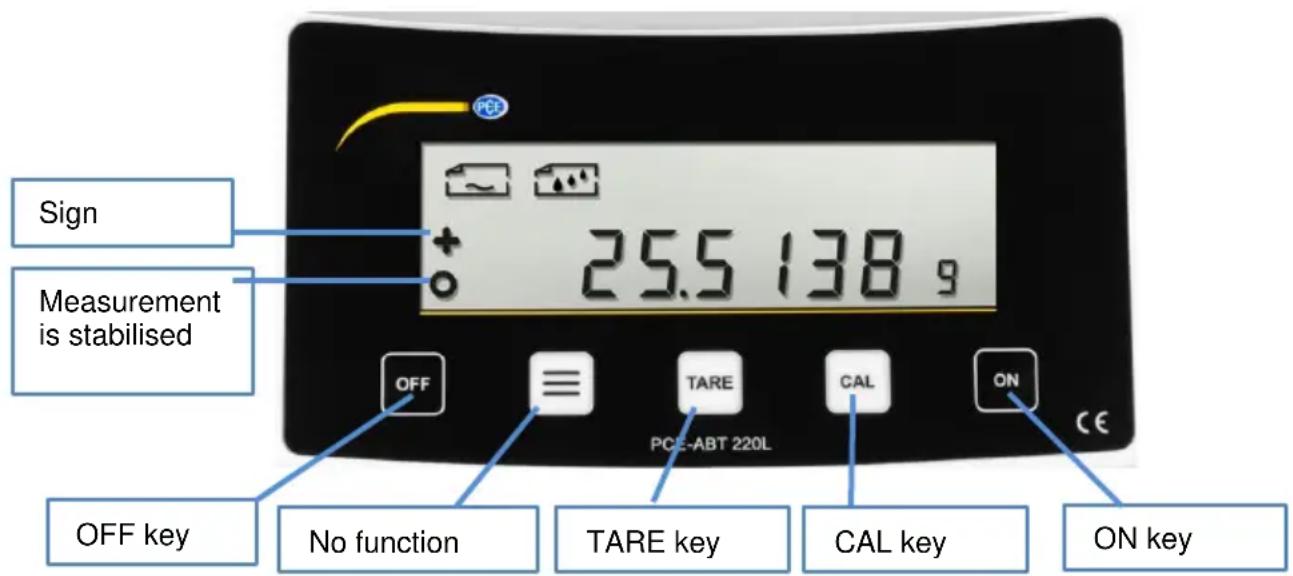
7 Calibration of the balance
If the analytical balance PCE-ABT 220L is inaccurate, it must be calibrated.
Follow these steps:
- Position the balance on a stable, vibration-free surface. In addition, the balance must remain stationary for one hour to allow it to adjust to the ambient temperature.
- Press the CAL key. "CAL-200" is displayed. Then place the 200 g weight on top. Initially, the balance displays "----". The balance then shows 200.0000 g. This means that the calibration is finished.
8 Settings
8.1 Sensitivity
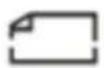
With the power on, press ON until the word "Stab" appears on the display. Press TARE to access the setting options; press the ON key to change the setting:
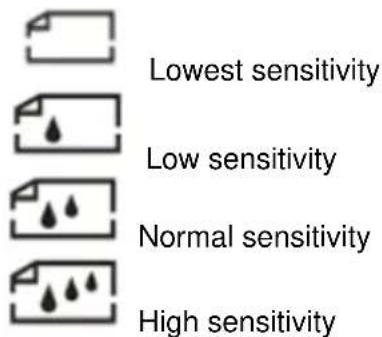
Press TARE to save the setting.
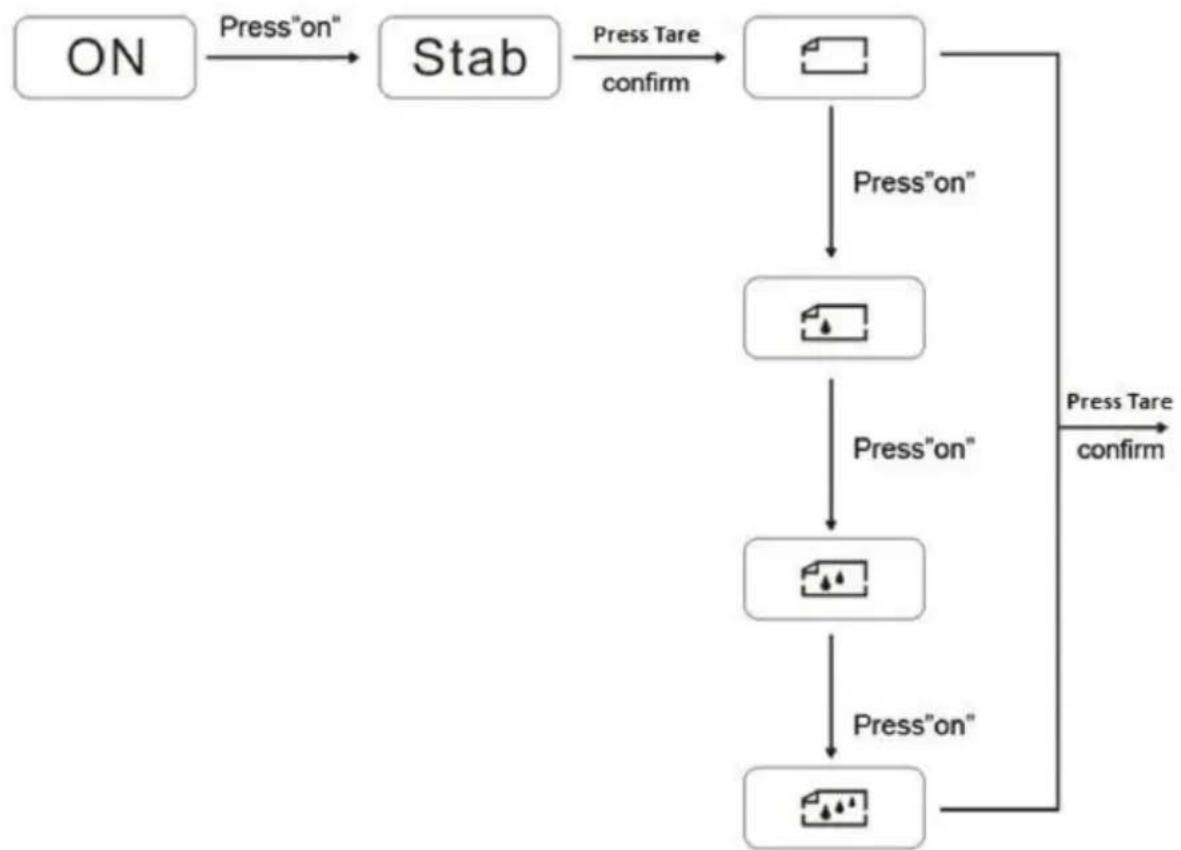
flowchart
graph TD
    A["ON"] -->|Press"on"| B["Stab"]
    B -->|Press Tare confirm| C["Image"]
    C -->|Press"on"| D["Image"]
    D -->|Press"on"| E["Image"]
    E -->|Press"on"| F["Image"]
    F -->|Press Tare confirm| G["Final Output"]
8.2 Measuring rate
With the power on, press ON until the word "Speed" appears on the display.
Press TARE to access the setting options. Press the ON key to change the setting:
Highest speed

High speed

Normal speed

Low speed
Press TARE to save the setting.
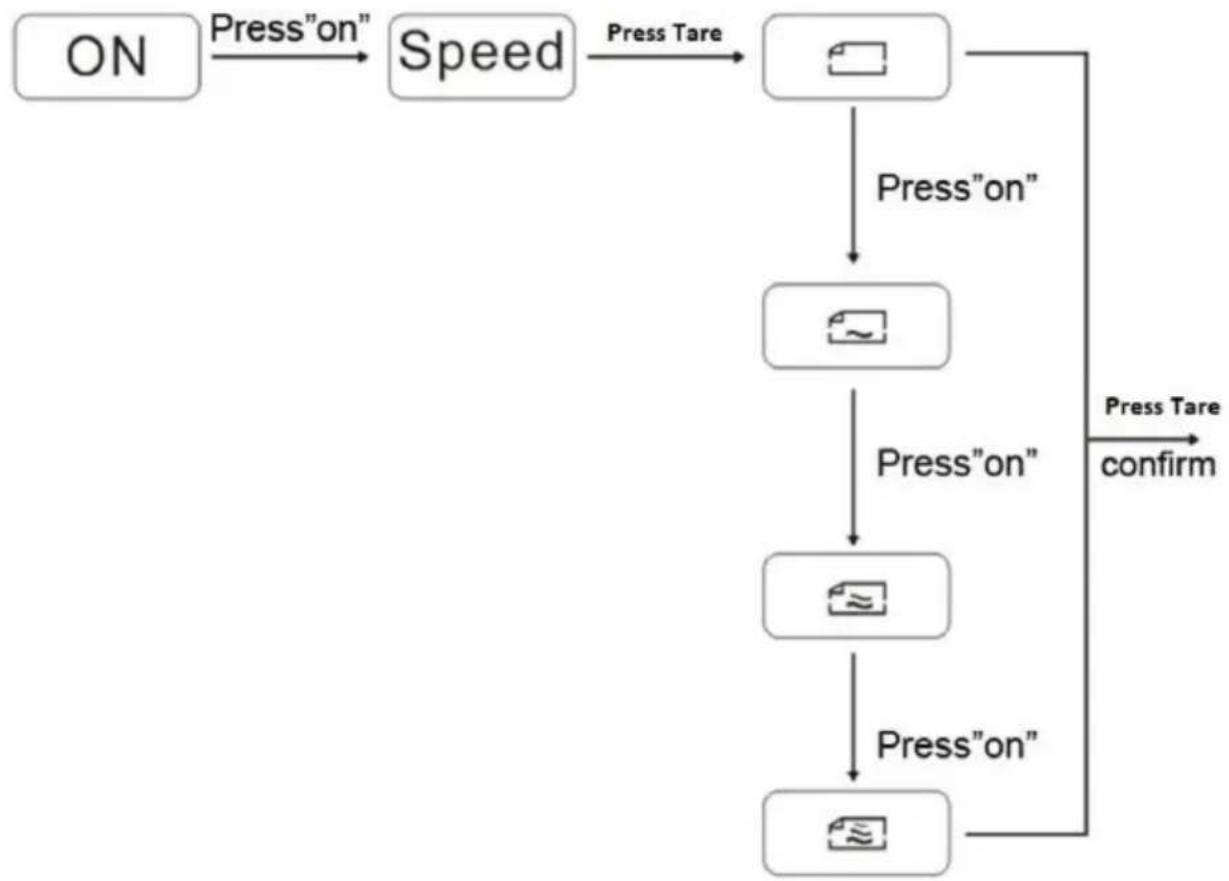
flowchart
graph TD
    A["ON"] -->|Press"on"| B["Speed"]
    B -->|Press Tare| C["Image"]
    C -->|Press"on"| D["Image"]
    D -->|Press"on"| E["Image"]
    E -->|Press"on"| F["Image"]
    C -->|Press Tare confirm| G["Final Output"]
8.3 Setting the unit
With the power on, press ON until the word "Unit" appears on the display. Press TARE to access the setting options. Press the ON key to change the setting. Press TARE to save the setting.
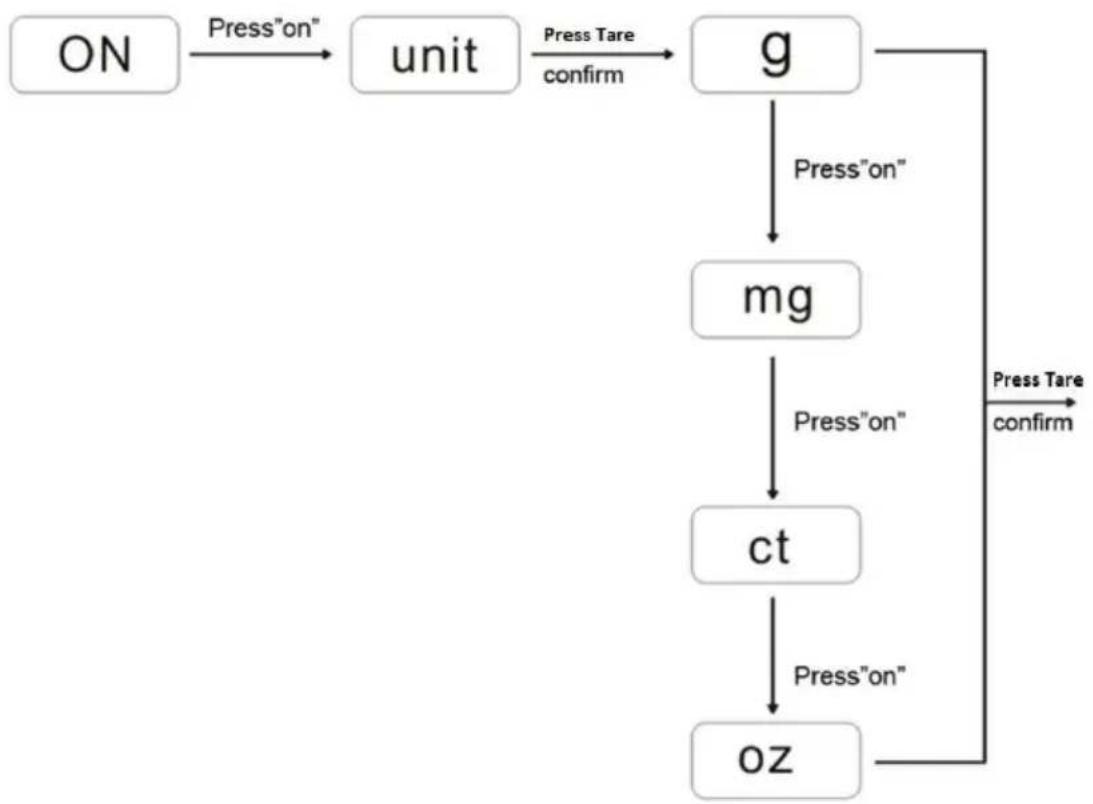
flowchart
graph TD
    A["ON"] -->|Press"on"| B["unit"]
    B -->|Press Tare confirm| C["g"]
    C -->|Press"on"| D["mg"]
    D -->|Press"on"| E["ct"]
    E -->|Press"on"| F["oz"]
    F -->|Press Tare confirm| E
8.4 Counting function
The analytical balance has a counting function. Please make sure that the objects have the same weight and have a minimum weight of 0.5 mg.
The counting function is performed as follows:
Press the ON key until "COU" is displayed.
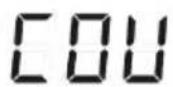
- press Tare. The display now shows "COU 5pcs".

- Press ON to select the quantity to be placed on the balance and then press Tare to confirm.

- Now you can start counting and continue to place objects with the same weight on the balance.

- After counting, press ON and select "weight". Then confirm with Tare to return to normal weighing.

9 Troubleshooting
If an error occurs, you can use the following chart to correct the error.
| ERROR | CAUSE | SOLUTION |
| Nothing is displayed | - Not connected to the power supply- The fuse is defective- Adaptor damaged | - Connect the unit the power supply- Replace the fuse- Replace the adaptor- Contact PCE Instruments |
| Value unstable during operation | - Poor operating conditions- The wind screen is open- Table is not stable- Power supply fluctuates- Balance was positioned in an unstable manner | - Change the location- Close windows and doors- Close the glass door- Provide a stable power supply |
| The displayed weight is incorrect | - Balance not calibrated- Not tared before weighing | - Calibration- Tare before weighing- Adjust the levelling feet |
10 Contact
If you have any questions, suggestions or technical problems, please do not hesitate to contact us. You will find the relevant contact information at the end of this user manual.
11 Disposal
For the disposal of batteries in the EU, the 2006/66/EC directive of the European Parliament applies. Due to the contained pollutants, batteries must not be disposed of as household waste. They must be given to collection points designed for that purpose.
In order to comply with the EU directive 2012/19/EU we take our devices back. We either re-use them or give them to a recycling company which disposes of the devices in line with law.
For countries outside the EU, batteries and devices should be disposed of in accordance with your local waste regulations.
If you have any questions, please contact PCE Instruments.


PCE Instruments contact information
Germany France Spain
PCE Deutschland GmbH PCE Instruments France EURL PCE Ibérica S.L.
Im Langel 4 23, rue de Strasbourg Calle Mayor, 53
D-59872 Meschede 67250 Soultz-Sous-Forets 02500 Tobarra (Albacete)
Unit 11 Southpoint Business Park
Ensign Way, Southampton
Hampshire
United Kingdom, SO31 4RF
Tel: +44 (0) 2380 98703 0
Fax: +44 (0) 2380 98703 9
info@pce-instruments.co.uk
www.pce-instruments.com/english
Italy
PCE Italia s.r.l.
Via Pesciatina 878 / B-Interno 6
55010 Loc. Gragnano Pehlivan Sok. No.6/C
Capannori (Lucca)
Italia
www.pce-instruments.com/turkish
The Netherlands
PCE Brookhuis B.V.
Institutenweg 15
7521 PH Enschede
Nederland
Telefoon: +31 (0)53 737 01 92
info@pcebenelux.nl
www.pce-instruments.com/dutch
China
PCE (Beijing) Technology Co., Limited
1519 Room, 6 Building
Zhong Ang Times Plaza
No. 9 Mentougou Road, Tou Gou District
102300 Beijing, China
Tel: +86 (10) 8893 9660
info@pce-instruments.cn
www.pce-instruments.cn
Hong Kong
PCE Instruments HK Ltd.
Unit J, 21/F., COS Centre
56 Tsun Yip Street
Kwun Tong
Kowloon, Hong Kong
Tel: +852-301-84912
jyi@pce-instruments.com
www.pce-instruments.cn
United States of America
PCE Americas Inc.
1201 Jupiter Park Drive, Suite 8
Jupiter / Palm Beach
33458 FL
USA
Tel: +1 (561) 320-9162
Fax: +1 (561) 320-9176
info@pce-americas.com
www.pce-instruments.com/us
- User Manual
- Contents
- Safety notes
- Specifications
- Delivery scope
- Commissioning
- Unpacking
- Structure
- Levelling
- Placement
- Control panel
- Calibration of the balance
- Settings
- Sensitivity
- Measuring rate
- Setting the unit
- Counting function
- Troubleshooting
- Contact
- Disposal
- PCE Instruments contact information
- Germany France Spain
- Italy
- The Netherlands
- China
- Hong Kong
- United States of America
Brand : PCE Instruments
Model : ABT 220L
Category : Scale