
ASBBT-0724 - Soundbar Bauhn - Free user manual and instructions
Find the device manual for free ASBBT-0724 Bauhn in PDF.


| Product Type | Soundbar |
| Brand | Bauhn |
| Model | ASBBT-0724 |
| Dimensions (W x D x H) | 90 cm x 7 cm x 8 cm |
| Weight | 2.5 kg |
| Power Supply | AC 100-240V, 50/60Hz |
| Power Consumption | 30 W (standby < 0.5 W) |
| Bluetooth Version | 5.0 |
| Inputs | AUX 3.5mm, Optical, HDMI ARC, USB |
| Output (RMS) | 40 W |
| Frequency Response | 60 Hz – 20 kHz |
| Drivers | 2 full-range, 1 passive radiator |
| Remote Control | Included (battery CR2032) |
| Wall Mountable | Yes (bracket included) |
| Material | ABS plastic with mesh grille |
| Color | Black |
| Warranty | 1 year limited |
| Cleaning | Wipe with dry cloth; avoid liquids |
| Safety | Do not expose to water or heat sources |
| Spare Parts | Available via Bauhn support |
| Repairability Score | 6/10 |
Frequently Asked Questions - ASBBT-0724 Bauhn
User questions about ASBBT-0724 Bauhn
0 question about this device. Answer the ones you know or ask your own.
Ask a new question about this device
Download the instructions for your Soundbar in PDF format for free! Find your manual ASBBT-0724 - Bauhn and take your electronic device back in hand. On this page are published all the documents necessary for the use of your device. ASBBT-0724 by Bauhn.
USER MANUAL ASBBT-0724 Bauhn
natural_image
Black cylindrical electronic device with visible indicator lights and buttons (no readable text or symbols)MODEL: ASBBT-0724
User Manual

AFTER SALES SUPPORT


1300 002 534

tempo.org/support
MODEL: ASBBT-0724 PRODUCT CODE: 716651 7/2024
Welcome
Congratulations on your purchase!
This manual tells you all you need to know about using your new BAUHN® product.
Please take special note of any important safety and usage information presented with the ⚠ symbol.
All products brought to you by BAUHN ^® are manufactured to the highest standards of performance and safety and, as part of our philosophy of customer service and satisfaction, are backed by our comprehensive 1 Year Warranty.
Domestic use only: This product is intended for indoor domestic use only. It is not suitable for commercial, industrial or outdoor use. Do not use this product for anything other that its intended purpose, and only use it as described in this manual.
We hope you will enjoy using your purchase for many years to come.
Contents
Welcome 2
Unpack and Prepare 4
What's in the box 4
Wall Mount Installation Kit 5

Important Tips 5
Installation - Free Standing 6
Installation - Wall Mounted 7
Wall Mounting Instructions 8
Connect to Power 9
Controls and Connections 10
Get to know your Soundbar 10
Buttons on the Soundbar 10
Rear Ports on the Soundbar 11
Remote Control 13
Setup 13
Using the Remote Control 14
Remote Control Overview 15
Operation 16
General Operation 16
Input Modes 17
Function Display 17
Pairing Bluetooth® Devices 18
Troubleshooting 19
Specifications 21
Compliance and Responsible Disposal 22
Warranty Information 23
Repair and Refurbished
Goods or Parts Notice 24
Unpack and Prepare
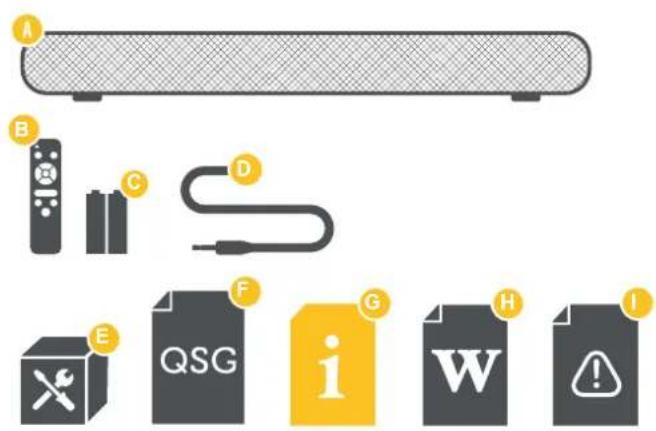
What's in the box
Before setting up your new Soundbar, check you have everything:
A. 2.0 Channel Soundbar
B. Remote Control
C. AAA Activ Energy Batteries
D. 3.5mm Audio Cable
E. Wall Mount Installation Kit
(See next page for more information.)
F. Quick Start Guide
G. User Manual
H. Warranty Certificate
I. General Safety Warnings
You will need:
- Phillips-head screwdriver and a drill (for wall mount installation.)
- HDMI ARC cable if you want to set up and use HDMI ARC.
(Alternatively you can use either an optical audio cable or coaxial audio cable if not using HDMI ARC.)
Wall Mount Installation Kit
The illustration below shows the contents of the wall mount installation kit. These are the parts you will need when wall mounting the soundbar. Some parts are not shown at the same scale.
Note: If you choose to wall mount the soundbar, it is recommended to use an HDMI adapter in order to fit properly.

- Plastic anchor (2)
- Long screw (2)
Important Tips
- Place the Soundbar on a level surface.
- Place the Soundbar away from any source that may generate heat or vibrations.
- Make sure there is enough space around the Soundbar for airflow.
- The remote control works up to 6 metres away from the Soundbar.
- Unplug the Soundbar before cleaning it.
- Clean using a dry cloth only - do not use water or chemicals.
- Use only the power supply provided.
- Keep liquid, children and pets away from the Soundbar at all times.
Installation - Free Standing
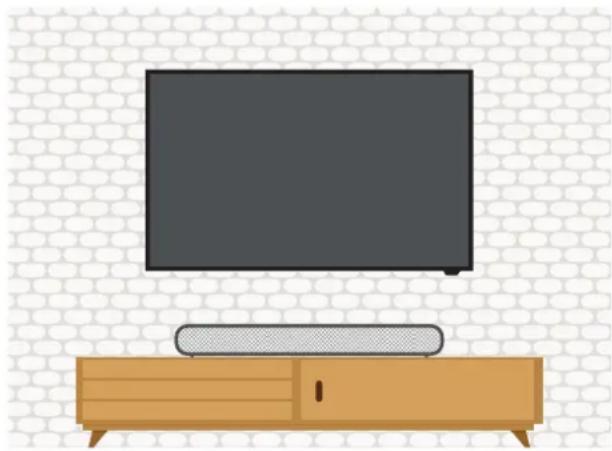
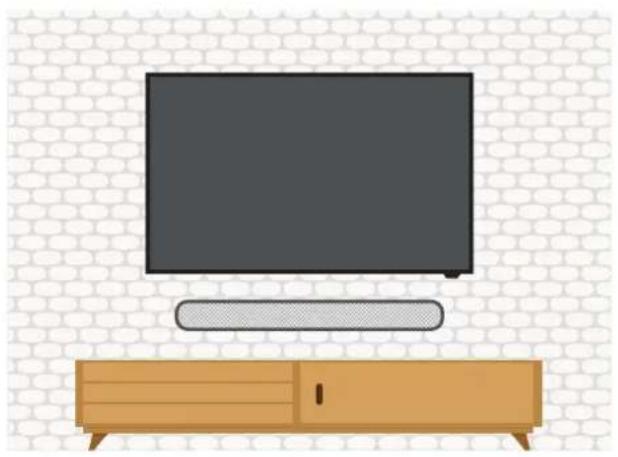
This soundbar can sit free-standing on a surface, or it can be mounted to a wall.
natural_image
Illustration of a modern TV set with a wooden box and a flat-screen monitor on top, against a brick wall background (no text or symbols)Free standing
Place on a secure, flat surface. Make sure the soundbar is standing on its rubber pads (on the left and right sides of the soundbar) and no other area of the bottom of the soundbar is touching the surface.
Installation - Wall Mounted
natural_image
Illustration of a modern TV set with a wooden cabinet and a flat-screen monitor, set against a brick wall background (no text or symbols)Wall mounted
Wall mounting instructions are on the following pages.
!
- Wall mounted installation must be carried out by qualified personnel only. Incorrect assembly can result in severe personal injury and property damage! If you intend to install this product yourself, you must check for installations such as electrical wiring and plumbing, which may be hidden inside or behind the wall.
- It is the installer's responsibility to verify and confirm that the wall will safely support the total load of the soundbar and wall brackets.
• Additional tools (not included) are required for the installation. - Do not overtighten screws.
- If mounting on a wood stud wall, use an electronic stud finder to locate the centre of the framing studs before drilling and mounting.
Wall Mounting Instructions

Note: The sound bar has two keyhole slots on the back to enable wall mounting, using the fixings provided. The distance between the two keyholes is 700mm.

Use a pencil to make 2 drill hole marks on the wall for the adaptors. Make sure the marks are level before drilling. Use a 6mm bit and power drill (not supplied) to drill holes on the marks.
Note: For a wood stud wall, use an electronic stud detector to locate the centre of the framing studs before marking and drilling the holes.

3

natural_image
3D diagram of a rectangular block with dashed lines and circular markers indicating dimensions (no text or symbols)Use the supplied screws and plastic anchors to fix the wall mount adaptors onto the drilled hole marks. Once fixed to the wall, hang the soundbar onto the wall mount adaptors.
Connect to Power

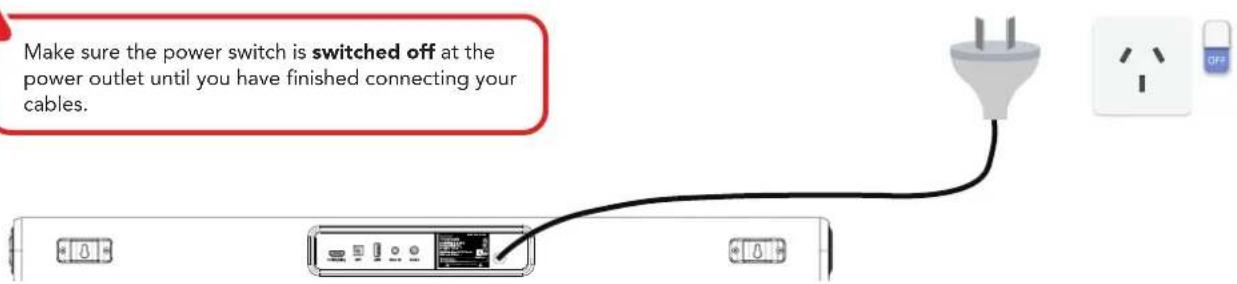
Make sure the power switch is switched off at the power outlet until you have finished connecting your cables.
Rear view
Controls and Connections
Get to know your Soundbar

Buttons on the Soundbar

10 | CONTROLS AND CONNECTIONS
- ⏻ (POWER/SOURCE):
Press and hold the power button about 1.5s to turn on/off the soundbar.
Once switched on, press the power button momentarily to switch between input sources.
Once switched on, press the power button twice to enable/disable sound playback.
-
VOL + / —: Increase/decrease the volume level.
-
◀◀/▶◀Skip to the previous / next track
Press and hold the 🏻/ 🔊buttons on the soundbar simultaneously to disconnect the paired Bluetooth device.
Rear Ports on the
Soundbar

natural_image
Simple diagram showing an orange arrow pointing to a dark rectangular block, with no text or symbols present.
| 1 | HDMI (ARC) |  | SOUND | The ARC (Audio Return Channel) function allows you to send audio input from an ARC-compliant TV to an ARC-compliant audio device (e.g. soundbar) without the need for an additional audio cable connection. |
| 2 | OPTICAL | 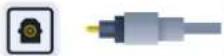 | SOUND | Connect an Optical audio cable (not included) to the OPTICAL OUT socket of your device (e.g. TV, DVD player) and the OPTICAL socket on the soundbar. |
| 3 | USB | 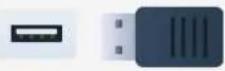 | STORAGE | Plug in a USB stick to play media files stored on your USB storage device. |
| 4 | AUX | 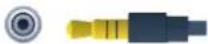 | SOUND | Use the supplied 3.5mm to 3.5mm audio cable to connect the headphone socket of the connected audio device, such as a media player, to the AUX socket on the soundbar. |
| 5 | COAXIAL |  | SOUND | Connect a Coaxial cable (not included) to the COAXIAL OUT socket of your device (e.g. TV, DVD player) and the COAXIAL socket on the soundbar. |
| 6 | AC IN | POWER | Before connecting the plug to the mains supply socket., ensure you have completed all other connections. |
Rear Ports on the Soundbar
HDMI (ARC)
To use the ARC function, make sure the soundbar's HDMI (ARC) socket is connected via a HDMI cable (not included) to the HDMI (ARC) socket of your ARC compliant TV. Then just use your TV's remote control to adjust the volume output (VOL +/- and MUTE) of the connected audio device. In the TV settings menu, turn on the ARC and CEC function (when CEC is turned on, the sound bar will turn on/off automatically when the TV is turned on/off).

When you use ARC, Optical or Coaxial connection to your TV or DVD, the audio output in the TV or DVD settings menu must be set to PCM mode (instead of Auto mode, RAW mode or etc.).
Remote Control
Setup
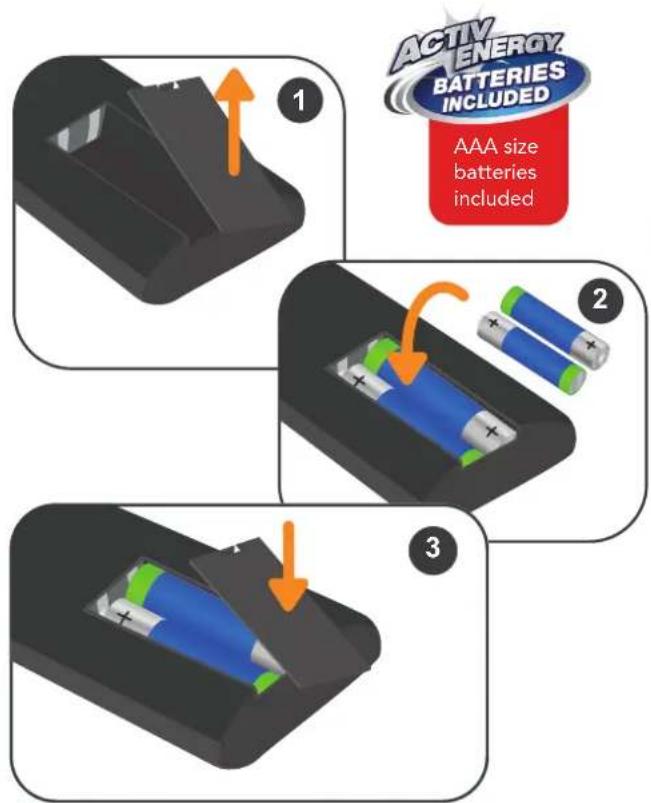
Insert two AAA size batteries according to the polarity markings (+ / -) inside the compartment. Make sure the batteries are correctly aligned and properly pushed into place.
Precautions When Using Batteries
- Do not use old and new batteries together.
- Do not use different types of batteries (e.g. Manganese and Alkaline batteries) together.
- Remove the batteries from the remote if you do not intend to use it for a long time.
- When discarding used batteries, follow any guidelines for recycling and disposal of batteries that apply in your local area.
- Keep batteries away from children and pets.
- Never throw batteries into a fire or expose them to extreme heat.
Using the Remote Control
To use the remote control, point it towards the remote control sensor at the front of the soundbar. The remote control will not operate if its path is blocked.
The remote control has a range of up to about 6 metres from the soundbar at an angle of up to 30 degrees to either side of the sensor, as illustrated below.

14 | REMOTE CONTROL

Remote Control Use
- Do not drop, step on or otherwise impact the remote control. This may damage the parts or lead to malfunction.
- Do not place objects between the remote control and the remote control sensor.
- Do not use this remote control while simultaneously operating a remote control for other devices.
Remote Control Overview
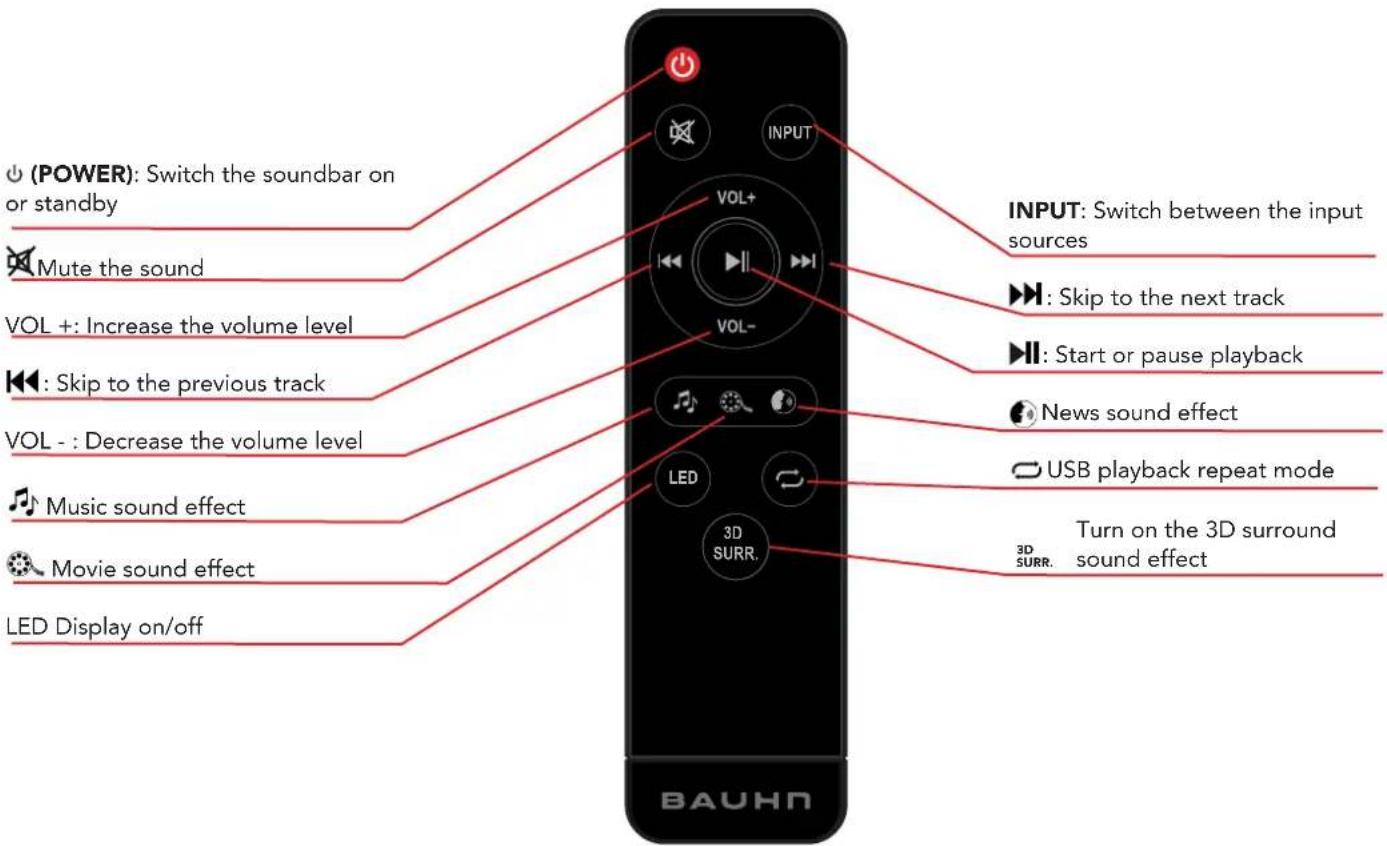
Operation
General Operation
Function Action
| Turn the Soundbar On/Off | Press and hold the power button for about 1.5s to turn on/off the soundbar.Once switched on, press the power button to switch the input source.Once switched on, press the power button twice to enable/disable sound playback. |
| Increase/Decrease the Volume | Press the VOL + / - to increase/decrease the volume level. |
| PREV / NEXT | Skip to the previous/next trMissPress and hold the Monson on the soundbar simultaneously to disconnect the paired Bluetooth device. |
| Change the Input Source/Mode | Press the (POWER/SOURCE) button repeatedly on the soundbar to change between input modes or press the INPUT button on the remote control repeatedly to change the input source. |
16 | OPERATION

Refer to the next page for the corresponding LED display for each mode.
Input Modes Function Display
| Input Display | Function Display | ||
| HDMI ARC | ARC | Volume | 0 to 32 |
| Bluetooth® | 6t | Mute LED display flashes | |
| Optical | OPT | EQ Music | E91 |
| Coaxial | COR | EQ Movie | E92 |
| AUX | AUX | EQ News | E93 |
| USB | USB | 3D Surround | 30 |
| 3D Surround | OFF | ||
| USB repeat mode | ONE | ||
| Note: Press the LED button of the remote control to switch on/off the display. | USB repeat mode | ALL | |
Bluetooth®
You can listen to tracks from a media device if connected to the soundbar via Bluetooth® wireless technology.
Pairing Bluetooth ^® Devices
The first time you use your Bluetooth® device with the soundbar, you will need to pair them with one another.
Activate Bluetooth ^® on your compatible device, and set it to search for compatible devices.
Select 'BAUHN ASBBT-0724' from the list of found devices.
Note: Only one playback unit can be connected to the soundbar. If the soundbar is already connected to another playback unit, the soundbar will not appear in the Bluetooth® selection list. To disconnect the existing paired device. Press and hold the 🔊 Buttons on the soundbar simultaneously to disconnect the paired Bluetooth device.
If your device asks for a passkey (depending on the device manufacturers, model and software version), then enter the digits "0000" and press OK.

The operational range between this soundbar and a Bluetooth ^® device is approximately 10 metres (without any object between the Bluetooth ^® enabled device and the soundbar). Any obstacles between the devices can reduce the operational range.
Before you connect a Bluetooth® enabled device to this soundbar, ensure you know the device's capabilities. Compatibility with all Bluetooth® devices is not guaranteed.
If the signal strength is weak, your Bluetooth® receiver may disconnect, but it will re-enter pairing mode automatically.

If a mobile phone on which you are playing music receives a call, the music will be interrupted. The phone call audio however is not played via the soundbar. Once you end the call, the devices are connected to each other again and playback resumes.
Your device will also be disconnected when your device is moved beyond the operational range. If you want to reconnect your device, place it within the operational range.
If the connection is lost, follow the instructions (left) to pair your device to the soundbar again.
Troubleshooting
If you have problems with the soundbar, check below for advice. If you don't find a solution here, contact After Sales Support on 1300 002 534.
| Problem Solution | |
| No power | ·Ensure that the AC power is properly connected.·Press the ⏻(POWER) button on the soundbar or ⏻POWER) button on the remote control to turn the soundbar on. |
| Remote control does not work | ·Use the remote control closer to the soundbar. Aim directly at the sensor on the front of the soundbar.·Insert the battery with its polarities (+/-) aligned as indicated. Please check the battery is installed correctly.·Replace the battery. |
| No response from the unit | ·Disconnect and reconnect the AC power, then turn the soundbar on again. |
| Soundbar not found in the Bluetooth® device list when pairing | ·Ensure you have unpaired the previously paired Bluetooth® device from the soundbar.·Ensure the Bluetooth® function is activated on your Bluetooth® enabled device. |
| General sound issues | ·Make sure the soundbar is connected to power and turned on, and that it's set to the correct mode; use the ⏻(POWER) button on the soundbar or the INPUT button on the remote control to change the input mode.·To check the system hasn't frozen, press the volume buttons.·If only a specific input mode is not working, it's likely the setting is wrong or the cable used is not working. |
| No sound from Netflix/other apps | ·Go to the TV settings menu, find Audio Output settings, and change the audio output mode to 'PCM' mode (instead of Auto, RAW, etc.) |

20 | TROUBLESHOOTING
| Problem Solution | |
| No sound in HDMI ARC mode | Make sure the input source is set to ARC.Make sure your TV or external device supports ARC function and connect the HDMI ARC cable to the ARC port of the TV or external device.In the TV or external device setting menu, turn on the ARC function and the CEC function.In the TV or external device setting menu, find the audio output settings and change the audio output mode to 'PCM' mode (instead of Auto, RAW, etc.)Make sure both ends of the HDMI ARC cable are fully plugged into the sockets.If none of these solutions work, try changing the HDMI ARC cable. |
| No sound in OPTICAL/ COAXIAL mode | Make sure the input source is set to the correct mode.Increase the volume of the soundbar to make sure it's not muted.In the TV or external device settings menu, find the audio output settings and change the audio output mode to 'PCM' mode (instead of Auto, RAW, etc.).For Optical, make sure you remove the small caps on either end of the Optical audio cable, and both ends are fully plugged into the sockets.If none of these solutions work, try changing the optical or coaxial cable. |
| No sound in Bluetooth® mode | Increase the volume of the soundbar to make sure it's not muted. Make sure Bluetooth® is connected successfully.Make sure the external Bluetooth® device is playing normally and its volume is turned up. |
| No sound in AUX IN mode | Make sure the input source is set to AUX IN, turn up the volume on the soundbar.Turn up the volume on the external device and make sure it's not paused or muted.Make sure the audio cable is properly plugged in at both ends. |
| No sound in USB mode | Make sure the USB drive is in FAT32 file format, and it's no greater than 32GB.Some media format may not be supported. Please try another file format. |
Specifications
| Power supply AC 100-240V, 50/60 Hz | |
| Power consumption 65W Max. | |
| Speaker output 4 x 15W | |
| Bluetooth® pairing operation range - distance | Up to 10 metres |
| Bluetooth® pairing name BAUHN ASBBT-0724 | |
| USB output | DC 5V, 100mA (for playback only, not for charging devices) |
| Dimensions (W x H x D) 855mm x 72mm x 104mm | |
| Weight 2.4kg | |
For Technical Support:
1300 002 534
tempo.org/support
Distributed by Tempo (Aust) Pty Ltd,
PO Box 6097, North Sydney, NSW 2059
Compliance and Responsible Disposal

Packaging
The packaging of your product has been selected from environmentally friendly materials and can usually be recycled. Please ensure these are disposed of correctly. Plastic wrapping can be a suffocation hazard for babies and young children, please ensure all packaging materials are out of reach and are safely disposed of. Please recycle these materials rather than throwing them away.
Product
At the end of its working life, do not throw this product out with your household rubbish. An environmentally friendly method of disposal will ensure that valuable raw materials can be recycled. Electrical and electronic items contain materials and substances which, if handled or disposed of incorrectly, could potentially be hazardous to the environment and human health.
Compliance
This product complies with the Australian Safety Standard AS/NZS 62368.1 to ensure the safety of the product.
Bluetooth®
The Bluetooth ^® word mark and logos are registered trademarks owned by Bluetooth SIG, Inc., and any use of such marks by Hands (IP) Holdings Pty Ltd is under license. Other trademarks and trade names are those of their respective owners.
BAUHN®
Warranty Information
The product is guaranteed to be free from defects in workmanship and parts for a period of 12 months from the date of purchase. Defects that occur within this warranty period, under normal use and care, will be repaired, replaced or refunded at our discretion, solely at our option with no charge for parts and labour. The benefits conferred by this warranty are in addition to all rights and remedies in respect of the product that the consumer has under the Competition and Consumer Act 2010 and similar state and territory laws.
Our goods come with guarantees that cannot be excluded under the Australian Consumer Law. You are entitled to a replacement or refund for a major failure and to compensation for any other reasonably foreseeable loss or damage. You are also entitled to have the goods repaired or replaced if the goods fail to be of acceptable quality and the failure does not amount to a major failure.

BAUHN®
Repair and Refurbished Goods or Parts Notice
Unfortunately, sometimes faulty products are manufactured, which need to be returned to the supplier for repair.
Please be aware that if your product is capable of retaining user-generated data (such as files stored on a computer hard drive, telephone numbers stored on a mobile telephone, songs stored on a portable media player, games saved on a games console or files stored on a USB memory stick) during the process of repair, some or all of your stored data may be lost. We recommend you save this data elsewhere prior to sending the product for repair.
You should also be aware that rather than repairing goods, we may replace them with refurbished goods of the same type or use refurbished parts in the repair process.
Please be assured though, refurbished parts or replacements are only used where they meet ALDI's stringent quality specifications.
If at any time you feel your repair is being handled unsatisfactorily, you may escalate your complaint. Please telephone us on 1300 002 534 or write to us at:
Tempo (Aust) Pty Ltd ABN 70 106 100 252
PO Box 6097, North Sydney NSW 2059
Telephone: 1300 002 534 (Aust) - Fax: (02) 8977 3765
Tempo Help Desk: 1300 002 534 (Aust)
(Operating Hours: Mon-Fri 8:30am-6pm; Sat 9am-6pm AEST)
Email: tempo.org/support
Notes
Notes
Notes
Online support
Visit bauhn.com.au for software updates to keep your soundbar up-to-date, as well as the latest User Manual for information on the updated features.
Warranty returns
Should you for any reason need to return this product for a warranty claim, make sure to include all accessories with the product.
Product does not work?
If you encounter problems with this product, or if it fails to perform to your expectations, please contact our After Sales Support Centre on 1300 002 534.
ALDI guarantees that our products are developed to our stringent quality specifications. If you are not entirely satisfied with this product, please return it to your nearest ALDI store within 60 days from the date of purchase for a full refund or replacement, or take advantage of our after sales support by calling the supplier's Customer Service Hotline.


- Welcome
- Contents
- Welcome 2
- Controls and Connections 10
- Remote Control 13
- Operation 16
- Troubleshooting 19
- Unpack and Prepare
- What's in the box
- Wall Mount Installation Kit
- Important Tips
- Installation - Free Standing
- Installation - Wall Mounted
- !
- Wall Mounting Instructions
- Connect to Power
- Controls and Connections
- Rear Ports on the Soundbar
- HDMI (ARC)
- Remote Control
- Setup
- Precautions When Using Batteries
- Using the Remote Control
- Remote Control Use
- Operation
- General Operation
- Bluetooth®
- Pairing Bluetooth ® Devices
- Troubleshooting
- Specifications
- Compliance and Responsible Disposal
- Packaging
- Product
- Compliance
- BAUHN®
- Warranty Information
- Repair and Refurbished Goods or Parts Notice
- Online support
- Warranty returns
- Product does not work?
Brand : Bauhn
Model : ASBBT-0724
Category : Soundbar