
T103PC - Programmateur numérique INTERMATIC - Free user manual and instructions
Find the device manual for free T103PC INTERMATIC in PDF.


User questions about T103PC INTERMATIC
0 question about this device. Answer the ones you know or ask your own.
Ask a new question about this device
Download the instructions for your Programmateur numérique in PDF format for free! Find your manual T103PC - INTERMATIC and take your electronic device back in hand. On this page are published all the documents necessary for the use of your device. T103PC by INTERMATIC.
USER MANUAL T103PC INTERMATIC
WARNING Risk of Fire or Electric Shock
- Disconnect power at the circuit breaker(s) or disconnect switch(es) before installing or servicing.
• Installation and/or wiring must be in accordance with national and local electrical code requirements. - Use wires rated at least 90^ - COPPER conductors ONLY.
- Bonding between conduit connections is not automatic and must be provided as part of the installation.
- For outdoor locations, raintight, or wet location, conduit hubs that comply with requirements of UL514B (standard for fittings for conduit and outlet boxes) are to be used.
- Replace plastic insulator covering terminals before powering ON.
- KEEP DOOR CLOSED AT ALL TIMES when not servicing.

- Rotate timer dial clockwise only.
- Do not move the clock hands on the timer. Moving the clock hands can damage the timer.
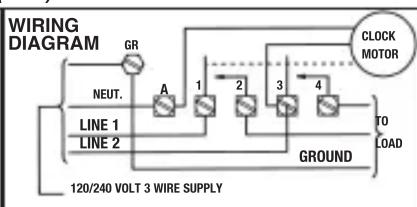
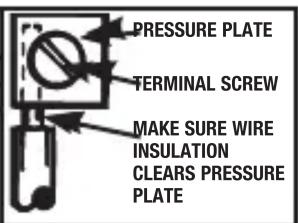
WIRING INSTRUCTIONS: Remove 1/2 inch of insulation from wire ends. Tighten terminal screws firmly (2-18 in-lbs). Use solid or stranded COPPER conductors only. May use two wires of the same size and type.
CLOCK MOTOR: 120 VAC. 60 HZ.
CLOCK MOTOR VOLTAGE AND CYCLE MUST BE AS SPECIFIED. TO ORDER REPLACEMENT, INDICATE PART NO. (WG--) ON MOTOR COVER.
| MINIMUM COPPER WIRE SIZE (AWG) | MAX. LOAD (AMP) | MAX. MOTOR LOAD (HP) | |
| SINGLE PHASE | |||
| 120V | 240V | ||
| 14 | 15 | 1/2 | 2 |
| 12 | 20 | 1 | 2 1/2 |
| 10 | 30 | 2 | 3 |
| 8 | 40 | 5 | |
PROGRAMMING INSTRUCTIONS
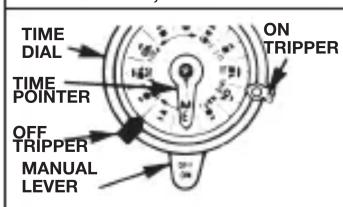
- TO SET "ON" AND "OFF" TIMES: Hold trippers against edge of CLOCK-DIAL, pointing to time (AM or PM) when ON and OFF operations are desired, tighten tripper screws firmly. For additional tripper pairs on CLOCK-DIAL order 156T1978A.
- TO SET TIME-OF-DAY: Pull CLOCK-DIAL outward. Turn in either direction and align the exact time-of-day on the CLOCK-DIAL (the time now, when switch is being put into operation) to the pointer. DO NOT MOVE POINTER.
OPERATING INSTRUCTIONS
- TO OPERATE SWITCH MANUALLY: Move MANUAL LEVER below CLOCK-DIAL left or right as indicated by arrows. This will not effect next operation.
• IN CASE OF POWER FAILURE, reset CLOCK-DIAL to proper time-of-day. See programming instructions.
INTERMATIC INCORPORATED
SPRING GROVE, ILLINOIS 60081-9698
154--02004
Brand : INTERMATIC
Model : T103PC
Category : Programmateur numérique