KASBD100HA - Soundbar Kogan - Free user manual and instructions
Find the device manual for free KASBD100HA Kogan in PDF.


| Product Type | Dolby Soundbar with Built-in Subwoofer (2.2CH, 100W) |
| Brand | Kogan |
| Model | KASBD100HA |
| Dimensions | 960 x 112 x 78 mm |
| Power Output | 100W |
| Speaker Drivers | 2 x 2" / 15W speakers, 2 x 3" / 25W subwoofers |
| Bluetooth Version | 5.0 + EDR |
| Bluetooth Range | 10 m |
| Connections | HDMI (ARC), Optical, Coaxial, USB 2.0, 3.5 mm Auxiliary |
| Power Supply | AC 100-240V |
| Input Modes | HDMI ARC, Optical, Coaxial, Auxiliary, USB, Bluetooth |
| Equalizer Presets | Music (EQ1), Movie (EQ2), News (EQ3) |
| Wall Mountable | Yes, with included wall-mounting kit |
| USB Playback | MP3, WAV, FLAC; FAT32 format; up to 64 GB; with repeat modes (ONE/ALL) and memory function |
| Remote Control | Includes: power, mute, volume, treble/bass, track control, mode selection, EQ, 3D surround, repeat |
| Safety | Do not expose to extreme temperatures, direct sunlight, or moisture. Do not disassemble. Disconnect power if liquid enters. |
| Included Accessories | Soundbar unit, remote control, power cord, 3.5mm to 3.5mm cable, wall-mounting kit, user guide |
Frequently Asked Questions - KASBD100HA Kogan
User questions about KASBD100HA Kogan
0 question about this device. Answer the ones you know or ask your own.
Ask a new question about this device
Download the instructions for your Soundbar in PDF format for free! Find your manual KASBD100HA - Kogan and take your electronic device back in hand. On this page are published all the documents necessary for the use of your device. KASBD100HA by Kogan.
USER MANUAL KASBD100HA Kogan
natural_image
Black rectangular electronic device labeled 'kogan' on a white background (no other text or symbols visible)DOLBY SOUNDBAR WITH BUILT-IN SUBWOOFER
(2.2CH, 100W)
KASBD100HA
SAFETY & WARNINGS
Attention
- To reduce the risk or electronic shock or fire, do not remove the cabinet cover. In the case of maintenance or repairs, contact help.kogan.com for all assistance. Do not attempt to make repairs without authorisation.
- Do not operate this product in extreme temperatures, direct sunlight, or wet environments. Do not place the unit in a location where the exposure to these environments is likely to occur.
- Do not drop or mishandle the product.
- If liquids or foreign debris falls into the unit, disconnect the power and cease use immediately. Do not resume operation until it has been checked by a service professional.
COMPONENTS LIST
- Soundbar unit x 1
- Remote control x 1
• Power cord x 1
• 3.5mm to 3.5mm cable x1
• Wall-mounting kit x 1 - User guide x 1
OVERVIEW
Control panel
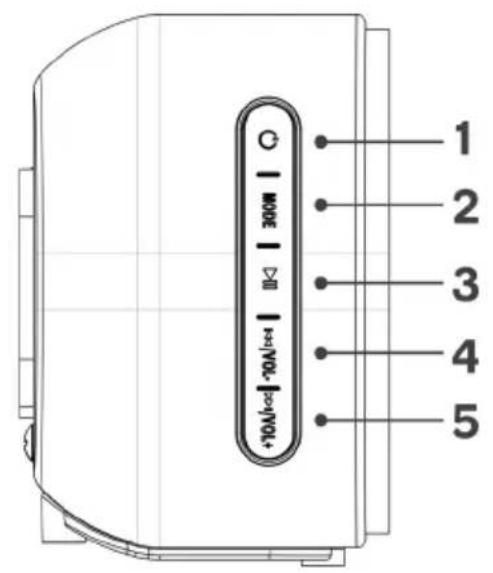
1 Standby on/off
2 MODE Mode selection
3 Play/Pause
4 | Previous track (hold)
VOL - Decrease volume (tap)
5 ▶▶| Next track (hold)
VOL+ Increase volume (tap)
Connection panel
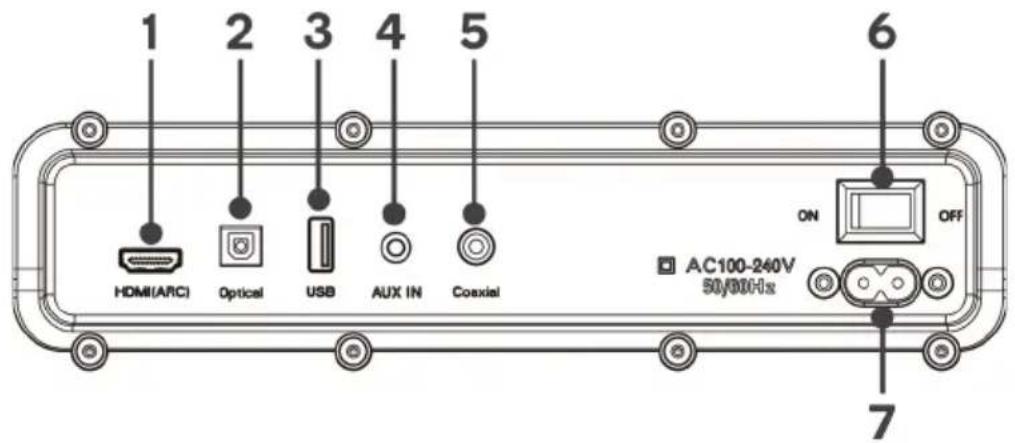
- HDMI (ARC)
- OPTICAL
- USB IN
- AUX IN
- COAXIAL
- ON/OFF
- AC power in
Modes
| LED Display Mode Description | ||
| Red light | Standby | Press standby button to turn on/off |
| “BT” Bluetooth | Available for pairing with bluetooth compatible device such as smartphone or laptop | |
| “USB” USB input | Use to connect a flash drive for direct MP3 / WAV / FLAC audio playback (FAT32 format, 64GB max) | |
| “AUX” Auxiliary input | Use to connect compatible devices using a 3.5mm stereo jack cable | |
| “OPT” Optical input | Use to connect compatible devices using an optical cable* | |
| “COA” Coaxial input | Use to connect compatible devices using a coaxial cable* | |
| “ARC” HDMI ARC input | Use to connect compatible devices using an HDMI cable* - compatible with TVs or other devices with ARC outputs | |
*not supplied
| Remote Control Button Function | |
 | Standby on/off |
 | Mute volume - press again to unmute |
| TREBLE + | Increase the treble level |
| TREBLE - | Decrease the treble level |
| BASS + | Increase the bass level |
| BASS - | Decrease the bass level |
| + | Increase volume level |
| - | Decrease volume level |
| |◀◀ | Previous track |
| ▶|| | Play/Pause |
| ▶▶| | Next track |
| MODE | Toggle between modes |
| BT | Bluetooth mode, hold button to disconnect or reconnect |
| OPT | Optical input mode |
| USB | USB input mode |
| AUX | Auxiliary input mode |
| EQ | Toggle EQ presets |
| ARC | HDMI (ARC) mode |
| 3D | Toggle 3D Surround on/off |
| Repeat playback (USB media only) |
OPERATION
Input Functions
- Power on/off: Press the Power on/off button on the remote control or soundbar control panel to turn the unit on and off.
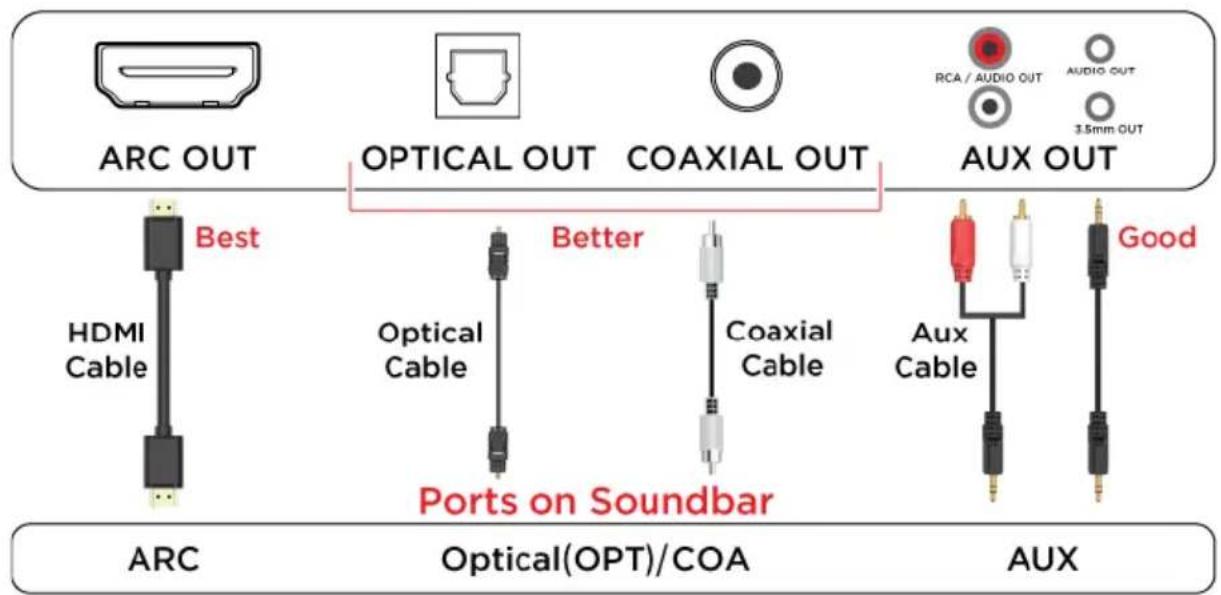
- HDMI (ARC): Connect an HDMI ARC compatible device to the HDMI (ARC) port on the soundbar using an HDMI cable (not supplied). Select HDMI (ARC) mode either by pressing the HDMI (ARC) button on your remote control, or repeatedly pressing the Mode button on the soundbar control panel until “ARC” is displayed on the LED display. Ensure HDMI ARC is selected as the TV’s audio output (check your TV’s settings), then adjust the volume of soundbar using the soundbar’s remote control or control panel.
- Auxiliary in: Connect a compatible device using the supplied 3.5mm cable. Select auxiliary mode either by pressing the “AUX” button on your remote control or repeatedly pressing the Mode button on the soundbar control panel until “AUX” is displayed on the LED display. Ensure the connected device is producing an audio signal, then adjust the volume of soundbar using the volume up and volume down buttons on the remote control or soundbar control panel.
- Optical in: Connect a compatible device to the optical input on the soundbar using a digital optical cable (not supplied). Select optical mode either by pressing the "OPT" button on your remote control or repeatedly pressing the Mode button on the soundbar control panel until "OPT" is displayed on the LED display. Ensure Optical SPDIF is selected as the TV's audio output, then adjust the volume of the soundbar using the volume up and volume down buttons on the remote control or soundbar control panel.
- Coaxial in: Connect a compatible device to the coaxial input on the soundbar using a digital coaxial cable (not supplied). Select coaxial mode by repeatedly pressing the Mode button on the soundbar control panel until “COA” is displayed on the LED display. Ensure Coaxial is selected as the TV’s audio output, then adjust the volume of the soundbar using the volume up and volume down buttons on the remote control or soundbar control panel.
- Bluetooth: Press the “BT” button on the remote control or repeatedly pressing the Mode button on the soundbar control panel until BT is shown on the LED display. The LED display will flash to indicate that the soundbar is in Bluetooth pairing mode. Ensure that the device you wish to connect is also in pairing mode and search for “Kogan 100W Dolby SB” in its device list. When the two devices are paired, the LED display on the soundbar will remain solidly lit. The soundbar will now automatically repair with this device whenever it is within range and has Bluetooth turned on.
Notes: Long-press the BT button on the remote control to disconnect or reconnect the Bluetooth between the phone and the soundbar.
- USB media mode: The soundbar is compatible with USB flash drives of up to 64GB (Fat32 format) in size and can play MP3/WAV/FLAC audio files directly. Insert a compatible drive (not supplied) into the USB port on the back of the soundbar and the unit will automatically switch to USB mode and play the first compatible track.
Press the Repeat Playback button on the remote control to toggle between single track repeat ("ONE"), or all track repeat ("ALL") to repeat all songs.
The media player also has a memory function that will recall and continue from the last-played point when a USB flash drive that has previously been used with the soundbar is reinserted.
- Equalizer modes: The soundbar has three equalizer presets, tailored to complement various styles of audio. Press the EQ button on the remote to cycle between Music ("EQ1"), Movie ("EQ2"), and News ("EQ3") presets.
- Wall mounting: The soundbar has two keyhole slots on the back to enable wall mounting using the wall-mounting kit provided.
Ports on TV
SPECIFICATIONS
| Power output 100W | |
| Speaker drivers | 2” / 15W speakers x 43” / 25W subwoofer x 2 |
| Bluetooth version | 5.0 + EDR |
| Bluetooth range 10m | |
| Connections | HDMI (ARC)OpticalCoaxialUSB 2.03.5mm Auxiliary |
| Power supply | AC 100-240V |
| Dimensions 960 x 112 x78mm | |
NOTES
Need more information?
We hope that this user guide has given you the assistance needed for a simple set-up.
For the most up-to-date guide for your product, as well as any additional assistance you may require, head online to help.kogan.com
kogan.com
Brand : Kogan
Model : KASBD100HA
Category : Soundbar