
CRX-51 - Security Camera CRUX - Free user manual and instructions
Find the device manual for free CRX-51 CRUX in PDF.


User questions about CRX-51 CRUX
0 question about this device. Answer the ones you know or ask your own.
Ask a new question about this device
Download the instructions for your Security Camera in PDF format for free! Find your manual CRX-51 - CRUX and take your electronic device back in hand. On this page are published all the documents necessary for the use of your device. CRX-51 by CRUX.
USER MANUAL CRX-51 CRUX
- For use as a front or backup camera.
- Includes 5 mounting options.
- With parking guide lines (can be turned on/off).
- Horizontal flip image feature for front camera use.
PARTS INCLUDED:

BALL CAMERA

SQUARE MOUNT
HOUSING

LIP MOUNT
HOUSING
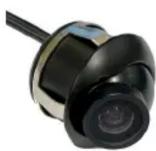
ADJUSTABLE ANGLE
PUSH IN MOUNT HOUSING

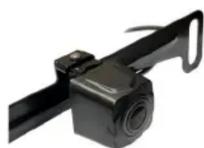
RUBBER STICK-ON MOUNT HOUSING LICENSE PLATE MOUNT

flowchart
graph LR
    A["Reverse Camera Interface Backup Camera Input"] --> B["OR"]
    B --> C["Extension Coax Cable"]
    C --> D["Regulator"]
    D --> E["Make sure the arrows line up and push in the connectors well."]
    E --> F["GREEN Wire Flip Image Horizontally (see below)"]
    F --> G["WHITE Wire Parking Guideline (see below)"]
    G --> H["Camera"]
    I["RED Wire (A)*"] --> J["Black Wire (Ground)"]
    K["RED Wire (B)*"] --> L["Red Wire (A)"]
    M["Green Wire"] --> N["White Wire Parking Guideline"]
*NOTE: The camera needs a +12V trigger. Power the camera at the headunit using RED Wire B or from the reverse light wire using RED Wire A. DO NOT connect both wires to +12V at the same time. Insulate the red wire that is not being used. Tap the Black wire to an existing ground lead, or ground Black wire securely to vehicle body metal.
| Loop Wire Color Function Joined Cut | ||
| White Parking Lines ON (default) OFF | ||
| Green Flip Image horizontally to use as a front camera | OFF (default) ON |

Brand : CRUX
Model : CRX-51
Category : Security Camera