USB Matchbox II - Soundcard Henry Engineering - Free user manual and instructions
Find the device manual for free USB Matchbox II Henry Engineering in PDF.


User questions about USB Matchbox II Henry Engineering
0 question about this device. Answer the ones you know or ask your own.
Ask a new question about this device
Download the instructions for your Soundcard in PDF format for free! Find your manual USB Matchbox II - Henry Engineering and take your electronic device back in hand. On this page are published all the documents necessary for the use of your device. USB Matchbox II by Henry Engineering.
USER MANUAL USB Matchbox II Henry Engineering
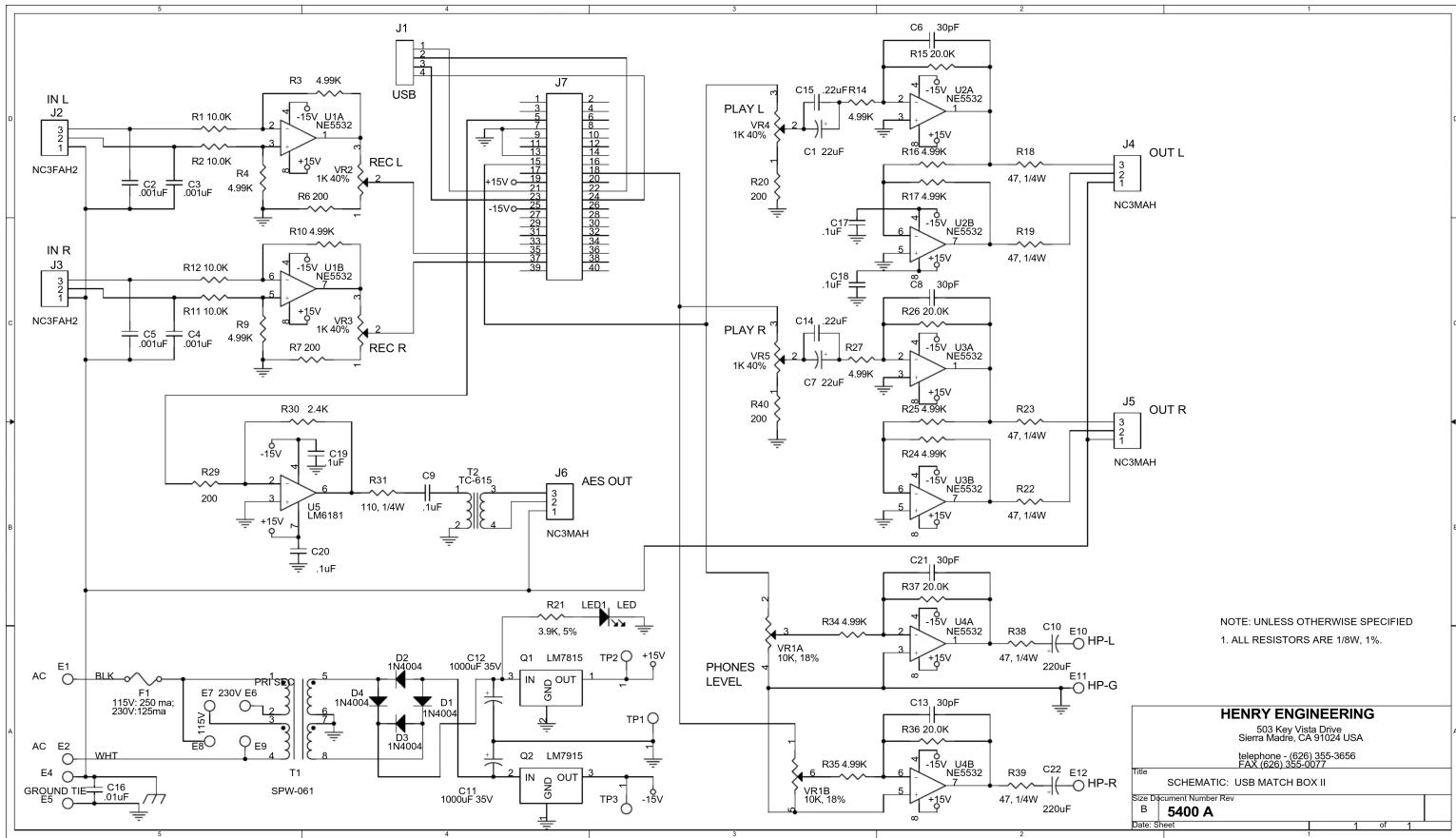
The USB Matchbox II is a high-performance professional audio codec. Used in place of a computer “sound card”, it provides stereo analog inputs and outputs at professional studio levels, an AES/EBU output, and a Headphone output for critical monitoring. The USB Matchbox II yields superb “audiophile” performance with the convenience of USB interface to any Windows, Mac, or Linux based computer. The USB Matchbox II is compatible with virtually any audio recording/editing software that supports a USB sound device. No special software or driver is needed. A USB 1.1 (or higher) connection to the PC is required. The USB Matchbox II complies with the AES-48-2005 grounding standard.
INSTALLATION
ANALOG LINE INPUTS/OUTPUTS: Connect balanced analog inputs and output to the XLR connectors as follows:
Pin 1 = GND, Pin 2 = HI, Pin 3 = LOW.
NOTE: Ground loops cause hum, buzz, and other noises that are created by the computer mouse, drives, fan, and keyboard. Prevent noise by connecting ground wires at one end only.
The HEADPHONE output can be used to monitor the “play” output of the system. Use contemporary headphones with an impedance of 24 ohms or greater. Do NOT use older “8 ohm” headphones. The VOLUME control adjusts the headphone level. Warning! Excessive listening levels can cause permanent hearing damage.
DIGITAL OUTPUT: Connect to the AES/EBU digital output XLR connector as follows:
Pin 1 = GND, Pin 2 = HI, Pin 3 = LOW. (The AES/EBU output is transformer isolated.)
COMPUTER CONNECTION:
First, close any audio-related programs. Use a USB cable to connect the USB Matchbox II to any USB port on the PC. The computer should recognize the USB Matchbox II as "USB Audio Codec". No additional software or drivers are needed. When audio software is started, it may be necessary to change its Settings to select the USB Audio Codec as its default.
WINDOWS\* VOLUME SETTING
BEFORE USING USB MATCHBOX II, be sure to check the Windows "SPEAKER VOLUME" setting. The Speaker Volume can be accessed via the Windows Control Panel under "Sound and audio devices" or "Adjust the system volume". Select "Volume" or "Set system volume", then adjust the slider. In most cases, the Speaker Volume should be set to MAXIMUM. *Windows is a registered trademark of Microsoft Corporation.
The USB Matchbox II is calibrated to operate with analog I/O levels of +4 dBu. Input and Output levels can be changed via the recessed trimmers; use a small screwdriver to carefully adjust. NOTE: There is 15 dB of digital headroom above +4 dBu: a calibration tone recorded at 0 dBfs will produce an output level of about +19 dBu.
OPERATION
To record, feed audio into the unit. Set the INPUT LEVEL trimmers as necessary, as indicated by the software being used. To play a recording, simply play the file. Audio will be present on the XLR analog outputs, Headphone jack, and on the AES/EBU digital output. (The Headphone output monitors “ playback” audio only.)
SPECIFICATIONS
Balanced analog inputs Stereo, nom. +4 dBu @ -15 dBfs, 20K ohms input impedance, XLR X 2
Balanced analog outputs Stereo, nom. +4 dBu @ -15 dBfs, +24 dBu max level, 600 ohms, XLR X 2
AES/EBU digital output Transformer isolated, 110 ohms, XLR connector
Headphones output For headphones, 24 ohms or higher; 3.5mm stereo jack
Sample rates supported 48, 44.1, or 32 kHz, software defined
Resolution, dynamic range 16 bit stereo or mono, software defined
USB supported USB 1.1 or higher
Power Input 115 or 230 VAC, 50-60 Hz, 2W, + USB power
Approval City of Los Angeles Electrical Test Lab
Physical 5.75" w X 5.50"d X 1.60"h, 3 LBS
Construction Steel enclosure
Brand : Henry Engineering
Model : USB Matchbox II
Category : Soundcard