KACOINCNTBA - Compteur de monnaie Kogan - Free user manual and instructions
Find the device manual for free KACOINCNTBA Kogan in PDF.


| Product Type | Coin Counter |
| Brand | Kogan |
| Model | KACOINCNTBA |
| Dimensions (W x D x H) | 345 x 306 x 260 mm |
| Weight | 3.9 kg |
| Power Source | AC 220V/50Hz or AC 110V/60Hz |
| Power Consumption | < 45 W |
| Hopper Capacity | Maximum 500 coins |
| Coin Drawer Capacity | 50–300 coins per channel |
| Counting Speed | Up to 270 coins per minute |
| Counting Display | 4-digit LED |
| Batch Preset Display | 3-digit LED |
| Operating Temperature | 0°C to 40°C |
| Ambient Humidity | 30% to 80% |
| Batch Setting | Per channel, 0 to 999 coins |
| Auto-Stop Features | Stops when batch reached, drawer full, or 20 sec inactivity (if batch=0) |
| Report Function | View counting results per channel |
| Self-Test & Error Codes | EA (optical sensor), E1–E8 (counting sensors), E9 (running sensor) |
| Maintenance | Clean optical sensor glass, remove foreign objects, push jammed coin upward |
| Safety | Do not operate when damp; unplug before maintenance; keep hands out when running |
| Customer Support | Contact Kogan.com support |
Frequently Asked Questions - KACOINCNTBA Kogan
User questions about KACOINCNTBA Kogan
0 question about this device. Answer the ones you know or ask your own.
Ask a new question about this device
Download the instructions for your Compteur de monnaie in PDF format for free! Find your manual KACOINCNTBA - Kogan and take your electronic device back in hand. On this page are published all the documents necessary for the use of your device. KACOINCNTBA by Kogan.
USER MANUAL KACOINCNTBA Kogan
For your safety, it is very important that you always follow these simple precautions:
- Do not operate the unit if you or the unit itself are damp. Operating the machine under damp conditions may lead to an electric shock hazard.
- Turn off and unplug the power supply before performing any maintenance.
- Never start the unit with the back cover open.
- Do not put your fingers inside the hopper or channels when the unit is under operation.
- Turn off and unplug the power if the unit will not be used for some time.
- Should you have any questions or concerns regarding the use of this product, please contact the Kogan.com customer support team.
Product Layout
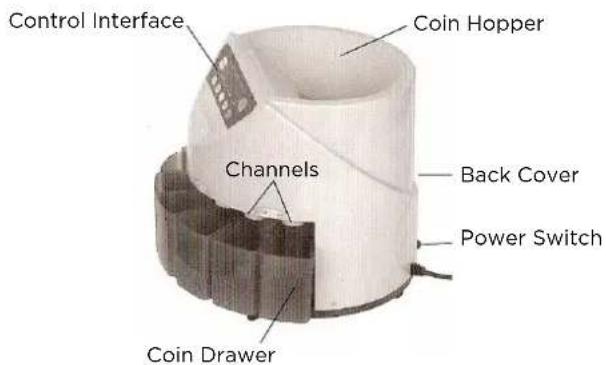
Technical Specifications
| Operating Temperatures | 0°C ~ 40°C |
| Ambient Humidity 30 ~ 80% | |
| Hopper Capacity Maximum of 500 coins | |
| Coin Drawer Capacity Each 50 ~ 300 coins | |
| Batch Preset Number Display 3 Digits LED | |
| Counting Number Display 4 Digits LED | |
| Power Source AC 220V/ 50Hz | AC 110V / 60Hz |
| Power Consumption <45W | |
| Dimensions 345 x 306 x 260mm | |
| Weight 3.9kg | |
| Counting Speed | Max 270 coins per minute |
In the interest of ongoing development and improvement of our products, these specifications are subject to change without prior notice.
Attention
Please handle this product with care and inspect it regularly to ensure it is in good working order.
If the product, power supply cord or plug shows any signs of damage: stop use, unplug and contact Kogan.com support.
Operation
-
Ensure that the machine is placed on a flat, level surface, then turn the unit on.
-
Set an expected batch
Each channel can be set an expected batch (from 0 to 999)
Press the "SET" key to select the channel, and the "BAT" key, "+" key and "-" key to set the expected batch number.
Note 1: If some channels have the batch set to 0, the machine will not stop this channel, even if the drawer is full, unless "START/STOP" has been pressed or no coins drop through the channel within 20 seconds.
Note 2: Keep "." pressed for 7 seconds to set ALL channels to 0.
Note 3: The batch settings can be automatically memorized.
- Start Counting
Put coins in the hopper, then press the "START/STOP" key to start counting. Press "START/STOP" again to stop counting.
- Check Report
Press the "REPORT" key when the machine is in standby state and you can check the counting results of each channel. Pressing the "C" key will exit this checking procedure.
Maintenance
WARNING: Turn machine off and unplug from the power supply before performing maintenance!
If foreign object falls into the hopper it will cause jamming and may even damage the unit! Take care to not allow foreign objects to fall into the hopper. As shown to right, to remove a foreign object, open the back cover and remove the foreign object.
If a coin gets jammed, use a finger to push the jammed coin upwards, then let it fall out through the gap between the channels, as shown to right.
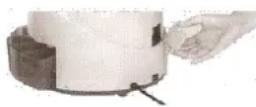
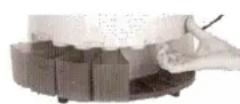
When the unit is switched on, it undergoes a self-testing process. The following error messages may be displayed:
EA : This means the optical sensor is blocked. Stop the machine, unplug the unit from the power supply and remove the back cover. If you then turn the carry tray with your hands, you should see the glass covering. If it looks like the glass is dirty/dusty, please clean it. If you are getting the EA error message often, it may mean that the working environment is resulting in too much dust/dirt getting into the inner parts of the machine.
E1 ... E8 : This means the counting sensor is blocked (according to diameter from smallest to largest).
E9 : This means the running sensor is blocked.
If after cleaning the sensors the error messages continue to appear or the unit does not operate as desired, please contact the Kogan.com customer support team for further advice.
Brand : Kogan
Model : KACOINCNTBA
Category : Compteur de monnaie