KAESCOFFGRA - Coffee maker Kogan - Free user manual and instructions
Find the device manual for free KAESCOFFGRA Kogan in PDF.


| Product Type | Espresso Barista Coffee Machine with Built-in Grinder |
| Brand | Kogan |
| Model | KAESCOFFGRA |
| Dimensions (Approx.) | 31.5 x 38 x 43 cm |
| Weight (Approx.) | 10 kg |
| Water Tank Capacity | 1.5 L (approx.) |
| Grinder Type | Built-in conical burr grinder |
| Grind Settings | 30 levels (Fine 5 to Coarse 30) |
| Filter Baskets Included | Single and double shot |
| Steam Wand | Stainless steel, for milk frothing |
| Hot Water Function | Yes, for Americano or cleaning |
| Pump Type | 15 bar (typical) |
| Control Interface | Push-button with LED indicators |
| Grind Time Adjustment | 4-18 seconds |
| Coffee Volume Adjustment | Single up to 125 ml, Double up to 250 ml |
| Descaling Reminder | Yes, indicators flash every 4-6 months |
| Water Shortage Reminder | Yes, indicators flash and buzzer sounds |
| Safety Features | Grounded plug, auto shut-off, overheat protection |
| Accessories Included | Tamper, cleaning brush, cleaning pins, drip tray, water tank |
Frequently Asked Questions - KAESCOFFGRA Kogan
User questions about KAESCOFFGRA Kogan
0 question about this device. Answer the ones you know or ask your own.
Ask a new question about this device
Download the instructions for your Coffee maker in PDF format for free! Find your manual KAESCOFFGRA - Kogan and take your electronic device back in hand. On this page are published all the documents necessary for the use of your device. KAESCOFFGRA by Kogan.
USER MANUAL KAESCOFFGRA Kogan
natural_image
Technical line drawing of a coffee maker with control panel and side-mounted device (no text or symbols)ESPRESSO BARISTA COFFEE MACHINE AND GRINDER
KAESCOFFGRA
Safety & Warnings 3
Overview 5
Before First Use 7
Operation 8
Cleaning & Care 15
Troubleshooting 23
Notes 25
SAFETY & WARNINGS
- Read all the instructions and retain this user guide for future use.
- Ensure the electrical outlet voltage corresponds to the rated voltage marked on the rating plate.
- This appliance has been incorporated with a grounded plug. Ensure the electrical outlet in your house is earthed. Any questions about grounding should be directed to a certified electrician.
- Do not immerse the power cord or plug in water or other liquids to avoid electric shock.
- Do not leave the appliance unattended while in use.
- Remove the plug from the electrical outlet before cleaning and when not in use. Always turn the switch off first and hold the plug; never pull the cord.
- If the cord or plug is damaged, cease use immediately and contact help.Kogan.com for support.
- Do not operate this appliance if it malfunctions or is dropped or damaged. Cease use immediately and contact help.Kogan.com for support.
- Do not use any attachments that are not included with this appliance. Doing so may result in fire, electric shock, or injury.
- Place the appliance on a flat surface or table. Do not hang the power cord over the edge of a table or counter.
- Ensure the power cord does not touch the hot surfaces of the appliance.
- Do not place the appliance on or near any open flames or other sources of heat.
- Do not use the appliance for any use other than its intended purpose.
- Close supervision is necessary when the appliance is being used near children.
- Do not operate the appliance without water.
- This appliance is not intended for use by persons (including children) with reduced physical, sensory or mental capabilities or lack of experience and knowledge unless they have been given supervision or instruction concerning use of the appliance by a person responsible for their safety.
- Supervise children to ensure that they do not play with the appliance.
- This appliance is intended to be used in household and similar environments such as:
- Staff kitchen areas in shops, offices, and other working environments.
o Farmhouses. - By clients in hotels, motels, and other residential type environments.
- Bed and breakfast type environments.
- Do not use the appliance outdoors.
Warning: Pressure
- Do not remove the water tank or portafilter while operating the appliance. Steam and hot water can cause burns and other injuries.
- Ensure the appliance is in standby mode when removing the water tank or portafilter.
- To add more water to the water tank, turn the appliance off by pressing the power button. The four indicators will turn off when the appliance is off.
- When extracting coffee, ensure the portafilter is in the specified position to prevent it loosening from the pressure of the appliance, which may cause injury.
High Temperature
- Do not touch or extend your hands or other body parts into the portafilter or steam tube while operating the appliance, as doing so can cause burns.
- Only move the steam tube by touching the silicone sleeve.
- Use caution when operating the steam tube. Steam can reach very high temperatures and may cause burns.
- Do not touch the hot surface of the appliance (such as the steam tube and the steel mesh). Always use handles or knobs.
- Do not remove the filter when the appliance is brewing coffee or making steam.
- Allow the appliance to cool down completely before attaching components, or before cleaning.
OVERVIEW
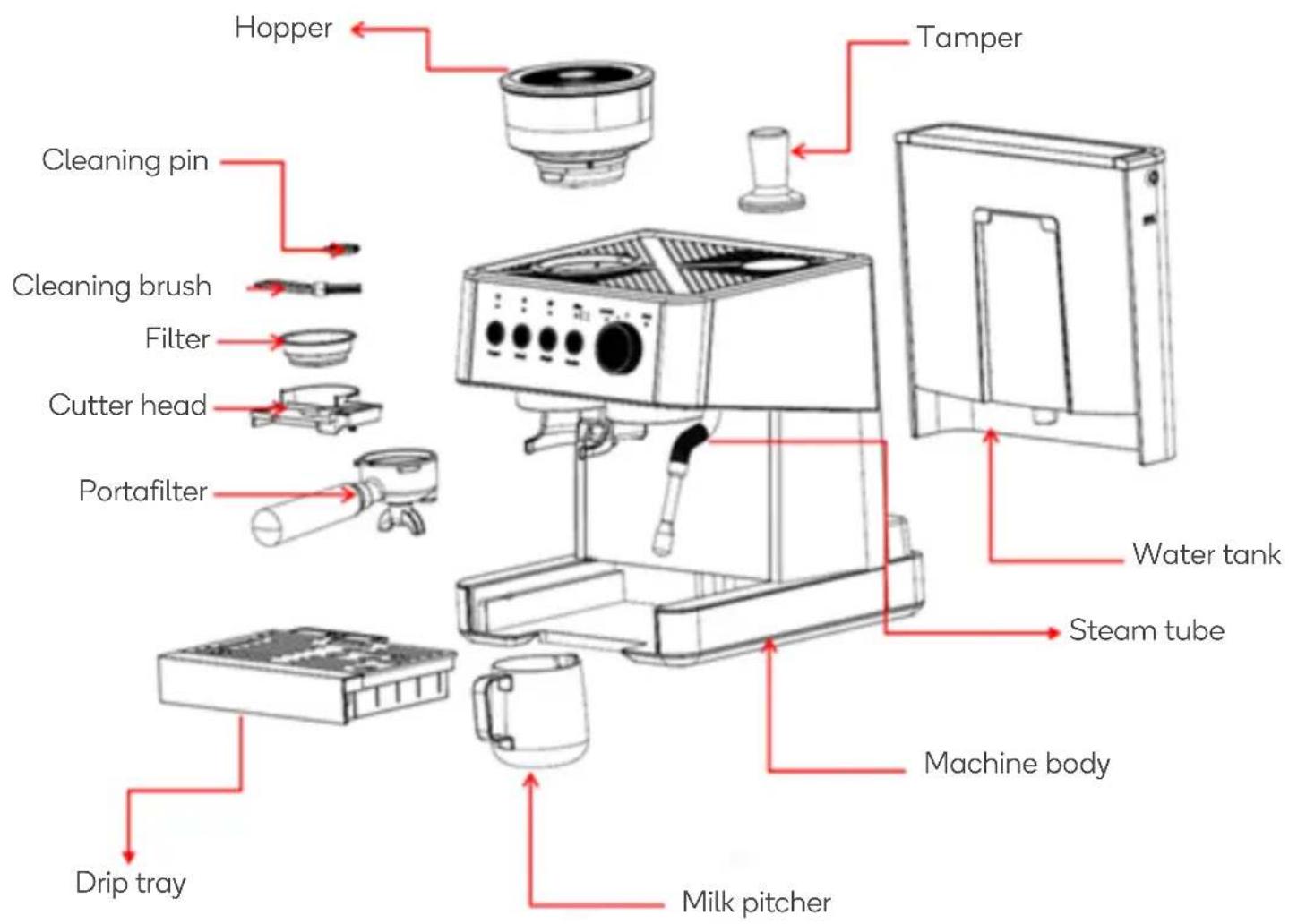
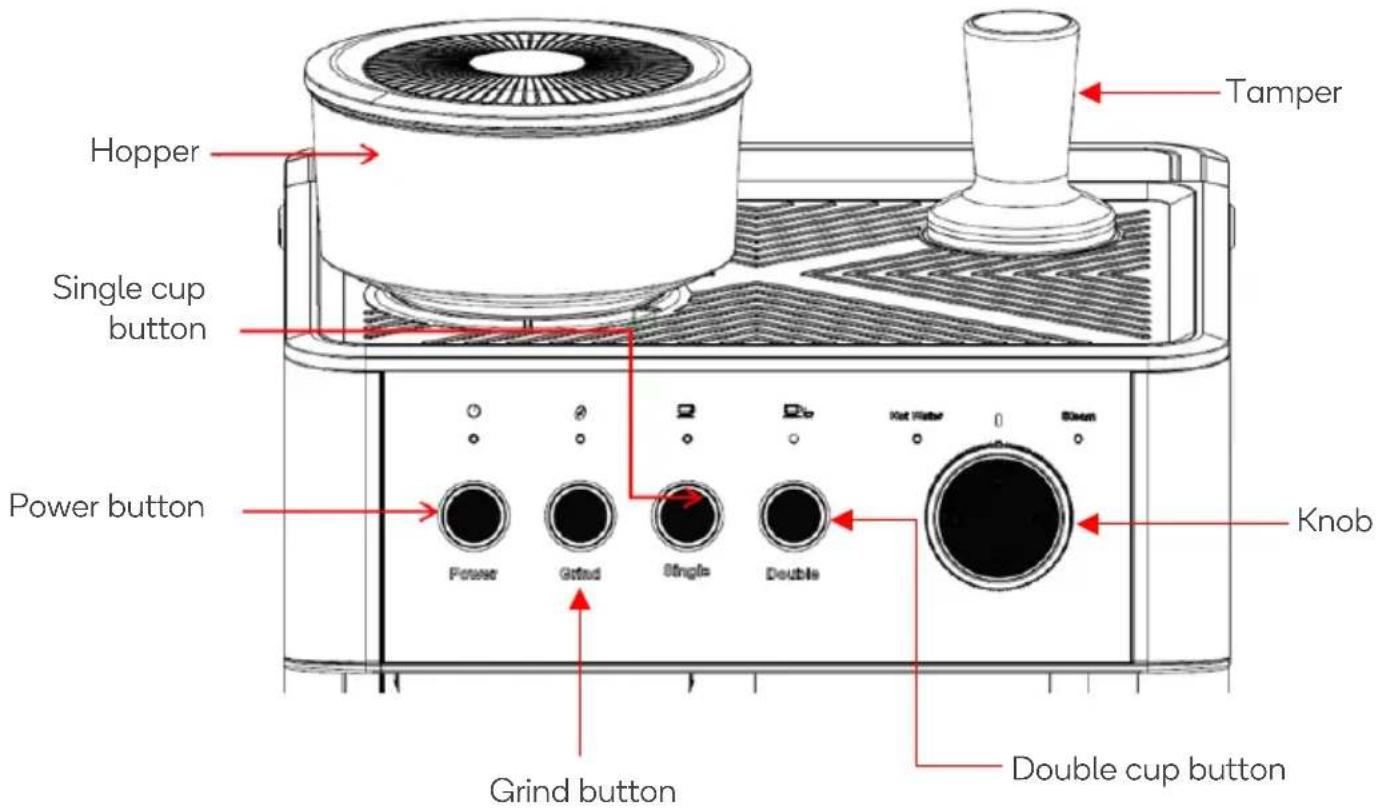
Indicators
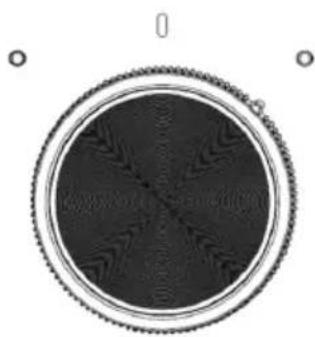
Hot water Centre Steam
natural_image
Circular mechanical component with gear-like end and central seam pattern (no text or symbols)BEFORE FIRST USE
- Ensure all components are included and not damaged.
- Fill the water tank with clean water. The water level should not exceed the 'MAX' mark in the tank.
- Insert a single cup or double-cup filter into the portafilter. Align the filter with the portafilter (do not add coffee yet) and rotate the portafilter anti-clockwise to lock it in place.
- Plug the power cord into an electrical outlet and press the power button on the coffee machine. The coffee machine will preheat and then enter standby mode.
- Align the steam tube towards the drip tray. Turn the knob towards the 'Hot water' or 'Steam' indicator. Hot water or steam will flow out from steam tube.
- Press the 'Single' or 'Double' button to clean the pipes in coffee machine. Hot water will come out of the portafilter. Do not extend any body parts under the portafilter and use the drip tray or cup to collect the hot water.
- When the water stops flowing, dispose of the water in the drip tray or cup.
- Thoroughly clean the detachable parts of the coffee machine with warm water.
Coffee Requirements
- The coffee should be freshly ground and deep roasted. French or espresso roasted coffee is recommended.
- It is not recommended to use pre-ground coffee. Freshly ground coffee beans maintain their aroma and create higher quality coffee.
- Pre-ground coffee will only keep for 7 to 8 days unless stored in a sealed container in a cool place. Do not store coffee in the refrigerator or freezer.
OPERATION
Install the Grinder
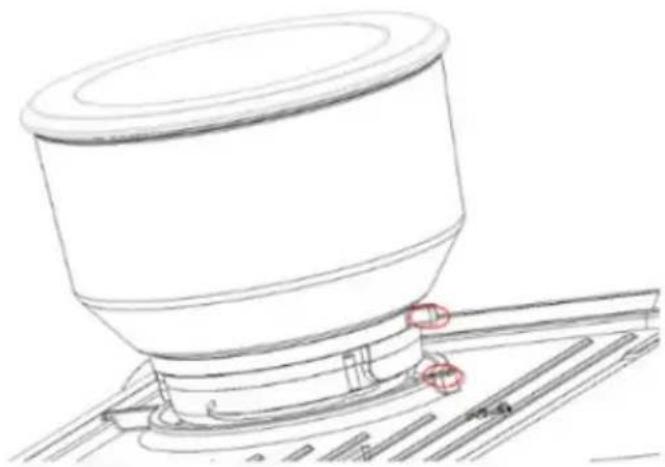
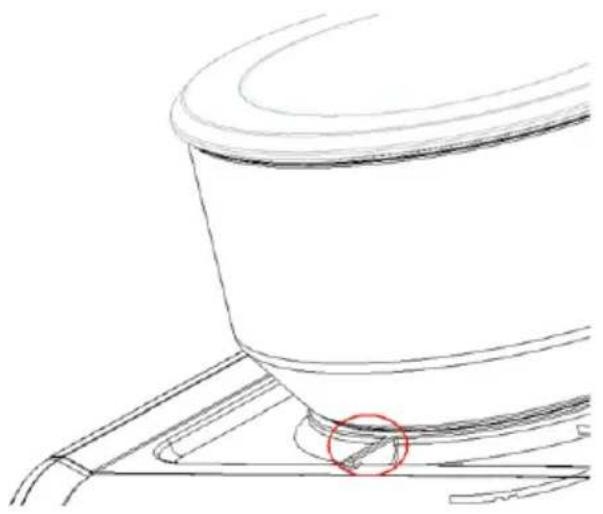
- Insert the cutter head into the coffee machine and tighten it clockwise. Then, place the hopper on top.
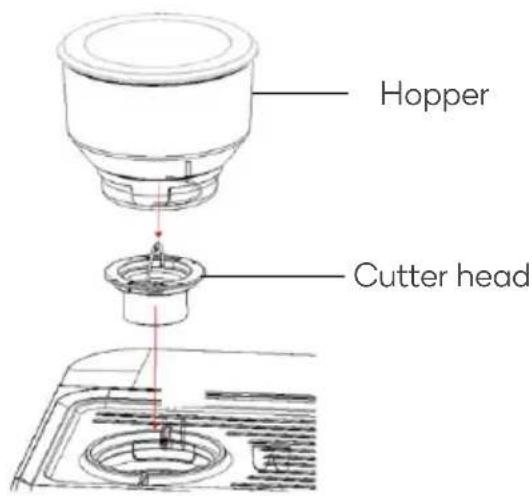
- Align the hopper with the grooves in the coffee machine. Press the hopper down and rotate it clockwise to install it.
natural_image
Technical line drawing of a cylindrical mechanical component mounted on a base plate (no text or symbols)Grind Size
- To ensure the coffee grounds are consistent and create high-quality coffee, adjust the grinding degree on the hopper according to the type and quality of the coffee beans.
• There are markings on the hopper to indicate the size of the coffee grounds.

line
| Stage | Value | |-------|-------| | Coarse | 30 | | Faster Extraction | 25 | | Medium | 20 | | Slower Extraction | 15 | | Fine | 10 | | Final | 5 |- For freshly roasted coffee beans (up to 1 month), set the grinder between 5 and 10.
• Ground coffee should look like salt.
- If the coffee grounds are too fine, it may cause the coffee to flow intermittently.
- If the coffee grounds are too coarse, the water will flow through the coffee too quickly, which will affect the aroma and taste.
- To prevent the coffee beans from getting wet, affecting the grinding and the final coffee taste and effect, do not overfill the hopper.
- To achieve the grind size you prefer, ensure the setting on the hopper is aligned with the correct marking.
natural_image
Line drawing of a mechanical component with a red circle highlighting a feature (no text or symbols)
-
Press the 'Grind' button once for single cup grinding and twice for double cup grinding. Grinding will automatically stop after reaching the set grind amount (9 seconds for single cup and 13 seconds for double cup).
-
Remove the portafilter from the portafilter bracket and softly tap it on the benchtop to evenly distribute the ground coffee.
-
Use the tamper to apply a force of approximately 12.5kg to tamp the coffee.
-
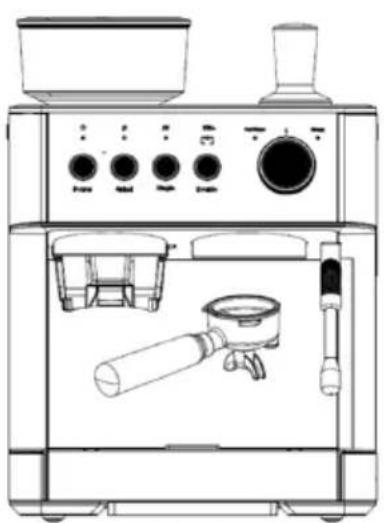
Align the portafilter to the coffee outlet and turn the portafilter anti-clockwise to lock it.
Notes:
- When the grinding function cannot be used normally due to system restriction, press the 'Grind' button. The grind indicator will flash white and beep three times.
-
When the grinder works continuously for 3 minutes and the rest time before the next use is less than 6 minutes, the grinder will stop operating. After 6 minutes, press the 'Grind' button again to resume.
-
Place a coffee cup on the cup holder.
-
Press the 'Single' or 'Double' button to brew the coffee. When the set coffee level is reached (about 30ml for single cup and 60ml for a double cup), the machine will stop dispensing coffee automatically and enter standby mode.
Notes:
- It is recommended that the coffee machine be preheated before extracting coffee, so the coffee will not be affected by the temperature of the machine.
- If you are using pre-ground coffee, place 13g in the portafilter for a single cup, and 18g for a double cup.
natural_image
Line drawing of a coffee maker with control panel, side dish, and mechanical components (no text or labels)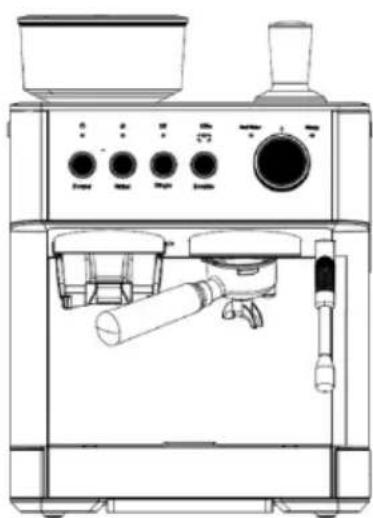
natural_image
Line drawing of a coffee machine with control panel and side-mounted stand (no text or symbols)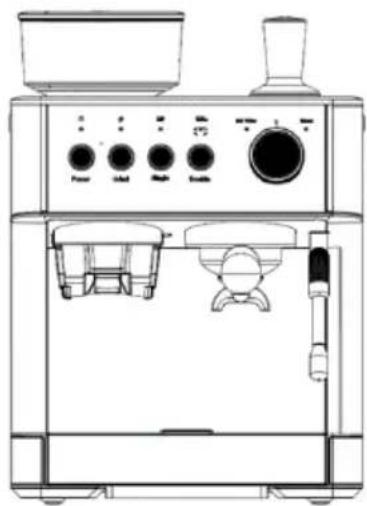
natural_image
Line drawing of a coffee machine with control panel, side dish, and side arm (no text or labels)Boil Hot Water
- Place a cup under the steam tube.
- Turn the knob to 'Hot water'. The hot water indicator will flash, and hot water will flow out from the steam nozzle.
- Turn the knob back to the centre to stop the hot water. The hot water indicator will turn solid, and the coffee machine will enter standby mode.
Notes:
• The maximum output of hot water is ≥170ml.
- Ensure you are using a container that is big enough to collect all the water.
- Ensure the coffee machine is always supervised while the hot water is running.
• Always turn the knob back to the centre after running hot water. If not, the steam and hot water indicators will flash rapidly, and an alarm will sound. Coffee cannot be brewed during this time.
- When the power, grind, single cup and double cup indicators rapidly flash, the water level is low. Refill the water tank.
Froth Milk
- Fill the milk pitcher with 100ml of milk (a quarter full) to make a cappuccino, or 150ml (a third full) to make a latte. Place the pitcher under the steam tube.
- Turn the knob to 'Steam'. The steam indicator will illuminate while the steam is preheating. When the steam is preheated, the steam indicator will start flashing and the steam outlet will release steam.
- Tilt the pitcher and position the steam tube so the end extends 1cm under the surface of the milk.
- When the milk has foamed, turn the knob back to the centre.
Notes:
- The steam will be hot. Take care when handling the steam tube.
- For best results, let the steam run for 3-5 seconds and then turn the knob to the centre. Extend the steam tube into the milk and then turn the knob back to 'Steam' to froth the milk.
- The maximum milk-frothing time is 5 minutes. If the knob is not turned to the centre after 5 minutes, the steam indicator will flash, and the coffee machine will stop operating.
Coffee Machine Settings
Grind Time
- Ensure the hopper is installed correctly and filled with the appropriate amount of coffee beans.
- To adjust the single cup grinding amount, press and hold the 'Grind' button until the grind indicator starts to flash, and the grinder starts to work.
- Release the 'Grind' button to stop grinding after the desired coffee amount is reached. The buzzer will sound, and the coffee machine will record the grind time.
Note:
The grind time can be adjusted within the range of 4-18 seconds.
Coffee Amount
- Ensure there is enough water in the water tank.
- Press and hold the 'Single' or 'Double' button until the corresponding indicator stays solid, and the coffee machine starts to dispense coffee.
- Release the selected button to stop dispensing coffee when the desired amount is reached. The buzzer will sound for 1 second and the machine will record the coffee amount.
Note:
The maximum coffee amount is 125ml for a single cup and 250ml volume for a double cup.
Restore to Factory Coffee Amount
Single cup:
- Press and hold the power button and the 'Single' button. The single cup indicator will flash twice, and the other indicators will switch off.
- The buzzer will sound for approximately 1 second when the factory coffee amount is restored, and the coffee machine will enter standby mode.

WARNING: Unplug the coffee machine before cleaning to allow it to cool down sufficiently to prevent scalding. Do not immerse the coffee machine or the power cord in water or other liquids.
- After each use, clean all detachable parts, including the portafilter, with water and detergent if necessary.
- Ensure all parts are rinsed with clean water before use and dried thoroughly.
- Clean the external surface of the coffee machine often by scrubbing it with a moisture-proof sponge.
Note:
- Do not use alcohol or detergent to clean the coffee machine.
- Do not immerse the coffee machine in water when cleaning.
- The water tank is not dishwasher safe.
When to Clean the Grinder
- Clean the coffee-dispensing channel and grinding wheel at least once every two weeks to prevent blockages from forming.
- Clean the coffee-dispensing channel and grinder wheel when:
There's a reduction in the amount of coffee being dispensed.
- The grinding degree is very fine.
- Coffee is spilling out from the portafilter.
Cleaning the Grinder
- Rotate the hopper anti-clockwise to remove it.
- Turn the grinding wheel anti-clockwise to remove it. Use the provided cleaning brush to clean the grinding wheel and remove any residual coffee grounds. Do not rinse the grinding wheel with water.
- Use the provided cleaning brush to clean the grinding chamber and the coffee-dispensing channel.
- Do not install the grinding wheel at this time. Re-install the empty hopper. Press the 'Grind' button and run the grinder to clear out the powder residue in the grinding chamber.
- If there is still powder inside the chamber, repeat steps 3 and 4.
- Remove the hopper and install the grinding wheel.
Note:
Ensure there are no coffee beans in the hopper when cleaning the grinder.
Descaling
- It is recommended to descale the coffee machine every 4-6 months. The descaling process takes about 10 minutes.
- This coffee machine has a descaling reminder. The single cup, double cup, steam and hot water indicators will flash when the machine needs descaling.
Before Descaling:
Complete the following preparations before running the descaling program:
- Ensure there is at least 1L of water in the water tank.
• Empty the drip tray and re-install it. - Turn on the coffee machine on and place it in standby mode.
- Place the double cup filter into the portafilter and place the portafilter into the coffee outlet.
Descaling Solution:
Use one of the following solutions to descale the coffee machine:
• Coffee machine descaling tablets.
- Liquid descaler.
- White vinegar and warm water.

Start Descaling:
After completing the above steps, you can start the descaling process as follows:
Step 1: Start the descaling program.
- In standby mode, press and hold the 'Grind', 'Single' and 'Double' buttons for 5 seconds to start the descaling process. The power indicator will flash, and the hot water and steam indicators will illuminate solidly, and the single cup and double cup indicator will turn off.
- Turn the knob to 'Steam'. The steam indicator will flash. The pump will start to operate and hot water will dispense from the coffee outlet and steam tube.
- When hot water dispensing stops, the power indicator will flash slowly, and the steam and hot water indicators will flash rapidly.
- Turn the knob to back to the centre. The steam and hot water indicators will illuminate solidly.
Note:
- Exit the descaling program at any time by pressing the power button.
- If the descaling does not start within 1 minute, the appliance will exit the descaling cycle and return to standby mode.
Step 2: Clean up.
- Allow up to 5 minutes to complete the following before finishing the descaling program:
- Clean the water tank.
- Fill the water tank.
o Empty the containers.
- The steam tube and coffee outlet need to be cleaned with fresh water to remove the descaling solution.
Step 3: Finish the descaling program.
- Turn the knob to 'Hot water'. The hot water indicator will flash. The pump will start to operate and hot water will dispense from the coffee outlet and steam tube.
- When hot water dispensing stops, the power and hot water indicators will flash, the power and grind indicators will illuminate solidly, and the single cup and double cup indicators will turn off.
- Turn the knob back to the centre. The descaling program will end, and the machine will return to standby mode.
Water Shortage Reminder
- When the water tank is low in water, the power indicator, grind indicator, single cup indicator and double cup indicator will flash, and the buzzer will sound 5 times.
- This reminder will also occur when the coffee grounds are too fine, and the machine cannot brew the coffee.
- If there is no operation one minute after the reminder, the coffee machine will enter standby mode.
Restore to Factory Settings
- Press and hold the ‘Power’ button and ‘Grind’ button at the same time to restore the coffee machine to factory settings, including the grinding time.
- All indicators will flash twice, and the buzzer will sound when factory settings are restored.
Toolbox
- The coffee machine is equipped with a toolbox where the cleaning pin and cleaning brush are stored. The single cup and double cup filters can be stored in the toolbox as well.
- The toolbox is located on the lower left corner of the coffee machine and can be seen by removing the drip tray.
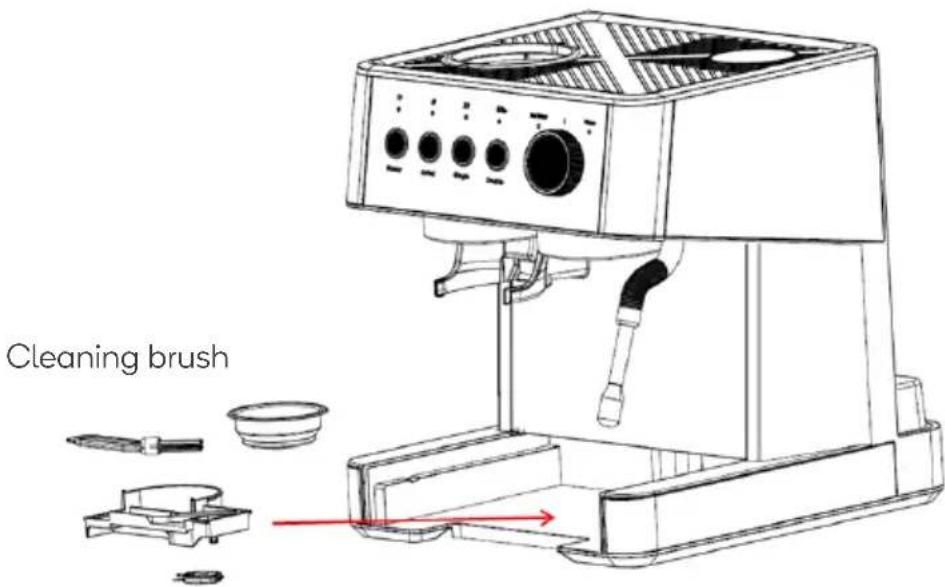
Cleaning pin
Cleaning Pin:
This coffee machine has two cleaning pins. The thicker pin is for cleaning the steam tube and thinner one is for cleaning the filters.
Clean the steam tube with the thicker pin.
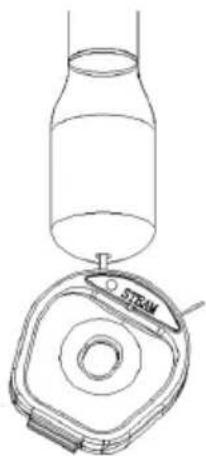
natural_image
Line drawing of a bottle with a tray labeled 'STEAM' and a circular component (no text or symbols beyond label)Clean the filters with thinner pin.
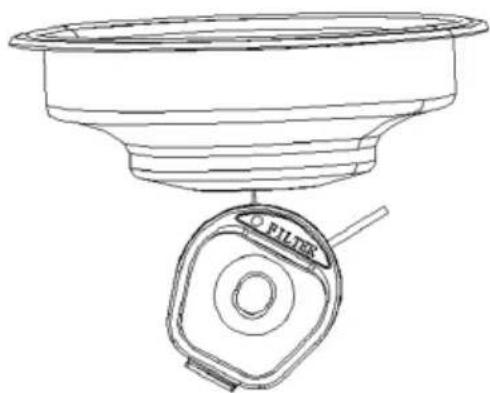
natural_image
Technical line drawing of a funnel and filter component (no text or symbols)Cleaning Brush:
The cleaning brush is used for cleaning the grinding system.
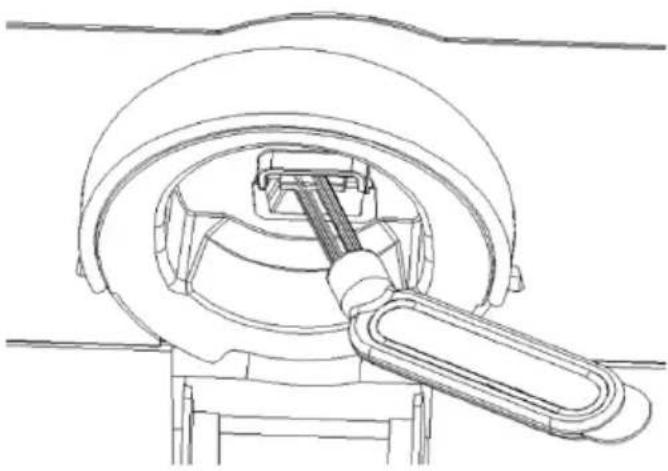
natural_image
Technical line drawing of a mechanical assembly with a central shaft and housing (no text or symbols)Clean the grinding chamber and the coffee-dispensing channel.
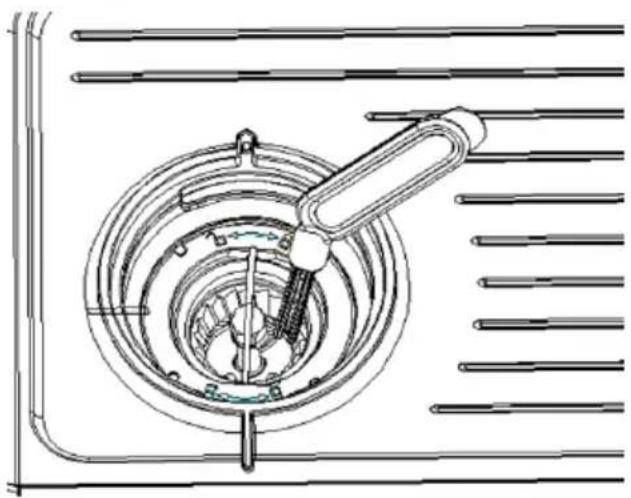
natural_image
Technical line drawing of a mechanical component with concentric rings and a lever (no text or symbols)The other end of cleaning brush can be used to remove the filter from the portafilter.
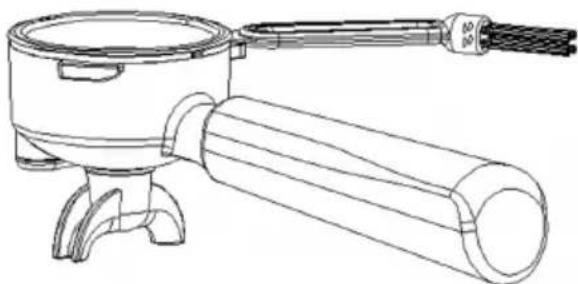
natural_image
Line drawing of a mechanical device with a cylindrical shaft and a side-mounted fan (no text or symbols)Coffee Tamper:
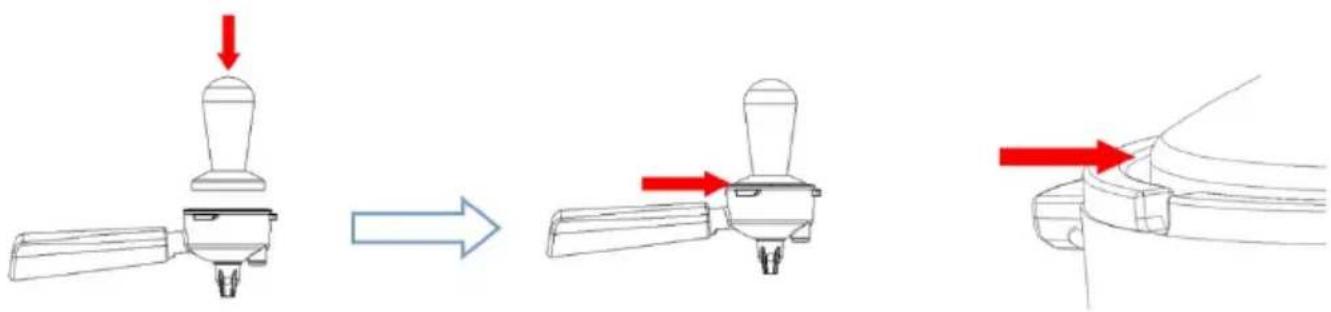
Tamp the coffee grounds downwards.
The edge of the tamper will align to the edge of portafilter when the correct amount of coffee grounds is in the portafilter.
TROUBLESHOOTING
| Problem | Possible Cause | Solution |
| The indicators are not illuminating. | No power. | Ensure the power plug is properly connected to the electrical outlet and the power button has been pressed. |
| The grind indicator is flashing. | The hopper is not installed. | Install hopper. |
| There are water marks on the bottom of the machine. | The water tank or drip tray is not installed, or the drip tray is full | Install the water tank and drip tray and ensure the drip tray is empty. |
| The coffee machine makes a hissing sound after coffee is dispensed. | This sound is produced by the normal operation of the pressure control valve. | |
| No coffee is dispensed, or it drips out slowly, or the portafilter cannot be properly installed in the coffee outlet. | There is an excessive amount of coffee grounds, the coffee grounds are too fine. | The amount of ground coffee should not exceed the standard. Adjust the grind time and coffee amount. The ground coffee should not be tamped repeatedly with excessive force. |
| Coffee without crema. | The coffee beans are damp, or the coffee grounds are too coarse. | Use fresh coffee beans and grounds with a moderate grind size. |
| No steam is produced. | The coffee machine is not preheated. | Preheat the coffee machine. |
| The steam nozzle is blocked. | The coffee machine needs to be descaled. Use the cleaning pin to clean the steam nozzle. | |
| The coffee machine will not make coffee or hot water immediately after the steam dispenses and the machine will automatically pump water. | After steaming is completed, the pressure needs to be released to reduce the temperature. During that time, other operations cannot be performed. The water-pumping operation is used for cooling down the heating element quickly. | It takes 20-30 seconds to release the pressure and cool down. After the pressure is released and the coffee machine has cooled down, the coffee machine will operate normally. |
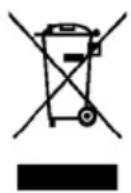
This marking indicates that this appliance should not be disposed with other household wastes. To prevent possible harm to the environment or human health from uncontrolled waste disposal, recycle it responsibly to promote the sustainable reuse of material resources.
NOTES
Need more information?
We hope that this user guide has given you the assistance needed for a simple set-up.
For the most up-to-date guide for your product, as well as any additional assistance you may require, head online to help.kogan.com
kogan.com
- ESPRESSO BARISTA COFFEE MACHINE AND GRINDER
- SAFETY & WARNINGS
- Warning: Pressure
- High Temperature
- OVERVIEW
- BEFORE FIRST USE
- Coffee Requirements
- OPERATION
- Install the Grinder
- Grind Size
- Notes:
- Boil Hot Water
- Froth Milk
- Coffee Machine Settings
- Grind Time
- Note:
- Coffee Amount
- Restore to Factory Coffee Amount
- Single cup:
- When to Clean the Grinder
- Cleaning the Grinder
- Descaling
- Before Descaling:
- Descaling Solution:
- Start Descaling:
- Step 1: Start the descaling program.
- Step 2: Clean up.
- Step 3: Finish the descaling program.
- Water Shortage Reminder
- Restore to Factory Settings
- Toolbox
- Cleaning Pin:
- Cleaning Brush:
- Coffee Tamper:
- TROUBLESHOOTING
- NOTES
- Need more information?
Brand : Kogan
Model : KAESCOFFGRA
Category : Coffee maker