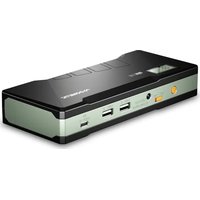
PJS118 - Battery starter DOMETIC - Free user manual and instructions
Find the device manual for free PJS118 DOMETIC in PDF.


| Product Type | Jump Starter |
| Brand | Dometic |
| Model | PJS118 |
| Battery Type | Lithium Polymer (Pure LiCoO2) |
| Battery Capacity | 66.6 Wh |
| Start Current | 450 A |
| Peak Current | 900 A |
| USB Output | 2 x USB Type A: 5 V/2 A, 9 V/2 A |
| Laptop Charging Port | 12 V/16 V/19 V, max 3.5 A at 12 V |
| DC Input (Type-C) | 5 V/1 A, 9 V/2 A |
| Dimensions (L x W x H) | 190.5 x 82.5 x 34 mm |
| Weight | 608 g |
| Operating Temperature | -20 °C to +60 °C |
| Charging Time | 3–5 hours |
| LED Work Light | Continuous, Strobe, SOS |
| Safety Features | Voltage stabilisation, over‑voltage, overload, over‑discharge, over‑temperature, reverse polarity, short circuit |
| Intended Use | Jump start 12 V vehicles (up to 6 L petrol or 4 L diesel); charge digital devices |
| Accessories Included | Home charger, car charger, 4-in-1 USB cable, intelligent battery clamp, laptop charging cable, 8 laptop connectors, storage case |
| Warranty | 1 year |
| Maintenance | Charge every 3 months; clean with damp cloth |
| Disposal | Do not dispose with household waste; recycle battery |
Frequently Asked Questions - PJS118 DOMETIC
User questions about PJS118 DOMETIC
0 question about this device. Answer the ones you know or ask your own.
Ask a new question about this device
Download the instructions for your Battery starter in PDF format for free! Find your manual PJS118 - DOMETIC and take your electronic device back in hand. On this page are published all the documents necessary for the use of your device. PJS118 by DOMETIC.
USER MANUAL PJS118 DOMETIC
natural_image
Line drawing of a rectangular electronic device casing with internal compartments and ports (no text or symbols)PJS118

Jump Starter
Operating manual
Please read this instruction manual carefully before first use, and store it in a safe place. If you pass on the product to another person, hand over this instruction manual along with it.
Table of contents
1 Explanation of symbols....3
2 General safety instructions .... 4
3 Scope of delivery 5
4 Intended use 6
5 Technical description 6
6 Using the appliance .... 10
7 Troubleshooting 16
8 Maintaining and cleaning the product 17
9 Warranty 18
10 Disposal....18
11 Technical data....19
12 Copyright 19
1 Explanation of symbols

WARNING!
Safety instruction: Indicates a hazardous situation that, if not avoided, could result in death or serious injury.

CAUTION!
Safety instruction: Indicates a hazardous situation that, if not avoided, could result in minor or moderate injury.

NOTICE!
Indicates a situation that, if not avoided, can result in property damage.

NOTE
Supplementary information for operating the product.
2 General safety instructions
The manufacturer accepts no liability for damage in the following cases:
- Damage to the product resulting from mechanical influences and incorrect connection voltage
• Alterations to the product without express permission from the manufacturer - Use for purposes other than those described in the operating manu
The declaration of conformity can be requested from the manufacturer (contact information on the back).
Note the following basic safety information when using electrical devices to protect against:
- Electric shock
- Fire hazards
- Injury
2.1 General safety

WARNING! INSTRUCTIONS PERTAINING TO RISK OF FIRE, ELECTRIC SHOCK, OR INJURY TO PERSONS.
- Only use the device as intended.
- Disconnect the device from the mains
- Before cleaning and maintenance
- After use
- Do not use this product in the bathroom or other wet areas or near water.
- Do not dismantle the device.
- Keep the product away from children.
- Do not reverse the connections of output or input.
- Do not throw the product into fire.
- Do not use the charger whose charging. Charging Voltage is more than the product to charge.
- Only charge the product when the ambient temperature is between 0^ to 40^ .
- Do not hit or throw the product.
- If there is problem with charging, contact your dealer.
- Keep the product away from the flammable objects (e.g. bedding or carpet).
- If the product becomes hot and/or discoloured please stop using as this may lead to a fire.
• Electrical devices are not toys.
Always keep and use the device out of the reach of children.
- Children must be supervised to ensure that they do not play with the device.

NOTICE! MATERIAL DAMAGE.
- Do not insert foreign objects into the output or input terminals.
-
Do not put fingers or hands into the device.
-
Before using for the first time, charge your jump starter using one of the methods described in chapter "Charging the jump starter" on page 11.
- Before charging the jump starter for the first time, check that the voltage specification on the rating plate matches that of the power supply.
- Never pull on the power cord to unplug the device from the power socket.
- Store the device in a dry and cool place.
2.2 Operating the device safely

WARNING! INSTRUCTIONS PERTAINING TO RISK OF FIRE, ELECTRIC SHOCK, OR INJURY TO PERSONS.
- Only use the jump starter for to the intended purpose described in chapter "Intended use" on page 6.
Use of an attachment not recommended or sold by the manufacturer may result in a risk of fire, electric shock, or personal injury. - When charging the jump starter ensure that the power socket is readily accessible.

CAUTION! FIRE AND/OR EXPLOSION HAZARD.
• D o not operate the device
– In the vicinity of corrosive fumes
– In the vicinity of combustible materials
– In areas where there is a danger of explosions
- Do not place the device next to heat sources such as fires.
- Place the device in a shady place. Avoid direct sun exposure in hot and humid surroundings for a proper usage.

NOTICE! MATERIAL DAMAGE.
- Do not disconnect any cables when the device is still in use.
3 S c o p e o f d e l
The jump starter comes with the following provided equipment:
- Product Manual
- PJS118 unit
• Home charger - C a r c h a r g e r
• Universal 4-in-1 USB Cable - Intelligent battery clamp
- Laptop charging cable
- 8 different laptop connectors/charging adapters (fits most laptop charging ports)
- Storage case with zipper and handle
4 l n t e n d e d u s
The PJS118 jump starter is designed for charging digital devices like tablets, mobile phones, laptops etc. The device can also be used to jump start vehicles with 12V batteries (up to 6L petrol or 4L diesel engines).
Intended use also includes observing all the information and safety instructions in this manual.
The jump starter is suitable
• to be used as a jump battery for a vehicle,
• to be used as a charger or as a power source for USB devices.
The jump starter is not intended to be used by children and persons with limited mental abilities or without the required specialist knowledge. Keep children away from the device.
The jump starter is not allowed
- to be used in parallel connection with other two jump starters.
• to jump start a deeply discharged or defective vehicle battery.
• for commercial use.
5 Technical description
The jump starter is a compact and handy starting aid & power station to jump empty vehicle batteries. Mobile power consumers such as mobile phones, tablets, cameras, etc. can be quickly and easily recharged.
The jump starter uses a powerful lithium polymer battery. The status of charge can also be quickly read via a build in display.
The device includes an integrated LED work light with continuous light, strobe light and SOS signal for emergency situations.
5.1 Connections and indicators

No. in fig. 1
Description
1 LED work light
2 Display
3 Power button
4 On-Off switch
5 Laptop charging port
6 USB port
7 USB port
8 Type-C input port for charg
ing the jump starter
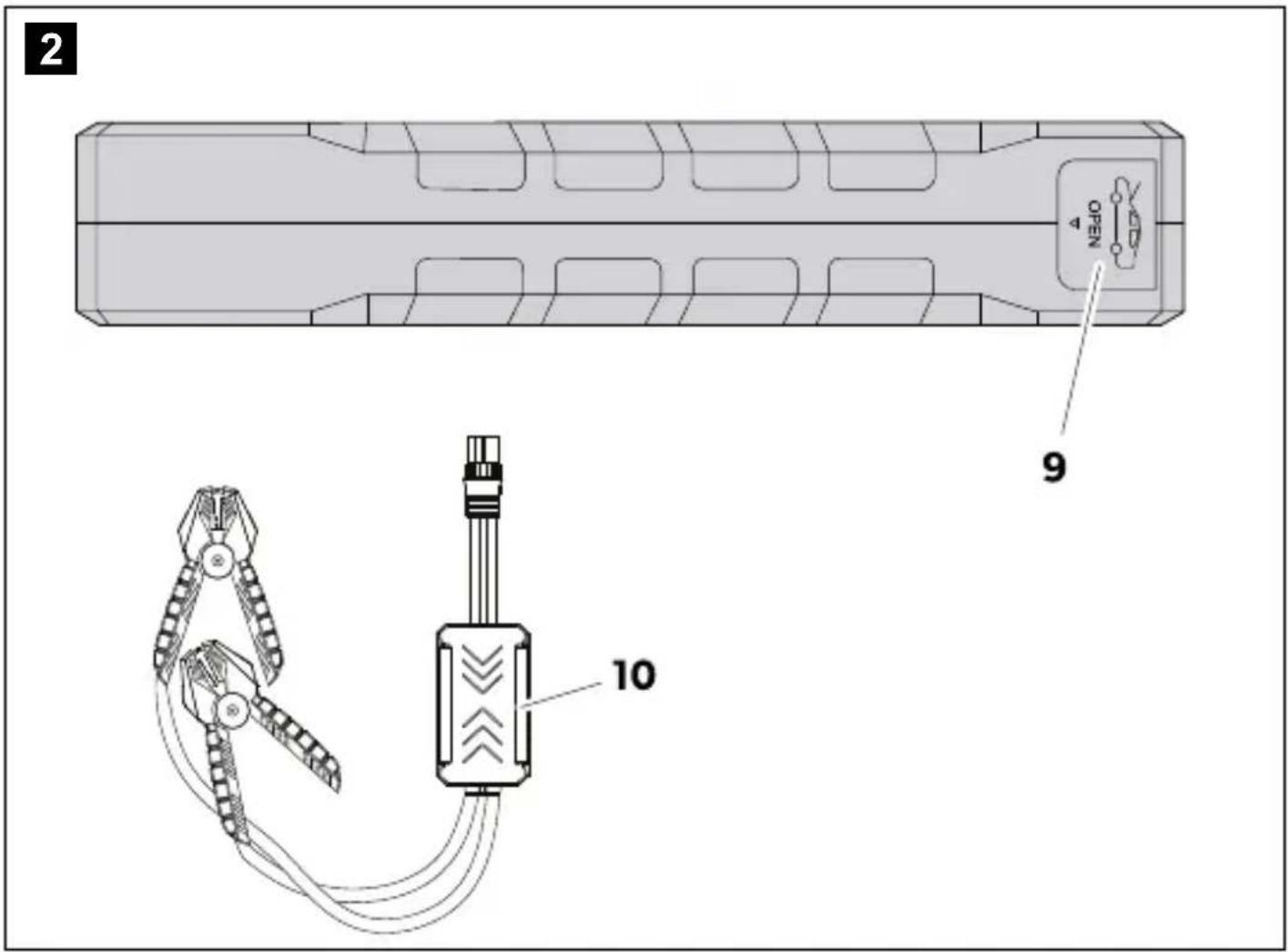
No. in fig. 2
Description
9 Socket for intelligent battery clamp
10 Intelligent battery clamp
The jump starter enables mobile power supply for USB devices and as a jump starter for a vehicle starter battery.
The device has the following protective functions:
• Voltage stabilization protection
• Over-voltage protection
• Overload protection
• Over discharge protection
• Over temperature protection
• Balanced charge
The intelligent battery clamp (fig. 2 10) has a build in indication LED and a buzzer. It also has additional protective functions, refer to chapter "Protective functions" on page 17.
5.2 Display

No. in fig. 3 Description
1 Charging indicator - state of charge as a percentage
2 Input indicator - device is being charged
3 USB output indicator - device is outputting power
4 Supply indicator - USB charging voltage and current
5 Supply indicator - Laptop charging port voltage
The display shows the operational status of the jump starter.
The charging indicator (fig. 3 1) shows the current state of charge between 0% (discharged) up to 100% (fully charged).
The input indicator (fig. 3 2) shows up in the display when the device is being charged.
The output indicator (fig. 3 3) shows up in the display when the device is supplying energy to any USB port.
The supply indicator for USB voltage and current (fig. 3 4) shows the 5 V USB charging current when a device is connected to the port.
The supply indicator for the laptop charging port (fig. 3 or 5) shows the selected output Voltage 12V, 16V or 19V.
6 Using the appliance
6.1 Before first use
▶ Before first use or storing, charge the jump starter until it is fully charged.
▶ Observe the information given in chapter "Charging the jump starter" on page 11.
6.2 Starting and switching on/off
Switching on the jump starter
▶ Slide the On-Off switch (fig. 1 4, page 7) to the On position.
▶ Press the power button (fig. 1 3, page 7).
√The device is ready to use.
√ The display (fig. 3, page 9) shows the operational status.
√ The display switches off automatically after 1 minute.
Switching the display on
▶ When display is switched off press the power button (fig. 1 3, page 7).
√ The display (fig. 3, page 9) switches on.
Switching off the jump starter
The jump starter switches off automatically if no load and no charger are connected.
▶ Slide the On-Off switch (fig. 1 4, page 7) to the Off position.
6.3 Charging the jump starter
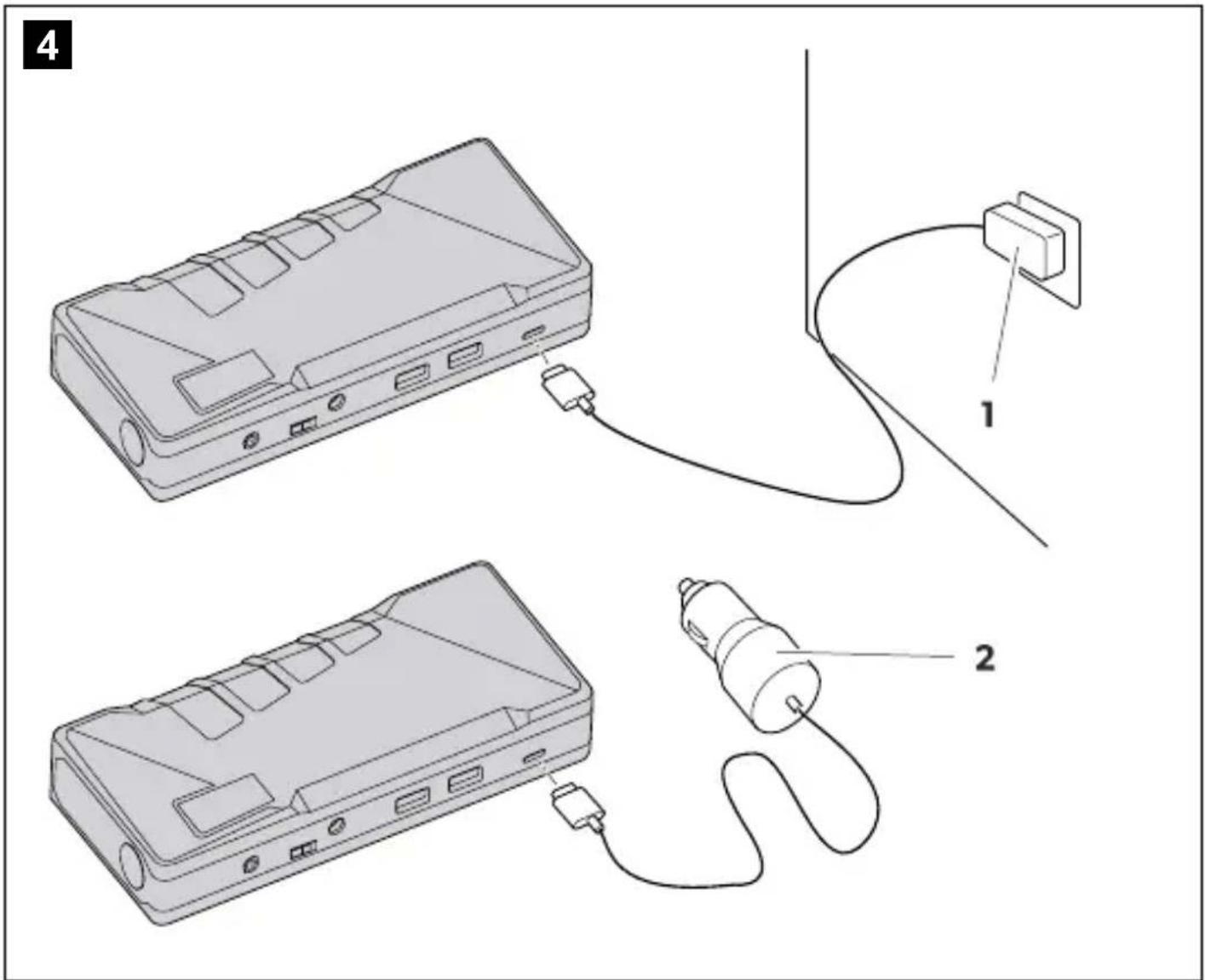
No. in fig. 4 Description
1 Home charger
2 Car charger
Charging takes 3-5 hours using either charging options. The charging function automatically stops when the jump starter is fully charged.
The jump starter can be charged in two ways:
• Using the home charger (fig. 4 1),
• Using the car charger (fig. 4 2).
▶P lace the jump starter on a firm base.
▶S witch On the device, following the instructions given in chapter "Starting and switching on/off" on page 10.
Charging with the home charger
▶ Connect the home charger (fig. 4 1, page 11) to the connection socket (fig. 1 10, page 7).
▶Connect the home charger to the AC mains.
√ The input indicator is shown in the display, see chapter "Display" on page 9.
The charging function automatically stops when the jump starter is fully charged.
Charging with the car charger
▶ Connect the car charger (fig. 4 2, page 11) to the connection socket (fig. 1 10, page 7).
▶Connect the car charger to the socket in the car.
√ The input indicator is shown in the display, see chapter "Display" on page 9.
Checking the charge level
▶ Press the power button (fig. 1 3, page 7).
√ The display shows the state of charge between 0% (discharged) to 100% (fully charged), see chapter "Display" on page 9.
6.4 Using the LED work light
The LED work light (fig. 3 1, page 9) can be used with three different functions.
The different functions can be changed in sequence by pressing the power button (fig. 1 3, page 7): Continuous light, strobe light, SOS signal - OFF
LED continuous light
▶Press and hold the power button for 3 seconds.
√The LED work light lights up continuously.
Strobe light
▶Press the power button again.
√The LED work light is flashing in constant intervals.
SOS signal
▶Press the power button again.
√The LED work light is flashing the SOS signal pattern.
OFF
▶Press the power button again.
√The LED work light is switched off.
6.5 Charging digital devices via USB

natural_image
Diagram showing two devices connected via a cable, one with an external resistor and the other a smartphone (no text or symbols present)▶ Choose either the provided 4-in-1 USB cable or your own USB cable suitable for your digital device.
▶Co nnect the digital device to be charged to either USB port (fig. 5).
▶S witch On the device, following the instructions given in chapter "Starting and switching on/off" on page 10.
√The output and the supply indicators are shown in the display, see chapter "Display" on page 9.
6.6 Charging Laptops

natural_image
Line drawing of a laptop connected to a computer case via cable (no text or symbols)▶ Select the suitable charging adapter and connect it to the short laptop charging cable provided.
▶S witch On the device, following the instructions given in chapter "Starting and switching on/off" on page 10.
▶ Pr ess the power button (fig. 1 3, page 7) to select the correct voltage (12V, 16V or 19V) for your laptop.
√ The e selected output Voltage is shown on the supply indicator in the display, see chapter "Display" on page 9.
▶Co nnect the laptop to the laptop charging port (fig. 6).
√The output and the supply indicators are shown in the display, see chapter "Display" on page 9.
6.7 Starting Vehicles
The jump starter can be used to start vehicles with 12V batteries with up to 6L petrol or 4L diesel engines.

No. in fig. 7
Description
1 Socket for intelligent battery clamp
2 Intelligent battery clamp
3 Plug for intelligent battery clamp
4 Battery clamps (red/black)

NOTE
Ensure that the jump starter is no less than 50% charged. If it is below 50%, it may not be able to jump start a vehicle.
▶ Open the socket (fig. 7 1).
▶Co nnect the plug (fig. 7 3) of the intelligent battery clamp to the socket (fig. 7 1).
▶S witch On the device, following the instructions given in chapter "Starting and switching on/off" on page 10.

NOTICE! MATERIAL DAMAGE.
- Once the vehicle is started, disconnect the clamps (fig. 7 4) from the vehicle's battery within 30 seconds (negative terminal on the vehicle's battery first).
- Do not connect the red and black clams together.
Ensure the vehicle's battery terminals are clean and free from corrosion.
▶C onnect the red clamp to the + terminal on the vehicle's battery.
▶Co nnect the black clamp to the - terminal on the vehicle's battery.
√The blue LED on the intelligent battery clamp (fig. 7 2, page 15) indicates that the jump starter is ready to start the vehicle.

NOTE
A flashing red LED on the intelligent battery clamp indicates that a safety function is active. Also the buzzer may sound. For more information refer to chapter "Protective functions" on page 17. After a flashing red LED, disconnect and reconnect the plug (fig. 7 3, page 15) before using the device again.
▶ Start the vehicle.
On ce the vehicle is started, disconnect the clamps (fig. 7 4) from the vehicle's battery as soon as possible.
D isconnect the black clamp from the - terminal on the vehicle's battery first.
Disconnect the red clamp from the + terminal on the vehicle's battery last.
7 Troubleshooting
Problem Cause Remedy
| The power capacity of the device is shown at 100%, but did not fully charge in charging process. | This situation can occur when the device is in a semi-state of charge, which is conducive to long-term storage when the device is not in use for long time. | Pull out the charge plug, then reinsert. |
| The device is defective. Contact a service centre. | ||
| Nothing happens when switching the device on, display stays dark. | Low voltage protection of the device is active and the device can not be turned on. | Insert the charger plug into the 9V/2A input port to activate. |
| The display is defective. Contact a service centre. | ||
| Red LED on the intelligent battery clamp at the intelligent battery clamp is flashing. | A flashing red LED on the inelligent battery clamp indicates that a safety function is active. | See table in chapter “Protective functions” on page 17. |
7.1 Protective functions
| Details | |
| Low voltage protectionRed LED flashing, buzzer active | Jump starter battery voltage is below 10.5VPower output is cut off automatically. |
| Reverse polarity protectionRed LED flashing, buzzer active | Clamps are not connected properly (reversed)Power output is prevented. |
| Short circuit protectionRed LED flashing, buzzer active | When both camps are connected together(short circuit).Power output is prevented. |
| Reverse charging protectionRed LED flashing | Higher voltage of vehicle's battery than thejump starter, normally when vehicle has startedPower output is prevented. |
| Automatic power shut offRed LED flashing | After normal output, if no further operationoccurs for 60 seconds, the clamps will automatically turn off. |
8 Maintaining and cleaning the product

NOTICE! MATERIAL DAMAGE.
- Do not use sharp or hard objects or cleaning agents for cleaning as these may damage the product.
- Do not use alcohol based cleaning materials for cleaning.
- Fully charge the jump starter at least every three months. Overloading the device or storing it for too long without charging it may cause permanent damage.
▶Occasionally clean the product with a damp cloth.
9 W a r r a n t y
If the product does not work as it should, please contact your retailer or the manufacturer's branch in your country (see dometic.com/dealer). The warranty applicable to your product is 1 year(s).
For repair and warranty processing, please include the following documents when you send in the device:
• A copy of the receipt with purchasing date
- A reason for the claim or description of the fault
Australia only
Our goods come with guarantees that cannot be excluded under the Australian Consumer Law. You are entitled to a replacement or refund for a major failure and for compensation for any other reasonably foreseeable loss or damage. You are also entitled to have the goods repaired or replaced if the goods fail to be of acceptable quality and the failure does not amount to a major failure.
New Zealand only
This warranty policy is subject to the conditions and guarantees which are mandatory as implied by the consumer guarantees act 1993 (NZ).
10 Disposal
▶ Place the packaging material in the appropriate recycling waste bins wherever possible.
If you wish to finally dispose of the product, ask your local recycling centre or specialist dealer for details about how to do this in accordance with the applicable disposal regulations.

Protect the environment!
Do not dispose of any batteries with general household waste. Return defective or used batteries to your retailer or dispose of them at collection points.
11 Technical data
| PJS118 | |
| Battery type: Lithium Polymer battery, Pure LiCo02 | |
| Battery rated capacity: 66.6 Wh | |
| Start current: 450 A | |
| Peak current: 900 A | |
| Rated port DC output:2 x USB Type A:Laptop charging port: | 5 V==/2 A, 9 V==*/2 A12 V/16 V/19V==/max.3.5 A at 12 V |
| DC Input: | Type -C: 5 V==/1 A, 9 V==/2 A |
| Ambient temperature for operation: | -20 °C to +60 °C (-4 °F to +140 °F) |
| Dimensions (L x W x H): | 190.5x 82.5 x 34 mm (75 x 32.5 x 1.3 in) |
| Weight: 608 g | |
* depends on connected USB device and the connected cable
Power supply unit
| Home charger | |
| AC Input:DC output: | 100 – 240 V~ / 50/60 Hz, max. 0.6 AType-C: 9 V==, 2 A |
12 Copyright
© 2020 Dometic Group. The visual appearance of the contents of this manual is protected by copyright and design law. The underlying technical design and the products contained herein may be protected by design, patent or be patent pending. The trademarks mentioned in this manual belong to Dometic Sweden AB. All rights are reserved.
dometic.com
YOUR LOCAL DEALER
dometic.com/dealer
YOUR LOCAL SUPPORT
dometic.com/contact
dometic.com/sales-offices
- Jump Starter
- Table of contents
- Explanation of symbols
- WARNING!
- CAUTION!
- NOTICE!
- NOTE
- General safety instructions
- General safety
- WARNING! INSTRUCTIONS PERTAINING TO RISK OF FIRE, ELECTRIC SHOCK, OR INJURY TO PERSONS.
- NOTICE! MATERIAL DAMAGE.
- Operating the device safely
- CAUTION! FIRE AND/OR EXPLOSION HAZARD.
- S c o p e o f d e l
- l n t e n d e d u s
- Technical description
- Connections and indicators
- Description
- Display
- Using the appliance
- Before first use
- Starting and switching on/off
- Switching on the jump starter
- Switching the display on
- Switching off the jump starter
- Charging the jump starter
- Charging with the home charger
- Charging with the car charger
- Checking the charge level
- Using the LED work light
- LED continuous light
- Strobe light
- SOS signal
- OFF
- Charging digital devices via USB
- Charging Laptops
- Starting Vehicles
- Troubleshooting
- Protective functions
- Maintaining and cleaning the product
- W a r r a n t y
- Australia only
- New Zealand only
- Disposal
- Protect the environment!
- Technical data
- Power supply unit
- Copyright
Brand : DOMETIC
Model : PJS118
Category : Battery starter