
AS41SYS - Home Automation Origin Acoustics - Free user manual and instructions
Find the device manual for free AS41SYS Origin Acoustics in PDF.


| Product Type | Smart Home Automation Speaker |
| Brand | Origin Acoustics |
| Model | AS41SYS |
| Category | Home Automation |
| Dimensions (H x W x D) | 6.5 x 6.5 x 6.5 inches |
| Weight | 2.5 lbs |
| Power Supply | 100-240V AC, 50/60Hz |
| Power Consumption | 15W |
| Connectivity | Wi-Fi 802.11ac, Bluetooth 5.0 |
| Voice Assistant | Amazon Alexa, Google Assistant |
| Compatible Platforms | Apple HomeKit, Samsung SmartThings |
| Audio Output | 40W RMS |
| Speaker Driver | 4-inch woofer, 1-inch tweeter |
| Frequency Response | 50Hz - 20kHz |
| Impedance | 8 ohms |
| Mounting Type | In-wall / In-ceiling |
| Color | White |
| Material | ABS plastic, metal grille |
| Operating Temperature | 32°F to 104°F |
| Humidity | Up to 80% non-condensing |
| Certifications | FCC, CE, RoHS |
| Warranty | 2 years limited |
| Maintenance | Clean with soft dry cloth. Do not use liquids or abrasive cleaners. |
| Safety | Read all instructions. Do not expose to water or excessive heat. |
| Spare Parts | Not available separately; contact support. |
Frequently Asked Questions - AS41SYS Origin Acoustics
User questions about AS41SYS Origin Acoustics
0 question about this device. Answer the ones you know or ask your own.
Ask a new question about this device
Download the instructions for your Home Automation in PDF format for free! Find your manual AS41SYS - Origin Acoustics and take your electronic device back in hand. On this page are published all the documents necessary for the use of your device. AS41SYS by Origin Acoustics.
USER MANUAL AS41SYS Origin Acoustics
ORIGIN ACOUSTICS
Seasons Outdoor Collection™ AS41SYS
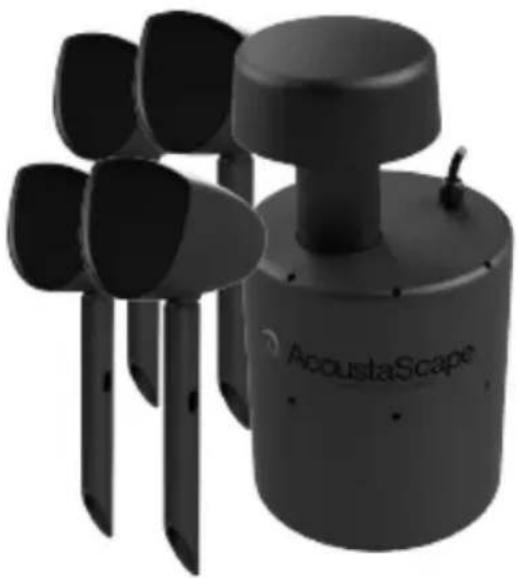
Table of Contents
| Introduction 1 |
| Specifications 2 |
| What's Included 3 |
| Tools & Items 3 |
| Wire Recommendation 3 |
| Planning 4 |
| System Location 4 |
| Amplifier & Wiring 4 |
| About Speaker Wire 6 |
| Installing the System 6 |
| Installing the Wire 7 |
| Troubleshooting 8 |
| Technical Assistance 9 |
| Warranty 10 |
| Return Process 11 |
Introduction
Thank you for purchasing the AS41 Hi-Fi Landscape Audio System. At Acoustic Landscape, we take pride in providing you with a high quality product. All of Acoustic Landscape's speakers are designed to have excellent sound quality, longevity, and a simple installation process.
This instruction booklet covers the necessary information for a smooth installation, including: the tools you will need, step-by-step instructions for installation, troubleshooting tips for any errors that may occur, and all warranty information. If for any reason you experience problems or if you have installation questions please call us at (844) 674-4461. Hours of operation are 8:00am to 5:00pm (Pacific Time), Monday through Friday.
Specifications
MODEL AS41SYS
PART AS4100SYS (4 Satellite & 1 Subwoofer)
Satellite Woofer 4 1/2" Poly
Tweeter 3/4" PEI
Subwoofer 8" Poly
Frequency Response 39Hz-20kHz
Power RMS 100 Watts (System)
Power Peak 200 Watts (System)
Impedance 8 ohm (systems)
Enclosure Weather & UV Resistant, ABS Enclosure
Dimensions 5 3/16 x 5 19/32 x 7 3/32 ", 9 3/16 x 18 1/2 x 9 3/16 " (132 x 15 x 180mm, 233 x 470 x 233mm)
What's Included


Speaker Subwoofer Wire Nuts
Tools & Items
- Drywall Saw
- Speaker Wire
-
Pencil
-
Wire Stripper
- Measuring Tape
- Shovel
- Screwdriver
Wire Recommendation
The gauge of wire used can have an impact on the performance of your speakers. Use a multi-stranded wiring designed for amplifier to speaker connections. Which gauge to select depends on the length of wire to be used on any particular speaker. The longer your run is, the larger your wire size must be.
Wire Length Wire Gauge
0 - 100' (0 - 30m) 16
50 - 150' (15 - 45m) 14
Over 100' (30m) 12
Planning
The Acoustic Landscape speakers and subwoofer should be strategically placed to evenly distribute sound throughout the outdoor area. Fully plan out the locations of all speakers, subwoofers and buried wires before beginning the installation process.
System Location
Speakers should be fairly evenly spaced in a line and aimed so they cover the listening area uniformly. For best coverage, we recommend placing the speakers 6 to 8 feet apart.
Select a location for the subwoofer somewhat near the middle of the speaker arrangement. For more bass, install the subwoofer near a wall or other solid surface. Subwoofers should be positioned away from standing water.

Amplifier & Wiring Plan
Ideally, all the speakers and subwoofer will be connected to two parallel wire runs, and these wires will be buried in single trench. The Acoustic Landscape System is designed for the speakers to be evenly divided between these two wire runs, with the subwoofer connected to both. Most receivers can safely handle up to 8 speakers and a subwoofer (6 ohm load).
Fig. 1
![graph TD A["Speaker"] --> B["Expansion Packs"] B --> C["Subwoofer"] C --> D["Speaker"] E["Source"] --> F["2-Ch Amplifier"] style A fill:#f9f,stroke:#333 style B fill:#ccf,stroke:#333 style C fill:#cfc,stroke:#333 style D fill:#fcc,stroke:#333 style E fill:#cff,stroke:#333 style F fill:#ffc,stroke:#3…](/content/2026/05/940873/images/06eec9102a1fd44e19b63994830e1a93f780395a327e102b2b99aaed2ec93397.jpg)
Fig. 2

You will need a wire that has at least two conductors; one that can be identified as the positive and the other as the negative. All two conductor wires have some means of identifying which conductor is which, but at times this identification may be subtle. It’s crucial that you keep track of which wire you use for positive (+) and negative (-). Typically if the wires are colored red and black, the red wire is used for positive and the black wire is used for negative, but sometimes other colors or patterns are used. You can choose whichever color of wire you want to be positive and negative as long as you remain consistent throughout the install.
On both your amplifier and your speaker the connectors will be identified as red for positive and black for negative. It is very important to look carefully at the speaker wires and be certain that the same wire that is attached to the positive connector in the amplifier is attached to the positive connector in the speaker.
1. Installing the System
Lay out the speakers and subwoofer in their selected locations. To prevent water damage, angle the speaker less than 45 degrees up.
Dig a hole for the subwoofer, about 16" deep and 11" in diameter. Use loose dirt to level the subwoofer. The subwoofer shouldn't be in contact with large rocks or large empty holes.
Dig a 5" trench where you plan on laying out the wire. Run the wire from the amplifier to your first speaker location.
2. Installing the Wire
Bundle all three of the left channel positive wires (wire from the amplifier, wire to the first speaker, and wire to the rest of the speakers) together and connect them with the first wire nut. Then do the same for all the left channel negative wires.
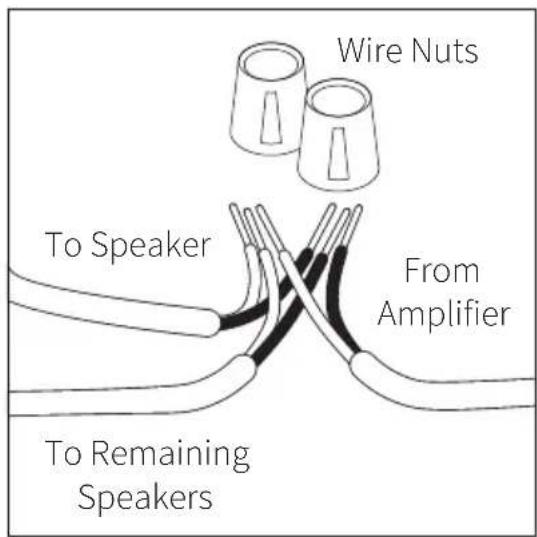
Run the wires to the next speaker and
connect them the same way, but this time connect the right channel positive and negative wires. Continue connecting the speakers like this, alternating left and right, until you reach the subwoofer.
The subwoofer should have four input connections. Using the wire nuts, connect both left and right channels to the subwoofer, making sure positive is connected to positive and negative is connected to negative. Continue down the line and connect the rest of the speakers. Then connect the wires to the amplifier with the volume turned down.
Connect your music playing device and test the system. If everything is working properly, fill all the holes and trenches.
Troubleshooting
If possible, it's often good to try to isolate the problem first. For example, if you're playing a DVD on a television and there's no sound, try connecting an MP3 player to the system to see if that works. If it does work, then the problem is with the television, DVD player, or the cables connecting them. If it doesn't work, the problem will be with the amplifier, speakers, or those cables.
Problem Possible Cause
| No Sound The volume may be turned down or muted. Check the volume settings on both the amplifier and the television/computer/CD player/etc. | |
| No Sound | Make sure the proper source is selected on the amplifier or receiver. |
| No Sound Check the cord connecting the amplifier with the source. The cord may be damaged or plugged into the wrong input or output. | |
| No Sound Check the wires connecting the amplifier with the speakers. Make sure they're connected properly and not damaged in any way. | |
| Poor Sound Quality | If you hear something like static, or the sound is cutting in and out, check the audio cables. If the problem increases when a cable is being moved, then the cable is most likely faulty or not connected properly. |
| Poor Sound Quality | Today's audio systems may have several places to adjust the volume, for example your MP3 player may have a volume control, and your amplifier may also have one. Check to be certain that the volume isn't turned up past 80% on any device. |
| Poor Sound Quality | Try changing sources to be certain that the selection you've chosen is a good quality recording. |
Technical Assistance
If you have any questions or concerns about installing or using this product, you can reach us through one of the following methods:
Phone: (844) 674-4461
Hours of operation: 8:00am - 5:00pm (Pacific Time), Mon - Fri
Email: techsupport@originacoustics.com
If you are having technical trouble, please include the model number and briefly explain what steps you took to resolve the problem in your email, or be prepared to answer these questions over the phone. If you are considering returning the product, it's required that you contact Acoustic Landscape prior to any return attempts. This way we can determine if the issue can be resolved without returning the product, or if needed we can provide instructions and support for the return process.
Limited 5 Year Warranty
Acoustic Landscape warrants to the original retail purchaser only that this Acoustic Landscape product will be free from defects in materials and workmanship, provided the speaker was purchased from an Acoustic Landscape authorized dealer.
If the product is determined to be defective, it will be repaired or replaced at Acoustic Landscape's discretion. If the product must be replaced yet it is no longer manufactured, it will be replaced with a model of equal to or greater value that is the most similar to the original. If this is the case, installing the replacement model may require mounting modifications; Acoustic Landscape will not be responsible for any such related costs.
Requirements & Warranty Coverage
This warranty may not be valid if the product was purchased through an unauthorized dealer. This warranty only applies to the individual that made the original purchase, and it cannot be applied to other purchases. The purchaser must be prepared to provide proof of purchase (receipt). This warranty will not be valid if the identifying number or serial number has been removed, defaced, or altered.
Not Covered by Warranty
- Accidental damage
• Damage caused by abuse or misuse - Damage caused by attempted repairs/modifications by anyone other than Acoustic Landscape or an authorized dealer
• Damage caused by improper installation
• Normal wear, maintenance, and environmental issues - Damage caused by voltage inputs in excess of the rated maximum of the unit
• Damage inflicted during the return shipment
Return Process
Before making any return attempts, it is required that you first contact Acoustic Landscape. Return product to Acoustic Landscape or your dealer, either in person or by mail. It's preferable if the product is returned in the original packaging. If this isn't possible, the customer is responsible for insuring the shipment for the full value of the product.
This warranty is in lieu of all other expressed or implied warranties. Some states do not allow limitations on implied warranties, so this may not apply depending on the customer's location. (For more information, see Magnuson-Moss Warranty Act.)

ORIGIN
ACOUSTICS


- SEASONS OUTDOOR COLLECTION™ AS41SYS
- INTRODUCTION
- SPECIFICATIONS
- MODEL AS41SYS
- PART AS4100SYS (4 SATELLITE & 1 SUBWOOFER)
- WHAT'S INCLUDED
- TOOLS & ITEMS
- WIRE RECOMMENDATION
- PLANNING
- SYSTEM LOCATION
- AMPLIFIER & WIRING PLAN
- INSTALLING THE SYSTEM
- INSTALLING THE WIRE
- TROUBLESHOOTING
- TECHNICAL ASSISTANCE
- LIMITED 5 YEAR WARRANTY
- REQUIREMENTS & WARRANTY COVERAGE
- NOT COVERED BY WARRANTY
- RETURN PROCESS
Brand : Origin Acoustics
Model : AS41SYS
Category : Home Automation