
MJR001T - Water dispenser MIDEA - Free user manual and instructions
Find the device manual for free MJR001T MIDEA in PDF.


| Product Type | Water Dispenser |
| Brand | Midea |
| Model | MJR001T |
| Rated Voltage | 220-240V~ |
| Rated Frequency | 50/60Hz |
| Rated Power | 2100W |
| Water Tank Capacity | 3.0 L |
| Hot Water Output | 20 L/h (≥90°C) |
| Temperature Settings | 45°C, 55°C, 65°C, 80°C, 90°C, Boiling |
| Dispensing Options | Tap once: 250 ml; Tap 1.5 sec: 1000 ml |
| Dimensions (W x D x H) | 309 x 143 x 320 mm |
| Operating Temperature Range | 10°C - 43°C |
| Maximum Altitude | 1500 m (not recommended above) |
| Water Quality Requirement | TDS < 150 (to prevent scaling) |
| Safety Lock | Auto-lock after 60 seconds of inactivity |
| Cleaning Frequency | Descale at least twice a month with citric acid or vinegar |
| Accessories Included | Instruction manual, Warranty card |
| Intended Use | Household and similar applications |
| Not Suitable For | Use with additives; high altitude >1500 m |
| Certifications | WEEE, RoHS |
Frequently Asked Questions - MJR001T MIDEA
User questions about MJR001T MIDEA
0 question about this device. Answer the ones you know or ask your own.
Ask a new question about this device
Download the instructions for your Water dispenser in PDF format for free! Find your manual MJR001T - MIDEA and take your electronic device back in hand. On this page are published all the documents necessary for the use of your device. MJR001T by MIDEA.
USER MANUAL MJR001T MIDEA
natural_image
Technical line drawing of a mechanical device with a cylindrical top and circular base (no text or symbols)Water Dispenser
USER MANUAL
MJR001T
THANK YOU LETTER
Thank you for choosing Midea! Before using your new Midea product, please read this manual thoroughly to ensure that you know how to operate the features and functions that your new appliance offers in a safe way.
CONTENTS
THANK YOU LETTER 01
SAFETY INSTRUCTIONS 02
SPECIFICATIONS 04
PRODUCT OVERVIEW 05
PRODUCT INSTALLATION 07
OPERATION INSTRUCTIONS 08
CLEANING AND MAINTENANCE 10
TROUBLESHOOTING 11
TRADEMARKS, COPYRIGHTS AND LEGAL STATEMENT 12
DISPOSAL AND RECYCLING 13
DATA PROTECTION NOTICE 14
SAFETY INSTRUCTIONS
Intended Use
The following safety guidelines are intended to prevent unforeseen risks or damage from unsafe or incorrect operation of the appliance. Please check the packaging and appliance on arrival to make sure everything is intact to ensure safe operation. If you find any damage, please contact the retailer or dealer. Please note modifications or alterations to the appliance are not allowed for your safety concern. Unintended use may cause hazards and loss of warranty claims.
Explanation of Symbols

Danger
This symbol indicates that there are dangers to the life and health of persons due to extremely flammable gas.

Warning of electrical voltage
This symbol indicates that there is a danger to life and health of persons due to voltage.

Warning
The signal word indicates a hazard with a medium level of risk which, if not avoided, may result in death or serious injury.

Caution
The signal word indicates a hazard with a low degree of risk which, if not avoided, may result in minor or moderate injury.

Attention
The signal word indicates important information (e.g. damage to property), but not danger.

Observe instructions
This symbol indicates that a service technician should only operate and maintain this appliance in accordance with the operating instructions.
Read these operating instructions carefully and attentively before using/commissioning the unit and keep them in the immediate vicinity of the installation site or unit for later use!
DANGER: Risk of Fire/Flammable materials
- Do not store explosive substances such as aerosol cans with a flammable propellant in this appliance.
- The appliance must be disconnected from the main safter use and before user-performable maintenance is carried out.
- The following safety guidelines are intended to prevent unforeseen risks or damage from unsafe or incorrect operation of the appliance. Please check the packaging and appliance on arrival to make sure everything is intact to ensure safe operation. If you find any damage, please contact the retailer or dealer. Please note modifications or alterations to the appliance are not allowed for your safety concern. Unintended use may cause hazards and loss of warranty claims.
CAUTION: Risk of injury!
Failure to comply with the safety information and instructions may result in injury. Safety of children and persons with reduced abilities.
- This appliance is not intended for use by persons (including children) with reduced physical, sensory or mental capabilities, or lack of experience and knowledge, unless they have been given supervision or instruction concerning use of the appliance by a person responsible for their safety.
• Children should be supervised to ensure that they do not play with the appliance. - This appliance is intended to be used in household and similar applications such as: staff kitchen areas in shops, offices and other working environments; farm houses and by clients in hotels, motels and other residential type environments; bed and breakfast type environments; catering and similar non-retail applications.
WARNING
- If the supply cord is damaged, it must be replaced by the manufacturer, its service agent or similarly qualified persons in order to avoid a hazard.
- This appliance is intended to be used by expert or trained users in shops, in light industry and on farms, or for commercial use by lay persons.
- The appliance is suitable for indoor use only.
- WARNING: Keep ventilation openings, in the appliance enclosure or in the built-in structure, clear of obstruction.
- WARNING: When positioning the appliance, ensure the supply cord is not trapped or damaged.
- WARNING: Do not locate multiple portable socket-outlets or portable power supplies at the rear of the appliance.
- The appliance must not be cleaned by a water jet.
- The appliance must not be immersed.
• This product is not recommended to use in areas above 1,500m altitude. - This machine is applicable to the water environment with TDS value less than 150 in case of the high water hardness lead to incrustation even breakdown of the heater.
- In order to avoid a hazard due to inadvertent resetting of the thermal cut-out, this appliance must not be supplied through an external switching device, such as a timer, or connected to a circuit that is regularly switched on and off by the utility.
- It's normal when water flow shaking a little for air enter in especially in first use or working without water.
SPECIFICATIONS
| MJR001TProduct Model | |
| Rated Voltage | 220-240V~ |
| Rated Frequency | 50/60Hz |
| Rated power | 2100W |
| Hot water capacity | 20L/h(≥90°C) |
| Capacity | 3.0L |
| Product size | 309x143x320mm |
This appliance should work under environment of temperature from 10^ C-43 ^ C humidity ≤slant 90%.
PRODUCT OVERVIEW
Product
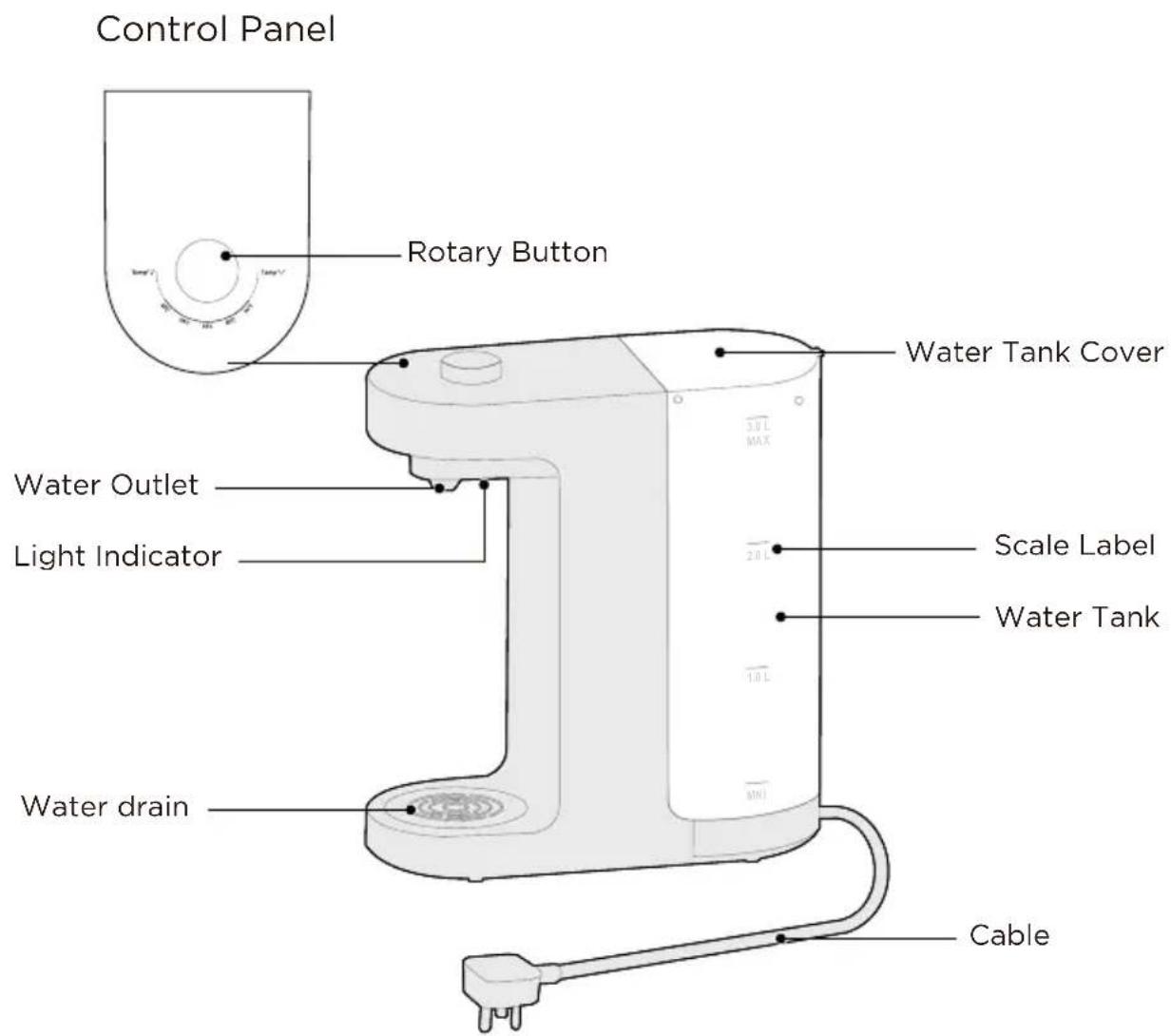
Accessories
Instruction Manual x1 Warranty Card x1
natural_image
Simple line drawing of a tilted rectangular shape (no text or symbols)
natural_image
Simple geometric shape: a parallelogram outline with no text or symbolsPRODUCT INSTALLATION
GETTING STARTED
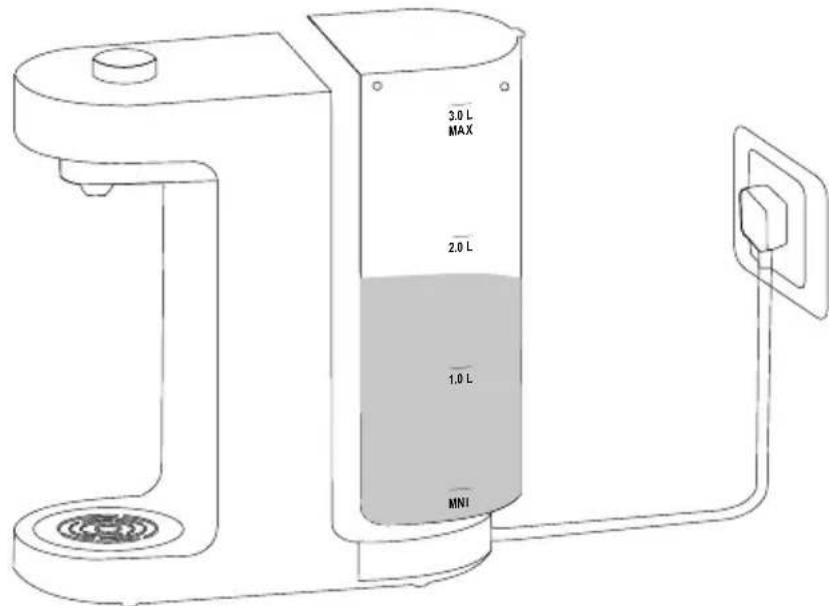
Fill in the water and plug the appliance into the main power outlet
Fill water volume between MIN and MAX level marked on the water tank. Plug the appliance into a main power outlet. All the lights on the control panel will light up. The room temperature sign will light on normally.
Use only fresh water at room temperature without any additive; otherwise this can damage the appliance.
Note: Please ensure the water temperatures are more than 5°C when filling Attention: Not suitable for dishwasher
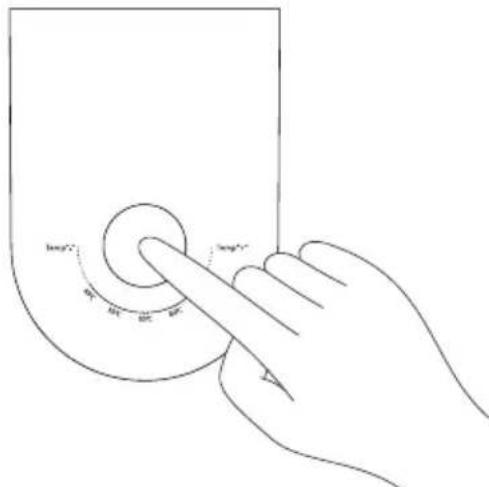
Unlock the appliance and dispense water
Turn the button to unlock the safety lock mode. The water dispense indicator light will illuminate when dispensing water. The appliance will automatically go into safety lock mode after 60 seconds if no function is selected on the appliance.
OPERATION INSTRUCTIONS
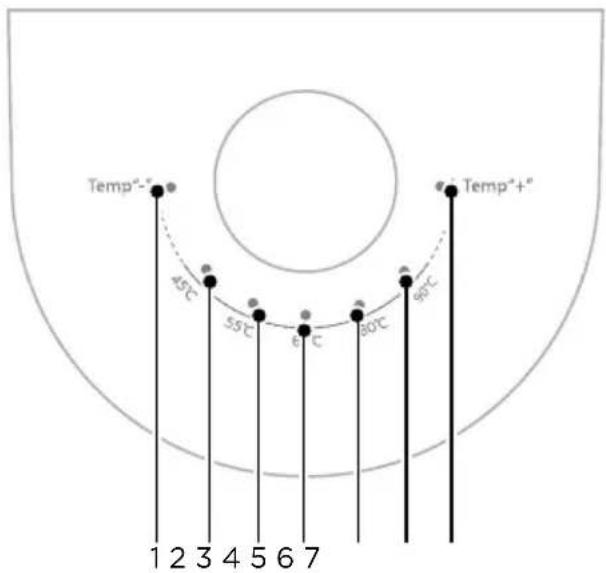
Operation Panel
| Description | ||
| No.1 | Temp“-” Indicator Light | ·When this indicator light is on, the water temperature knob button is in the warm water position, and the water from the faucet is at constant temperature. |
| No.2 | 45°C Indicator Light | ·When this indicator light is on, the water temperature knob button is selected at the 45 °C gear, and the water outlet from the faucet is at 45 °C. |
| No.3 | 55°C Indicator Light | ·When this indicator light is on, the water temperature knob button is selected at the 55 °C gear, and the water outlet from the faucet is at 55 °C. |
| No.4 | 65°C Indicator Light | ·When this indicator light is on, the water temperature knob button is selected at the 65 °C gear, and the water outlet from the faucet is at 65 °C. |
| No.5 | 80°C Indicator Light | ·When this indicator light is on, the water temperature knob button is selected at the 80 °C gear, and the water outlet from the faucet is at 80 °C. |
| No.6 | 90°C Indicator Light | ·When this indicator light is on, the water temperature knob button is selected at the 90 °C gear, and the water outlet from the faucet is at 90 °C. |
| No.7 | Temp“+” Indicator Light | ·When this indicator light is on, the water temperature knob button is selected in the boiling water position, and the water outlet from the faucet is boiling water. |
OPERATION INSTRUCTIONS
Dispensing Water
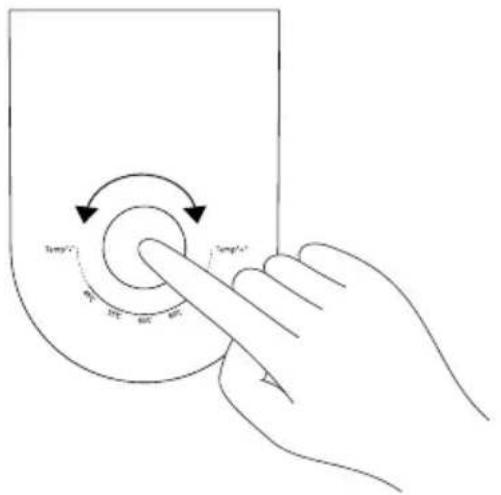
Turn the button to select the desired temperature. The water dispenses Indicator light will illuminate when dispensing water.
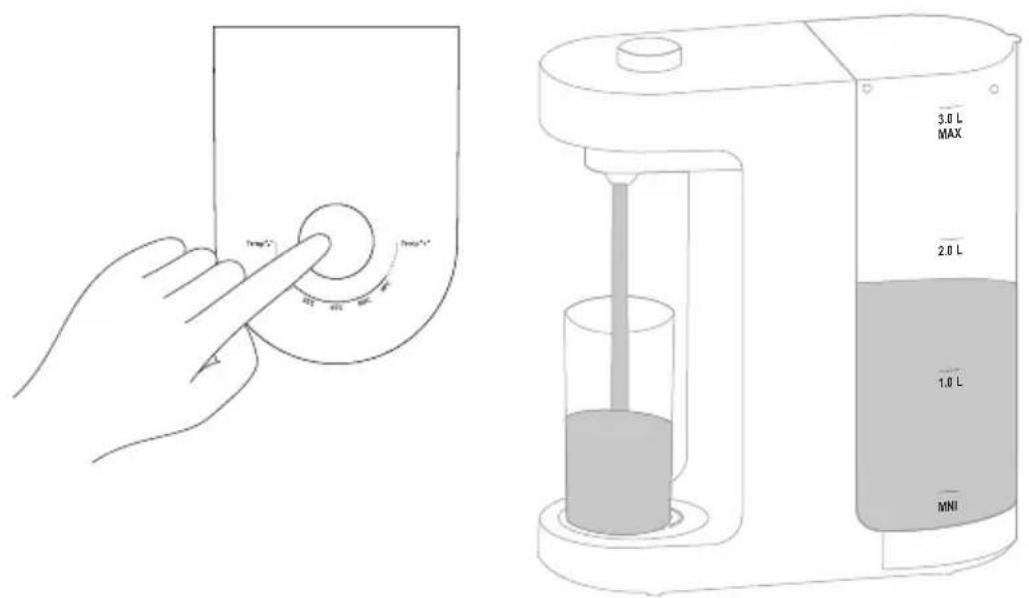
Water dispensing
Tap the button, the water will flow out continuously from the water spout. Press the Confirm button to stop the appliance immediately. Repeat if more hot water is required.
Water Flow:
Tap Once: 250ml Water
Tap 1.5 Sec, 1000ml Water
Notice: The appliance may take approximately 7 seconds to resume regular temperature after being plugged in.
CLEANING AND MAINTENANCE
1. Clean the water tank and spout
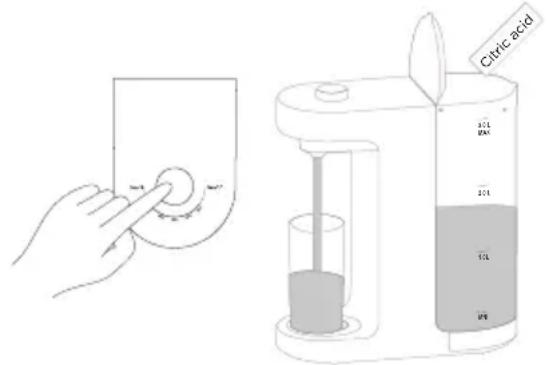
To maintain performance, it is recommended to descale the appliance at least twice a month: use a toxic-free detergent such as citric acid or vinegar to the tank. Suggest using 50g-100g citric acid with 2.5L water in the first time. Wait until the citric acid is completely dissolved. Tap the button to empty the water tank. After that, fill in 2.5L water, and wait for 5 minutes. Empty the water tank again. Repeat two or three times to complete descaling. Drain boiled water and replace with clean water before operating the appliance again.
2. Refreshing the water
If the water is filling in the tank more than 48 hours, please refreshing the water
periodically.
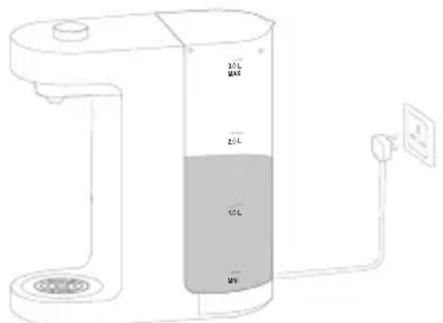
3. Always disconnect the appliance from mains power when not in use
Turn the appliance (power) off if you are not going to use it for a long time. Please wait for at least 3 minutes for reheating the water while plugging in the water dispenser. Drain boiled water and replace with clean water before operating the appliance again.
4. Emptying the Water Drain
Remove the water tray by using one hand to stabilize the appliance and another to lift the water drain slightly and remove it. Empty the water drain and replace it with medium force. Clean up the water tray periodically to prevent germs and bacteria.
TIPS:
- Do not drink the cleaning water.
- Empty the water tank and pour out the water in the appliance while using the citric acid to prevent from entering the pipeline and causing the product damage.
- First usage: Fill in 3L Fresh water to the water tank. Turn the button to select the desired temperature. Suggest turn the button from the highest level to the lowest level once in sequence, and empty the water tank.
TROUBLESHOOTING
Please use this chart to troubleshoot common problems using instant hot water dispenser
| Possible reason SolutionProblem | ||
| Panel light does not shine | The plug is not in place. Check the plug. | |
| Display board failure | Contact the company's customer service department. | |
| Thermostat failure | ||
| Panel does not work | Panel does not work | Contact the company's customer service department. |
| Not Heaing | Temperature failure | Check the temperature. |
| Board failure | Contact the company's customer service department. | |
| Heater failure | ||
| All panel lights flash | Heater over temperature | Waiting for cold down. |
| The room temperature light flashes, the other lights off | Heater over temperature | Press the water button to return to normal automatically. |
| Water flow becomes smaller | Water pump failure | Contact the company's customer service department. |
| Heater blockage | Cleaned by citric acid. | |
| There is something between the inlet water tank | Check the water tank. | |
| No water | Water pump failure | Contact the company's customer service department. |
| Heater blockage | ||
| Board failure | ||
| Hall device abnormal | ||
| There is something between the inlet water tank | Check the water tank. | |
| No water or too little water in the.water tank | ||
TRADEMARKS, COPYRIGHTS AND LEGAL STATEMENT
Midea logo, word marks, trade name, trade dress and all versions thereof are valuable assets of Midea Group and/or its affiliates (“Midea”), to which Midea owns trademarks, copyrights and other intellectual property rights, and all goodwill derived from using any part of an Midea trademark. Use of Midea trademark for commercial purposes without the prior written consent of Midea may constitute trademark infringement or unfair competition in violation of relevant laws.
This manual is created by Midea and Midea reserves all copyrights thereof. No entity or individual may use, duplicate, modify, distribute in whole or in part this manual, or bundle or sell with other products without the prior written consent of Midea.
All the described functions and instructions were up to date at the time of printing this manual. However, the actual product may vary due to improved functions and designs.
DISPOSAL AND RECYCLING
Important instructions for environment
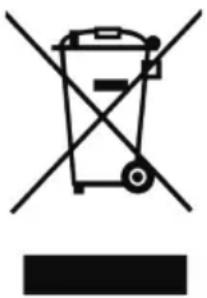
Compliance with the WEEE Directive and Disposing of the Waster Product: This product complies with EU WEEE Directive (2012/19/EU). This product bears a classification symbol for waster electrical and electronic equipment (WEEE).
This symbol indicates that this product shall not be disposed with other household wastes at the end of its service life. Used device must be returned to official collection point for recycling of electrical electronic devices. To find these collection systems please contact to your local authorities or retailer where the product was purchased. Each household performs important role in recovering and recycling of old appliance. Appropriate disposal of used appliance helps prevent potential negative consequences for the environment and human health.
natural_image
Symbol of a trash bin crossed out by two crossed lines, with no text or labels present.Compliance with RoHS Directive
The product you have purchased complies with EU RoHS Directive (2011/65/EU). It does not contain harmful and prohibited materials specified in the Directive.
Package information
Packaging materials of the product are manufactured from recyclable materials in accordance with our National Environment Regulations. Do not dispose of the packaging materials together with the domestic or other wastes. Take them to the packaging material collection points designated by the local authorities.

natural_image
Recycling symbol with three chasing arrows forming a triangle (no text or labels)DATA PROTECTION NOTICE
For the provision of the services agreed with the customer,
we agree to comply without restriction with all stipulations of applicable data protection law, in line with agreed countries within which services to the customer will be delivered, as well as, where applicable, the EU General Data Protection Regulation (GDPR).
Generally, our data processing is to fulfil our obligation under contract with you and for product safety reasons, to safeguard your rights in connection with warranty and product registration questions. In some cases, but only if appropriate data protection is ensured, personal data might be transferred to recipients located outside of the European Economic Area.
Further information are provided on request. You can contact our Data Protection Officer via MideaDPO@midea.com. To exercise your rights such as right to object your personal date being processed for direct marketing purposes, please contact us via MideaDPO@midea.com. To find further information, please follow the QR Code.

make yourself at home
- USER MANUAL
- THANK YOU LETTER
- CONTENTS
- SAFETY INSTRUCTIONS
- Intended Use
- Explanation of Symbols
- Danger
- Warning of electrical voltage
- Warning
- Caution
- Attention
- Observe instructions
- DANGER: Risk of Fire/Flammable materials
- CAUTION: Risk of injury!
- SPECIFICATIONS
- PRODUCT OVERVIEW
- Product
- Accessories
- PRODUCT INSTALLATION
- GETTING STARTED
- Fill in the water and plug the appliance into the main power outlet
- Unlock the appliance and dispense water
- OPERATION INSTRUCTIONS
- Operation Panel
- Dispensing Water
- Water dispensing
- CLEANING AND MAINTENANCE
- Clean the water tank and spout
- Refreshing the water
- Always disconnect the appliance from mains power when not in use
- Emptying the Water Drain
- TIPS:
- TROUBLESHOOTING
- TRADEMARKS, COPYRIGHTS AND LEGAL STATEMENT
- DISPOSAL AND RECYCLING
- Important instructions for environment
- Compliance with RoHS Directive
- Package information
- DATA PROTECTION NOTICE
Brand : MIDEA
Model : MJR001T
Category : Water dispenser