
MR-L710EG - Fridge MITSUBISHI - Free user manual and instructions
Find the device manual for free MR-L710EG MITSUBISHI in PDF.


User questions about MR-L710EG MITSUBISHI
0 question about this device. Answer the ones you know or ask your own.
Ask a new question about this device
Download the instructions for your Fridge in PDF format for free! Find your manual MR-L710EG - MITSUBISHI and take your electronic device back in hand. On this page are published all the documents necessary for the use of your device. MR-L710EG by MITSUBISHI.
USER MANUAL MR-L710EG MITSUBISHI
Refrigerator-Freezer
SERIES MODEL
MR-L710EG
OPERATING INSTRUCTIONS
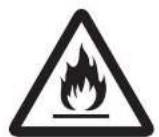
R600a
Cleaning Instruction - Important!
It is strongly recommended to use only lukewarm water and a soft cloth when cleaning.
Cleaning agents can cause cracking to the plastic components of your refrigerator.
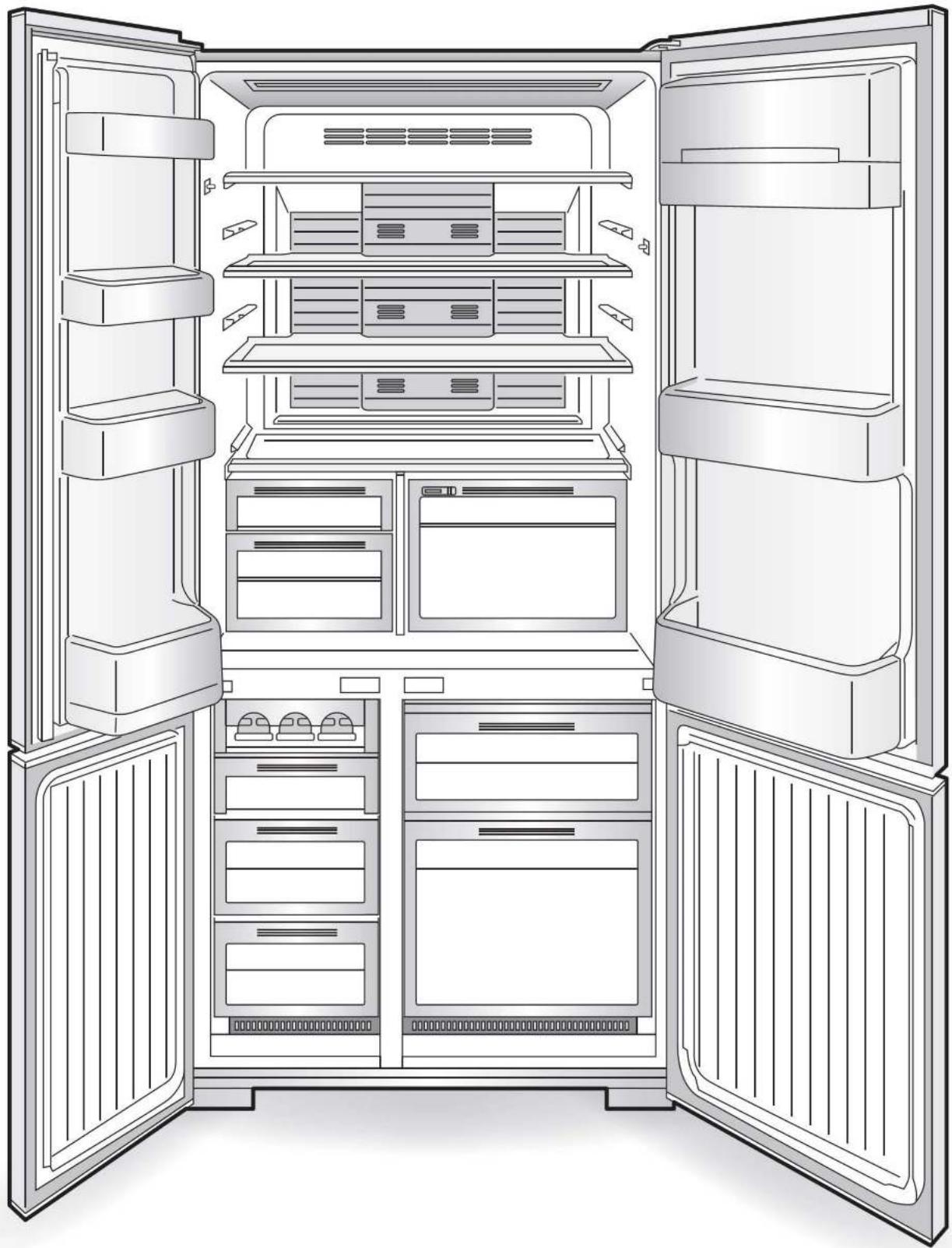
Function Overview
natural_image
Line drawing of an open refrigerator with multiple doors and internal compartments (no text or symbols)■ This refrigerator is manufactured for refrigerating and freezing foods in general households. For industrial use, please use a commercial refrigerator-freezer.
■ The material names are indicated on the main plastic parts to facilitate recycling.
natural_image
Black-and-white circular image of a floral arrangement with leaves and fruits (no text or symbols)Vitamin Factory
The vitamins in vegetables are boosted by the LED.
ECO MODE
Use when you want to save power.
When the temperature inside the refrigerator is stable, the power-saving operation is performed
automatically.

Contents
Page
| Safety Precautions | 4-5 |
| From Installation to Operation | 6-7 |
| Using Control Panel | 8-9 |
| Setting the Refrigerator and Freezer compartment | 10 |
| Refrigerator Compartment | 11-12 |
| Freezer Compartment | 13 |
| Removing and Cleaning the Parts | 14-15 |
| Other Issues | 16-17 |
| Specifications | 17 |
| When in trouble | 18-19 |
Safety Precautions
Danger and degree of danger caused by improper handling are categorized and described by the following indicators.

Warning
Improper handling can result in death or serious injury.

Caution
Improper handling can result in personal injury or damage to your house, household furnishings, etc.
■ Meaning of symbols.

Never do

Never touch

Never attempt to disassemble, repair or alter

Never expose to water

Never touch with wet hands

Be sure to follow the instructions

Be sure to remove the power plug from the socket

If an abnormality or malfunction occurs, stop operation
immediately and contact the retail store where you purchased the refrigerator or MITSUBISHI ELECTRIC SERVICE CENTRE or Customer Service representative.
Installation
Do not install the refrigerator outdoors or in places exposed to water or excessive humidity.
Water may cause insulation failure, resulting in an electric shock or fire.
▶ Page 6

Water prohibited
Use a dedicated outlet for the power supply that meets the rating specified on the rating label. (The rating label is located on the door-liner of the refrigerator compartment.)
Using extension cords and plugging too many leads into a single socket can cause heat build-up or fire.
▶ Page 6
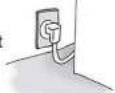

Only use an outlet that meets the specified rating.
Anchor the refrigerator to a strong wall or post to protect against damage during earthquakes.
The refrigerator may tip over and cause injury.
▶ Pages 6 - 7
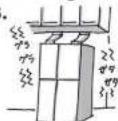

Prevent tipping
Insert the power plug with the cord facing down, and fully insert the prongs.
Inserting the plug upside-down places stress on the cord and may cause heat generation or fire.
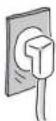

Cord facing down
If the power cord is damaged, call our MITSUBISHI ELECTRIC SERVICE CENTRE for the replacement.
If the power cord is damaged, purchase a new cord from MITSUBISHI ELECTRIC SERVICE CENTRE. Make sure that the power cord is designed for this model.
▶ Page 6

Service Call
Leave space around the refrigerator.
If refrigerant leaks, it may accumulate and catch fire or explode.
▶ Page 6
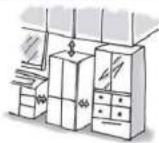

Leave space
Power and power plug
Remove the power plug before cleaning.
Otherwise an electric shock or injury may result.
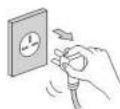

Remove plug
Do not crush the power plug with the rear of the refrigerator.
Do not damage the power cord.
Pressing, folding, bundling or placing heavy objects on the power cord may cause an electric shock or fire.
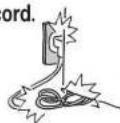

Prohibited
Do not use damaged cords or plugs, or loose sockets.
Doing so may cause an electric shock or fire.
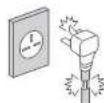

Do not use
Do not pull the cord when unplugging the power plug.
The cord may be damaged, resulting in electric shock or fire.
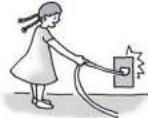

Prohibited
Remove dust periodically from the power plug.
Dust may cause insulation failure, resulting in fire.
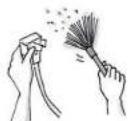

Remove dust
Do not plug in or out the power plug with wet hands.
Doing so may cause an electric shock.
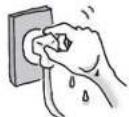

Wet hands prohibited
Installation and transportation
Anchor the refrigerator to a strong and level floor by adjusting the adjustable supports.
Otherwise, the refrigerator may move and cause injury.
▶ Pages 6 - 7

Install level
Use the transportation hand-holds when transporting the refrigerator.
Holding other parts may result in injury.
▶ Page 16

Use the hand-holds
Be careful not to damage the floor or injure yourself when moving the refrigerator.
Lay a protective sheet on the floor and move the refrigerator slowly.

Use protective material
Do not pack in excessive amounts of food. Do not pull the shelves with excessive force.
Food may fall out and cause injury.
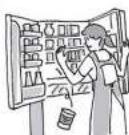

Prohibited
Do not touch food or containers in the freezer compartment with wet hands.
Doing so may cause a cold injury.
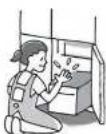

Wet hands prohibited

Warning
Operation
| Do not place water containers on top of the refrigerator.Exposing electrical parts to water may cause an electric shock or fire. | 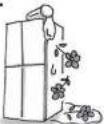 |  Water prohibited Water prohibited | Do not use electrical appliances inside the refrigerator.The refrigerant gas leaking into the compartment with sparks from an electrical contact may cause fire and explosion. | 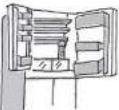 |  Prohibited Prohibited | Do not place volatile, inflammable objects inside the refrigerator.Benzene, cosmetics and hair dressing products may catch fire or explode. | 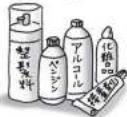 |  Do not store Do not store |
| Do not place objects on top of the refrigerator.Objets may fall when the doors are opened or closed and cause injury. | Prohibited | Do not store chemicals or scientific specimens in the refrigerator.Substances that require strict control must not be stored in household refrigerators. | Do not store | Do not hang from the door or handle.Do not climb on an open door.Do not apply a heavy load.The refrigerator may tip over and cause injury. | Prohibited | |||
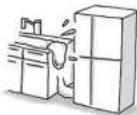
| Do not wash with water or spill soup or juice onto the refrigerator.Water or other liquid may cause an electric shock or fire. Wipe off any liquid immediately. | 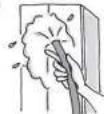 |  Water prohibited Water prohibited | Do not use combustible sprays near the refrigerator.Sparks from an electrical contact may cause an ignition and fire. | 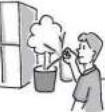 |  Do not use Do not use | Do not damage the refrigerant circuit (piping) of the refrigerator; do not drive in screws.Because a flammable refrigerant (gas) is used, there is the danger of igniting or explosion. | 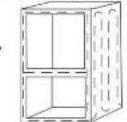 |  Do not do Do not do |
| When opening and closing the door, be careful not to let it hit any surrounding furniture.There is a risk of injury and damaged to the door or furniture. | Prohibited | Do not use in a shed or garage.Pet animals may damage the electrical wiring and cause an electric shock or fire. | Do not use | This appliance is not intended for use by young children or infirm persons unless they have been adequately supervised by a responsible person to ensure that they can use the appliance safely.Young children should be supervised to ensure that they do not play with the appliance. | ||||
| Only use refrigerant specified by the company.See rating label inside Refrigerator for refrigerant type. | Prohibited | |||||||
| Malfunctions and long-term storage | ||
| If an abnormality occurs (such as a burning odor), unplug the power plug and stop the refrigerator operation.Continuing to operate with an abnormality may cause an electric shock or fire. | Do not disassemble, repair or alter.Do not use while parts are damaged.Doing so may cause injury, electric shock or fire. | If there is a possibility of a child getting trapped in the refrigerator during storage, pull out and remove the door seal.Children getting trapped in refrigerators is very dangerous. |
| When not using the refrigerator for a long time, unplug the power plug and open the doors to dry the refrigerator.If the refrigerator is not dried sufficiently, refrigerant may leak due to condenser corrosion and cause a fire or explosion. | Contact the retail store or municipal government for details about correct refrigerator disposal.Improper disposal may cause refrigerant leaks, resulting in a fire or explosion if exposed to a flame. | If the refrigerant circuit (pipe) is damaged, do not touch the refrigerator and avoid using flames. Open windows to ventilate.If the refrigerant circuit is damaged, contact the retail store. |

Caution
| Operation | ||
| Do not place glass bottles in the freezer compartments.The bottle may break if the liquid inside freezes, causing an injury. | 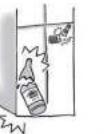  Do not store Do not store | Observe the following when opening and closing the doors.Do not open or close the doors when another person is touching the refrigerator.Do not put your fingers on the top edge of a drawer-type door while closing it.Do not open or close the doors with excessive force. (Food may fall out and cause injury.)Be careful not to trap your fingers or any other part of your body.Be careful not hit a part of your body.Do not trap your feet with bottom drawer. (Danger of your toes caught by the drawer.) |
| Do not put your hands or feet under the refrigerator.The steel plates or other parts may cause injury. | [To go]Do not touch | [TA8D]  Prohibited Prohibited |
From Installation to Operation
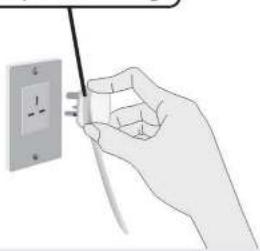
Dedicated
outlet that meets the specified rating.
natural_image
Hand holding a wall-mounted electrical outlet with a power plug inserted (no text or symbols visible)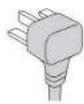
Turn on the power of the refrigerator as soon as possible.
The refrigerator will not be damaged even if you turn on the power immediately after the installation.
1 Installation
Install the refrigerator at:
● A place with good ventilation not exposed to direct sunlight or hot air
To prevent a diminishing in cooling performance and to reduce power costs.
● A place with low humidity
To prevent rusting, electric shock and fire.
- A strong and level place
To prevent vibration and noise, and ajar or tilting doors.
If the refrigerator supports sink easily into the flc material, lay a strong plate or board underneath (To prevent deformation or discoloration due to the weight or heat.)
● A place away from other devices
To prevent noise or video interference with devices such as televisions.
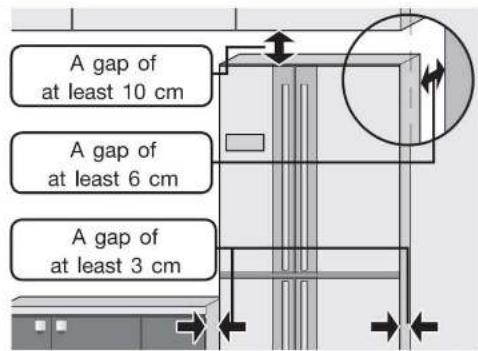
● A place with at least 3 cm of space beside the left and right of the refrigerator, 10 cm of space from the top and 6 cm from the back. To allow heat to dissipate from the sides, top and the back of the refrigerator.
Use in hot spring areas
Corrosion control treatment may be required for the refrigerant circuit (pipe) due to generation of corrosive gases. Contact the retail store where you purchased the refrigerator.

Warning
Do not obstruct the refrigerator vents or the space around the refrigerator. If refrigerant leaks, it may accumulate and catch fire or explode.
2 Connect the power supply
*Connect power supply soon after installing the refrigerator
- Use a dedicated outlet
Use a dedicated outlet for the power supply that meets the rating specified on the rating label. (The rating label is located on the door-liner of the refrigerator compartment.)

Warning
Using outlets that do not meet the specified rating or plugging in too many leads into a single socket can cause heat buildup or fire.
- The refrigerator will not be damaged even if the power is supplied soon after installation.
It takes a while for the refrigerator to cool, therefore supply power as soon as possible.
● Electrical Connections
Make sure this unit is properly grounded.
- The refrigerator should always be plugged into its dedicated electrical outlet. This will provide the best performance and prevent electrical circuits from being overloaded and causing a fire. Make sure that the electrical outlet provides the proper voltage. Extension cords are not recommended.
- If your refrigerator is installed in the high humidity location, not only ground connection but also installation of the earth leakage breaker is recommended.
- If the power cord is damaged, purchase a new cord from MITSUBISHI ELECTRIC SERVICE CENTRE. Make sure that the power cord is designed for this model. A qualified service person should only replace the power cord.
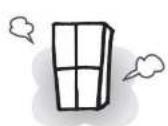
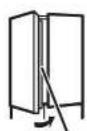
The outside of the refrigerator and the rotating partition get hot.
Heat radiation causes the temperature to rise to about 50^ C to 60^ C when operation is first started, and during the summer. The rotating partition may get hot when heated by the heater.
Rotating partition
Cooling takes time after turning on the refrigerator.
- Wait until the refrigerator has fully cooled before storing non-cooled food or ice cream.
- Do not open the doors more than necessary, and close them as soon as possible.
When making ice for the first time
In the summer, it may take more than 24 hours.
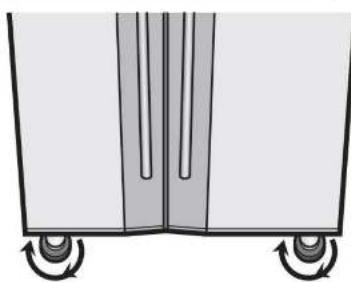
Bottom front of refrigerator
natural_image
Diagram of a cart with wheels and vertical guide rails, no text or symbols present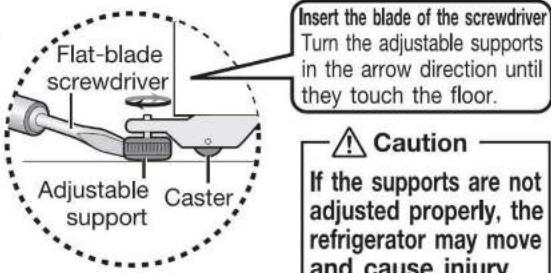
3 Adjustment and anchoring
(To prevent vibration, noise, movement, and ajar doors)
Turn the adjustable supports until they touch the floor and the front casters are raised from the floor.
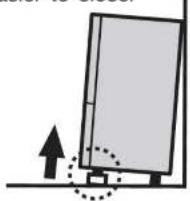
● Preventing ajar doors
Adjust the supports to make the refrigerator level.
If the front of the refrigerator is slightly raised, the doors are easier to close.
● Adjusting a tilted door or unevenness
Readjust the adjustable supports as shown in the figures below.
If the installation location is not level or the supports sink after a few days due to the weight of the food, the doors may appear tilted.
Readjust the supports.
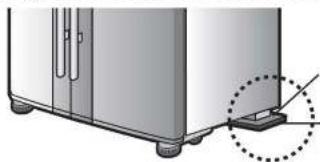
- If the door is still tilted after adjustment of the supports
When installing the refrigerator in the corner of a room, one of the rear supports may sink, causing the refrigerator to tilt. If this happens, use a caster support or strong board for adjustment.
(Normally, use a board with a thickness of about 2 to 3 mm.)
natural_image
Diagram of a refrigerator with a dotted line indicating a mounting bracket (no text or symbols present)Rear support
Caster support or strong board
Warning
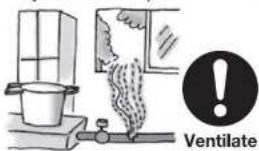
If you notice a gas leak, do not touch the refrigerator. Open windows to ventilate.
Sparks from an electrical contact may cause an explosion or fire.
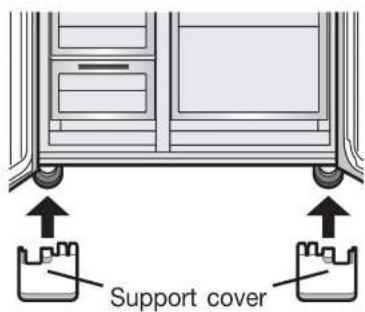
4 Support cover
The support cover is stored inside the refrigerator compartment at shipment.
● Installing the support cover
While the freezer door is open
Insert the support cover horizontally and fully, until it makes contact with the rear side.
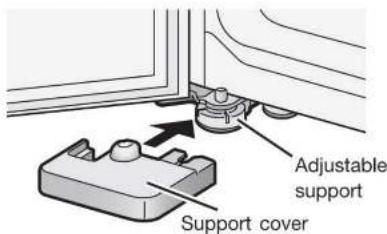
The support covers are designed for the left and right adjustable supports respectively.
The operation noise gets louder immediately after installation.
Immediately after instillation, when: the weather is hot, the doors are frequently opened or closed, or any similar situation; the operation noise will get louder because the refrigerator will switch to high-speed operation to cool with high power.
Prepare for earthquakes. (for earthquake prone areas)
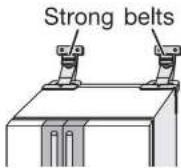
Thread 2 strong belts through the hand-holds on the top rear of the refrigerator and anchor them to a strong location, such as wall or post. To obtain the refrigerator tipping prevention belts.

Warning
The refrigerator may tip over and cause injury.

Do not damage the refrigerant cuit (pipes) or drive screws into it.
Although R600a refrigerants are combustible, the refrigerant circuit is hermetically sealed and normally leaks will not occur.

Warning
Should the refrigerant circuit be damaged:
-
Do not use flames or electrical appliances nearby.
-
Open the windows to fully ventilate the room.
Then, contact the retail store where you purchased the refrigerator.
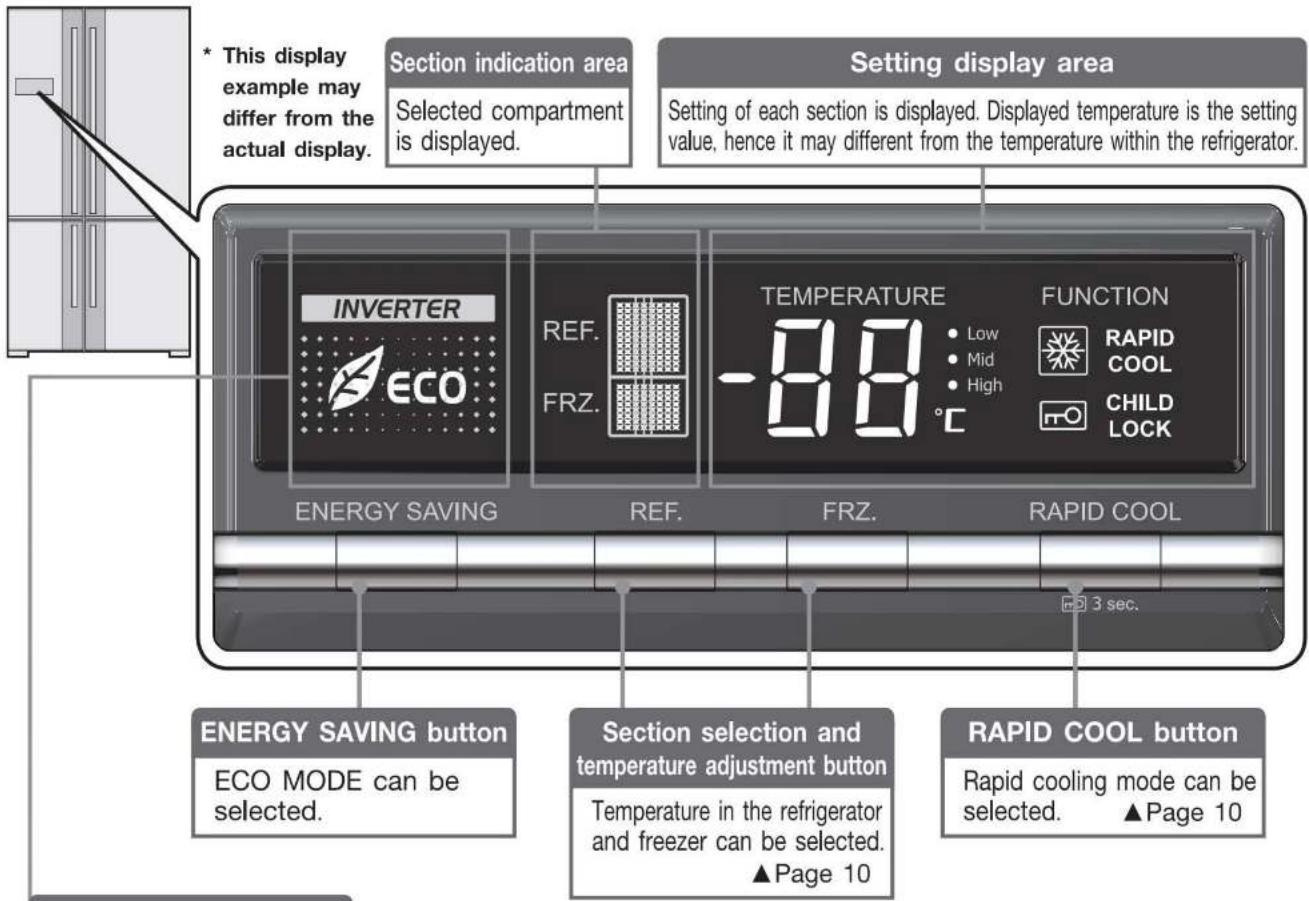
Using the Control Panel
The control panel display light is normally turned off to save power.
● To check a setting status, turn on the display by pressing any button on the control panel.
- To set a section, press the relevant button when the control panel is illuminated.
● The control display panel turns off after 30 seconds if there is no operation to save power.
ECO MODE
Use when you want to save power. When the temperature inside the refrigerator is stable, the power-saving operation is performed automatically. (Operates with the freezer compartment temperature set slightly higher.)
Setting ECO MODE
1
Press
1
To cancel
Press
to turn off

ECO MODE
If ECO MODE is set, 📄 is displayed. If switched to power saving operation while ECO MODE is set, ECO is displayed.
Tips for using the refrigerator wisely
Temperature settings
Setting each compartment to a relatively low operation reduces the consumption of electricity.
Opening and closing compartment doors
The refrigerator consumes more electricity if you open and close the compartment doors frequently or leave the doors open for a long time.
ECO MODE
In this mode, the refrigerator automatically operates in an energy saving fashion when the temperatures are stable in the compartments. The refrigerator is not set in this mode when newly installed.
Storing foods
Do not stuff the compartments with too much food or do not place foods in manner to cover the cold air outlets. Or else, cold air does not flow through optimally in the compartments, causing the foods to take time getting cool or frozen and increase electric power consumption.
Child safety lock
Locks the control panel to prevent accidental button operations by children.
Setting the child safety lock
1
Press


lights up.
for about 3 seconds. (Until the buzzer sounds twice.)
To cancel
1
Press


for about 3 seconds. (Until the buzzer sounds twice.)
- Even if the child safety lock is set, the compartment selection can be operated.
Reset the Settings
Returns the compartment selection, temperature control, ECO MODE, rapid cooling settings and temperature fine adjustment mode to their initial condition (at the time of purchase). Use for example if you have forgotten the settings.
Resetting
1
Press
and

at the simultaneously for about 3 seconds. (Until the buzzer sounds twice.)
About the door alarm
The door alarm beeps when the refrigerator or freezer compartment door is opened for more than 1 minute.
The door alarm beep varies depending on how long the door has been opened. See below for details.
| Door open time | 1 minute | 2 minutes | 3 minutes | 4 minutes | 5 minutes or longer |
| Alarm | 2 beeps | 3 beeps | 4 beeps | Continuous long beeps | Continuous short beeps |
- The compartment displays on the control panel blink in time with the door alarm sounding.
- Check for an ajar door or trapped food (Door packing, rear side of the drawer cases). (Check at least once a month.)
- If the alarm keeps sounding even after closing the doors, contact the retail store where you purchased the refrigerator or MITSUBISHI ELECTRIC SERVICE CENTRE.
If the control panel display blinks
The refrigerator is in the demonstration operation when the entire display blinks 3 times in regular intervals, or the compartment display and temperature control display blinks repeatedly in order.
The refrigerator does not cool in this mode.
Cancel the demonstration operation.
▶ Page 16
Setting the Refrigerator and Freezer compartment
Setting the temperature in the refrigerator and freezer compartments
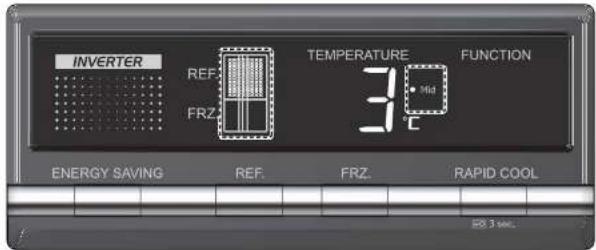
* Display example
1 Press REF or FRZ to display the compartment that you want to set.
The compartment display changes each time the button is pressed.
2 Repeatedly press REF. or FRZ. to set the temperature.
The • High • Mid • Low display changes each time the button is pressed.
| Temperature control | |||||
| Compartment display | When cooling is too strong● Low | When cooling is a little too strong● Mid ● Low | Standard*1● Mid | When you want to cool a little more● High ● Mid | When you want to cool more● High |
| REF. | 5°C | 4°C | 3°C | 2°C | 1°C |
| FRZ. | -16°C | -17°C | -18°C | -19°C | -20°C |
*1: The setting at installation (at time of purchase).
■ To control the temperature more precisely
Note
● Before and after defrosting, the temperature inside the refrigerator may drop or rise temporarily.
- To prevent food freezing in refrigerator compartment in the following kinds of situations, set the refrigerator compartment temperature to "Mid Low" or "Low".
- When the refrigerator compartment temperature is set to "High" or "High Mid"
- In winter or at other times when the surrounding temperature is 5^ or less
Rapid cooling
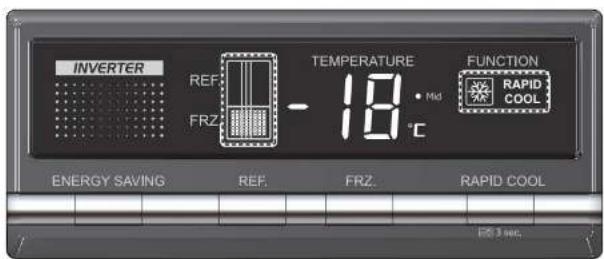
* Display example
1 Press RAPID COOL RAPID COOL lights up.
- RAPID COOL stops automatically after about 2 hours. (After stopping, RAPID COOL goes off and the temperature reverts to the set temperature automatically.)
Stopping before the cooling ends
When should I use RAPID COOL ?
For example, after you have bought a lot of food and you want to freeze them quickly to preserve their freshness.
- You can use rapid cooling even when other food is inside!
• The operation sounds gets louder during rapid cooling, because inner fans operate at high speed.
1 Press RAPID COOL to turn off RAPID COOL.
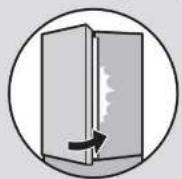
Do not close the door while the rotating partition is turned up to the front.
If you open or close the doors rapidly with force, the rotating partition may open to the front. Open and close the doors slowly. (Otherwise damage may result.)

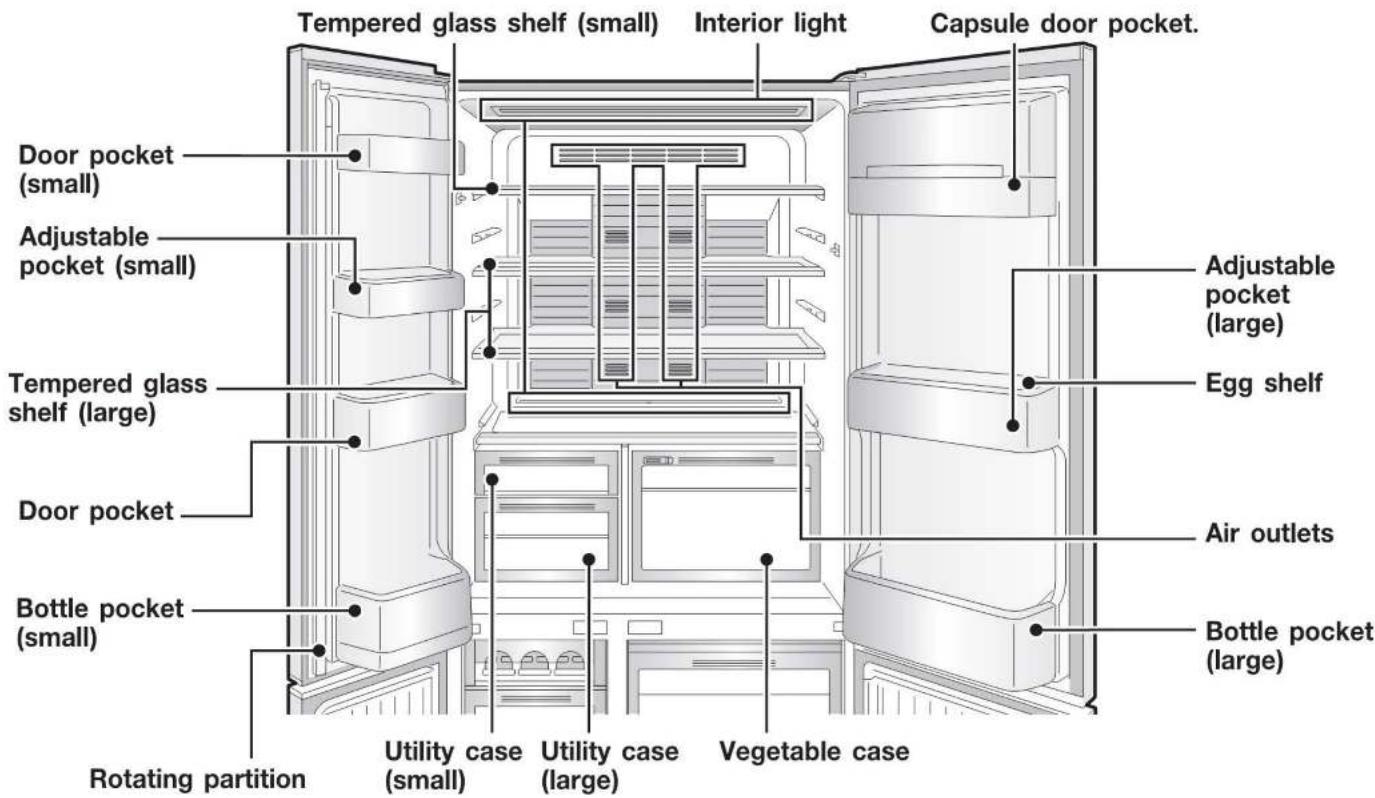
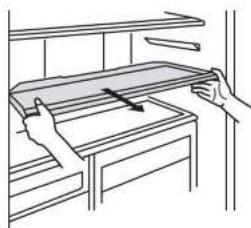
Tempered glass shelf
natural_image
Line drawing of a hand holding a rectangular object on a wooden shelf, with an arrow indicating direction (no text or symbols)While cleaning the refrigerator, be sure to remove the shelves (made of tempered glass) and put them back properly. Or else, the falling or smashed shelf could cause personal injuries.
Vegetable case
Humidity of vegetable compartment can be adjusted.
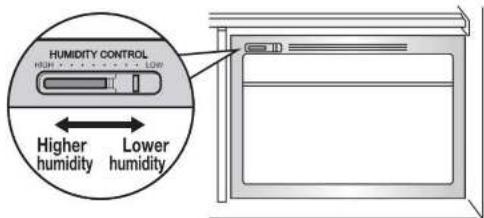
* If food with a high level of moisture is placed near the air outlets, it may freeze. ▶ Page 18
■ If the door alarm sounds ▶ Page 9
Wrap food that have strong odours thoroughly before storage
Food that transfers odours easily
Garlic, dried fish, fermented foods, beef, takuan, sardines, kimchi, chinese dumpling, etc.
• A slight odours may remain.
Food to which odours are easily transferred
Puddings, ice cream, potato, salad, tofu, rice, bread, milk, cake, ice, etc.
• A slight odours may remain.
Auto closer (equipped in doors)
With the door of the each compartment open at an angle of less than around 15 degrees, the door closes automatically.
- The auto closer is not a function that automatically closes the door that opens slightly. The door may stop before closing completely if you swing close the door too softly.
- The amount of food inside the compartment may affect the closing speed.
Refrigerator Compartment
(Continued)
Adjustable pockets
Adjustable to 2 positions
Small
Large
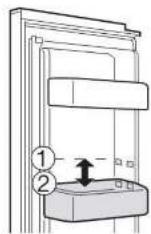
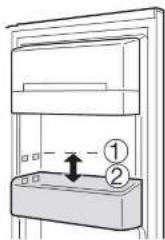
■ Relocate the pockets
▶ Page 15
Egg shelf
Egg holder or small organizing compartments. By turning it over it can be used either way.
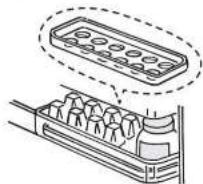
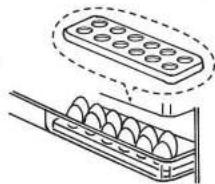
natural_image
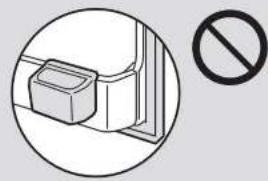
Diagram of a mechanical component with a rectangular block and coiled spring, no text or symbols presentDo not leave food hanging over shelves or pockets. Do not place glass bottles that cannot fit all the way to the bottom at the front of the bottle pocket.
The bottle may keep a door ajar, or the bottle may break.
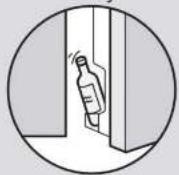

Do not close the door while food is in front of the Vegetable case or Utility cases.
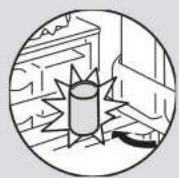

Do not attach a case that you purchased separately onto the outside of a pocket.
It may keep a door ajar and reduce the cooling performance, or food may fall and cause an injury or damage to a case or lid.
natural_image
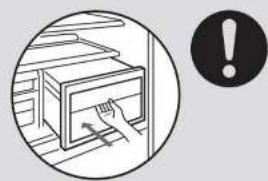
Simple line drawing of a door handle with a stop sign symbol (no text or labels)Fully stow away the cases.
natural_image
Illustration of a hand placing a cabinet into a drawer, with an exclamation mark symbol nearby (no text or labels)Tips for energy saving

ECO
Set to ECO MODE for automatic energy saving operation. ▶ Page 8
Idea for energy saving
Keep space between items in the refrigerator.
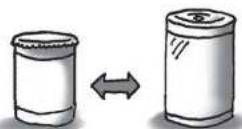
Put items on the top shelf if you wish to cool sufficiently.
Helpful storage hints
Allow hot food to cool before storing.
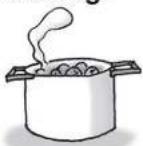
Wipe
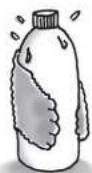
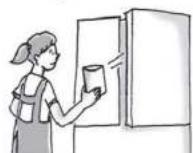
Avoid opening the door frequently or leaving the door open for a long time.
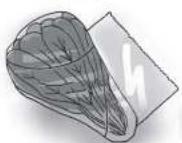
wrap
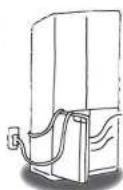
Be sure not to catch food items, plastic bags, power cord, etc. in the door when you close it.
Frost or dew build-up that may cause decline in cooling ability as a result of even the slightest door opening.
Water may also drip off.
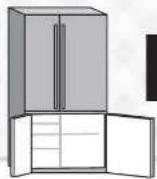
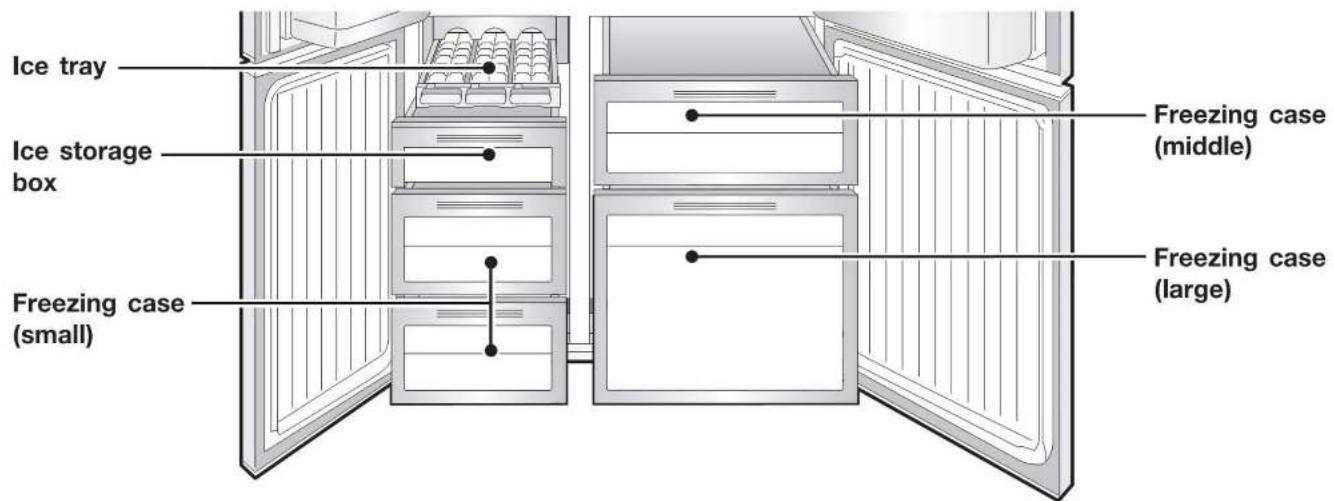
Freezer Compartment
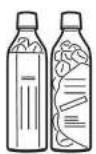
15 cm height of plastic bottles for freezing can be placed standing up in the Freezing case (large).
The bottles intended to let freeze are suitable. In many cases, they are displayed so.
■ If the door alarm sounds ▶ Page 9
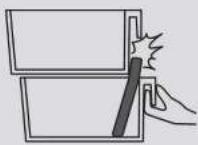
Do not place tall objects in the lower freezing case.
- Food or the slide case may be damaged.
• The door may not be closed.

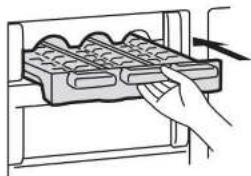
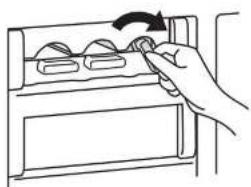
Making ice cubes
1 Pour water into each of the section of the ice tray up to the water line.
The ice cubes will not separate easily from the ice tray if you add too much water.
natural_image
Hand inserting a grid into a rack (no text or symbols visible)2 Insert the tray completely into the ice tray holder.
3 Once the ice cubes are made, turn the lever to the right until the ice cubes fall into the ice storage box.
natural_image
Hand holding a device with a scroll wheel, no text or symbols visibleRemoving and Cleaning the Parts
Step 1
Before cleaning
Remove the power plug
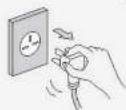
Warning
Failure to unplug may result in an electric shock.
Wait at least 10 minutes before reinserting the power plug into the socket.
If you insert the plug immediately, the mechanism will not function.
Step 2
How to clean
- Wipe with a soft cloth soaked in lukewarm water, or remove the parts and (Wipe the control panel with a soft, dry cloth.)
- For stubborn dirt, wipe using water mixed with a weak concentration of kitchen only). In particular, be sure to wipe off oily dirt because leaving it may damage

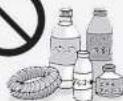
Do not use following alkaline or low alkaline kitchen detergents, alcohol, benzene, thinner, oil, acid, scrubbers, boiling water, or Doing so may cause the plastic parts (such as the door or damage or rust the doors or painted surfaces.
Tempered glass shelves
How to remove the upper shelf
Lift the upper shelf with both hands to take it out.
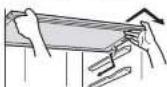
How to remove the middle and lower shelves
Remove the middle and lower shelves with both hands.
Reverse the steps to put back the shelves.
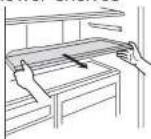
- Do not let the tempered glass shelves fall off.
Ice tray / Ice storage box
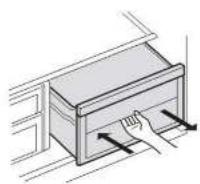
① Open the door.
② Slide out the ice tray and remove.
③ Draw the ice storage case towards you and remove.
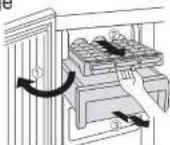
Cases in the Freezer compartment
Pull the case towards you. Hold the end on your side and lift the case.
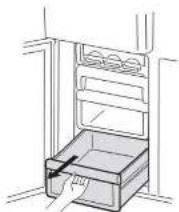
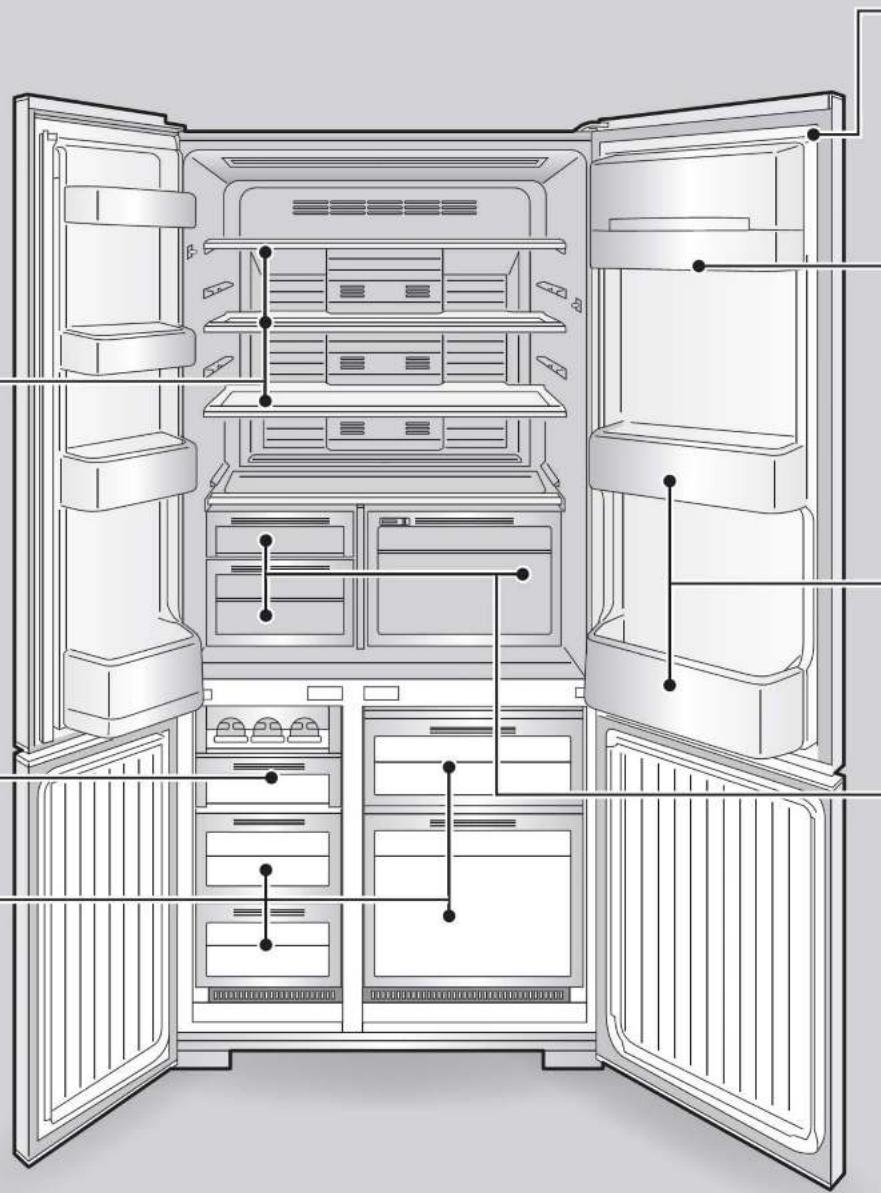
natural_image
Line drawing of an open refrigerator interior showing internal compartments and doorways (no text or labels)To return the parts, perform the removal procedures in reverse.
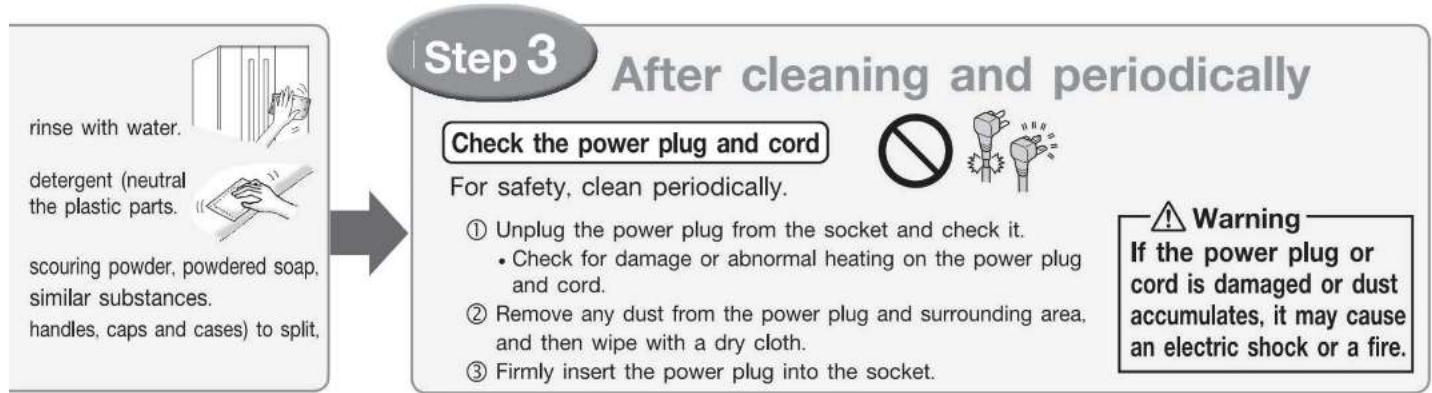
flowchart
graph LR
    A["rinse with water"] --> B["To split"]
    C["detergent (neutral the plastic parts)"] --> B
    D["scouring powder, powdered soap, similar substances."] --> B
    E["handles, caps and cases"] --> B
    B --> F["Check the power plug and cord"]
    F --> G["For safety, clean periodically."]
    G --> H["Unplug the power plug from the socket and check it.<br>Check for damage or abnormal heating on the power plug and cord.<br>Remove any dust from the power plug and surrounding area, and then wipe with a dry cloth.<br>Firmly insert the power plug into the socket."]
    H --> I["Warning: If the power plug or cord is damaged or dust accumulates, it may cause an electric shock or a fire."]
Door seal
Dirty seal is easily damaged and can cause refrigerated air to leak.
Door seal
Capsule door pocket
① Lift the cover by 100 degrees.
② Push the cover to one side and remove it while pushing in the rib of the hinge cover with your finger.
③ Remove the cover towards you.
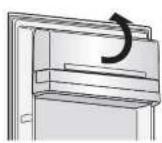
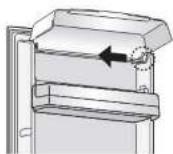
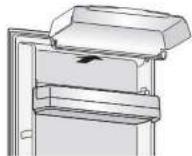
Adjustable pocket / Bottle pocket
Adjustable pocket
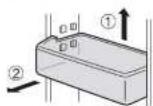
Bottle pocket
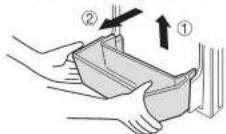
① Alternately lift up the left and right sides (the pockets are securely installed).
② Pull towards you.
③ Be sure to install the Adjustable pocket and the bottle pocket securely and correctly.
(Or else, the pocket may fall off, causing a personal injury.)
Utility case / Vegetable case
Utility case
① Fully pull out the slide case.
② Lift the end on your side.
Vegetable case
Lift the end on your side to pull out the Vegetable case.
*The ceiling shelf on the upper side of cases cannot be removed.
The rear of the refrigerator and the floor
① Remove the support covers from the refrigerator
② Turn the adjustable supports to lift them from the floor and move the refrigerator off the wall. Use protective materials so as not to scratch the floor.
③ Wipe away all dust and soil from the rear of the refrigerator.
the wall and the floor. Wipe them clean. Air circulation can cause dust to collect at the rear of and on the floor under the refrigerator, creating black soiled areas. Clean the area periodically as it also contributes to energy saving.
④ Check the floor for a sign of water leaks from the refrigerator.
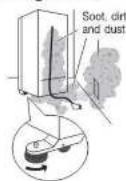
Caution
Do not put your hands, fingers or feet underneath the refrigerator. Doing so can cause injury.
Replacing lamps in compartments
LEDs in the refrigerator compartments and behind of Vegetable case.
Contact the retail store at which you purchased this refrigerator from or MITSUBISHI ELECTRIC SERVICE CENTRE.
Control panel
Wipe with a soft dry cloth.
*Do not use alcohol, benzene, steel wool or alkaline-base detergents. They can cause the control panel to malfunction.
Other Issues
| Issue | Action | |
| A power outage occurs | Minimize the frequency of opening the doors, and avoid adding more food.Control panel settings other than the temperature settings may change. Check the settings. (Child safety lock rapid cooling, etc.) | |
| To move the refrigerator or change its orientation | 1 Remove support covers.2 Raise the adjustable supports. ▶ Page 73 Lay protective material under the casters and rear supports to prevent floor damage.4 Move the refrigerator to the forward and backward directions.* Dragging in directions other than forward and backward may damage the floor. | |
| When not using the refrigerator for a long time | 1 Remove all stored food from inside the refrigerator.2 Unplug the power plug, clean the interior of the refrigerator, and open the doors for 2 to 3 days to dry the inside.* If the refrigerator is not dried sufficiently, it may cause mold, odors, or refrigerant (gas) leaks due to condenser corrosion. | |
| To transport the refrigerator(when moving house, etc.) | 1 Empty any water or ice from the ice tray.2 Wear protective gear (gloves).3 Remove the support cover and raise the adjustable supports.4 Unplug the power plug.5 Lay towels under the drainage port and the lower rear edge of the refrigerator, and position a container or tray with a height of about 3 cm on the towels to collect the water.* The towels prevent floor damage, and water from being spilled on the floor.6 Tilt the refrigerator slowly to the rear by about 30 degrees, and drain the water from the evaporation tray via the drainage port on the lower rear side. (The evaporation tray is not visible from the outside.)* Because the refrigerator is heavy, the work must be performed by at least 2 people.* The work must not be performed by small children or people who are not capable of doing heavy work. Ask a specialist transportation company.7 4 or more people should hold the hand-holds on the lower inside of the front and the upper side of the rear, and carry the refrigerator slowly.Do not lay down the refrigerator on its side. (The compressor may be damaged.) | 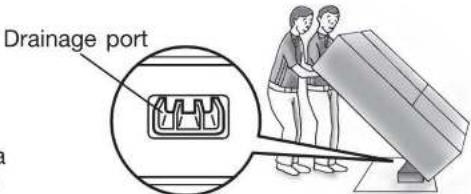 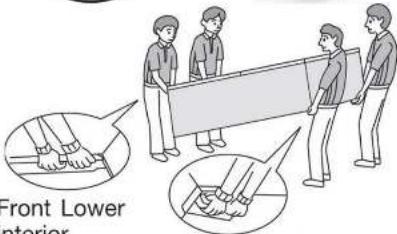 Interior Upper part of back side Interior Upper part of back side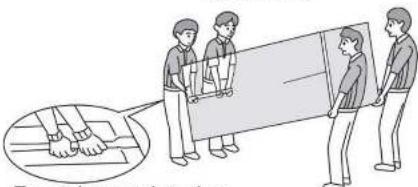 Front Lower interior Front Lower interior |
Demonstration operation statusWhen the entire display blinks 3 times at a certain interval even though you have not operated any buttonsWhen the compartment displays and temperature control displays on the control panel blink in order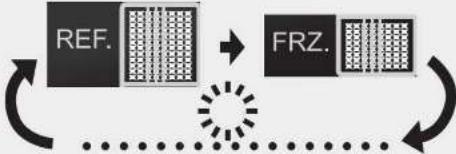 | The refrigerator does not cool in this mode. Contact the retail store where you purchased the refrigerator, or cancel the demonstration operation with the procedure below.To cancel the demonstration operation1 Keep the doors of the refrigerator compartment open.2 Press [REF] [FRZ] and [RAPID COOL] at the same time for about 5 seconds.3 Make sure that there is no blinking of the display area for after a minute.(If the display still blinks, the demonstration operation has not been canceled.) | |
| When the [mO] blinks rapidly (about 5 times per second) or the alarm cannot be turned off | Contact the retail store where you purchased the refrigerator as soon as possible.Alternatively, contact MITSUBISHI ELECTRIC SERVICE CENTRE.[ENERGY SAVING] [RAPID COOL]Press [and] at the same time for about 3 seconds to stop the alarm.An inspection is required. Contact the retail store where you purchased the refrigerator or a MITSUBISHI ELECTRIC SERVICE CENTRE or Customer Service representative. | |
To control the temperature more precisely
(Temperature fine adjustment mode)
When the refrigerator or freezer compartment is selected, you can control the temperature more precisely.
- When temperature fine adjustment mode is set, the compartment display blinks about every 10 seconds.
Setting the temperature fine adjustment mode

and

at the same time for about 3 seconds.
(Until the buzzer sounds twice.)
To cancel
The same operation as above.
Performing the temperature fine adjustment


① Pre

I compartment you want to the temperature t.
② Re

fine adjustment of the temperature.
* The values on the right are approximate. The temperature may differ from the values on the right, depending on factors such as the food storage condition and how often the doors are opened.

This represents a blinking display.
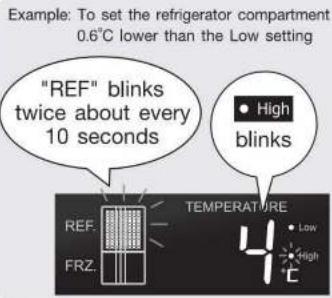
| Refrigerator or freezer compartment | |
 | Low settingNote 1: ▶ Page 10 |
  | About 0.3°C lower than “Low” |
  | About 0.6°C lower than “Low” |
  | Low medium setting▶ Page 10 |
  | About 0.3°C higher than “Mid” |
  | Medium setting▶ Page 10 |
  | About 0.3°C lower than “Mid” |
  | Medium high setting▶ Page 10 |
  | About 0.6°C higher than “High” |
  | About 0.3°C higher than “High” |
 | High setting▶ Page 10 |
Specifications
This appliance is designed for use in Australia, New Zealand only and can not be used in any other country.
No servicing is available outside of Australia, New Zealand.
| Accesories | Units | |
| Model | MR-L710EG | |
| Refrigerator Compartment | Tempered glass shelf (small) | 1 |
| Tempered glass shelf (large) | 2 | |
| Utility case (small) | 1 | |
| Utility case (large) | 1 | |
| Vegetable case | 1 | |
| Door pocket (small) ※ 1 | 2 | |
| Door pocket (middle) | 1 | |
| Bottle pocket (small) | 1 | |
| Capsule door pocket | 1 | |
| Door pocket | 1 | |
| Adjustable pocket (large) ※ 1 | 1 | |
| Bottle pocket (large) | 1 | |
| Freezer Compartment | Ice tray | 1 |
| Ice storage box | 1 | |
| Freezing case (small) | 2 | |
| Freezing case (middle) | 1 | |
| Freezing case (large) | 1 | |
| Leg cover (Right and Left) | 2 |
※ 1 Position of the pockets on the second level of left and right door in the refrigerator compartment can be adjusted.
When in trouble
First, check the items described in this section. If the problem persists, contact the retail store where you purchased the refrigerator as soon as possible.
Frequently asked questions in the initial period and in summer
Questions about operation and handling
The refrigerator does not cool at all!
- The refrigerator takes time to cool when you first start using it. Especially in the summer, it may take up to 24 hours for the inside to be fully cooled.
- Are the displays on the control panel blinking?
→ Demonstration operation:
- Is the power plug disconnected or has the circuit breaker tripped?
▶ Page 16
The outer walls heat up!
- The outer walls heat up significantly (to about 50 to 60^ ) immediately after installation and in the summer. This is because the heat discharging and condensation prevention pipes are located on the sides and the top of the refrigerator. They are required for cooling and the heat is not an abnormality.
• The refrigerator compartment rotating partition also has a
condensation prevention heater that heats up.
▶ Page 6
- A heat discharging fan is located at the bottom of the refrigerator. Warm air may be blown from here.
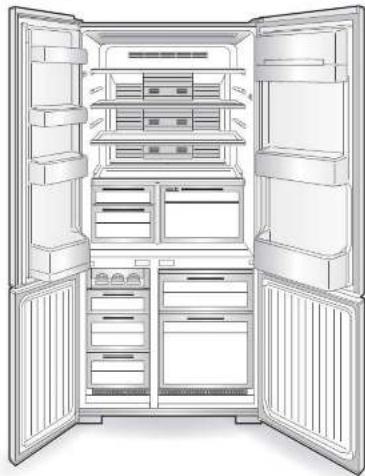
natural_image
Interior view of a fully stocked refrigerator with doors open and internal compartments (no text or symbols visible)The control panel turns off automatically!
• To save power, the display goes off if there is no operation for about 30 seconds.
▶ Page 8
Strong odours on the food or ice!
- Have you placed food with strong odours inside the refrigerator without sealing in a container? Page
▶ Page 11
| Problem ➔ Check ➔ Explanation and action | ||
| Does not cool wellNot much ice is madeIce melts | 1Is “Low” set as the temperature for the compartment?2Has enough time passed after installation?3Is heat discharging being blocked? Check there is gap around the refrigerator and the refrigerator is not exposed to direct sunlight.4Is the flow of cold air being blocked? Are the doors being opened frequently, or is a door ajar? | 1Set the temperature to “Mid” or “High”.2It takes about 4 or 5 hours for the refrigerator to cool, and up to about 24 hours in the summer to make ice.3Check that the refrigerator is installed correctly.► Page 64Check the quantity of food inside and ajar door.► Pages 12 |
| Food freezes in the refrigerator compartment | 1Is the temperature on the control panel set to "High"?2Is food with a lot of moisture stored at the rear of the shelf?3Is the surrounding temperature 5°C or less? | 1Set the temperature to "Mid". Note that in the rapid cooling operation, the temperature inside the refrigerator drops temporarily.2Place drinks and food containing a lot of moisture, such as tofu, vegetables and fruit, at the front.3Freezing is likely to be prevented when the temperature settings of the refrigerator compartment and vegetable compartment are set to “Low”. |
| Cannot adjust the temperature | 1Is displayed? | 1Cancel the child safety lock.► Page 9 |
| Condensation forms on the outer walls and inside the refrigeratorFrost forms in the freezer compartmentWater drips onto the floor | 1Are the doors being opened frequently, or is a door ajar?2Is the humidity high, for example is it raining? | 1When moisture in the air cools, it forms frost or condensation. Even when a door is open only slightly, it can cause frost or condensation, or dripping onto the floor.► Page 122Condensation may form temporarily. Wipe off with a dry cloth. It is also easy for frost to form in the freezer compartment. Minimize the time that the doors are open. |
| Doors open easilyDoors do not close | 1Is a door making contact with food or a case?Is too much food packed inside?2Has food fallen behind a case in a drawer door, or is the power cord or another object trapped between the refrigerator and a door?3Is the refrigerator installed stably?Are the adjustable supports making contact with the floor? | 1Store food so that the door does not make contact with objects when closed.2Remove any objects. Make sure that the door does not trap objects such as food, power cords or plastic bags.3Lower the adjustable supports to raise the front side slightly and make the doors easier to close.► Page 7 |
| Door alarm sounds | 1Is the door of the refrigerator or freezer compartments open?2Is the rotating partition of the refrigerator compartment turned up to the front? | 1Close the door. The alarm sounds at every minute after the door is opened, and after 4 minutes it sounds continuously.If the alarm sounds even after closing the door, press the ENERGY SAVING button and RAPID COOL button at the same time for about 3 seconds to stop it. An inspection is required. Contact the retail store where you purchased the refrigerator or MITSUBISHI ELECTRIC SERVICE CENTRE. ▶ Pages 9, 162Check the position of the rotating partition while the doors are open. ▶ Page 11 |
| Ice cube is small or joined together | 1Has ice been stored inside for a long time? | 1If the ice is stored for a long time, ice cubes may stick together or shrink.(Due to a phenomenon called sublimation.) |
| Noise interferes with televisions or other devices | 1Is the refrigerator installed near to an electronic device such as a television?2Is the power to the refrigerator supplied from a socket near the entry hole of the antenna cable? | 1Install the refrigerator away from electronic devices such as televisions.2We recommend using a dedicated power supply. |
| Loud noisesAnnoying noise(These noises are normal.) | 1The noise gets louder suddenly or the tone changes.2A whistling sound is made after closing a door.3A hissing, bubbling or running water sound is made sometimes.4A whipping or dripping sound is sometimes heard from inside the refrigerator after a door is opened.5A buzzing sound is made sometimes. | 1Immediately after installation, when the weather is hot, when the doors are frequently opened and closed, during the rapid cooling operation, and in similar situations, the refrigerator switches to high-speed operation and cools with high power.2This is the sound of the fan motor starting.3This is the sound of the refrigerant (gas) flowing.4This is the creaking sound as warm air enters and expands the plastic.5This is the operating sound of the damper as it adjusts the air flow. |
CAUTION
- This appliance is designed for use in ambient temperature listed below.
| MODEL NAME | AMBIENT TEMPERATURE RANGE | CLIMATIC CLASS |
| MR-L710EG-A | 16 ^ 43 ^ | T |
| MR-L710EG-NZ | 16 ^ 43 ^ | T |
The internal temperatures could be affected by such factors as the location of the refrigerating appliance, ambient temperature and the frequency of door opening, and, if appropriate, a warning that the setting of any temperature control device might have to be varied to allow for these factors.
- A rise in temperature of the frozen food during manual defrosting, maintenance or cleaning could shorten the storage life.
- Food to be frozen is not to be placed in direct contact with food in storage and, if appropriate, that it could be necessary to reduce the quantity to be frozen if freezing every day is anticipated.
- The electrical power failure for 1-2 hour will only slightly effect the inside temperature. However, open & close of the door results in the temperature loss. In case there is more than 24 hours electrical power failure, the food should be taken out from the fridge.
- In case you are leaving or there is no food in the fridge for more than 3 weeks, The fridge should be unplugged and cleaned.
■ This refrigerator uses flammable foaming gas for insulation.
Please deliver the unit to specialized industrial waste dealer when you do away it. Please follow the rules in your country.
■ WARNING - Do not use mechanical devices or other means to accelerate the defrosting process, other than those recommended by the manufacturer.
■ WARNING - Do not use electrical appliances inside the food storage compartments of the appliance, unless they are of the type recommended by the manufacturer.
■ WARNING - Just in case of having damaged the refrigerant circuit, do not use electric items or fire equipment near by, and open the window to ventilate the room. And contact the retail store at which you purchased it or the following MITSUBISHI ELECTRIC SERVICE CENTRE.
■ The refrigerator contains flammable refrigerant (R600a: isobutane).
■ The refrigeration system behind and inside the refrigerator contains refrigerant. Do not allow any sharp objects to come into contact with the refrigeration system.
■ Do not block the openings on the circumstances of the refrigerator.
The user manual should be handed over to any person who would use or handle the refrigerator whenever the refrigerator would be transferred to another location and delivered to a recycling plant.
■ The appliance is not intended for use by young children or infirm persons without supervision.
■ Young children should be supervised to ensure that they do not play with the appliance.
R600a Refrigerant Warning
- This appliance contains a small quantity of R600a refrigerant which is flammable.
- During transportation and installation, ensure that the tubing of the refrigerant circuit is not damaged.
- Leaking refrigerant can ignite and may damage the eyes.
- In the event any damage does occur, avoid exposure to open fires and any device which creates a spark. Disconnect the appliance from the mains power.
- Thoroughly vantilate the room in which the appliance is located for several minutes.
- Notify Mitsubishi Electric Australia Pty Ltd. for necessary action and advice.
- The room for installing the appliance must be at least 1 cubic metre per 8 grams of refrigerant. The refrigerant quantity contained in this appliance is noted on the Rating Label of the appliance.
- If your Mitsubishi Electric Refrigerator should require service, please contact Mitsubishi Electric Australia Pty Ltd see back page of this user manual for contact details.
NOTE: MITSUBISHI ELECTRIC AUSTRALIA PTY LTD. DO NOT ALLOW SERVICE TO THE REFRIGERATION CIRCUIT OF THIS APPLIANCE.

If an abnormality or malfunction occurs, stop operation immediately and contact the retail store where you purchased the refrigerator or MITSUBISHI ELECTRIC SERVICE CENTRE or its service agent.
SOLE AGENT in Australia
MITSUBISHI ELECTRIC AUSTRALIA PTY LTD.
(Incorporated in New South Wales) ABN 58 001 215 792
New South Wales:
348 Victoria Road, Rydalmere NSW 2116 Phone: (02) 9684 7777, Fax: (02) 9898 1043
Queensland:
Da Vinci Business Park, Building 101, 2A Boronia Road, Brisbane Airport QLD 4008
Phone: (07) 3623 2000, Fax: (07) 3860 6761
South Australia / Northern Territory:
Suite 1, 224 Glen Osmond Road, Fullarton SA 5063 Phone: (08) 8338 1001, Fax: (08) 8338 0501
Western Australia:
Unit 5, 329 Collier Road, Bassendean WA 6054 Phone: (08) 9377 3400, Fax: (08) 9377 3499
Victoria / Tasmania:
Unit 5, 12 Compark Circuit Mulgrave VIC 3170 Phone: (03) 9535 7800, Fax: (03) 9535 7801
SOLE AGENT in New Zealand
BLACK DIAMOND TECHNOLOGIES LIMITED (BDT)
Wellington Office (Head Office)
1 Parliament Street Lower Hutt PO Box 30772 Phone: (04) 560 9147, Fax: (04) 560 9133
Auckland Office
Unit 1, 4 Walls Road Penrose PO Box 12726 Phone: (09) 526 9347, Fax: (09) 526 9348
Christchurch Office
44 Halwyn Drive Hornby PO Box 16904 Phone: (03) 341 2837, Fax: (03) 341 2838
MITSUBISHI ELECTRIC CORPORATION
- MR-L710EG
- OPERATING INSTRUCTIONS
- Cleaning Instruction - Important!
- Function Overview
- Vitamin Factory
- ECO MODE
- Contents
- Safety Precautions
- Warning
- Caution
- Installation
- Power and power plug
- Installation and transportation
- From Installation to Operation
- Installation
- Install the refrigerator at:
- Use in hot spring areas
- Connect the power supply
- The outside of the refrigerator and the rotating partition get hot.
- Cooling takes time after turning on the refrigerator.
- Adjustment and anchoring
- ● Preventing ajar doors
- ● Adjusting a tilted door or unevenness
- - If the door is still tilted after adjustment of the supports
- Support cover
- ● Installing the support cover
- The operation noise gets louder immediately after installation.
- Prepare for earthquakes. (for earthquake prone areas)
- Do not damage the refrigerant cuit (pipes) or drive screws into it.
- Using the Control Panel
- Setting ECO MODE
- Tips for using the refrigerator wisely
- Temperature settings
- Opening and closing compartment doors
- Storing foods
- Child safety lock
- Setting the child safety lock
- To cancel
- Reset the Settings
- Resetting
- About the door alarm
- If the control panel display blinks
- Setting the Refrigerator and Freezer compartment
- Setting the temperature in the refrigerator and freezer compartments
- Note
- Rapid cooling
- Stopping before the cooling ends
- When should I use RAPID COOL ?
- Tempered glass shelf
- Vegetable case
- Wrap food that have strong odours thoroughly before storage
- Food that transfers odours easily
- Food to which odours are easily transferred
- Auto closer (equipped in doors)
- Refrigerator Compartment
- (Continued)
- Adjustable pockets
- Egg shelf
- Tips for energy saving
- ECO
- Freezer Compartment
- Making ice cubes
- Removing and Cleaning the Parts
- Step 1
- Before cleaning
- Step 2
- How to clean
- Tempered glass shelves
- How to remove the upper shelf
- How to remove the middle and lower shelves
- Ice tray / Ice storage box
- Cases in the Freezer compartment
- To return the parts, perform the removal procedures in reverse.
- Door seal
- Capsule door pocket
- Adjustable pocket / Bottle pocket
- Adjustable pocket
- Bottle pocket
- Utility case / Vegetable case
- Utility case
- The rear of the refrigerator and the floor
- Replacing lamps in compartments
- Control panel
- Wipe with a soft dry cloth.
- Other Issues
- To control the temperature more precisely
- Setting the temperature fine adjustment mode
- Performing the temperature fine adjustment
- Specifications
- When in trouble
- The refrigerator does not cool at all!
- The outer walls heat up!
- The control panel turns off automatically!
- Strong odours on the food or ice!
- R600a Refrigerant Warning
- NOTE: MITSUBISHI ELECTRIC AUSTRALIA PTY LTD. DO NOT ALLOW SERVICE TO THE REFRIGERATION CIRCUIT OF THIS APPLIANCE.
- SOLE AGENT in Australia
- MITSUBISHI ELECTRIC AUSTRALIA PTY LTD.
- Queensland:
- Western Australia:
- Victoria / Tasmania:
- SOLE AGENT in New Zealand
- BLACK DIAMOND TECHNOLOGIES LIMITED (BDT)
- Wellington Office (Head Office)
- Auckland Office
- Christchurch Office
- MITSUBISHI ELECTRIC CORPORATION
Brand : MITSUBISHI
Model : MR-L710EG
Category : Fridge