
HC90DCBB4 - Household Fan Fisher & Paykel - Free user manual and instructions
Find the device manual for free HC90DCBB4 Fisher & Paykel in PDF.


| Product Type | Rangehood (Ventilateur domestique) |
| Brand | Fisher & Paykel |
| Model | HC90DCBB4 |
| Dimensions (Width) | 90 cm |
| Weight | 17 kg |
| Color | Black Stainless Steel |
| Control Type | Touch control panel |
| Number of Fan Speeds | 4 (1, 2, 3, Boost) |
| Boost Function | Yes, 5-minute boost then reverts to speed 3 |
| Timer | Yes, 5 minutes at current speed, 2 minutes at each descending speed |
| Lighting | Adjustable brightness and colour temperature (warm/cold) |
| Wi-Fi Connectivity | Yes, via SmartHQ app |
| Link Mode | Yes, to compatible cooktop for auto on/off |
| Filter Alarm | Yes, illuminates when filters need cleaning |
| Filter Type | Aluminium mesh, dishwasher safe |
| Carbon Filters | Optional, for recirculating mode; replace every 3 months |
| Safety Features | Auto shut-off (fan after 4 hours, lights after 12 hours); thermal motor protection |
| Warranty | 2 years manufacturer's warranty |
| Included Accessories | Aluminium filters; carbon filters (some models); chimney extensions (optional) |
| Installation | Wall-mounted; requires solid wall, stud, or truss |
Frequently Asked Questions - HC90DCBB4 Fisher & Paykel
User questions about HC90DCBB4 Fisher & Paykel
0 question about this device. Answer the ones you know or ask your own.
Ask a new question about this device
Download the instructions for your Household Fan in PDF format for free! Find your manual HC90DCBB4 - Fisher & Paykel and take your electronic device back in hand. On this page are published all the documents necessary for the use of your device. HC90DCBB4 by Fisher & Paykel.
USER MANUAL HC90DCBB4 Fisher & Paykel
Safety and warnings 4
Cooking considerations 6
First use 7
Wi-Fi connection 8
Light settings 9
Care and cleaning 10
Parts and accessories 12
Troubleshooting
Manufacturer's Warranty 14
Customer care 16
13
WARNING!
 | Electric Shock HazardFailure to follow this advice may result in electric shock or death.Always disconnect the appliance from the mains power supply before carrying out any maintenance or repairs. Failure to do so can result in death, electric shock, fire or injury to persons.Do not immerse cord or plugs in water or other liquid. |
WARNING!
 | Weight HazardFailure to follow this advice may result in personal injury.The appliance is heavy. Please ensure adequate care is taken when installing the appliance to prevent personal injury. The appliance must be installed onto a solid wall, stud, beam or truss. | |
| Product weight:HC60DCXB4 15kgHC90DCXB4 17kgHC90DCBB4 17kgHC90DCEBB4 12kg | HC120DCXB4 25kgHC90DCEXB4 12kg | |
READ AND SAVE THESE INSTRUCTIONS
WARNING!
When using this appliance always exercise basic safety precautions including the following:
General
- This product is for use with a compatible Fisher & Paykel external motor (some models only). Failure to comply could void your warranty. Please read the entire set of instructions before installing or using this appliance.
- Remove all packaging, including protective wrappings, before use.
- The room must have adequate ventilation when the rangehood is used at the same time as appliances burning gas or other fuels.
- This appliance is not intended for use by persons (including children) with reduced physical, sensory or mental capabilities, or lack of experience and knowledge, unless they have been given supervision or instruction concerning the use of the appliance by a person responsible for their safety.
- Children should be supervised to ensure they do not play with the appliance. Cleaning and user maintenance shall not be made by children without supervision.
- Never leave frying food unattended since grease can overheat and catch fire. The risk of fire is even greater in the case of used oil.
- Do not flambé under the rangehood.
- The rangehood may stop working during an electrostatic discharge (eg lightning). Switch off the electricity supply to the rangehood and reconnect after one minute.
- CAUTION: accessible parts may become hot when used with cooking appliances.
Maintenance
- You must read the details concerning the method and frequency of cleaning.
- Unplug or disconnect the appliance from the power supply before servicing or cleaning.
• There is a fire risk if cleaning is not carried out in accordance with the instructions. - Never use the rangehood without the filters in place.
- Never use abrasive or oil based cleaners.
Induction
Induction cooktops use energy-efficient technology that only heats the contents of a cooking pot, not the surrounding air. As a result, there is more likelihood of condensation on rangehood filters, splashbacks and surrounding cabinetry than when you use traditional electric or gas cooktops.
Other factors that influence condensation are room temperature, humidity, natural ventilation of the room, size of the cookware and how the induction cooktop is being used. For example, rapid boiling increases the likelihood of condensation. It is important to understand that neither the rangehood nor the induction cooktop are faulty.
Reducing condensation
- When boiling, use the rangehood on a lower speed setting and the induction cooktop on a lower heat setting.
- Switch the rangehood on 5 minutes before cooking and let it run for at least 5 minutes after cooking.
Gas
Rangehood surfaces may become hot if using a powerful gas cooktop or multiple gas burners operating at the same time. This effect can be reduced by using the maximum speed setting to enable hot air to be extracted quickly.
Optimising performance
- Turn your rangehood on for a few minutes before cooking. This will establish air currents up through the rangehood, remove hot air from your kitchen and keep the rangehood surface cool.
- Reduce fan speed for normal use and increase it for high heat, strong odours or fumes.
Control panel

| 1 | Power | Press to turn the rangehood on/off. The fan turns on at lowest speed and lights turn on to the last used level. Fan turns off after 4 hours with no interaction. |
| 2 | Timer | Press to turn the timer on. The fan operates for 5 minutes at the current speed and 2 minutes at each descending speed before turning off. |
| 3 | Lights | Press to turn lights on/off or change settings. Refer to 'Light settings'. |
| 4 | Reduce fan speed | Press to reduce fan speed. |
| 5 | Fan speed indicator | Illuminates to indicate fan speed. |
| 6 | Increase fan speed | Press to increase fan speed. |
| 7 | Boost | Press to turn the fan onto boost speed. Reverts to speed 3 after 5 minutes. |
| 8 | Wi-Fi Press to start Wi-Fi connection process. | |
| 9 | Link mode | Press to start linking to a compatible cooktop, then follow instructions on the cooktop to connect. Rangehood will turn on/off automatically while cooking. |
| 10 | Filter cleaning mode | Illuminates to indicate filters require cleaning. Press once to reset. |
Your appliance may be connected to your home wireless network and operated remotely using the app.
Getting started
- Ensure your home Wi-Fi network is turned on.
• You will be given step by step guidance on your mobile device. - It may take up to 10 minutes to connect your appliance.
- For further guidance and troubleshooting, please refer to the app.
On your mobile device:
① Download the app from www.fisherpaykel.com/connect
② Register and create an account.
③ Add your appliance and set up the Wi-Fi connection.
Connecting to your home Wi-Fi
①
Press Wi-Fi button. It will start to flash.
Follow the instructions in the app to complete the connection within 15 minutes.
Disconnecting from your home Wi-Fi
②
Press and hold Wi-Fi button for 5 seconds until it flashes, or open the app and remove rangehood.
Connection will time out after 15 minutes.
Lights can be adjusted for brightness or colour temperature. They will turn off after 12 hours with no interaction.
Adjusting brightness level
natural_image
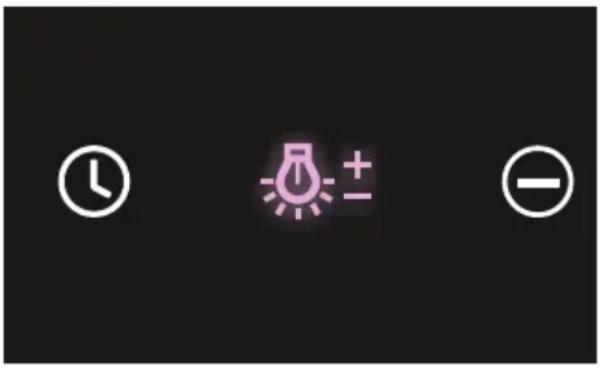
Three white circular icons on black background: clock, light bulb with plus sign, and minus sign (no text or symbols)With rangehood ON, press and hold Lights button to adjust brightness level. You can also adjust brightness via the app.
Changing colour temperature
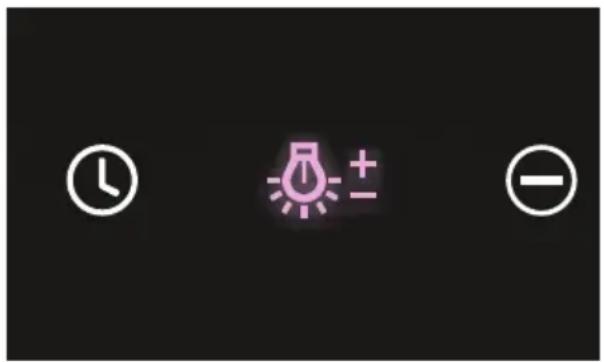
With rangehood OFF, press and hold Light button until adjacent buttons flash red for WARM or white for COLD.
Press again to switch between options. To confirm, press and hold until flashing stops.
You can also change colour temperature via the app.
Disconnect the product from the power source before undertaking any cleaning. Clean your rangehood regularly using a mild, liquid detergent and a clean soft cloth to avoid a build-up of grease. Avoid the use of corrosive chemicals, abrasive cleaning products, hard brushes and steel wool pads. In areas of high humidity or coastal environments, cleaning should be carried out more frequently.
Do not operate the hood without filters in place.
Aluminium filters
- Clean the filters at least once a month. Filters may need to be cleaned more frequently depending on the cooking methods used and frequency of use.
- Aluminium filters should be removed and cleaned with hot soapy water or in a dishwasher.
- If washed in a dishwasher, the filter should be placed in an upright position to prevent food from falling on them.
• After rinsing and drying, refit the filters.
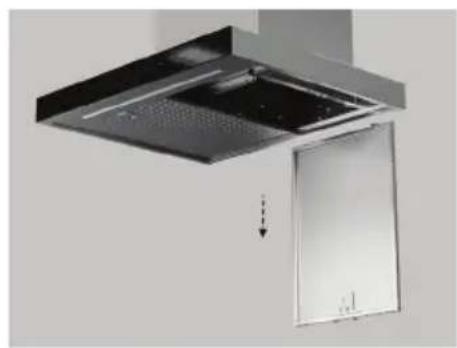
Removing the aluminium filters
①
natural_image
Exterior view of a modern office building (no signage)Pull the catch and tilt the filter downwards until vertical, then lift the filter up to disengage it from the supports.
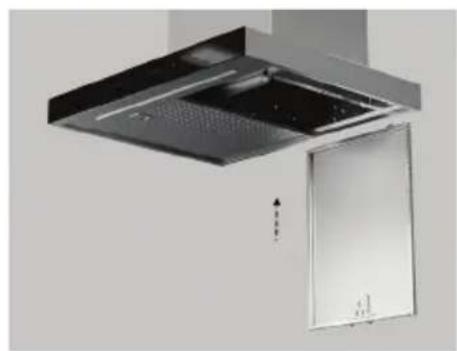
Replacing the aluminium filters
②
natural_image
Exterior view of a modern kitchen ventilation duct with ventilation grilles and a door (no text or symbols visible)Hook the vertical filter onto the slots at the rear of the cooker hood. Lift the filter up until the clips fully engage.
Carbon filters (some models only)
Carbon filters are for use in recirculating mode. They are disposable and must be replaced at least every three months to ensure the performance of the rangehood. In the event of a fire, grease-laden filters could be flammable.
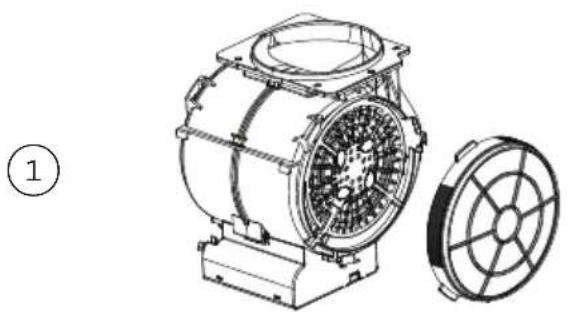
Removing the carbon filters
natural_image
Technical line drawing of an electric motor with a separate fan blade (no text or symbols)Remove the aluminium filters from the rangehood before removing the carbon filters.
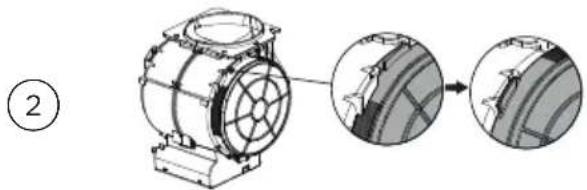
Replacing the carbon filters
natural_image
Mechanical assembly diagram showing a motor with rotating components and two close-up views of the wheel (no text or labels)Place a new carbon filter on each side of the motor inlet and turn until they clip into place. Refit aluminium filters.
Replacing LED lights
- Please contact your Fisher & Paykel trained and supported service technician. Refer to fisherpaykel.com for contact details.
External motor maintenance and cleaning (some models only)
- Before roof restoration or cleaning completely cover the outside motor system to avoid any chemical contact.
- Regularly clean the area surrounding the external motor to ensure it is not blocked by debris.
PARTS AND ACCESSORIES
| ITEM REFERENCE NUMBER | |
| LED Strip 60cm 793708 | |
| LED Strip 90cm 793709 | |
| Filter with Stainless Steel cover and anti drop hooks 793707 | |
| Carbon filter x 2 793599 | |
| Recirculation Diverter 150mm 793713 | |
| Chimney Extension 850mm 792492 | |
| Chimney extension 850mm Black Stainless Steel 793716 |
If there is a problem with your rangehood, please check the following points before contacting your local Fisher & Paykel trained and supported service technician or the Customer Care Centre.
| PROBLEM POSSIBLE CAUSE WHAT TO DO | ||
| The external motor shuts off during use | The thermal protector has shut off the motor to prevent overheating. | Turn off the rangehood. Wait approximately 60 minutes, then restart it. |
| Airflow is lower than expected | The ducting is blocked. Check the ducting and external vent for kinks or blockages. | |
| The external motor is blocked. Check the external motor is clear of debris. | ||
| Incorrect ducting used. Check that the correct ducting has been used as per the installation guide. | ||
| Ducting route is very long. Check the ducting route is as short as possible. | ||
| Rangehood is loud External | motor is installed in wrong place. | External motor should be installed as per the installation guide. |
| Incorrect ducting used in installation. | Check ducting is installed as per the installation guide. | |
| Ducting installed incorrectly. Check ducting is installed as per installation guide, with no loose sections, kinks or vibrations. | ||
| Wi-Fi button is flashing white | Rangehood is trying to reconnect to the Wi-Fi network. | Check your Wi-Fi router. |
| Rangehood is still connected to old Wi-Fi network. | Press and hold Wi-Fi button until it flashes red. Open SmartHQ App and follow instructions on screen. | |
| App not working to control rangehood | You are not connected to the internet. | Check your Wi-Fi router. |
| Link button flashing white | Rangehood is trying to reconnect to the cooktop. | Check your cooktop. |
| Excessive condensation forms on the rangehood | Using an induction cooktop. Condensation can be minimised. | |
| High ambient temperature, humidity or low natural ventilation in the room. | Refer to ‘Cooking considerations’. | |
| Height of rangehood installation. | ||
You automatically receive a 2-year Manufacturer's Warranty with the purchase of this product covering parts and labour for servicing within the country of purchase.
Fisher & Paykel undertakes to:
Repair or, at its option, replace without cost to the owner either for material or labour any part of the product, the serial number of which appears on the product, which is found to be defective within TWO YEARS of the date of purchase.
Note: this Manufacturer's Warranty is an extra benefit and does not affect your legal rights.
This Manufacturer's Warranty DOES NOT cover
A Service calls which are not related to any defect in the product. The cost of a service call will be charged if the problem is not found to be a product fault. For example:
① Correcting the installation of the product.
② Instructing you how to use the product.
③ Replacing house fuses or correcting house wiring or plumbing.
④ Correcting fault(s) caused by the user.
⑥ Correcting damage caused by pests, eg rats, cockroaches, etc
⑦ Replacement light bulbs.
⑤ Noise or vibration that is considered normal, eg drain/fan sounds, refrigeration noises or user warning beeps.
⑧ Defects caused by factors other than:
① Normal domestic use; or
② Use in accordance with the product's user guide.
© Defects to the product caused by accident, neglect, misuse or ‘act of God’.
The cost of repairs carried out by non-trained and supported service technicians or the cost of correcting such repairs.
E Normal recommended maintenance as set out in the product's user guide.
⑤ Repairs when the appliance has been dismantled, repaired or serviced by other than a Fisher & Paykel trained and supported service technician or the selling dealer.
⑥ Pick-up and delivery.
Transportation or travelling costs involved in the repair when the product is installed outside the Fisher & Paykel trained and supported service technician's normal service area.
Nothing in this Manufacturer's Warranty is intended to, or does, limit any rights you may have under law to recover the costs of inspecting or returning the goods to us.
This product has been designed for use in a normal domestic (residential) environment. This product is not designed for commercial use (whatsoever). Any commercial use by a customer will affect this product's Manufacturer's Warranty.
Service under this Manufacturer's Warranty must be provided by a Fisher & Paykel trained and supported service technician (refer to the ‘Customer Care’ section at the back of this book). Such service shall be provided during normal business hours. This Manufacturer's Warranty certificate should be shown when making any claim.
For Australian Customers
This Manufacturer's Warranty is an extra benefit and does not affect your legal rights. Our goods come with guarantees that cannot be excluded under the Australian Consumer Law. You are entitled to a replacement or refund for a major failure and for compensation for any other reasonably foreseeable loss or damage.
You are also entitled to have the goods repaired or replaced if the goods fail to be of acceptable quality and the failure does not amount to a major failure.
Please keep this user guide in a safe place.
Before you call for service or assistance
Check the things you can do yourself. Refer to your user guide and check that:
① Your product is correctly installed.
② You are familiar with its normal operation.
If after checking these points you still need assistance or parts, please refer to your nearest Fisher & Paykel trained and supported service technician, Customer Care, or contact us through our local website listed on the back cover.
In New Zealand if you need assistance\*
Call your Fisher & Paykel retailer who is trained to provide information on your appliance, or if we can be of any further help, contact our Customer Care Centre.
Toll free: 0800 FP CARE or 0800 372 273
Fax: (09) 273 0656
Website: fisherpaykel.com
Postal address: Fisher & Paykel Appliances Ltd, PO Box 58550, Botany, Auckland 2163
If you need service\*
Fisher & Paykel has a network of Fisher & Paykel trained and supported service technicians that can carry out any service necessary on your appliance. Our Customer Care Centre can recommend a Fisher & Paykel trained and supported service technician in your area.
In Australia if you need assistance\*
Call the Fisher & Paykel Customer Care Centre and talk to one of our Customer Care Consultants.
Toll free: 1300 650 590
Fax: (07) 3826 9298
Website: fisherpaykel.com
Postal address: Fisher & Paykel Appliances Ltd, PO Box 798, Cleveland QLD 4163
If you need service\*
Fisher & Paykel has a network of Fisher & Paykel trained and supported service technicians that can carry out any service necessary on your appliance. Our Customer Care Centre can recommend a Fisher & Paykel trained and supported service technician in your area.
For rest of the world\*
Call the Fisher & Paykel retailer/dealer from whom you purchased the product. They are trained to provide information on your appliance. If we can be of any further help, contact use on:
Phone: +64 9 273 0660
Fax: +64 9 273 0580
Website: fisherpaykel.com
Postal address: Fisher & Paykel Appliances Ltd, PO Box 58550, Botany,
Auckland 2163, New Zealand.
*If you call, write or contact our website please provide:
your name and address, model number, serial number, date of purchase and a complete description of the problem. This information is needed in order to better respond to your request for assistance.
Product details can be found on the inside of the chassis.
The filter needs to be removed to be able to see them.
Registration
Register your product with us so we can provide you with the best service possible.
To register your product visit our website: fisherpaykel.com/register
Complete and keep for safe reference:
Model
Serial No.
Purchase Date ____
Purchaser
Dealer
Suburb
Town ____
Country ____
FISHERPAYKEL.COM
© Fisher & Paykel Appliances 2023. All rights reserved.
The models shown in this guide may not be available in all markets and are subject to change at any time.
The product specifications in this guide apply to the specific products and models described at the date of issue. Under our policy of continuous product improvement, these specifications may change at any time.
For current details about model and specification availability in your country, please go to our website or contact your local Fisher & Paykel dealer.
- WARNING!
- General
- Maintenance
- Induction
- Reducing condensation
- Gas
- Optimising performance
- Control panel
- Getting started
- On your mobile device:
- Connecting to your home Wi-Fi
- Disconnecting from your home Wi-Fi
- Aluminium filters
- Removing the aluminium filters
- Replacing the aluminium filters
- Carbon filters (some models only)
- Removing the carbon filters
- Replacing the carbon filters
- Replacing LED lights
- External motor maintenance and cleaning (some models only)
- Fisher & Paykel undertakes to:
- This Manufacturer's Warranty DOES NOT cover
- For Australian Customers
- Before you call for service or assistance
- In New Zealand if you need assistance\*
- If you need service\*
- In Australia if you need assistance\*
- For rest of the world\*
- Registration
- FISHERPAYKEL.COM
Brand : Fisher & Paykel
Model : HC90DCBB4
Category : Household Fan