
BF21APF - Household Fan Stirling - Free user manual and instructions
Find the device manual for free BF21APF Stirling in PDF.


| Product Type | Bladeless Fan with Purifier & Wi-Fi Control |
| Model Number | BF21APF |
| Brand | Stirling |
| Dimensions (approx.) | 310 x 230 x 592 mm |
| Weight (approx.) | 2.9 kg |
| Power Consumption | 35 W (24 V) |
| AC Adaptor Input | 100–240 V~ 50/60 Hz 1.5 A max. |
| AC Adaptor Output | 36 W, 24 V |
| Airflow Speeds | 9 speed levels |
| Oscillation Angle | 80° left and right |
| Tilt Adjustment | Up to 15° front/back |
| Timer Range | 1–8 hours |
| Filter Type | H13 HEPA filter (captures 99.95% of fine particles) |
| Filter Replacement Interval | After 720 hours of operation (indicated by display) |
| Wi-Fi Compatibility | IEEE 802.11 b/g/n, 2.4 GHz band |
| Smartphone App | STIRLING® App (Android 5.0+ / iOS 9.0+) |
| Remote Control Battery | CR2025 3V coin cell (secured with screw) |
| Warranty | 3 Years |
| Cleaning | Wipe with soft dry cloth; clean air inlets/outlets with soft brush |
| Safety Features | Double insulation (Class II); no earth connection required; RCD recommended |
| Spare Parts Available | Remote control and HEPA filter (contact after sales support) |
| Intended Use | Indoor household only; not for commercial, industrial, or outdoor use |
Frequently Asked Questions - BF21APF Stirling
User questions about BF21APF Stirling
0 question about this device. Answer the ones you know or ask your own.
Ask a new question about this device
Download the instructions for your Household Fan in PDF format for free! Find your manual BF21APF - Stirling and take your electronic device back in hand. On this page are published all the documents necessary for the use of your device. BF21APF by Stirling.
USER MANUAL BF21APF Stirling
natural_image
Black STIRLING remote control device with curved handle and ventilation grille (no text or symbols visible on body)Bladeless Fan with Purifier & Wi-Fi Control
Model Number BF21APF
INSTRUCTION MANUAL
Welcome
Congratulations on choosing to buy a STIRLING® product.
All products brought to you by STIRLING ® are manufactured to the highest standards of performance and safety and, as part of our philosophy of customer service and satisfaction, are backed by our comprehensive 3 Year Warranty. We hope you will enjoy using your purchase for many years to come.
Contents
02 Welcome
04 Warranty Details
05 General Safety Instructions
08 Product Overview
09 Getting Started
11 Instructions
15 Wi-Fi Control
23 Frequently Asked Questions
24 Other Useful Information
27 Repair and Refurbished Goods or Parts Notice


STIRLING®
Bladeless Fan with Purifier & Wi-Fi Control
Warranty Details
REGISTER YOUR PURCHASE AT www.aldi.com.au/en/about-aldi/product-registration/ TO KEEP UP-TO-DATE WITH IMPORTANT PRODUCT INFORMATION
The product is guaranteed to be free from defects in workmanship and parts for a period of 36 months from the date of purchase. Defects that occur within this warranty period, under normal use and care, will be repaired, replaced or refunded at our discretion. The benefits conferred by this warranty are in addition to all rights and remedies in respect of the product that the consumer has under the Competition and Consumer Act 2010 and similar state and territory laws.
Our goods come with guarantees that cannot be excluded under the Australian Consumer Law. You are entitled to a replacement or refund for a major failure and to compensation for any other reasonably foreseeable loss or damage. You are also entitled to have the goods repaired or replaced if the goods fail to be of acceptable quality and the failure does not amount to a major failure.

General Safety Instructions
IMPORTANT SAFETY INSTRUCTIONS READ CAREFULLY AND KEEP FOR FUTURE REFERENCE
Read this manual thoroughly before first use, even if you are familiar with this type of product. The safety precautions enclosed herein reduce the risk of fire, electric shock and injury when correctly adhered to. Keep the manual in a safe place for future reference, along with the completed warranty card, purchase receipt and carton. If applicable, pass these instructions on to the next owner of the appliance.
Always follow basic safety precautions and accident prevention measures when using an electrical appliance, including the following:
Electrical safety and cord handling
- Voltage: Ensure your outlet voltage and circuit frequency correspond to the voltage stated on the rating label. If this is not the case, do not use the fan.
- Separate outlet: Always plug the AC adaptor straight into a separate electrical outlet; do not use a multi-purpose socket for simultaneous use with other electrical devices.
- Water: To protect against fire and electric shock, do not immerse the AC adaptor, cord, plug or the fan itself in water or other liquid, or expose the electrical connections to water. Ensure your hands are dry before handling the plug or switching on the fan. Do not use the fan outdoors or on wet surfaces. Protect it from liquid spills.
- Damage: Check the power cord regularly for visible damage. If the adaptor cord is damaged, it must be replaced by the manufacturer, its authorised service agent or appropriately qualified personnel in order to avoid a hazard.
WARNING! Do not pick up or operate the fan if the AC adaptor, cord, plug or housing is damaged, or after it malfunctions or has been dropped or damaged in any manner. In case of damage, contact our after sales support centre. - Protect the adaptor and power cord:
- Do not operate the fan with the AC adaptor's power cord coiled up; always fully unwind.
- Do not twist or kink the cord or let it touch heated surfaces or sharp edges.
- Do not allow the cord to hang over the edge of a table or bench.
- Do not put any stress on the cord where it connects to the product.
- Never carry the fan by the cord.
- Arrange the cord away from any traffic area so no one will trip over it.
- Do not run the cord under carpeting or cover it with rugs or runners. In the event of danger, the plug must be quickly and easily accessible.
General Safety Instructions (Cont.)
- WARNING! No extension cord, no timer: Do not use this fan with an extension cord, plug adaptor, external timer or separate speed control device.
- Connection: To connect the fan to the power supply, insert the AC connector into the socket at the back of the appliance, then insert the power plug firmly into an appropriate electrical outlet.
- Disconnection: Unplug the fan from the power outlet when it is not in use and before cleaning, servicing, moving or storing the appliance. Grasp the plug and remove it from the outlet, do not pull the cord when disconnecting.
- RCD: Unless your home is already fitted with a residual current device (safety switch), we recommend installing an RCD with a rated residual operating current not exceeding 30 mA to provide additional safety protection when using electrical appliances. See your electrician for professional advice.
Usage conditions and restrictions
- Domestic use only: This appliance is intended for indoor household use only. It is not suitable for commercial, industrial or outdoor use. Do not use it for anything other than its intended purpose, and only use it as described in this manual. Any other use may cause fire, electric shock or injury.
• No clothes drying: Do not use this fan as a driver.
• No outdoor use: Do not use the fan outdoors or on a wet surface. - Attachments: The use of accessory attachments not recommended by the appliance distributor may result in fire, electric shock or personal injury.
- Usage restriction: This fan is not intended for use by persons (including children) with reduced physical, sensory or mental capabilities, or lack of experience and knowledge, unless they have been given supervision or instruction concerning use of the appliance by a person responsible for their safety.
- Children: This fan is not a toy. Supervise children to ensure they do not play with it. Close supervision is necessary when any appliance is used by or near children.
- WARNING! Do not leave unattended during use. Always switch it off and unplug when not in use, if left unattended and before cleaning and storing.
- Location: Place the fan on a dry, flat, stable surface to avoid overturning. Do not place it on an inclined or soft surface.
- Clearances: Do not place any objects within 30 cm of the air outlet, otherwise the fan's performance will be impaired.
General Safety Instructions (Cont.)
- Airflow openings: Ensure nothing is blocking the airflow outlet and air inlet. Do not insert foreign objects into any opening as this may cause electric shock and/or a fire hazard. Make sure that the ventilation openings are free of dust, lint, hair and other obstacles that could impair the airflow.
-
WARNING! DO NOT use the fan in the following areas:
-
near an open flame, a hot burner, oven or near other sources of high heat
- on a soft surface (such as carpet) or where it may tip over during use
- outdoors or in areas of high humidity without suitable ventilation (such as in a bathroom, laundry area, near a sink, washer, pool or any source of water)
- near curtains or drapes as they may be sucked into the fan and cause a hazard
-
in areas where paint, petrol, etc. is stored and there is a risk of explosion or fire from flammable gases, or in areas where substances are being sprayed.
-
CAUTION! Personal safety: Keep hair and loose clothing well away from the fan when it is in use.
- Cleaning: Do not use an air cleaner or similar product right next to the fan. Do not use any cleaning agents or lubricants on the fan. Always pull out the power plug before cleaning, transporting and servicing the fan.
- Misuse of the product can result in personal injury or damage to property. We accept no liability for any damages or personal injury caused by misuse of the product and/or failure to follow these instructions.
Responsible disposal


Packaging materials are recyclable. Please dispose of them responsibly for recycling.
At the end of its working life, make the appliance unserviceable by unplugging it from the power outlet and cutting the power cord.
Do not throw this appliance out with your household waste. Electrical and electronic products contain substances that can have a detrimental effect on the environment and human health if disposed of inappropriately. Observe any local regulations regarding the disposal of electrical consumer goods and dispose of it appropriately for recycling.
Contact your local authorities for advice on recycling facilities in your area. Or find recycling scheme services listed on Planet Ark's website at www.recyclingnearyou.com.au, or call Planet Ark on 1300 733 712.
Product Overview
Scope of delivery
Bladeless fan with purifier
1 Air duct
2 Air outlet
3 Top cover of the air purifier filter
4 Air inlet
5 Base
6 DC socket (at the back, not visible here)
7 Touch screen button / LED display / signal receiver
8 Fan housing
Accessories
9 Remote control
10 AC adaptor and cord
11 HEPA filter
Documentation (not shown)
Instruction manual Quick start guide Warranty certificate

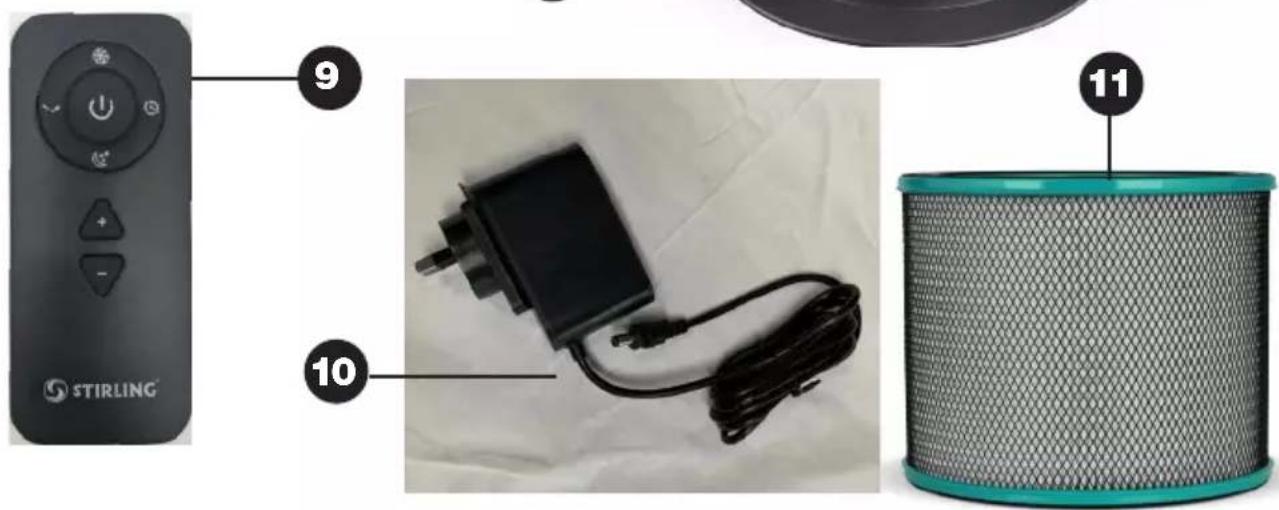
NOTE: Due to continued product improvement, images and illustrations in this manual may vary slightly from the product purchased. All images in this manual are for reference purposes only. Parts are not necessarily pictured to scale.
Getting Started
Before first use
- Unpacking: This product has been packaged to protect it against transportation damage. Unpack the appliance and keep the original packaging carton and materials in a safe place. It will help prevent any damage if the product needs to be transported in the future, and you can use it to store the appliance when it is not in use. In the event that the packaging is to be disposed of, please recycle it where possible.
- Packaging disposal: Plastic wrapping can be a suffocation hazard for babies and young children, so ensure all packaging materials are out of their reach and disposed of safely.
- Inspection: Unwind the cord of the AC adaptor to its full length and inspect it for damage. Do not use the appliance if the appliance or the adaptor has been damaged or is not working properly. In case of damage, please contact our after sales support centre for advice on examination, repair or return of the product.
- Documentation: Make sure you have read and understood all instructions and warnings in this manual. Refer to the product overview (opposite) and parts illustrations throughout this manual to familiarise yourself with the product and identify all parts. Pay particular attention to the safety instructions on the previous pages.
- Assembly: The fan is equipped with an air-purifying HEPA filter, which is supplied separately for installation into the appliance housing before operation. Installation instructions are provided on the next page.
- Remote control: The fan comes with a remote control, which is powered by a CR2025 3V coin cell (contained inside the remote control). Before use, please pull the plastic insulation film out from the back side of the remote control. See page 25 for how to insert a new coin cell when the one supplied is depleted.
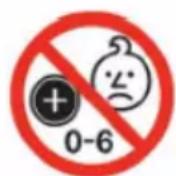
DANGER
if swallowed
WARNING: KEEP OUT OF REACH OF CHILDREN!
The remote control contains a coin/button cell battery inside. Keep batteries out of reach of children. Swallowing can lead to chemical burns, perforation of soft tissue and death. Severe burns can occur within 2 hours of ingestion.
If swallowed, immediately call the 24-hour Poisons Information Centre on 13 11 26 for fast expert advice. Or go straight to a hospital emergency room.
Dispose of used batteries immediately.
This product has been designed so that the coin/button cell battery is not accessible to young children, as the battery compartment cover is secured with a screw or mechanical fastener. Always ensure that the compartment is secured before use.
Getting Started (Cont.)
Installing the filter into the fan
This bladeless fan with purifier is equipped with an air-purifying H13 HEPA filter, which captures 99.95% of fine air-polluting particles. Before using the fan you must unwrap the filter and install it in its proper place in the fan housing.
- Take the filter out of the protective plastic bag and discard the bag safely.
- To open the top cover, push the wind outlet gently to the back—it can be tilted up to 15 degrees to the front and back, but not more. Place your hand on the top cover, push down firmly and turn the cover slightly in anticlockwise direction (to the left) until it snaps open (Fig. 1).
- To attach the filter to the top cover, place the top cover upside down on a sturdy surface. Place the filter in the grooves, then push the filter down firmly with both hands until you hear click into place (Fig. 2).
- To install the filter, place the filter with the top cover into the housing (Fig. 3). Turn it loosely until the curved edges almost line up, then press down firmly and turn the cover in clockwise direction (to the right) until it locks securely into place.
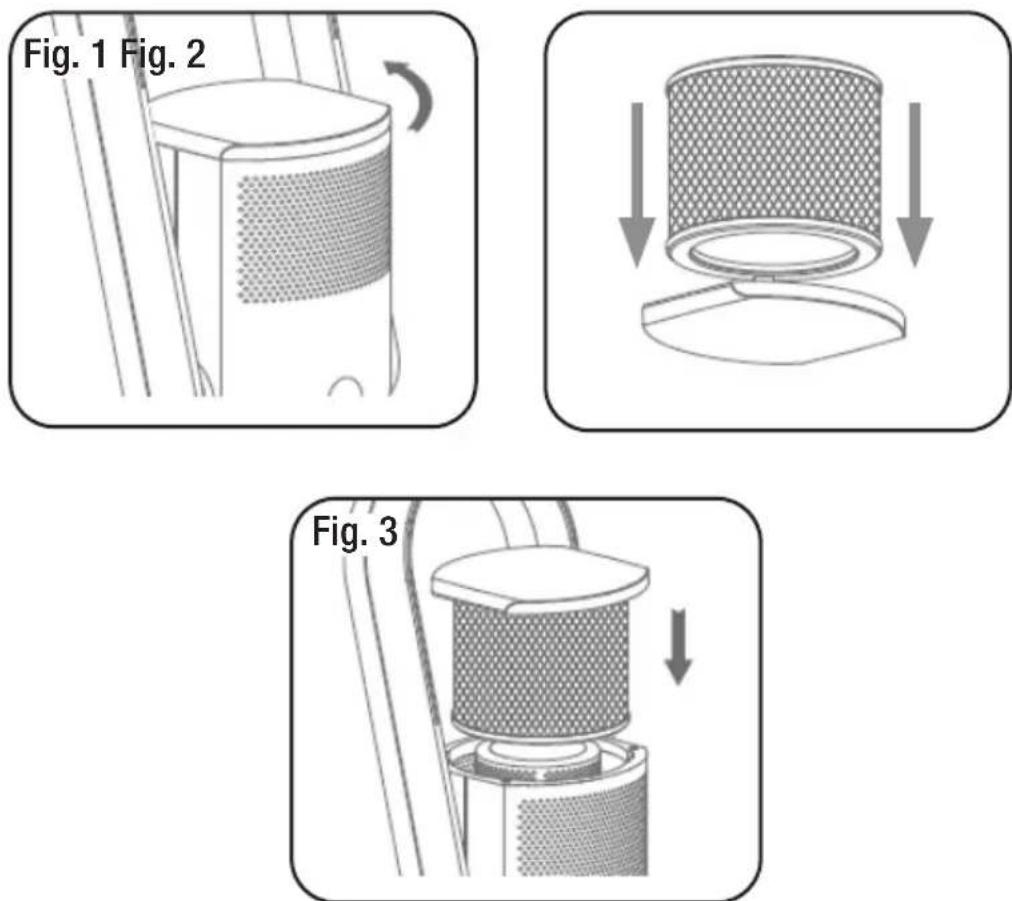
Your new bladeless fan with purifier is now ready for use.
Instructions
Location
Place the fan on a dry, flat, stable surface. Do not place it on an inclined or soft surface to avoid damage or malfunctions caused by the fan tipping over.
Avoid blocking the air inlet when using the fan. Do not place it near curtains or similar to avoid objects blocking the air inlet, which could impair operation of the fan (Fig. 4).
Do not place any objects within 30 cm of the air outlet, otherwise the fan's performance will be impaired.
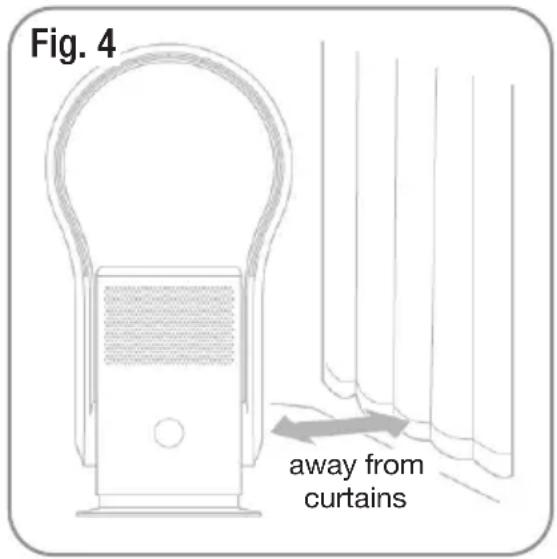
Connection
Insert the appliance plug of the AC adaptor in the DC socket at the back of the fan body. Then plug the power plug into an appropriate electrical outlet and switch on the power to the outlet. The fan will enter standby mode and the LED display illuminates.
Remote control preparation
The remote control for the bladeless fan is powered by a CR2025 coin cell (contained inside the remote control). Before use, make sure you have removed the plastic insulation film from the back side of the remote control.
When using the remote control, point it at the signal receiver at the front of the fan to maximise the remote control signal (Fig. 5).
NOTE: This fan may respond to the remote control of other devices, and other devices may respond to this fan's remote control. This is due to the overlapping frequencies of the remote control. It is not a quality problem in the product itself. To avoid misuse, keep the remote control away from other electrical devices during operation.

Instructions (Cont.)
Remote control operation (Fig. 6)

POWER:
Turn the fan on or to standby

BOOST mode:
Maximum power, strong airflow

SLEEP mode:
Soft and smooth airflow


SWING:
Start and stop oscillation

INCREASE AIRFLOW /
DECREASE AIRFLOW:
9 speed levels to choose from

TIMER:
1–8 hours of timed shut-down

Press the POWER button to switch the device on. When the fan is operating, press the button to set it to standby.

Press the BOOST mode button to activate strong airflow at maximum power. The display will show "H" and the wind strength will increase. Press the button again to exit BOOST mode. (You can also exit this mode by pressing the [ + ] or [ - ] button.)

Press the SLEEP mode button to activate soft and smooth airflow. The display will show "L" and the wind strength is reduced. Press the button again to exit SLEEP mode. (You can also exit this mode by pressing the [ + ] or [ - ] button.)

Press the SWING button to start and stop oscillation. The fan will start oscillating 80irc left and right. Press the button again to stop oscillation.

Press the [ + ] button to increase the air volume. Press the [ - ] button to decrease the air volume. There are 9 speed settings.

Press the TIMER button to set the device to turn off after 1 to 8 hours. The LED display will show the number of hours set and the dot is flashing. You can still use other functions. To cancel the timer, switch off the appliance.
Instructions (Cont.)
Setting basic functions without the remote control
You can also use the touch screen button at the front of the fan housing to switch the fan on or off and set the air volume or oscillation.
Switching on and off
Connect the power supply, the LED display will light up and the device will enter standby mode.
To switch on the fan, press the touch screen button on the fan body. The unit will emit a short beep sound and start operation.
To switch off the fan, press and hold the touch screen button on the fan body until the unit emits two short beep sounds and stops operation.
Setting the air volume
When the fan is operating, press the touch screen button on the fan body to adjust the air volume from 1 to 9.
Oscillation
When the fan is operating, press and hold the touch screen button on the fan body for one second. The buzzer will beep once and the fan will start oscillating 80irc left and right.
Press and hold the touch screen button until the buzzer beeps once and the fan stops oscillating.
Adjusting the tilt angle
The fan's wind outlet can be slightly tilted to direct the airflow in the desired direction.
Make sure the fan has stopped operation. Holding the fan body with one hand, adjust the wind outlet by up to 15irc to either side (Fig. 7).
CAUTION!
- Only adjust the tilt angle after the fan has stopped operating.
- Do not tilt the wind outlet more than it is intended to. Doing so will damage the fan.
Fig. 7

natural_image
Simple line drawing of a vertical cylindrical object mounted on a base, with no text or symbols present.
natural_image
Pure diagram of a vertical cylindrical object with internal structure and directional arrows, no text or symbols present.
natural_image
Simple line drawing of a U-shaped tube mounted on a stand (no text or symbols)Instructions (Cont.)
Filter replacement reminder
The fan has a memory function which records the number of hours of operation. After a total of 720 hours of operation, the display lights up when the unit is switched on, the buzzer sounds 5 times and after 5 seconds, the display shows a vertical row of lines (Fig. 8). This is a reminder for you to replace the air-purifying HEPA filter.

Replacement filters are available from our after sales support centre. Please use the details at the bottom of the page to contact us when purchasing replacement filters.
For filter replacement instructions, please refer to the instructions on page 10 of this manual.
After replacing the filter, press and hold the POWER button on the remote control for 5 seconds to clear the alarm and reset the operating time.
Wi-Fi Control
This STIRLING® bladeless fan with purifier features Wi-Fi technology, which enables you to control the appliance remotely from wherever you are—at work, at play or on the go—so that on your arrival at home the room temperature is comfortable. The fan works in conjunction with your mobile device, using your home Wi-Fi network router to communicate with the fan.
Controlling the fan remotely is very easy. You will need:
- an Android smartphone or an Apple iPhone
- an internet connection at your home
- a Wi-Fi network router set up at home.
You must also have our STIRLING® App installed or updated on your smartphone or mobile device. This app is available from Google Play Store or Apple App Store.
Initial set-up
Upon installation of your new bladeless fan, or when you have changed your mobile device or wireless router, you will have to set up the communication channel between the devices. In order to do this, make sure you have the STIRLING® App installed or updated on your mobile device, your Wi-Fi router is switched on and your mobile device connected to your home Wi-Fi network.
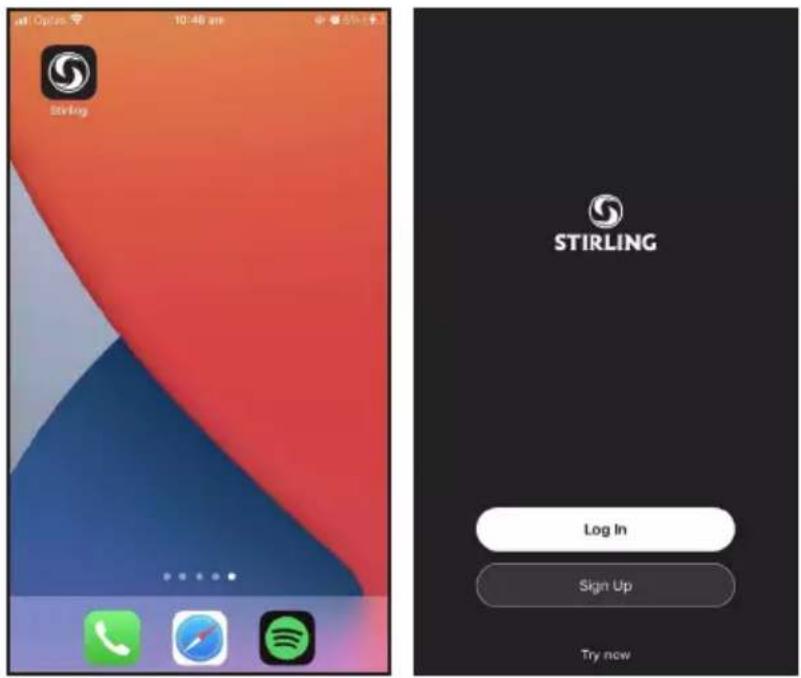
- On your mobile device, tap on the [STIRLING®] app (Fig. WF1). It will open and take you to the Login Page (Fig. WF2).
Fig. WF1 Fig. WF2
Wi-Fi Control (Cont.)
- Before you log in, please tap [Register] and register your account using your email account (Fig. WF3, WF4).
- Once you enter your email address, tap [ Get Verification Code ] and an email will be sent directly to the email account that you entered when registering. Enter this verification code.
- Now you have to enter your password and tap [Done] (Fig. WF5).
Fig. WF3

Fig. WF4

Fig. WF5

IMPORTANT!
Before you can control your fan remotely, you must reset the Wi-Fi module:
- Unplug the fan for 10 seconds, then reconnect the power supply.
- Press the touch screen button on the fan housing and hold it for 5 seconds until it beeps 3 times.
- When "F" appears and blinks on the display (WF6), the Wi-Fi module is ready for configuration with your mobile phone.
Fig. WF6

natural_image
Close-up of a black Stirling air purifier with visible grille and speaker grille (no text or symbols on body)Wi-Fi Control (Cont.)
- You will now enter the main device list. Tap [ + ] or [ Add Device ] and add your device (Fig. WF7) from the product list (Fig. WF8).

Fig. WF8Fig. WF7
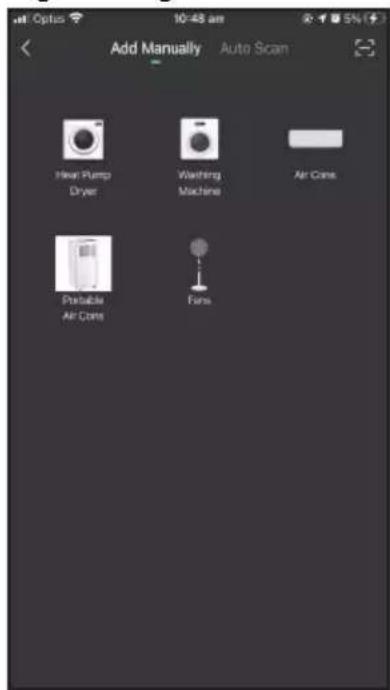
Fig. WF9

- Enter your Wi-Fi name and password, then tap [Next] (WF9).
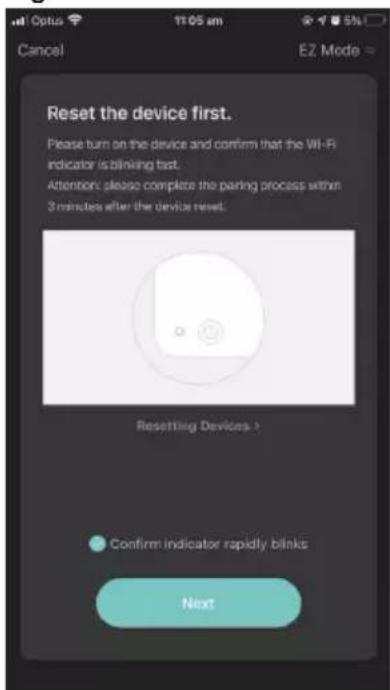
- Confirm that the Wi-Fi indicator is blinking fast, then tap [Next] (WF10).
Fig. WF10
Wi-Fi Control (Cont.)
- While the device is being added, the progress will be displayed (Fig. WF11, WF12).
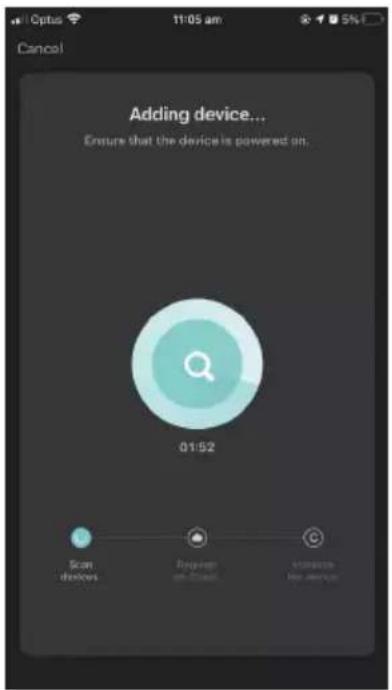
Fig. WF12Fig. WF11

- On completion, when your device has been successfully added, tap [Done]
- Click on the device name and it will take you to the device's main control page (Fig. WF13).
- Operating the fan with the STIRLING® App is self-explanatory.
Fig. WF13

Wi-Fi Control (Cont.)
- If the device is not responding and you get the following message, you can try to switch the pairing mode (Fig. WF15). Click [Switch Pairing Mode] and then follow the prompts (WF 16, WF17).
Fig. WF15

Fig. WF16 Fig. WF17


- After you have confirmed your Wi-Fi network and password, connect your mobile phone to the device's hotspot (WF18, WF19), then go back to the app and continue to add the device.
Fig. WF18
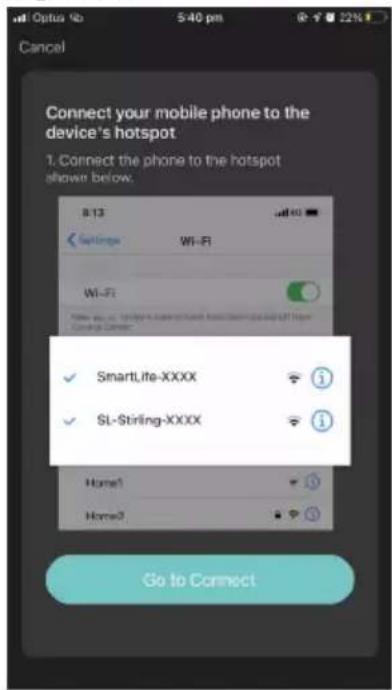
Fig. WF19

Wi-Fi Control (Cont.)
Device sharing
- The device only recognises ONE registered user. But you can share access to the device with other members of your household if they have the STIRLING® App installed and updated on their phone. To share the device, proceed as follows:
- On the device's main control page, click the edit symbol in the top right corner (WF20). Then follow the prompts (WF21, WF22, WF23).
Fig. WF20
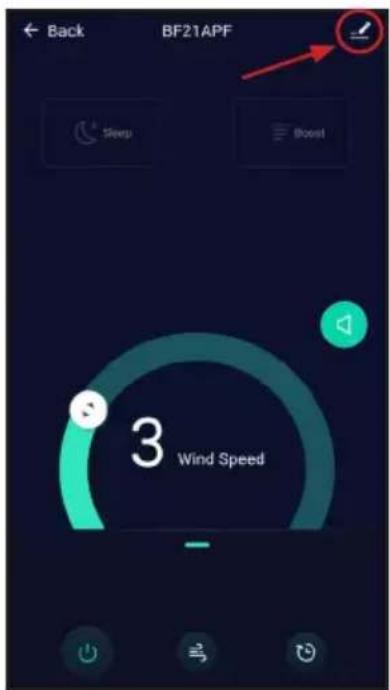
Fig. WF21

Fig. WF22

Fig. WF23

Wi-Fi Control (Cont.)
Adding the STIRLING® app to your Google Home app \*
- Open your Google Home app.
(Before you can link your STIRLING® App to your Google Home app you will have to have a Google Home account set up.)
• From the home screen of the Google Home app, tap [Add]. - Tap [ Set up device ], then tap [ Have something already set up? ] under the “Works with Google” banner.
• Using the magnifying glass icon, search for Stirling. - Tap the [Stirling] app and enter your Stirling account details and password, then tap [Sign in].
Adding the STIRLING® app to your Alexa account \*
- Before you can link your STIRLING ® app to your Alexa account you will have to have an Alexa account set up.
- From the home screen of the Alexa app, tap the three bars in the top left hand corner. Tap Skills & Games, then use the magnifying glass icon to search for Stirling.
- Select the Stirling app. Ensure you have followed the steps listed, then select [Confirmed] and tap [Next]. Enter your Stirling account details and password, then tap [Sign in].
* These instructions for adding the STIRLING® app are of a general nature only. Detailed steps or specific messages from your Google Home or Alexa account may vary depending on the version.
Smartphone and Wi-Fi specification requirements
Minimum smartphone specifications
Android 5.0 version or later
IOS 9.0 version or later
Wireless network requirements of the Wi-Fi module
| Frequency band | 2.412 GHz to 2.484 GHz |
| Wi-Fi standard | IEEE 802.11 b/g/n (channels 1 to 14) |
| Data transmission rate | 802.11b: 1, 2, 5.5 or 11 (Mbits/s)802.11g: 6, 9, 12, 18, 24, 36, 48 or 54 (Mbits/s)802.11n: HT20 MCS0 to MCS7 |
| Antenna type | PCB antenna with a gain of 2.0 dBi |
Wi-Fi Control (Cont.)
Wi-Fi troubleshooting
| Problem Possible cause and solution | |
| During the set-up, the fan cannot be configured successfully. | Check and ensure you have internet reception and your mobile phone and the fan are connected to the same Wi-Fi network. |
| Check and ensure your Wi-Fi password is correct. | |
| Check and ensure that no firewalls or other restrictions are set. | |
| Check and ensure that the router works normally — check the network requirements. | |
| Ensure that the fan, router and mobile are all on the same Wi-Fi network and within the signal range. | |
| I cannot control the fan with my mobile. | If a message is displayed to alert you to an identification failure, the fan has been reset and the mobile phone lost control permission. You need to reconnect the phone to the fan, following the set-up instructions in this manual.If after these steps you still cannot control the fan with your mobile, please delete the fan from your device list and reconnect again. |
| My mobile phone cannot find the fan. | If a message is displayed to alert you that the device is offline, please check and ensure that your fan is connected to your mains supply and power is switched on at the outlet.Also ensure that your router is connected to the mains supply and that the router and your mobile phone are properly connected to your Wi-Fi network. |
Frequently Asked Questions
If your fan fails to operate, or you experience any other problem with the appliance, check in the list of questions below for possible causes and solutions to common problems. Many problems can easily be solved without the need for a service call.
If the suggestions below do not help you solve the problem, please contact our after sales support centre for advice or to arrange a service. Before phoning for a service, please ensure that your fan is properly assembled and connected to your power supply.
- The fan does not work although it is properly connected and the outlet is working.
Check and ensure that the air inlet and air outlet areas are clean. Use a clean and dry brush (or a vacuum cleaner soft brush attachment) to clean any dust or dirt off the openings, if necessary. Also ensure that there is enough space around the fan and that nothing is blocking the air inlet and outlet. If it still fails to operate, please contact our after sales support centre.
- I have misplaced the remote control. Can I still operate the fan?
Yes, you can still switch the fan on and off and set the air volume and oscillation by using the touch screen button on the fan body; please refer to the instructions on page 13. You will need a remote control for setting operation modes and the timer. To purchase a new remote control, please contact after sales support centre.
- I cannot get it to work with my phone, although I have the STIRLING® app installed and have paired the fan successfully.
Please refer to the Wi-Fi Control section on the previous pages for detailed pairing instructions and Wi-Fi-specific FAQs.
- The fan has stopped working and the LED screen shows a row of lines.
This is a reminder for you to replace the filter. It indicates that the unit has been running for 720 hours and the filter needs to be replaced in order to maintain the unit's air-purification effect. HEPA filters are available from our after sales support centre. Please refer to page 10 for filter replacement instructions.
- The fan's LED screen shows "F" when I want to switch it on.
You have held the button for too long (5 seconds) and reset the Wi-Fi module. To switch the fan on, press the touch screen button only briefly.
Other Useful Information
WARNING!
- Before cleaning, maintenance or moving the fan, switch off the fan and disconnect it from the power source.
- Do not immerse the fan in water or other liquids. Do not spray it with liquids. Do not allow water to drip on or into the fan motor housing.
- Never use petrol, solvents, harsh detergents, or abrasive or alkaline cleaners on the fan.
Cleaning and maintenance
- Surface cleaning: Clean your fan periodically by wiping it with a soft, dry cloth. If required, use a damp cloth moistened with water and a little mild detergent, then dry thoroughly.
- Air inlet and air outlet: Clean the air inlet and outlet by lightly running a soft brush vacuum cleaner nozzle over the openings to remove any dust or dirt that may have accumulated inside or on the unit. Alternatively, use a soft, dry brush (Fig. 9). Too much dust in the openings may affect the fan's performance.
- Remote control: Gently wipe the surface of the remote control with a soft, dry cloth.
- Adaptor and power plug: Gently wipe the surface of the AC adaptor and power plug with a soft, dry cloth.

natural_image
Illustration of a handheld device with a handle and screen, labeled 'Fig. 9' (no text or symbols on the device itself)Storage
- When storing your bladeless fan in the off season, make sure to keep it in a safe, dry location, protected from dust. We recommend using the original carton for storage. Alternatively, place a plastic bag or piece of material over the top of the cleaned appliance for dust protection.
- Store the appliance in an area that is free from vibrations, direct sunlight and heating/cooling devices. Keep it out of reach of children.
- Remove the button cell from the remote control for prolonged storage. Battery removal and replacement instructions follow on the next page.
Other Useful Information (Cont.)
Battery replacement
The remote control is powered by a CR2025 3V coin cell (supplied inside). When the battery needs replacing, insert a new one of the same type and size following the instructions below:
- Unscrew the screw that secures the battery compartment (Fig. 10).
- Push the locking tab to one side (Fig. 10) and pull out the battery holder at the back side of the remote control (Fig. 11).
- Remove the old coin cell from the device and insert a new one, ensuring to match the polarity, as illustrated on the back of the remote control. Then push the battery holder back into the device.
- Reinstall the screw and tighten it to secure the battery compartment.


natural_image
Two black plastic electronic components, one with a circular lens and label '2015-18', placed on a plain surface (no text or symbols on the devices themselves)NOTE: The above photos are for reference purposes only. The appearance of the actual remote control may vary slightly.

DANGER
if swallowed
WARNING: KEEP OUT OF REACH OF CHILDREN!
The remote control contains a coin/button cell battery inside. Keep batteries out of reach of children. Swallowing can lead to chemical burns, perforation of soft tissue and death. Severe burns can occur within 2 hours of ingestion.
If swallowed, immediately call the 24-hour Poisons Information Centre on 13 11 26 for fast expert advice. Or go straight to a hospital emergency room.
Dispose of used batteries immediately.
This product has been designed so that the coin/button cell battery is not accessible to young children, as the battery compartment cover is secured with a screw or mechanical fastener. Always ensure that the compartment is secured before use.
Other Useful Information (Cont.)
Service, repair and spare parts
Except for filter replacement (please refer to page 10 and page 14), the appliance requires no maintenance and contains no other user-serviceable parts. Do not attempt to take the motor housing apart, repair or modify it.
If the appliance is damaged or working abnormally, do not operate it or attempt to repair it yourself. The appliance must only be repaired by trained personnel. Contact our after sales support centre for advice.
Our after sales support centre stocks spare remote controls and replacement HEPA filters for the bladeless fan with purifier. To purchase a part, call the centre on 1300 112 534 or email us at parts@tempo.org.
Technical specifications
| Power 35 W 24 V | --- |
| Design Bladeless fan with purifier and brushless DC motor | |
| Timer 1–8 h | |
| Dimensions (approx.) 310 x 230 x 592 mm | |
| Weight (approx.) 2.9 kg | |
| AC adaptor specifications | |
| Model FJ-SW7292401 | 500N |
| Input 100–240 V~ 50/60 Hz 1.5 A max. | |
| Rated output power 36 W, 24 V --- | |
| Protection class II | |

This marking indicates that the appliance is suitable for use in tropical climates under ambient temperatures of 18\ °C to 43\ °C .

USE ONLY WITH
SUPPLY UNIT
This marking indicates only to use this fan with the supplied adaptor.

CLASS II - DOUBLE INSULATED APPLIANCE
This symbol indicates that the appliance has been designed in such a way that it does not require a safety connection to electrical earth (ground).

The RCM Mark (Regulatory Compliance Mark) indicates that the product complies with the relevant guidelines of the ACMA as well as corresponding government requirements for the safety of electrical devices.


STIRLING®
Bladeless Fan with Purifier & Wi-Fi Control
Repair and Refurbished Goods or Parts Notice
Unfortunately, from time to time, faulty products are manufactured which need to be returned to the supplier for repair.
Please be aware that if your product is capable of retaining user-generated data (such as files stored on a computer hard drive, telephone numbers stored on a mobile telephone, songs stored on a portable media player, games saved on a games console or files stored on a USB memory stick) during the process of repair, some or all of your stored data may be lost. We recommend you save this data elsewhere prior to sending the product for repair.
You should also be aware that rather than repairing goods, we may replace them with refurbished goods of the same type or use refurbished parts in the repair process.
Please be assured though, refurbished parts or replacements are only used where they meet ALDI's stringent quality specifications.
If at any time you feel your repair is being handled unsatisfactorily, you may escalate your complaint. Please telephone us on 1300 112 534 or write to us at:
Tempo (Aust) Pty Ltd (ABN 70 106 100 252)
PO BOX 132, Frenchs Forest NSW 1640, Australia
Web Support: tempo.org/support
Tempo Help Desk: 1300 112 534 (Aust)
(Operating Hours: Mon–Sat 09:00 am to 06:00 pm AEST)


natural_image
Icon showing a person reading a document with an exclamation mark, symbolizing information review or warning (no text present)Please read the manual
It will help you get the best out of your product.
Still have questions?
Call after sales support
1300 112 534
Or visit www.tempo.org
Warranty returns
Should you for any reason need to return this product for a warranty claim, make sure to include all accessories with the product.
Product does not work?
If you encounter problems with this product, or if it fails to perform to your expectations, make sure to contact our after sales support centre on for advice.
For an electronic copy of this manual, please go to www.stirlingappliances.com.au and download a copy, or contact our after sales support centre.
Instruction Manual Revision Index
Version No Issue Date Description
V1.0 03 August 2020 Original release
V2.0 16 July 2021 2021 release
V2.1 04 August 2021 Minor amends on pg 8

- Bladeless Fan with Purifier & Wi-Fi Control
- Welcome
- Contents
- STIRLING®
- Warranty Details
- General Safety Instructions
- IMPORTANT SAFETY INSTRUCTIONS READ CAREFULLY AND KEEP FOR FUTURE REFERENCE
- Electrical safety and cord handling
- General Safety Instructions (Cont.)
- Usage conditions and restrictions
- Responsible disposal
- Product Overview
- Scope of delivery
- Bladeless fan with purifier
- Accessories
- Documentation (not shown)
- Getting Started
- Before first use
- WARNING: KEEP OUT OF REACH OF CHILDREN!
- Getting Started (Cont.)
- Installing the filter into the fan
- Instructions
- Location
- Connection
- Remote control preparation
- Instructions (Cont.)
- Remote control operation (Fig. 6)
- Setting basic functions without the remote control
- Switching on and off
- Setting the air volume
- Oscillation
- Adjusting the tilt angle
- CAUTION!
- Filter replacement reminder
- Wi-Fi Control
- Initial set-up
- Wi-Fi Control (Cont.)
- IMPORTANT!
- Device sharing
- Adding the STIRLING® app to your Google Home app \*
- Adding the STIRLING® app to your Alexa account \*
- Smartphone and Wi-Fi specification requirements
- Minimum smartphone specifications
- Frequently Asked Questions
- Other Useful Information
- WARNING!
- Cleaning and maintenance
- Storage
- Other Useful Information (Cont.)
- Battery replacement
- Service, repair and spare parts
- CLASS II - DOUBLE INSULATED APPLIANCE
- Repair and Refurbished Goods or Parts Notice
- Please read the manual
- Still have questions?
- Warranty returns
- Product does not work?
- Instruction Manual Revision Index
Brand : Stirling
Model : BF21APF
Category : Household Fan