
MCS-20P - Kitchen scale Cardinal Detecto - Free user manual and instructions
Find the device manual for free MCS-20P Cardinal Detecto in PDF.


| Product Type | Kitchen Scale |
| Brand | Cardinal Detecto |
| Model | MCS-20P |
| Capacity | 30 lb x 0.02 lb / 15 kg x 0.01 kg |
| Display | 5-digit LCD, 1.0 inch (25 mm) high |
| Power Source | Solar cell (min. 400 LUX) |
| Operating Temperature | 32 to 104°F (0 to 40°C) |
| Units | lb, kg |
| Zero Function | Yes, via Zero Button |
| Unit Switching | Press and hold Zero Button for 5 seconds |
| Solar Charge Status Indicator | Yes (■■■■ display) |
| Calibration | Via test pins (3-4) with test weight |
| Included Accessories | S-Hooks (2), Bow Assembly, Ring Assembly, Pan Bow Nuts, Wing Nuts (2), Pan |
| Cleaning Instructions | Damp soft cloth with mild detergent; avoid volatile solvents |
| Safety Precautions | Ensure adequate support, avoid shock loading, check hardware regularly |
| Installation | Hang from support strong enough to hold scale plus load |
| Lighting Requirement | Minimum 400 LUX (typical room lighting) |
| Display Annunciators | lb, kg, →○← (Zero), ■■■■ (Solar Charge Status) |
Frequently Asked Questions - MCS-20P Cardinal Detecto
User questions about MCS-20P Cardinal Detecto
0 question about this device. Answer the ones you know or ask your own.
Ask a new question about this device
Download the instructions for your Kitchen scale in PDF format for free! Find your manual MCS-20P - Cardinal Detecto and take your electronic device back in hand. On this page are published all the documents necessary for the use of your device. MCS-20P by Cardinal Detecto.
USER MANUAL MCS-20P Cardinal Detecto
natural_image
Digital balance scale measuring tomatoes in a bowl, no visible text or symbols on the scale or background.SCS30 Solar Powered Hanging Scale Operation Manual
CARDINAL SCALE MFG. CO.
8551-0967-0M Rev A
12/14
PO BOX 151 • WEBB CITY, MO 64870
PH (417) 673-4631 • FAX (417) 673-5001
www.detectoscale.com
SPECIFICATIONS
Power: Solar Cell (min. 400 LUX)
Operating Temperature: 32 to 104^ F (0 to 40^ C)
Display: Five digit, seven segment, 1.0 inch (25 mm) high LCD
Annunciators: lb, kg, →○← (Zero), ■■■■ (Solar Charge Status)
Capacity: 30lb x 0.02 lb (15kg x 0.01kg)
UNPACKING
Before beginning installation of your scale, make certain it has been received in good condition. When removing the scale from its packing, inspect it for signs of damage, such as exterior dents and scratches. Keep the carton and packing material for return shipment if it should become necessary. It is the responsibility of the purchaser to file all claims for any damages or loss incurred during transit. You should have the following items:
(1) SCS30 Scale
(2) S-Hooks
(1) Bow Assembly
(1) Ring Assembly
(2) Pan Bow Nuts
(2) Wing Nut 5/16-18
(1) Pan

natural_image
Digital balance scale with digital display, bowl, and ring (no text or symbols visible)SETUP
- Insure that the light available is adequate to power the scale (typically an average lighted room is 400 LUX. This is adequate to power the scale.
NOTE: Make sure nothing is shading the solar cell from the available light. Low lighting will result in the scale display showing I o.
- Referring to Figure No. 1, install S-Hook on top loop of scale.
- Hang scale from a support that is strong enough to support the scale PLUS the weight of the item to be weighed.
- Follow the Hanging Assembly instructions to compete the required assembly.
- The scale has been calibrated with the enclosed hanging assembly. In order to display zero, the hanging assembly must be attached.
- Scale is now ready to use.

Figure No. 1
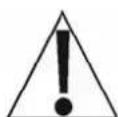
WARNING! Failure to attach the scale to a support of sufficient strength using a connector to hold the scale PLUS the weight of the item to be weighed can result in the scale coming loose and damaging the scale and/or injuring the operator and persons nearby.
HANGING ASSEMBLY
The SCS30 is shipped with a bow and pan hanging assembly. The hanging assembly is made up of four (4) main components.
S-Hook
Bow
Ring and bow attachment hardware (Pan Bow Nuts and 5/16-18 Wing Nuts)
Pan
Assemble the hanging assembly as illustrated in Figure No. 2. The hanging assembly is then attached to the lower loop on the scale. Place pan in Ring.
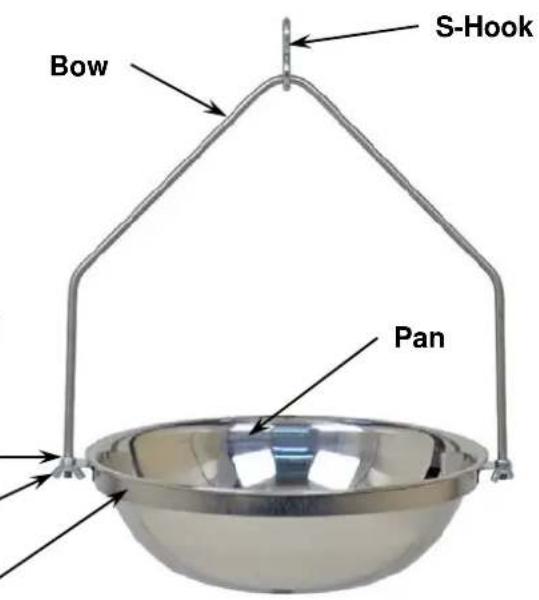
Figure No. 2
OPERATION
-
Hang scale from a secure position with minimum 400 LUX lighting level. Make sure nothing is shading the solar cell from the available light.
-
Referring to Figure No. 3, press Zero Button to zero scale.
-
To change between units (lb to kg or kg to lb), press and hold Zero Button for approximately 5 seconds.
-
Place item to be weighed in pan.
-
Display will show weight of item.
-
Remove product and press Zero Button if required before weighing next item.
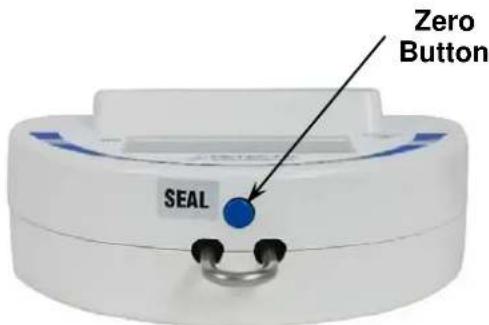
Figure No. 3
DO'S AND DON'TS
- DO hang scale from a support that is strong enough to support the weight of the scale PLUS the weight of the material to be weighed. The more rigid the support the better.
- DO ensure that the scale is not shaded from the available light.
- DO avoid shock loading the scale, i.e. do not drop heavy loads in the pan.
- DO check the hanging assembly wing nuts on a regular basis to ensure they are tight.
- DO check on a regular basis the scale's supporting hardware to ensure that it continues to provide the strength necessary to support the weight of the scale PLUS the item to be weighed.
• DO NOT spray; water directly on the scale.
• DO clean scale using a damp, soft cloth and mild detergent.
- DO NOT use acetone, alcohol, or other volatile solvents for cleaning.
CALIBRATION
NOTE: Calibration must be performed under plenty of light.
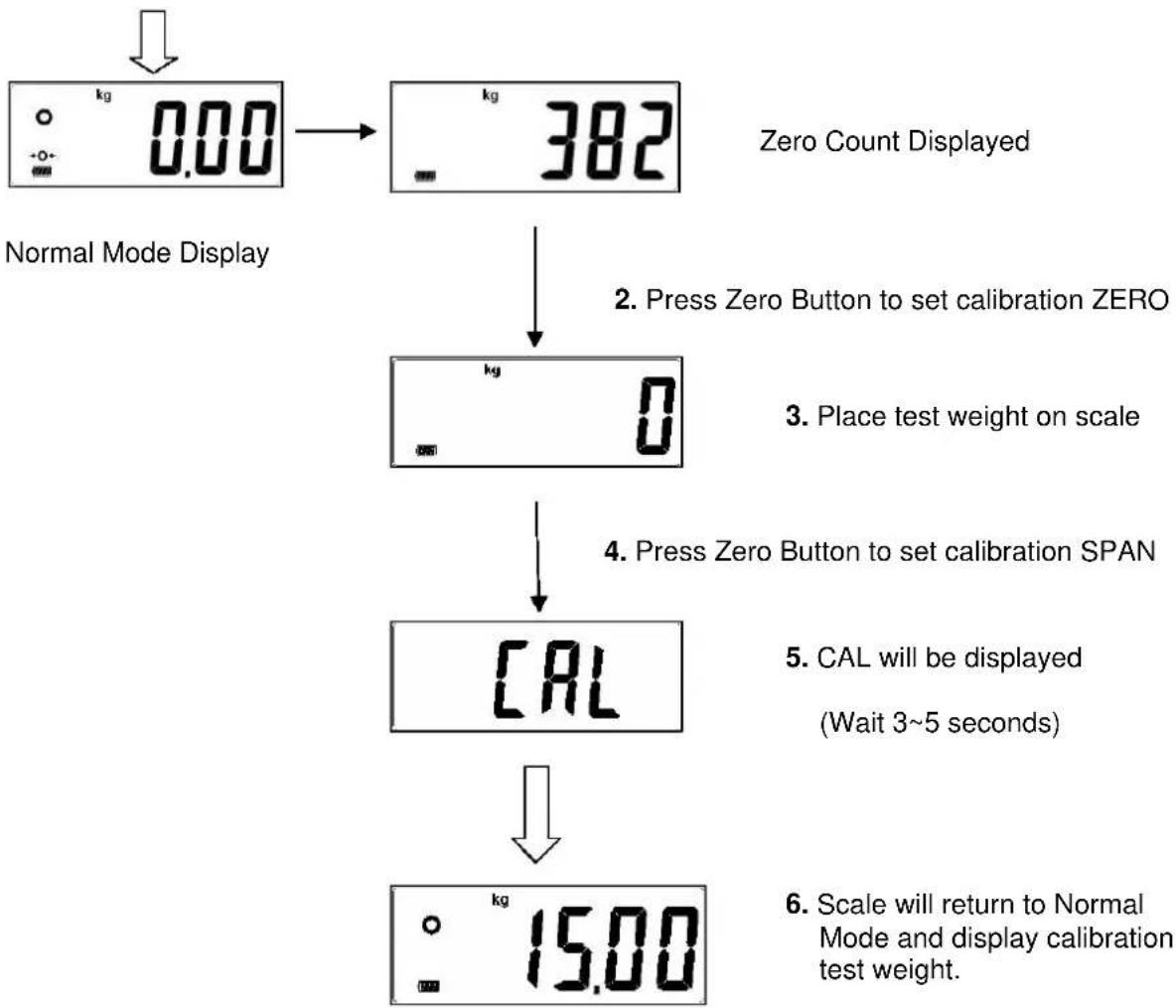
- Referring to Figure No. 4, short Test Pins 3-4 to enter calibration mode. The display will show the internal count (zero count) when in the calibration mode. (Please note "kg" or "lb" unit for selecting the calibration weight).
- Press Zero Button to set calibration ZERO.
- Place 15kg or 30lb test weight in pan and wait for scale weight to stable.
- Press Zero Button to set calibration SPAN.
- CAL will be displayed for approximately 3-5 seconds.
- After calibration is finished, scale will automatically return to Normal Mode and display will show 15kg/30lb.

Figure No. 4
- From Normal Mode Display, short Test Pins 3-4
flowchart
graph TD
    A["Normal Mode Display"] --> B["Zero Count Displayed"]
    B --> C["Press Zero Button to set calibration ZERO"]
    C --> D["Place test weight on scale"]
    D --> E["Press Zero Button to set calibration SPAN"]
    E --> F["CAL will be displayed\n(Wait 3~5 seconds)"]
    F --> G["Scale will return to Normal Mode and display calibration test weight."]

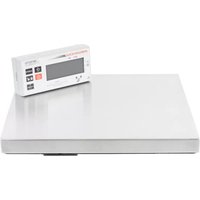
Brand : Cardinal Detecto
Model : MCS-20P
Category : Kitchen scale