
iWB63VW - Printer Elite Screens - Free user manual and instructions
Find the device manual for free iWB63VW Elite Screens in PDF.


| Brand | Elite Screens |
| Model | iWB63VW |
| Product Type | Dry-erase Whiteboard Projection Screen |
| Screen Material | VersaWhite (GREENGUARD certified) |
| Gain | 1.1 |
| Viewing Angle | 160 degrees |
| Special Coating | Anti-scratch layer for dry-erase use |
| Package Contents | Insta-DE screen, pen holder, double-sided tape, 2 whiteboard markers, 2 high-density foam erasers, 1 screw |
| Installation Method | Adhesive tape on prepared wall surface; optional professional wallpaper adhesive for commercial use |
| Recommended Cleaner | Non-alcohol based whiteboard cleaner with microfiber cloth |
| Replacement Kit | Part number ZER3 includes cleaning solution, cloth, erasers, and markers |
| Maintenance Frequency | Deep clean every 2-4 weeks with microfiber cloth and clean water |
| Commercial Use | Recommended to hire professional wallpaper installer and use stronger adhesive (e.g., Shur-Stik Heavy Duty Clay Wallcovering Adhesive) |
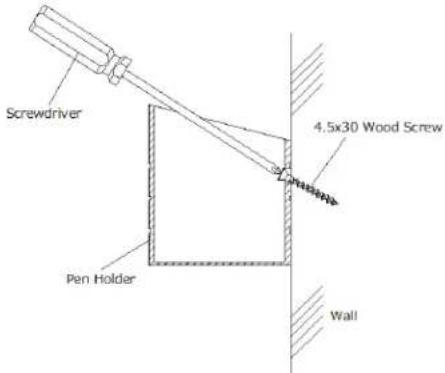
| Pen Holder Installation | Peel tape and attach to wall, or mount with included screw |
| Warranty / Support | Visit www.elitescreens.com for technical support |
Frequently Asked Questions - iWB63VW Elite Screens
User questions about iWB63VW Elite Screens
0 question about this device. Answer the ones you know or ask your own.
Ask a new question about this device
Download the instructions for your Printer in PDF format for free! Find your manual iWB63VW - Elite Screens and take your electronic device back in hand. On this page are published all the documents necessary for the use of your device. iWB63VW by Elite Screens.
USER MANUAL iWB63VW Elite Screens
natural_image
Abstract black logo design with three horizontal bars and a curved shape (no text or symbols)ELITE SCREENS
Insta-DE Series
So-padded Dry-erase Whiteboard Projecon Screen
User's Guide
Thank you for choosing the Insta-DE Series dry-erase whiteboard projection screen! Please read through this user guide before utilizing the screen. Correct usage and maintenance will ensure a long product life.
Precautionary Notes:
Before using the dry-erase function of your whiteboard screen, please make note of the following instructions to properly maintain and clean your dry-erase surface projection screen. (These Whiteboard cleaning tips are just as relevant with any dry-erase writing surface as they are with our Whiteboard-Projection Screens.)
- Only use a high density foam eraser when removing dry-erase markings from the Whiteboard screen.
- Do not use abrasive erasers as these may scratch the surface of the screen.
- Never spray the whiteboard cleaner solution onto the surface while marker writing is present and then attempt to use a high density foam eraser to remove. This will only smear the dry-erase marker ink making the surface more difficult to clean and will likely ruin the foam eraser.
- If there are any dry-erase markings left behind even after attempting to remove them using our high density erasers, spray our whiteboard cleaning solution directly onto the screen surface and use only a soft microfiber cloth to wipe-down and clean the area.
For a video demonstration, please visit: hp://www.elitescreens.com/whiteboardscreen-cleaning
If replacement cleaning accessories are needed, please visit the Whiteboard cleaning accessories section of our website at http://www.elitescreens.com/clean-whiteboard
Product Features
➢ Award winning and GREENGUARD certified VersaWhite material.
➢ 1.1 gain with 160 degree wide viewing angle.
Special anti-scratch layer to ensure long use as a dry-erase projection screen.


Application Advantages
Instantly converts flat surfaces/walls into a dry-erase whiteboard projection screen.
Includes dry-erase pens, eraser, and pen holder.
Perfect dry-erase and projection solution for today's short throw projectors.
➢ Ideal and effective instructional presentation tool in the classroom, boardroom, and training facilities.
What's in the package
Please make sure all parts listed below are included. If anything is missing please contact us immediately.
a.

b.
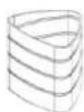
C.

d.
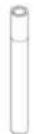
e.

f.

Notes:
- For best results and maximum product longevity, ONLY use Elite Screens high density whiteboard Eraser
- Please use a microfiber cloth and clean water to cleanse the surface every 2-4 weeks to maintain a fresh and clean projection surface.
| Parts List | QTY |
| a. Insta-DE Screen Material | 1 |
| b. Pen Holder | 1 |
| c. Double-sided tape | 1 |
| d. Whiteboard markers | 2 |
| e. Elite special high density eraser | 2 |
| f. 4.5mmx30mm Screw | 1 |
Commercial use installation recommendation
If you would like your screen to have a professional-grade finish that is flat, durable, and free from imperfections – Elite Screens strongly recommends hiring a professional wallpaper installer, and using a stronger adhesive material such as Shur-Stik Heavy Duty Clay Wallcovering Adhesive. You can purchase this product easily online, or consult with your wallpaper installer for other options.
Pre-Installation Notice:
- Make sure the surface of the wall has been properly patched, sanded, and primered.
- Remove anything from the wall that may puncture the Insta-DE material.
- Please consult with a professional wallpaper installer for further assistance. We strongly recommend two or more people for this installation.
Installation
Watch the Installation video at: www.elitescreens.com/ide-install
- Clean the location where the Insta-DE Screen will be installed.
- Measure and mark the top-right and bottom-right corner of the installation location

natural_image
Simple line drawing of a square with dashed border and label 'Wall' below (no other text or symbols)- Apply double-sided film tape all around the edges of the Insta-DE back padding.

flowchart
graph TD
    A["Double-sided tape"] --> B["Black Box"]
    B --> C["Hand holding Top Right"]
- Then, apply vertical double-sided film tape from top to bottom every 3-4 inches.
- Completely peel the first vertical tape strip and peel off a 1-inch length tape film at the top of the double-side tape on the rest of the vertical strips.

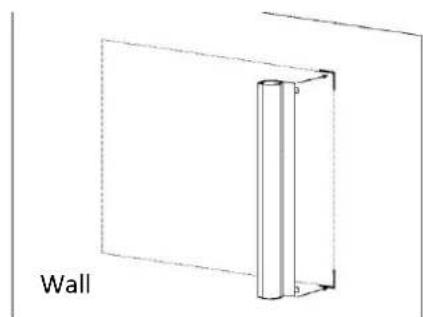
- Attach the Insta-DE Screen to the top-right and bottom-right corner of the location
natural_image
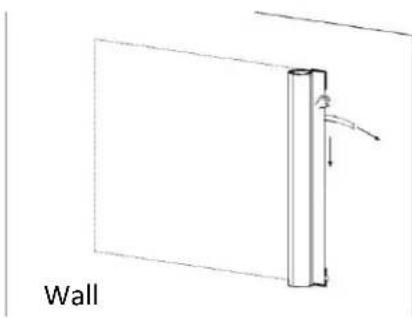
Simple line drawing of a wall with a vertical cylindrical object inside, no text or symbols present- Remove the tape film paper while unrolling the material and firmly attach the first taping line with pressure.
natural_image
Simple line drawing of a wall-mounted vertical component with an arrow indicating force or movement (no text or symbols)- Follow the taping line while unrolling the material and continue removing the tape film as the material unrolls. Continue attaching the double-sided adhesive tape until you've reached the end.

natural_image
Diagram of a wall-mounted device with a circular inset showing internal components (no text or symbols)- Unroll the material to the left and firmly attach the following taping line onto the location. Make sure that the material has completely rolled out perfectly flat.

natural_image
Simple line drawing of a vertical cylindrical object with a circular arrow indicating rotation, labeled 'Wall' at the bottom (no other text or symbols)- Repeat steps 7-9 to nish aaching the material to the wall and complete the Installaon.

Pen holder installaon
Method one: Peel the tape strip o the back of the pen holder and each the pen holder to the wall or your preferred locaon.
Method two: Install the included screw in the wall and hang the pen-holder. See diagram below for details.
Cauon:
The double-sided tape is meant to be permanent for the life of the product. It does not remove easily. Please attach very carefully to avoid having to remove the product and positioning it in a different location.
Use only the included erasers to remove and erase dry-erase markings. For a deep clean, we recommend using a non-alcohol based dry-erase board cleaner with a so microber cloth.
Elite oers a replacement kit (part number ZER3) which includes:
1 x bole of 8.45 oz cleaning soluon
1 x microber cloth
2 x high density foam erasers
2 x sets of dry-erase markers (4 total)
For more information visit www.elitescreens.com/zer3
Contact your reseller or visit shop.elitescreens.com for pricing and purchase.

For more informaon, technical support or your local Elite Screens contact,
please visit www.elitescreens.com
Brand : Elite Screens
Model : iWB63VW
Category : Printer