
Diva-Lite 31 LED - Video Lighting Kino Flo - Free user manual and instructions
Find the device manual for free Diva-Lite 31 LED Kino Flo in PDF.


| Product Type | Professional LED Video Light |
| Model | Diva-Lite 31 LED |
| Brand | Kino Flo |
| Mounting Options | Center Mount (DIV-L31XCU) or Yoke Mount (DIV-L31XYU) |
| Weight (Center Mount) | 14 lb (6.5 kg) |
| Weight (Yoke Mount) | 14.5 lb (6.5 kg) |
| Dimensions (Center Mount) | 37.5 x 4.5 x 9.5 in (95 x 11.5 x 24 cm) |
| Dimensions (Yoke Mount) | 42 x 4.5 x 12 in (107 x 11.5 x 30.5 cm) |
| AC Input | 100-240 VAC, 50/60 Hz, 150 W |
| DC Input | 18-36 VDC, 150 W (3-pin XLR) |
| Color Temperature Range (White Mode) | 2700 K - 6500 K |
| Color Temperature Range (Color Mode) | 2500 K - 9900 K |
| Dimming Range | 100% - 1% |
| Color Modes | White, Gels & Hue, RGB, FX (Candle, Fire, TV, Police, Lightning, Paparazzi, Pulse, Scroll) |
| DMX Control | Yes, with auto-terminate feature |
| Wireless DMX | Built-in (model dependent) |
| Operating Temperature | 14°F to 104°F (-10°C to 40°C) |
| Included Accessories | Louver (90°), SnapBag with diffusion, SnapGrid 40° |
| Optional Accessories | Travel case, battery system (SYS-BK12), lollipops, baby offset arm |
| Certifications | FCC Part 15, IC, ETL, CE (implied) |
| Safety | Safety cord loop for hanging; low voltage warning below 18 VDC |
| Firmware Update | Via Mini B USB port |
Frequently Asked Questions - Diva-Lite 31 LED Kino Flo
User questions about Diva-Lite 31 LED Kino Flo
0 question about this device. Answer the ones you know or ask your own.
Ask a new question about this device
Download the instructions for your Video Lighting in PDF format for free! Find your manual Diva-Lite 31 LED - Kino Flo and take your electronic device back in hand. On this page are published all the documents necessary for the use of your device. Diva-Lite 31 LED by Kino Flo.
USER MANUAL Diva-Lite 31 LED Kino Flo
Operation Manual Diva-Lite 41, 31, 21 LED
(True Match® Firmware 3.0)

natural_image
Three rectangular light strips mounted on poles, no text or symbols visible
natural_image
Exterior view of a DIVA LITE 21 industrial control unit with visible wiring and ports (no readable text or symbols)
natural_image
Logo of a black and yellow circular emblem with stylized white and yellow elements (no text or symbols)KINO FLO
Lighting Systems
Diva-Lite LED DMX Systems

natural_image
Simple black rectangular frame with a small protrusion at the bottom right corner (no text or symbols)Center Mount
DIV-L21XCU Diva-Lite 21 LED DMX Center, Univ
DIV-L31XCU Diva-Lite 31 LED DMX Center, Univ
DIV-L41XCU Diva-Lite 41 LED DMX Center, Univ

natural_image
Exterior view of a black-framed overhead lampshade with adjustable frame (no text or symbols visible)Yoke Mount
DIV-L21XYU Diva-Lite 21 LED DMX Yoke, Univ
DIV-L31XYU Diva-Lite 31 LED DMX Yoke, Univ
DIV-L41XYU Diva-Lite 41 LED DMX Yoke, Univ
Included w/ all Diva-Lite Models
natural_image
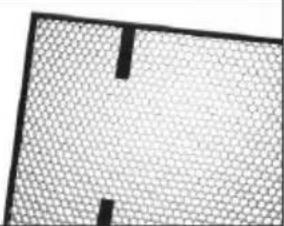
Abstract geometric pattern with a grid-like texture and two black rectangular cutouts (no text or symbols)LVR-SL290-P Diva-Lite 21 Louver/HP, 90°
LVR-SL390-P Diva-Lite 31 Louver/HP, 90°
LVR-SL490-P Diva-Lite 41 Louver/HP, 90°
Included w/ all Diva-Lite Center Mount Only
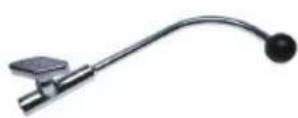
MTP-LBC Kino 41 Lollipop w/ Baby Receiver Curve (16mm)
Included w/ all Diva-Lite Yoke Mount Only
natural_image
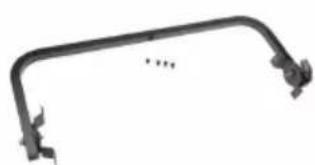
Pure mechanical linkage component without any text or symbols7010055 Diva-Lite 21 Yoke Assembly
7010057 Diva-Lite 31 Yoke Assembly
7010059 Diva-Lite 41 Yoke Assembly
Diva-Lite 31 LED DMX Kits

natural_image
Yellow portable electronic device with coiled cable, flat panel, and stand (no text or symbols visible)Diva-Lite 31 LED DMX Kit w/ Travel Case
KIT-DL31XU
Diva-Lite 31 LED DMX Kit w/ Travel Case, Univ
Kit Contents:
1 Diva-Lite 31 LED DMX Center
1 Travel Case
Dimensions:
45.5 × 9 × 16.5"
(116 × 23 × 42cm)
Weight:
33.5 lb
(15kg)
Diva-Lite 21 LED DMX Kits

natural_image
Exterior view of a yellow hard-shell case with attached blackboard and cable, no visible text or symbolsDiva-Lite 21 LED DMX Kit w/ Travel Case
KIT-DL21XU
Diva-Lite 21 LED DMX Kit w/ Travel Case, Univ
Kit Contents:
1 Diva-Lite 21 LED DMX Center
1 Travel Case
Dimensions:
28.5 × 8.5 × 16"
(72.5 × 22 × 41cm)
Weight:
22.5 lb
(10kg)
Power

natural_image
Close-up of a hand adjusting a black mechanical component with a red indicator light (no visible text or symbols)AC Input
The Diva-Lite LED is powered AC and includes an IEC connection. It also includes a 12ft power cord with a locking IEC connector.
It includes a built-in power supply with universal input from 100-240VAC.
Ambient Operating Temperature
The Diva-Lite LED is designed to operate at temperatures from 14°F to 104°F (-10°C to 40°C).
DC Input
The Diva-Lite LED can also be operated on 24VDC (input range 18-36VDC) through a 3-Pin XLR. The pin polarity is:
Pin # 1 - Ground
Pin # 2 + 18-36VDC
Pin # 3 not used
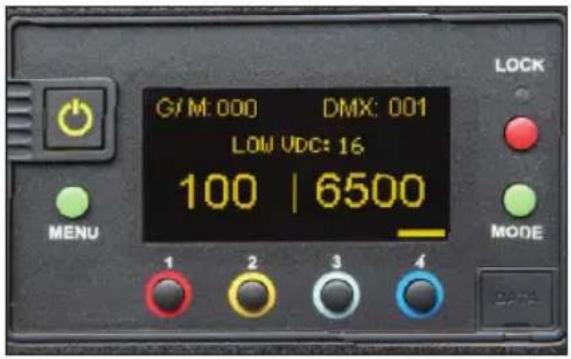
Note:
A low voltage warning will display if input DC voltage is under 18VDC. Photo example: LOW VDC: 16
Mounting Procedures

natural_image
Exterior view of a black electronic device with a display and cable (no visible text or symbols)Mounted on a baby stand.
natural_image
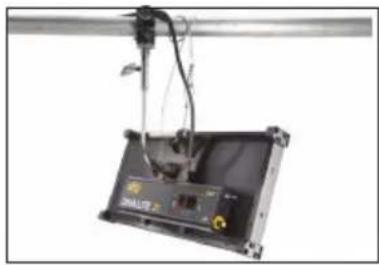
Exterior view of a mechanical device with wires and a labeled component (no readable text or symbols)Mounted to pipe grid.

natural_image
Close-up of a mechanical testing setup with metal components and wiring (no visible text or symbols)Note: When hanging in a studio, loop a safety cord through the metal ring provided on the back of the fixture.

natural_image
Close-up of a mechanical device with a yellow connector and white arrow indicating motion (no visible text or symbols)Turn the knob to loosen or tighten the mount.

natural_image
Three mechanical tools or sensors with curved and straight ends, no visible text or symbolsLollipops are interchangeable.
MTP-L Kino 41 Lollipop w/ 3/8" Pin (10mm)
MTP-LBC Kino 41 Lollipop w/ Baby Rcvr Curve (16mm)
MTP-LBS Kino 41 Lollipop w/ Baby Rcvr Short (16mm)
Baby Offset Arm

natural_image
Metal mechanical tool with a handle and spout, no visible text or symbolsMTP-B41F
Kino Offset w/ Baby Receiver (16mm)

natural_image
Mechanical device with black frame and attached cable, no visible text or symbols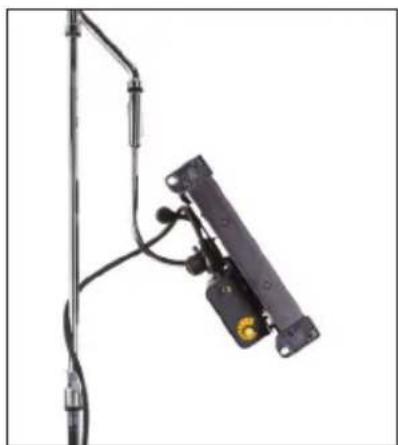
natural_image
Close-up of a mechanical device with attached black components and wires (no visible text or symbols)The Baby Offset Arm (MTP-B41F) allows fixtures to mount on the center of a stand or it can also be under slung from a baby stand to use as an up light.
Applying Louver

natural_image
Close-up of hands assembling a black electronic device frame with a mounted bracket (no visible text or symbols)
natural_image
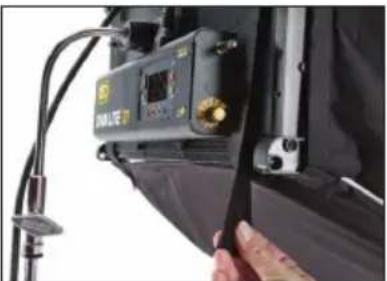
Close-up of a hand inserting a small black component into a black textured device (no text or symbols visible)The Louver is fastened to the fixture with 4 Velcro straps.
SnapBag & SnapGrid
natural_image
Close-up of a camera module with a handheld device and cable, no visible text or symbols
natural_image
Black and white photo of a studio lighting fixture with a rectangular frame and reflective material (no text or symbols visible)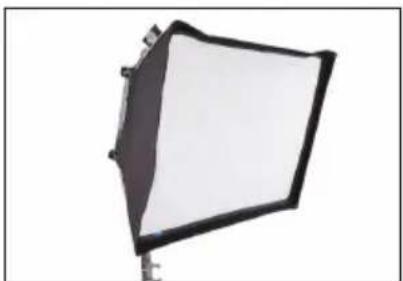
natural_image
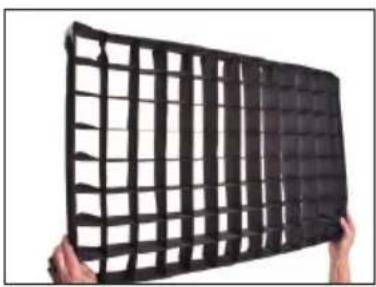
Studio lighting studio lamp with a black frame and white screen (no text or symbols visible)The SnapBag accessory is a lightweight fabric tailor-made for the Diva-Lite LED. It slips over the fixture and is attached with straps. The reflective material intensifies the soft light. The removable grid cloth attaches to the inside with Velcro.
DFS-FS41-S Diva-Lite 41 SnapBag w/ 2 x Diffusion
DFS-FS31-S Diva-Lite 31 SnapBag w/ 2 x Diffusion
DFS-FS21-S Diva-Lite 21 SnapBag w/ 2 x Diffusion
natural_image
Hands holding a black plastic grid object (no text or symbols visible)
natural_image
Exterior view of a black grid-patterned metal frame mounted on a stand (no text or symbols visible)The SnapGrid accessory is constructed of pre-stretched fireproof fabric with a built-in stainless steel frame. It unfolds and snaps into place. This model requires the use with the corresponding SnapBag; it is not designed to be used by itself.
LVR-FS440-S Diva-Lite 41 SnapGrid 40°
LVR-FS340-S Diva-Lite 31 SnapGrid 40°
LVR-FS240-S Diva-Lite 21 SnapGrid 40°
Control Panel - White Mode
A
B
C
DEFGH
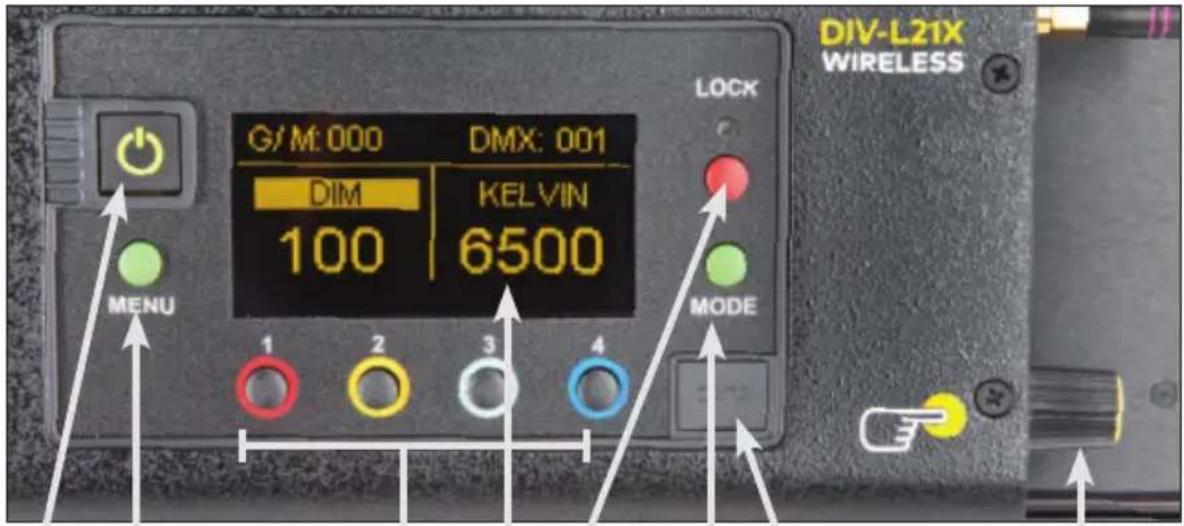
A) On /Off: On = Green light displayed. Off = Red light displayed. The display and all menu settings can be operated while the power button is in the Off position, as long as power is applied to the controller. The On /Off button only controls the light source.
B) Menu: Provides access to menu options such as General settings, Reset, DMX and DMX Wireless settings. Shortcut: While on control screen, press and hold for 3 seconds to switch through menus (White, Gels & Hue, RGB, FX).
C) Preset Buttons: Factory defaults left to right are: 2700K, 3200K, 5000K and 6500K. G/M default value is 000. User can also use these preset buttons to store custom Kelvin and G/M settings.
D) Display: Provides access to Dim, Kelvin, G/M, and DMX channel. Factory reset will show: Dim = 10%, Kelvin = 2700K, G/M = 000, DMX = 001.
E) Lock: Press the Lock button to disable all buttons and Control knob. Press for 3 seconds to restore displayed presets to default factory settings.
F) Mode: Press to navigate from Dim to Kelvin and G/M settings. When in sub-menus, pressing Mode always returns you to main display. When DMX is applied, use Mode to access DMX channel on main display. Shortcut: Long press will bring you back one step.
G) Data Port: Mini B USB for firmware updates.
H) Control Knob: Manually adjusts Dim, Kelvin, G/M levels and DMX address. Press the Control knob to toggle between Fine and Coarse increments or when selecting options within menus.
DMX Note: Each LED Fixture has an "AUTO TERMINATE" feature. The last fixture that does not have an XLR cable attached to the DMX "Out" port will automatically terminate.
Control Panel - Gels/Hue Mode

ADCB
Gels/Hue Mode
A) Menu:
Provides access to menu options such as General settings (Gels/Hue Mode), Reset, DMX and DMX Wireless settings. Shortcut: While on control screen, press and hold for 3 seconds to switch through menus (White, Gels & Hue, RGB, FX).
B) Preset Buttons:
Factory defaults left to right are: 2700K, 3200K, 5000K and 6500K. G/M default value is 000. User can also use these preset buttons to store custom Kelvin between 2500K and 9900K and custom G/M, Gel, Hue and Saturation settings.
C) Display:
Provides access to Dim, Kelvin, G/M, Gel, Hue/Saturation and DMX channel. Factory reset will show: Dim = 10%, Kelvin = 2700K, G/M = 000, DMX = 001.
D) Mode:
Press to navigate from Dim to Kelvin, G/M, Gel, Hue and Saturation settings. When on the Gel function, pushing the Control knob in/out will apply the gel or remove the gel. When in sub-menus, pressing Mode always returns you to main display. When DMX is applied, use Mode to access DMX channel on main display. Shortcut Tip: Long press will bring you back one step.
Control Panel - RGB Mode

ADCB
RGB Mode
A) Menu:
Provides access to menu options such as General settings (RGB Mode), Reset, DMX and DMX Wireless settings. Shortcut: While on control screen, press and hold for 3 seconds to switch through menus (White, Gels & Hue, RGB, FX).
B) Preset Buttons:
Factory defaults left to right are: 2700K, 3200K, 5000K and 6500K. G/M default value is 000. User can also use these preset buttons to store custom Kelvin between 2500K and 9900K and custom G/M, and RGB settings.
C) Display:
Provides access to Dim, Kelvin, G/M, RGB and DMX channel. Factory reset will show: Dim = 10%, Kelvin = 2700K, G/M = 000, DMX = 001.
D) Mode:
Press to navigate from Dim to Kelvin, G/M, RGB settings. When in sub-menus, pressing Mode always returns you to main display. When DMX is applied, use Mode to access DMX channel on main display. Shortcut: Long press will bring you back one step.
Control Panel - FX (Effects)

FX (Effects) Mode
FX mode provides access to effects including Candle, Fire, TV, Police, Lightning, Paparazzi, Pulse and Scroll. Candle mode used as an example:
A) FX Option:
Choose the desired FX Mode by rotating the control knob. When on the desired effect, there will be several pre-programmed effects as well as control parameters that can be altered.
B) Preset Buttons:
In FX Mode, Kelvin custom settings and any control functions displayed such as Rate and Amplitude (Ampl) can be saved as a preset. Chosen values can be assigned to any preset button by holding down the desired button for 3 seconds. The Kelvin display will flash once the setting is registered.
To restore presets to default factory settings, choose Reset under General settings and Clear Presets. This method will reset all buttons in all Modes. Shortcut: If only want to clear presets for Candle Mode, hold Lock button for 3 seconds while Candle mode is displayed.
C) Mode:
Press to navigate from Dim to Kelvin and FX settings. Shortcut: Long press will bring you back one step.
Accessories

natural_image
Collection of electronic devices including a power connector, charging cable, and two labeled boxes (no visible text or symbols)SYS-BK12 Block/KF21 Single Battery System, 140Whr, 28.8V (2 x Battery)

DFS-FS41-S Diva-Lite 41 SnapBag w/ 2 x Diffusion
DFS-FS31-S Diva-Lite 31 SnapBag w/ 2 x Diffusion
DFS-FS21-S Diva-Lite 21 SnapBag w/ 2 x Diffusion
natural_image
Black grid-patterned metal panel or fence structure (no text or symbols visible)LVR-FS440-S Diva-Lite 41 SnapGrid 40°
LVR-FS340-S Diva-Lite 31 SnapGrid 40°
LVR-FS240-S Diva-Lite 21 SnapGrid 40°
natural_image
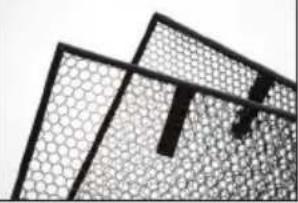
Abstract geometric pattern with interlocking shapes and grid textures (no text or symbols)LVR-SL490-P Diva-Lite 41 Louver/HP 90° LVR-SL460-P Diva-Lite 41 Louver/HP 60°
LVR-SL390-P Diva-Lite 31 Louver/HP 90° LVR-SL360-P Diva-Lite 31 Louver/HP 60°
LVR-SL290-P Diva-Lite 21 Louver/HP 90° LVR-SL260-P Diva-Lite 21 Louver/HP 60°

natural_image
Three mechanical tools or sensors with curved and flanged ends, no visible text or symbolsLollipops are interchangeable.
MTP-L Kino 41 Lollipop w/ 3/8" Pin (10mm) MTP-LBC Kino 41 Lollipop w/ Baby Rcvr Curve (16mm) MTP-LBS Kino 41 Lollipop w/ Baby Rcvr Short (16mm)
Cases

natural_image
Yellow plastic case with black handle and embossed pattern (no visible text or symbols)KAS-DL31-C Diva-Lite 31 Travel Case
KAS-DL21-C Diva-Lite 21 Travel Case
Fixture Specifications

natural_image
Simple black rectangular frame mounted on a stand, no text or symbols visibleDiva-Lite 21 LED Center Mount
DIV-L21XCU Diva-Lite 21 LED DMX Center Mount
AC Input Voltage: 100\~240VAC 50/60Hz, 150W
Amperage VAC: 1.25A at 120VAC, 0.65A at 230VAC
DC Input Voltage: 18\~36VDC, 150W
Amperage VDC: 6.25A at 24VDC
Kelvin Range: 2700K\~6500K (White Mode)
Kelvin Range: 2500K\~9900K (Color Mode)
Dimming Range: 100%\~1%
Weight: 12 lb (5.5kg)
Dimensions: 23.5 x 4.5 x 11.5"
(60 × 11.5 × 29cm)

natural_image
Mechanical device with a rectangular frame and attached bracket (no visible text or symbols)Diva-Lite 21 LED Yoke Mount
DIV-L21XYU Diva-Lite 21 LED DMX Yoke Mount
AC Input Voltage: 100\~240VAC 50/60Hz, 150W
Amperage VAC: 1.25A at 120VAC, 0.65A at 230VAC
DC Input Voltage: 18\~36VDC, 150W
Amperage VDC: 6.25A at 24VDC
Kelvin Range: 2700K\~6500K (White Mode)
Kelvin Range: 2500K\~9900K (Color Mode)
Dimming Range: 100%\~1%
Weight: 13 lb (6kg)
Dimensions: 28.5 x 4.5 x 14.5"
(72.5 × 11.5 × 37cm)

natural_image
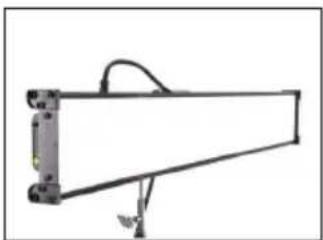
Simple black rectangular frame mounted on a stand with a cable, no text or symbols visibleDiva-Lite 31 LED Center Mount
DIV-L31XCU Diva-Lite 31 LED DMX Center Mount
AC Input Voltage: 100\~240VAC 50/60Hz, 150W
Amperage VAC: 1.25A at 120VAC, 0.65A at 230VAC
DC Input Voltage: 18\~36VDC, 150W
Amperage VDC: 6.25A at 24VDC
Kelvin Range: 2700K\~6500K (White Mode)
Kelvin Range: 2500K\~9900K (Color Mode)
Dimming Range: 100%\~1%
Weight: 14 lb (6.5kg)
Dimensions: 37.5 x 4.5 x 9.5"
(95 × 11.5 × 24cm)

natural_image
Mechanical component with attached frame and suspended arm (no visible text or symbols)Diva-Lite 31 LED Yoke Mount
DIV-L31XYU Diva-Lite 31 LED DMX Yoke Mount
AC Input Voltage: 100\~240VAC 50/60Hz, 150W
Amperage VAC: 1.25A at 120VAC, 0.65A at 230VAC
DC Input Voltage: 18\~36VDC, 150W
Amperage VDC: 6.25A at 24VDC
Kelvin Range: 2700K\~6500K (White Mode)
Kelvin Range: 2500K\~9900K (Color Mode)
Dimming Range: 100%\~1%
Weight: 14.5 lb (6.5kg)
Dimensions: 42 x 4.5 x 12"
(107 × 11.5 × 30.5cm)
natural_image
Pure mechanical component diagram without any text, numbers, or symbolsDiva-Lite 41 LED Center Mount
DIV-L41XCU Diva-Lite 41 LED DMX Center Mount
AC Input Voltage: 100\~240VAC 50/60Hz, 150W
Amperage VAC: 1.25A at 120VAC, 0.65A at 230VAC
DC Input Voltage: 18\~36VDC, 150W
Amperage VDC: 6.25A at 24VDC
Kelvin Range: 2700K\~6500K (White Mode)
Kelvin Range: 2500K\~9900K (Color Mode)
Dimming Range: 100%\~1%
Weight: 15 lb (7kg)
Dimensions: 49.5 x 4.5 x 7.5"
(126 × 11.5 × 19cm)

natural_image
Pure mechanical assembly diagram without any text, numbers, or symbolsDiva-Lite 41 LED Yoke Mount
DIV-L41XYU Diva-Lite 41 LED DMX Yoke Mount
AC Input Voltage: 100\~240VAC 50/60Hz, 150W
Amperage VAC: 1.25A at 120VAC, 0.65A at 230VAC
DC Input Voltage: 18\~36VDC, 150W
Amperage VDC: 6.25A at 24VDC
Kelvin Range: 2700K\~6500K (White Mode)
Kelvin Range: 2500K\~9900K (Color Mode)
Dimming Range: 100%-1%
Weight: 15.5 lb (7kg)
Dimensions: 56 x 4.5 x 10"
(142×11.5×25.5cm)
FCC Part 15 Verification:
This device complies with Part 15 of the FCC Rules. Operation is subject to the condition that this device does not cause harmful interference.
FCC Part 15 Declaration of Conformity:
This device complies with Part 15 of the FCC Rules. Operation is subject to the following two conditions: (1) this device may not cause harmful interference, and (2) this device must accept any interference received, including interference that may cause undesired operation.

KINO FLO, INC
Diva-Lite 21, Diva-Lite 31, Diva-Lite 41
ID: XRSCRMXTIMO101
IC: 8879A-CRMXT101
For full operation manual, latest Warranty information and Certifications, see Kino Flo website at www.kinoflo.com.


Environmental: Disposal of Old Electrical & Electronic Equipment.

This symbol on the product or on its packaging indicates that this product shall not be treated as household waste. This product is made of recyclable materials and should be disposed of in accordance with governmental regulations.
Kino Flo, Inc. 2840 N. Hollywood Way, Burbank, CA 91505, USA
Tel: 818 767-6528 website: www.kinoflo.com

- Operation Manual Diva-Lite 41, 31, 21 LED
- Diva-Lite LED DMX Systems
- Included w/ all Diva-Lite Models
- Included w/ all Diva-Lite Center Mount Only
- Included w/ all Diva-Lite Yoke Mount Only
- Diva-Lite 31 LED DMX Kits
- KIT-DL31XU
- Kit Contents:
- Dimensions:
- Weight:
- Diva-Lite 21 LED DMX Kits
- KIT-DL21XU
- Power
- AC Input
- Ambient Operating Temperature
- DC Input
- Note:
- Mounting Procedures
- Baby Offset Arm
- Applying Louver
- SnapBag & SnapGrid
- Control Panel - White Mode
- Control Panel - Gels/Hue Mode
- Gels/Hue Mode
- A) Menu:
- B) Preset Buttons:
- C) Display:
- D) Mode:
- Control Panel - RGB Mode
- RGB Mode
- Control Panel - FX (Effects)
- FX (Effects) Mode
- A) FX Option:
- C) Mode:
- Accessories
- Cases
- Fixture Specifications
- FCC Part 15 Verification:
- FCC Part 15 Declaration of Conformity:
- Environmental: Disposal of Old Electrical & Electronic Equipment.
Brand : Kino Flo
Model : Diva-Lite 31 LED
Category : Video Lighting