
EasiLife Go 200 - Robotic mower FLYMO - Free user manual and instructions
Find the device manual for free EasiLife Go 200 FLYMO in PDF.


| Product Type | Robotic Mower |
| Brand | Flymo |
| Model | EasiLife Go 200 |
| Dimensions (L x W x H) | 48 x 38 x 24 cm |
| Weight | 9.5 kg |
| Power Source | Lithium-ion Battery 18V / 2.5 Ah |
| Charging Time | Approx. 85 minutes |
| Mowing Area Capacity | Up to 200 m² |
| Cutting Width | 18 cm |
| Cutting Height Range | 20 - 60 mm |
| Cutting Height Adjustment | Manual, 3-position central knob |
| Cutting System | 3 free-swinging razor blades |
| Slope Capability | Up to 40% (22°) |
| Sensors | Rain sensor, lift sensor, tilt sensor |
| Navigation | Boundary wire and guide wire |
| Control Panel | LCD display with buttons |
| Programming | Weekly schedule, mowing time, start delay |
| Security | PIN code, automatic stop on lift/tilt, obstacle detection |
| Maintenance | Clean blades, replace blades annually, check boundary wire |
| Spare Parts Available | Blade set, battery, wheels, charging station |
| Noise Level | 58 dB(A) |
| IP Rating | IPX5 (water resistant) |
| Included Accessories | Charging station, power supply, boundary wire, pegs, screwdriver |
Frequently Asked Questions - EasiLife Go 200 FLYMO
User questions about EasiLife Go 200 FLYMO
0 question about this device. Answer the ones you know or ask your own.
Ask a new question about this device
Download the instructions for your Robotic mower in PDF format for free! Find your manual EasiLife Go 200 - FLYMO and take your electronic device back in hand. On this page are published all the documents necessary for the use of your device. EasiLife Go 200 by FLYMO.
USER MANUAL EasiLife Go 200 FLYMO
natural_image
Close-up of a Flymo robotic lawn mower with orange and black casing (no visible text or symbols)Easier by Design
www.flymo.com/uk
Contents
1 Introduction
1.1 Introduction.... 3
1.2 Product overview....4
1.3 Symbols on the product.... 5
1.4 Symbols on the battery.... 5
1.5 General manual instructions.... 5
1.6 Keypad.... 5
1.7 LED status indicator on the keypad....6
2 Safety
2.1 Safety information....8
2.2 Safety definitions....9
2.3 Safety instructions for operation....9
3 Installation
3.1 Introduction - Installation.... 12
3.2 Main components for installation....12
3.3 General preparations.... 12
3.4 Before the installation of the wires.... 12
3.5 Installation of the product.... 17
3.6 To put the wire into position with stakes..... 19
3.7 To bury the boundary wire or the guide wire.....19
3.8 To extend the boundary wire or the guide wire... 19
3.9 After the installation of the product....19
3.10 To do the product settings....20
4 Operation
4.1 To use the ON/OFF button....23
4.2 To start the product.... 23
4.3 Operating modes....23
4.4 To stop the product.... 25
4.5 To switch off the product.... 25
4.6 To charge the battery.... 25
4.7 Adjust the cutting height....25
5 Maintenance
5.1 Introduction - maintenance.....27
5.2 Clean the product....27
5.3 Replace the blades.... 28
5.4 Firmware update.... 28
5.5 Update of the Flymo EasiLife app.... 29
5.6 Battery....29
5.7 Winter service.... 30
6 Troubleshooting
6.1 Introduction - troubleshooting....31
6.2 Fault messages....31
6.3 Information and warning messages.... 35
6.4 Indicator lamp in the charging station.... 36
6.5 Symptoms.... 37
6.6 Find breaks in the loop wire.... 38
7 Transportation, storage and disposal
7.1 Transportation.... 41
7.2 Storage....41
7.3 Disposal.... 41
8 Technical data
8.1 Technical data....42
8.2 Registered trademarks....43
9 Warranty
9.1 Warranty terms....44
10 EU Declaration of Conformity
11 UK Declaration of Conformity
1 Introduction
1.1 Introduction
| Serial number: |
| PIN code: |
| Product registration key: |
The serial number is on the product carton and on the product rating plate. Refer to Product overview on page 4.
- Use the serial number to register your product on .
1.1.1 Support
For support about the Flymo product, speak to your Flymo service.
1.1.2 Product description
Note: Flymo regularly updates the appearance and function of the products. Refer to Support on page 3.
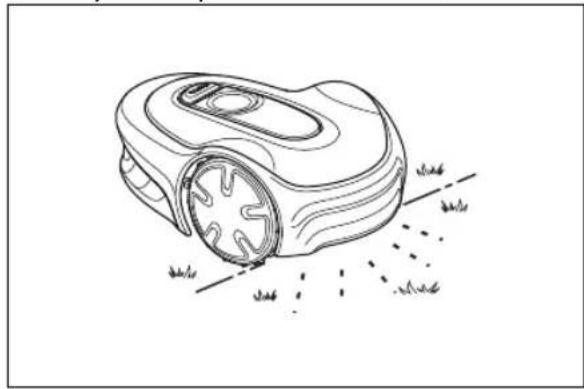
The product is a robotic lawn mower. The product has a battery power source and cuts the grass automatically. It continuously alternates between mowing and charging. The movement pattern is random, which means that the lawn is mowed evenly and with less wear. The boundary wire and the guide wire controls the movement of the product within the work area. Sensors in the product senses when it is approaching the boundary wire. The front of the product always passes the boundary wire by a specific distance before the product turns around. When the product hits an obstacle or approaches the boundary wire the product selects a new direction.
natural_image
Line drawing of a robotic lawn mower with grass blades and motion lines (no text or symbols)The operator selects the operation settings in the Flymo EasiLife app or with the keys on the keypad. The app and the LED status indicator lamps show the selected and possible operation settings, and the operation mode of the product.
1.1.2.1 Mowing technique
The product is emission free, easy to use and saves energy. The frequent cutting technique improves the grass quality and decreases the use of fertilizers. Collection of grass is not necessary.
1.1.2.2 Find the charging station
The product operates until the battery state of charge is low, then the product starts to go to the charging station. The guide wire is put from the charging station to a remote part of the work area or through a narrow passage. The guide wire is connected with the boundary wire to make it easier and faster for the product to find the charging station.
1.1.2.3 Flymo EasiLife app
The product can be operated with the keypad on the product and use the factory settings of the product.
To adjust the settings of the product the Flymo EasiLife app is used. The product can be controlled remotely with Bluetooth® within short range.
1.2 Product overview
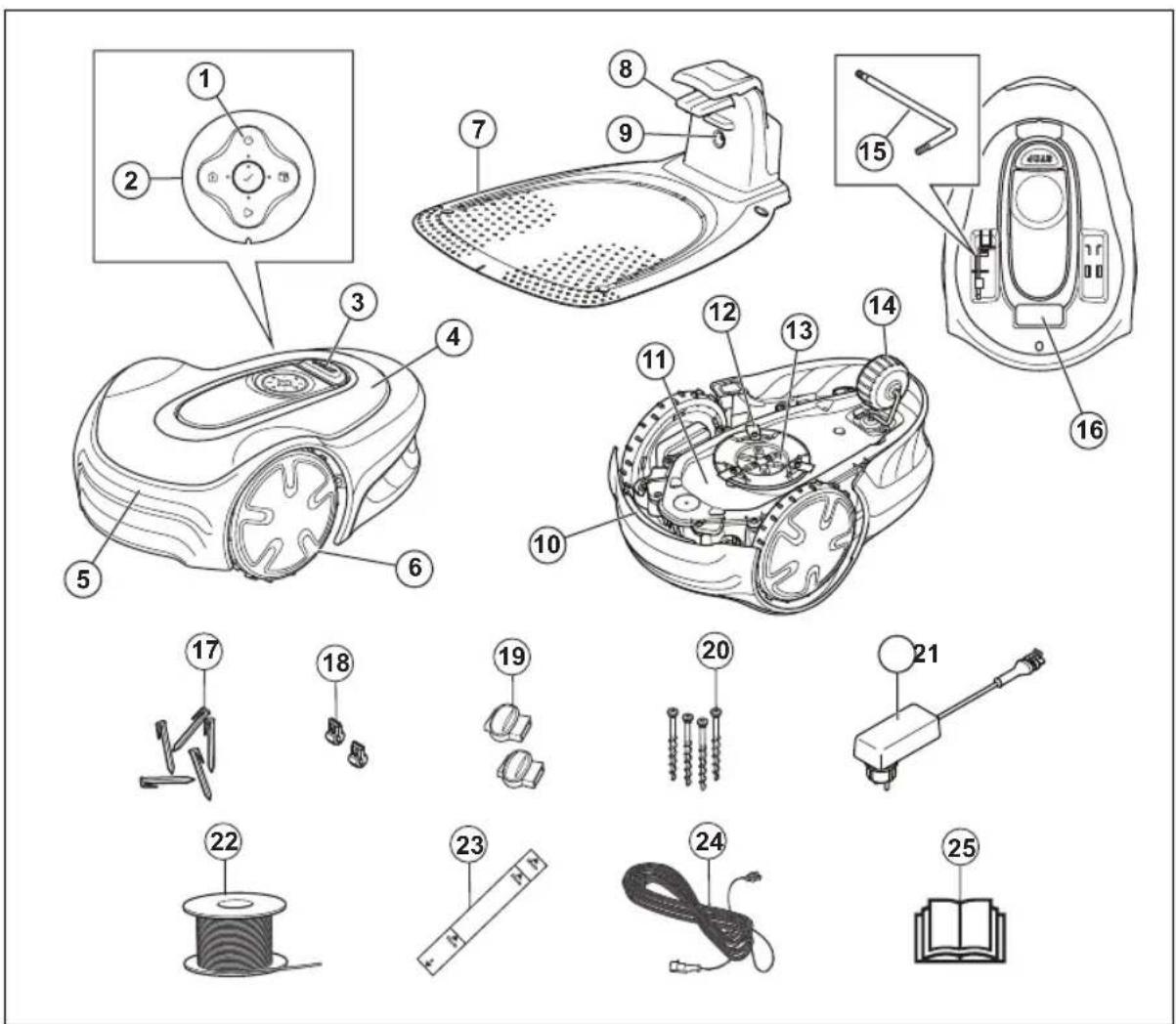
- ON/OFF button
- Keypad
- Stop button
- Top cover
- Body
- Front wheels
- Charging station
- Contact plates
- LED for operation check of the charging station, boundary wire and guide wire
- Handle
- Chassis box with electronics, battery and motors
-
Cutting system
-
Blade disc
- Rear wheel
- Hex key ^1
- Rating plate 2
- Stakes
- Connector for the loop wire
- Couplers for loop wire
- Screws for securing the charging station
- Power supply ^3
- Loop wire for boundary loop and guide wire
-
Measurement gauge for help when installing the boundary wire (the measurement gauge is broken loose from the box)
-
Low-voltage cable
- Operator's Manual and Quick Guide
1.3 Symbols on the product
These symbols can be found on the product. Study them carefully.
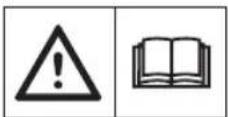
WARNING: Read the user instructions before operating the product.
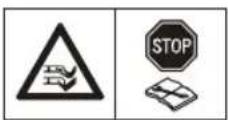
WARNING: Disable the product before working on or lifting the product.
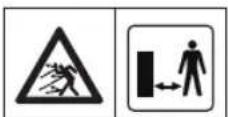
WARNING: Keep a safe distance from the product when operating. Keep your hands and feet away from the rotating blades.
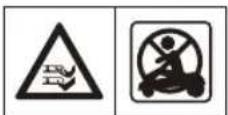
WARNING: Do not ride on the product. Do not put your hands or feet close to or under the product.
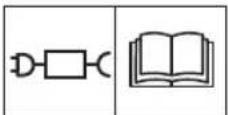
Use a detachable power supply as defined on the rating plate next to the symbol.

This product complies with the applicable EU Directives.

This product complies with the applicable UK Directives.
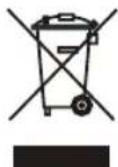
It is not permitted to dispose this product as normal household waste. Ensure that the product is recycled in accordance with local legal requirements.
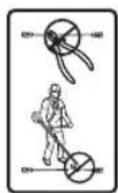
The low-voltage cable must not be shortened, extended or spliced.
Do not use a trimmer nearby the low-voltage cable. Be careful when trimming edges where the cables are placed.
1.4 Symbols on the battery

Read the user instructions.

Do not discard the battery into fire and do not expose the battery to a heat source.

Do not immerse the battery into water.
1.5 General manual instructions
The following system is used in the Operator's Manual to make it easier to use:
- Text written in italics is a text that is shown in the display or is a reference to another section in the Operator's Manual.
- Text written in bold is one of the buttons on the product.
1.6 Keypad
Use the keypad on the product to select an operating mode for the product. Push the button for 1 second or 3 seconds to set an operating mode, refer to Operating modes on page 23. The buttons on the keypad with flashing lights are the available operating modes for the product that you can select. You must enter the PIN code for the product before you can select an operating mode.
- Use the ON/OFF button (A) to switch on and switch off the product.
- Use the Park button (B) to send the product to the charging station.
- Use the OK button (C) to confirm the settings you select in the menus.
- Use the GO/Schedule button (D) to start the product and set a schedule. The schedule will start at this current time each day and the product will operate to its maximum cutting time each day.
- Use the GO button (E) to start the operation of the product.
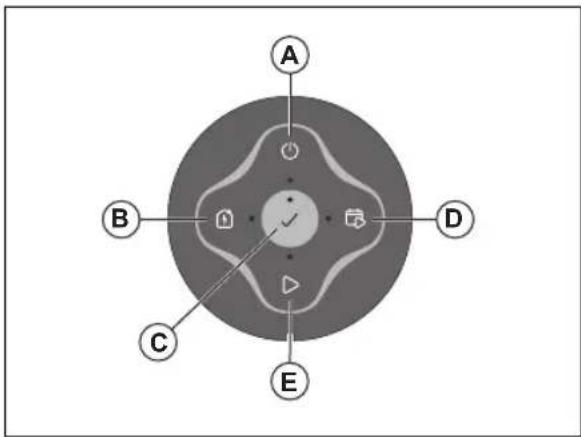
1.7 LED status indicator on the keypad
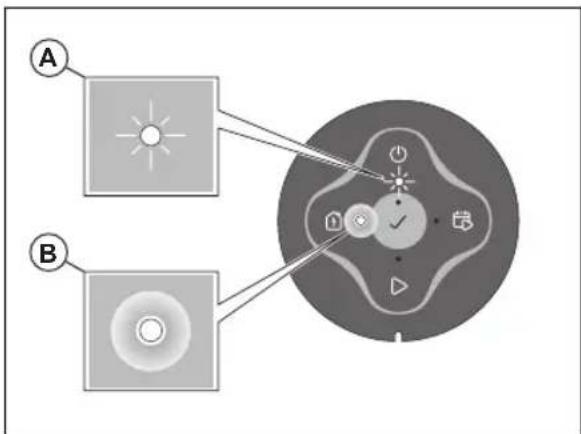
The LED status indicator on the keypad shows the status of the product. There are 2 light modes on the LED status indicator, flashing light (A) and solid light (B).
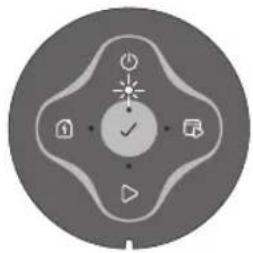
| Standby Idle | |
 | 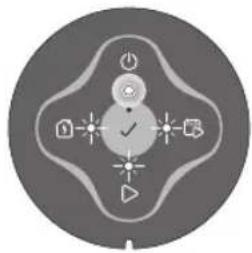 |
| Waiting for PIN code Wrong PIN code | |
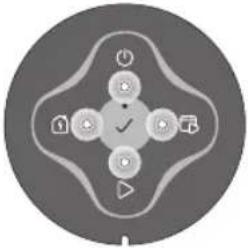 | 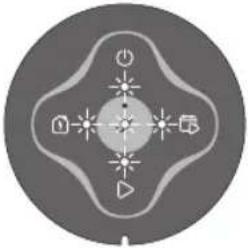 |
| Cutting according to set Schedule | Cutting, either in operating mode Override schedule or Secondary area |
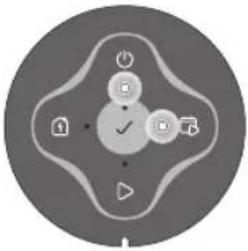 | 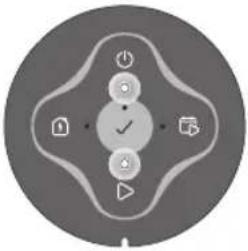 |
| Parked | Error |
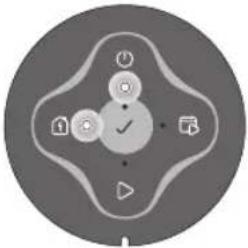 | 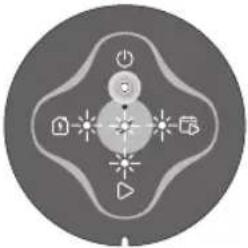 |
2 Safety
2.1 Safety information
2.1.1 IMPORTANT. READ CAREFULLY BEFORE USE. KEEP FOR FUTURE REFERENCE
The operator is responsible for accidents or hazards occurring to other people or property.
This appliance is not intended for use by persons (including children) with reduced physical, sensory or mental capabilities (that could affect a safe handling of the product), or lack of experience and knowledge, unless they have been given supervision or instruction concerning use of the appliance by a person responsible for their safety.
This appliance can be used by children aged from 8 years and above and persons with reduced physical, sensory or mental capabilities or lack of experience and knowledge if they have been given supervision or instruction concerning use of the appliance in a safe way and understand the hazards involved. Local regulations may restrict the age of the operator. Cleaning and maintenance shall not be made by children without supervision.
Never connect the power supply to an outlet if the plug or cord is damaged. Worn or damaged cord increase the risk of electric shock.
Only charge the battery in the included charging station. Incorrect use may result in electric shock, overheating or leaking of corrosive liquid from the battery. In the event of leakage of electrolyte, flush with water/neutralizing agent. Seek medical help if it comes in contact with the eyes.
Use only original batteries recommended by the manufacturer. Product safety cannot be guaranteed with other than original batteries. Do not use non-rechargeable batteries.
The appliance must be disconnected from the supply mains when removing the battery.

WARNING: The product can be dangerous if used incorrectly.

CAUTION: Used if there is a risk of damage to the product, other materials or the adjacent area if the instructions in the manual are not obeyed.

WARNING: Do not use the product when persons, especially children, or animals are in the work area.
Note: Used to give more information that is necessary in a given situation.

WARNING: Keep your hands and feet away from the rotating blades. Never put your hands or feet close to or under the product when it is switched on.
2.3 Safety instructions for operation
2.3.1 Use
- The product may only be used with the equipment recommended by the manufacturer. All other types of use are incorrect. The manufacturer's instructions with regard to operation/maintenance must be followed precisely.
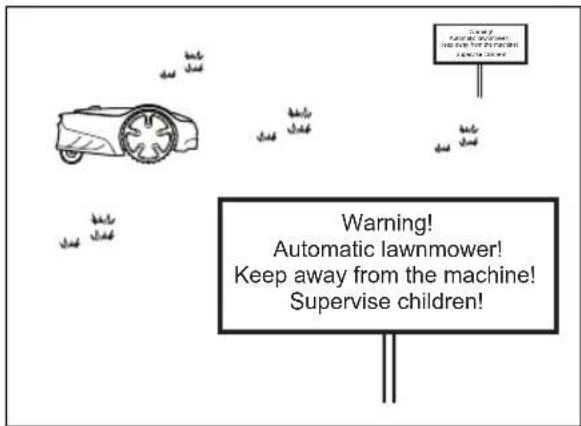
- Warning signs shall be placed around the work area of the product if it is used in public areas. The signs shall have the following text: Warning! Automatic lawnmower! Keep away from the machine! Supervise children!

WARNING: In the event of an injury or accident seek medical help.
2.2 Safety definitions
Warnings, cautions and notes are used to point out specially important parts of the manual.
- Use the park mode, refer to Park on page 24 or switch off the product when persons, especially children, or animals are in the work area. It is recommended to program the product for use during hours when the area is free from activity. Refer to Park / Schedule on page 24. Consider that certain animals, e.g. hedgehogs, are active at night. They can potentially be harmed by the product.
- Do not install the charging station, including any accessory, at a location that is below, or within 60 cm / 24 in. from, any combustible material. Do not install the power supply unit in easily flammable surroundings. In case of malfunction, heating of the charging station and the power supply may occur and create a potential risk of fire.

WARNING: Used if there is a risk of injury or death for the operator or bystanders if the instructions in the manual are not obeyed.
- The product may only be operated, maintained and repaired by persons that are fully conversant with its special characteristics and safety regulations. Please read the Operator's Manual carefully and make sure you understand the instructions before using the product.
- It is not permitted to modify the original design of the product. All modifications are made at your own risk.
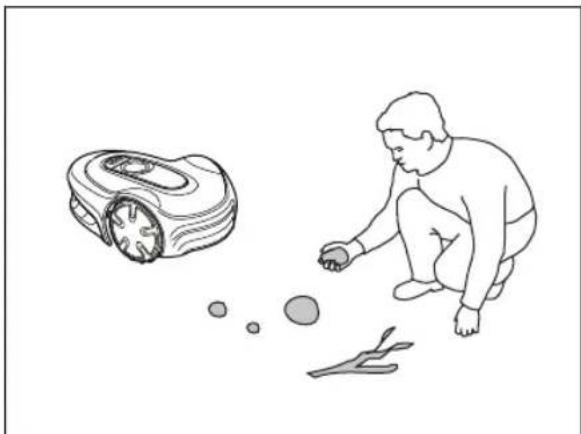
- Check that there are no foreign objects such as stones, branches, tools or toys on the lawn. If the blades hit foreign objects, the blades can be damaged. Always switch off the product with the ON/OFF button before clearing a blockage. Inspect the product for damage before staring the product again.
natural_image
Illustration of a person crouching next to a small robot-like object and scattered objects (no text or symbols)- If the product starts to vibrate abnormally. Always switch off the product with the ON/OFF button and inspect for damage before staring the product again.
- Start the product according to the instructions. When the product is switched on, make sure to keep your hands and feet away from the rotating blades. Never put your hands and feet under the product.
- Never touch moving hazardous parts, such as the blade disc, before it has come to a complete stop.
- Never lift up the product or carry it around when it is switched on.
- Do not let persons who do not know how the product works and behaves use it.
- The product must never be allowed to collide with persons or other living creatures. If a person or other living creature comes in the product's way, it shall be stopped immediately. Refer to To stop the product on page 25.
- Do not put anything on top of the product or its charging station.
- Do not allow the product to be used with a defective guard, blade disc or body. Neither should it be used with defective blades, screws, nuts or cables. Never connect a damaged cable, or touch
a damaged cable before it is disconnected from the supply.
- Do not use the product if the ON/OFF button and STOP button does not work.
• Always switch off the product using the ON/OFF button when the product is not in use. The product can only start when the product has been switched on with the ON/OFF button and the correct PIN code has been entered. - Flymo does not guarantee full compatibility between the product and other types of wireless systems such as remote controls, radio transmitters, hearing loops, underground electric animal fencing or similar.
- Metal objects in the ground (for example reinforced concrete or anti-mole nets) can result in a stoppage. The metal objects can cause interference with the loop signal which then can lead to a stoppage.
• Operation and storage temperature range is 0-50 °C / 32-122 °F. Temperature range for charging is 0-45 °C / 32-113 °F. Too high temperatures might cause damage to the product.
2.3.2 Battery safety

WARNING: Lithium-ion batteries can explode or cause fire if disassembled, short-circuited, exposed to water, fire, or high temperatures. Handle carefully, do not dismantle, open the battery or use any type of electrical/mechanical abuse. Avoid storage in direct sunlight.
For more information about the battery, refer to Battery on page 29
2.3.3 How to lift and move the product

WARNING: The product must be switched off before lifting it. The product is disabled when the indicator lamp on the ON/OFF button is not lit.

CAUTION: Do not lift the product when it is parked in the charging station. It can damage the charging station and/or the product. Push STOP and pull the product out of the charging station before lifting it.
To safely move from or within the work area:
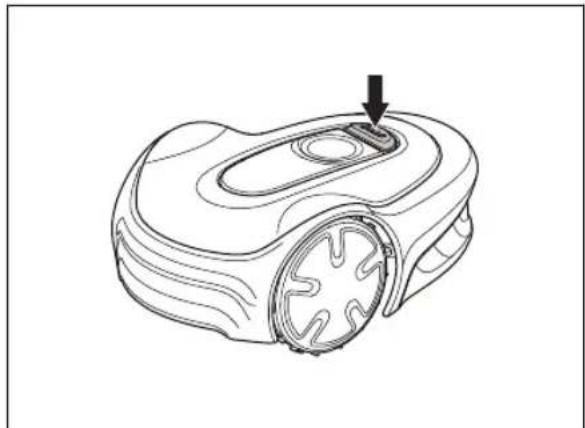
- Push the STOP button to stop the product.
natural_image
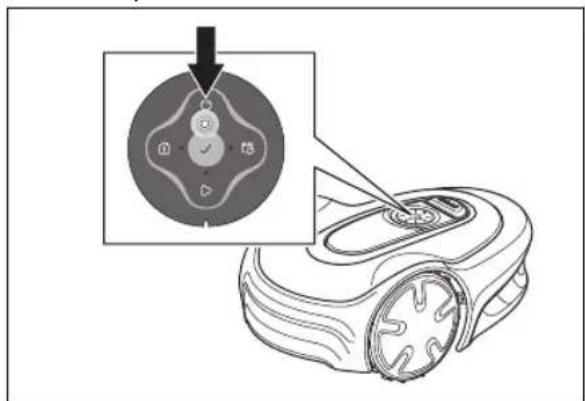
Line drawing of a robotic vacuum cleaner with a handle and mounting bracket (no text or symbols)- Push the ON/OFF button for 3 seconds to switch off the product.
-
Make sure that the product is disabled. The indicator lamp on the ON/OFF button is not lit when the product is disabled. Refer to LED status indicator on the keypad on page 6.
-
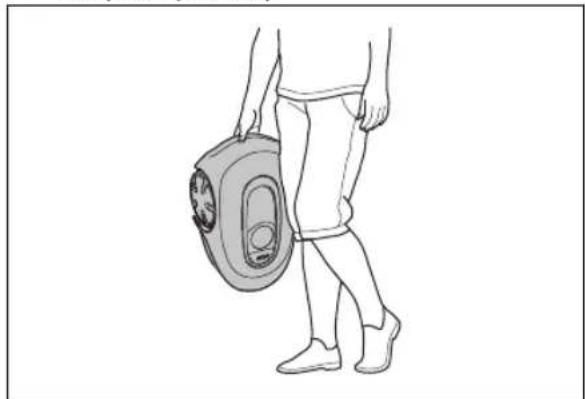
Carry the product by the handle with the blade disc away from your body.
natural_image
Line drawing of a person walking with a portable device (no text or symbols)2.3.4 Maintenance

WARNING: Set the product to OFF before you do maintenance on the product. The product is disabled when the LED
indicator on the keypad of the product goes out.

WARNING: Disconnect the power supply to the charging station before you clean or do maintenance of the charging station or the loop wire.

CAUTION: Do not use a high-pressure washer to clean the product. Do not use solvents to clean the product.
Examine the product each week and replace damaged or worn parts. Refer to Maintenance on page 27.
2.3.5 In the event of a thunderstorm
To reduce the risk of damage to electrical components in the product and the charging station, we recommend that all connections to the charging station are disconnected (power supply, boundary wire and guide wire) if there is a risk of a thunderstorm.
- Mark the wires to simplify reconnecting. The charging station's connections are marked R, L and GUIDE.
- Disconnect all connected wires and the power supply.
- Connect all the wires and the power supply if there is no longer a risk of thunder. It is important that each wire is connected to the right place.
3 Installation
3.1 Introduction - Installation
Refer to for more information about installation and instruction videos.
We recommend you to update the firmware before you install the product to make sure that the product has the latest firmware. Refer to Firmware update on page 28.

WARNING: Read and understand the safety chapter before you install the product.

CAUTION: Use original spare parts and installation material.
3.2 Main components for installation
The installation involves the following components:
• A robotic lawn mower that mows the lawn automatically.
• A charging station, which has 3 functions:
• To send control signals along the boundary wire.
- To send control signals along the guide wire so that the product can follow the guide wire to specific remote areas in the garden and can find its way back to the charging station.
• To charge the product.
- A power supply, which is connected to the charging station and a 100-240V power outlet.
- Loop wire, which is laid around the work area and around objects and plants that the product must not run into. The loop wire is used both as boundary wire and guide wire.
3.3 General preparations

CAUTION: Holes with water in the lawn can cause damage to the product.
Note: Read through the Installation chapter before beginning the installation. How the installation is done affects how the product performs. It is therefore important to plan the installation carefully.
- Make a blueprint of the work area and include all obstacles. This makes it easier to see the ideal positions for the charging station, the boundary wire and the guide wire.
• Make a mark on the blueprint where to put the charging station, the boundary wire and the guide wire.
- Make a mark on the blueprint where the guide wire connects to the boundary wire. Refer to To install the guide wire on page 18
- Fill in holes in the lawn.
- Cut the grass before you install the product. Make sure that the grass is maximum 4 cm / 1.6 in.
Note: The first weeks after installation the perceived sound level when cutting the grass may be higher than expected. When the product has cut the grass for some time, the perceived sound level is much lower.
3.4 Before the installation of the wires
You can select to attach the wires with stakes or bury them. You can use the 2 procedures for the same work area.

CAUTION: If you use a dethatcher in the work area, bury the boundary wire and the guide wire to prevent them from damage.
3.4.1 To examine where to put the charging station
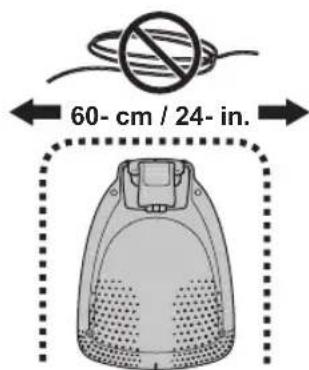
- Keep a minimum 2 m / 6.6 ft. of free space in front of the charging station. Refer to To examine where to put the guide wire on page 16.
- Keep a minimum of 30 cm / 12 in. of free space to the right and left of the center of the charging station.
- Put the charging station near a power outlet.
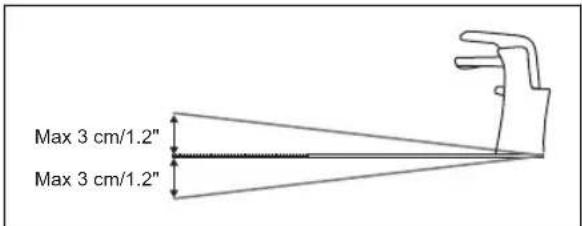
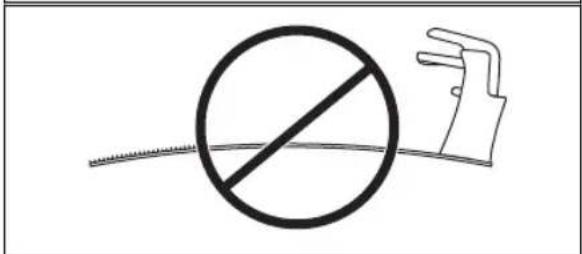
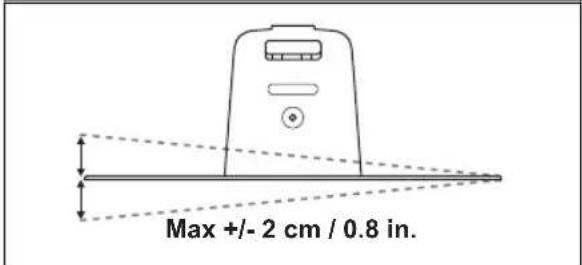
- Put the charging station on a level surface.
- The baseplate of the charging station must not be bent.
- If the work area has two parts separated with a steep slope, we recommend to put the charging station in the lower section.
- Put the charging station in an area with protection from the sun.
- If the charging station is installed on an island, make sure to connect the guide wire to the island. Refer to To make an island on page 15.
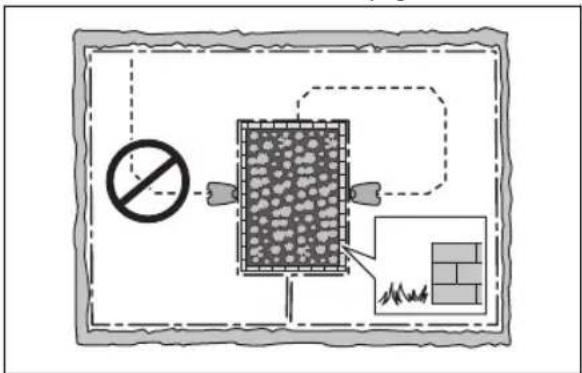
3.4.2 To examine where to put the power supply

WARNING: Do not cut or extend the low-voltage cable. There is a risk of electrical shock.

CAUTION: Make sure that the blades on the product do not cut the low-voltage cable.

CAUTION: Do not put the low-voltage cable in a coil or below the charging station plate. The coil causes interference with the signal from the charging station.
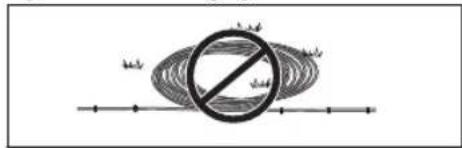
- Put the power supply in an area with a roof and protection from the sun and rain.
- Put the power supply in an area with good airflow.
- Use a residual-current device (RCD) with a tripping current of maximum 30 mA when you connect the power supply to the power outlet.
Low-voltage cables of different lengths are available as accessories.
3.4.3 To examine where to put the boundary wire

CAUTION: There must be a barrier of minimum 15 cm / 6 in. in height between the boundary wire and water bodies, slopes, precipices or public roads. This will prevent damage to the product.

CAUTION: Do not let the product operate on gravel.

CAUTION: Do not make sharp bends when you install the boundary wire.

CAUTION: For careful operation without noise, isolate all obstacles such as trees, roots and stones.
The boundary wire should be put as a loop around the work area. Sensors in the product senses when the product approaches the boundary wire, and the product selects another direction. All parts of the work area must be maximum 15 m / 50 ft. from the boundary wire.
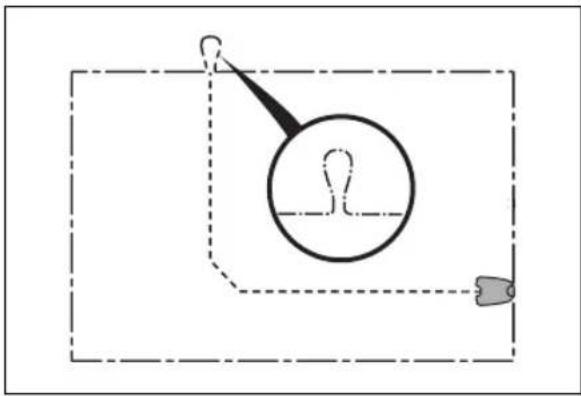
To make the connection easier between the guide wire and the boundary wire, it is recommended to make an eyelet where the guide wire will be connected. Make the
eyelet with approximately 20 cm / 8 in. of the boundary wire.
natural_image
Simple line drawing of a magnifying glass over a dashed rectangular frame with a small object at the bottom (no text or symbols)Note: Make a blueprint of the work area before you install the boundary wire and guide wire.
flowchart
graph TD
    A["Material A"] --> B["Process Step C"]
    B --> C["Material B"]
    C --> D["Material C"]
    D --> E["Material E"]
    E --> F["Material D"]
    F --> G["Material F"]
    G --> H["Material B"]
    H --> I["Material C"]
    I --> J["Material D"]
    J --> K["Material E"]
    K --> L["Material F"]
    L --> M["Material B"]
    M --> N["Material C"]
    N --> O["Material D"]
    O --> P["Material E"]
    P --> Q["Material F"]
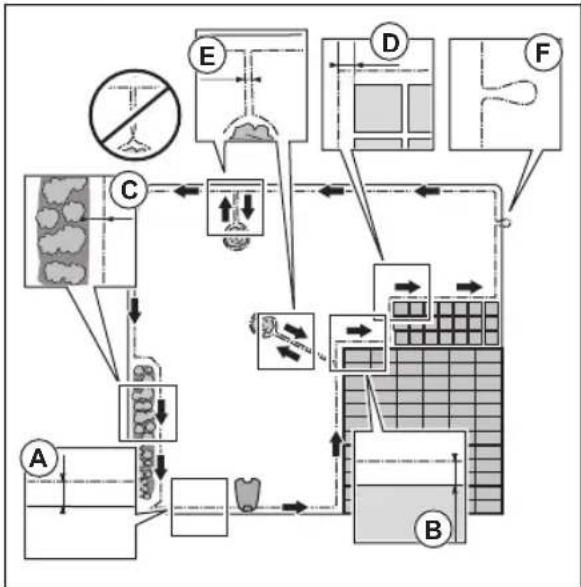
- Put the boundary wire around all of the work area (A). Adapt the distance between the boundary wire and obstacles.
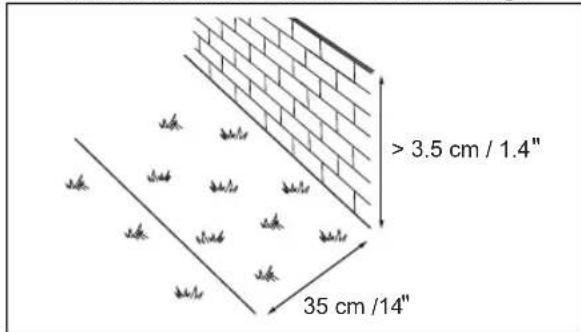
- Put the boundary wire 35 ~cm / 14 in. (B) from an obstacle that is more than 3.5 ~cm / 1.4 in. high.
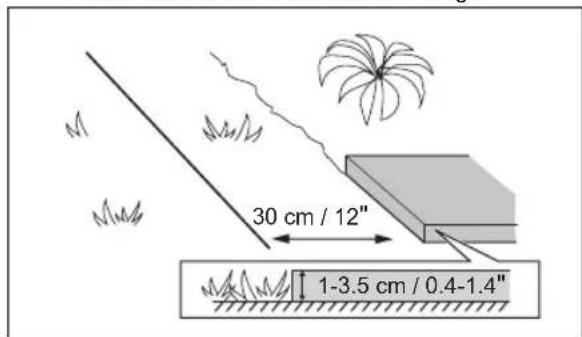
- Put the boundary wire 30 ~cm / 12 in. (C) from an obstacle that is 1 - 3.5 ~cm / 0.4 - 1.4 in. high.
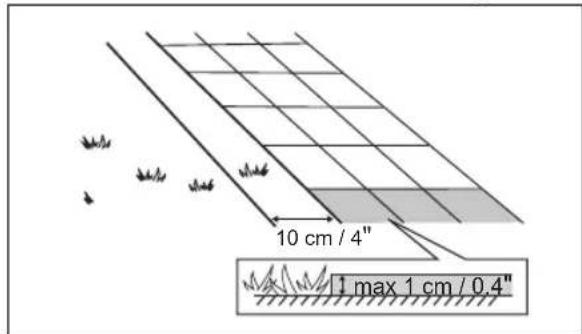
- Put the boundary wire 10cm / 4 in. (D) from an obstacle that is less than 1cm / 0.4 in. high.
- If you have a paving stone path that is in level with the lawn, put the boundary wire below the paving stone.
Note: If the paving stone is minimum 30 cm / 12 in. wide, use the factory setting for the Drive Past Wire function to cut all the grass adjacent to the paving stone. Refer to Drive Past Wire function on page 21.
- If you make an island, put the boundary wire that runs to and from the island near together (E). Put the wires in the same stake. Refer to To make an island on page 15.
- Make an eyelet (F) where the guide wire is to be connected to the boundary wire.
3.4.3.1 To put the boundary wire in a slope
The product can operate in 25% slopes. Slopes that are too steep must be isolated with the boundary wire. The gradient (%) is calculated as height per m. Example: 10 cm / 100 cm = 10%.
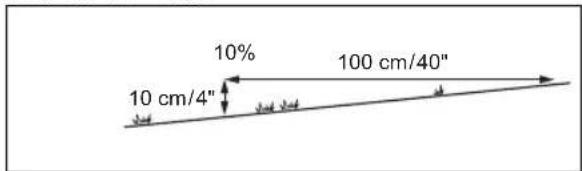
- For slopes steeper than 25% inside the work area, isolate the slope with boundary wire.
- For slopes steeper than 10% along the outer edge of the lawn, put the boundary wire 20~cm / 8 in. (A) from the edge.
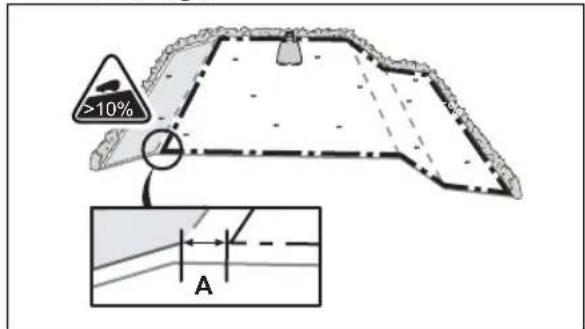
- For slopes adjacent to a public road, put a barrier of minimum 15 cm / 6 in. along the outer edge of the slope. You can use a wall or a fence as a barrier.
3.4.3.2 Passages
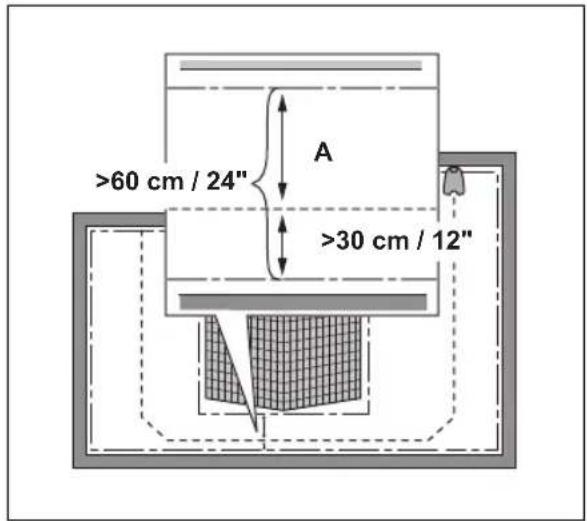
A passage is a section that has boundary wire on each side and that connects 2 parts of the work area. The distance between the boundary wire on each side in the passage must be a minimum of 60 cm / 24 in.
Note: If a passage is less than 2 m / 6.5 ft. wide, install a guide wire through the passage.
The recommended minimum distance between the guide wire and the boundary wire is 30 cm / 12 in. The product always runs to the left of the guide wire as seen facing the charging station. It is recommended to have as much free area as possible to the left of the guide wire (A).
3.4.3.3 To make an island

CAUTION: Do not put a section of boundary wire across the other. The sections of boundary wire must be parallel.

CAUTION: Do not put the guide wire across the boundary wire.

CAUTION: Isolate or remove obstacles that are less than 15 cm / 5.9 in. in height. Isolate or remove obstacles that slope slightly, for example, stones, trees or roots. This will prevent damage to the blades of the product.
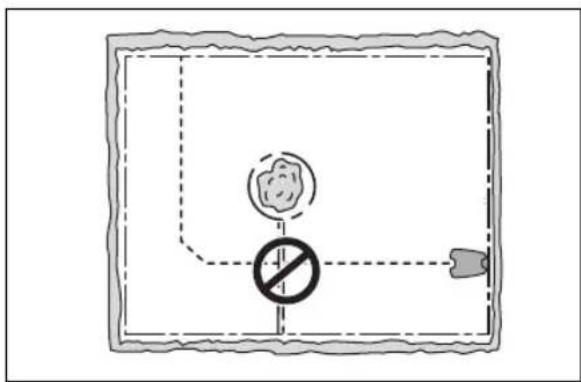
To make an island, isolate areas in the work area with the boundary wire. We recommend to isolate all stable objects in the work area.
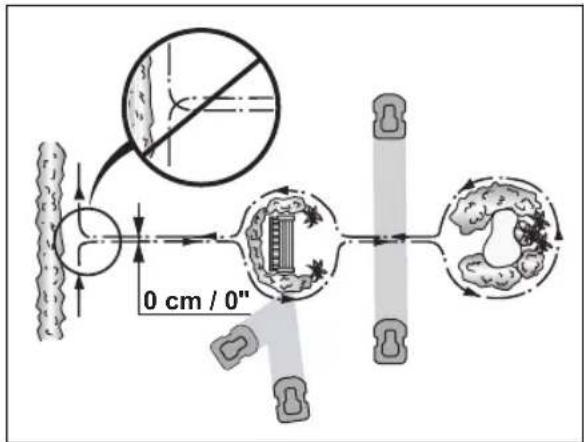
Some obstacles are resistant to a collision, for example, trees or bushes that are more than 15 cm / 5.9 in. in height. The product will collide with the obstacle and then select a new direction.
- Put the boundary wire to and around the obstacle to make an island.
- Put the 2 sections of boundary wire to and from the island close together. This will make the product run across the wire.
- Put the 2 sections of boundary wire in the same stake.
3.4.3.4 To make a secondary area
Make a secondary area (B) if the work area has 2 areas that are not connected with a passage. The work area with the charging station is the main area (A).
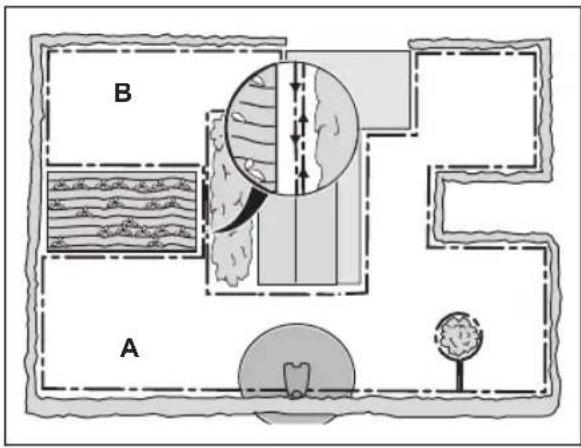
Note: The product must be manually moved between the main area and the secondary area.
- Put the boundary wire around the secondary area (B) to make an island. Refer to To make an island on page 15.
Note: The boundary wire must be put as 1 loop around all of the work area (A + B).
Note: When the product cuts grass in the secondary area, the Secondary area mode must be selected. Refer to Secondary area on page 24.
3.4.4 To examine where to put the guide wire
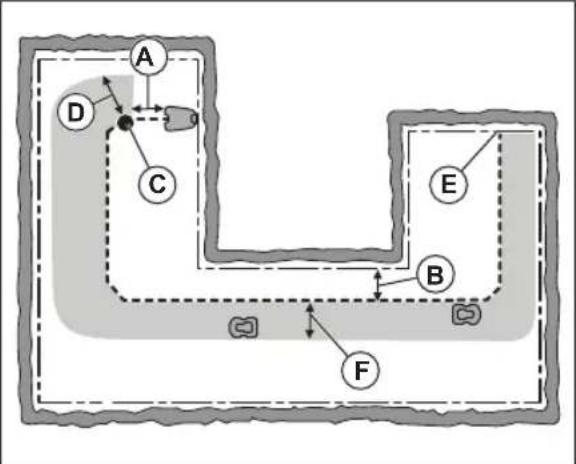
Put the guide wire from the charging station through the work area and connect it to the boundary wire.
flowchart
graph TD
    A["A"] --> B["B"]
    C["C"] --> D["D"]
    E["E"] --> F["F"]
    style A fill:#f9f,stroke:#333
    style B fill:#ccf,stroke:#333
    style C fill:#cfc,stroke:#333
    style D fill:#fcc,stroke:#333
    style E fill:#ffc,stroke:#333
    style F fill:#fcc,stroke:#333
- Put the guide wire in a line at a minimum of 1 ~m / 3.3 ft . in front of the charging station (A).
- Put the guide wire minimum 30 cm / 1 ft. from the boundary wire (B).
- Starting point (C). Refer to 21. Starting point on page
- Minimum distance 60 cm / 2 ft. perpendicular to the guide wire (D).
- Where the guide wire is connected to the boundary wire (E).
- Guide corridor (F). The product always runs to the left of the guide wire as seen facing the charging station. Make sure that the guide wire has as much free area as possible to the left of the guide wire. The guide corridor can be maximum 1.2 m / 4 ft.
Note: The product always runs in the guide corridor but changes the distance to the guide wire.
3.4.5 Work area examples
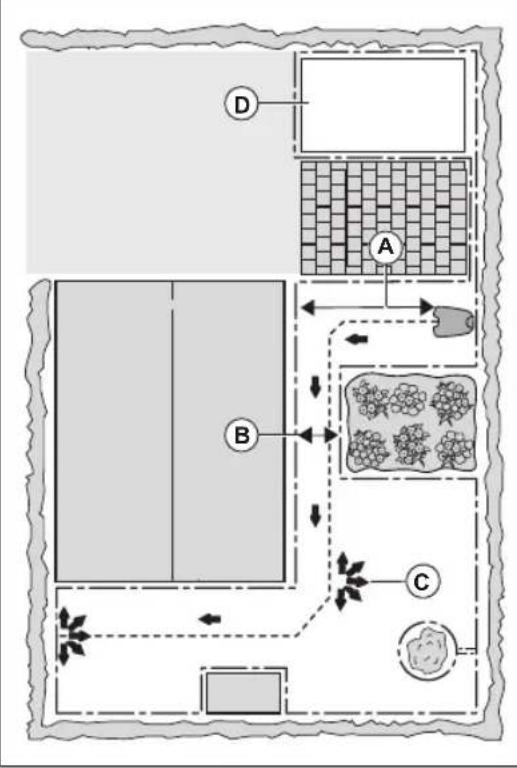
- If the charging station is put in a small area (A), make sure that the distance to the boundary wire is at a minimum 2 m / 6.6 ft. in front of the charging station.
- If the work area has a passage (B) with no guide wire installed, the minimum distance between the boundary wires is 2 m / 6.5 ft. With a guide wire installed through the passage, the minimum distance between the boundary wires is 60 cm / 24 in. Use the PassageSense function to cut this passage, Refer to Lawn Coverage and PassageSense on page 20.
- If the work area has areas which are connected by a narrow passage (B), you can set the product to first follow and then leave the guide wire after a
certain distance (C). The settings can be changed in Lawn Coverage and PassageSense on page 20.
- If the work area includes a secondary area (D), refer to Secondary area on page 24. Put the product in the secondary area and select Secondary area mode
flowchart
graph TD
    A["Layout A"] --> B["Layout B"]
    B --> C["Layout C"]
    C --> D["Layout D"]
    style A fill:#f9f,stroke:#333
    style B fill:#ccf,stroke:#333
    style C fill:#cfc,stroke:#333
    style D fill:#fcc,stroke:#333
3.5 Installation of the product
3.5.1 Installation tools
- Hammer/plastic mallet: To simplify putting the stakes into the ground.
- Edge cutter/straight spade: To bury the boundary wire.
- Combination pliers: For cutting the boundary wire and pressing the connectors together.
- Adjustable plier: For pressing the couplers together.
3.5.2 To install the charging station

WARNING: Obey national regulations about electrical safety.

WARNING: The product is only to be used with the power supply unit supplied by Flymo.

WARNING: Do not put the power supply at a height where there is a risk it can be put in water. Do not put the power supply on the ground.

WARNING: Do not encapsulate the power supply. Condensed water can harm the power supply and increase the risk of electrical shock.

WARNING: Risk of Electric Shock. Install only to a residual-current device (RCD) with a tripping current of maximum 30 mA when connecting the power supply to the power outlet. Applicable to USA/Canada. If power supply is installed outdoors: Risk of Electric Shock. Install only to a covered Class A GFCI receptacle (RCD) that has an enclosure that is weatherproof with the attachment plug cap inserted or removed.

CAUTION: Do not make new holes in the charging station plate.

CAUTION: Do not put your feet on the baseplate of the charging station.

WARNING: The power supply cable and extension cable must be outside the work area to avoid damage to the cables.
When connecting the power supply, only use a power outlet that is connected to a residual-current device (RCD).
- Read and understand the instructions about where to put the charging station. Refer to To examine where to put the charging station on page 12.
- Put the charging station in the selected area.
Note: Do not attach the charging station with the screws to the ground until the guide wire is installed. Refer to To install the guide wire on page 18.
- Connect the low-voltage cable to the charging station.
- Put the power supply at a minimum height of 30 cm / 12 in.
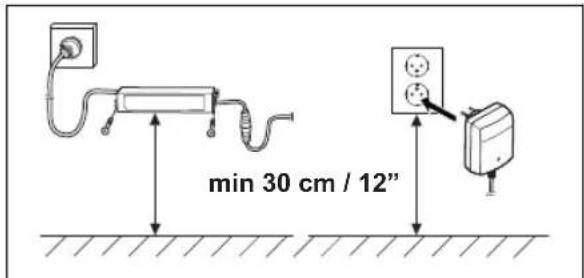
- Connect the power supply cable to a 100-240V power outlet.
Note: When the charging station is connected, it is possible to charge the product. Put the product in the charging station while the boundary and guide wires are being laid. Switch on the product to start charging the product. Refer to To use the ON/OFF button on page 23. Do not continue with any product settings before the installation is complete.
- Put the low-voltage cable in the ground with stakes or bury the cable. Refer to To put the wire into position with stakes on page 19 or To bury the boundary wire or the guide wire on page 19.
- Connect the wires to the charging station after the installation of boundary wire and guide wire is complete. Refer to To install the boundary wire on page 18 and To install the guide wire on page 18.
- Attach the charging station to the ground with the supplied screws after the guide wire is installed. Refer to To install the guide wire on page 18.
3.5.3 To install the boundary wire

CAUTION: Do not put remaining wire in a coil. The coil causes interference with the product.
- Put the boundary wire around all of the work area. Start and complete the installation behind the charging station.
- Open the connector and put the boundary wire in the connector.
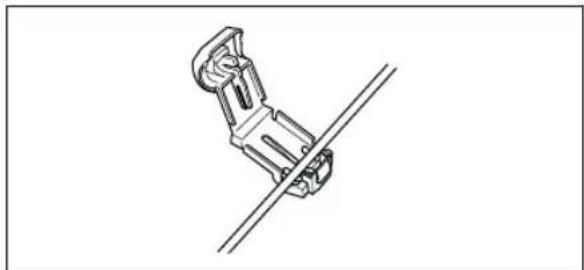
natural_image
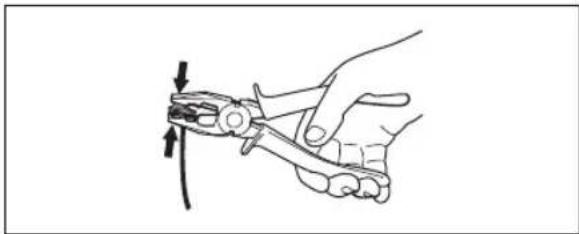
Technical line drawing of a mechanical clamp or bracket assembly (no text or symbols)- Close the connector with a pair of pliers.
natural_image
Line drawing of a hand using a pliers to cut a tool, no text or symbols present- Cut the boundary wire 1-2 cm / 0.4-0.8 in. above each connector.
- Push the right connector onto the metal pin on the charging station with the mark "R".
- Push the left connector onto the metal pin on the charging station with the mark "L".
3.5.4 To install the guide wire

CAUTION: Twinned cables, or a screw terminal block that is insulated with insulation tape are not satisfactory splices. Soil moisture will cause the wire to oxidize and after a time result in a broken circuit.
- Open the connector and put the wire in the connector.
- Close the connector with a pair of pliers.
- Cut the guide wire 1-2 cm / 0.4-0.8 in. above each connector.
- Push the guide wire through the slot in the charging station plate.
- Push the connector onto the metal pin on the charging station with the mark "G".
- Disconnect the charging station from the power outlet.
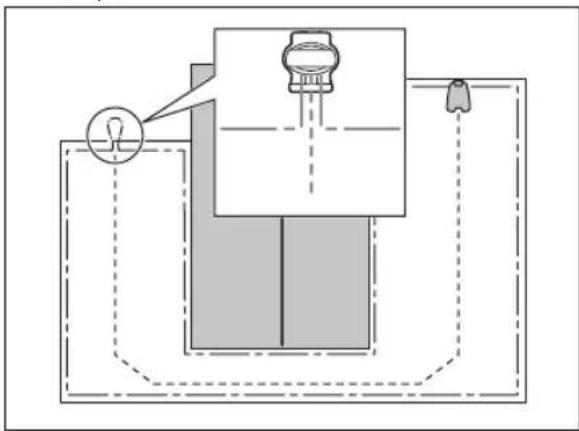
- Put the end of the guide wire at the eyelet on the boundary wire.
- Cut the boundary wire with a pair of wire cutters.
- Connect the guide wire to the boundary wire with a coupler.
natural_image
Diagram of a mechanical device with a light bulb and lever, showing internal components and dashed lines indicating hidden edges (no text or symbols)a) Put the 2 ends of the boundary wire and the end of the guide wire into the coupler.
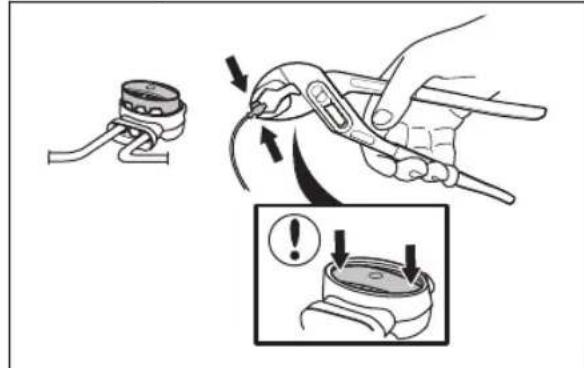
Note: Make sure that you can see the ends of the wires through the transparent area of the coupler.
b) Push down the cover on the coupler with adjustable pliers to attach the wires in the coupler.
-
Attach the guide wire to the ground with stakes or bury the guide wire in the ground. Refer to To put the wire into position with stakes on page 19 or To bury the boundary wire or the guide wire on page 19.
-
Connect the charging station to the power outlet.
3.6 To put the wire into position with stakes

CAUTION: Make sure that the stakes hold the boundary wire and the guide wire against the ground.

CAUTION: Cutting the grass too low right after installation can damage the wire insulation. Damage to the insulation may not cause disruptions until several weeks or months later.
- Put the boundary wire and the guide wire on the ground.
- Put the stakes at a maximum of 100 cm / 40 in. distance from each other.
- Attach the stakes to the ground with a hammer or a plastic mallet.
Note: The wire is overgrown with grass and not visible after a few weeks.
3.7 To bury the boundary wire or the guide wire
- Cut a groove in the ground with an edge cutter or a straight shovel.
- Put the boundary wire or the guide wire 1-20 cm / 0.4-8 in. into the ground.
3.8 To extend the boundary wire or the guide wire
Note: Extend the boundary wire or the guide wire if it is too short for the work area. Use original spare parts, for example couplers.
- Disconnect the charging station from the power outlet.
- Cut the boundary wire or the guide wire with a pair of wire cutters where it is necessary to install the extension.
- Add wire where it is necessary to install the extension.
- Put the boundary wire or the guide wire into position.
- Put the wire ends into a coupler.
Note: Make sure that you can see the ends of the boundary wire or the guide wire through the transparent area of the coupler.
- Push down the cover on the coupler with adjustable pliers to attach the wires in the coupler.
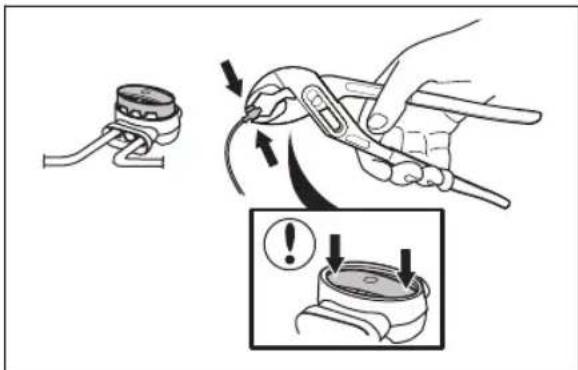
- Put the boundary wire or the guide wire into position with stakes.
- Connect the charging station to the power outlet.
3.9 After the installation of the product
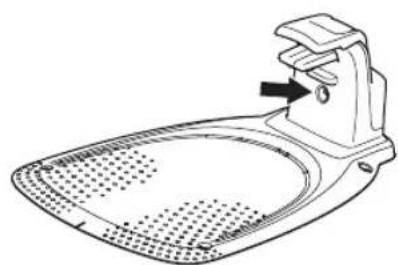
3.9.1 To do a visual check of the charging station
- Make sure that the indicator LED lamp on the charging station has a green light.
natural_image
Line drawing of a hair iron with a handle and spout, showing no text or symbols- If the indicator LED lamp does not have a green light, do a check of the installation. Refer to Indicator lamp in the charging station on page 36 and To install the charging station on page 17.
3.10 To do the product settings
Use the Flymo EasiLife app to set all the settings for the product. The functions have factory settings that are applicable for almost all work areas, but the settings can be adapted to the conditions for each work area.
3.10.1 To download and pair with the Flymo EasiLife app
The Flymo EasiLife app is a free app for your mobile device. The Flymo EasiLife app is used for the settings and operation of the product. The short-range interaction with the product is called Bluetooth®. When pairing between the product and app has been confirmed, you have access to the menus and functions as long as you are within short-range (Bluetooth®).
-
Download the Flymo EasiLife app on your mobile device.
-
Switch off the product and switch it on again.
-
Pair the Flymo EasiLife app with the product.
Note: The Bluetooth® pairing mode is active for 3 minutes.
- Enter the PIN code. Refer to PIN code on page 22.
3.10.2 To do the Schedule settings
You can set the schedule in 3 different procedures:
- Use the Flymo assisted scheduling where you enter the size of your work area and the scheduling wizard shows an applicable schedule.
- Use the Manual scheduling to set or adjust the schedule manually.
- Use the GO/Schedule button to set a daily schedule that starts this current time each day and the product will operate to its maximum cutting time each day. Refer to To set the product to operate in Main area and make a daily schedule on page 23.

CAUTION: Do not cut the lawn more than it is necessary to prevent wear on the product and the lawn.
3.10.2.1 Make an estimate of the necessary operating time
If the work area is less than maximum product capacity, the schedule must be set to decrease the wear on the lawn and the product. The product has a maximum cutting time each day. You can set the operating time of the product in the schedule. The operating time includes cutting, searching and charging. The operating time can be different because of many reasons, for example the layout of the work area, the grass growth and age of the battery. When the product has operated to the maximum cutting time in a day, the message Today's mowing complete is shown in the display of the app.
The recommended operating times for some work area examples are shown in the table below. If the result is not satisfactory, increase the operating time.
| Area, m^2 | Recommended operating time, h |
| 250 4-5 | |
| 500 10-11 |
3.10.3 Lawn Coverage and PassageSense
If the work area includes remote parts that are connected with narrow passages, the Lawn Coverage and PassageSense function are useful to be able to maintain a well-cut lawn in all parts of the yard. The Lawn Coverage function is used to guide the product to remote parts of the work area. The PassageSense function is used for narrow passage mowing. A guide wire must be installed to use these functions. You can set a maximum of 3 remote areas.
With the Lawn Coverage function the product first follows and then leaves the guide wire after a certain distance and starts to mow the lawn.
Area A, approximately 50%
Area B, approximately 30%
Area C, approximately 20%
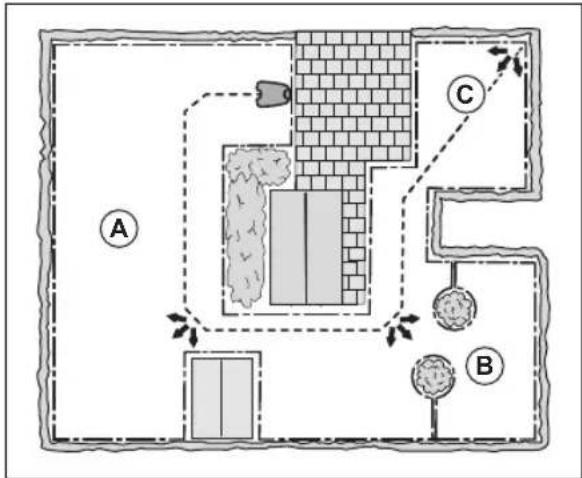
The PassageSense function is suitable to mow narrow passages of 60 cm - 1.5 m / 2 ft. - 4.9 ft. width. The product moves in a pattern to cover the passage width. The product starts the PassageSense at the set distance from the charging station. When the product reaches the end of the narrow passage, the product continues and cuts the lawn as normal.
Note: To prevent that the grass in the narrow passage is worn, Flymo recommends to set a low percentage for the PassageSense.
In the factory settings the product follows the guide wire 20% of the time for 99 m / 325 ft, or until the product reaches the connection with the boundary wire. The remaining time the product starts to cut at the starting point. In the factory settings the PassageSense is disabled.
3.10.4 Drive Past Wire function
The front of the product always moves past the boundary wire by a specified distance. Then the product moves rearward and changes direction. The factory setting is 32 cm / 12 in. You can select a distance of 20-35 cm / 8-14 in.
Note: If you change the distance for Drive Past Wire, the distance will change along the boundary wire in all parts of the work area.
3.10.5 Starting point
This function allows you to control how far the product drives along the guide wire from the charging station before it starts operating. The factory setting is 60 cm / 2 ft.
Note: The product straddles the guide wire from the charging station to the starting point. Keep as short
distance to the starting point as possible to reduce the risk of tracks forming on the lawn.
If the charging station is put in a small space area, for example between flower beds, set the starting point where the distance to the boundary wire is minimum 60 cm / 2 ft.
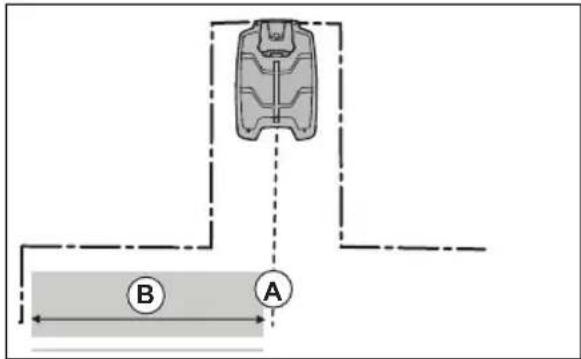
A) Starting point
B) Minimum distance 60 cm / 2 ft (perpendicular to the guide wire).
3.10.6 LawnSense

LawnSense automatically adjust the cutting time to the growth of the grass. The product is not permitted to operate more than the schedule settings. You get set how frequently the product cuts the grass when you use LawnSense. There are 3 frequency levels: Low, Mid and High. The higher the frequency, the more sensitive the product is to the grass growth. That is, if the grass growth is high then the product can operate longer.
Note: When using LawnSense, it is recommended to make as much operating time as possible available for LawnSense. Do not restrict the schedule more than necessary. Also, check that the blade disc is clean and that the blades are in good condition.
The first operation of the day is set by the schedule settings. The product always completes 1 mowing cycle, and then LawnSense selects if the product will continue to operate or not. In the factory setting this function is disabled.
Note: LawnSense is reset if the product does not operate for more than 50 hours, or if a Reset of all user settings is done. LawnSense is not changed if a Reset of schedule settings is done.
3.10.7 Avoid collisions with Flymo mower house
If you have installed a Flymo mower house ^4 , the wear on the product and the mower house decreases when you select Avoid house collisions. In the factory setting this function is disabled.
Note: If Avoid house collisions is selected it can result in grass that is not cut around the charging station.
3.10.8 ECO mode
If ECO mode is activated, it switches off the signal in the boundary loop, the guide wire and the charging station, when the product is parked or is charging. In the factory setting this function is disabled.
Note: Use ECO mode to save energy and avoid interference with other equipment, for example hearing loops or garage doors.
Note: To start the product manually in the work area, push the STOP button before you remove the product from the charging station. If not, the product can not be started in the work area.
3.10.9 FrostSense
The grass is extra sensitive to wear if the yard is covered with frost. If the FrostSense is activated, the product is not allowed to start to cut the grass if the temperature is below 5°C / 41°F. In the factory setting this function is disabled.
Note: The frost sensor is located inside the chassis and there can be a delay compared to the ambient temperature.
3.10.10 New loop signal
The loop signal is randomly selected to create a unique link between the product and the charging station. In rare cases, there may be a need to generate a new signal, for instance if two adjacent installations have a very similar signal. Put the product in the charging station before you make a new loop signal.
3.10.11 PIN code
The PIN code is a combination of 4 buttons on the keypad.
Note: The ON/OFF button, the Park button, the GO button and the GO/Schedule buttons can be included in the PIN code.
3.10.11.1 To enter the factory PIN code
- Push the ON/OFF button (A).
- Push the GO/Schedule button (B).
- Push the GO button (C).
- Push the Park button (D).
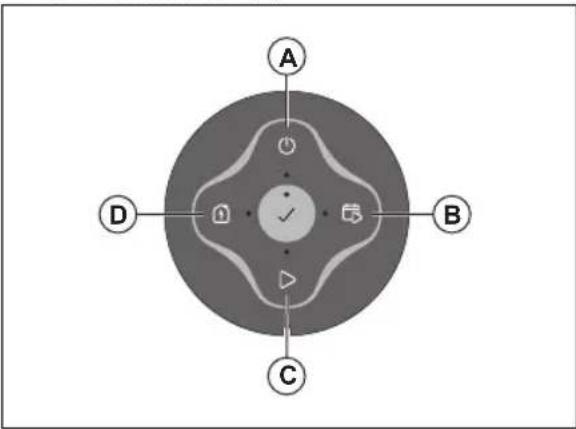
Note: You can change the PIN code in the Flymo EasiLife app.
3.10.12 Reset all user settings
Use this function to reset all user settings.
Note: PIN code, Loop signal and Messages are not reset when you select Reset all user settings
4 Operation
4.1 To use the ON/OFF button

WARNING: Read and understand the safety chapter before you use the product.

WARNING: Keep your hands and feet away from the rotating blades. Do not put your hands or feet near or below the product when the product is set to ON.

WARNING: Do not use the product when persons, especially children, or animals are in the work area.
- Push the ON/OFF button for 3 seconds to set the product to ON. Make sure that the LED indicator comes on.
• The product is ON and in power save mode if the LED indicator flashes. Push the ON/OFF button for 3 seconds to set the product to ON.
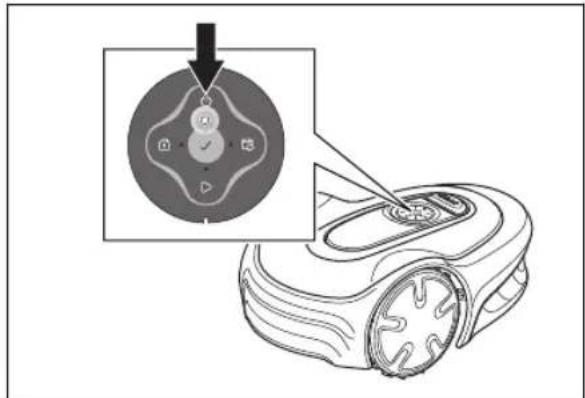
- Push the ON/OFF button for 3 seconds to set the product to OFF. Make sure that the LED indicator goes out.
4.1.1 The indicator lamp
The indicator lamps on the keypad shows the operating mode of the product, refer to LED status indicator on the keypad on page 6.
4.2 To start the product
- Push the ON/OFF button for 3 seconds.
- Use the keypad to enter the PIN code. Refer to PIN code on page 22
- Select the desired operating mode and confirm. Refer to Operating modes on page 23.
Note: The first weeks after installation the perceived sound level when cutting the grass may be higher than expected. When the product has cut the grass for some time, the perceived sound level is much lower.
4.3 Operating modes
The following operating modes are available:
- Main area
• Secondary area
Park
Park / Schedule - Override schedule
- Spot cutting
4.3.1 Main area
Main area is the standard operating mode where the product mows and charges automatically.
4.3.1.1 To set the product to operate in Main area
This can be set in the dashboard in the app or with the keypad on the product:
-
Push the STOP button.
-
Push the GO/Schedule button for 1 second.
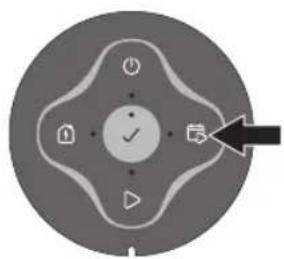
natural_image
Circular device control knob with directional arrows and function buttons (no text or symbols)- Push the OK button.
Note: If there is no set schedule a daily schedule will be set. The schedule will start at this current time each day and the product will operate to its maximum cutting time each day.
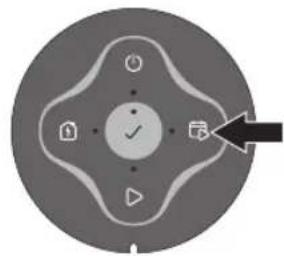
4.3.1.2 To set the product to operate in Main area and make a daily schedule
You can set a schedule that starts at this current time each day and cuts the maximum cutting time for the product each day. This can be set in the dashboard in the app or with the keypad on the product:
- Push the STOP button.
- Push the GO/Schedule button for 3 seconds.
natural_image
Circular device dial with control buttons and a black arrow pointing to the right (no text or symbols)- Push the OK button.
4.3.2 Secondary area
To mow secondary areas the operating mode Secondary area must be selected. In this mode, the operator must move the product manually between the main area and the secondary area. The product mows until the battery is empty. When the battery is empty, put the product in the charging station to charge the battery. When the battery is charged, the product moves out of the charging station and stops. The product is now prepared to start operation, but needs confirmation from the operator first.
Note: Put the product in the charging station and change the operating mode to Main area in the app or with the keypad on the product if you want to cut the main area after the battery is charged.
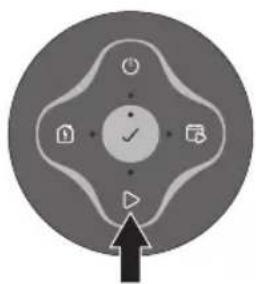
4.3.2.1 To set the product to operate in Secondary area This can be set in the dashboard in the app or with the keypad on the product:
- Push the STOP button.
- Push the GO button for 3 seconds.
natural_image
Circular icon with a central checkmark and surrounding icons, no text or symbols present.- Push the OK button.
4.3.3 Park
Operating mode Park means that the product returns to the charging station where it remains until a different operating mode is selected.
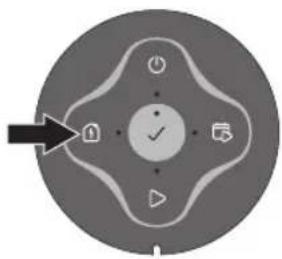
4.3.3.1 To park the product
This can be set in the dashboard in the app or with the keypad on the product:
- Push the STOP button.
- Push the Park button for 3 seconds.
natural_image
Circular device control panel with buttons and a central checkmark (no text or symbols)- Push the OK button.
Note: To change the operating mode of the product, push the STOP button and the product will be in idle mode where you can set an operating mode.
4.3.4 Park / Schedule
Operating mode Park / Schedule means that the product goes back to the charging station where it stays until the next schedule. If the product has operated the maximum cutting time for the day, it will start to operate again the next day. Refer to Make an estimate of the necessary operating time on page 20.
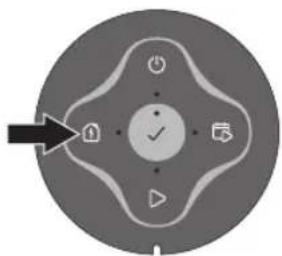
4.3.4.1 To park the product and start again with the next schedule
This can be set in the dashboard in the app or with the keypad on the product:
- Push the STOP button.
- Push the Park button for 1 second.
natural_image
Circular device control knob with directional arrows and function buttons (no text or symbols)- Push the OK button.
Note: To change the operating mode of the product, push the STOP button and the product will be in idle mode where you can set an operating mode.
4.3.5 Override schedule
Select Override schedule to temporarily override the schedule settings. You can select to override the
schedule settings for 3 hours. The product cannot be set to cut more than the maximum cutting time for each day.
4.3.5.1 To override the schedule
This can be set in the dashboard in the app or with the keypad on the product:
- Push the STOP button.
- Push the GO button for 1 second.
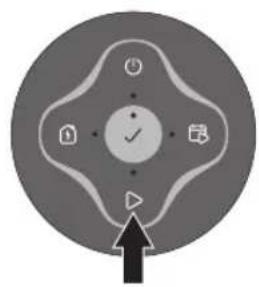
natural_image
Circular icon with a central checkmark and surrounding icons, no text or symbols present.- Push the OK button.
4.3.6 Spot cutting
Use the Spot cutting function to quickly cut an area where the grass has been cut less than in other parts of the yard. You must manually move the product to the selected area. This operating mode can only be set in the app.
Spot cutting means that the product operates in a spiral pattern in order to cut the grass in the area where it was started. When this is done, the product automatically switches back to Main area or Secondary area.
4.4 To stop the product
- Push the STOP button on top of the product.
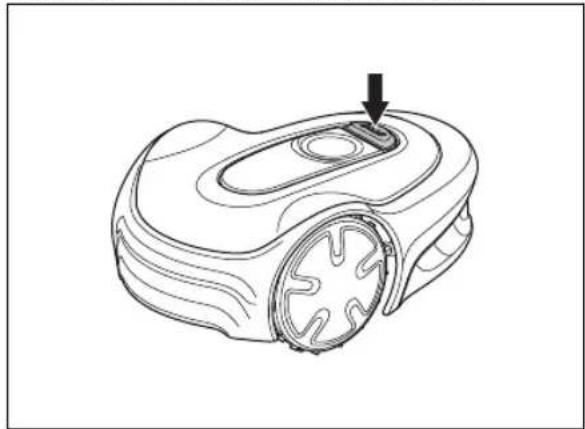
natural_image
Line drawing of a robotic vacuum cleaner with a black arrow pointing to the handle (no text or symbols)Note: When the STOP button is pushed the product will be idle. The product stops and the cutting motor stops.
4.5 To switch off the product
- Push the STOP button.
- Push the ON/OFF button for 3 seconds.
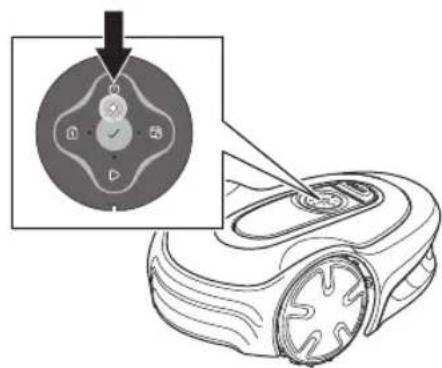
- The product shuts down.
- Check that the indicator lamp on the keypad is not lit.
4.6 To charge the battery

WARNING: Only charge the product using a charging station which is intended for it. Incorrect use may result in electric shock, overheating or leakage of corrosive liquid from the battery.
In the event of leakage of electrolyte flush with water and seek medical help if it comes in contact with the eyes etc.
When the product is new or has been stored for a long period, the battery can be empty and needs to be charged before starting. In the Main area mode, the product automatically alternates between mowing and charging.
- Push the ON/OFF button to start the product.
- Put the product in as far as possible in the charging station. Make sure that the product and the charging station is connected. Refer to contact and charging strips in Product overview on page 4
4.7 Adjust the cutting height

CAUTION: During the first weeks after a new installation, the cutting height must be set to MAX to avoid damaging the loop wire. After this, the cutting height can be lowered step by step every week until the desired cutting height has been reached.
The cutting height can be varied 3 steps. Step 1 is the lowest height, step 2 is the middle height, and step 3 is
the highest height. The steps 1-3 are marked on the blade disc. The factory setting for the cutting height is 3.
4.7.1 To adjust the cutting height

WARNING: Use protective gloves.
- Push the ON/OFF button for 3 seconds to switch off the product.
- Make sure that the product is disabled. The indicator lamp on the ON/OFF button is not lit when the product is disabled. Refer to LED status indicator on the keypad on page 6.
- Pull up the top cover clockwise by hand and remove it.
- Remove the hex key that is attached to the body of the product.
- Turn the product upside down.
- Remove the 2 screws on the blade disc.
- Lift up the blade disc.
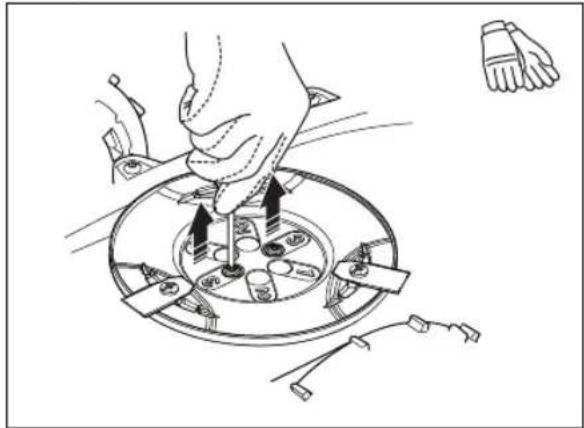
natural_image
Illustration of a hand using a tool to adjust or install a circular component with tools and components (no text or symbols present)-
Install the blade disc on the shaft. Select a cutting height and align the 2 holes on the blade disc with the 2 holes in the shaft.
-
Attach the 2 screws on the blade disc to install the shaft on the blade disc.
-
Put back the hex key on the body of the product.
-
Attach the top cover on the product.
5 Maintenance
5.1 Introduction - maintenance

WARNING: The product must be switched off before any maintenance is done. The product is disabled when the LED status indicator is not lit.

WARNING: Wear protective gloves.
For better operation and longer service life, make sure to clean the product regularly and replace worn parts. All maintenance and servicing must be done according to Flymo's instructions. Refer to Warranty on page 44.
When the product is first used, the blade disc and blades should be inspected once a week. If the amount of wear during this period has been low, the inspection interval can be increased.
It is important that the blade disc rotates easily. The edges of the blades should not be damaged. The lifetime of the blades varies immensely and depends for instance on:
- Operating time and size of the work area.
• Type of grass and seasonal growth. - Soil, sand and use of fertilizers.
- The presence of objects such as cones, windfalls, toys, tools, stones, roots and the like.
The normal life is 4 to 7 weeks when used under favorable conditions. Refer to Replace the blades on page 28 on how to replace the blades.
Note: Working with blunt blades gives a poorer mowing result. The grass is not cut cleanly and more energy is needed resulting in the product not mowing such a large area.
5.2 Clean the product

CAUTION: Do not use a high-pressure washer to clean the product. Do not use solvents for cleaning.
Flymo recommends to use a special cleaning and maintenance kit as an accessory. Speak to your Flymo service for more information.
5.2.1 To clean the chassis and blade disc
Examine the blade discs and blades weekly.
-
Push the STOP button.
-
Push the ON/OFF button for 3 seconds to set the product to OFF. Make sure that the LED indicator on the keypad goes out.
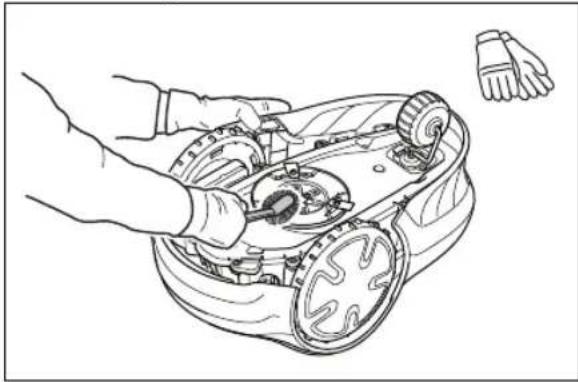
- Lift the product onto its side.
- Make sure that the blades are not damaged and that the blades and blade discs can rotate freely.
- Clean the blade discs and chassis with a brush and running water.
natural_image
Line drawing of a robotic lawn mower with hands operating it (no text or symbols)5.2.2 To clean the wheels
The product does not operate satisfactorily in slopes if the wheels are blocked with grass.
- Use a soft brush to clean the wheels.
5.2.3 To clean the body of the product
- Use a moist cloth and a weak soap solution to clean the body of the product.
5.2.4 To clean the charging plates and contact plates
- Use a fine grade emery cloth to clean the charging plates and the contact plates.
- Lubricate the charging plates and contact plates with oil or grease.
5.2.5 To clean the charging station

WARNING: Disconnect the power supply from the power outlet before maintenance, or when you clean the charging station or power supply.

CAUTION: Do not use a high-pressure washer or running water to clean the charging station.
Note: The product cannot enter the charging station if there are objects in the charging station. Clean the charging station regularly.
- Remove grass, twigs and other objects from the charging station.
5.3 Replace the blades

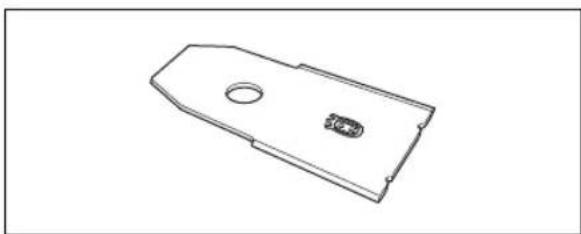
WARNING: Use blades and screws of the right type. Flymo can only guarantee safety when using original blades. Only replacing the blades and reusing the screw can result in a screw wearing during mowing. The blades can then be propelled from under the body and cause serious injury.
Replace worn or damaged parts for safety reasons. Even if the blades are intact, they should be replaced on a regular basis for the best mowing result and low energy usage. All 3 blades and screws must be replaced at the same time to obtain a balanced cutting system. Use Flymo original blades embossed with the crowned H-mark logotype, refer to Warranty on page 44.
natural_image
Technical line drawing of a mechanical part with a circular hole and a small inset feature (no text or symbols)5.3.1 To replace the blades
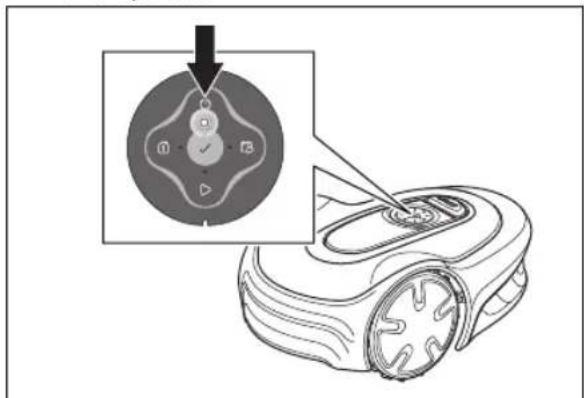
- Push the STOP button.
- Push the ON/OFF button for 3 seconds to switch off the product.
-
Make sure that the indicator lamp on the keypad is not lit.
-
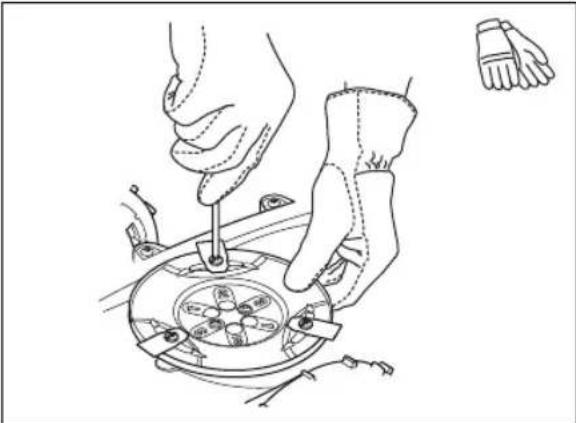
Turn the product upside down. Put the product on a soft and clean surface to prevent scratching the product.
- Remove the 3 screws. Use a straight slot or cross-tip screwdriver.
natural_image
Line drawing of hands using a tool to adjust or install a mechanical component (no text or symbols visible)- Remove each blade and screw.
- Attach new blades and screws.
- Make sure that the blades can pivot freely.
5.4 Firmware update
If service is done by Flymo service, available firmware updates are downloaded to the product by the service technician. Owners of Flymo products can update the firmware if this is initiated by Flymo. Registered users are in that case notified.
5.4.1 To update the firmware
- Remove the rubber plug.
- Connect a USB printer cable (USB A and USB B contacts) in the product and your computer. The USB printer cable is available as an accessory.
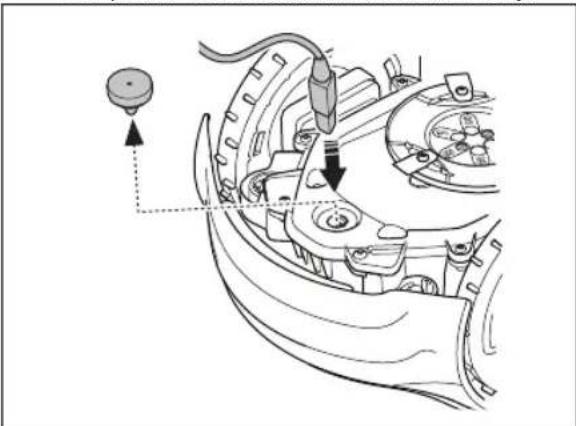
natural_image
Technical line drawing of a mechanical component with arrows indicating assembly or adjustment (no text or symbols)- Go to, search for and download the firmware update tool and follow the instructions.
- Remove the USB printer cable.
- Attach the rubber plug and make sure that it seals fully.

CAUTION: Make sure that the rubber plug seals fully to prevent moisture.
5.5 Update of the Flymo EasiLife app
Flymo regularly updates the Flymo EasiLife app. Update the app on App Store or on Google Play to make sure that you have the latest version.
5.6 Battery

WARNING: Only charge the product using a charging station which is intended for it. Incorrect use may result in electric shock, overheating or leakage of corrosive liquid from the battery. In the event of leakage of electrolyte flush with water and seek medical help if it comes in contact with the eyes etc.

WARNING: Use only original batteries recommended by the manufacturer. Product safety cannot be guaranteed with other batteries. Do not use non-rechargeable batteries.

CAUTION: The battery must charge a complete cycle before winter storage. If the battery is not fully charged it can be damaged and in certain cases be rendered useless.
If the operating time for the product is shorter than normal between charges, this indicates that the battery is getting old and eventually needs replacing.
Note: Battery life is dependent on the length of the season and how many hours a day the product is operating. A long season or many hours of use a day means that the battery must be replaced more regularly. The battery is fine as long as the product maintains a well-cut lawn.
5.6.1 To replace or to remove the battery

WARNING: Use protective gloves.

CAUTION: Do not touch the circuit boards.
- Push the ON/OFF button for 3 seconds to switch off the product.
- Make sure that the product is disabled. The indicator lamp on the ON/OFF button is not lit when the product is disabled. Refer to LED status indicator on the keypad on page 6.
- Turn the product upside down. Put the product on a soft and clean surface to prevent scratching the product.
- Remove the 10 screws with a Torx 20.
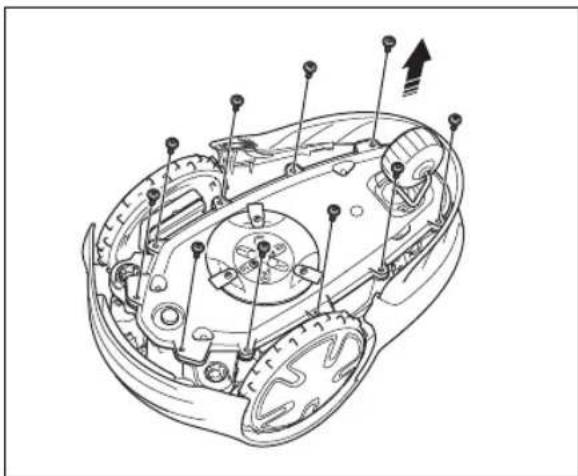
natural_image
Technical line drawing of a mechanical assembly with no visible text or symbols- Carefully lift the lower section of the chassis and put it adjacent to the upper chassis.

CAUTION: Be careful, the cable is connected to the main board.
- Remove the screw for the battery holder.
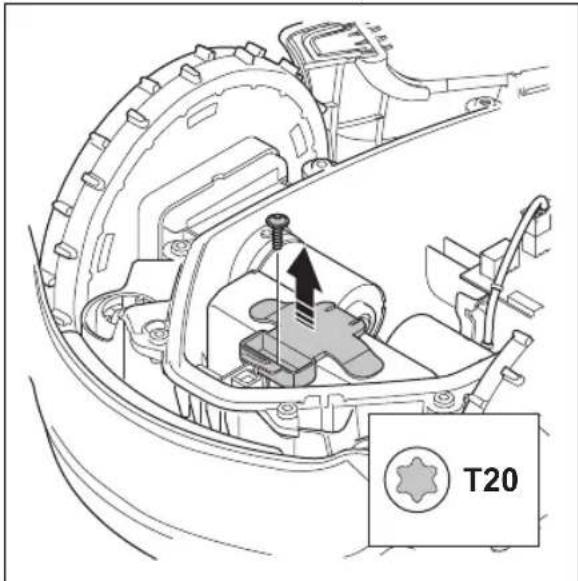
- Push the clips and lift up the battery holder.
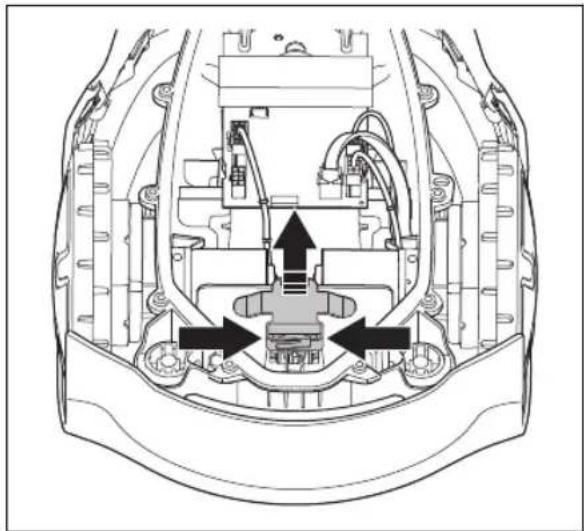
natural_image
Technical diagram of a mechanical assembly with internal components and directional arrows (no text or labels)- Remove the battery.
- Disconnect the cable to the battery.
- Connect the cable to a new battery.
- Put the new battery into position in the product.
- Install the battery holder and the screw.
- Remove the sealing strip in the upper chassis.
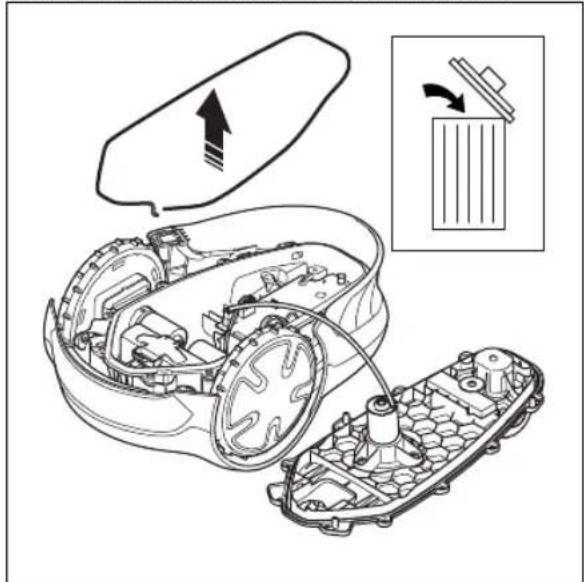
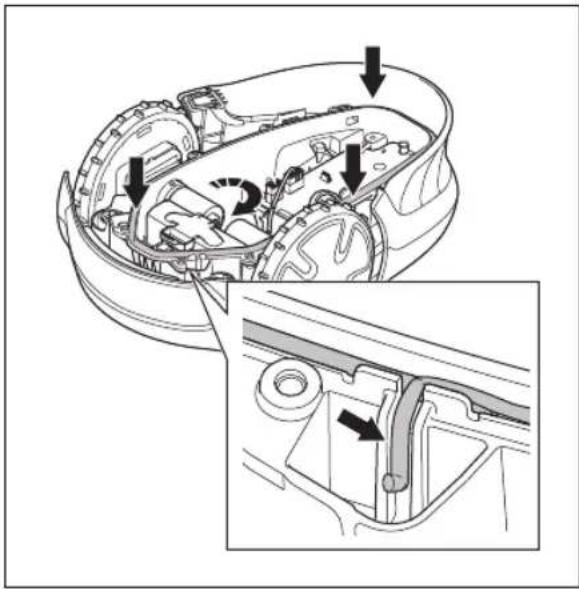
- Install a new sealing strip in the upper chassis. Put one end of the sealing strip in line with the mark on the chassis.
natural_image
Technical diagram of a car interior showing internal components and a close-up view of the engine compartment (no text or labels)
CAUTION: Install a 5 mm sealing strip. An incorrect dimension of the sealing strip or an incorrect installation can cause leakage.
- Put the sealing strip clockwise around the lower chassis.
- Put the other end of the sealing strip above the first end and then out of the channel.
- Attach the sealing strip in the retainer.
- Install the upper chassis and attach the 10 screws with a Torx 20 (Screw torque 1.8 Nm).
5.7 Winter service
Take your product to your Flymo service for service prior to winter storage. Regular winter service will maintain the product in good condition and create the best conditions for a new season without any disruptions.
Service usually includes the following:
- Thorough cleaning of the body, the chassis, the blade disc and all other moving parts.
- Testing of the product's function and components.
- Checking and, if required, replacing wear items such as blades and bearings.
- Testing the product's battery capacity as well as a recommendation to replace battery if necessary.
- If new firmware is available, the product is updated.
6 Troubleshooting
6.1 Introduction - troubleshooting
In this chapter you can find information and help about faults and symptoms of the product. You can find more information and FAQ (Frequently Asked Questions) on .
6.2 Fault messages
The fault messages in the table below are shown in the app. Speak to your Flymo service if the same message shows frequently.
| Message Cause Action | ||
| Wheel motor blocked, left/right | Grass or other object around the drive wheel. | Remove grass or other object. |
| Cutting system blocked | Grass or other object around the blade disc. | Remove grass or other object. |
| The blade disc is in water. Move the product and prevent the collection of water in the work area. | ||
| The grass is too high. Cut the grass before you install the product. Make sure that the grass is maximum 4 cm / 1.6 in. | ||
| Trapped | The product is behind a number of obstacles in a small area. | Remove the obstacles or put the boundary wire around the obstacle to make an island. Refer to To make an island on page 15. |
| Outside working area | A section of boundary wire is put across the other section of boundary wire to the charging station. | Make sure that the boundary wire is connected correctly. |
| The boundary wire is too near the edge of the work area. | Make sure that the boundary wire is installed correctly. Refer to To install the boundary wire on page 18. | |
| The work area slopes much by the boundary loop. | ||
| The boundary wire is put in the incorrect direction around an island. | ||
| Interference to the boundary wire from metal objects such as fences, reinforcement steel or buried cables nearby. | Move the boundary wire. | |
| The product can not find the correct loop signal because of interference with a loop signal from a different product installation nearby. | Put the product in the charging station and generate a new loop signal. | |
| Empty battery | The product cannot find the charging station. | Change the position of the guide wire. Refer to To install the guide wire on page 18. |
| The battery is at the end of its life cycle. Replace the battery. Refer to Battery on page 29. | ||
| The antenna of the charging station is defective. | Do a check if the indicator lamp in the charging station flashes red. Refer to Indicator lamp in the charging station on page 36. | |
| The charging plates on the product or contact plates on the charging station are defective because of corrosion. | Clean the charging plates and contact plates. Refer to To clean the charging plates and contact plates on page 27. If the problem stays speak to your Flymo service. | |
| Wrong PIN code | Incorrect PIN code has been entered. Enter the correct PIN code. If you do not know the correct PIN code, go to to get information about how to get the PIN code or speak to your Flymo service. | |
| No drive | The product has got caught in something and has been slipping. | Free the product and correct the cause of problem. If it is because of wet grass, wait until the lawn is dry before you use the product. |
| The work area includes a steep slope. Steep slopes must be isolated. Refer to To examine where to put the boundary wire on page 13. | ||
| The guide wire is not put diagonally in the slope. | Make sure that the guide wire is installed diagonally across the slope. Refer to To examine where to put the guide wire on page 16. | |
| Wheel motor overloaded, left/right | Grass or other object around the drive wheel. | Remove grass or object from the drive wheel. |
| Collision sensor problem | The front wheels on the product are blocked. | Free the product and correct the cause of problem. If the problem stays speak to your Flymo service. |
| Charging station blocked | The contact between the charging plates on the product and the contact plates on the charging station is not good. The product has made a number of tries to charge. | Put the product in the charging station and make sure that the charging plates and contact plates are connected. |
| An object prevents the product to enter the charging station. | Remove the object. | |
| The charging station is tilted or bent. Put the baseplate on level ground. | ||
| The guide wire is not installed correctly. Install the guide wire correctly. Refer to To install the guide wire on page 18. | ||
| Stuck in charging station | An object prevents the product to move out from the charging station. | Remove the object. |
| Upside down | The product is in an incorrect position, the product is tilting too much or is upside down. | Put the product in the correct position. |
| Lifted | The lift sensor has been enabled because the product has been lifted. | Make sure that the product body can move freely around its chassis. Remove or create an island around objects that can cause the chassis to be lifted. If the problem stays speak to your Flymo service. |
| Wheel drive problem, right/left | Grass or other object around the drive wheel. | Clean the wheels and around the wheels. |
| Electronic problem | Temporary electronic or firmware related problem in the product. | Restart the product. If the problem stays speak to your Flymo service. |
| Loop sensor problem, front/rear | ||
| Tilt sensor problem | ||
| Temporary problem | ||
| Invalid sub-device combination | ||
| Temporary battery problem | ||
| Safety function faulty | ||
| Charging system problem | Incorrect type of battery. Use original batteries recommended by the manufacturer. | |
| Battery problem | Temporary battery or firmware related problem in the product. | Restart the product. If the problem stays speak to your Flymo service. |
| Incorrect type of battery. Use original batteries recommended by the manufacturer. | ||
| Battery temperature outside limits | The temperature in the battery is too high or too low to start operation. | The temperature in the battery is not in its operating limits and charging/mowing has stopped. Charging/mowing will start when the temperature is restored to its limits. |
| Charging current too high | Incorrect or defective power supply unit. Restart the product. If the problem stays speak to your Flymo service. | |
| No loop signal | The power supply or low-voltage cable are not connected. | If the LED status indicator on the charging station is not lit, it shows that there is no power. Examine the power outlet connection and the residual-current device. Make sure that the low-voltage cable is connected to the charging station. |
| The power supply or low-voltage cable are damaged or not connected. | Replace the power supply or low-voltage cable. | |
| The boundary wire is not connected to the charging station. | Connect the boundary wire to the charging station. Replace the connectors if damaged. Refer to To install the boundary wire on page 18 | |
| The boundary wire is damaged. Do a check of | the LED status indicator on the charging station. If it shows damage in the boundary wire, replace the damaged section with new boundary wire. | |
| The product has tried to start but it is not in the charging station and ECO mode is enabled. | Put the product in the charging station and start the product. | |
| A section of the boundary wire is across the other section of boundary wire to and from an island. | Install the boundary wire in the correct direction around the island. Refer to To install the boundary wire on page 18. | |
| Problem with the pairing between the product and the charging station. | Put the product in the charging station and make a new loop signal. Refer to New loop signal on page 22. | |
| Interference from metal objects such as fences, reinforcement steel or buried cables nearby. | Move the boundary wire and/or make islands in the work area to increase the signal strength. | |
| The product is too far from the boundary wire. | Install the boundary wire to make all parts of the work area maximum 15 m / 50 ft. from the boundary wire. | |
| Mower tilted | The product is tilted more than the maximum angle. | Move the product to a level area. |
6.3 Information and warning messages
The information messages in the table below are shown in the app. Speak to your Flymo service if the same message shows frequently.
| Message Cause Action | ||
| Low battery | The product cannot find the charging station. | Change the position of the guide wire. Refer to To install the guide wire on page 18. |
| The battery is at the end of its life cycle. Replace the battery. Refer to Battery on page 29. | ||
| The antenna of the charging station is defective. | Do a check if the indicator lamp in the charging station flashes red. Refer to Indicator lamp in the charging station on page 36. | |
| The charging plates on the product or contact plates on the charging station are defective because of corrosion. | Clean the charging and contact plates. Refer to To clean the charging plates and contact plates on page 27. If the problem stays speak to your approved servicing dealer. | |
| Settings restored | A Reset all user settings has been done. Usual operation of the product. | |
| Guide not found | The guide wire is not connected to the charging station. | Connect the guide wire to the charging station. Refer to To install the guide wire on page 18. |
| Damage in the guide wire. Replace the damaged section with new guide wire. | ||
| The guide wire is not connected to the boundary loop. | Connect the guide wire correctly to the boundary loop. Refer to To install the guide wire on page 18. | |
| Loop signal created | New loop signal changed. Usual operation of the product. | |
| Needs manual charging | The product is set to the Secondary area operating mode. | Put the product in the charging station. |
| Next start hh:mm | The schedule setting prevents the product from operating. | Change the schedule settings. Refer to Park / Schedule on page 24. |
| The product has operated the maximum cutting time for the day. | Usual operation of the product. | |
| Today's mowing completed | The product has operated the maximum cutting time for the day. | Usual operation of the product. Refer to Park / Schedule on page 24. |
| Connection NOT changed | The loop signal was not changed because of an error. | Make a New loop signal/a number of times. Refer to New loop signal on page 22. If the problem stays speak to your Flymo service. |
6.4 Indicator lamp in the charging station
The indicator lamp in the charging station must show a solid or flashing green light for a correct installation. If not, follow the instructions in the troubleshooting table below.
Speak to your Flymo service for more information.
| Light Cause Action | ||
| Green solid light Good | signals. Usual operation of the product. | |
| Green flashing light The | the signals are good and ECO mode is enabled. | Usual operation of the product. Refer to ECO mode on page 22. |
| Blue flashing light The | boundary wire is not connected to the charging station. | Make sure that the boundary wire is correctly installed in the charging station. Refer to To install the boundary wire on page 18. |
| Damage in the boundary wire. Find out where | the damage is. Replace the damaged section with new boundary wire. | |
| Yellow flashing light The | the guide wire is not connected to the charging station. | Make sure that the guide wire is correctly installed in the charging station. Refer to To install the guide wire on page 18 |
| Damage in the guide wire. Find out where the | damage is. Replace the damaged section with new guide wire. | |
| Red flashing light Interference | in the antenna of the charging station. | Speak to your Flymo service. |
| Red solid light Error in | the circuit board or incorrect power supply in the charging station. The error must be corrected by your Flymo service | Speak to your Flymo service. |
6.5 Symptoms
If the product does not operate as usual, follow the symptoms table below. Speak to your Flymo service if you cannot find the cause for the fault.
| Symptoms Cause Action | ||
| The product has diffi-culty docking. | The guide wire is not put straight in a line and correct distance from the charging sta-tion. | Do a check of the installation of the charging station. Refer to To install the charging sta-tion on page 17. |
| The guide wire is not put in the slot in the charging station plate. | Make sure that the guide wire is put straight in a line and put in the slot in the charging station plate. Refer to To install the guide wire on page 18. | |
| The charging station is not on a level sur-face. | Put the charging station on a level surface. Refer to To examine where to put the charging station on page 12. | |
| The product operates at the wrong time. | The start and stop times for operating are in-correct. | Change the schedule settings. Refer to To do the Schedule settings on page 20. |
| The product vibrates. | The cutting system is not in balance because of damaged blades. | Examine the blades and screws and replace them if necessary. Refer to Replace the blades on page 28. |
| The cutting system is not in balance because of too many blades in the same position. | Do a check that only one blade is attached to each screw. | |
| Different thickness of blades are installed on the product. | Do a check if the blades are of different thick-ness and replace if necessary. | |
| The product oper-ates, but the blade disc does not rotate. | The product searches for the charging sta-tion, or is moving to the starting point. | Usual operation for the product. The blade disc does not rotate when the product is searching for the charging station. |
| The product operates for shorter periods than usual between charges. | Grass or other object causes a blockage to the blade disc. | Remove and clean the blade disc. Refer to Clean the product on page 27. |
| The battery is at the end of its life cycle. Replace the battery. Refer to Battery on page 29. | ||
| Blunt blades. More energy is necessary when cutting the grass. | Replace the blades. Refer to Replace the blades on page 28. | |
| Mowing and charging times are shorter than usual. | The battery is at the end of its life cycle. Replace the battery. Refer to Battery on page 29. | |
| The product is parked for hours in the charging station. | The product has operated the maximum cut-ting time for the day. | Usual operation for the product. Refer to Make an estimate of the necessary operating time on page 20. |
| The STOP button has been pushed. | Enter the PIN code and push the OK button. Push the GO button. | |
| Parking mode is enabled. Change the operating mode. Refer to Operating modes on page 23. | ||
| The product does not operate if the battery temperature is too high or too low. | Make sure that the charging station is put in an area with protection from the sun. | |
| Uneven mowing results. | The product operates for a small number of hours per day. | Increase the cutting time. Refer to Make an estimate of the necessary operating time on page 20. |
| For the shape of the work area it is necessary to adjust the settings for Lawn Coverage to cover all parts of the work area. | Change the settings of the areas where the product starts to cut and how often. Refer to Lawn Coverage and PassageSense on page 20. | |
| The work area is too large. Decrease the size | of the work area or extend the schedule. Refer to Make an estimate of the necessary operating time on page 20. | |
| Blunt blades. Replace all the blades. Refer to | Replace the blades on page 28. | |
| Long grass in relation to the set cutting height. | Increase the cutting height and then lower it when the grass is shorter. | |
| Collection of grass by the blade disc or around the motor shaft. | Remove the collection of grass and clean the product. Refer to Clean the product on page 27. | |
| The battery state of charge is high, but the product goes back to the charging station. | To prevent to become blocked in a small area, the product follows the guide wire to the charging station. | Usual operation for the product. |
6.6 Find breaks in the loop wire
Breaks in the loop wire are usually the result of unintentional physical damage to the wire such as when gardening with a shovel. In countries with ground frost, also sharp stones that move in the ground can damage the wire. Breaks can also occur due to the wire being stretched excessively during installation.
Mowing the grass too low right after the installation can damage wire insulation. Damage to the insulation may not cause disruptions until several weeks or months later. To avoid this, always select the maximum cutting height the first weeks after installation and then lower the height one step at a time every second week until the desired cutting height has been reached.
A defective splicing of the loop wire can also lead to disruptions several weeks after the splice was done. A faulty splice can, for example, be the result of the coupler not being pressed together hard enough with a pair of pliers, or that a coupler of lower quality than the original coupler has been used. Please first check all known splices before further troubleshooting is done.
A wire break can be located by gradually halving the distance of the loop where the break may have occurred until there is only a very short section of the wire left.
The following method does not work if ECO mode is activated. Make sure first that ECO mode is switched off. Refer to ECO mode on page 22.
- Check that the indicator lamp in the charging station flashes blue, which indicates a break in the boundary loop. Refer to Indicator lamp in the charging station on page 36.
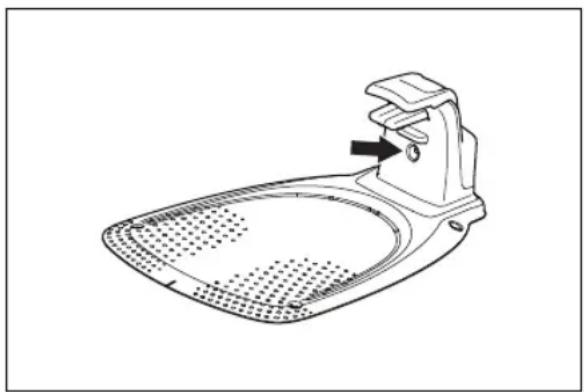
natural_image
Line drawing of a stainless steel iron stand with a handle and mesh base (no text or symbols)- Check that the boundary wire connections to the charging station are properly connected and not damaged. Check that the indicator lamp in the charging station is still flashing blue.
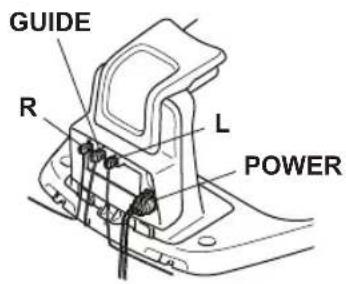
- Switch the connections between the guide wire and the boundary wire in the charging station.
Start by switching connection L and GUIDE.
If the indicator lamp is flashing yellow, then the break is somewhere on the boundary wire between L and the point where the guide wire is connected to the boundary wire (thick black line in the illustration).
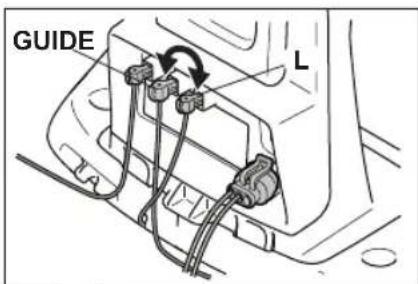
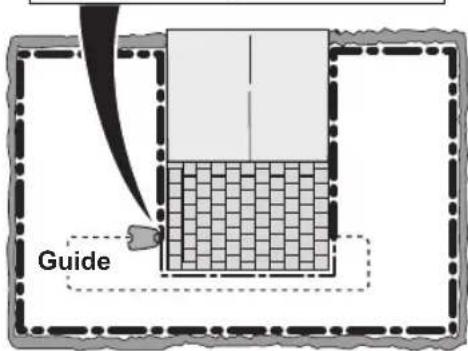
To rectify the fault you will need boundary wire, connector(s) and coupler(s):
a) If the suspected boundary wire is short then the easiest way is to exchange all of the boundary wire between L and the point where the guide wire is connected to the boundary wire (thick black line).
b) If the suspected boundary wire is long (thick black line) then do as follows: Put L and GUIDE back to their original positions. Then disconnect R. Connect a new loop wire to R. Connect the other end of this new loop wire at the middle of the suspected wire section.
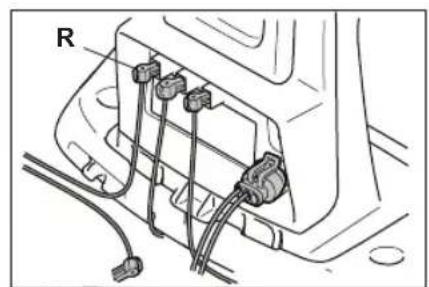
natural_image
Technical diagram of a mechanical or electrical component with four connectors and wiring (no text or symbols visible)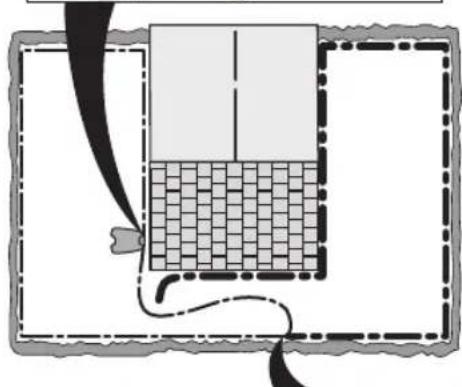
natural_image
Diagram showing a grid-patterned structure inside a rectangular frame with a curved line and a small object at the bottom (no text or symbols)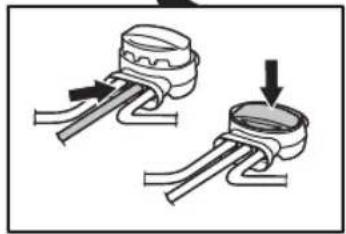
natural_image
Diagram showing two mechanical components with arrows indicating motion, no text or symbols presentIf the indicator lamp now is flashing yellow, then the break is somewhere in the wire between the disconnected end to the point where the new wire is connected (thick black line below). In that case, move the connection for the new wire closer to the disconnected end (roughly at the middle of the suspected wire section) and check again if the indicator lamp is green.
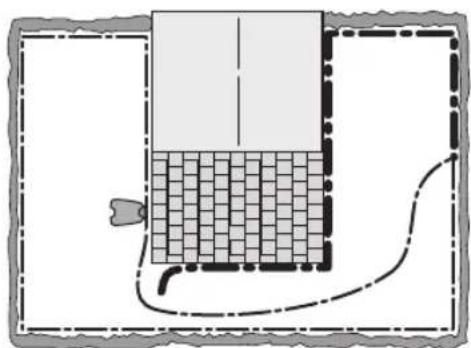
natural_image
Diagram of a rectangular container with a grid pattern inside, connected by a curved line and dashed lines (no text or symbols)Continue until only a very short section of the wire remains which is the difference between a solid green light and a flashing blue light. Then follow instruction in step 5 below.
- If indicator lamp still flashes blue in step 3 above: Put L and GUIDE back in their original positions. Then switch R and GUIDE. If indicator lamp now is lit with a solid green light then disconnect L and connect a new boundary wire to L. Connect the other end of this new wire at the middle of the suspected wire section. Follow the same approach as in 3a) and 3b) above.
- When the break is found, the damaged section must be replaced with a new wire. Always use original couplers.
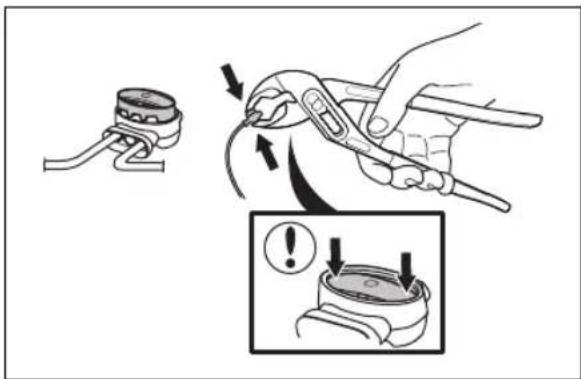
7 Transportation, storage and disposal
7.1 Transportation
The supplied Li-ion batteries obey the Dangerous Goods Legislation requirements.
- Obey all applicable national regulations.
- Obey the special requirement on package and labels for commercial transportations, including by third parties and forwarding agents.
7.2 Storage
- Fully charge the product. Refer to battery on page 25. To charge the
- Switch off the product. Refer to product on page 25. To switch off the
- Clean the product. Refer to page 27. Clean the product on
- Keep the product in a dry, frost free space.
- Keep the product with all wheels on level ground during storage.
- If you keep the charging station indoors, disconnect and remove the power supply and all the connectors from the charging station. Put the end of each connector wire in a connector protection box.
Note: If you keep the charging station outdoors, do not disconnect the power supply and the connectors.
- Speak to your Flymo service for information about available storage accessories for your product.
7.3 Disposal
- Obey the local recycling requirements and applicable regulations.
- For questions about how to remove the battery, refer to Battery on page 29.
8 Technical data
8.1 Technical data
| Dimensions EasiLife GO | |
| Length, cm / in. 52 / 20.5 | |
| Width, cm / in. 34 / 13.4 | |
| Height, cm / in. 22 / 8.7 | |
| Weight, kg / lb 6.1 / 13.4 | |
| Electrical system EasiLife GO | |
| Battery, Lithium-Ion 18 V/2.0 Ah Art.No 590 21 42-02, 590 21 42-04 | |
| Battery, Lithium-Ion 18.25 V/2.0 Ah Art.No 590 21 42-03 | |
| Battery, Lithium-Ion 18.5 V/2.0 Ah Art.No 590 21 42-07 | |
| Battery, Lithium-Ion 18.5 V/2.5 Ah Art.No 590 21 42-08 | |
| Power supply (28V DC), V AC 100-240 | |
| Low-voltage cable length, m / ft. 3 / 9.8 | |
| Mean energy consumption at maximum use 4 kWh/month in a 500 m | ^2 work area |
| Charge current, A DC 1 | |
| Type of Power Supply Unit ^5 | ADP-28AW XX, ADP-28AR XX, ADP-40BR XX, ADP-40EW XX, FW7313/28/D/XX/Y/1.0, FW7313/28/D/XX/Y/1.0/PI, FW7313/28/D/XX/Y/1.3, FW7313/28/D/XX/Y/1.3/PI |
| Average mowing time, min 70 | |
| Average charging time, min 75 | |
| Boundary wire antenna EasiLife GO | |
| Operating Frequency Band, Hz 100-80000 | |
| Maximum magnetic field ^6 , dBuA/m | 82 |
| Maximum Radio-frequency power ^7 , mW @60m | <25 |
| Sound data8 | EasiLife GO |
| Sound level, perceived, dB (A) 57 | |
| Measured sound power noise level, dB (A) 58 | |
| Noise emissions uncertainties KWA, dB (A) 2 | |
| Sound pressure noise level at the operator's ear9, dB (A) 50 | |
| Mowing EasiLife GO | |
| Cutting system 3 pivoted cutting blades | |
| Cutting motor speed, rpm 2670 | |
| Power consumption during cutting, W +/- 20 % 20 | |
| Cutting height, cm / in. 2-4.5 / 0.8-1.8 | |
| Cutting width, cm / in. 16 / 6.3 | |
| Narrowest possible passage, cm / in. 60 / 24 | |
| Maximum slope for cutting area, % 25 | |
| Maximum slope for boundary wire, % 10 | |
| Maximum length boundary wire, m / ft. 300 / 980 | |
| Maximum length guide loop10, m / ft. 150 / 490 | |
| IP-code EasiLife GO | |
| Product IPX5 | |
| Charging station IPX5 | |
| Power supply | IPX4/IP44 |
| Bluetooth® | EasiLife GO |
| Operating frequency band, MHz | 2400 - 2484 |
| Maximum transmitted power, dBm | 8 |
Husqvarna AB does not guarantee full compatibility between the product and other types of wireless systems such as remote controls, radio transmitters, hearing loops, underground electric animal fencing or similar.
The products are made in England or the Czech Republic. See information on the rating plate. Refer to Introduction on page 3.
8.2 Registered trademarks
The Bluetooth® word mark and logos are registered trademarks owned by Bluetooth SIG, inc. and any use of such marks by Flymo is under license.
9 Warranty
9.1 Warranty terms
Flymo warranty covers this product's functionality for a period of 2 years from date of purchase. The warranty covers serious faults relating to materials or manufacturing faults. Within the warranty period, we will replace the product or repair it at no charge if the following terms are met:
- The product and the charging station may only be used in compliance with the instructions in this Operator's Manual. This manufacturer's warranty does not affect warranty entitlements against the dealer/retailer.
- End-users or non-authorized third parties must not attempt to repair the product.
Examples of faults which are not included in the warranty:
- Damage caused by water seepage from using a high-pressure washer, or from being submerged under water, for example when heavy rain forms pools of water.
• Damage caused by lightning. - Damage caused by improper battery storage or battery handling.
- Damage caused by using a battery that is not a Flymo original battery.
- Damage caused by not using Flymo original spare parts and accessories, such as blades and installation material.
- Damage to the loop wire.
- Damage caused by non-authorized changing or tampering with the product or its power supply.
The blades and wheels are seen as disposable and are not covered by the warranty.
If an error occurs with your Flymo product, please contact Flymo service for further instructions. Please have the receipt and the product's serial number at hand when contacting Flymo service.
10 EU Declaration of Conformity
We, Husqvarna AB, SE 561 82 Huskvarna, SWEDEN,
Tel. +46 36 146500 declare on our sole responsibility
that the product:
| Description Robotic lawn mower | |
| Brand Flymo | |
| Type/Model EasiLife GO | |
| Identification Serial numbers dating from 2021 week 31 | |
complies fully with the following EU directives and regulations:
| Regulation Description | |
| 2006/42/EC Relating to machinery | |
| 2014/53/EU Relating to radio equipment | |
| 2011/65/EU Restriction of use of certain hazardous substances |
and that the following harmonized standards and/or technical specifications are applied;
• EN 60335-1:2012+AC:2014+A11:2014+A13:2017
• EN 50636-2-107:2015+A1:2018+A2:2020
• EN IEC 63000:2018
• EN 55032:2015
• ETSI EN 301 489-1 V2.2.3
• ETSI EN 301 489-3 V2.1.1
• ETSI EN 301 489-17 V3.1.1
• Draft ETSI EN 303 447 V1.2.1_0.1.16
• ETSI EN 300 330 V2.1.1
• ETSI EN 300 328 V2.2.2
The notified body RISE Research Institutes of Sweden
AB, No. 0402, has issued a type examination certificate
with no. C900475 covering Art. 3.2 of 2014/53/EU.
CE
11 UK Declaration of Conformity
We, Husqvarna AB, SE 561 82 Huskvarna, SWEDEN,
Tel. +46 36 146500 declare on our sole responsibility
that the product:
| Description Robotic lawn mower | |
| Brand Flymo | |
| Type/Model EasiLife GO | |
| Identification Serial numbers dating from 2021 week 31 | |
complies fully with the following UK directives and regulations:
| Regulation Description | |
| S.I. 2008/1597 The Supply of Machinery (Safety) Regulations 2008 | |
| S.I. 2017/1206 The Radio Equipment Regulations 2017 | |
| S.I. 2012/3032 The Restriction of the Use of Certain Hazardous Substances in Electrical and Electronic Equipment Regulations 2012 | |
and that the following harmonized standards and/or technical specifications are applied;
• EN 60335-1:2012+AC:2014+A11:2014+A13:2017
• EN 50636-2-107:2015+A1:2018+A2:2020
• EN IEC 63000:2018
• EN 55032:2015
• ETSI EN 301 489-1 V2.2.3
• ETSI EN 301 489-3 V2.1.1
• ETSI EN 301 489-17 V3.1.1
• Draft ETSI EN 303 447 V1.2.1_0.1.16
• ETSI EN 300 330 V2.1.1
• ETSI EN 300 328 V2.2.2

UK Importer:
Husqvarna UK Ltd
Preston Road, Co. Durham
DL5 6UP

Copyright ^® 2021 Flymo S.A. All rights reserved Flymo and other product and feature names are registered trademarks of Flymo S.A. The Husqvarna UK policy of continuous improvement and updating means that specifications can be altered without prior notice. All measurements quoted are approximate.
www.fl ymo.com/uk
Original instructions
1142755-26
2021-09-01
- Contents
- Introduction
- Safety
- Installation
- Operation
- Maintenance
- Troubleshooting
- Transportation, storage and disposal
- Technical data
- Warranty
- EU Declaration of Conformity
- UK Declaration of Conformity
- Introduction
- Support
- Product description
- Mowing technique
- Find the charging station
- Flymo EasiLife app
- Product overview
- Symbols on the product
- Symbols on the battery
- General manual instructions
- Keypad
- LED status indicator on the keypad
- Safety information
- IMPORTANT. READ CAREFULLY BEFORE USE. KEEP FOR FUTURE REFERENCE
- Safety instructions for operation
- Use
- Safety definitions
- Battery safety
- How to lift and move the product
- Maintenance
- In the event of a thunderstorm
- Introduction - Installation
- Main components for installation
- General preparations
- Before the installation of the wires
- To examine where to put the charging station
- To examine where to put the power supply
- To examine where to put the boundary wire
- To put the boundary wire in a slope
- Passages
- To make an island
- To make a secondary area
- To examine where to put the guide wire
- Work area examples
- Installation of the product
- Installation tools
- To install the charging station
- To install the boundary wire
- To install the guide wire
- To put the wire into position with stakes
- To bury the boundary wire or the guide wire
- To extend the boundary wire or the guide wire
- After the installation of the product
- To do a visual check of the charging station
- To do the product settings
- To download and pair with the Flymo EasiLife app
- To do the Schedule settings
- Make an estimate of the necessary operating time
- Lawn Coverage and PassageSense
- Drive Past Wire function
- Starting point
- LawnSense
- Avoid collisions with Flymo mower house
- ECO mode
- FrostSense
- New loop signal
- PIN code
- Reset all user settings
- To use the ON/OFF button
- The indicator lamp
- To start the product
- Operating modes
- Main area
- To set the product to operate in Main area
- To set the product to operate in Main area and make a daily schedule
- Secondary area
- Park
- To park the product
- Park / Schedule
- Override schedule
- To override the schedule
- Spot cutting
- To stop the product
- To switch off the product
- To charge the battery
- Adjust the cutting height
- To adjust the cutting height
- WARNING: Use protective gloves.
- Introduction - maintenance
- Clean the product
- To clean the chassis and blade disc
- To clean the wheels
- To clean the body of the product
- To clean the charging plates and contact plates
- To clean the charging station
- Replace the blades
- To replace the blades
- Firmware update
- To update the firmware
- Update of the Flymo EasiLife app
- Battery
- To replace or to remove the battery
- Winter service
- Introduction - troubleshooting
- Fault messages
- Information and warning messages
- Indicator lamp in the charging station
- Symptoms
- Find breaks in the loop wire
- Transportation
- Storage
- Disposal
- Registered trademarks
- Warranty terms
Brand : FLYMO
Model : EasiLife Go 200
Category : Robotic mower