
HOD-600 - Receiver Ashdown Engineering - Free user manual and instructions
Find the device manual for free HOD-600 Ashdown Engineering in PDF.


| Type | Bass Amplifier Head |
| Power Output | 600W RMS at 4 ohms |
| Minimum Impedance | 4 ohms |
| Channels | 1 |
| EQ Section | Bass, Middle, Treble, with sweepable mid |
| Inputs | 1x 1/4" instrument input, 1x XLR input |
| Outputs | 1x 1/4" speakon combo, 1x DI XLR, 1x headphone |
| Effects Loop | Series with send/return on 1/4" jacks |
| Weight | Approx. 7.2 kg |
| Dimensions (W x D x H) | 310 x 270 x 100 mm |
| Power Supply | Mains powered, 100-240V AC, 50/60Hz |
| Power Consumption | 450W maximum |
| Cooling | Variable speed fan |
| Construction | Steel chassis with aluminium front panel |
| Warranty | 2 years |
| Accessories Included | Power cord, user manual |
| Recommended Speaker Cabinet | 8 ohms or 4 ohms, minimum 600W power handling |
| Input Impedance | 1 MOhm |
| Signal to Noise Ratio | Better than 90 dB |
| Operating Temperature | 0°C to 40°C |
Frequently Asked Questions - HOD-600 Ashdown Engineering
User questions about HOD-600 Ashdown Engineering
0 question about this device. Answer the ones you know or ask your own.
Ask a new question about this device
Download the instructions for your Receiver in PDF format for free! Find your manual HOD-600 - Ashdown Engineering and take your electronic device back in hand. On this page are published all the documents necessary for the use of your device. HOD-600 by Ashdown Engineering.
USER MANUAL HOD-600 Ashdown Engineering
DESTRUCTION MANUAL
BUTLER

H.O.D
WWW.ASHDOWNMUSIC.COM

THANK YOU
Thank you for purchasing your Ashdown Engineering Amplifier and welcome to the family! We really think you've made the right choice and know that this amplifier will give you years of great tone and service. It is a machine though and needs to be looked after, please read through this user manual which will help you get the most out of your new Amp and keep it running as long as some of our happiest and very famous customers.
Before operating this bass guitar amplifier please read the enclosed safety information document.
Please register this product online or by post so we can make sure we give you years of customer support through our friendly in-house service centre.
REGISTER ONLINE
Here is where you need to visit to register your product: http://www.ashdownmusic.com/register
HEAD OF DOOM USER GUIDE:
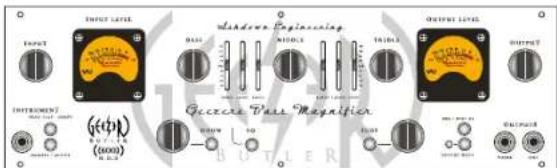
INPUT - There is a single instrument input provided linked to a PASSIVE/ACTIVE selector switch. The Passive input (switch out) is high sensitivity and also high impedance to suit the output from PASSIVE basses. The Active input (switch in) is low sensitivity and lower impedance to suit the output from ACTIVE basses.
INPUT CONTROL - The INPUT control sets the signal level through the preamp in conjunction with the INPUT LEVEL VU Meter. This is adjusted to give a reading of DVU on the meter for average playing dynamics with occasional peaks into the red region. Please note that the setting of this may have to be re-adjusted after modification of the EQ controls.
PUSH FLAT / SHAPE - With this button in its OUT position a fixed E.O. is superimposed on the preamp to give a bright but punchy character to the sound. Pushing this button IN returns the preamp to a Flat frequency response. This function may also be controlled from a footswitch. For the footswitch to operate this button must be in its OUT position.
DOOM - This routes the signal either through a clean Solid State amplification section (control on zero) or through a Dual Triode Tube amplification/overdrive section in order to add either tonal character i.e. warmth with the control set at 9 o'clock, a slight edge in the sound at 12 O'clock through to an increasing degree of Tube distortion/overdrive as the control is advanced to maximum.
A Mix of these two amplification sections can be achieved with this control.
N.B. The degree of tube distortion provided by this control will also depend on the setting of the INPUT control.
DOOM IN/OUT - This push button switches the valve drive section IN or OUT. This function may also be controlled from the Ashdown 4 way footswitch. For the footswitch to operate this button must be in its OUT position.
E.O. IN / OUT - This push button switches the Equalisation section IN or OUT i.e. the Bass. Middle and Treble controls plus the two sets of sliders placed between each of these.
This function may also be controlled from the Ashdown 4 way footswitch. For the footswitch to operate this button must be in its OUT position.
9 BAND EQUALISATION - This consists of BASS, MIDDLE and TREBLE controls with three sliders placed between each control. This can be used in a number of ways:
Firstly as a very simple Bass. Middle and Treble tone control section as found on older traditional amplifiers. This is done by leaving
The two sets of sliders interposed between these controls set in their centre positions and using only the BASS, MIDDLE and TREBLE controls to alter the overall tone.
Secondly, if more control is required then the sliders can also be used to tailor the E.O. In the regions between the main tone controls. This provides a very versatile Equalisation section, it is simple to understand and operate, yet provides a wide degree of variation. It retains the simplicity of a three-control tone section but provides the flexibility of a graphic equaliser.
SUB HARMONICS - This section produces Sub Harmonics an octave below the notes being played. The level of these Sub Harmonics relative to the straight bass sound can be adjusted using the LEVEL control. This is very effective in thickening the sound and you will find in use that only a small degree of this lower octave is required to really fill out the sound and provide a character that is not possible by any other means.
WWW.ASHDOWNMUSIC.COM
The degree of Sub Harmonics is also dependant on the setting of the BASS control.
DIRECT INJECT (D.I.) - A balanced D.I. Is provided on a latching XLR socket. This has a push button placed below it that allows the user to choose either a Pre E.O. Signal (button pushed IN) or a Post E.O. Post Sub and effects signal (button OUT).
The output signal from this XLR socket is set to a level and impedance suitable for connecting directly into the Microphone input of a mixing desk for either Direct Injection into the PA system or for recording. This must ONLY be used into a Balanced Microphone input, it is not intended for any other type of connection.
This has a floating ground that is referenced to the mixing console it is plugged into and should not need ground lifting. It is also unaffected by Phantom Powering on the Microphone input. Make sure your XLR plug does not have the shell of the plug internally connected to signal ground or this will connect the system to chassis ground of the ABM and may cause problems with hum.
PUSH TO MUTE - When pushed IN this button mutes the output from the preamp to the power amp, mutes the output from the D.I. Socket and mutes the output from the LINE Out socket as well. This leaves the output from the TUNER socket still available to allow muted tuning. A purple LED is provided next to this switch to indicate when the amplifier is muted. This function operates only from the front panel MUTE push switch. i.e. pressing this button mutes all sound from the
amplifier and allows a tuner connected to the TUNER socket to operate for silent tuning. Release the button and you are back in action again.
TUNER OUT - This output socket provides a line level signal that can be used for a permanent connection to a tuner.
The signal from this socket remains when all other outputs from the amplifier are Muted allowing all sound from the amplifier to be silenced while tuning is in progress.
LINE OUT -This output socket provides a line level/post Output Level control signal for connection to an external power amplifier driving additional speaker cabinets.
OUTPUT LEVEL - The OUTPUT control adjusts the overall level of the amplifier. Adjust this for your preferred overall stage playing volume in conjunction with the OUTPUT LEVEL VU Meter.
LINE INPUT - The rear panel has a Line Input socket for connection of other signal sources into the system. This can be used for plugging a CD, Tape or MP3 player into the amplifier for practising, rehearsing or for connection of a second pre-amp into the system.
EFFECTS SEND / RETURN - A serial effects loop is provided at a level of 0dB. The EFFECTS SEND socket can also be used as a Line Out socket if required as the signal path through the preamp is only broken when a jack plug is inserted into the EFFECTS RETURN socket. The EFFECTS SEND is situated after the EQ, the Valve section the Compression and the Sub Bass Processor.
4-WAY FOOTSWITCH SOCKET - For the 4 way footswitch to operate it is essential that the corresponding front panel push buttons be in the OUT position.
This is a mono jack socket for connection of the Ashdown 4 way footswitch (sold separately) only. Always connect this prior to turning on the power to the amplifier as the footswitch derives its power from the amplifier and sends a serial data stream to the amplifier in order to operate the various functions.
Each of the 4 facilities available for selection is indicated by an LED (on the FS4) that will light when that facility is selected from the footswitch.
SPEAKER OUTPUT - The Speaker Output sockets are also situated on the rear panel of the unit. The HOD has one power section rated at 666 Watts RMS with two Neutrik combi speakon out-puts. The Power section has a minimum load of 4 ohms.

SLAVE INPUT - There is a slave input on the rear of the head this has been designed to be fed by the transformer isolated outputs if running multiple heads from one input source...
ISOLATED INSTRUMENT OUTPUTS - On the rear of the head are 3 transformer isolated outlets labelled A, B and C. These are designed to either feed the slave inputs of multiple heads, if you wish to just use one head as a master.
Alternatively if you wish to be able to shape each individual amplifier simply plug your instrument into your master amp and connect slave outputs A, B or C to the instrument input on the front of your other amp.
Please see the diagram over page for a few scenarios...
SPECIFICATIONS:
INPUTS
High Input Impedance 3.9M Ohms Input range 50mV to 15V p-p
Low Input Impedance 10K Ohms Input range 300mV to 30V p-p
Save Input Impedance 10K Ohms Input range 0dBu nominal Line Input Impedance 22K Ohms Input level 0dBu nominal
Effects Return Impedance 22K Ohms Input level 0dBu nominal
OUTPUTS
Tuner Output Impedance 1K Ohms Level OdBu nominal
Line Output Impedance 10K Ohms Level OdBu nominal
Effects Send Impedance 22K Ohms Level UdBu nominal D.I. Output, 600 Ohms balanced Level -20dBu nominal
Isolated Instrument Outputs A, B & C 2400 Ohms balanced Level 0dBu nominal
EQUALISATION
Shape (Push Flat) +8dB @ 50Hz & 4kHz. -8dB @ 400Hz. filter slope -6dB/octave
Bass +J-15dB @ 45Hz
Middle +/-15dB © 660Hz
Treble +/-15dB © 7kHz shelving
Slider1 +/-15dB @ 100Hz
Slider 2 +/-15dB @ 180Hz
Slider 3 +1-15dB @ 340Hz Slider 4 +/- 15dB @ 1.2kHz
Slider 4 +1-15dB @ 1.5kHz Slider 5 +/-15dB @ 2.4kHz
Slider 6 +/-15dB @ 5kHz
Frequency Response
-3dB at 17Hz and 22KHz
Speaker Outputs
Minimum impedance 4 Ohms
Output Power
600walls RMS into 4 ohms.
WWW.ASHDOWNMUSIC.COM
SLAVE INPUT/OUTPUT SIGNAL FLOW:
![graph TD A["MASTER HEAD INSTRUMENT"] --> B["SLAVE A"] B --> C["SHAPLEABLE"] C --> D["SLAVE B"] D --> E["AMP 1"] D --> F["AMP 2"] D --> G["AMP 3"] D --> H["AMP 4"]](/content/2026/05/935702/images/b52b6f0705b6990b57d4ee70eb005ff5147368ef4e0d08de9364712a832eb1c7.jpg)
NOTES:
WWW.ASHDOWNNUSIC.COM

WWW.ASHDOWNMUSIC.COM

BUTLER
WWW.ASHDOWNMUSIC.COM

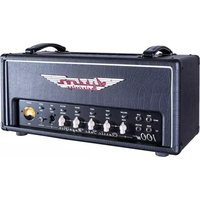


Brand : Ashdown Engineering
Model : HOD-600
Category : Receiver