
SLSPGN20 - Power bank SereneLife - Free user manual and instructions
Find the device manual for free SLSPGN20 SereneLife in PDF.


| Product Type | Power Bank |
| Brand | SereneLife |
| Model | SLSPGN20 |
| Battery Capacity | 20,000 mAh |
| Input Port | Micro USB (5V/2A) |
| Output Port(s) | 2 x USB-A (5V/2.1A max each) |
| LED Flashlight | Yes, built-in |
| LED Power Indicator | 4-level LED display |
| Dimensions | 6.7 x 3.3 x 0.8 inches |
| Weight | 1.0 lb (approx.) |
| Material | ABS plastic, Li-ion battery |
| Charging Time | Approx. 10-12 hours (using 2A charger) |
| Safety Features | Overcharge, over-discharge, short circuit protection |
| Operating Temperature | 32°F to 104°F (0°C to 40°C) |
| Compatibility | Smartphones, tablets, and other USB-charged devices |
| Included Accessories | Micro USB charging cable, user manual |
| Maintenance | Wipe with a dry cloth; do not use liquids |
| Repairability | Not user-serviceable; contact SereneLife support |
| Certifications | CE, RoHS, FCC |
Frequently Asked Questions - SLSPGN20 SereneLife
User questions about SLSPGN20 SereneLife
0 question about this device. Answer the ones you know or ask your own.
Ask a new question about this device
Download the instructions for your Power bank in PDF format for free! Find your manual SLSPGN20 - SereneLife and take your electronic device back in hand. On this page are published all the documents necessary for the use of your device. SLSPGN20 by SereneLife.
USER MANUAL SLSPGN20 SereneLife

natural_image
Abstract decorative pattern with star and arrow shapes (no text or symbols)
natural_image
Collection of abstract geometric shapes including stars, circles, and squares (no text or symbols)Rechargeable Battery Pack Power Supply Solar Panel Compatible (42,000mAh Capacity)
ATTENTION:
This product user manual is universal for portable powerpack AC output. AC Output: 110V/60Hz, 100W, Modified SineWave Output. Please refer to the actual product specification before you use the product.
ABOUT THE UNIT
In case of power failure and you need to charge while travelling, you can temporarily charge your electrical or digital products with this unit. This unit has built in high quality lithium-ion battery that supports DC and AC output. It can also be used as emergency light. Before using this unit, please read the user manual carefully and properly keep for reference.
ATTENTION!
This manual will help you to use the product correctly. It does not represent any description on the hardware and software configuration of the product. About the product configuration, please refer to the contract related to this product (if there is), or consult the seller that provides the product. Pictures in this manual is for reference use only, if there are individual pictures that do not match the actual, please prevail in actual products.
The unit provides Modified Sine Wave output
The unit provides Modified Sine Wave output, and can be compatible to AC electric appliance that works with Sinusoidal waveform (power <100W). However, anything that uses an AC motor isn't going to work to full capacity on a modified sine wave such as electrical fan. It will even make the electric appliance make some noise. Appliances like refrigerators, microwaves, and compressors that uses AC motors and some delicate medical equipment will be better off with a pure sine wave inverter. This product is only used for emergency, it cannot replace the normal alternating current for long-term use. Please adapt the power station specification required by electrical appliances.
PRODUCT PARAMETERS
| Capacity 42000mAh, 3.7V /155Wh | |
| Dimensions (LWH) 7.67" x 3.54" x 6.73" -inches | |
| Weight 3.48 lbs. | |
| Input Recharging | DC13~22V/2.1A Max |
| Fully Charged Time | DC 15V/2A: 7~8 hours |
| Output 3 x USB 5V-2 | .1A(Max), DC 9-12.6V/10A(15A Max) |
| DC Wattage (MAX) | 9~12.6V/10A (15A, 180W Max) |
| AC Output 110V/60Hz, 100W, Modified SineWave Output | |
| Bulb Type | Ultra bright LED Flashlight |
| Power Indicator | LED Indicators |
| Operation temperature range | 14°F to 104°F |
| Lifecycle >500 times | |
PRODUCT DESCRIPTION
![[Front] Handle AC Power ON/OFF AC Indicator Battery indicator Battery Check](/content/2026/05/935451/images/63a2cdce0c66e9a2c55b9e228f2b52c3d950a2a44d8679fac4b50e7b9051482a.jpg)
【Right】
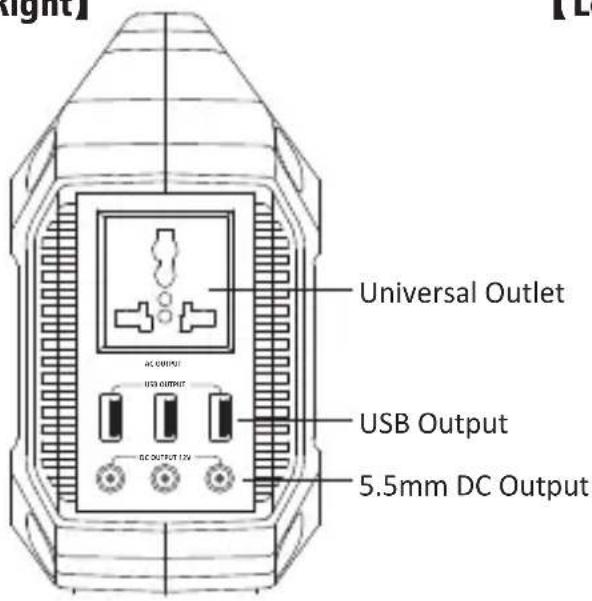
【Left】
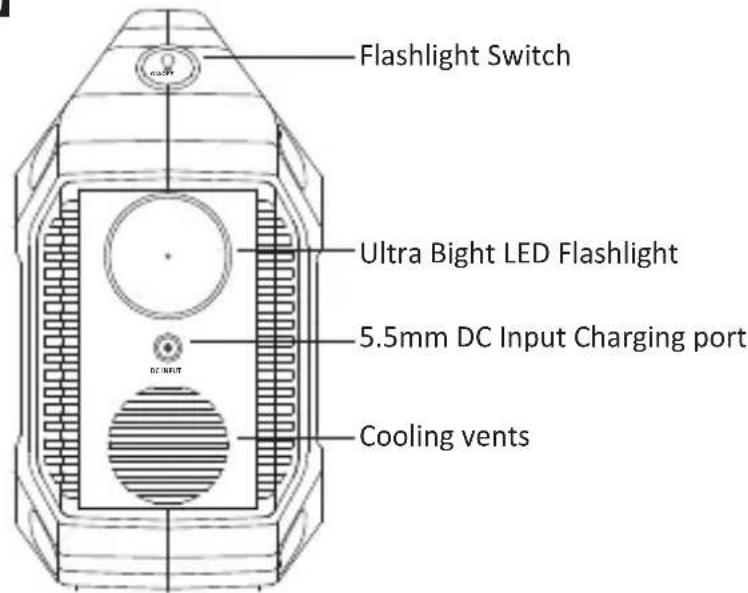
ATTENTION! AC Outlets, AC Output voltage and frequency will be different according to different areas. Please refer to the actual product before using.
PRODUCT INSTRUCTION
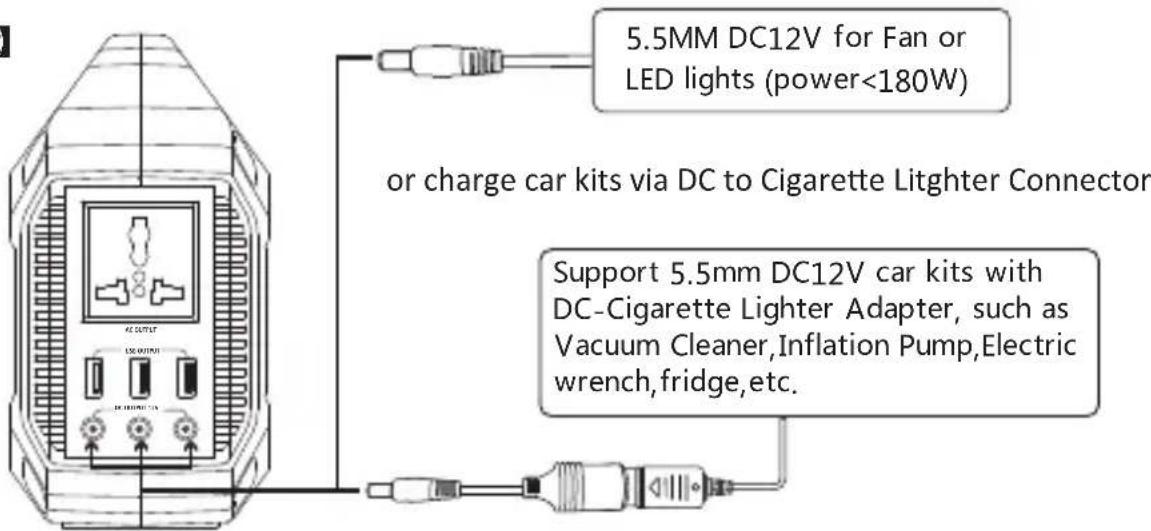
- How to provide power for DC12V appliances (such as head lamp, fan, radio) with this product?
- The 5.5mm 12V DC output is plug and play. Plug your appliances to the DC output port to gain power.
Notices: Please confirm wether your DC 12V appliance supports charging with 5.5mm DC Header Interface (The diameter of the DC Port of the Product is: 5.5mm), otherwise it is unable to connect with the DC output, if so, you can consult the electrical manufacturer, buy the corresponding adapter and connect with it.
[Right]
![[Right] DC12V USB OUTPUT DC OUTPUT 12A 5.5mm DC12V for Fan or LED lights (power<180W)](/content/2026/05/935451/images/48c43e9330c12f00a73a2187cbc85e2dbff90463c261e9168edfd952bc096e43.jpg)
PRODUCT DESCRIPTION
Note: The12V DC output voltage range is between 9V\~12.6V, maximum output current is 15A. DC output voltage drops while battery capacity drops due to chemical characteristics of the battery. If your appliance does not have built-in input voltage stabilizing function, it may shutdown when the input voltage is too low, please unplug your device from the unit and charge the unit in time.
Protection Mode:
Short-circuit/Overpower Protection: If the DC output had a short-circuit or overpowered (-Load(s) power>180W), the unit will shutdown to protect itself. Please clear the problem and recharge the unit to recover from protection mode.
2. How to provide power for AC appliances with this product?
Connect the power cable plug of the electrical appliance to the AC outlet of the product, switch on the power button and the unit will start providing power to your appliances.
【Right】
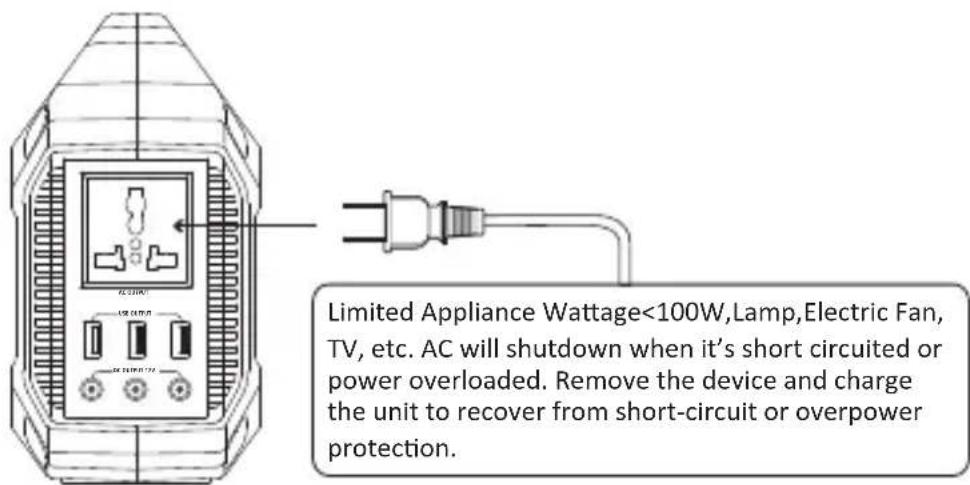
WARNING! The Ac outlets, AC voltage and frequency are different according to different countries; please carefully check whether the product specifications are consistent with the appliance specifications before use, otherwise it can lead to dangerous situations.
Protection Mode:
Short-circuit/Overpower Protection: If the AC output had short circuit or overpowered (-Load(s)power>100W), the unit will shutdown AC output to protect itself. Please clear the problem and re-press the AC button for AC output.
- Some devices, such as refrigerator, ice maker or laser printer may require surge power to start or work during a very time period, the surge power could exceed 100W or even higher, this could cause overpower protection with this unit. Please remove the devices and consult with the device manufacturers for more information. Please clear the problem and re-press the AC button for AC output.
-
When the AC port is not in use, turn it off to conserve power.
-
How to provide power for USB digital appliances with this product?
Connect the standard USB cable of digital appliance to the USB output of the unit, press the Battery check button to switch on to gain power.
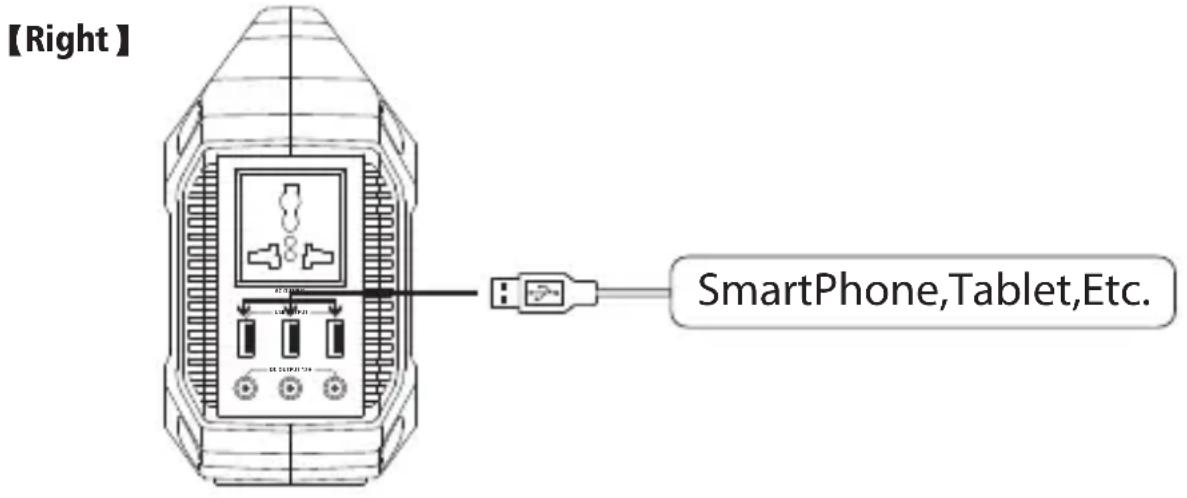
- How to use the flashlight
This unit is built with an ultra-bright LED flashlight. Single press the flashlight button to switch on: Flashlight->Blink->5witch off.
Warning! Do not point directly into human eyes which may cause damage due to the strong light.
- How to charge the unit?
a. Charge through AC Wall Charger
Using the included AC Wall Charger, plug the unit into any wall outlet to charge the unit. You will know the unit is charging when the blue LED battery indicators are blinking. The unit is fully charged when all battery indicators stop blinking and remain solid. After the unit is fully charged, please remove the AC wall charger in fime.
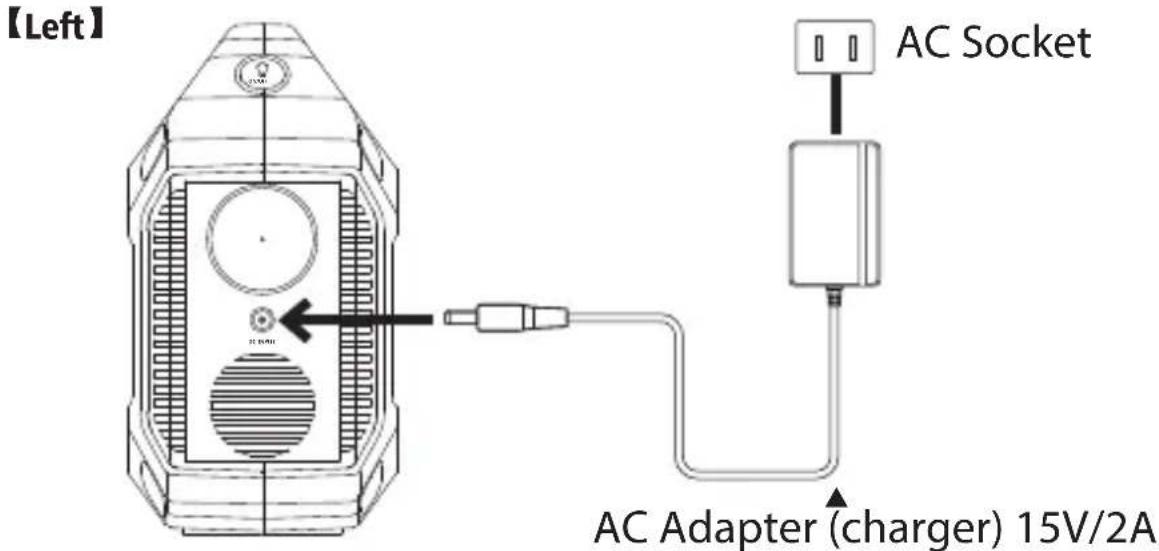
b. Optional Charging Method: Charge through Solar panel
-
Place your solar panel where it will get as much direct sunlight as possible.
-
Plug the output of the solar panel into the input of the unit to start charging. You will know the unit is charging when the blue LED Battery Indicator lights up and blinks. The unit is fully charged when all battery indicators stop blinking and remain solid.
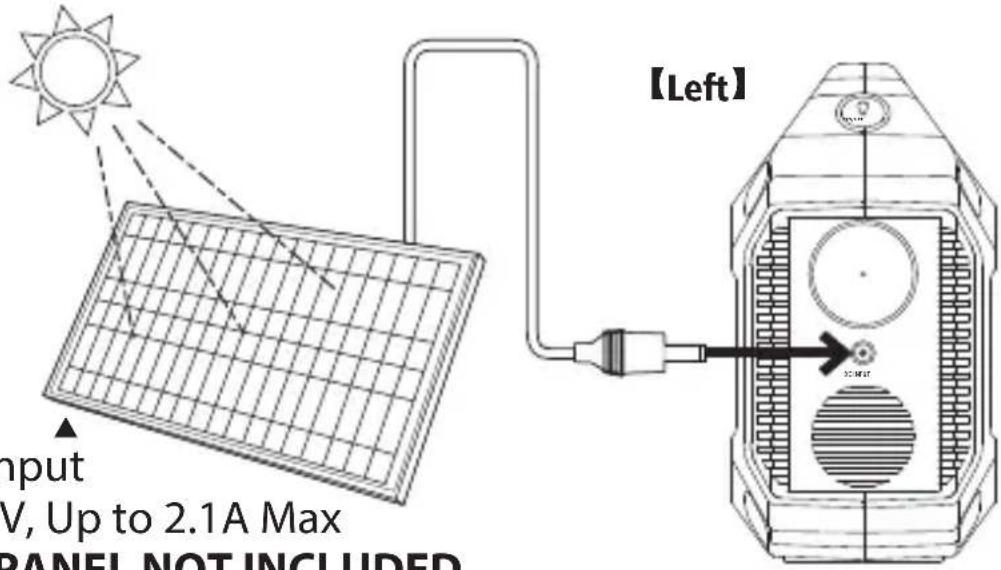
Solar Panel input
MPPT 13\~22V, Up to 2.1A Max
CHARGING PANEL NOT INCLUDED
SUPPORT MPPT TECHNOLOGY
This unit is designed to support charging by solar panel. It's built-in MPPT (Maximum Power Point Tracking) technique, which is designed to use with wind turbines and photovoltaic (PV) solar systems to maximize power extraction under all conditions.
With MPPT technology, the unit can compare the output of the solar panels to the battery voltage. It then figures out what is the best power that the panel can put out to charge the battery and help the unit get maximum AMPS from the solar panels.
- Actual gain can vary widely depending weather, temperature, battery state of charge, and other factors.
c. Charge from your car with a 12V cigarette lighter.
Using the included car charger, plug the unit into a 12V cigarette lighter (car port) of your car. You will know the unit is charging when the blue LED Battery Indicator lights up and blinks. The unit is fully charged when all battery indicators stop blinking and remain solid.
Attention: To avoid car battery power loss. Charging this unit through your car cigarette lighter is only available when your car engine is started.
SECURITY AND MAINTENANCE
a. Do not short-circuit the unit. To avoid short-circuit, keep the unit away from all metal objects (e.g. coins, hair-pins, keys, etc.).
b. Do not overheat the unit, or dispose of it in fire, water or other liquids. Keep away from high temperatures. Do not expose the unit to direct sunlight.
c. Keep away from high humidity, dusty places.
d. Do not disassemble or reassemble this unit.
e. Do not drop, place heavy objects on, or allow strong impact to this unit.
f. This appliance is not intended for use by persons (including children) with reduced physical, sensory or mental capabilities, or lack of experience and knowledge, unless they have been given supervision
or instruction concerning use of the appliance by a person responsible for their safety.
g. Children should be supervised to ensure that they do not play with the appliance.
h. Do not cover the device with towels, clothing and other item.
i. The unit may become hot when charging. This is normal. Use caution when handling.
j. Do not charge the unit over the required time.
k. Disconnect the unit when fully charged.
I. Use the unit properly to avoid electronic shock.
m. Please deal with scrap products in accordance with the regulations, do not treatment the built-in battery as a household garbage, so as not to cause the explosion and pollution.
n. The product is only used for emergency power station, it can not replace the standard DC or AC power of household appliances or digital products.
PRODUCT APPLICATION SKILLS
a. This product is built in high quality original lithium ion battery, it has no memory effect but high-capacity, and it is durable. However, we still recommend you to apply in the range of 50^ F\~ 86^ F, so as to obtain the optimal charging capacity
b. When charging, in order to avoid interference, please stay away from TV, radio and other equipment
c. If the device has not been used for a long time, please disconnect the cable and store it
d. Some portable devices may need to be set in charge mode to charge, see the corresponding equipment user manual for more information
e. In order to extend the life of product (lithium battery), it is best to charge within 3 months, and charge at least once within 6 months.
f. After starting, if there is no any output, it displays to automatically shut down within 3 minutes, so as to achieve better energy-saving effect.
Cold Weather Usage
Cold temperatures (below freezing) can affect the unit's battery capacity due to chemical characteristics of the battery. If you'll be living off-grid in sub-zero conditions, we recommend you keep your unit in an insulated cooler, and connected to a power source (solar panels). The natural heat generated by the unit contained in an insulated cooler will keep battery capacity at its highest.
Recycle
Always return your used electronic products, batteries, and packaging materials to its dedicated collection points. This way you help prevent uncontrolled waste disposal and promote the recycling of materials.
Battery information
Your device has an internal, non-removable, rechargeable battery. Do not attempt to remove the battery, as you may damage the device. The battery can be charged and discharged over 500 fimes, but it will eventually wear out.
Statement
All rights reserved. Reproducion in whole or in part without written permission is prohibited. All other trademarks are trademarks of their respective owners. Features and specifications are subject to change without notice.
SLSPGN20: Portable Power Generator
Features:
- Compact & Portable Battery Power
- Generator Power Supply for All of Today's Latest Devices
- Works with Smartphones, Tablets, Laptops, Small Appliances
- Ability to Power Multiple Devices, Simultaneously
• Standard 3-Prong Wall Plug Outlet
• (3) USB Device Charge Ports - Provides Power or Device Charging
- Simple Electric Plug-in Operation
- Battery Level Indicator
- Convenient Travel Design
• Built-in LED Flashlight - Compatible with Solar Panel Power Generators, Not Included
- Perfect for Outdoor Travel, Beach Visits, Camping, Hiking, Fishing
- Portable Power Generator
• Home Wall Power Adapter - Car / Cigarette Lighter Power Cable
• Vehicle Cigarette Lighter Adapter
What's in the Box:
Technical Specifications:
- Rechargeable Battery Type: 3.7V Lithium-ion, 42,000mAh
- Battery Power: 155 Wh
- Input Recharging: DC 13 to 22V/2.1A Max
- Charging Time: About \~8 hours
- Bulb Type: Ultra Bright LED Flashlight
• AC Max Load: 120 Watts
• DC Power: 9\~12.6V/10A (15A Max)
• Rated Power: 120W, Max 180Watts
• Lifecycle: 500+ Full Charges
• USB Output: (3) 5V/2.1A (Total 6A Max)
• Wall Outlet Connector Types: 3-Prong Plugs (Type B)
• Operation Temperature: 14°F to 104°F (-10°C to 40°C) - Construction Materials: Engineered ABS
• AC Output: 110V/60Hz, 100W, Modified SineWave Output
• Power Input: 15V/2A DC Power Adapter - Dimension (L x W x H): 7.67" x 3.54" x 6.73" -inches
- Sold as: 1
SereneLife
by PYLE

natural_image
Illustration of a laptop with a red checkmark on screen (no text or symbols)VISIT US ONLINE:
Have a question?
Need service or repair?
Want to leave a comment?
PyleUSA.com/ContactUs
PYLE
- ATTENTION:
- ABOUT THE UNIT
- ATTENTION!
- The unit provides Modified Sine Wave output
- PRODUCT INSTRUCTION
- PRODUCT DESCRIPTION
- Protection Mode:
- How to provide power for AC appliances with this product?
- SUPPORT MPPT TECHNOLOGY
- SECURITY AND MAINTENANCE
- PRODUCT APPLICATION SKILLS
- Cold Weather Usage
- Recycle
- Battery information
- Statement
- SLSPGN20: Portable Power Generator
- Features:
- What's in the Box:
- Technical Specifications:
- SereneLife
- VISIT US ONLINE:
Brand : SereneLife
Model : SLSPGN20
Category : Power bank