
ASI7223Y-A-V3 - Security Access Control System Dahua Technology - Free user manual and instructions
Find the device manual for free ASI7223Y-A-V3 Dahua Technology in PDF.


| Product Type | Access Control Terminal |
| Model | ASI7223Y-A-V3 |
| Brand | Dahua Technology |
| Dimensions (W x H x D) | 100 mm x 150 mm x 30 mm |
| Weight | 0.5 kg |
| Power Supply | 12V DC or PoE (IEEE 802.3af) |
| Power Consumption | ≤ 10W |
| Operating Temperature | -10°C to 50°C |
| Main Functions | Face recognition, card reading, password input, door control, alarm input/output |
| Recognition Distance | 0.3 m to 1.5 m |
| Recognition Speed | < 0.3 seconds per user |
| User Capacity | Up to 10,000 users |
| Display | 7-inch touch screen |
| Connectivity | Ethernet (RJ-45), Wiegand input/output, RS-485, USB |
| Security Features | Anti-tamper switch, encrypted communication, live face detection |
| Maintenance | Clean lens and screen with soft cloth; check for firmware updates regularly |
| Spare Parts & Repairability | Contact Dahua service center for replacement parts; device designed for easy mounting only, internal repairs not user-serviceable |
| General Information | For indoor use only; IP65 rating optional with housing; compatible with Dahua DSS and other access control software |
Frequently Asked Questions - ASI7223Y-A-V3 Dahua Technology
User questions about ASI7223Y-A-V3 Dahua Technology
0 question about this device. Answer the ones you know or ask your own.
Ask a new question about this device
Download the instructions for your Security Access Control System in PDF format for free! Find your manual ASI7223Y-A-V3 - Dahua Technology and take your electronic device back in hand. On this page are published all the documents necessary for the use of your device. ASI7223Y-A-V3 by Dahua Technology.
USER MANUAL ASI7223Y-A-V3 Dahua Technology
Face Recognition Access Controller & Face Recognition Terminal
User's Manual

natural_image
Abstract geometric composition with gray and blue color blocks (no text or symbols)Foreword
General
This manual introduces the functions and operations of the Face Recognition Access Controller & Face Recognition Terminal (hereinafter referred to as the "Device"). Read carefully before using the device, and keep the manual safe for future reference.
Safety Instructions
The following signal words might appear in the manual.
| Signal Words Meaning | ||
 | DANGER | Indicates a high potential hazard which, if not avoided, will result in death or serious injury. |
 | WARNING | Indicates a medium or low potential hazard which, if not avoided, could result in slight or moderate injury. |
 | CAUTION | Indicates a potential risk which, if not avoided, could result in property damage, data loss, reductions in performance, or unpredictable results. |
 | TIPS | Provides methods to help you solve a problem or save time. |
 | NOTE Provides additional information as a supplement to the text. | |
Revision History
| Version Revision Content Release Time | ||
| V1.0.1 | Updated the manual. | January 2023 |
| V1.0.0 | First Release. | June 2022 |
Privacy Protection Notice
As the device user or data controller, you might collect the personal data of others such as their face, fingerprints, and license plate number. You need to be in compliance with your local privacy protection laws and regulations to protect the legitimate rights and interests of other people by implementing measures which include but are not limited: Providing clear and visible identification to inform people of the existence of the surveillance area and provide required contact information.
About the Manual
- The manual is for reference only. Slight differences might be found between the manual and the product.
- We are not liable for losses incurred due to operating the product in ways that are not in compliance with the manual.
- The manual will be updated according to the latest laws and regulations of related jurisdictions. For detailed information, see the paper user's manual, use our CD-ROM, scan the QR code or visit our official website. The manual is for reference only. Slight differences might be found between the electronic version and the paper version.
- All designs and software are subject to change without prior written notice. Product updates might result in some differences appearing between the actual product and the manual. Please
contact customer service for the latest program and supplementary documentation.
- There might be errors in the print or deviations in the description of the functions, operations and technical data. If there is any doubt or dispute, we reserve the right of final explanation.
- Upgrade the reader software or try other mainstream reader software if the manual (in PDF format) cannot be opened.
- All trademarks, registered trademarks and company names in the manual are properties of their respective owners.
- Please visit our website, contact the supplier or customer service if any problems occur while using the device.
- If there is any uncertainty or controversy, we reserve the right of final explanation.
Important Safeguards and Warnings
This section introduces content covering the proper handling of the Device, hazard prevention, and prevention of property damage. Read carefully before using the Device, and comply with the guidelines when using it.
Transportation Requirement

Transport, use and store the Device under allowed humidity and temperature conditions.
Storage Requirement

Store the Device under allowed humidity and temperature conditions.
Installation Requirements

WARNING
- Do not connect the power adapter to the Device while the adapter is powered on.
- Strictly comply with the local electric safety code and standards. Make sure the ambient voltage is stable and meets the power supply requirements of the Access Controller.
- Do not connect the Device to two or more kinds of power supplies, to avoid damage to the Device.
- Improper use of the battery might result in a fire or explosion.

- Personnel working at heights must take all necessary measures to ensure personal safety including wearing a helmet and safety belts.
- Do not place the Device in a place exposed to sunlight or near heat sources.
- Keep the Device away from dampness, dust, and soot.
• Install the Device on a stable surface to prevent it from falling. - Install the Device in a well-ventilated place, and do not block its ventilation.
- Use an adapter or cabinet power supply provided by the manufacturer.
- Use the power cords that are recommended for the region and conform to the rated power specifications.
- The power supply must conform to the requirements of ES1 in IEC 62368-1 standard and be no higher than PS2. Please note that the power supply requirements are subject to the Device label.
- The Device is a class I electrical appliance. Make sure that the power supply of the Device is connected to a power socket with protective earthing.
Operation Requirements

- Check whether the power supply is correct before use.
- Do not unplug the power cord on the side of the Device while the adapter is powered on.
- Operate the Device within the rated range of power input and output.
- Use the Device under allowed humidity and temperature conditions.
- Do not drop or splash liquid onto the Device, and make sure that there is no object filled with
liquid on the Device to prevent liquid from flowing into it.
- Do not disassemble the Device without professional instruction.
Table of Contents
Foreword....
Important Safeguards and Warnings....III
1 Introduction....1
2 Local Operations....2
2.1 Basic Configuration Procedure....2
2.2 Common Icons....2
2.3 Initialization 2
2.4 Standby Screen....3
2.5 Logging In .... 5
2.6 Network Communication ....5
2.6.1 Configuring IP....6
2.6.2 Active Register 6
2.6.3 Configuring Wi-Fi....7
2.6.4 Configuring Serial Port....8
2.6.5 Configuring Wiegand....8
2.7 User Management....9
2.7.1 Adding New Users....9
2.7.2 Viewing User Information....11
2.7.3 Configuring Administrator Password....12
2.8 Access Management 13
2.8.1 Configuring Unlock Combinations....13
2.8.2 Configuring Unlock by Period....14
2.8.3 Configuring Group Combination....15
2.8.4 Unlocking by Monitoring Temperature....16
2.8.5 Configuring Alarm....17
2.8.6 Configuring Door Status....18
2.8.7 Configuring Lock Holding Time ....18
2.9 Period Management....18
2.9.1 Configuring Period ....18
2.9.2 Configuring Holiday Groups....19
2.9.3 Configuring Holiday Plan....19
2.9.4 Configuring NO Period....19
2.9.5 Configuring NC Period 20
2.9.6 Configuring Remote Verification Period....20
2.10 Attendance Management....20
2.11 System 21
2.11.1 Configuring Time....21
2.11.2 Configuring Face Parameters ...... 23
2.11.3 Configuring Image Mode 25
2.11.4 Configuring Fill Light Mode 25
2.11.5 Configuring the Brightness of Fill Light 26
2.11.6 Configuring the Brightness of IR Light....26
2.11.7 Configuring Fingerprint Parameters....26
2.11.8 Setting Volume ......26
2.11.9 Restoring Factory Defaults....26
2.11.10 Restart the Device....26
2.12 USB Management 26
2.12.1 Exporting to USB 27
2.12.2 Importing From USB....27
2.12.3 Updating System....28
2.13 Configuring Features....28
2.14 Unlocking the Door....30
2.14.1 Unlocking by Cards ....31
2.14.2 Unlocking by Face....31
2.14.3 Unlocking by User Password....31
2.14.4 Unlocking by Administrator Password ....31
2.14.5 Unlocking by Fingerprint....32
2.15 Viewing Unlock Records....32
2.16 Configuring Self-test....32
2.17 System Information....33
2.17.1 Viewing Data Capacity ....33
2.17.2 Viewing Device Version ....34
3 Web Operations....35
3.1 Initialization 35
3.2 Logging In ....35
3.3 Resetting the Password....36
3.4 Configuring Door Parameter....37
3.5 Configuring Alarm Linkage....40
3.5.1 Setting Alarm Linkage....40
3.5.2 Viewing Alarm Logs....42
3.6 Intercom Configuration....42
3.6.1 Configuring SIP Server....42
3.6.2 Configuring Basic Parameters....46
3.6.3 Adding the VTO 47
3.6.4 Adding the VTH....48
3.6.5 Adding the VTS ....50
3.6.6 Viewing Device Status....51
3.6.7 Viewing Call Logs....51
3.7 Configuring Time Schedules....51
3.7.1 Configuring Time Sections....51
3.7.2 Configuring Holiday Groups....52
3.7.3 Configuring Holiday Plans....53
3.8 Data Capacity....54
3.9 Configuring Video and Image ....54
3.9.1 Configuring Video 54
3.9.1.1 Configuring Channel 1....54
3.9.1.2 Configuring Channel 2....58
3.9.2 Setting Volume....61
3.9.3 Configuring Motion Detection....61
3.9.4 Configuring Local Coding....62
3.9.5 Configuring Image Mode....63
3.10 Configuring Face Detection....63
3.11 Configuring Network 68
3.11.1 Configuring TCP/IP 68
3.11.2 Configuring Port....69
3.11.3 Configuring Automatic Registration....70
3.11.4 Configuring P2P....71
3.12 Safety Management ....72
3.12.1 Configuring IP Authority....72
3.12.1.1 Network Access 72
3.12.1.2 Prohibit PING....74
3.12.1.3 Anti Half Connection ....74
3.12.2 Configuring System....74
3.12.2.1 Creating Server Certificate 76
3.12.2.2 Downloading Root Certificate ....77
3.13 User Management 81
3.13.1 Adding Users....81
3.13.2 Adding ONVIF Users 82
3.13.3 Viewing Online Users....83
3.14 Maintenance....83
3.15 Configuration Management....84
3.15.1 Exporting/Importing Configuration Files....84
3.15.2 Restoring Factory Defaults 84
3.16 Fusion Calibration 85
3.17 Upgrading System....86
3.17.1 File Update....86
3.17.2 Online Update....86
3.18 Viewing Version Information....86
3.19 Viewing Logs 87
3.19.1 System Logs 87
3.19.2 Admin Logs 87
3.19.3 Unlocking Logs....87
4 Smart PSS Lite Configuration....88
4.1 Installing and Logging In 88
4.2 Adding Devices....88
4.2.1 Adding One By One....88
4.2.2 Adding in Batches....89
4.3 User Management....90
4.3.1 Configuring Card Type....90
4.3.2 Adding Users....91
4.3.2.1 Adding One by One....91
4.3.2.2 Adding in Batches....92
4.3.3 Assigning Access Permission....93
4.3.4 Assigning Attendance Permissions....95
4.4 Access Management 97
4.4.1 Remotely Opening and Closing Door....97
4.4.2 Setting Always Open and Always Close 98
4.4.3 Monitoring Door Status....98
Appendix 1 Important Points of Intercom Operation....100
Appendix 2 Important Points of Fingerprint Registration Instructions....101
Appendix 3 Important Points of Face Registration....103
Appendix 4 Cybersecurity Recommendations....106
1 Introduction
This series of products is an access control device that supports unlock through faces, passwords, cards, fingerprint, and their combinations. Based on the deep-learning algorithm, it features faster recognition and higher accuracy. It can work with management platform which meets various needs of customers. It is also widely used in parks, communities, business centers and factories, and ideal for places such as office buildings, government buildings, schools and stadiums.

Unlock methods might differ depending on the models of the product.
2 Local Operations
2.1 Basic Configuration Procedure
Figure 2-1 Basic configuration procedure

flowchart
graph TD
    A["Initialization"] --> B["Network Communication"]
    B --> C["User Management"]
    C --> D["Access Management"]
    D --> E["Unlock"]
    A --> F["Set Password for Admin"]
    F --> G["Set Email Address"]
    B --> H["IP Configuration"]
    C --> I["Add Users"]
    D --> J["Unlock Mode Management"]
2.2 Common Icons
Table 2-1 Description of icons
| Icon Description | |
| Main menu icon. | |
| Confirm icon. | |
| Turn to the first page of the list. | |
| Turn to the last page of the list. | |
| Turn to the previous page of the list. | |
| Turn to the next page of the list. | |
| Return to the previous menu. | |
| Turn on. | |
| Turn off. | |
| Delete | |
| Home screen | |
| Search |
2.3 Initialization
For the first-time use or after restoring factory defaults, you need to set a password and email address for the admin account. You can use the admin account to log in to the main menu of the Device and the webpage.
Figure 2-2 Initialization
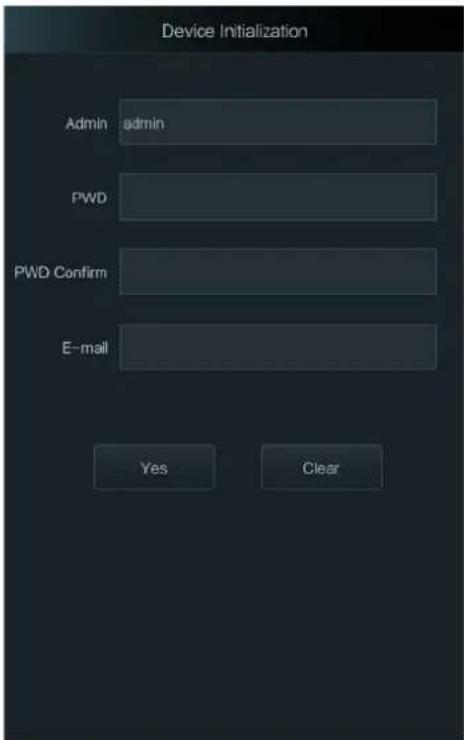

- If you forget the administrator password, send a reset request to your registered e-mail address.
- The password must consist of 8 to 32 non-blank characters and contain at least two types of characters among upper case, lower case, number, and special character (excluding '" ;: &).
2.4 Standby Screen
You can unlock the door through faces, passwords, fingerprint, card, and their combinations.

- The standby screen below is for reference only, and might differ from the actual product.
- If there is no operation in 30 seconds, the Device will go to the standby mode.
Figure 2-3 Homepage

Table 2-2 Home screen description
| No. Name Description | ||
| 1 Unlock methods | Displays the unlock methods supported by the Access Controller. | |
| 2 Date and time | Current date and time. | |
| 3 | Status display | Displays status of Wi-Fi, network, or USB. |
| 4 Main menu | icon | Log in to the main menu of the Device. Only admin account and users with administrator permission can enter the main menu.Only certain types of model has this icon. |
| 5/6 Password | Enter user password or administrator password to unlock the door. | |
| No. Name Description | |
| 7 Intercom |
2.5 Logging In
Log in to the main menu to configure the Device. Only admin account and administrator account can enter the main menu of the Device. For the first-time use, use the admin account to enter the main menu screen and then you can create the other administrator accounts.
Background Information
- Admin account: Can log in to the main menu screen of the Access Controller, but has no door access permission.
- Administration account: Can log in to the main menu of the Access Controller and has door access permissions.
Procedure
Step 1 Enter the verification screen.

There are 2 methods to enter the identity verification screen. Different models of products support different methods.
- Tap on the standby screen.
- Press and hold the standby screen for 3 seconds, and then swipe left or right.
Step 2 Select a verification method to enter the main menu.
- Face: Enter the main menu by face recognition.
- Fingerprint: Enter the main menu by using fingerprint.

Fingerprint unlock is only available on select models.
- Card Punch: Enter the main menu by swiping card.

Card punch is only available on select models.
- PWD: Enter the user ID and password of the administrator account.
- admin: Enter the admin password to enter the main menu.
2.6 Network Communication
Configure the network, serial port and Wiegand port to connect the Access Controller to the network.
2.6.1 Configuring IP
Set IP address for the Device to connect it to the network. After that, you can log in to the webpage and the management platform to manage the Device.
Procedure
Step 1 On the Main Menu, select Connection > Network > IP Address.
Step 2 Configure IP Address.
Figure 2-4 IP address configuration
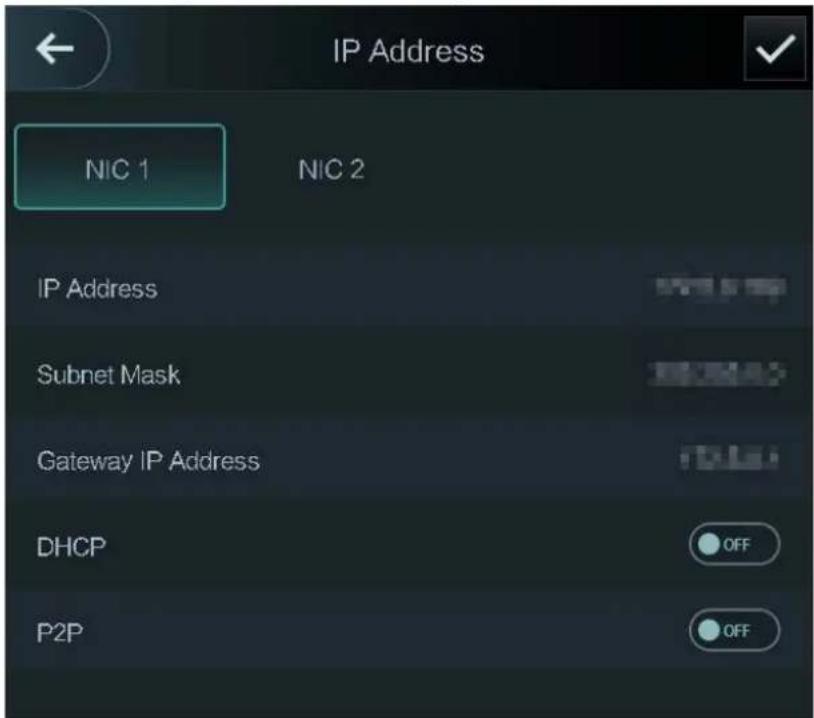

Dual NICs (Network Interface Card) is only available on select models.
Table 2-3 IP configuration parameters
| Parameter Description | |
| IP Address/Subnet Mask/Gateway Address | The IP address, subnet mask, and gateway IP address must be on the same network segment. |
| DHCP | It stands for Dynamic Host Configuration Protocol.When DHCP is turned on, the Device will automatically be assigned with IP address, subnet mask, and gateway. |
| P2P | P2P (peer-to-peer) technology enables users to manage devices without applying for DDNS, setting port mapping or deploying transit server. |
2.6.2 Active Register
You can turn on the automatic registration function to access the Device through the management
platform.
Procedure
Step 1 On the Main Menu, select Connection > Network > Active Register.

The management platform can clear all personnel configurations and initialize the Device. To avoid data loss, keep the management platform permissions properly.
Figure 2-5 Auto register

Step 2 Turn on the automatic registration function and set the parameters.
Table 2-4 Auto registration
| Parameter Description | |
| Server Address The IP address of the management platform. | |
| Port The port No. of the management platform. | |
| Device ID | Enter the device ID (user defined).[42HG]When you add the Device to the management platform, the device ID on the management platform must conform to the defined device ID on the Device. |
Step 3 Enable the active register function.
2.6.3 Configuring Wi-Fi
You can connect the Device to the network through Wi-Fi network. Wi-Fi function is only available for certain models of the Access Controller.
Procedure
Step 1 On the Main Menu, select ConnectionNetwork > WiFi.
Step 2 Turn on Wi-Fi.
Step 3 Tap to search available wireless networks.
Step 4 Select a wireless network and enter the password.
2.6.4 Configuring Serial Port
Procedure
Step 1 On the Main Menu, select Connection > Serial Port.
Step 2 Select a port type.
- Select Serial Input when the Access Controller connects to a card reader.
- Select Serial Output when the Access Controller functions as a card reader, and the Access Controller will send data to the Device to control access.
Output Data type:
☐ Card: Outputs data based on card number when users swipe card to unlock door; outputs data based on user's first card number when they use other unlock methods.
◇ No.: Outputs data based on the user ID.
- Select OSDP Input when the Access Controller is connected to a card reader based on OSDP protocol.
- Security Module: When a security module is connected, the exit button, lock and fire alarm linkage will be not effective.
Figure 2-6 Serial port

2.6.5 Configuring Wiegand
The Device allows for both Wiegand input and output mode.
Procedure
Step 1 On the Main Menu, select Connection > Wiegand.
Step 2 Select a Wiegand.
- Select Wiegand Input when you connect an external card reader to the Device.
- Select Wiegand Output when the Device functions as a card reader, and you need to connect it to a controller or another access terminal.
Figure 2-7 Wiegand output
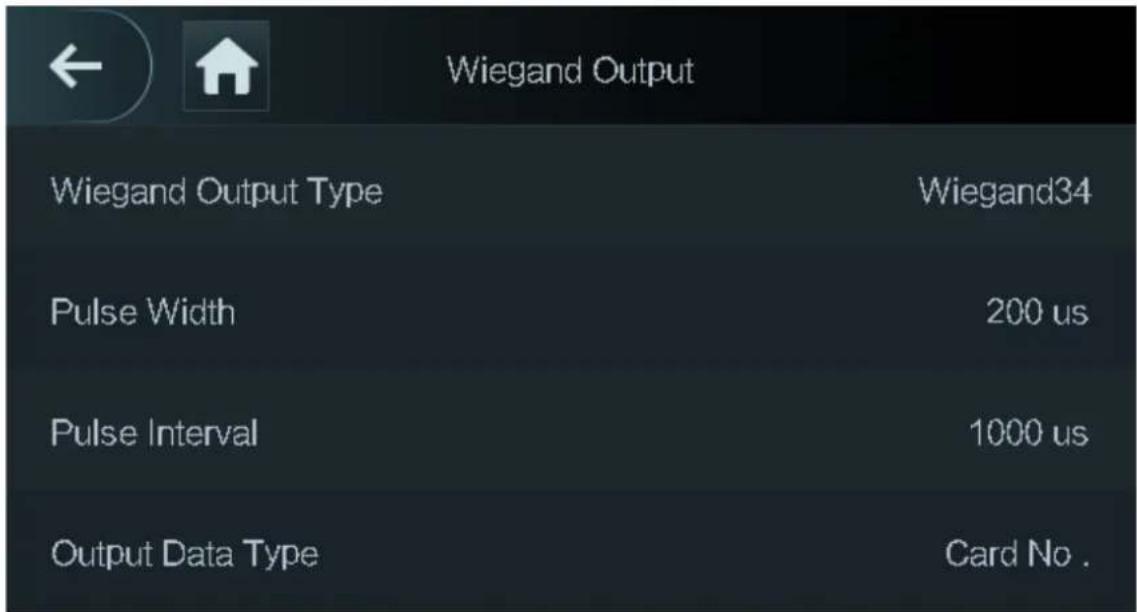
Table 2-5 Description of Wiegand output
| Parameter Description | |
| Wiegand Output Type | Select a Wiegand format to read card numbers or ID numbers.Wiegand26: Reads three bytes or six digits.Wiegand34: Reads four bytes or eight digits.Wiegand66: Reads eight bytes or sixteen digits. |
| Pulse Width | Enter the pulse width and pulse interval of Wiegand output. |
| Pulse Interval | |
| Output Data Type | Select the type of output data.User ID: Outputs data based on user ID.Card No.: Outputs data based on user's first card number. |
2.7 User Management
You can add new users, view user/admin list and edit user information.

The pictures in this manual are for reference only, and might differ from the actual product.
2.7.1 Adding New Users
Procedure
Step 1 On the Main Menu, select User > New User.
Step 2 Configure the parameters.

The parameters of new users might differ depending on the models of the product.
Figure 2-8 New user

Table 2-6 Description of new user parameters
| Parameter Description | |
| User ID | Enter user IDs. The IDs can be numbers, letters, and their combinations, and the maximum length of the ID is 32 characters. Each ID is unique. |
| Name | Enter name with at most 32 characters (including numbers, symbols, and letters). |
| FP | At most 3 fingerprints can be registered for each user.You can set one of the registered fingerprints to duress fingerprint.After the duress function is turned on, an alarm will be triggered when a duress fingerprint is used to unlock the door.It is not recommended that you set the first fingerprint as the duress fingerprint. |
| Face | Make sure that your face is centered on the image capturing frame, and an image of the face will be captured and analyzed automatically. |
| Card | A user can register 5 cards at most. Enter your card number or swipe your card, and then the card information will be read by the Device.You can enable the Duress Card function. An alarm will be triggered if a duress card is used to unlock the door.Only certain models support card unlock. |
| PWD | Enter the user password. The maximum length of the password is 8 digits. |
| User Level | You can select a user level for new users.User: Users only have door access permission.Admin: Administrators can unlock the door and configure the access controller. |
| Period | People can unlock the door only during the defined period. |
| Holiday Plan | People can unlock the door only during the defined holiday plan. |
| Valid Date | Set a date on which the access permissions of the person will be expired. |
| User Type | General: General users can unlock the door.Blocklist: When users in the blocklist unlock the door, service personnel will receive a notification.Guest: Guests can unlock the door within a defined period or for certain amount of times. After the defined period expires or the unlocking times runs out, they cannot unlock the door.Patrol: Patrol users will have their attendance tracked, but they have no unlocking permissions.VIP: When VIP unlock the door, service personnel will receive a notice.Others: When they unlock the door, the door will stay unlocked for 5 more seconds.Custom User 1/Custom User 2: Same with general users. |
| Use Time | When the user level is set to guest, you can set the maximum number of times that the user can unlock the door. |
Step 3 Tap √ to save the configuration.
2.7.2 Viewing User Information
You can view user/admin list and edit user information.
Procedure
Step 1 On the Main Menu, select User > User List, or select User > Admin List.
Step 2 View all added users and admin accounts.
Figure 2-9 Admin list

- : Unlock through password.
- : ☑lock through swiping card.
- : Unlock through face recognition.
- : Unlock through fingerprint.
Related Operations
On the User screen, you can manage the added users.
- Search for users: Tap and then enter the username.
- Edit users: Tap the user to edit user information.
- Delete users
Delete individually: Select a user, and then tap.
◇ Delete in batches:
- On the User List screen, tap to delete all users.
- On the Admin List screen, tap to delete all admin users.
2.7.3 Configuring Administrator Password
You can unlock the door by only entering the admin password. Admin password is not limited by user types. Only one admin password is allowed for one device.
Procedure
Step 1 On the Main Menu screen, select User > Administrator PWD.
Figure 2-10 Set admin password

Step 2 Tap Administrator PWD, and then enter the administrator password.
Step 3 Tap.
Step 4 Turn on the administrator function.
2.8 Access Management
You can configure door access parameters, such as unlocking modes, alarm linkage, door schedules.
Unlock modes might differ depending on the actual product.
2.8.1 Configuring Unlock Combinations
Use card, fingerprint, face or password or their combinations to unlock the door.
Procedure
Step 1 Select Access > Unlock Mode > Unlock Mode.
Step 2 Select unlocking methods.

To cancel your selection, tap the selected method again.
Step 3 Tap + And or /Or to configure combinations.
- +And: Verify all the selected unlocking methods to open the door.
- /Or: Verify one of the selected unlocking methods to open the door.
Figure 2-11 Element (multiple choice)

Step 4 Tap to have changes.
2.8.2 Configuring Unlock by Period
Doors can be unlocked through different unlock modes in different periods. For example, in period 1, the door can only be unlocked through card; and in period 2, doors can only be locked through fingerprints.
Procedure
Step 1 Select Access > Unlock Mode > Unlock by Period.
Step 2 Set starting time and end time for a period, and then select a unlock mode.
Figure 2-12 Unlock by period

Step 3 Tap to wave changes.
Step 4 Turn on the unlock by period function.
2.8.3 Configuring Group Combination
Doors can only be unlocked by a group or groups that consist of more than two users if the Group Combination is enabled.
Procedure
Step 1 Select Access > Unlock Mode > Group Combination.
Step 2 Tap to create a group.
Figure 2-13 Add group

Table 2-7 Group combination description
| Parameter | Description |
| User List | Add users to the newly created group.1. Tap User List.2. Tap , and then enter a user ID.3. Tap save the settings. |
| Unlock Mode There are four options: Card, FP,PWD and Face. | |
| Valid User | Valid users are the ones that have unlock authority. Doors can be unlocked only when the number of users to unlock the doors equals the valid user number.· Valid users cannot exceed the total number of users in a group.· If valid users equal total user numbers in a group, doors can only be unlocked by all the users in the group.· If valid users are less than the total number of users in a group, doors can be unlocked by any users whose number equals the valid user number. |
Step 3 Tap ← to go back to the previous interface.
Step 4 Tap √ to save the changes.
Step 5 Turn on the group combination function.
2.8.4 Unlocking by Monitoring Temperature
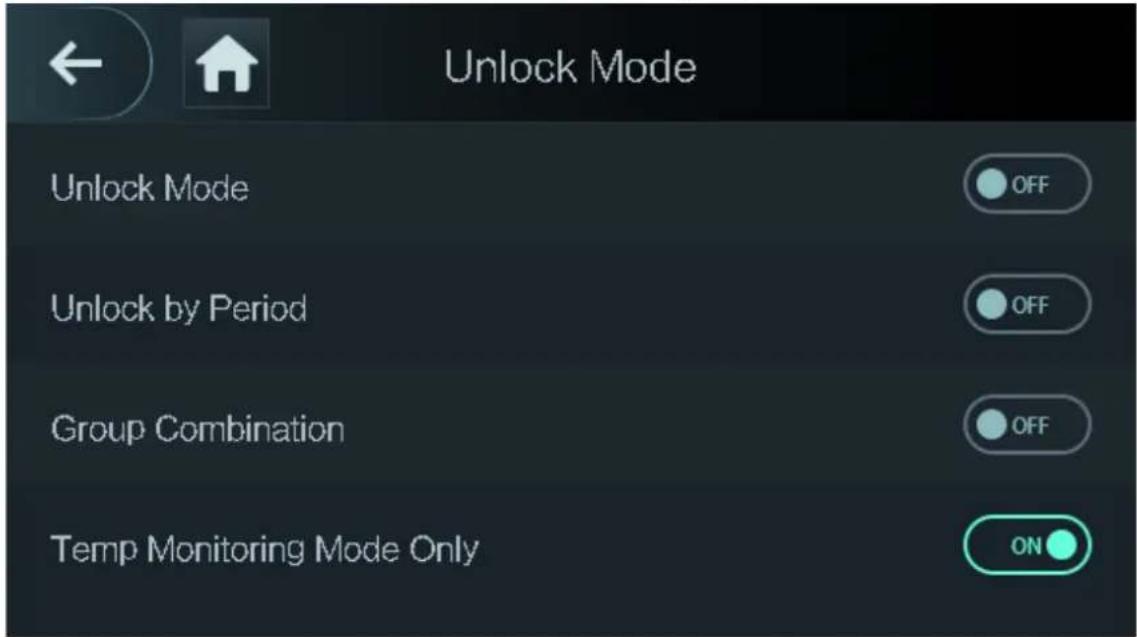
Control access only through temperature monitoring. This function is only available on select models.
Procedure
Step 1 Select Access > Unlock Mode.
Step 2 Enable Temp Monitoring Mode Only.
Figure 2-14 Temperature monitoring only
2.8.5 Configuring Alarm
An alarm will be triggered when abnormal access events occur.
Procedure
Step 1 Select Access > Alarm.
Step 2 Enable the alarm type.

Alarm types might differ depending on the models of the product.
Figure 2-15 Alarm

Table 2-8 Description of alarm parameters
| Parameter Description | |
| Anti-passback | Users need to verify their identities both for entry and exit; otherwise an alarm will be triggered. It helps prevents a card holder from passing an access card back to another person so they gain entry. When anti-passback is enabled, the card holder must leave the secured area through an exit reader before system will grant another entry.If a person enters after authorization and exits without authorization, an alarm will be triggered when they attempt to enter again, and access is denied at the same time.If a person enters without authorization and exits after authorization, an alarm will be triggered when the they attempt to enter again, and access is denied at the same time. |
| Duress | An alarm will be triggered when a duress card, duress password or duress fingerprint is used to unlock the door. |
| Illegal Card Exceeding Time | After an unauthorized card is used to unlock the door more than 5 times in 50 seconds, an alarm will be triggered. |
| Intrusion | When door sensor is enabled, an intrusion alarm will be triggered if the door is opened abnormally. |
| Door Sensor Timeout | A timeout alarm will be triggered if the door remains unlocked longer than the defined door sensor timeout, which ranges from 1 to 9999 seconds. |
| Door Sensor On | Intrusion and timeout alarms can be triggered only after door sensor is enabled. |
2.8.6 Configuring Door Status
Procedure
Step 1 On the Main Menu screen, select Access > Door Status.
Step 2 Set door status.
- NO: The door remains unlocked all the time.
- NC: The door remains locked all the time.
- Normal: If Normal is selected, the door will be unlocked and locked according to your settings.
2.8.7 Configuring Lock Holding Time
After a person is granted access, the door will remain unlocked for a defined time for them to pass through.
Procedure
Step 1 On the Main Menu, select Access > Lock Holding Time.
Step 2 Enter the unlock duration.
Step 3 Tap to save changes.
2.9 Period Management
You can set periods, holiday periods, holiday plan periods, door normally open periods, door normally closed periods, and remote verification periods.
2.9.1 Configuring Period
You can configure up to 128 periods. In each period, you need to edit door access schedules for a whole week. A user can only unlock the door during the scheduled time.
Procedure
Step 1 Log in to the Main Menu screen.
Step 2 Select Access > Period > Period Config.
Step 3 Tap 📋 on the upper-right corner.
Step 4 Enter No. and period name.
- No: Enter a section No. It ranges between 0 to 127.
- Period Name: Enter a name for the period. You can enter 10 Chinese characters or 32 characters (contain number, special characters and English characters).
Step 5 Configure time for a week.
Step 6 You can configure up to four periods for a single day.
2.9.2 Configuring Holiday Groups
Set time sections for different holiday groups. You can configure up to 128 holiday groups (from No.0 through No.127), and up to 16 holidays for a single holiday group.
Procedure
Step 1 Log in to the Main Menu screen.
Step 2 Select Access > Period > Holiday Group Config.
Step 3 Tap 📋 on the upper-right corner.
Step 4 Enter a number and a name for the holiday group.
- No.: Enter a period name. It ranges from 0 through 127.
- Holiday Group Name: Enter a name for each holiday group. You can enter 10 Chinese characters or 32 characters (contain numbers, special characters and English characters).
Step 5 Tap Group Config, and then tap
Step 6 Enter the serial number and holiday name, and then select the start date and end date.
Step 7 Tap to vave changes.
2.9.3 Configuring Holiday Plan
Assign the configured holiday groups to the holiday plan. Users can only unlock the door in the defined time sections in the holiday plan.
Procedure
Step 1 Log in to the Main Menu screen.
Step 2 Select Access > Period > Holiday Plan Config.
Step 3 Tap 📋 on the upper-right corner.
Step 4 Enter a number and name for the holiday plan.
- No.: Enter a number of the holiday plan. It ranges from 0 through 127.
- Holiday Plan Name: Enter a name for each time section. You can enter 10 Chinese characters or 32 characters (contain numbers, special characters and English characters).
Step 5 Select Holiday Group No., and enter the holiday group No. that you have configured.
Step 6 Select Holiday Period, configure time periods for a single holiday.
Step 7 Tap to wave changes.
2.9.4 Configuring NO Period
If you configure NO period, the door remains open in the defined period. The NO/NC period overrides other periods.
Procedure
Step 1 Log in to the Main Menu interface.
Step 2 Select Access > Period > NO Period.
Step 3 Enter the period No. that you have configured.
Step 4 Tap √ to save changes.
2.9.5 Configuring NC Period
If you configure NC period, the door remains unlocked in the defined period. The NO/NC period overrides other periods.
Procedure
Step 1 On the Main Menu screen, select Access > Period > NO Period.
Step 2 Enter the period No. that you have configured.
Step 3 Tap to vave changes.
2.9.6 Configuring Remote Verification Period
Procedure
Step 1 Log in to the Main Menu screen
Step 2 On the Main Menu, select Access > Period > Remote Verification Period.
Step 3 Enable Remote Verification Period.
Step 4 Enter the period No. that you have configured.
Step 5 Tap to vave changes.
2.10 Attendance Management
You can turn on the time attendance function, and employee can make their attendance tracked by the Device at the same time when they unlock the door. This function is only available on select models.
Procedure
Step 1 On the main menu, tap Attendance, and then turn on the attendance function.
Step 2 Tap Mode Set.
Step 3 Select an attendance mode.
Step 4 Configure the parameters for the attendance mode.
Figure 2-16 Attendance mode
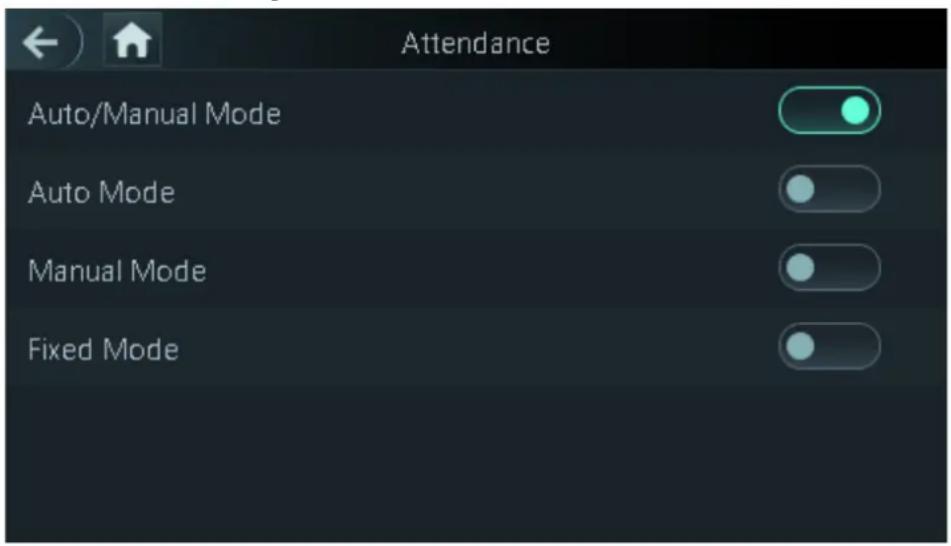
Table 2-9 Attendance mode description
| Parameter Description | |
| Auto/Manual Mode | After you clock in/out, you can manfully select the attendance status or the screen displays the time attendance status automatically. |
| Auto Mode | The screen displays attendance status automatically after you clock in/out. |
| Manual Mode | Clock in/out and then tap Attendance status to manfully select the attendance status. |
| Fixed Mode | When you clock in/out, the screen will displays the pre-configured attendance status all the time. |
Table 2-10 Attendance mode parameters
| Parameters Description | |
| Check In Clock in when your normal workday starts. | |
| Break Out Clock out when your leave of absence ends. | |
| Break In Clock in when your leave of absence starts. | |
| Check Out Clock out when your normal workday starts. | |
| OT-In | Clock in when your overtime working hours starts. |
| OT-Out | Clock out when your overtime working hours ends. |
2.11 System
2.11.1 Configuring Time
Configure system time, such as date, time, and NTP.
Procedure
Step 1 On the Main Menu, select System > Time.
Step 2 Configure system time.
Figure 2-17 Time

Table 2-11 Description of time parameters
| Parameter Description | |
| 24-hour System | The time is displayed in 24-hour format. |
| Date Setting Set up the date. | |
| Time Set up the time. | |
| Date Format Select a date format. | |
| DST Setting | 1. Tap DST Setting.2. Enable DST.3. Select Date or Week from the DST Type list.4. Enter start time and end time.5. tap . √ |
| NTP Check | A network time protocol (NTP) server is a machine dedicated as the time sync server for all client computers. If your computer is set to sync with a time server on the network, your clock will show the same time as the server. When the administrator changes the time (for daylight savings), all client machines on the network will also update.1. Tap NTP Check.2. Turn on the NTP check function and configure parameters.Server IP Address: Enter the IP address of the NTP server, and the Device will automatically sync time with NTP server.Port: Enter the port of the NTP server.Interval (min): Enter the time synchronization interval. |
| Time Zone Select the time zone. | |
2.11.2 Configuring Face Parameters
Procedure
Step 1 On the main menu, select System > Face Parameter.

DANGER
We recommend professional personnel to configure face parameters.
Step 2 Configure the face parameters, and then tap.

The picture below is for reference only, and face parameters might differ depending on models of the product.
Figure 2-18 Face parameter

Table 2-12 Description of face parameters
| Name Description | |
| Face Threshold | Adjust the face recognition accuracy. Higher threshold means higher accuracy. |
| Max. Angle of Face | Set the maximum face pose angle for face detection. Larger value means larger face angle range. If the face pose angle is out of the defined range, the face detection box will not appear. |
| Pupillary Distance | Face images require desired pixels between the eyes (called pupillary distance) for successful recognition. The default pixel is 45. The pixel changes according to the face size and the distance between faces and the lens. If an adult is 1.5 meters away from the lens, the pupillary distance can be 50 px-70 px. |
| Recognition Timeout (S) | If a person with access permission has their face successfully recognized, the Device will prompt face recognition success. You can enter the prompt interval time. |
| Invalid Face Prompt Interval (S) | If a person without access permission attempts to unlock the door for several times in the defined interval, the Device will prompt face recognition failure. You can enter the prompt interval time. |
| Temp Parameters | Only Device with temperature monitoring supports this function.Temperature Monitoring: Enable or disable this function.Temp Rect: Set whether to display the temperature monitoring box or not.Temp Monitoring Distance (cm): 50 by default. You must monitor your temperature standing away from the Device at the distance you define.Temp Correction Duration (ms): When monitoring the temperature, the Device will take the temperature value after the time defined by this parameter.High Temp Threshold: Set the temperature threshold. The monitored body temperature will be judged as high temperature if it is greater than or equal to the set value.Max/Min temperature: Set the temperature range you need. If the monitored temperature is lower than the lower limit, it will prompt that the temperature is too low; if higher than the upper limit, it will prompt that there is a heat source interfering with the function.Temp Correction Value: This parameter is for testing. The difference of the temperature monitoring environment might cause the temperature deviation between the monitored temperature and the actual temperature. You can select multiple monitored samples for testing, and then correct the temperature deviation by this parameter according to the comparison between the monitored temperature and the actual temperature. For example, if the monitored temperature is 0.5^ lower than the actual temperature, the correction value is set to 0.5^ ; if the monitored temperature is 0.5^ higher than the actual temperature, the correction value is set to -0.5^ .Temp Monitoring Mode:Auto: Uses a face heat map for face recognition; if heat maps are not found, it will automatically change to calibration mode.Thermogram: Uses only a heat map for face recognition and temperature monitoring.Calibration: Uses a white light image of a face for face recognition, and then extract and apply the coordinates on the face heat map for temperature monitoring.Temp Unit: Select° C or° F.Evn Compensation Value: This value will be added to the monitored environment temperature. |
| Anti-fake Threshold | Avoid false face recognition by using a photo, video, mask or a different substitute for an authorized person's face. |
| Mask Parameters | Mask mode:◇ No detect: Mask is not detected during face recognition.◇ Mask reminder: Mask is detected during face recognition. If the person is not wearing a mask, the system will remind them to wear masks, and access is allowed.◇ Mask intercept: Mask is detected during face recognition. If a person is not wearing a mask, the system will remind them to wear masks, and access is denied.● Mask Recognition Threshold: Higher threshold means higher mask detection accuracy. |
2.11.3 Configuring Image Mode
Configure the image mode based on the installation site.
Procedure
Step 1 On the Main Menu, select System > Image Mode.
Step 2 Select image mode according to the installation location.
- Indoor: The Device is usually installed indoor such as offices. The artificial light is even across the room and there is no daylight.
- Outdoor: The Device is usually installed outdoor and the daylight is bright and even.
- Other: When human face is in back-lighting which makes the face dim, we recommend you select other mode to make it easier for the Access Controller to detect.
Figure 2-19 Image mode

2.11.4 Configuring Fill Light Mode
You can select the modes of the fill light based on the actual environment. There are three modes.
- Auto: When the fill light is automatically turned on when the ambient environment is dark, and it is automatically off when there is a lot of light.
- NO: The fill light is normally open.
- NC: The fill light is normally closed.
2.11.5 Configuring the Brightness of Fill Light
You can select the brightness of the fill light based on the actual environment.
2.11.6 Configuring the Brightness of IR Light
The larger the value is, the clearer the images will be; otherwise the unclearer the images will be.
2.11.7 Configuring Fingerprint Parameters
Set the fingerprint accuracy level. The higher the level is, the lower the false recognition rate will be. This function is only available on select models.
2.11.8 Setting Volume
Procedure
Step 1 On the Main Menu, select System > Volume.
Step 2 Select Beep Volume or Mic Volume.
Step 3 Tap + or - to adjust the volume.
2.11.9 Restoring Factory Defaults
Procedure
Step 1 On the Main Menu, select System > Restore Factory.
Step 2 Restore factory defaults if necessary.
- Restore Factory: Resets all configurations except for configurations of IP and the type of extension module.
- Restore Factory (Save user & log): Resets all configurations except for user information and logs.
2.11.10 Restart the Device
On the Main Menu, select System > Reboot, and the Device will be restarted.
2.12 USB Management
You can use a USB to update the Device, and export or import user information through USB.

- Make sure that a USB is inserted to the Device before you export data or update the system. To avoid failure, do not pull out the USB or perform any operation of the Device during the process.
- You have to use a USB to export the information from an Access Controller to other devices. Face images are not allowed to be imported through USB.
2.12.1 Exporting to USB
You can export data from the Device to a USB. The exported data is encrypted and cannot be edited.
Procedure
Step 1 On the Main Menu, select USB > USB Export.
Step 2 Select the data type you want to export, and then tap OK.
Figure 2-20 USB export

2.12.2 Importing From USB
You can import data from USB to the Device.
Procedure
Step 1 On the Main Menu, select USB > USB Import.
Step 2 Select the data type that you want to export, and then tap OK.
Figure 2-21 USB import

2.12.3 Updating System
Use a USB to update the system of the Device.
Procedure
Step 1 Rename the update file to "update.bin", put it in the root directory of the USB, and then insert the USB to the Device.
Step 2 On the Main Menu, select USB > USB Update.
Step 3 Tap OK.
The Device will restart when the updating completes.
2.13 Configuring Features
On the Main Menu, tap Features.

Features might differ depending on the models of the product.
Figure 2-22 Configure features

Table 2-13 Description of features
| Parameter Description | |
| Private Setting | PWD Reset Enable: You can enable this function to reset password. The PWD Reset function is enabled by default.HTTPS: Hypertext Transfer Protocol Secure (HTTPS) is a protocol for secure communication over a computer network.When HTTPS is enabled, HTTPS will be used to access CGI commands; otherwise HTTP will be used.When HTTPS is enabled, the Device will restart automatically.CGI: Common Gateway Interface (CGI) offers a standard protocol for web servers to execute programs similarly to console applications running on a server that dynamically generates web pages.The CGI is enabled by default.SSH: Secure Shell (SSH) is a cryptographic network protocol for operating network services securely over an unsecured networkCapture Photos: Face images will be captured automatically when people unlock the door. The function is enabled by default.Debug Mode: Enable this mode to display the temperature of the blackbody on the standby interface. You can correct the temperature of the blackbody accordingly.When this mode is enabled, the door cannot be opened by any method.Temperature Display: If it is enabled, the temperature will be displayed when you unlock the door.Clear all captured photos: Deletes all captured photos.Face Privacy: Set different levels to blur the face image on the standby screen. |
| Card No. Reverse | When the Access Controller connects to a third-party device through Wiegand input, and the card number read by the Access Controller is in the reserve order from the actual card number, you need to turn on the Card No. Reverse function. |
| Security Module | The security module does not come with the product and it needs to be purchased separately by the customer. The security module needs separate power supply.When the security module is turned on, the exit button, lock control and firefighting linkage will be invalid. |
| Thermogram Display | Display a heat map at the upper-left corner. |
| External Reader Temp Monitoring | Turn it on and the card reader will also monitor the temperature of a person. |
| Door Sensor | NC: When the door opens, the circuit of the door sensor circuit is closed.NO: When the door opens, the circuit of the door sensor circuit is open.Intrusion and overtime alarms are triggered only after door detector is turned on. |
| Result Feedback | Success/Failure: Only displays success or failure on the standby screen.Only Name: Displays user ID, name and authorization time after access granted; displays not authorized message and authorization time after access denied.Photo&Name: Displays user's registered face image, user ID, name and authorization time after access granted; displays not authorized message and authorization time after access denied.photos&Name: Displays the captured face image and a registered face image of a user, user ID, name and authorization time after access granted; displays not authorized message and authorization time after access denied. |
2.14 Unlocking the Door
You can unlock the door through faces, passwords, cards, and more. The default unlock methods are card/face/password.
2.14.1 Unlocking by Cards
Place the card at the swiping area to unlock the door.
2.14.2 Unlocking by Face
Verify the identity of an individual by detecting their faces. Make sure that your face is centered on the face detection frame.
2.14.3 Unlocking by User Password
Enter the user ID and password to unlock the door.
Procedure
Step 1 Tap □ on the standby screen.
Step 2 tap PWD Unlock, and then enter the user ID and password.
Step 3 Tap Yes.
2.14.4 Unlocking by Administrator Password
Enter only the administrator password to unlock the door. The Device only allows for one administrator password. Using administrator password to unlock the door without being subject to user levels, unlock modes, periods, holiday plans, and anti-passback except for normally closed door. One device allows for only one admin password.
Prerequisites
The administrator password was configured. For details, see "2.7.3 Configuring Administrator Password".
Background Information

Administrator password cannot be used to unlock the door status is set to NC.
Procedure
Step 1 Tap ☐ on the standby screen.
Step 2 Tap Admin PWD, and then enter the admin password.
Step 3 Tap.
2.14.5 Unlocking by Fingerprint
Place you finger on the fingerprint scanner. This function is only available on select models.
2.15 Viewing Unlock Records
You can view door unlock records.
Figure 2-23 Search records

2.16 Configuring Self-test
When you use the Device for the first time or when the Device malfunctioned, you can use auto test function to check whether the Device can work normally. Test according to the screen prompts. Test
items might differ depending on the models of the product.
Figure 2-24 Self test

Table 2-14 Self-test
| Parameter Description | |
| Screen Test whether the screen is normal. | |
| Voice Test whether the voice is normal. | |
| Button Test whether the voice is normal. | |
| FP Test whether the fingerprint recognition is normal. | |
| Face Test whether the face recognition is normal. | |
| Clock Test whether the clock is normal. | |
| Auto Test All the items above will be tested automatically. | |
| Self Test | The Device automatically tests RTC clock, network card, fingerprint chips, and cameras, and it gives test results. |
2.17 System Information
You can view data capacity and device version.
2.17.1 Viewing Data Capacity
On the Main Menu, select System Info > Data Capacity, you can view storage capacity of each data
type.
2.17.2 Viewing Device Version
On the Main Menu, select System Info > Data Capacity, you can view the device version, such as serial No., software version and more.
3 Web Operations
On the webpage, you can also configure and update the Device.

Web configurations differ depending on models of the Device.
3.1 Initialization
Initialize the Device when you log in to the webpage for the first time or after the Device is restored to the factory defaults.
Prerequisites
Make sure that the computer used to log in to the webpage is on the same LAN as the Device.
Procedure
Step 1 Open a browser, go to the IP address (the default address is 192.168.1.108) of the Device.

We recommend you use the latest version of Chrome or Firefox.
Step 2 Set the password and email address according to the screen instructions.

- The password must consist of 8 to 32 non-blank characters and contain at least two types of the following characters: upper case, lower case, numbers, and special characters (excluding '"; : &). Set a high-security password by following the password strength prompt.
- Keep the password safe after initialization and change the password regularly to improve security.
3.2 Logging In
Procedure
Step 1 Open a browser, enter the IP address of the Device in the Address bar, and press the Enter key.
Figure 3-1 Login

Step 2 Enter the user name and password.

- The default administrator name is admin, and the password is the one you set up during initialization. We recommend you change the administrator password regularly to increase security.
- If you forget the administrator login password, you can click Forget password? For details, see "3.3 Resetting the Password".
Step 3 Click Login.
3.3 Resetting the Password
Reset the password through the linked e-mail when you forget the admin password.
Procedure
Step 1 On the login page, click Forgot password.
Step 2 Read the on-screen prompt carefully, and then click OK.
Step 3 Scan the QR code, and you will get the security code.
Figure 3-2 Reset password


- Up to two security codes will be generated when the same QR code is scanned. If the security code becomes invalid, refresh the QR code and scan again.
- After you scan the QR code, you will receive a security code in your linked e-mail address. Use the security code within 24 hours after you receive it. Otherwise, it will become invalid.
- If the wrong security code is entered in a row, the administrator account will be frozen for 5 minutes.
Step 4 Enter the security code.
Step 5 Click Next.
Step 6 Reset and confirm the new password.

The password should consist of 8 to 32 non-blank characters and contain at least two of the following types of characters: upper case, lower case, number, and special character (excluding '"; &).
Step 7 Click OK.
3.4 Configuring Door Parameter
Configure the access control parameters.
Procedure
Step 1 Log in to the webpage.
Step 2 Select Door Parameter.
Figure 3-3 Door parameter

Table 3-1 Description of door parameters
| Parameter Description | |
| Name Enter a name of the door. | |
| State | Set the door status.NO: The door remains unlocked all the time.NC: The door remains locked all the time.Normal: If Normal is selected, the door will be unlocked and locked according to your settings. |
| Opening Method | Unlock by Period: Set different unlock methods for different periods.Group Combination: The user can unlock the door only after defined users or user groups grant access.Unlock Mode: Set unlock combinations. |
| Hold Time (Sec.) | After a person is granted access, the door will remain unlocked for a defined time for them to pass through. It ranges from 0.2 s to 600 s. |
| Normally Open Time | The door remains open or closed during the defined period. |
| Normally Close Time | |
| Timeout (Sec.) | A timeout alarm will be triggered if the door remains unlocked for longer time than this value. |
| Open with remote verification | Set the remote verification door opening period. After users gain access on the Device, they must also be granted access from the management platform before the door unlocks. |
| Duress Alarm | An alarm will be triggered when a duress card or duress password is used to unlock the door. |
| Door Sensor | Intrusion and overtime alarms can be triggered only after Door Sensor is enabled. |
| Intrusion Alarm | When Door Sensor is enabled, an intrusion alarm will be triggered if the door is opened abnormally. |
| Overtime Alarm | A timeout alarm will be triggered if the door remains unlocked for longer time than the Timeout (Sec). |
| Anti-passback Alarm | Users need to verify their identities both for entry and exit; otherwise an alarm will be triggered. It helps prevents a card holder from passing an access card back to another person so they gain entry. When anti-passback is enabled, the card holder must leave the secured area through an exit reader before system will grant another entry.If a person enters after authorization and exits without authorization, an alarm will be triggered when they attempt to enter again, and access is denied at the same time.If a person enters without authorization and exits after authorization, an alarm will be triggered when the they attempt to enter again, and access is denied at the same time. |
Step 3 Configure the opening method.
- Unlock by Period
- In the Opening Method list, select Unlock by Period, and then click

Figure 3-4 Time section parameter

- Configure the time and the opening method for a time section. You can configure up to four time sections for a single day.
- Select Apply to the whole week to copy the defined time to the rest of days.
- Group Combination
- In the Opening Method list, select Group Combination, and then click

- Click Add.
- Select an unlocking method in the Opening Method list, and enter the number of valid users. If the number of valid users is 2, and there are 3 users in the defined user list. Two users in the list are required to grant access.
Figure 3-5 Group Combination

- In the User List area, click Add User, enter the user ID of existing users.

◇ VIP, patrol, and blocklist users cannot be added.
- Valid users in all groups must verify their identities to grant access in the group order.
- Click OK.
- Unlock mode
- In the Opening Method list, select Group Combination, and then click .
- In the Combination list, select Or or And.
And means you must use all the selected methods to open the door.
Or means you can open the door with any of the selected methods.
- In the Element list, select the unlock method.
Step 4 Configure other parameters.
Step 5 Click OK
3.5 Configuring Alarm Linkage
3.5.1 Setting Alarm Linkage
Configure alarm linkage to trigger alarms when abnormal access events occur. The configurations on the webpage will be synchronized with the configurations on the management platform if the Device is added to it.
Procedure
Step 1 Log in to the webpage.
Step 2 Select Alarm Linkage > Alarm Linkage.
Figure 3-6 Alarm linkage
| Alarm Linkage | ||||
| Refresh | ||||
| Alarm Input | Name | Alarm Input Type | Alarm Output Channel | Modify |
| 1 | Zone1 | NO | 1 | ✓ |
| 2 | Zone2 | NO | 1 | ✓ |
Step 3 Click ☑, and then you can modify alarm linkage parameters.
Figure 3-7 Modify alarm linkage parameters

Table 3-2 Description of alarm linkage parameters
| Parameter Description | |
| Alarm Input | The number of the alarm input which cannot be modified. |
| Name Enter the name of the alarm. | |
| Alarm Input Type | Select the input type according to the alarm device.NO: The circuit of the alarm device is normally open, and it closes when an alarm is triggered.NC: The circuit of the alarm device is normally closed, and it opens when an alarm is triggered. |
| Fire Link Enable | If fire linkage is enabled, fire alarms will be triggered fire events occur, and alarm outputs and door access will be linkaged.If fire linkage is turned on, alarm output is turned on by default, and the door access will be normally open when fire events occur by default. |
| Alarm Output Enable | If alarm output is turned on, the relay will generate alarm messages. |
| Duration (Sec.) | Alarm duration. It ranges from 1 s through 300 s. |
| Alarm Output Channel | Select the alarm output channel according to your alarm device. |
| Access Link Enable After the access control linkage is turned on, the door will be normally open or normally closed when there are input alarm signals. Channel Type | NO: The door is normally open when there are input alarm signals.NC: The door is normally closed when there are input alarm signals. |
Step 4 Click OK
3.5.2 Viewing Alarm Logs
Procedure
Step 1 Log in to the webpage.
Step 2 Select Alarm Linkage > Alarm Log.
Step 3 Select a time range and alarm type, and then click Query.
3.6 Intercom Configuration
The Device can function as a door station to realize video intercom function.

Only the Device with intercom support this function.
3.6.1 Configuring SIP Server
When connected to the same SIP server, all VTOs and VTHs can call each other. You can use the
Device or other VTOs or the management platform as the SIP server.
Background Information

When the Device functions as the SIP server, it can connect up to 500 access control devices and VTHs.
Procedure
Step 1 Select Intercom > SIP Server.
Step 2 Select a server type.
- Use the Device as the SIP server. Turn on SIP Server and keep other parameters as default.
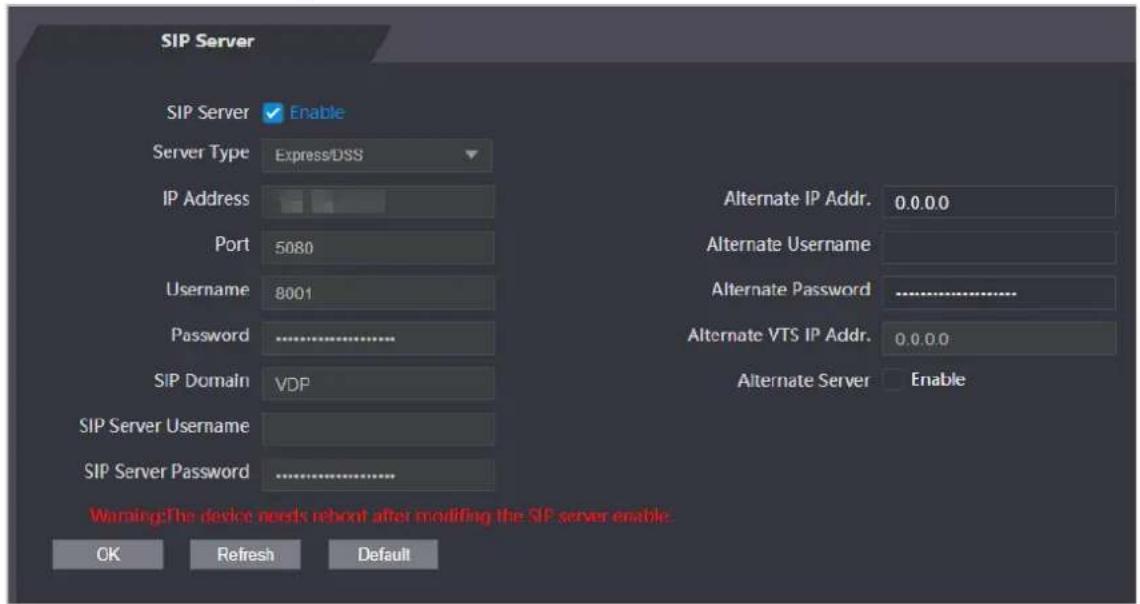
Figure 3-8 Use the Device as the SIP server
- Use another VTO as the SIP server:
- Do not enable SIP server. Select VTO from the Server Type.
- Configure the parameters, and then click OK.
Figure 3-9 Use VTO as the SIP server

Table 3-3 SIP server configuration
| Parameter Description | |
| IP Address IP address of the platform. | |
| Port | 5060 by default when VTO works as SIP server.5080 by default when the platform works as SIP server. |
| Username | Leave them as default. |
| Password | |
| SIP Domain VDP. | |
| SIP Server Username | The login username and password of the SIP server. |
| SIP Server Password | |
- Use the DSS Express or DSS Pro as the SIP server.Do not enable SIP server. Select Express/DSS from the Server Type.
Figure 3-10 Use DSS Express or DSS Pro as the SIP server

Table 3-4 SIP server configuration
| Parameter Description | |
| IP Address IP address of the platform. | |
| Port | 5060 by default when VTO work as SIP server.5080 by default when the platform works as SIP server. |
| Username | Leave them as default. |
| Password | |
| SIP Domain Leave it as default. | |
| SIP Server Username | The login username and password of the platform. |
| SIP Server Password | |
| Alternate IP Addr. | The alternate server will be used as the SIP server when DSS Express or DSS Pro does not respond. We recommend you configure the alternate IP address. If you turn on the Alternate Server function, you will set the Devices the alternate server.If you want another VTO to function as the alternate server, you need to enter the IP address, username, password of the VTO. Do not enable Alternate Server in this case.We recommend you set the main VTO as the alternate server. If you turn on the Alternate Server function, you will set the Devices the alternate server.If you want another VTO to function as the alternate server, you need to enter the IP address, username, password of the VTO. Do not enable Alternate Server in this case.We recommend you set the main VTO as the alternate server. |
| Alternate Username | Used to log in to the alternate server. |
| Alternate Password | |
| Alternate VTS IP Addr. | Enter the IP address of the alternate VTS. When the management platform does not respond, the alternate VTS will be activated to make sure VTO, VTH and VTS can still realize video intercom function. |
Step 3 Click OK
3.6.2 Configuring Basic Parameters
Configure the basic information of VTO, such as device type and device number.
Procedure
Step 1 Select Talkback > Local.
Step 2 Configure the parameters.
- Use the Device as the SIP server.
Figure 3-11 Basic parameter
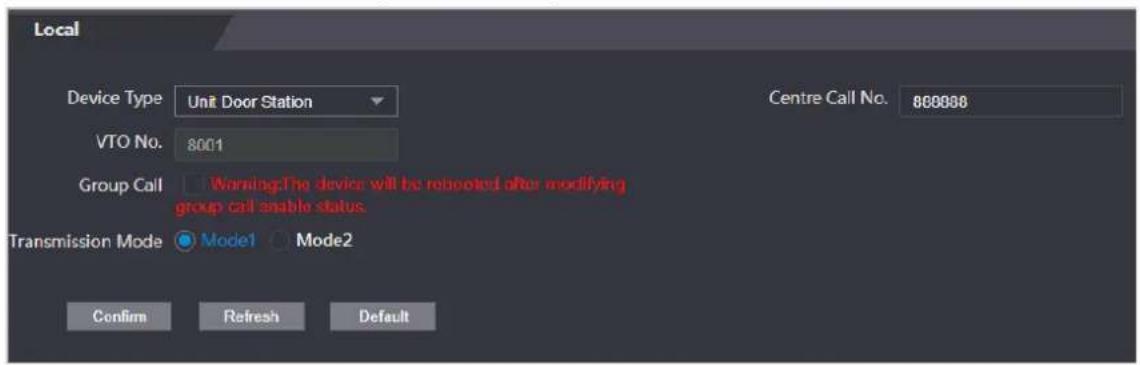
Table 3-5 Basic parameter description
| Parameter Description | |
| Device Type Select | Unit Door Station. |
| VTO No. The number of the VTO, which cannot be configured. | |
| Group Call | When you turn on the group call function, the VTO calls the main VTH and the extensions at the same time. |
| Centre Call No. | The default phone number is 888888+VTS No. when the VTO calls the VTS. You can check the number of the VTS from the Device screen of VTS. |
| Transmission Mode | Mode 1 is selected by default. |
- Use other VTO as the SIP server.
Figure 3-12 Basic parameter

Table 3-6 Basic parameter description
| Parameter Description | |
| Device Type Select | Unit Door Station. |
| VTO No. | The number of the VTO.The number must have four digits. The first two digits are 80, and the last two digits start from 01. For example, 8001.If multiple VTOs exist in one unit, the VTO No. cannot be repeated. |
| Centre Call No. | The default phone number for the management center is 888888.Keep it as default. |
| Transmission Mode | Mode 1 is selected by default. |
- Use the Platform (DSS Express or DSS Pro) as the SIP Server.
Figure 3-13 Basic parameter

Table 3-7 Basic parameter description
| Parameter Description | ||
| Device Type | Select the device type based on the installation position. | |
| Building No. | Select the checkbox and then enter the number of the building where the unit door station is installed. | If building and unit are enabled on DSS, enter the building number and unit number on the webpage. The building number, unit number and VTO number must conform to the configured parameters on DSS.Take room 1001, unit 2, and building 1 as an example. If building number is enabled on the DSS and the unit is not enabled, the room number is "1#1001". If building and unit are both enabled, the room number is "1#2#1001". If building is not enabled, and unit is not enabled either, the room number is "1001". For details, see the user manual of DSS. |
| Unit No. | Select the checkbox and then enter the number of the unit where the unit door station is installed. | |
| VTO No. | The number of the unit door station.If multiple VTOs exist in one unit, the VTO No. cannot be repeated. | |
| Centre Call No. | The default phone number is 888888 when the VTO calls the VTS. Keep it as default. | |
| Transmission Mode | Mode 1 is selected by default. | |
Step 3 Click Confirm.
3.6.3 Adding the VTO
When the Device functions as the SIP Server and you have other VTOs, you need to add other VTOs to the SIP server to make sure they can call each other.
Procedure
Step 1 On the webpage of the Device, select Talkback setting > VTO No. Management.
Step 2 Click Add, and then configure the VTO.
Figure 3-14 Add VTO

Table 3-8 Add VTO configuration
| Parameter Description | |
| Rec No. | The number of the added VTO. You can check the number from the Device page on the webpage of the VTO. |
| Registration Password | Keep it default. |
| Build No. | Cannot be configured. |
| Unit No. | |
| IP Address | The IP address of the added VTO. |
| Username | The username and password used to log in to the webpage of the added VTO. |
| Password |
Step 3 Click OK
3.6.4 Adding the VTH
When the Device functions as the SIP Server, you can add all VTHs in the same unit to the SIP server
to make sure they can call each other.
Background Information

- When there are main VTH and extension, you need to turn on the group call function first and then add main VTH and extension on the VTH Management page. For how to turn on the group call function, refer to "3.6.2 Configuring Basic Parameters".
- Extension cannot be added when the main VTHs are not added.
Procedure
Step 1 On the home page, select Talkback setting > Room No. Management.
Step 2 Add the VTH.
- Add individually
- Click Add.
- Configure parameters, and then click OK.
Figure 3-15 Add individually

Table 3-9 Room information
| Parameter Description | |
| Room No. | Enter the room number of the VTH.The room number consists of 1-5 digits, and must conform to the configured room number on the VTH.When there are main VTH and extensions, the room number of main VTH ends with -0 and the room number of extension ends with -1, -2 or -3. For example, the main VTH is 101-0, and the room number of the extension is 101-1, 101-2...If the group call function is not turned on, room number in the format of 9901-xx cannot be set. |
| First Name | Enter the name of the VTH to help you differentiate VTHs. |
| Last Name | |
| Nick Name | |
| Register Type | Keep them as defaults. |
| Registered Password |
- Add in batches
- Click Batch Add
- Configure the parameters.
Figure 3-16 Batch add
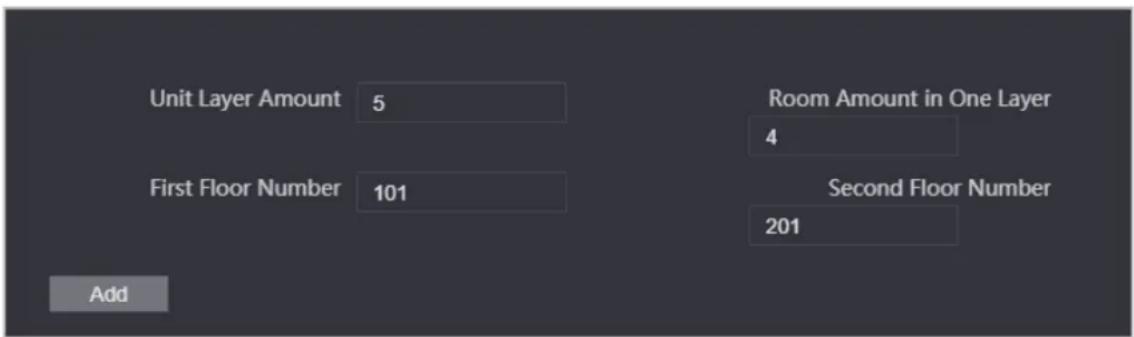
Table 3-10 Batch add
| Parameter Description | |
| Unit Layer Amount | The number of floors of the building (ranging from 1 to 99). |
| Room Amount in One Layer | The number of rooms on each floor, which ranges from 1 to 99. |
| First Floor Number The first room on the first floor. | |
| Second Floor Number | The first room on the second floor, which equals the first room on the first floor plus the number of rooms on each floor. |
3.6.5 Adding the VTS
When the Device functions as the SIP Server, you can add VTSs to the SIP server to make sure they
can call each other.
Procedure
Step 1 On the Homepage, select Talkback setting > VTS Management.
Step 2 Click Add and set parameters.
Figure 3-17 VTS management

Step 3 Click OK.
3.6.6 Viewing Device Status
When the Device works as the SIP Server, you can view the status of devices that are connected the SIP server. On the Homepage, select Talkback setting >Status.
3.6.7 Viewing Call Logs
View all the record of outgoing calls and incoming calls. On the Homepage, select Talkback setting > Call.
3.7 Configuring Time Schedules
Configure time sections and holiday plans, and then you can define when a user has the permissions to unlock doors.
3.7.1 Configuring Time Sections
You can configure up to 128 groups (from No.0 through No.127) of time section. In each group, you need to configure door access schedules for a whole week. A user can only unlock the door during the scheduled time.
Procedure
Step 1 Log in to the webpage.
Step 2 Select Time Section >Time Section.
Figure 3-18 Time section parameters

Step 4 Enter No. and name for the time section.
• No.: Enter the number of the time. It ranges from 0 through 127.
- Name: Enter a name for each time section. You can enter a maximum of 32 characters (contain number, special characters and English characters).

You can configure up to four time sections for a single day.
Step 5 Configure time sections for each day.
Step 6 (Optional) Click Apply to the whole week to copy the configuration to the rest of days.
Step 7 Click OK
3.7.2 Configuring Holiday Groups
Set time sections for different holiday groups. You can configure up to 128 holiday groups (from No.0 through No.127). and up to 16 time sections for a single holiday group. Users can unlock doors in the defined time sections.
Procedure
Step 1 Log in to the webpage.
Step 2 Select Time Section > Holiday Group > Config.
Step 3 Click Add.
Figure 3-19 Add a holiday group

Step 4 Set the name and the time for the holiday group.
- Holiday Name: Enter the name of the holiday group. Enter a name for each time section. You can enter a maximum of 32 characters (contain numbers, special characters and English characters).
• Time Section: Select the start time and end time of the holiday.
Step 5 Click OK.

You can add multiple holidays in a holiday group.
Step 6 Click OK.
3.7.3 Configuring Holiday Plans
Assign the configured holiday groups to the holiday plan. Users can only unlock the door in the defined time in the holiday plan.
Procedure
Step 1 Log in to the webpage.
Step 2 Select Time Section > Holiday Plan Config.
Step 3 Click Add.
Figure 3-20 Add holiday plan

Step 4 Enter a number and name for the holiday plan.
- No.: Enter a section number. It ranges from 0 through 127.
- Name: Enter a name for each time section. You can enter a maximum of 32 characters (contain numbers, special characters and English characters).
Step 5 In the Holiday Group No. list, select the number of the defined holiday group.

Select 255 if you do not want to select a holiday group.
Step 6 In the Holiday Period area, configure time sections in the holiday group. You can configure up to four time sections.
Step 7 Click OK.
3.8 Data Capacity
You can see how many users, cards and face images that the Device can store.
Log in to the webpage and select Data Capacity.
3.9 Configuring Video and Image
Configure video and image parameters, such as stream and brightness. We recommend you use the default parameters in this section.
3.9.1 Configuring Video
On the home page, select Video Setting, and then configure the video stream, status, image and exposure.
Background Information
• Video Standard: Select NTSC.
- Channel Id: Channel 1 is for configurations of visible light image. Channel 2 is for configurations of infrared light image.
- Default: Restore to defaults settings.
- Capture: Take a snapshot of the current image.

PAL video standard is 25 fps and the NTSC video standard is 30 fps.
3.9.1.1 Configuring Channel 1
Procedure
Step 1 Select Video Setting > Video Setting.
Step 2 Select 1 from the Channel No. list.
Step 3 Configure the date rate.
Figure 3-21 Date rate

Table 3-12 Date rate description
| Parameter Description | ||
| Main Format | Video Format | When the Device functions as the a VTO and connects the VTH, the acquired stream limit of VTH is 720p.When resolution is changed to 1080p, the call and monitor function might be affected. |
| Frame Rate | The number of frames (or images) per second. The frame rate range is 1–25 fps. | |
| Bitrate | It indicates the amount of data transmitted over an internet connection in a given amount of time. Select a proper bandwidth based on your network speed. | |
| Extra Stream | Video Format | The sub-stream supports D1, VGA and QVGA. |
| Frame Rate | The number of frames (or images) per second. The frame rate range is 1–25 fps. | |
| Bitrate | It indicates the amount of data transmitted over an internet connection in a given amount of time. | |
Step 4 Configure the image.
Figure 3-22 Image

Table 3-13 Image description
| Parameter Description | |
| Brightness | Brightness is the relative lightness or darkness of a particular color. The larger the value is, the brighter the image will be. |
| Contrast | Contrast is the difference in the luminance or color that makes an object distinguishable. The larger the contrast value is, the greater the color contrast will be. |
| Hue | Refers to the strength or saturation of a color. It describes the color intensity, or how pure it is. |
| Saturation | Color saturation indicates the intensity of color in an image. As the saturation increases, the color appears stronger, for example being more red or more blue.The saturation value does not change image brightness. |
| Scene Mode | The image hue is different in different scene mode.Close: Scene mode function is turned off.Auto: The system automatically adjusts the scene mode based on the photographic sensitivity.Sunny: In this mode, image hue will be reduced.Night: In this mode, image hue will be increased. |
| Day/Night | Day/Night mode affects light compensation in different situations.Auto: The system automatically adjusts the day/night mode based on the photographic sensitivity.Colorful: In this mode, images are colorful.Black and white: In this mode, images are in black and white. |
| Backlight Mode | Close: Backlight compensation is turned off.Backlight: Backlight compensation automatically brings more light to darker areas of an image when bright light shining from behind obscures it.Wide dynamic: The system dims bright areas and compensates for dark areas to create a balance to improve the overall image quality.Inhibition: Highlight compensation (HLC) is a technology used in CCTV/IP security cameras to deal with images that are exposed to lights like headlights or spotlights. The image sensor of the camera detects strong lights in the video and reduces exposure in these spots to enhance the overall quality of the image. |
| Mirror | When the function is turned on, images will be displayed with the left and right side reversed. |
| Flip | When this function is turned on, images can be flipped over. |
Step 5 Configure the exposure parameters.
Figure 3-23 Exposure
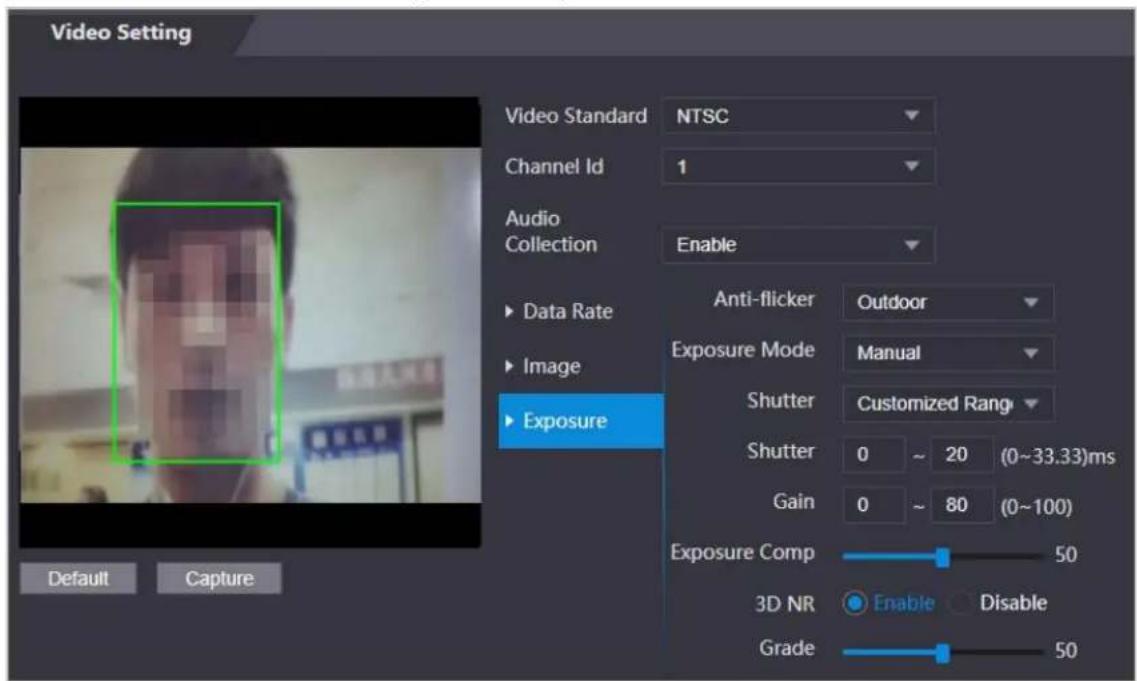
Table 3-14 Exposure parameter description
| Parameter Description | |
| Anti-flicker | Set anti-flicker to reduce flicker and reduce uneven colors or exposure.50Hz: When the mains power supply is 50 Hz, the exposure is automatically adjusted to prevent the appearance of horizontal lines.60Hz: When the mains power supply is 60 Hz, the exposure is automatically adjusted to reduce the appearance of horizontal lines.Outdoor: When Outdoor is selected, the exposure mode can be switched. |
| Exposure Mode | You can set the exposure to adjust image brightness.● Auto: The Device automatically adjusts the brightness of images.● Shutter Priority: The Access Terminal will adjust image brightness according to shutter exposure range. If the image brightness is not enough and the shutter value has reached its upper or lower limit, the Device will adjust the gain value automatically for ideal brightness level.● Manual: You can configure gain and shutter value manually to adjust image brightness. ◇ When you select Outdoor from the Anti-flicker list, you can select Shutter Priority as the exposure mode.◇ Exposure mode might differ depending on different models of Device. ◇ When you select Outdoor from the Anti-flicker list, you can select Shutter Priority as the exposure mode.◇ Exposure mode might differ depending on different models of Device. |
| Shutter | Shutter is a component that allows light to pass for a determined period. The higher the shutter speed, the shorter the exposure time, and the darker the image. |
| Gain When the gain value range is set, video quality will be improved. | |
| Exposure Compensation | You can make a photo brighter or darker by adjusting exposure compensation value. |
| 3D NR | When 3D Noise Reduction (RD) is turned on, video noise can be reduced to ensure high definition videos. |
| Grade | You can set its grade when this function is turned on. |
3.9.1.2 Configuring Channel 2
Procedure
Step 1 Select Video Setting > Video Setting.
Step 2 Select 2 from the Channel No..
Step 3 Configure the video status.

We recommend you turn on the WDR function when the face is in back-lighting.
Figure 3-24 Image

Table 3-15 Image description
| Parameter Description | |
| Brightness | Brightness is the relative lightness or darkness of a particular color. The larger the value is, the brighter the image will be. |
| Contrast | Contrast is the difference in the luminance or color that makes an object distinguishable. The larger the contrast value is, the greater the color contrast will be. |
| Backlight Mode | Close: Back-light compensation is turned off.Backlight: Black-light compensation automatically brings more light to darker areas of an image when bright light shining from behind obscures it.Wide dynamic: The system dims bright areas and compensates for dark areas to ensure to create a balance to improve the overall image quality.Inhibition: Highlight compensation (HLC) is a technology used in CCTV/IP security cameras to deal with images that are exposed to lights like headlights or spotlights. The image sensor of the camera detects strong lights in the video and reduce exposure in these spots to enhance the overall quality of the image. |
Step 4 Configure the exposure parameters.
Figure 3-25 Exposure parameter

Table 3-16 Exposure parameter description
| Parameter Description | |
| Anti-flicker | Set anti-flicker to reduce flicker and decrease or eliminate uneven colors or exposure.50Hz:When the mains power supply is 50 Hz, the exposure is automatically adjusted to prevent the appearance of horizontal lines.60 Hz:When the mains power supply is 60 Hz, the exposure is automatically adjusted to reduce the appearance of horizontal lines.Outdoor:When Outdooris selected, the exposure mode can be switched. |
| Exposure Mode | You can set the exposure to adjust image brightness.Auto:The Device automatically adjusts the brightness of images.Shutter Priority:The Access Terminal will adjust image brightness according to shutter exposure range. If the image brightness is not enough and the shutter value has reached its upper or lower limit, the Device will adjust the gain value automatically for ideal brightness level.Manual:You can configure gain and shutter value manually to adjust image brightness.When you selectOutdoorfrom theAnti-flickerlist, you can selectShutter Priorityas the exposure mode.Exposure model might differ depending on different models of Device. |
| Shutter | Shutter is a device that allows light to pass for a determined period. The higher the shutter speed, the shorter the exposure time, and the darker the image. |
| Gain When the gain value range is set, video quality will be improved. | |
| Exposure Compensation | You can make a photo brighter or darker by adjusting exposure compensation value. |
| 3D NR | When 3D Noise Reduction (RD) is turned on, video noise can be reduced to ensure high definition videos. |
| Grade | You can set its grade when this function is turned on. |
3.9.2 Setting Volume
You can adjust the volume of the speaker.
Procedure
Step 1 Log in to the webpage.
Step 2 Select Video Setting > Volume Setting.
Step 3 Drag the slider the adjust the volume.
Step 4 Click OK
3.9.3 Configuring Motion Detection
Set a range in which moving objects can be detected.
Procedure
Step 1 Select Video Setting > Video Setting > Motion Detection.
Figure 3-26 Motion detection area

Step 2 Press and hold the left mouse button, and then drag the mouse in the red area.

- The red rectangles are motion detection area. The default motion detection range is all the rectangles.
- To draw a motion detection area, you need to click Remove All first.
- The motion detection area you draw will be a non-motion detection area if you draw in the default motion detection area.
3.9.4 Configuring Local Coding
Set up the area to be displayed on the indoor monitors. This function is only available on select models.
Procedure
Step 1 Log in to the webpage.
Step 2 Select Video & Audio > Local Coding.
Step 3 Select Enable to turn on the function.
Step 4 Drag the box.
Figure 3-27 Local coding

Step 5 Click OK.
3.9.5 Configuring Image Mode
Select the image mode based on the installation site of Access Controller.
Procedure
Step 1 On the home page, select Video Setting > Image Mode.
Step 2 Select image mode according to the installation location of the Access Controller.
- Indoor: The Device is installed indoor such as offices. The artificial light is even across the room and there is no daylight.
- Outdoor: The Device is installed outdoor and the daylight is bright and even.
- Other: The human face is in back-lighting, which makes the face dim. We recommend you select other mode to make it easier for the Access Controller to detect.
Step 3 Click OK.
3.10 Configuring Face Detection
You can configure face parameters to increase the accuracy of the face recognition.
Procedure
Step 1 Log in to the webpage.
Step 2 Select Face Detect.
Step 3 Configure the parameters.

The pictures below are for reference only. The parameters of face detection might differ depending on models of the product.
Figure 3-28 Face detect (with temperature monitoring module)

Table 3-17 Description of face detection parameters (with temperature monitoring module)
| Parameter Description | |
| Face Recognition Threshold | Adjust the face recognition accuracy. Higher threshold means higher accuracy. |
| Max. Angle of Face Recognition | Set the maximum face pose angle for face detection. Larger value means larger face angle range. If the face pose angle is out of the defined range, the face detection box will not appear. |
| Anti-fake Threshold | Avoid false face recognition when people using a photo, video, mask or a different substitute for an authorized person's face. |
| Infrared Light Adjust the brightness of IR light. | |
| Fill Light Brightness Setting | You can set fill light brightness. |
| Fill Light Mode Setting | There are three fill light modes.● NO: Fill light is normally open.● NC: Fill light is normally closed.● Auto: Fill light will be automatically on when a motion detection event is triggered.WhenAutois selected, the fill light will not be on even if Infrared Light value is greater than 19. |
| Recognition Timeout (S) | If a person with access permission has their face successfully recognized, the Device will prompt face recognition success. You can enter the prompt interval time. |
| Invalid Prompt Interval (S) | If a person without access permission attempts to unlock the door for several times in the defined interval, the Device will prompt face recognition failure. You can enter the prompt interval time. |
| Pupillary Distance | Face images require desired pixels between the eyes (called pupillary distance) for successful recognition. The default pixel is 45. The pixel changes according to the face size and the distance between faces and the lens. If an adult is 1.5 meters away from the lens, the pupillary distance can be 50 px-70 px. |
| Channel Id | 1 is for the white light camera and 2 is for the IR light camera. |
| Exposure (Face) | After face exposure is enabled, human faces will be clearer when the Device is installed outdoors. |
| Face Target Brightness | The default value is 50. Adjust the brightness as needed. |
| Exposure Time | After a face is detected, the Device will give out light to illuminate the face, and the Device will not give out light again until the interval you set has passed. |
| Temperature Monitoring | Enable or disable the temperature monitoring function. |
| Temp Unit | SelectoC oroF. |
| Temp Rect | Set whether to display the temperature monitoring box on the standby screen or not. |
| Temp Correction Duration (ms) | When monitoring the temperature, the Device will take the temperature value after the time defined by this parameter. |
| Temp Monitoring Distance (cm) | 50 by default. You can correct the monitored temperature as needed according to the distance you set. |
| High Temp Threshold/Low Temp Threshold | Set the temperature threshold. The monitored body temperature will be judged as high/low temperature if it is greater/less than the set value. |
| Max Temperature | Set the temperature range you need. If the monitored temperature is lower than the lower limit, it will prompt that the temperature is too low; if higher than the upper limit, it will prompt that there is a heat source interfering with the function. |
| Min Temperature | |
| Temp Correction Value | This parameter is for testing. The difference of the temperature monitoring environment might cause the temperature deviation between the monitored temperature and the actual temperature. You can select multiple monitored samples for testing, and then correct the temperature deviation by this parameter according to the comparison between the monitored temperature and the actual temperature. For example, if the monitored temperature is 0.5°C lower than the actual temperature, the correction value is set to 0.5°C; if the monitored temperature is 0.5°C higher than the actual temperature, the correction value is set to -0.5°C. |
| Temp Monitoring Mode | Auto: Uses a face heat map for face recognition; if heat maps are not found, it will automatically change to calibration mode.Thermogram: Uses only a heat map for face recognition and temperature monitoring.Calibration: Uses a white light image of a face for face recognition, and then extract and apply the coordinates on the face heat map for temperature monitoring.Only certain models support this parameter. |
| Thermogram Display | Display a heat map at the upper-left corner. |
| Mask Mode | No detect: Mask is not detected during face recognition.Mask reminder: Mask is detected during face recognition. If the person does not wear a mask, the system will give them a reminder to wear masks, and access is allowed.Mask intercept: Mask is detected during face recognition. If a person is not wearing a mask, the system will give them a reminder to wear masks, and access is denied. |
Figure 3-29 Face detect (without temperature monitoring module)

Table 3-18 Description of face detection parameters (without temperature monitoring module)
| Parameter Description | |
| Face Recognition Threshold | Adjust the face recognition accuracy. Higher threshold means higher accuracy. |
| Max. Angle of Face Recognition | Set the maximum face pose angle for face detection. Larger value means larger face angle range. If the face pose angle is out of the defined range, the face detection box will not appear. |
| Anti-fake Threshold | Avoid false face recognition when people using a photo, video, mask or a different substitute for an authorized person's face. |
| Infrared Light Adjust the brightness of IR light. | |
| Recognition Timeout (S) | If a person with access permission has their face successfully recognized, the Device will prompt face recognition success. You can enter the prompt interval time. |
| Invalid Prompt Interval (S) | If a person without access permission attempts to unlock the door for several times in the defined interval, the Device will prompt face recognition failure. You can enter the prompt interval time. |
| Pupillary Distance | Face images require desired pixels between the eyes (called pupillary distance) for successful recognition. The default pixel is 45. The pixel changes according to the face size and the distance between faces and the lens. If an adult is 1.5 meters away from the lens, the pupillary distance can be 50 px–70 px. |
| Channel Id | 1 is for the white light camera and 2 is for the IR light camera. |
| Exposure (Face) | After face exposure is enabled, human faces will be clearer when the Device is installed outdoors. |
| Face Target Brightness | The default value is 50. Adjust the brightness as needed. |
| Exposure Time (Face) (S) | After a face is detected, the Device will give out light to illuminate the face, and the Device will not give out light again until the interval you set has passed. |
| Mask Mode | No detect: Mask is not detected during face recognition.Mask reminder: Mask is detected during face recognition. If the person does not wear a mask, the system will give them a reminder to wear masks, and access is allowed.Mask intercept: Mask is detected during face recognition. If a person is not wearing a mask, the system will give them a reminder to wear masks, and access is denied. |
Step 4 Draw the face detection area.
1. Click Detect Region,
2. Right-click to draw the detection area, and then release the left button of the mouse to complete drawing. The face in the defined area will be detected.
Step 5 Draw the target size.
1) Click Draw target.
2) Right-click to draw the face recognition box to define the minimum size of detected face.
Only when the size of the face is larger than the defined size, the face can be detected by the Device.
Step 6 Click OK
3.11 Configuring Network
3.11.1 Configuring TCP/IP
You need to configure IP address of Access Controller to make sure that it can communicate with other devices.
Procedure
Step 1 Select Network Setting > TCP/IP.
Step 2 Configure parameters.
Figure 3-30 TCP/IP
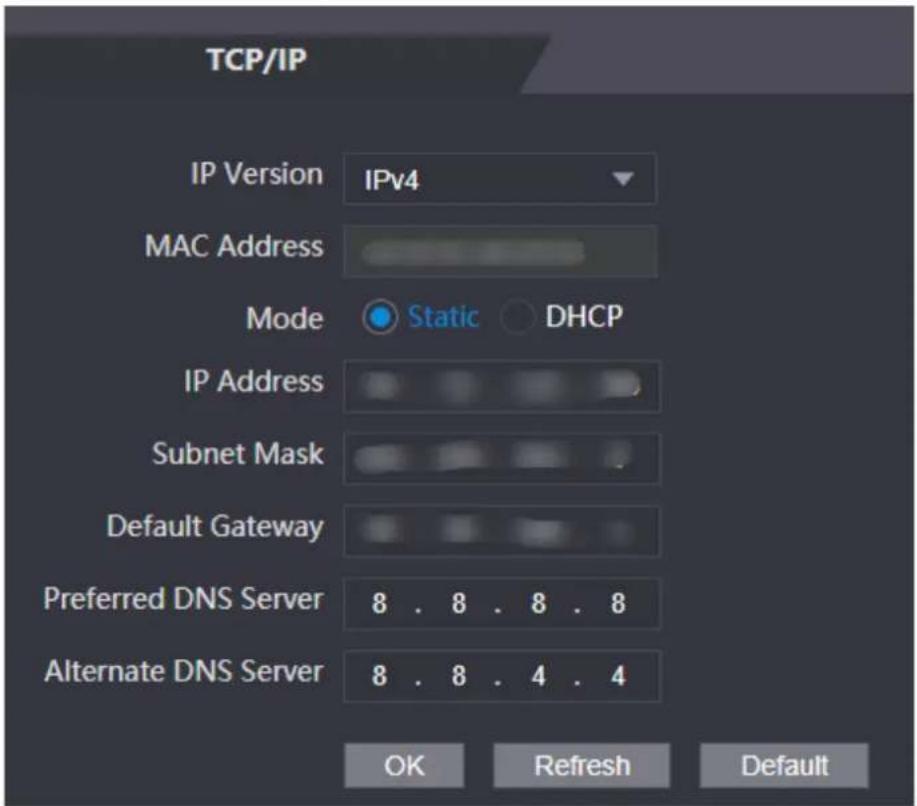
Table 3-19 Description of TCP/IP
| Parameter Description | |
| IP Version IPv4 | |
| MAC Address MAC address of the Device. | |
| Mode | Static: Manually enter IP address, subnet mask, and gateway.DHCP: It stands for Dynamic Host Configuration Protocol.When DHCP is turned on, the Device will automatically be assigned with IP address, subnet mask, and gateway. |
| IP Address | If you select static mode, configure the IP address, subnet mask and gateway. IP address and gateway must be on the same network segment. IP address and gateway must be on the same network segment. |
| Subnet Mask | |
| Default Gateway | |
| Preferred DNS Server Set IP address of the preferred DNS server. | |
| Alternate DNS Server Set IP address of the alternate DNS server. | |
Step 3 Click OK
3.11.2 Configuring Port
You can limit access to the Device at the same through web, desktop client and phone.
Procedure
Step 1 Select Network Setting > Port.
Step 2 Configure port numbers.
Figure 3-31 Configure ports
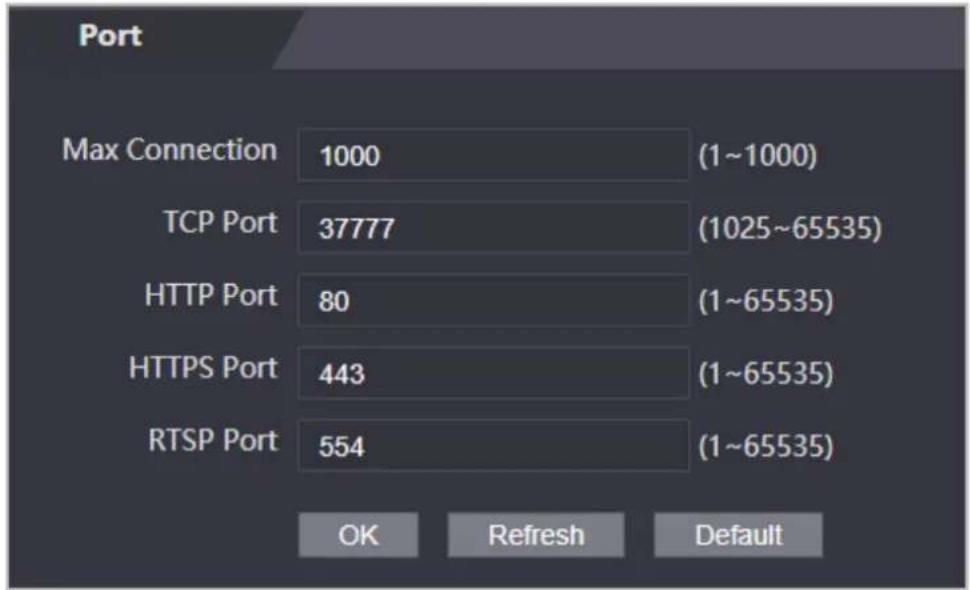

Except Max Connection and RTSP Port, you need to restart the Device to make the configurations effective after you change other parameters.
Table 3-20 Description of ports
| Parameter Description | |
| Max Connection | You can set the maximum number of clients (such as web, desktop client and phone) that can access the Access Terminal at the same time. |
| TCP Port Default value is 37777. | |
| HTTP Port | Default value is 80. If you want to change the port number, add the new port number after the IP address when you log in to the webpage. |
| HTTPS Port Default value is 443. | |
| RTSP Port Default value is 554. |
Step 3 Click OK.
3.11.3 Configuring Automatic Registration
The Device reports its address to the designated server so that you can get access to the Device through the management platform.
Procedure
Step 1 On the home page, select Network Setting > Register.
Step 2 Enable the automatic registration function and configure the parameters.
Figure 3-32 Register

Table 3-21 Automatic registration description
| Parameter Description | |
| Host IP | The IP address or the domain name of the server. |
| Port The port of the server | used for automatic registration. |
| Sub-Device ID | Enter the sub-device ID (user defined).When you add the Device to the management platform, the sub-device ID on the management platform must conform to the defined sub-device ID on the Device. |
Step 3 Click Apply.
3.11.4 Configuring P2P
Peer-to-peer computing or networking is a distributed application architecture that partitions tasks or workloads between peers. Users can download mobile application by scanning QR code, and then register an account so that more than one terminal can be managed on the mobile app. You do not need to apply dynamic domain name, do port mapping or do not need transit server.
Background Information

If you are to use P2P, you must connect the terminal to external network; otherwise the terminal cannot be used.
Procedure
Step 1 Select Network Setting > P2P
Step 2 Select Enable to turn on the P2P function.
Step 3 Click OK.
3.12 Safety Management
3.12.1 Configuring IP Authority
Procedure
Step 1 Log in to the webpage.
Step 2 Click Safety Mgmt. > IP Authority.
Figure 3-33 IP authority

Step 3 Select a cybersecurity mode from the Type list.
• Network Access: Set allowlist and blocklist to control access to the Device.
- Prohibit PING: Enable PING prohibited function, and the Device will not respond to the Ping request.
- Anti Half Connection: Enable Anti Half Connection function, and the Device can still function properly under half connection attack.
3.12.1.1 Network Access
Procedure
Step 1 Select Network Access from the Type list.
Step 2 Select the Enable check box.
Figure 3-34 Network access

Step 3 Select Allow List or Block List.
Step 4 Click Add.
Figure 3-35 Add IP

Step 5 Configure parameters.
Table 3-22 Description of adding IP parameters
| Parameter Description | |
| Type Select the address type from the | Type list. |
| IP Version IPv4 by default. | |
| All Ports | Select All Ports check box, and your settings will apply to all ports. |
| Device Start Port | If you clear All Ports check box, set the device start port and device end port. |
| Device End Port |
Step 6 Click Save, and the IP Authority interface is displayed.
Step 7 Click OK
- Click to edit the allowlist or blocklist.
- Click to delete the allowlist or blocklist
3.12.1.2 Prohibit PING
Procedure
Step 1 Select Prohibit PING from the Type list.
Step 2 Select the Enable check box.
Figure 3-36 Prohibit PING

Step 3 Click OK
3.12.1.3 Anti Half Connection
Procedure
Step 1 Select the Anti Half Connection from the Type list.
Step 2 Select the Enable check box.
Step 3 Click OK
3.12.2 Configuring System
Procedure
Step 1 Log in to the web interface.
Step 2 Select Safety Mgmt. > System Service.
Step 3 Enable or disable the system services as needed.
Figure 3-37 System service

Table 3-23 Description of system service
| Parameter Description | |
| SSH | Secure Shell (SSH) is a cryptographic network protocol for operating network services securely over an unsecured network.When SSH is enabled, SSH provides cryptographic service for the data transmission. |
| PWD Reset Enable | If enabled, you can reset the password. This function is enabled by default. |
| CGI | Common Gateway Interface (CGI) offers a standard protocol for web servers to execute programs similarly to console applications running on a server that dynamically generates webpages.When CGI is enabled, CGI commands can be used. The CGI is enabled by default. |
| ONVIF | Enable other devices to pull the video stream of the VTO via the ONVIF protocol. |
| Audio and Video Transmission Encryption | If this function is enabled, audio and video transmission is automatically encrypted. |
| RTSP Over TLS | If this function is enabled, audio and video transmission is encrypted via THE RTSP protocol. |
| HTTPS | Hypertext Transfer Protocol Secure (HTTPS) is a protocol for secure communication over a computer network.When HTTPS is enabled, HTTPS will be used to access CGI commands; otherwise HTTP will be used. |
| Compatible with TLSv1.1 and earlier versions | Enable this function if your browser is using TLS V1.1 or earlier versions. |
| Emergency Maintenance | Enable it for faults analysis and maintenance. |
| Password Expires in Set | the password expiration date. |
Step 4 Click OK
3.12.2.1 Creating Server Certificate
Background Information
Configure HTTPS server to improve your website security with server certificate.

- If you use HTTPS for the first time or the IP address of the Access Controller is changed, create a server certificate and install a root certificate.
- If you use another computer to log in to the webpage of the Access Controller, you need to download and install the root certificate again on the new computer or copy the root certificate to the it.
Procedure
Step 1 On the System Service page, click Create Server Certificate.
Step 2 Enter information and click OK.
The Device will restart.
Figure 3-38 Create Server Certificate
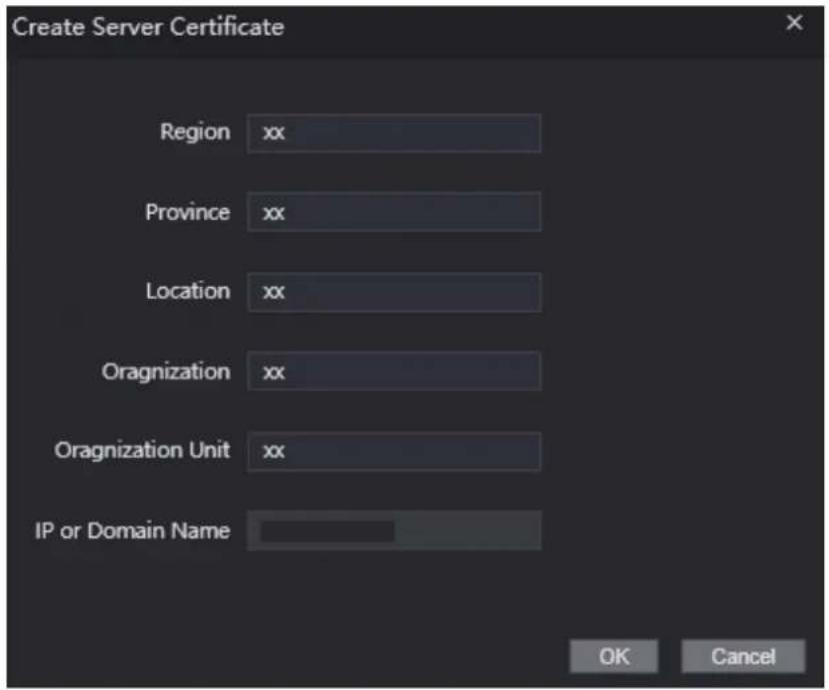
3.12.2.2 Downloading Root Certificate
Procedure
Step 1 On the System Service page, click Download Root Certificate.
Step 2 Double-click the file that you have downloaded, and then click Open.
Figure 3-39 File download

Step 3 Click Install Certificate.
Figure 3-40 Certificate information

Step 4 Select Current User or Local Machine, and then click Next.
Figure 3-41 Certificate import wizard (1)

Step 5 Select the appropriate storage location.
1) Select Place all certificates in the following store.
2) Click Browse to import the certificate to the Trusted Root Certification Authorities store, and then click Next.
Figure 3-42 Certificate Import Wizard (2)

Step 6 Click Finish.
Figure 3-43 Certificate import wizard (3)

3.13 User Management
You can add or delete users, change users' passwords, and enter an email address for resetting the password when you forget your password.
3.13.1 Adding Users
You can add new users and then they can log in to the webpage of the Access Controller.
Procedure
Step 1 On the home page, select User Mgmt. >User Mgmt..
Step 2 Click Add, and enter the user information.

- The username cannot be the same with existing account. The username consists of up to 31 characters and only allows for numbers, letters, underscores, midlines, dots, or @.
- The password must consist of 8 to 32 non-blank characters and contain at least two types of the following characters: Upper case, lower case, numbers, and special characters (excluding '"; &). Set a high-security password by following the password strength prompt.
Figure 3-44 Add user
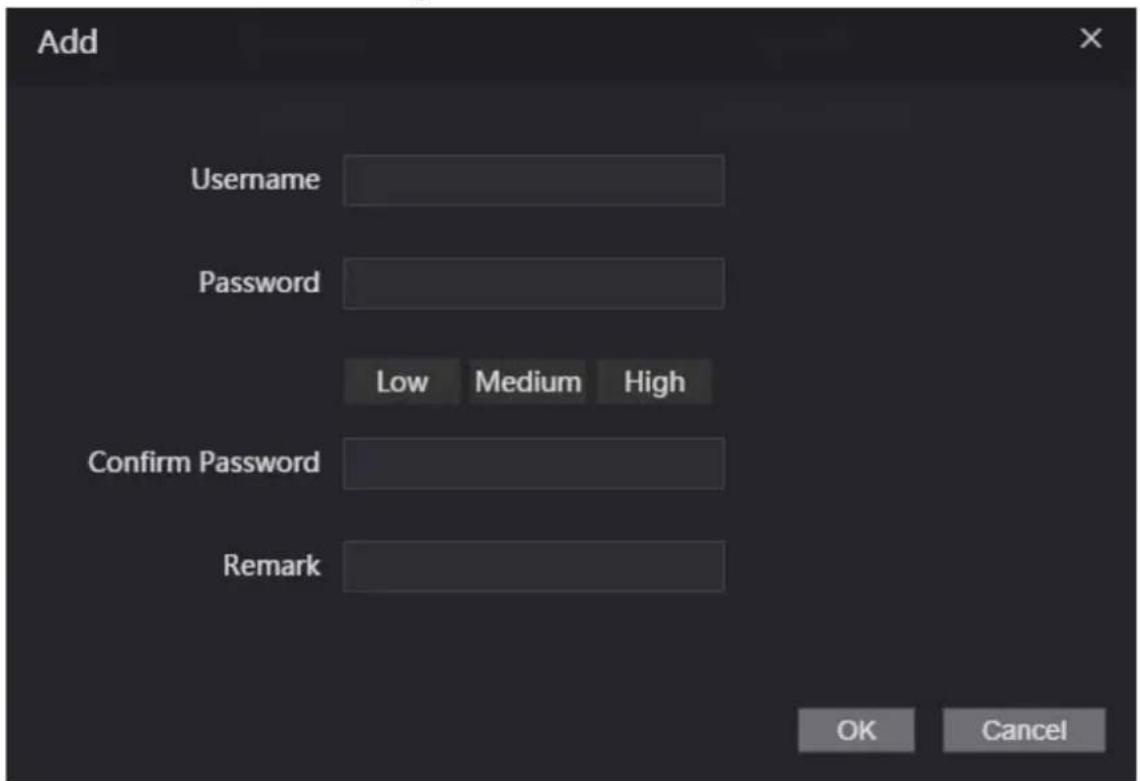
Step 3 Click OK.

Only admin account can change password and admin account cannot be deleted.
3.13.2 Adding ONVIF Users
Background Information
Open Network Video Interface Forum (ONVIF), a global and open industry forum that is established for the development of a global open standard for the interface of physical IP-based security products, which allows the compatibility from different manufactures. ONVIF users have their identities verified through ONVIF protocol. The default ONVIF user is admin.
Procedure
Step 1 On the home page, select User Mgmt. > Onvif User.
Step 2 Click Add and then configure parameters.
Figure 3-45 Add ONVIF user

Step 3 Click OK.
3.13.3 Viewing Online Users
You can view online users who currently log in to the webpage. On the home page, select Online User.
3.14 Maintenance
You can regularly restart the Device during the idle time to improve its performance.
Procedure
Step 1 Log in to the webpage.
Step 2 Select Maintenance.
Figure 3-46 Maintenance
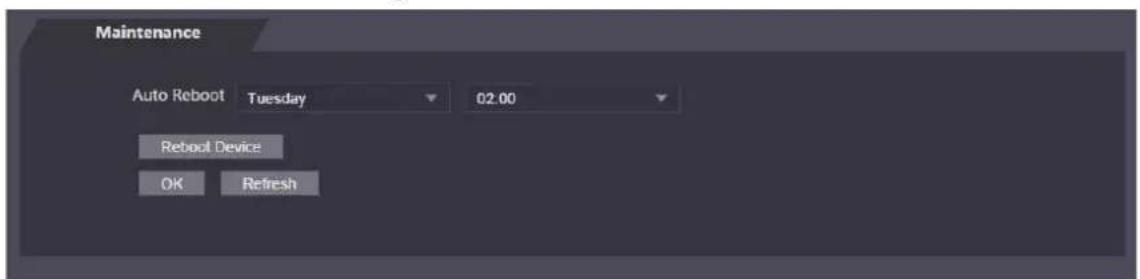
Step 3 Set the time, and then click OK.
Step 4 (Optional) Click Reboot Device, the Access Controller will restart immediately.
3.15 Configuration Management
When more than one Device need the same configurations, you can configure parameters for them by importing or exporting configuration files.
3.15.1 Exporting/Importing Configuration Files
You can import or export the configuration file of the Device. When you want to apply the same configurations to multiple devices, you can import the configuration file to them.
Procedure
Step 1 Log in to the webpage.
Step 2 Select Config Mgmt. > Config Mgmt..
Figure 3-47 Configuration management
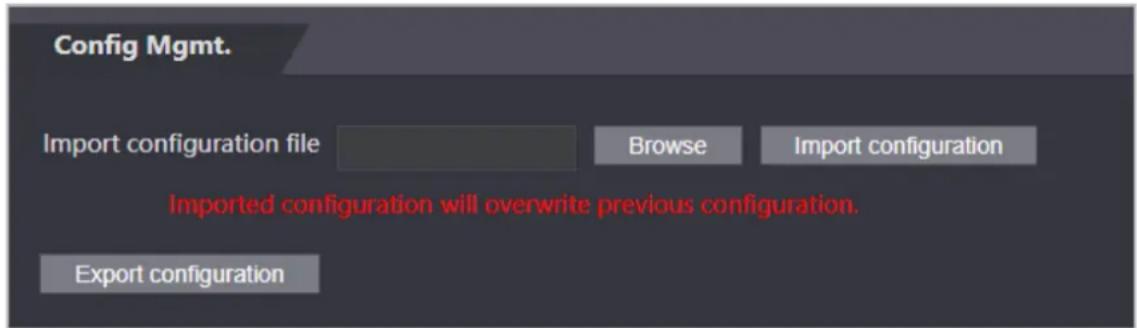
Step 3 Export or import configuration files.
- Export configuration file.Click Export Configuration to download the file to the local.

IP will not be exported.
- Import configuration file.
-
Click Browse to select the configuration file.
-
Click Import configuration

Configuration file can only be imported to the device with the same model.
3.15.2 Restoring Factory Defaults
Procedure
Step 1 Select Config Mgmt. > Default
Step 2 Restore factory defaults if necessary.

Restoring the Device to default configurations will cause data loss. Please be advised.
- Restore Factory: Resets configurations of the Device and delete all data.
- Restore Factory (Save user & log): Resets configurations of the Device and deletes all data except for user information and logs.
3.16 Fusion Calibration
Set up the coordinate relationship between the white light face image and face heat map. When calibration mode is enabled, the Device will use the coordinate relationship to measure temperature on the face heat map.
Background Information

- Only certain models of Device support this function.
- Select the Calibration mode from the Temp Monitoring Mode. For details, see "3.10 Configuring Face Detection".
Procedure
Step 1 Select Fusion Calibrate.
Step 2 Select a model from Calibration Mode according to the type of the access controller.
Figure 3-48 Fusion Calibrate
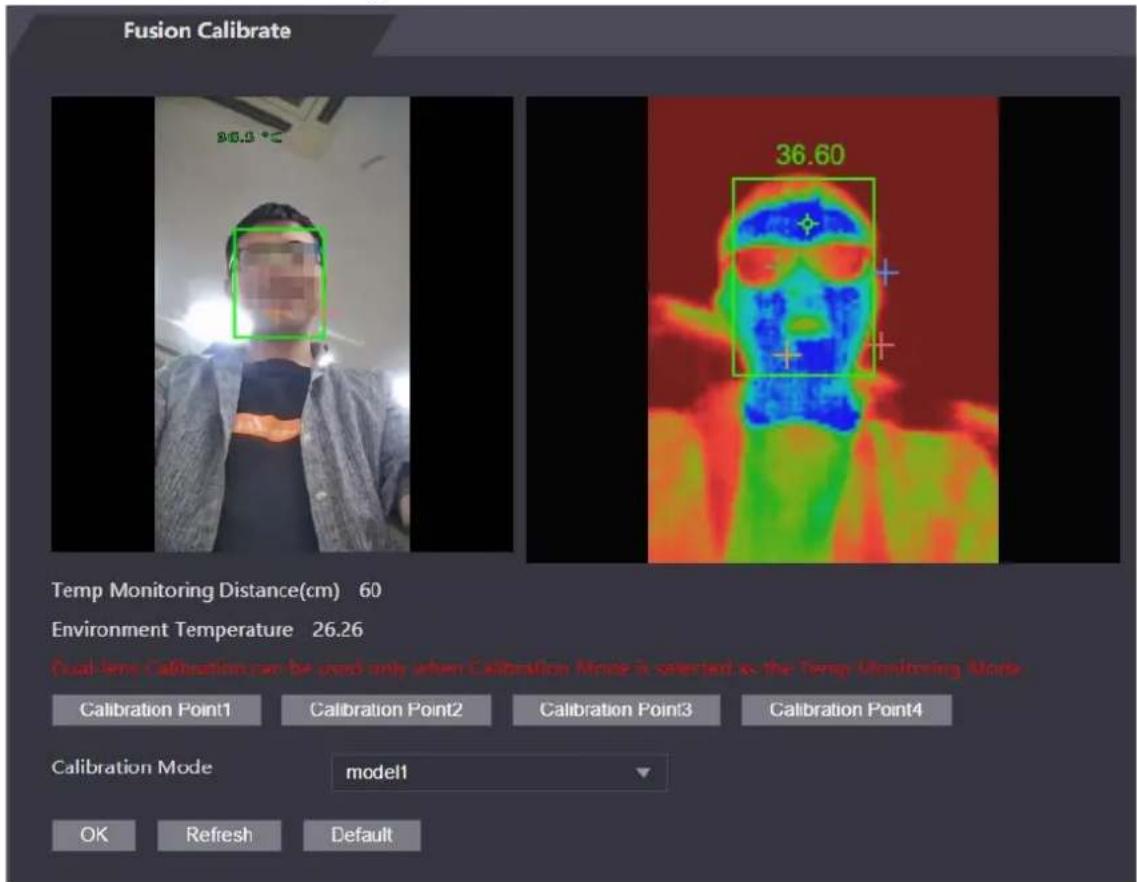
Step 3 Click Calibration Point1.
Step 4 Click the image on the left, and then left to set up a relationship between the two locations.
Step 5 Click Calibration Confirmed.
Step 6 Repeat step 2–4 to set calibration point 2 to point 4.
Step 7 Click OK
Step 8 (Optional) Click Default to reset all configuration the default settings.
3.17 Upgrading System
Background Information

- Use the correct update file. Make sure you get the correct update file from the technical support.
- Do not disconnect the power supply or network, or restart or shut down the Device during the update.
3.17.1 File Update
Procedure
Step 1 On the home page, select Upgrade.
Step 2 In the File Upgrade area, click Browse, and then upload the update file.

The upgrade file should be a .bin file.
Step 3 Click Update.
The Device will restart after update completes.
3.17.2 Online Update
Procedure
Step 1 On the home page, select Upgrade.
Step 2 In the Online Upgrade area, select an update method.
- Select Auto Check, the Device will automatically check whether the its latest version is available.
- Select Manual Check, and you can immediately check whether the latest version is available.
Step 3 Update the Device when the latest version is available.
3.18 Viewing Version Information
Background Information
On the home page, select Version Info, and you can view version information, such as device model, serial number, hardware version, legal information and more.
3.19 Viewing Logs
View logs such as system logs, admin logs, and unlock records.
3.19.1 System Logs
View and search for system logs.
Procedure
Step 1 Log in to the webpage.
Step 2 Select System Log > System Log.
Step 3 Select the time range and the log type, and then click Query.
Click Backup to download the system log.
3.19.2 Admin Logs
Search for admin logs by using admin ID.
Procedure
Step 1 Log in to the webpage.
Step 2 Select System Log > Admin Log.
Step 3 Enter the admin ID, and then click Query.
3.19.3 Unlocking Logs
Search for unlock records and export them.
Procedure
Step 1 Log in to the webpage.
Step 2 Select System Log > Search Records.
Step 3 Select the time range and the log type, and then click Query.
You can click Export Data to download the log.
4 Smart PSS Lite Configuration
This section introduces how to manage and configure the Access Controller through Smart PSS Lite. You can also configure time attendance rules on the platform, such as shifts, modes, schedules and more. For details, see the user's manual of Smart PSS Lite.
4.1 Installing and Logging In
Install and log in to Smart PSS Lite. For details, see the user manual of Smart PSS Lite.
Procedure
Step 1 Get the software package of the Smart PSS Lite from the technical support, and then install and run the software according to instructions.
Step 2 Initialize Smart PSS Lite when you log in for the first time, including setting password and security questions.

Set the password is for the first-time use, and then set security questions to reset your password when you forgot it.
Step 3 Enter your username and password to log in to Smart PSS Lite.
4.2 Adding Devices
You need to add the Access Controller to Smart PSS Lite. You can add them in batches or individually.
4.2.1 Adding One By One
You can add Access Controller one by one through entering their IP addresses or domain names.
Procedure
Step 1 Log in to Smart PSS Lite.
Step 2 Click Device Manager and click Add.
Step 3 Enter the device information.
Figure 4-1 Device information

Table 4-1 Device parameters Description
| Parameter Description | |
| Device Name | Enter a name of the Access Controller. We recommend you name it after its installation area. |
| Method to add Select | IP to add the Access Terminal by entering its IP Address. |
| IP Enter IP address of the Access Controller. | |
| Port | The port number is 37777 by default. |
| User Name/Password | Enter the username and password of the Access Terminal. |
Step 4 Click Add.
The added Access Controller displays on the Devices page. You can click Add and Continue to add more Access Controllers.
4.2.2 Adding in Batches
We recommend you use the auto-search function when you add want to Access Controllers in batches. Make sure the Access Controllers you add must be on the same network segment.
Procedure
Step 1 Log in to Smart PSS Lite.
Step 2 Click Device Manager and search for devices.
- Click Auto Search, to search for devices on the same LAN.
- Enter the network segment range, and then click Search.
Figure 4-2 Auto search

A device list will be displayed.

Select a device, and then click Modify IP to modify its IP address.
Step 3 Select the Access Controller that you want to add to Smart PSS Lite, and then click Add.
Step 4 Enter the username and the password of the Access Controller.
You can view the added Access Controller on the Devices page.

The Access Controller automatically logs in to Smart PSS Lite after being added. Online is displayed after successful login.
4.3 User Management
Add users, assign cards to them, and configure their access permissions.
4.3.1 Configuring Card Type
Set the card type before you assign cards to users. For example, if the assigned card is an ID card, set card type to ID card.
Procedure
Step 1 Log in to Smart PSS Lite.
Step 2 Click Access Solution > Personnel Manager > User.
Step 3 On the Card Issuing Type and then select a card type.

Make sure that the card type is same to the actually assigned card; otherwise, the card number cannot be read.
Step 4 Click OK.
4.3.2 Adding Users
4.3.2.1 Adding One by One
You can add users One by One.
Procedure
Step 1 Log in to Smart PSS Lite.
Step 2 Click Access Solution > Personnel Manger > User > Add.
Step 3 Click Basic Info tab, and enter the basic information of the user, and then import the face image.
Figure 4-3 Add basic information

Step 4 Click the Certification tab to add certification information of the user.
- Configure password: The password must consist of 6–8 digits.
- Configure card: The card number can be read automatically or entered manually. To read the card number automatically, select a card reader, and then place the card on the card reader.
- On the Card area, click and select Card issuer, and then click OK.
- Click Add, swipe a card on the card reader. The card number is displayed.
- Click OK.
After adding a card, you can set the card to main card or duress card, or replace the card with a new one, or delete the card.
- Configure fingerprint.
- On the Fingerprint area, click and select Fingerprint Scanner, and then click OK.
- Click Add Fingerprint, press your finger on the scanner three times in a row.
Figure 4-4 Add password, card, and fingerprint

Step 5 Configure permissions for the user. For details, see "4.3.3 Assigning Access Permission". Step 6 Click Finish.
4.3.2.2 Adding in Batches
You can add users in batches.
Procedure
Step 1 Log in to Smart PSS Lite.
Step 2 Click Personnel Manger > User > Batch Add.
Step 3 Select Card issuer from the Device list, and then configure the parameters.
Figure 4-5 Add users in batches

Table 4-2 Add users in batches parameters
| Parameter Description | |
| Start No. | The user ID starts with the number you defined. |
| Quantity The number of users | you want to add. |
| Department Select the department | ment that the user belongs to. |
| Effective Time/Expired Time | The users can unlock the door within the defined period. |
Step 4 Click Issue.
The card number will be read automatically.
Step 5 Click OK.
Step 6 On the User page, click to complete user information.
4.3.3 Assigning Access Permission
Create a permission group that is a collection of door access permissions, and then associate users with the group so that users can unlock corresponding doors.
Procedure
Step 1 Log in to the Smart PSS Lite.
Step 2 Click Access Solution > Personnel Manger > Permission configuration.
Step 3 Click . +
Step 4 Enter the group name, remarks (optional), and select a time template.
Step 5 Select the access control device.
Figure 4-6 Create a permission group
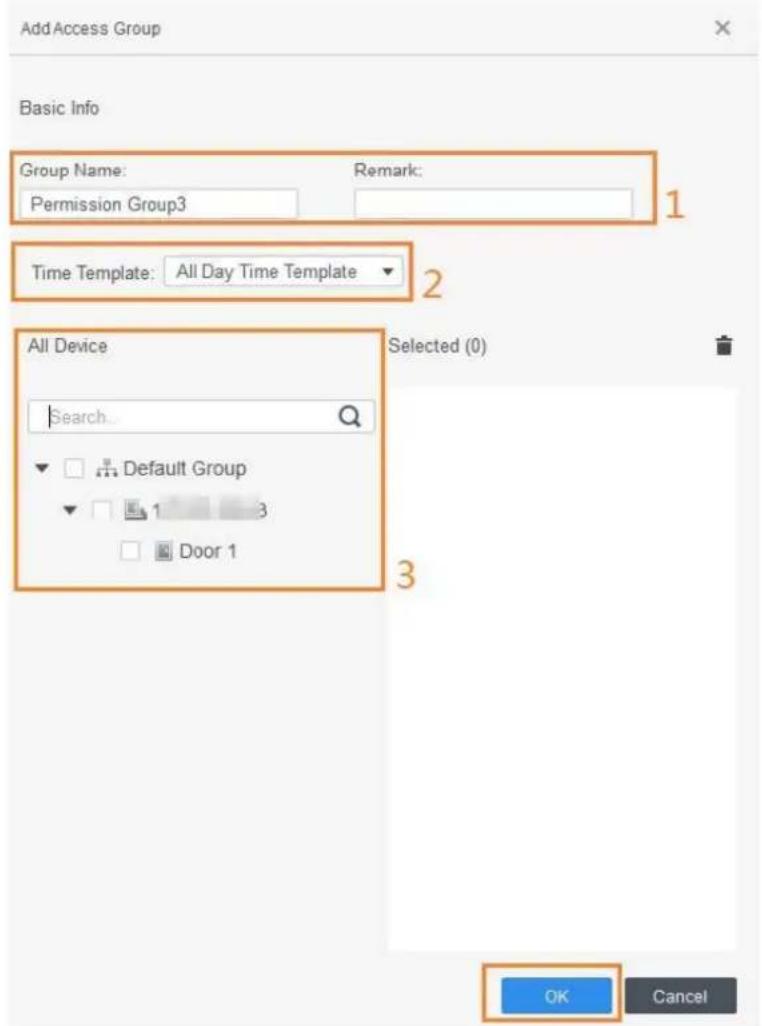
Step 7 Click of the permission group you added.
Step 8 Select users to associate them with the permission group.
Figure 4-7 Add users to a permission group

Step 9 Click OK.
Users in the permission group can unlock the door after valid identity verification.
4.3.4 Assigning Attendance Permissions
Create a permission group that is a collection of time attendance permissions, and then associate employees with the group so that they can punch in/out through defined verification methods.
Procedure
Step 1 Log in to the Smart PSS Lite.
Step 2 Click Access Solution > Personnel Manger > Permission configuration.
Step 3 Click . +
Step 4 Enter the group name, remarks (optional), and select a time template.
Step 5 Select the access control device.
Step 6 Click OK.
Figure 4-8 Create a permission group


The Time & Attendance only supports punch-in/out through password and face attendance.
Step 7 Click of the permission group you added.
Step 8 Select users to associate them with the permission group.
Figure 4-9 Add users to a permission group

Step 9 Click OK.
4.4 Access Management
4.4.1 Remotely Opening and Closing Door
You can remotely monitor and control door through Smart PSS Lite. For example, you can remotely open or close the door.
Procedure
Step 1 Click Access Solution > Access Manager on the Home page.
Step 2 Remotely control the door.
- Select the door, right click and select Open or Close.
- Click 📄 or ▪ to open or close the door.
Related Operations
- Event filtering: Select the event type in the Event Info, and the event list displays the selected event type, such as alarm events and abnormal events.
- Event refresh locking: Click ☐ to lock the event list, and then event list will stop refreshing. Click ☐ to unlock.
- Event deleting: Click to clear all events in the event list.
4.4.2 Setting Always Open and Always Close
After setting always open or always close, the door remains open or closed all the time.
Procedure
Step 1 Click Access Solution > Access Manager on the Home page. Step 2 Click Always Open or Always Close to open or close the door.
Figure 4-11 Always open or close

The door will remain open or closed all the time. You can click Normal to restore the access control to normal status, and then the door will be open or closed based on the configured verification methods.
4.4.3 Monitoring Door Status
Procedure
Step 1 Click Access Solution > Access Manager on the Home page.
Step 2 Select the Access Controller in the device tree, and right click the Access Terminal and then select Start Real-time Event Monitoring.
Real-time access control events will display in the event list.

Click Stop Monitor, real-time access control events will not display.
Figure 4-12 Monitor door status

Related Operations
- Show All Door: Displays all doors controlled by the Access Controller.
- Reboot: Restart the Access Controller.
- Details: View the device details, such as IP address, model, and status.
Appendix 1 Important Points of Intercom Operation
The Device can function as VTO to realize intercom function.
Prerequisites
The intercom function is configured on the Device and VTO.
Procedure
Step 1 On the standby screen, tap

Step 2 Enter the room No, and then tap.

Appendix 2 Important Points of Fingerprint Registration Instructions
When you register the fingerprint, pay attention to the following points:
- Make sure that your fingers and the scanner surface are clean and dry.
- Press your finger on the center of the fingerprint scanner.
- Do not put the fingerprint sensor in a place with intense light, high temperature, and high humidity.
- If your fingerprints are unclear, use other unlocking methods.
Fingers Recommended
Forefingers, middle fingers, and ring fingers are recommended. Thumbs and little fingers cannot be put at the recording center easily.
Appendix Figure 2-1 Recommended fingers

How to Press Your Fingerprint on the Scanner
Appendix Figure 2-2 Correct placement

natural_image
Line drawing of two fingers pointing at a square frame with dashed alignment lines (no text or symbols)Appendix Figure 2-3 Wrong placement
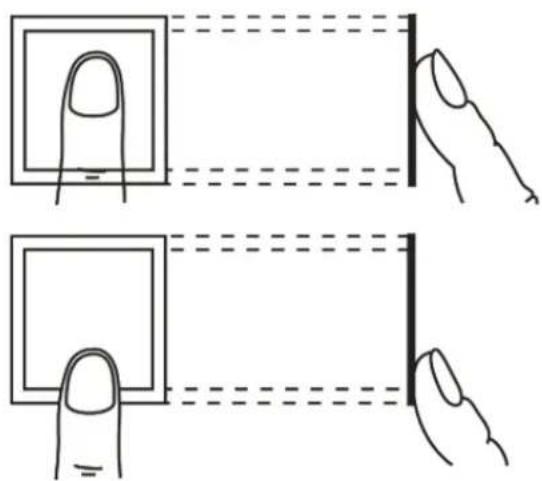

Appendix 3 Important Points of Face Registration
Before Registration
- Glasses, hats, and beards might influence face recognition performance.
- Do not cover your eyebrows when wearing hats.
- Do not change your beard style greatly if you use the Device; otherwise face recognition might fail.
- Keep your face clean.
- Keep the Device at least two meters away from light source and at least three meters away from windows or doors; otherwise backlight and direct sunlight might influence face recognition performance of the access controller.
During Registration
- You can register faces through the Device or through the platform. For registration through the platform, see the platform user manual.
- Make your head center on the photo capture frame. The face image will be captured automatically.

- Do not shake your head or body, otherwise the registration might fail.
- Avoid two faces appear in the capture frame at the same time.
Face Position
If your face is not at the appropriate position, face recognition accuracy might be affected.
Appendix Figure 3-1 Appropriate face position

Requirements of Faces
- Make sure that the face is clean and forehead is not covered by hair.
- Do not wear glasses, hats, heavy beards, or other face ornaments that influence face image recording.
- With eyes open, without facial expressions, and make your face toward the center of camera.
- When recording your face or during face recognition, do not keep your face too close to or too far from the camera.
Appendix Figure 3-2 Head position
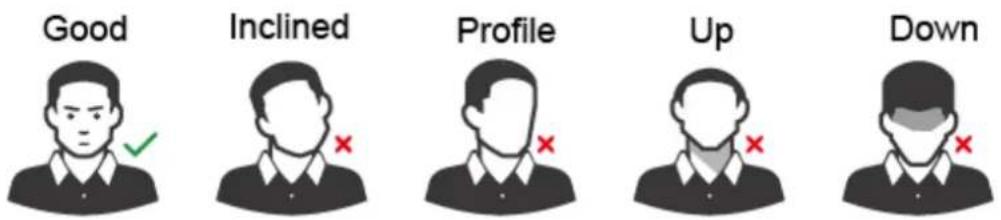
Appendix Figure 3-3 Face distance
Good

natural_image
Generic user avatar icon with a green checkmark (no text or symbols)Too Close

natural_image
Silhouette of a person in uniform with a red X mark on the chest (no text or symbols)Too Far

natural_image
Simple icon of a person in a collared shirt with a red X mark (no text or symbols)
- When importing face images through the management platform, make sure that image resolution is within the range 150 × 300 pixels– 600 × 1200 pixels; image pixels are more than 500 × 500 pixels; image size is less than 100 KB, and image name and person ID are the same.
- Make sure that the face takes up more than 1/3 but no more than 2/3 of the whole image area, and the aspect ratio does not exceed 1:2.
Appendix 4 Cybersecurity Recommendations
Mandatory actions to be taken for basic equipment network security:
1. Use Strong Passwords
Please refer to the following suggestions to set passwords:
- The length should not be less than 8 characters.
- Include at least two types of characters; character types include upper and lower case letters, numbers and symbols.
- Do not contain the account name or the account name in reverse order.
- Do not use continuous characters, such as 123, abc, etc.
- Do not use overlapped characters, such as 111, aaa, etc.
2. Update Firmware and Client Software in Time
- According to the standard procedure in Tech-industry, we recommend to keep your equipment (such as NVR, DVR, IP camera, etc.) firmware up-to-date to ensure the system is equipped with the latest security patches and fixes. When the equipment is connected to the public network, it is recommended to enable the "auto-check for updates" function to obtain timely information of firmware updates released by the manufacturer.
- We suggest that you download and use the latest version of client software.
"Nice to have" recommendations to improve your equipment network security:
1. Physical Protection
We suggest that you perform physical protection to equipment, especially storage devices. For example, place the equipment in a special computer room and cabinet, and implement well-done access control permission and key management to prevent unauthorized personnel from carrying out physical contacts such as damaging hardware, unauthorized connection of removable equipment (such as USB flash disk, serial port), etc.
2. Change Passwords Regularly
We suggest that you change passwords regularly to reduce the risk of being guessed or cracked.
3. Set and Update Passwords Reset Information Timely
The device supports password reset function. Please set up related information for password reset in time, including the end user's mailbox and password protection questions. If the information changes, please modify it in time. When setting password protection questions, it is suggested not to use those that can be easily guessed.
4. Enable Account Lock
The account lock feature is enabled by default, and we recommend you to keep it on to guarantee the account security. If an attacker attempts to log in with the wrong password several times, the corresponding account and the source IP address will be locked.
5. Change Default HTTP and Other Service Ports
We suggest you to change default HTTP and other service ports into any set of numbers between 1024–65535, reducing the risk of outsiders being able to guess which ports you are using.
6. Enable HTTPS
We suggest you to enable HTTPS, so that you visit Web service through a secure communication channel.
7. MAC Address Binding
We recommend you to bind the IP and MAC address of the gateway to the equipment, thus reducing the risk of ARP spoofing.
8. Assign Accounts and Privileges Reasonably
According to business and management requirements, reasonably add users and assign a
minimum set of permissions to them.
9. Disable Unnecessary Services and Choose Secure Modes
If not needed, it is recommended to turn off some services such as SNMP, SMTP, UPnP, etc., to reduce risks.
If necessary, it is highly recommended that you use safe modes, including but not limited to the following services:
- SNMP: Choose SNMP v3, and set up strong encryption passwords and authentication passwords.
- SMTP: Choose TLS to access mailbox server.
- FTP: Choose SFTP, and set up strong passwords.
- AP hotspot: Choose WPA2-PSK encryption mode, and set up strong passwords.
10. Audio and Video Encrypted Transmission
If your audio and video data contents are very important or sensitive, we recommend that you use encrypted transmission function, to reduce the risk of audio and video data being stolen during transmission.
Reminder: encrypted transmission will cause some loss in transmission efficiency.
11. Secure Auditing
- Check online users: we suggest that you check online users regularly to see if the device is logged in without authorization.
- Check equipment log: By viewing the logs, you can know the IP addresses that were used to log in to your devices and their key operations.
12. Network Log
Due to the limited storage capacity of the equipment, the stored log is limited. If you need to save the log for a long time, it is recommended that you enable the network log function to ensure that the critical logs are synchronized to the network log server for tracing.
13. Construct a Safe Network Environment
In order to better ensure the safety of equipment and reduce potential cyber risks, we recommend:
- Disable the port mapping function of the router to avoid direct access to the intranet devices from external network.
- The network should be partitioned and isolated according to the actual network needs. If there are no communication requirements between two sub networks, it is suggested to use VLAN, network GAP and other technologies to partition the network, so as to achieve the network isolation effect.
- Establish the 802.1x access authentication system to reduce the risk of unauthorized access to private networks.
- Enable IP/MAC address filtering function to limit the range of hosts allowed to access the device.
- Face Recognition Access Controller & Face Recognition Terminal
- Foreword
- General
- Safety Instructions
- Revision History
- Privacy Protection Notice
- About the Manual
- Important Safeguards and Warnings
- Transportation Requirement
- Storage Requirement
- Installation Requirements
- WARNING
- Operation Requirements
- Table of Contents
- Foreword....
- Important Safeguards and Warnings....III
- Introduction....1
- Local Operations....2
- User Management....9
- Access Management 13
- Period Management....18
- Attendance Management....20
- System 21
- Introduction
- Local Operations
- Basic Configuration Procedure
- Common Icons
- Initialization
- Standby Screen
- Logging In
- Background Information
- Procedure
- Network Communication
- Configuring IP
- Active Register
- Configuring Wi-Fi
- Configuring Serial Port
- Configuring Wiegand
- User Management
- Adding New Users
- Viewing User Information
- Related Operations
- Configuring Administrator Password
- Access Management
- Configuring Unlock Combinations
- Configuring Unlock by Period
- Configuring Group Combination
- Unlocking by Monitoring Temperature
- Configuring Alarm
- Configuring Door Status
- Configuring Lock Holding Time
- Period Management
- Configuring Period
- Configuring Holiday Groups
- Configuring Holiday Plan
- Configuring NO Period
- Configuring NC Period
- Configuring Remote Verification Period
- Attendance Management
- System
- Configuring Time
- Configuring Face Parameters
- Configuring Image Mode
- Configuring Fill Light Mode
- Configuring the Brightness of Fill Light
- Configuring the Brightness of IR Light
- Configuring Fingerprint Parameters
- Setting Volume
- Restoring Factory Defaults
- Restart the Device
- USB Management
- Exporting to USB
- Importing From USB
- Updating System
- Configuring Features
- Unlocking the Door
- Unlocking by Cards
- Unlocking by Face
- Unlocking by User Password
- Unlocking by Administrator Password
- Prerequisites
- Unlocking by Fingerprint
- Viewing Unlock Records
- Configuring Self-test
- System Information
- Viewing Data Capacity
- Viewing Device Version
- Web Operations
- Initialization
- Logging In
- Resetting the Password
- Configuring Door Parameter
- Configuring Alarm Linkage
- Setting Alarm Linkage
- Viewing Alarm Logs
- Intercom Configuration
- Configuring SIP Server
- Configuring Basic Parameters
- Adding the VTO
- Adding the VTH
- Adding the VTS
- Viewing Device Status
- Viewing Call Logs
- Configuring Time Schedules
- Configuring Time Sections
- Configuring Holiday Groups
- Configuring Holiday Plans
- Data Capacity
- Configuring Video and Image
- Configuring Video
- Configuring Channel 1
- Configuring Channel 2
- Setting Volume
- Configuring Motion Detection
- Configuring Local Coding
- Configuring Image Mode
- Configuring Face Detection
- Configuring Network
- Configuring TCP/IP
- Configuring Port
- Configuring Automatic Registration
- Configuring P2P
- Safety Management
- Configuring IP Authority
- Network Access
- Prohibit PING
- Anti Half Connection
- Configuring System
- Creating Server Certificate
- Downloading Root Certificate
- User Management
- Adding Users
- Adding ONVIF Users
- Viewing Online Users
- Maintenance
- Configuration Management
- Exporting/Importing Configuration Files
- Restoring Factory Defaults
- Fusion Calibration
- Upgrading System
- File Update
- Online Update
- Viewing Version Information
- Viewing Logs
- System Logs
- Admin Logs
- Unlocking Logs
- Smart PSS Lite Configuration
- Installing and Logging In
- Adding Devices
- Adding One By One
- Adding in Batches
- User Management
- Configuring Card Type
- Adding Users
- Adding One by One
- Adding in Batches
- Assigning Access Permission
- Assigning Attendance Permissions
- Access Management
- Remotely Opening and Closing Door
- Setting Always Open and Always Close
- Monitoring Door Status
- Click Stop Monitor, real-time access control events will not display.
- Appendix 1 Important Points of Intercom Operation
- Appendix 2 Important Points of Fingerprint Registration Instructions
- Fingers Recommended
- How to Press Your Fingerprint on the Scanner
- Appendix 3 Important Points of Face Registration
- Before Registration
- During Registration
- Face Position
- Requirements of Faces
- Appendix Figure 3-3 Face distance
- Appendix 4 Cybersecurity Recommendations
- Mandatory actions to be taken for basic equipment network security:
- Use Strong Passwords
- Update Firmware and Client Software in Time
- "Nice to have" recommendations to improve your equipment network security:
- Physical Protection
- Change Passwords Regularly
- Set and Update Passwords Reset Information Timely
- Enable Account Lock
- Change Default HTTP and Other Service Ports
- Enable HTTPS
- MAC Address Binding
- Assign Accounts and Privileges Reasonably
- Disable Unnecessary Services and Choose Secure Modes
- Audio and Video Encrypted Transmission
- Secure Auditing
- Network Log
- Construct a Safe Network Environment
Brand : Dahua Technology
Model : ASI7223Y-A-V3
Category : Security Access Control System