
the AquaStation Purifier Hot LWA200 - Water filter BREVILLE - Free user manual and instructions
Find the device manual for free the AquaStation Purifier Hot LWA200 BREVILLE in PDF.


| Product Type | Water Filter and Hot Water Dispenser |
| Model Number | LWA200BSS |
| Filter Model | LWA063WHT (Activ360™ 4-Stage Filter) |
| Dimensions (LxWxH) | Approx. 381 x 137 x 286 mm |
| Weight | Approx. 2.8 kg |
| Rated Voltage | 220-240 V |
| Rated Frequency | 50 Hz |
| Rated Power Consumption | 1850-2200 W |
| Filter Life | 90 days or approx. 200 L, whichever comes first |
| Applicable Water Source | Municipal tap water, 5-40 °C |
| Filtration Stages | 4-Stage: Pre-Sediment, Ion-Exchange Resin, Activated Carbon, Post Filter |
| Contaminants Reduced | Microplastics, sediment, pesticides, chlorine, limescale, heavy metals |
| Hot Water Temperature Range | 45-100 °C (Custom); preset temps: 80 °C (Green Tea), 85 °C (White Tea), 95 °C (Coffee), 100 °C (Black Tea) |
| Ambient Water Volume Range | 100-500 mL (adjustable in 25 mL increments) |
| Hot Water Volume Range | 100-1200 mL (adjustable in 25 mL increments up to 500 mL, then 100 mL) |
| Dispensing Clearance | 14 cm with drip tray, 17.5 cm without |
| Safety Features | Auto shut-off, altitude sensor, water level sensor, one-way tank valve, dry boil protection |
| Material | BPA-free plastic in all food contact parts |
| Descaling Interval | Every 6 months (reminder on LCD) |
| Warranty | Refer to Breville customer service |
Frequently Asked Questions - the AquaStation Purifier Hot LWA200 BREVILLE
User questions about the AquaStation Purifier Hot LWA200 BREVILLE
0 question about this device. Answer the ones you know or ask your own.
Ask a new question about this device
Download the instructions for your Water filter in PDF format for free! Find your manual the AquaStation Purifier Hot LWA200 - BREVILLE and take your electronic device back in hand. On this page are published all the documents necessary for the use of your device. the AquaStation Purifier Hot LWA200 by BREVILLE.
USER MANUAL the AquaStation Purifier Hot LWA200 BREVILLE
the AquaStation™ Hot
Instruction Book - Suits all LWA200 Models
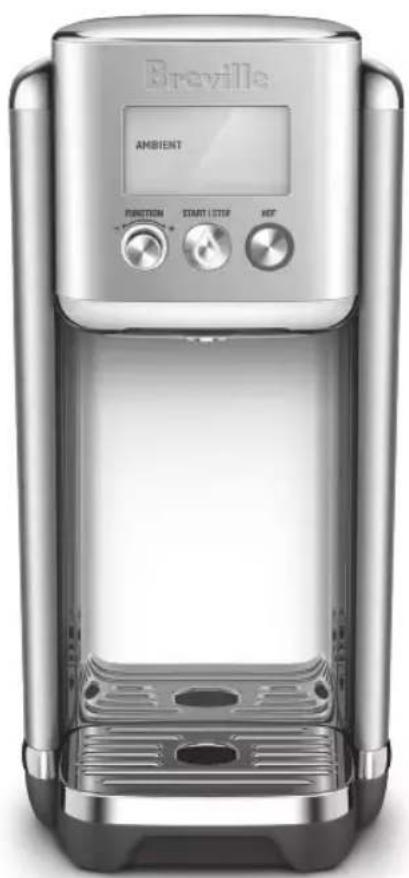
natural_image
Exterior view of a Breville brand microwave oven (no signage or text beyond branding)Breville®
Contents
2 Breville Recommends Safety First
8 Components
11 Features
13 Assembly
16 Operation
19 Tea Insights
20 Descaling
22 Care, Cleaning & Storage
24 Troubleshooting
BREVILLE RECOMMENDS SAFETY FIRST
At Breville we are very safety conscious. We design and manufacture consumer products with the safety of you, our valued customer, foremost in mind. In addition, we ask that you exercise a degree of care when using any electrical appliance and adhere to the following precautions. Misuse can cause potential injuries.
MAIN TECHNICAL SPECIFICATIONS
| Product Model LWA200BSS | |
| Filter Model LWA063WHT | |
| Filter Life 90 days or approximately200L, whichever comes first | |
| Rated Voltage 220-240V | |
| Rated Frequency 50Hz | |
| Rated power consumption 1850W-2200W | |
| Applicable water source Municipal tap water: 5~40°C | |
| Product Dimensions (LxWxH) | Approx. 381 x 137 x 286 |
| Weight (kg) Approx. 2.8 | |
Tested against: NSF/ANSI Standard 42 for the reduction of chlorine (taste and odour), & NSF/ANSI 372, lead content.
Tested to remove/reduce microplastics, floating particles/sediment, pesticides, chlorine, limescale & heavy metals.
Testing was performed under standard laboratory conditions. The contaminants or other substances removed or reduced by this filter are not necessarily in all users' water. Filter performance may vary based on local water conditions.
IMPORTANT SAFEGUARDS
READ ALL INSTRUCTIONS BEFORE USE AND SAVE FOR FUTURE REFERENCE
- Carefully read all instructions before operating and save for future reference.
- Remove and safely discard any packaging material and promotional labels before using the AquaStation™ Hot for the first time.
• Always ensure the appliance is properly assembled before use. Follow the instructions provided in this book.
- The AquaStation™ Hot must be used only with the Breville filter supplied or replacement product code LWA063.
- This appliance has been designed specifically for the purpose of filtering and heating drinking quality water only. Under no circumstances should this appliance be used to heat any other liquids.
- Do not place the appliance near the edge of a bench or table during operation. Ensure that the surface is level, clean and free of water and other substances.
- Do not operate the appliance on a sink drain board.
- Do not operate the appliance in an enclosed space, or within a cupboard.
- Never immerse the appliance, power cord or power plug in water, or allow moisture to come into contact with these parts.
- Do not move the appliance while it is switched on.
• Always ensure the appliance returns to standby mode, then turn the power off at the power outlet and remove the power
plug from the power outlet before attempting to move the appliance, when the appliance is not in use and before cleaning and storing.
- Do not remove the water tank from the power base during operation.
- If the water tank is removed from the power base during water dispensing, the appliance will automatically stop.
• Always fill the water tank with water between the minimum (MIN) and maximum (MAX) as marked on the water tank. - Too little water will result in the appliance not operating and 'Fill Tank' will display on the LCD screen. Filling above the maximum mark (MAX) may result in water splashing from the water tank.
- Ensure the water level is always above the MIN level for optimum dispensing flow rate.
• The lid should always be correctly fitted on the water tank except when refilling. -
Do not place the appliance in direct sunlight. Colour fading and discolouration may occur when the appliance is consistently exposed to sunlight.
-
Care should be taken when handling the appliance during and after use, ensuring that the appliance's spout and other parts and surface areas are not touched as these may still be hot due to residual heat after hot water dispensing.
- Allow the appliance to cool down before moving or cleaning any parts.
- Use in a well ventilated area. This appliance emits hot steam.
- Condensation from steam may form on the LCD screen and control panel; this is normal.
- Use caution when using the descale feature as hot steam may be released. Before descaling, ensure the drip tray is emptied and repositioned. Refer to ‘Decaling’ section for instructions.
- This appliance is intended to filter tap water only. Do not put water of unknown quality into the appliance. Use only cold or room temperature water. Do not use for the preparation of baby formula.
- Do not fill the water tank with hot water. Water added to the water tank should not be less than 5^ or more than 40^ .
If water in the tank is outside these temperatures, discard and fill with cold tap water.
- Do not leave the appliance unattended during operation.
- Do not remove filter whilst the appliance is operating.
- Surface is subject to residual heat after use.

WARNING
- Do not operate the appliance on an inclined plane. Do not move appliance unless the appliance is turned off and unplugged from the power outlet.
- Keep the appliance and all parts clean. Follow the cleaning instructions provided in this book.
- Any procedure not listed in this instruction book should be performed at an authorised Breville Service Centre.
IMPORTANT SAFEGUARDS FOR ALL ELECTRICAL APPLIANCES
- Fully unwind the power cord before use.
- Connect only to a 230V or 240V power outlet.
• The appliance must be used on
a properly grounded outlet. If you are not sure, please consult a qualified electrician.
- Do not, under any circumstances, modify the power plug or use a power plug adapter.
- Do not place this appliance on or near a heat source, such as a hot plate, oven or heaters.
- Position the appliance at a minimum distance of 20cm away from walls, curtains and other heat or steam sensitive materials and provide adequate space above and on all sides for air circulation.
- Do not let the power cord hang over the edge of a bench or table, touch hot surfaces or become knotted. Keep away from hot gas or electric burners, or where it could touch a heated oven.
- This appliance is for household use only. Do not use this appliance for anything other than its intended use. Do not use in moving vehicles or boats. Do not use outdoors. Misuse may cause injury
- This appliance can be used by children aged from 8 years and above and persons with reduced physical, sensory or mental capabilities or
lack of experience and knowledge if they have been given supervision or instruction concerning use of the appliance in a safe way and understand the hazards involved.
• Children should be supervised to ensure that they do not play with the appliance.
• Always turn the appliance to the OFF position, switch off at the power outlet and unplug at the power outlet when the appliance is not in use.
- Before cleaning, always turn the appliance to the OFF position, switch off at the power outlet, unplug at the power outlet and remove the power cord, if detachable, from the appliance and allow all parts to cool.
• To protect against electric shock, do not immerse the power cord, power plug or appliance in water or any other liquid or allow moisture to come in contact with the parts, unless it is recommended in the cleaning instructions.
• Any maintenance other than cleaning should be performed at an authorised Breville Service Centre
- It is recommended to regularly inspect the appliance. To avoid a hazard, do not use the appliance if power cord, power plug or appliance becomes damaged in any way. Return the entire appliance to the nearest authorized Breville Service Centre for examination and/or repair.
- The installation of a residual current device (safety switch) is recommended to provide additional safety protection when using electrical appliances. It is advisable that a safety switch with a rated residual operating current not exceeding 30mA be installed in the electrical circuit supplying the appliance. See a qualified electrician for professional advice.
- During electrical storms, the appliance should be disconnected from the power source at the wall socket to prevent any electrical surges that may arise during the storm and which may inadvertently cause damage to the appliance and its electronic componentry.
- Cleaning and user maintenance shall not be made by children without supervision.
SPECIFIC INSTRUCTIONS FOR WATER FILTER
- Filter cartridge should be kept out of reach of children.
- Store any unused filter cartridges in a dry place sealed in the original packaging.
- Protect filter cartridges from heat and direct sunlight. Only remove from packaging before using.
- Do not use a filter cartridge that is damaged.
- Do not open filter cartridge housing to access the material inside.
- If you are absent for a prolonged period of time, empty and clean the water tank and replace the filter cartridge before next use.
- Refer to the filter installation instructions found in the 'Assembly' section of these instructions.
BREVILLE ASSIST™ PLUG
- Your Breville appliance comes with a unique Assist™ Plug, conveniently designed with a finger hole in the power plug for easy and safe removal from the power outlet. For safety reasons, it is recommended you plug your Breville appliance directly into its own electrical outlet on a dedicated circuit separate from other appliances. If the electric circuit is overloaded with other appliances, your appliance may not function properly. Use in conjunction with a power strip or extension cord is not recommended.
FOR HOUSEHOLD USE ONLY SAVE THESE INSTRUCTIONS

Components
A. Water tank lid with easy-grip handle
B. The Activ360™ 4-Stage Filter with pull ring for easy removal
C. Upper water tank (Pre-Filtered)
D. Water tank ring to remove and carry
E. Filter holder
F. Lower water tank (Filtered)
G. Non-marking, non-slip feet
H. Removable drip tray
I. Detachable tray grill for cleaning
J. Dispensing area. 14cm cup clearance height with tray in place, 17.5cm height if drip tray removed
K. Dispensing spout
L. HOT button
M. START/STOP button with indicator lights
N. FUNCTION/SELECT DIAL
O. LCD screen
P. Bracket
Q. Water level Sensor
Not Shown

Control Panel
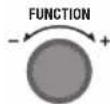
FUNCTION DIAL/SELECT
Turn/Press FUNCTION dial to adjust/select from the following:
MENU - When using HOT, turn dial to select between pre-programmed menu options and the custom setting; press the dial to confirm selection
TEMP - when using Custom, turn dial clockwise to increase temp and anti-clockwise to decrease temperature; press the dial to confirm selection.
VOLUME - when using Ambient or Custom, turn dial clockwise to increase volume and anti-clockwise to decrease volume; press the dial to confirm selection.

NOTE
TEMP & VOLUME cannot be adjusted once water dispensing commences.

NOTE
The FUNCTION dial light will illuminate solid white when the is switched on at the power (to indicate the is operational). The light ring will turn off when water is dispensing or when the enters standby mode after 5 minutes of non-use.
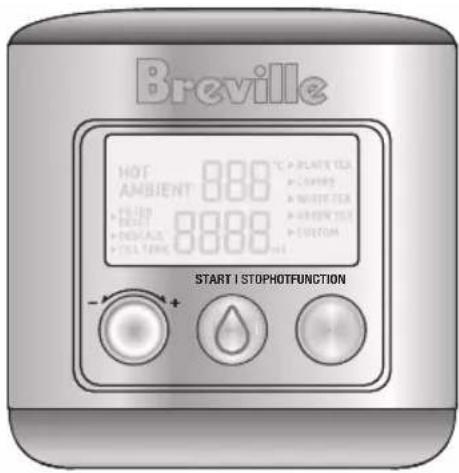
START | STOP

START/STOP BUTTON
Press to start or stop dispensing water (ambient or hot water dispensing). The water droplet light illuminates solid white while dispensing, and will flash if hot water is selected as a reminder that dispensing will not commence until START/STOP is pressed.
HOT

HOT WATER BUTTON
Press once to access the hot water menu. The HOT button light will illuminate and the hot water menu will appear on the LCD screen. The hot beverage menu offers programmed ideal brew temperatures recommended for black, white, green tea, coffee and custom. Custom allows for manual selection of temperature (45-100 degrees Celsius) and volume (100mls to 1.2L).
LCD SCREEN PROGRAM TABLE
| Function Flow Rate per Min | ^Preset Temp °C | ^Temp Range °C | Temp +/- Increments | Preset Volume MLS | Volume Range MLS | Volume +/- Increments from 50-250mL increase by 25mL, from 250-500mL increase by 50mL, from 500mL+ increase by 100mL | |
| Ambient 1L Temp of Water inside Water Tank | Temp of Water inside Water Tank | N/A 250mL~ 100-500 25mL | |||||
| Black Tea 400mL 100°C N/A N/A 250mL 100-500 25mL | |||||||
| Coffee | 400mL | 95°C | N/A | N/A | 250mL | 100-500 | 25mL |
| White Tea | 400mL | 85°C | N/A | N/A | 250mL | 100-500 | 25mL |
| Green Tea | 400mL | 80°C | N/A | N/A | 250mL | 100-500 | 25mL |
| Custom | 400mL | N/A | 45-100 | 5°C | 250mL | 100-1200 | 25mL |
^Temperature is measured at the heating element, not from the spout.
\~Without setting volume, unit will automatically stop pouring after 1 minute.

NOTES
- Hot water temperature settings are measured at the heating element, not the dispensed temperature at the spout or in the cup.
- This appliance is not calibrated for commercial or scientific use. Temperatures may vary +/-2°C, which is within range for optimal brewing for each hot beverage menu.
- The appliance is calibrated at sea level hot water temperatures. High altitude locations will have an impact on hot water temperatures due to low atmospheric pressure.
- When dispensing ambient water, if START/STOP is not pressed to stop dispensing, the will automatically stop after 60 seconds.
- Ambient water temperature will vary. The temperature dispensed will be influenced by the external factors surrounding the itself. An increase in the air temperature will cause water tank temperature to increase as well.
- If the water temperature in the tank becomes too warm, discard and replace with cold tap water. Water temperature in the tank should not be dispensed if above 40^ C.
LCD SCREEN DISPLAY MENU
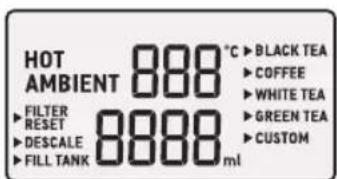
HOT
Appears on the screen only when the HOT button has been selected.
AMBIENT
Displays on the screen as the default for when in standby mode.
FILTER RESET
Appears on the screen as a reminder to change the filter cartridge once the filter life timer has counted down.
DESCALE
Appears on the screen every 6 months as a reminder to descale the machine.

NOTE
To descale more often than the programmed descale reminders, press and hold the HOT button for 3 seconds until Descale appears on the screen.
To quit descale mode, press and hold the HOT button again for 3 seconds.
FILL TANK
Appears on the screen when the water tank level is low. The will not dispense water until the tank is refilled.
The unit will beep 3 times and FILL TANK will flash on the LCD screen. The water droplet light on the START/STOP button will turn to solid red to alert the user that the water tank needs to be filled.
Once the unit has been filled, FILL TANK will no longer illuminate on the LCD screen.

NOTE
Take care when removing the water tank from the base after use as residual water may drip.

NOTE
- The will not dispense any water while the tank is below the minimum water level.
- Ensure the water level is always above the MIN level for optimum flow rate.
TEMP (°C) CONTROL & VOLUME (MLS)
When CUSTOM menu is selected, setting the temperature (between 45^ C- 100^ C) and the volume of water dispensed (between 100mL-1.2L) can be manually adjusted.
For AMBIENT, only the volume of water can be manually adjusted (between 100-500ml).
HOT BEVERAGE MENU
Press the HOT button to enter the MENU. Turn the FUNCTION dial to navigate the menu, then press the dial to select.

Features
The Breville AquaStation™ Hot when used with the Active360™ 4-stage fast flow water filtration system, provides cleaner, great tasting ambient or hot filtered water.
4 distinct levels of filtration, removes contaminants from water that can cause bad taste and odour, which may potentially be harmful to your health.
- Stage 1- Pre-Sediment Mesh Filter
Filters microplastics and floating particles
- Stage 2-Ion-Exchange Resin Filter
Filters limescale and metals
- Stage 3- Activated Carbon Filter
Filters Pesticides and Chlorine
- Stage 4- Post Filter
Filters fine particles
* 4-stage fast flow filtration tested and/or certified to remove/reduce microplastics, floating particles/sediment, pesticides, chlorine, limescale & heavy metals.
For more information, visit Breville.com
No Plumber Required
The unit will start to work as soon as assembled, water added and connected to a power source; then simply press to dispense filtered water. No need to plumb into mains water.
Filter Life Counter
The AquaStation™ Hot reminds you to replace the filter every 90 days or approximately 200L of water*, whichever comes first, to ensure the best filtration performance.
You may choose to change your filter more frequently in areas with poor water quality.
Filter Reset Replacement Alert
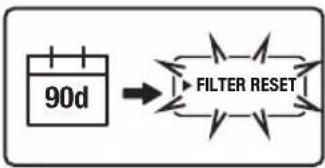
FILTER RESET will flash on the screen to indicate when it is time to change the filter. Once the filter is replaced, reset the filter time to start the filter life countdown.
*The filter change alert is set at 90 days or approximately 200L of water, whichever comes first, with performance based on typical municipal drinking water quality, however, water quality may vary considerably from one area to the next which may affect the life of the water filter and more frequent replacement may be required.
Last Setting Memory
The will return to the last used default hot beverage menu selected.
CUSTOM setting will return to the last set temp and volume unless the power is turned off.
Removable & Magnetic Drip Tray
The drip tray can easily be removed to accommodate different sizes of cups and bottles. The magnetic edge helps to keep the tray in place. Empty regularly to avoid overspill.
Water Level Sensor
The water tank is equipped with a floating sensor which will automatically stop dispensing when the water level becomes too low and the Fill Tank indicator will illuminate.
One-way Tank Valve
The water tank has been designed with a one-way valve so that it can be removed from the even if water is still in the tank. This prevents the water from leaking when removed from the dispensing unit. Be mindful however that there may be some residual water droplets when removed from the base of the unit.
Altitude Sensor
The unit is equipped with an altitude sensor to detect local boiling points and will automatically regulate the boiling point to avoid steam issues at high-altitude areas.
BPA Free\*
All parts that come into direct contact with water are made of BPA Free* materials
* Breville makes its BPA Free claim for this product based on independent laboratory testing performed for all the food contact plastic materials of the product per EU Commission regulation No 10/2011. BPA Free Material is used in all parts that come into contact with food.
WATER QUALITY
As far as contained in tap water, the contaminants or other substances reduced by the Activ360 ^™ water filter are not necessarily in all users' water. Tap water may contain impurities and heavy metals such as lead, copper, chlorine, limescale, pesticides and other contaminants like microplastics which all lead to impaired taste.

CAUTION
Do not use with water that is microbiologically unsafe or with water of unknown quality without adequate disinfection before or after the system. This product should only be used with water that has been adequately chlorinated or disinfected. For use with municipal cold water only.
Assembly
BEFORE FIRST USE
- Remove and safely discard any packaging material or promotional labels attached to your unit and filter. Check for any missing or damaged parts as per the components list.

NOTE
As an important part of our quality control process, your unit has been individually tested. As a result, you may notice a small amount of condensation or water droplets on the inside of the water tank. There is no need for concern. Please remove and discard the red silicone rubber cap off the spout before use.
- Remove the Activ360™ 4-Stage filter from the water tank and set aside.
- Do not wash the filter or insert into the upper water tank until 'Flushing the Breville AquaStation' and 'Preparing the Activ360 Filter' instructions are completed as found in this book.
- Place the unit on a dry, flat level surface.
- Wash the water tank lid, upper (pre-filtered) water tank, lower (filtered) water tank in warm soapy water with a soft, non-abrasive cloth. Rinse and dry thoroughly with a clean, soft, lint-free cloth and return to the.
- Assemble the water tank back onto the power base.
- Plug the power plug into a 230/240V power outlet and turn on the power outlet.

IMPORTANT
When moving the water, always lift from the base using two hands and set down gently on a flat and level surface.
FLUSHING THE BREVILLE AQUASTATION
It is important to flush and rinse the dispensing system before using the unit for the first time. Before first use, it is recommended to carry out the below steps without the Activ360™ Water Filter in place.
- Fit only the larger lower (filtered) water tank into place on the base of the with the lid removed.
- Fill the lower tank with cold tap water to the MAX level. Never fill past the MAX level.
- Place a 1L container under the dispensing spout
- Press the START/STOP button once to start dispensing ambient water until the container is full, then press the START/STOP button once again to stop dispensing. Discard the collected water.
- Repeat steps 3-5 until all the water in the lower tank has been dispensed. The unit will stop dispensing automatically when the water level is too low or automatically after 60 seconds.
- Proceed to the next step, 'Preparing the Activ360™ Filter'.
PREPARING THE ACTIV360™ FILTER
Flushing the filter is required every time you insert a new filter cartridge.
flowchart
graph LR
    A["90d"] --> B["FILTER RESET"]
Filter Reset will flash continuously on the screen to notify after 90 days or 200L of water filtered as an alert that it is time to replace the filter cartridge.
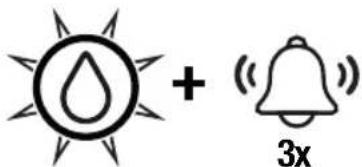
3 beeps will sound and the water droplet light will flash continuously in red.
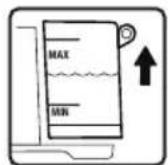
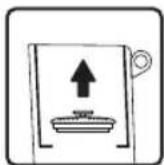
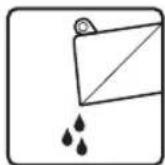
- Lift the water tank from the unit, remove the lid and set aside. Lifting by the ring, remove the filter cartridge from the filter holder and discard any remaining water inside the water tanks, then separate the upper tank from the lower tank.
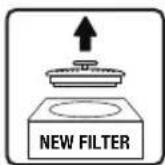
- Remove the new filter cartridge from its packaging.

NOTE
It is normal for the filter to appear moist when removed from its wrapping. This is condensation from the hygienic steam sterilisation process.
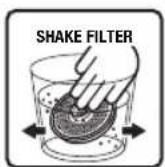
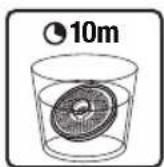
- Immerse the filter in a bowl of tap water and gently shake until there are no air bubbles. Soak filter in the tap water for 10 minutes.
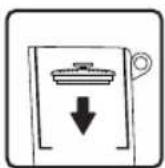
- Once soaked, insert the filter into the filter holder of the upper tank and push down firmly to secure in place.

NOTE
Make sure the filter is tightly fitted. If the filter is not pressed in tightly, unfiltered tap water may flow around the filter into the lower water tank, or the filter may float up.
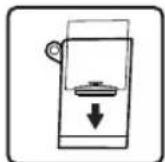
- Place the upper tank into the lower tank.
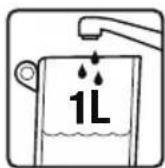
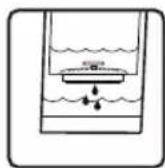
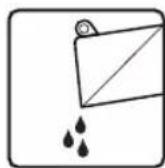
- To flush and activate the new filter cartridge, add 1L of water to the upper water tank, allowing the water to filter through. Remove the water tanks and discard the collected water. Repeat this step once more so the filter is fully flushed with 2L of water before use.
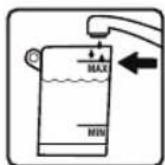
- Once flushed, fill the water tank with tap water up to the MAX line.
-
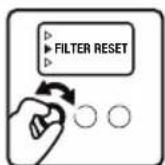
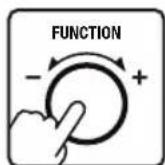
Press the "HOT" button once. Turn the FUNCTION dial until the indicator reaches FILTER RESET, then press the FUNCTION dial once to reset the filter counter. FILTER RESET will no longer appear on the screen.
-
The is now ready to use.

NOTE
When preparing the Activ360 ^™ filter for the first time use of your AquaStation ^™ , there is no need to action step 8 for filter reset; once the filter is installed, the will automatically begin the filter life counter.

IMPORTANT
- A dirty filter may reduce the performance of the unit.
• The filter is not washable. - Use only the original Breville filter specifically intended for use with the AquaStation™ Hot.
- Filter replacement alert is set to 90 days or approximately 200L of water, whichever comes first, however, for higher-than-normal consumption or poor water quality, more frequent changing may be required. If you need to change your filter before the filter replacement alert activates at 90 days or approximately 200L, press and hold the FUNCTION DIAL for 3 seconds, FILTER RESET will flash on the screen, press the function dial once to reset the filter once you have changed the filter cartridge.

NOTE
To exit FILTER RESET mode without resetting the filter, press and hold the FUNCTION DIAL once again for 3 seconds.
- Water quality varies considerably from one area to the next and has an effect on the life of the water filter cartridge. For optimum performance, the filter change alert will activate after 90 days.

NOTE
- No filter or an incorrectly fitted filter may cause the unit to operate less effectively and/or may cause damage to the water.
- The filter must be fitted in the filter holder with the pull ring facing upwards.
- From time to time, small floating black particles may escape from the filter into the water. This is a natural carbon fibre which is food grade safe and not harmful to health.

NOTE
For replacement water filters, visit Breville.com or contact Breville Customer Service.

Operation
- Ensure the upper pre-filtered water tank is assembled inside the lower filtered water tank, and that the water filter cartridge is correctly fitted into position.
- Plug into a 230/240V power outlet. The will beep, the water droplet light will flash 3 times, the LCD screen will illuminate, and AMBIENT will display on the LCD screen to indicate the is in standby mode.
- Use the pull ring at the back of the water tank to assist in lifting it up and away from the base of the . Fill the pre-filtered water tank with cold tap water to the MAX level. Never fill past the MAX level. Once water has filtered into the filtered water tank, top up the tanks until the water level is set to the MAX level.
- Ensure the water tanks are assembled to the and place a cup of choice onto the drip tray, or alternatively, remove the drip tray to accommodate large glasses.

NOTE
Always ensure the water tanks are filled to the MAX level for optimum flow of water from the spout. Ensure the water tanks are filled above MIN water level, or as soon as the FILL TANK alert appears on the LCD display.
If the water level falls below the MIN tank marking, the water sensor will automatically stop dispensing and the Fill Tank indicator will appear on the screen.
Regularly check and discard any water that might accumulate in the drip tray.
Turn off at the power outlet.

IMPORTANT
Turning the off at the power outlet will delete the 'last setting' memory function.

NOTE
Discard any filtered water that has been left sitting for several days or more. This will ensure you have cleaner, great-tasting water. If your filter has been unused for a long period of time, it is recommended to resoak the filter for 10 minutes before use and clean the water tanks as per the cleaning instructions found in this book.
STANDBY MODE
When the unit is plugged into the power outlet, the water droplet light will flash 3 times, the display screen will illuminate and AMBIENT will appear on the display screen to indicate the is ready for use.
The will automatically go into energy-saving standby mode after 5 minutes if not used. The water droplet light will turn off when in standby mode.
To awaken the , press any button or press/turn the FUNCTION dial once; one long beep will sound, the water droplet light will illuminate white and flash rapidly 3 times to indicate that the is ready to use.
Ambient Water in Operation
- Without setting volume
- Press the START/STOP button to instantly dispense filtered ambient water. Press START/STOP button once more to stop dispensing water.

NOTE
If the START/STOP button is not pressed a second time to stop dispensing water, the unit will automatically stop after 60 seconds.

NOTE
Always ensure the correct sized cup/glass is placed under the spout to collect the selected volume of dispensed water.
Ambient Water in Operation
- When setting volume
- Rotate the FUNCTION dial clockwise/anticlockwise for the default volume to appear on the LCD screen; the 250ml default volume will flash on the screen. Rotate the FUNCTION dial clockwise or anticlockwise to adjust the volume, then press the dial to confirm the selection.
- Press START/STOP button once to start dispensing filtered ambient water at the set volume. AMBIENT will flash on the LCD screen, the water droplet light will illuminate white to indicate water is dispensing, and the FUNCTION dial light will turn off.
- Water will automatically stop dispensing once the set volume has been reached and the water droplet light will turn off. The will return to standby mode.
Hot Menu - Black Tea, Coffee,
White Tea & Green Tea
- Press the HOT water button once; the red light around the HOT button will illuminate and HOT will display on the screen. The hot beverage programmed menu will appear on the screen with the indicator beside the first menu option. The default temp and volume will appear on the LCD screen.

NOTE
The water droplet white light will flash until START/STOP is pressed to start dispensing.
- Turn the FUNCTION dial to scroll through the pre-set menu options. The top digits on the LCD screen indicate the hot water temperature and the bottom digits indicate the volume for the menu option chosen.
- Press START/STOP button once to dispense at the default volume (250ml), or to adjust volume, press the FUNCTION dial once. The Volume digits on the LCD screen will begin to flash. Rotate the FUNCTION dial clockwise or anticlockwise to adjust the volume, then press the dial to confirm the selection.
- Press START/STOP button once to begin dispensing the filtered hot water at the set temp and volume. The red light around the HOT button will be remain on, the selected menu option and the word HOT will flash on the LCD screen. The water droplet white light will illuminate solid while water is dispensing.
- Water will automatically stop dispensing once the set volume has been reached. The red light around the HOT button and the water droplet light will both turn off. The will return to standby mode.

NOTE
This appliance is not calibrated for commercial or scientific use. Temperatures may vary by +/-2^ , which is within range for optimal brewing for each tea menu. Hot temperatures are indicative of temperature at the heating element, not at the spout or in the cup.

NOTE
The appliance is calibrated at sea level hot water temperatures. High altitude locations will have an impact on hot water temperatures due to low atmospheric pressure.
Hot Menu - Custom
This setting allows for customising of temp and volume to suit any hot beverages.
- Press the HOT water button once; the red light ring will illuminate with the indicator beside the first pre-set option on the hot beverage menu, and the default temp and volume will appear on the LCD screen.

NOTE
The water droplet white light will flash until START/STOP is pressed to start dispensing.
- Turn the FUNCTION dial until the indicator on the LCD screen reaches CUSTOM. Press the dial to confirm selection.
- When the TEMP digits on the LCD screen begin to flash, rotate the FUNCTION dial clockwise or anticlockwise to adjust the temperature between 45-100°C. Press the dial to confirm the selection.
-
When the Volume digits on the LCD screen begin to flash, rotate the FUNCTION dial clockwise or anticlockwise to adjust the volume between 100-1200MLS. Press the dial to confirm the selection.
-
Press START/STOP button once to start dispensing the filtered hot water at the customised temperature and volume. The red light around the HOT button will be remain on, the selected menu option and the word HOT will flash on the LCD screen. The water droplet white light will illuminate solid while water is dispensing.
- Water will automatically stop dispensing once the set volume has been reached. The red light around the HOT button and the water droplet light will both turn off. The will return to standby mode.

NOTE
- The will return to the last custom setting used.
- To change your CUSTOM setting at any time, repeat steps 1 -4 above.
- If the is disconnected from the power, the CUSTOM memory will reset to default.

Tea Insights
TEA TYPES
There are four main types of tea from the tea plant camellia sinensis. The picking and processing methods determine the type of tea finally produced.
Black Tea
Black tea is the most common type of tea worldwide. It is made by fermenting the harvested leaves for a couple of hours before heating or drying. This oxidation darkens the leaves and increases the amount of caffeine. Of all the teas, black tea has the strongest colour and flavour.
White Tea
White tea is the rarest and the most exclusive tea. White tea consists of the whitish buds of the tea plant which are steamed then left to dry naturally. This tea is low in caffeine and has a slightly sweet flavour.
Green Tea
Green tea makes up approximately ten percent of the world's tea. The leaves are picked, rolled and dried before they can go brown. Green tea has a distinctive aroma and has a slight astringent taste.
Oolong Tea
Oolong Tea is semi fermented, which means leaves are processed immediately after picking. They only have a short period of oxidation which turns the leaves from green to red/brown. Its leaves have a floral, fruity quality and hence have a delicate fruity taste. It is recommended not to drink Oolong tea with milk, sugar or lemon.
Herbal Infusions or Tisanes
Herbal infused teas are not produced from the tea plant, but from flowers, leaves, roots or seeds. Common herbal beverages are chamomile, peppermint, fennel, rose hip, and lemon verbena.
Herbal infusions that do not contain tea will generally not become bitter with extended brews. These can often be brewed with boiling water 3 times without jeopardising the taste.
Blends
Tea producers make blends by combining different types of teas, often in order to achieve flavour consistency from one season to the next. Common black tea blends include English Breakfast, Earl Grey, Irish Breakfast, and Russian Caravan.
Brewed tea leaves make an ideal garden fertilizer and help condition the soil.
TEA STORAGE
- Teas stored inside a vacuum sealed bag can be stored for up to two years, depending on the quality and grade of tea. Once opened, tea should be stored in an airtight container and kept in a dry and dark place.
- Once opened, black teas will last longer than green and oolong teas, but all tea needs to be stored in ideal conditions.
- You can tell when tea is past its best if it has lost its aroma and will create either a bitter or dull tasting cup.
TIPS FOR OPTIMAL TEA BREWING
• Water quality affects taste. For best results use filtered water.
- Finer tea particles and leaves will infuse more quickly than whole leaves. As a result, finer tea particles often release too much tannin too quickly, creating a harsher taste. Adjust the brewing time until desired strength is achieved.
Suggested Water to Tea Ratio
| CUPS / mL Tea (Teaspoons) |
| Approx. 2 Cups/500mL 2 tsp |
| Approx. 3 Cups/750mL 3 tsp |
| Approx. 4 Cups/1000mL 4 tsp |
| Approx. 5 Cups/1200mL 5 tsp |

Descaling
After regular use, hard water can cause mineral build up in and on many of the inner functioning components, reducing the water flow, water temperature, power of the unit and the taste of the water.
For safe and efficient operation of your, it is important to descale regularly.
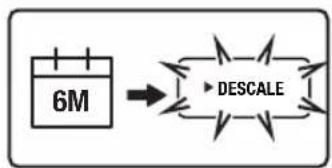
Breville recommends conducting a descaling cycle no longer than 6 month intervals.
flowchart
graph LR
    A["6M"] --> B["DESCALE"]
    style A fill:#f9f,stroke:#333
    style B fill:#ccf,stroke:#333
To assist, every 6 months, the LCD screen will display a DESCALE alert.
Descaling is a 3 step process. Once the descale cycle is complete, 2 rinse cycles will follow. DESCALE will flash on the LCD screen during the entire process.
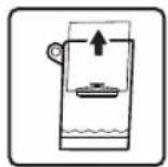
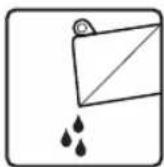
- To descale, remove the water tanks from the base and remove the filter. Discard any remaining water in the water tank.
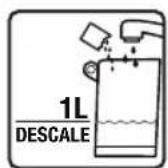
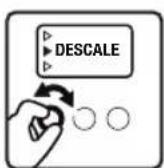
- Place 100mLs of Breville descale solution or 100grams of descale powder into the water tank and fill with tap water to the marked DESCALE line (1L). Reassemble the water tank to the base. Turn the FUNCTION dial until the indicator reaches DESCALE.
*Descale solutions sold separately.
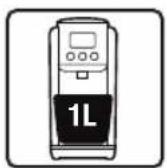
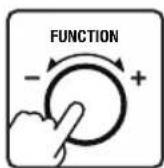
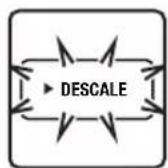
- Remove the drip tray and place a 1L container under the spout. Press FUNCTION dial to start the descaling cycle. DESCALE on the LCD screen with begin to flash.
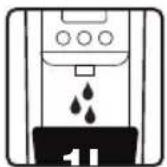
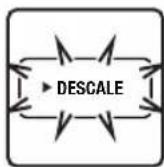
- Descaling is a 3 step process. Once the descale cycle is complete, 2 rinse cycles will follow. DESCALE will flash on the LCD screen during the entire process. During descaling, the 1L of water with added solution will dispense from the tank automatically. DESCALE will flash on the LCD screen.

NOTE
Following the descaling solution, 1 & 2 will appear on the LCD screen indicating each rinse cycle.
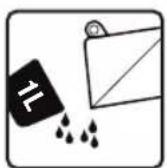
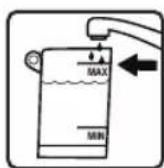
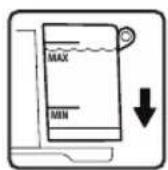
- Empty the 1L collection container and discard any remaining descale solution from the water tank. Fill water tank with tap water to the MAX line.

NOTE
Descaling water is not safe for plants, the descale solution is citric acid, Citric acid is below 4.0, meaning that it is acidic and potentially corrosive. Therefore, applying enough citric acid to a plant's water or soil will create an environment unsuitable for the plant.
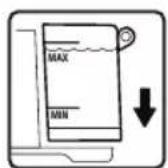
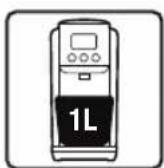
- Return water tank back to the base and place the 1L container under the spout.
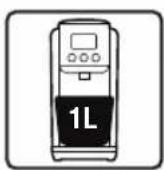
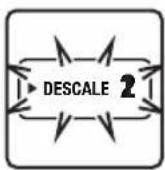
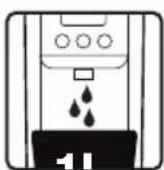
- Press the FUNCTION button to start 1st rinse. 1 on the LCD screen will begin to flash to indicate that the 1st cycle is in progress. The water will automatically dispense.
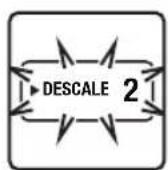
-
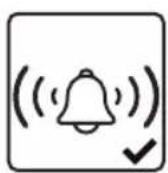
Once the 1st rinse cycle is complete, the will sound a long beep and 2 will appear on the LCD screen. The word DESCALE will continue blinking on the LCD screen.
-
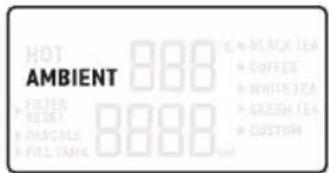
Empty the 1L collection container and then replace under the spout. Press the FUNCTION button once to start the 2nd rinse cycle. 2 on the LCD screen will begin to flash to indicate that the 2nd cycle is in progress.
-
The unit will automatically stop rinsing and will sound two long beeps once a sufficient amount of water has been dispensed. The unit will enter standby mode and DESCALE will no longer appear on the LCD screen.
-
Remove and clean the drip tray and water tank.

NOTE
- If descaling is required more regularly than when the auto DESCALE alert appears on the screen, press and hold the HOT button for 3 seconds for the word 'DESCALE' to appear on the screen, then follow descale steps 1-11.
• DO NOT turn off the power during descaling
- The descale process can be paused/resumed by pressing and holding the HOT button for 3 seconds or using the FUNCTION dial to select at the menu page. However, the descale process must be completed before dispensing drinking water.

NOTE
*Descale solutions sold separately.
visit Breville.com or contact Breville Customer Service to order.

Care, Cleaning & Storage

CAUTION
To prevent damage to the appliance, do not use alkaline or abrasive cleaning agents, steel wool or scouring pads as these can damage the surface of the unit. Do not place any part of this appliance in the dishwasher.
CLEANING THE AQUASTATION
- Remove the plug from the power outlet before cleaning.
- Discard any water in the water tanks, then separate the pre-filtered water tank from the filtered water tank. Remove the filter cartridge from the filter holder.
- Wipe the water tanks with a clean, damp, lint-free cloth. The filter is not washable.
CLEANING THE OUTER HOUSING
- Wipe with a soft, damp cloth followed by a soft, dry cloth to polish.
- Alternatively, purchase a stainless steel cleaner such as Breville's Stainless Steel Cleaner & Polish and follow directions.
- Do not use abrasive cleansers, pads or cloths which can scratch the surface.

NOTE
For Breville's Stainless Steel Cleaner & Polish, visit Breville.com or contact Breville Customer Service.
TAKING CARE OF THE WATER TANK, WATER LEVEL SENSOR, AND BRACKET
Avoid exposing the water tank to direct sunlight, as this may cause residue or foreign substances, such as algae, to accumulate in the tank, on the water level sensor, and on the bracket. Allow a few minutes for regular dishwashing detergent to sit in the water tank, on the sensor, and in the bracket before rinsing thoroughly with warm water. It is recommended that the water tank, bracket, and water level sensor be thoroughly cleaned with warm, soapy water on a regular basis to avoid the build-up of residue and foreign substances.

NOTE
If you are absent for a prolonged period of time, empty and clean the water tank and ensure it is thoroughly dried. Replace the filter cartridge before next use.
CLEANING THE WATER SPOUT
Residue build-up or foreign substances, such as dust or lint, may accumulate in the water outlet. Clean the spout periodically using a soft brush (not included).
CLEANING THE DRIP TRAY
The drip tray should be removed, emptied and cleaned after each use. Empty the tray before removing the top grill and cleaning.
- Remove the drip tray from the unit and discard any water.
- Separate the top grill from the drip tray.
- Wash the drip tray and grill in warm soapy water and dry thoroughly.
- Place the grill back onto the drip tray then push the assembled drip tray back into position in front of the using the magnetic connection.

WARNING
To protect against electric shock, do not immerse cord, plug or unit in water or any other liquid or allow moisture to come into contact with these parts.
STORAGE
Remove the plug from the power outlet. Follow the 'Care & Cleaning' instructions, ensuring the unit is completely empty, clean and dry before storing. Stand the unit upright. Do not store anything on top. If stored for a long period, we recommend following the 'Flushing the AquaStation™' and 'Preparing the Activ360 Filter' instructions found in this book before using the unit again.
ERROR MODE
If your unit displays Er on the LCD Screen, contact Breville Customer Service. See Troubleshooting for more details.
PROBLEM/Error Code POSSIBLE CAUSE WHAT TO DO Displayed on Screen
| Slow water flow rate | ·Aging of pump or inlet at the base of the is clogged | ·Contact Breville Customer Service |
| Small amounts of black particles in water tank | ·These are small pieces of carbon from the filter. These carbon particles are food grade and are not harmful. They will not impair the performance of your filter or unit. | ·Flush your unit and water filter cartridge. Refer to 'Flushing the Breville AQUASTATIONTM (page 12) and 'Preparing the Activ360 Filter' (page 12)NOTE: Some carbon fibre residual may still be present after flushing the unit and filter. |
| START/STOP Button does not respond | ·The unit is not connected to the power | ·Plug in to a usable power outlet and turn power on |
| Leakage from water tank | ·The water tank is filled beyond the maximum water level·Tank is not firmly pushed into position | ·Ensure water is only up to the MAX water level marking. If leakage continues, please contact Breville Customer Service·Replace the water tank back on the machine, pressing down to ensure that it is properly positioned and attached to the machine. |
| Odd taste of the water | ·The filtered water is not used for a long time·The filter has reached end of life | ·Discard the remaining water in the water tank and refill with fresh tap water. Depending on the length of time, the filter may require re-flushing·Replace with new filter |
| "FILTER RESET" flashing on LCD screen. | ·Filter needs to be changed or filter reset has not been actioned | ·Change the filter if required, turn the FUNCTION dial until the indicator on the LCD screen reaches the FILTER RESET function and press FUNCTION/ SELECT dial once to reset |
| LO | ·Water temperature in water tank less than 5 °C | ·Fill water between 5 °C to 40 °C |
| HI | ·Water temperature in water tank is higher than 40 °C | ·Fill water between 5 °C to 40 °C |
| E03 | ·Heating element malfunction | ·Contact Breville Customer Service |
| E04 | ·Dry boil protection | ·Turn the unit off at the power and Contact Breville Customer Service |
| E06 | ·Altitude Sensor Failure | ·You can continue to use the appliance, however, contact Breville Customer Service as a change in altitude will impact performance. |
If you cannot remedy problems by using the troubleshooting chart above, contact Breville Customer Service.

Notes

Notes

Notes
Breville Customer Service Centre
Australian Customers
New Zealand Customers
Phone: 1300 139 798
Phone: 0800 273 845
Web: www.breville.com
Web: www.breville.com
Breville®
Master Every Moment™
Breville, the Breville logo, AquaStation and Activ360 are trademarks of Breville Pty Ltd. All other brands may be trademarks of their respective owners. Breville's products are distributed in New Zealand under licence A.B.N. 98 000 092 928.
Approved by the appropriate electrical supply authorities.
Made in China to our specifications.
Due to continued product improvement, the product illustrated on this carton may vary slightly from the actual product.
- the AquaStation™ Hot
- Contents
- BREVILLE RECOMMENDS SAFETY FIRST
- IMPORTANT SAFEGUARDS
- READ ALL INSTRUCTIONS BEFORE USE AND SAVE FOR FUTURE REFERENCE
- WARNING
- IMPORTANT SAFEGUARDS FOR ALL ELECTRICAL APPLIANCES
- SPECIFIC INSTRUCTIONS FOR WATER FILTER
- BREVILLE ASSIST™ PLUG
- FOR HOUSEHOLD USE ONLY SAVE THESE INSTRUCTIONS
- Components
- Not Shown
- Control Panel
- FUNCTION DIAL/SELECT
- NOTE
- START/STOP BUTTON
- HOT WATER BUTTON
- NOTES
- LCD SCREEN DISPLAY MENU
- HOT
- AMBIENT
- FILTER RESET
- DESCALE
- FILL TANK
- TEMP (°C) CONTROL & VOLUME (MLS)
- HOT BEVERAGE MENU
- Features
- No Plumber Required
- Filter Life Counter
- Filter Reset Replacement Alert
- Last Setting Memory
- Removable & Magnetic Drip Tray
- Water Level Sensor
- One-way Tank Valve
- Altitude Sensor
- BPA Free\*
- WATER QUALITY
- CAUTION
- Assembly
- BEFORE FIRST USE
- IMPORTANT
- FLUSHING THE BREVILLE AQUASTATION
- PREPARING THE ACTIV360™ FILTER
- Operation
- STANDBY MODE
- Ambient Water in Operation
- - Without setting volume
- - When setting volume
- Hot Menu - Black Tea, Coffee,
- White Tea & Green Tea
- Hot Menu - Custom
- Tea Insights
- TEA TYPES
- Black Tea
- White Tea
- Green Tea
- Oolong Tea
- Herbal Infusions or Tisanes
- Blends
- TEA STORAGE
- TIPS FOR OPTIMAL TEA BREWING
- Descaling
- Care, Cleaning & Storage
- CLEANING THE AQUASTATION
- CLEANING THE OUTER HOUSING
- TAKING CARE OF THE WATER TANK, WATER LEVEL SENSOR, AND BRACKET
- CLEANING THE WATER SPOUT
- CLEANING THE DRIP TRAY
- STORAGE
- ERROR MODE
- Breville Customer Service Centre
- Breville®
- Master Every Moment™
Brand : BREVILLE
Model : the AquaStation Purifier Hot LWA200
Category : Water filter