
B172A - Processor Black Lion Audio - Free user manual and instructions
Find the device manual for free B172A Black Lion Audio in PDF.


| Product Type | Analog Stereo Processor (Compressor/Limiter with EQ) |
| Form Factor | 1U Rackmount |
| Dimensions (W x H x D) | 19 x 1.75 x 8.5 inches (483 x 44 x 216 mm) |
| Weight | 5.5 lbs (2.5 kg) |
| Power Supply | Internal linear, 100-240V AC, 50/60Hz, 15W |
| Input Connectors | 2x XLR-F, 2x TRS 1/4" (balanced) |
| Output Connectors | 2x XLR-M, 2x TRS 1/4" (balanced) |
| Frequency Response | 20 Hz – 20 kHz (±0.5 dB) |
| Dynamic Range | 110 dB (A-weighted) |
| THD+N | <0.01% at 1 kHz, +4 dBu |
| Compression Ratio | Variable 1:1 to 20:1 |
| Attack Time | 0.1 ms – 50 ms |
| Release Time | 50 ms – 2 s |
| EQ Band | 3-band semi-parametric (Low, Mid, High) |
| Bypass | Hardware True Bypass on both channels |
| Metering | LED VU meters for gain reduction and output level |
| Construction | Steel chassis with aluminum front panel |
| Operating Temperature | 0°C to 40°C (32°F to 104°F) |
| Included Accessories | Power cord, rackmount screws, user manual |
| Warranty | 2 years limited |
Frequently Asked Questions - B172A Black Lion Audio
User questions about B172A Black Lion Audio
0 question about this device. Answer the ones you know or ask your own.
Ask a new question about this device
Download the instructions for your Processor in PDF format for free! Find your manual B172A - Black Lion Audio and take your electronic device back in hand. On this page are published all the documents necessary for the use of your device. B172A by Black Lion Audio.
USER MANUAL B172A Black Lion Audio
SEVENTEEN
Transformer Coupled FET Limiting Amplifier
Thank you for purchasing the Black Lion Audio SEVENTEEN F.E.T. limiting amplifier. The SEVENTEEN is a single channel transformer coupled compressor/limiter. This product was designed and engineered by Black Lion Audio in Chicago, IL USA. All units are assembled and tested at our HQ in Chicago.
At Black Lion Audio, we believe in putting sound quality first. We strive to offer mind-blowing products at incredible prices. We are committed to continuously innovating in pursuit of the perfect sound. We live and breathe gear and can't imagine doing anything else. We hope you enjoy this product and share in our passion for all things audio.
Please be sure to follow the safety instructions on the following pages. We want you around to purchase more gear!
IMPORTANT SAFETY INSTRUCTIONS
-
Read these instructions.
-
Keep these instructions
-
Heed all warnings.
-
Follow all instructions.
-
Do not use this apparatus near water.
-
Clean only with dry cloth.
-
Install in accordance with the manufacturer's instructions.
-
Do not install near any heat sources such as radiators, heat registers, stoves, or other apparatus that produce heat.
-
Do not defeat the safety purpose of the polarized or grounding-type plug. A polarized plug has two blades with one wider than the other. A grounding-type plug has two blades and a third grounding prong. The wide blade or third prong is provided for your safety. If the provided plug does not fit into your outlet, consult an electrician for replacement of the obsolete outlet.
-
Protect the power cord from being walked on or pinched particularly at plugs, convenience receptacles, and the point where they exit from the apparatus.
-
Use only attachments/accessories specified by the manufacturer
-
Use only with a cart, stand, tripod, bracket or table specified by the manufacturer, or sold with the apparatus. When a cart is used, use caution when moving the cart/apparatus combination to avoid injury from tip-over.
-
Unplug this apparatus during lightning storms or when unused for long periods of time.
-
Refer all servicing to qualified service personnel. Servicing is required when the apparatus has been damaged in any way, such as power supply cord or plug is damaged, liquid has been spilled or objects have fallen into the apparatus, the apparatus has been exposed to rain or moisture, does not operate normally, or has been dropped.
-
This apparatus shall not be exposed to dripping or splashing, and no object filled with liquids, such as vases, shall be placed on the apparatus.
-
Not that this apparatus is not completely disconnected from the AC mains service when the power switch is in the OFF position.
-
The mains plug or an appliance coupler is used as the disconnect device, so the disconnect device shall remain readily operable.
-
Any changes or modifications not expressly approved in this manual could void your authority to operate this apparatus.
-
Exposure to extremely high noise levels may cause permanent hearing loss. Individuals vary considerable in susceptibility to noise-induced hearing loss, but nearly everyone will lose some hearing if exposed to sufficiently intense noise for a period of time. Be sensible.
IMPORTANT!
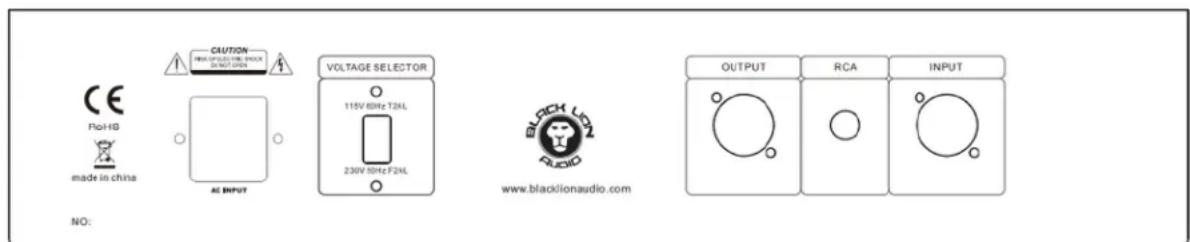
The sure to select the proper operating voltage (and install the correct fuse) on the rear panel before plugging in the power cord. Improper selection can result in damage to the unit that will not be covered under the warranty.




CAUTION: TO REDUCE THE RISK OF ELECTRIC SHOCK, DO NOT REMOVE COVER (OR BACK). NO USER SERVICEABLE PARTS INSIDE. REFER SERVICING TO QUALIFIED SERVICE PERSONNEL.
Warning: To reduce the risk of fire or electric shock, do not expose this unit to rain or moisture.

lightning flash with an arrowhead
symbol within an equilateral triangle is intended to alert the user to the presence of uninsulated "dangerous voltage" within the product's enclosure that may be of sufficient magnitude to constitute a risk of electric shock to persons.

exclamation point within an equilateral role is intended to alert the user to the importance of important operating and renance (servicing) instructions in the future accompanying the product.
RTFM!
Black Lion Audio
1801 West Belle Plaine Ave. Suite 105
Chicago, IL 60613 USA
+1 845 642 3697
www.blacklionaudio.com
Engineering Objective: We wanted to build a classic sounding compressor with features that have become important in the years since the original designs were made. We have added a sidechain high-pass filter to allow varied response depending on the type of signal being processed. Also, we added an exclusive MIX control to allow the user to set a wet/dry mix directly from the front panel. Further, we added signal low-pass and high-pass filters to round out the sound.
The internal design is unique since we use relays to keep the signal path compact and noise free. Front panel controls activate the relays which in turn manage the signal functions. We also use specialized balanced input electronics to maximize noise rejection.
Quick Start Guide
On your sound system, mute your monitors and then using balanced XLR cables, connect your SEVENTEEN to your mixing bus or patch bay. If you are using two SEVENTEENS in parallel (or stereo), connect the RCA's between the two units.
Set all controls to full counter-clockwise position, and all pushbuttons deselected or in the off position. Set the COMP ON button to the off position, bypassing the unit, and apply power.
Unmute the monitors, and verify that signal is passing to and from the unit.
Set the INPUT, OUTPUT, ATTACK and RELEASE controls to about 12 o'clock, set SIDECHAIN HPF to OFF, set COMP MIX to full clockwise, select RATIO 4, and press the COMP ON pushbutton (lit). Increase the INPUT until the meter is deflecting a few dB. Again, verify signal is passing through the unit.
Your SEVENTEEN is now ready for use!
Front Panel:

Rear Panel:
Specifications:
Signal HPF: 100Hz -6dB per octave
Signal LPF: 10kHz -6dB per octave
Attack: Continuously variable 20uS to 800uS
Release: Continuously variable 50mS to 800mS
Sidechain HPF: 5 position switch, OFF, 100Hz, 200Hz, 300Hz, 400Hz
Ratio: Pushbutton selected 4:1, 8:1, 12:1, 20:1 and any combination
Voltage: 115VAC, 230VAC rear panel switchable
AC Mains Input: IEC320-C14 standard plug.
Fuse: 115VAC 60Hz uses T2AL; 230VAC 50Hz uses F2AL both are 20mmx5mm
Dimensions: 438mm (19") x 88mm (2U) x 250mm D
Weight: 8kg

The Black Lion Audio SEVENTEEN complies with all applicable €/RoHS/WEEE European Union directives.
Do not attempt to service this unit yourself, as it will void your warranty. Please check your unit carefully upon receipt and return to place of purchase immediately if there are any problems with the product. After that, the standard Black Lion Audio 3 YEAR warranty will apply to defects in materials and workmanship.
(U.S.A.) Should your Black Lion Audio product require service, please contact the Black Lion Audio Service Department. +1 845 642 3697-or-contact us on our customer service site: https://www.blacklionaudio.com/contact. You must obtain an RA # (Return Authorization number) from us before shipping a unit back to us. This RA # must be clearly written on the outside of the box.
Please safely pack the units...It is best to use the original packing materials. Black Lion Audio cannot be responsible for any damages incurred in shipping to us due to poor packaging. PLEASE PACK CAREFULLY and FULLY INSURE THE SHIPMENT.
(INTERNATIONAL) For service or warranty assistance, please contact the Black Lion Audio distributor in your country through the dealer from whom you purchased this product.
LIMITED 3 YEAR WARRANTY
Black Lion Audio's SEVENTEEN is warranted by Black Lion Audio to be free from defects in materials and workmanship for the period of THREE (3) YEARS to the original purchaser. In the event of such defects, the product will be repaired without charge or, at our option, replaced with a new one if delivered to Black Lion Audio prepaid, together with a copy of the sales slip or other proof of purchase date. The warranty excludes problems due to normal wear, abuse, shipping damage or failure to use the product in accordance with the specifications.
All parts and labor are covered under this Limited Warranty. However, if it is determined by Black Lion Audio that the device was damaged or made defective through abuse, we reserve the right to charge the customer for the cost of the repair.
Black Lion Audio shall not be liable for damages based upon inconvenience, loss of use of the product, loss of time, interrupted operation or commercial loss or any other damages, whet incidental, consequential or otherwise. This warranty gives you specific legal rights, and you may have other rights, which will vary from state to state.
This warranty is not transferable.
Notice
This manual provides general information, preparation for use, installation and operating instructions for the Black Lion Audio SEVENTEEN Compressor.
The information contained in this manual is subject to change without notice. Black Lion Audio makes no warranties of any kind with regard to this manual, including, but not limited to, the implied warranties of merchantability and fitness for a particular purpose. Black Lion Audio shall not be liable for errors contained herein or direct, indirect, special, incidental, or consequential damages in connection with the furnishing, performance, or use of this material.
Trademarks
The Black Lion Audio ‘lion face’ logo, BLA, SEVENTEEN are trademarks or registered trademarks of Black Lion Audio.
Copyright ©Black Lion Audio 2018
This manual and any associated intellectual property are subject to copyright protection. No part of this document may be reproduced in any form without explicit written consent from Black Lion Audio.

- SEVENTEEN
- Transformer Coupled FET Limiting Amplifier
- IMPORTANT SAFETY INSTRUCTIONS
- IMPORTANT!
- The sure to select the proper operating voltage (and install the correct fuse) on the rear panel before plugging in the power cord. Improper selection can result in damage to the unit that will not be covered under the warranty.
- Black Lion Audio
- Quick Start Guide
- Specifications:
- LIMITED 3 YEAR WARRANTY
- This warranty is not transferable.
- Notice
- Trademarks
- Copyright ©Black Lion Audio 2018
Brand : Black Lion Audio
Model : B172A
Category : Processor