
TBWP True Bypass Wah Pad - Effect pedal G-LAB - Free user manual and instructions
Find the device manual for free TBWP True Bypass Wah Pad G-LAB in PDF.


| Product Type | Effect Pedal (Wah) |
| Brand | G-LAB |
| Model | TBWP True Bypass Wah Pad |
| Category | Wah Pedal |
| True Bypass | Yes, for transparent signal when off |
| Power Supply | 9V DC (center negative) or 9V battery |
| Current Consumption | Approx. 5 mA |
| Input Impedance | 1 MΩ |
| Output Impedance | 1 kΩ |
| Controls | Foot rocker for wah effect |
| Indicators | LED on/off status |
| Connectors | 1/4" mono input and output jacks |
| Housing Material | Die-cast metal chassis |
| Dimensions | 120 x 100 x 60 mm |
| Weight | 400 g (approx.) |
| Operating Temperature | 0°C to 40°C |
| Included Accessories | User manual |
| Cleaning | Wipe with a soft, dry cloth |
| Safety Precautions | Use only recommended power supply; avoid liquids |
| Disposal | Dispose according to local electronic waste regulations |
| Spare Parts / Repair | Contact authorized service center for repairs |
Frequently Asked Questions - TBWP True Bypass Wah Pad G-LAB
User questions about TBWP True Bypass Wah Pad G-LAB
0 question about this device. Answer the ones you know or ask your own.
Ask a new question about this device
Download the instructions for your Effect pedal in PDF format for free! Find your manual TBWP True Bypass Wah Pad - G-LAB and take your electronic device back in hand. On this page are published all the documents necessary for the use of your device. TBWP True Bypass Wah Pad by G-LAB.
USER MANUAL TBWP True Bypass Wah Pad G-LAB
True Bypass Wah-Pad

Thank you for choosing our product.
The True Bypass Wah-Pad (TBWP) is the device eliminating necessity of using a switching solution of a typical wah-wah effect. It assures also true bypassing the wah-wah effect circuit when it is not used.
flowchart
graph TD
    A["INPUT"] --> B["CHANNEL 1"]
    B --> C["CHANNEL 2"]
    C --> D["REVERB"]
    D --> E["MASTER"]
    E --> F["Output"]
    G["Radio Mixer"] --> H["wah wah"]
    H --> I["Handheld"]
    I --> J["Handheld"]
    J --> K["Handheld"]
    K --> L["Handheld"]
    L --> M["Handheld"]
    M --> N["Handheld"]
    N --> O["Handheld"]
    O --> P["Handheld"]
    P --> Q["Handheld"]
    Q --> R["Handheld"]
    R --> S["Handheld"]
    S --> T["Handheld"]
    T --> U["Handheld"]
    U --> V["Handheld"]
    V --> W["Handheld"]
    W --> X["Handheld"]
    X --> Y["Handheld"]
    Y --> Z["Handheld"]
    Z --> AA["Handheld"]
    AA --> AB["Handheld"]
    AB --> AC["Handheld"]
    AC --> AD["Handheld"]
    AD --> AE["Handheld"]
    AE --> AF["Handheld"]
    AF --> AG["Handheld"]
    AG --> AH["Handheld"]
    AH --> AI["Handheld"]
    AI --> AJ["Handheld"]
    AJ --> AK["Handheld"]
    AK --> AL["Handheld"]
    AL --> AM["Handheld"]
    AM --> AN["Handheld"]
    AN --> AO["Handheld"]
    AO --> AP["Handheld"]
    AP --> AQ["Handheld"]
    AQ --> AR["Handheld"]
    AR --> AS["Handheld"]
    AS --> AT["Handheld"]
    AT --> AU["Handheld"]
    AU --> AV["Handheld"]
    AV --> AW["Handheld"]
    AW --> AX["Handheld"]
    AX --> AY["Handheld"]
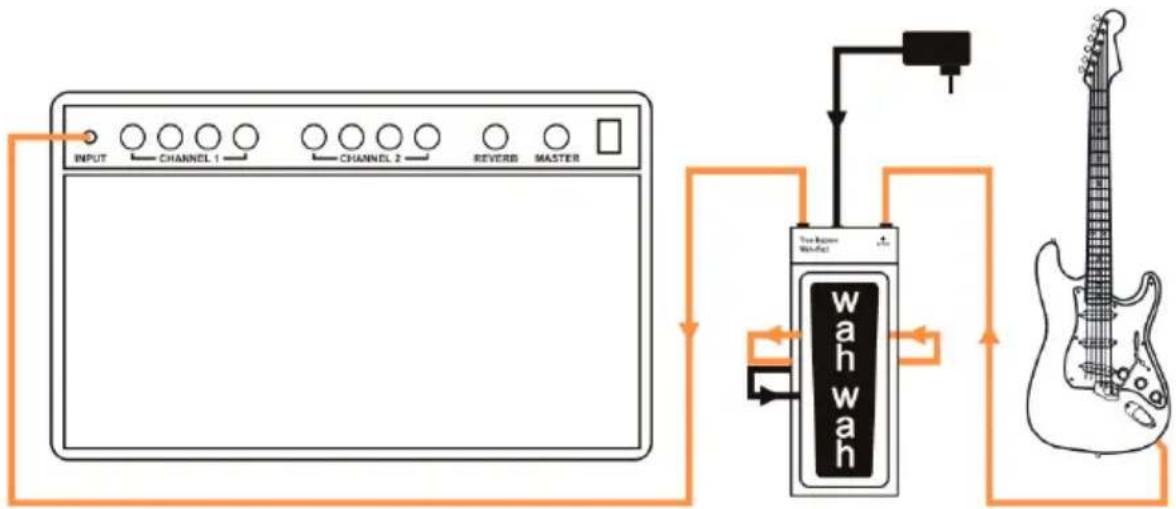
Connecting the TBWP with a guitar and an amp

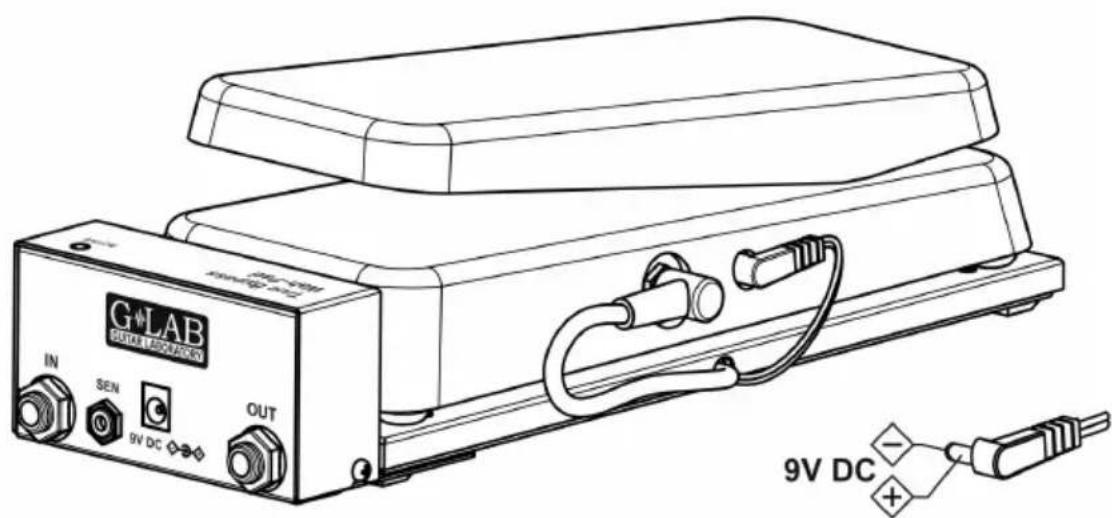
1 - return signal connector 6 - guitar input (IN) connector
2 - area of placing wah-wah effect 7 - Indicator of wah-wah effect
3 - output (OUT) signal connector activation (ACTIV)
4 - 9V DC power supply connector 8 - send signal connector
5 - signal indicating foot placement (SEN) connector
9 - wah-wah effect 9V DC power supply connector
Connecting the TBWP
-
- Place inside the TBWP cabinet a battery and connect it (see the point "Battery exchange").
-
- Place the wah-wah effect on the wah-pad and connect signal and power supply connectors (please check if the power connector polarisation is proper).
-
- Connect the guitar to the TBWP input IN (plugging in the mono Jack connector will cause in switching on the power supply of the TBWP and the wah-wah) and the cable from the amp to the TBWP output OUT (see the diagram from the page No. 1).
-
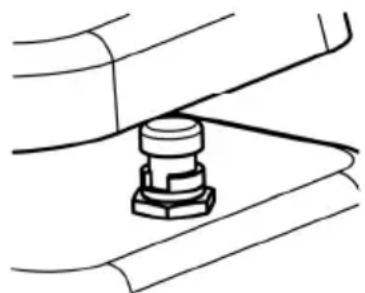
- Place your foot on the wah-wah effect (the ACTIV indicator start to lit meaning the wah-wah effect is activated), then the wah-wah effect switch set to active position and block it at this position by the blocking ring being a part supplied with the TBWP (this ring eliminates incidental switching off the wah-wah effect while playing).
natural_image
Pure mechanical diagram showing a bolted joint with no text or symbolsSwitching on (activating) the wah-wah effect takes place in the moment of placing your foot on the wah-wah effect and switching off – in the moment of removing your foot from the wah-wah effect. The wah-wah pedal can be left at any position.
Switching off the wah-wah effect is performed by True Bypassing the wah-wah effect what eliminates influence of the electronic wah-wah circuit onto the guitar tone.
Switching on and off the power supply
Switching on the power supply is done by plugging in the guitar cable connector into the IN TBWP input and switching off the power supply is done by unplugging this connector.
It should be used mono Jack connector to plug into IN input.

Power supply
To supply the TBWP should be used internal 9V battery or regulated 9V DC external power supply adapter. Make sure that the connector of the external power supply adapter has got the proper polarisation.
REMARK: Damage of the TBWP caused by improper power supply causes the loss of the warranty.
Battery exchange
To exchange the battery you should make less tight two holding screws and to remove (taking off) the cover (see the picture). It is recommended to use high capacity alkaline batteries.

Fixing of the TBWP and the wah-wah effect
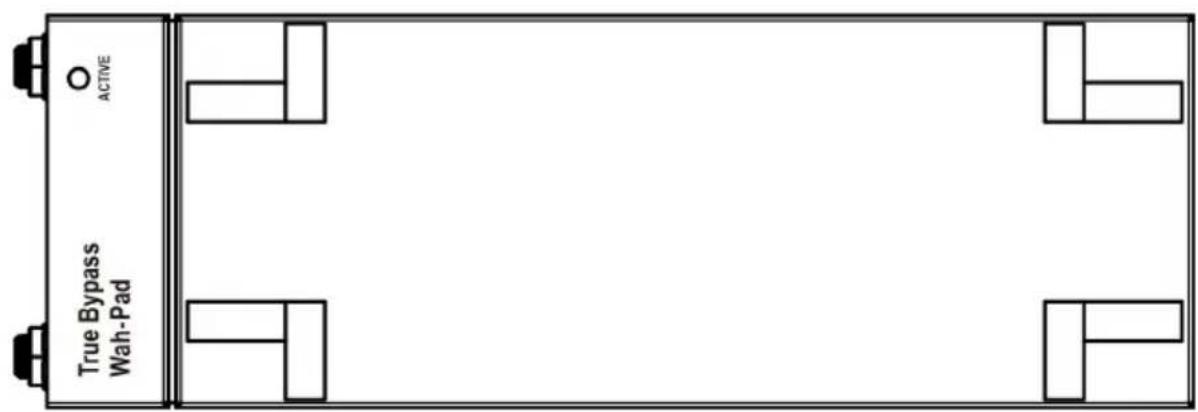
Fixing the TBWP with the pedalboard can be done by screwing it (see the picture) or by stacking with the industrial velcro (3.5 mm or higher).
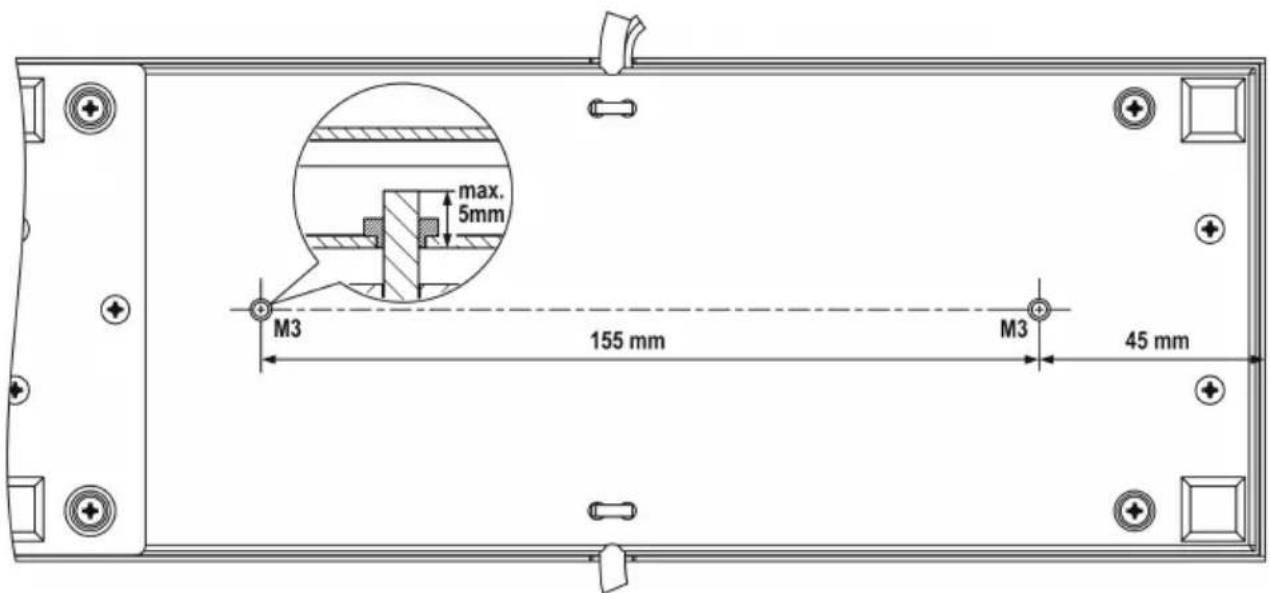
To eliminate movement of the wah-wah effect over the pad, you should stick movement limiters (adhesive elements supplied inside the package) on the upper surface of the pad's plate (close to the wah-wah effect legs – as shown on the picture).
To fix the wah-wah effect we suggest to unscrew the legs and use the industrial velcro.
Specification
Dimensions (depth x width x height) 301 x 104 x 55 mm
Weight (with battery) 840 g
Power supply 9V DC (regulated)
Power consumption 3 mA
Package content
1 - True Bypass Wah-Pad TBWP
2 - 9V Battery
3 - Blocking ring
4 - 8 Pieces of self-adhesive elements
5 - 4 Sets of industrial velcro
6 - User Manual
7 - Warranty Card
EMC/EMI & Certificate of conformity
EMC/EMI
This device has been designed and manufactured to conform with directives and standards in the field of safety operations and electromagnetic interference.
This device uses and can radiate radio frequency energy and, if not installed and used in accordance with the instructions, may cause harmful interference to radio communications. However in spite of performing below standards there is no guarantee that interference will not occur in a particular installation. If this device does cause harmful interference to radio or television reception which can be determined by turning the device on and off, the user is encouraged to try to correct the interference by one or more of the following operations:
- Reorient or relocate the receiving antenna.
- Increase the separation between the device and receiver.
- Connect the device into an outlet on a circuit different from that to which the receiver is connected.
- Contact with the manufacturer.
- Consult the dealer for help.
Certificate of Conformity
hereby declares on own responsibility that the following product:
True Bypass Wah-Pad (G LAB TBWP)
that is covered by this certificate and marked with CE 07 label conforms with following standards:
PN-EN 60065:2004
Safety requirements for mains operated electronic and related apparatus for household and similar general use
PN-EN 55103-1:1998
Product family standard for audio, video, audio-visual and entertainment lighting control apparatus for professional use. Part 1: Emission.
PN-EN 55103-2:1998
Product family standard for audio, video, audio-visual and entertainment lighting control apparatus for professional use. Part 2: Immunity.
with reference to regulations in following directives:
73/23/EEC, 2004/108/EEC
Issued in Zabrze, May 2007
Jerzy Biernat
President of the ELZAB S.A. Board of Directors

DO NOT PLACE THIS PRODUCT INTO THE WASTE CONTAINER!
This device is marked with a cross-lined waste container symbol according to 2002/96/EU Directive on Waste Electric and Electronic Equipment.
Such marking informs that after usage equipment can not be trashed together with other household waste.
An user obligation is to return wasted equipment to a party collecting wasted electric and electronic equipment. Parties collecting such equipment organise a system, including local collection points, shops and other units, allowing to return such equipment. This Directive assures an user free of charge utilisation of such delivered equipment.
This device is made of materials which can be recycled or utilised after becoming out of use. Proper handling of wasted electric and electronic equipment reduce demand for row materials and contribute in avoiding harmful consequences for environment and health of people caused by dangerous components and not proper storing and utilising of such equipment.
User Manual, Drawing No. G21INA00

COMPANY ADDRESS
ELZAB S. A.


- True Bypass Wah-Pad
- Connecting the TBWP
- Switching on and off the power supply
- Power supply
- Battery exchange
- Fixing of the TBWP and the wah-wah effect
- Specification
- Package content
- EMC/EMI & Certificate of conformity
- EMC/EMI
- True Bypass Wah-Pad (G LAB TBWP)
- DO NOT PLACE THIS PRODUCT INTO THE WASTE CONTAINER!
- COMPANY ADDRESS
Brand : G-LAB
Model : TBWP True Bypass Wah Pad
Category : Effect pedal