
One+ R18SO - Soldering iron RYOBI - Free user manual and instructions
Find the device manual for free One+ R18SO RYOBI in PDF.


| Product Type | Cordless Soldering Iron |
| Brand | RYOBI |
| Model | One+ R18SO |
| Power Source | 18 V Lithium-Ion battery (not included) |
| Power Consumption | 40 W |
| Working Temperature Range | 200 - 480 °C (+/- 30 °C) |
| Weight (without battery) | 0.91 kg |
| Temperature Control | Adjustable dial with LED indicator (red heating, green ready) |
| Included Tips | Chisel tip, hot cutting knife tip, drawing tip |
| Included Accessories | Iron holder, sponge tray, sponge, solder reel, tip holder |
| Compatible Battery Packs | RB18L13, RB18L15, RB18L20, RB18L25, RB18L40, RB18L50, RB18L90A |
| Compatible Chargers | BCS618G, BCL14181H, BCL14183H, BCL1418IV*, RC18150, RC18150U, RC18627U, RC18115, RC18120 |
| Intended Use | Soldering circuits, electrical connections, jewellery, stained glass, crafts |
| Safety Features | Auto-off when idle, cool-down period before tip change, do not touch hot tip |
| Maintenance | Clean tip with damp sponge or metallic wool pad when hot; use only identical replacement parts |
| Repairability | All repairs should be performed by an authorised service centre |
| Environmental Protection | Recycle raw materials; do not dispose with household waste |
| Compliance | Regulatory Compliance Mark (RCM) |
Frequently Asked Questions - One+ R18SO RYOBI
User questions about One+ R18SO RYOBI
0 question about this device. Answer the ones you know or ask your own.
Ask a new question about this device
Download the instructions for your Soldering iron in PDF format for free! Find your manual One+ R18SO - RYOBI and take your electronic device back in hand. On this page are published all the documents necessary for the use of your device. One+ R18SO by RYOBI.
USER MANUAL One+ R18SO RYOBI
natural_image
Ryoai electric soldering kit with coiled spring and soldering tool (no visible text or symbols)
Important!
This appliance is not intended to be used or cleaned by persons with reduced physical, sensory or mental capabilities, or lack of experience or knowledge, unless they have been given instructions concerning the safe use of the appliance by a person legally responsible for their safety. They should be supervised whilst using the appliance.
Children shall not use, clean or play with this appliance, which when not in use should be secured out of their reach.
It is essential that you read the instructions in this manual before assembling, operating, and maintaining the product. Subject to technical modifications.
Safety, performance, and dependability have been given top priority in the design of your soldering station.
INTENDED USE
The soldering station is only intended for soldering circuits, electrical connections, jewellery, stained glass, and other crafts.
Do not use the product for any other purposes.
SOLDERING STATION SAFETY WARNINGS
■ Save these instructions. Refer to them frequently and use them to instruct others who may use this tool. If you loan someone this tool, loan them these instructions also.
- Keep work area clean and well lit. Cluttered or dark areas invite accidents.
- Do not operate the product in explosive atmospheres, such as in the presence of flammable liquids, gases, or dust. Battery products create sparks which may ignite the dust or fumes.
- Keep children and bystanders away while operating the product. Distractions can cause you to lose control.
■ The product is intended for household use only.
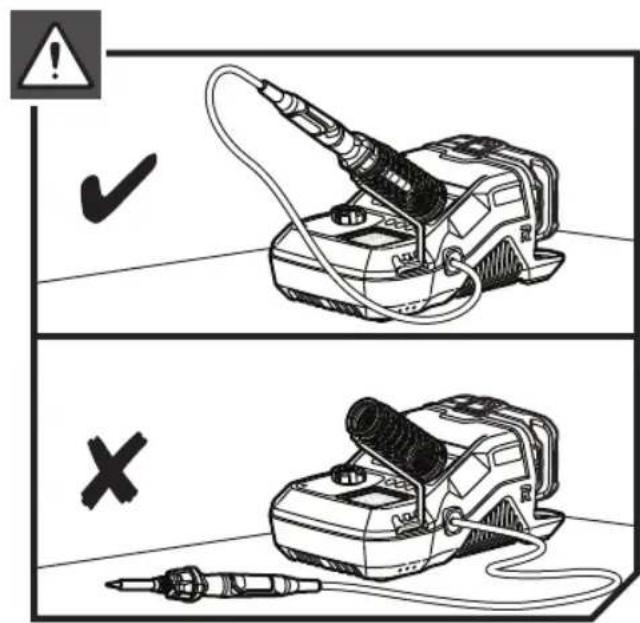
■ The soldering iron must be placed in the holder when not in use.
■ Do not lay a hot soldering iron on its side.
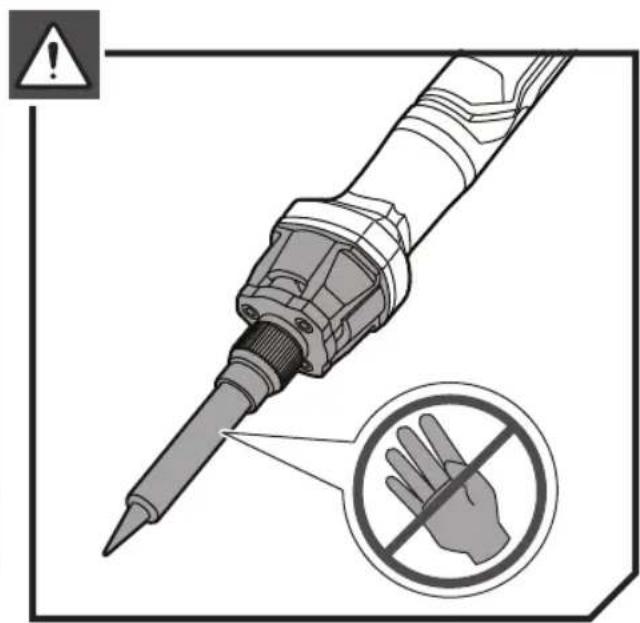
■ Do not touch the heated tip of the soldering iron.
■ Always assume that the soldering iron tip is hot.
■ Use the soldering iron in a well-ventilated area to avoid breathing fumes.
- Do not point the tip of the soldering iron at another person.
- Do not place your hands or fingers near the tip of the soldering iron.
■ Never leave the product unattended while it is switched on.
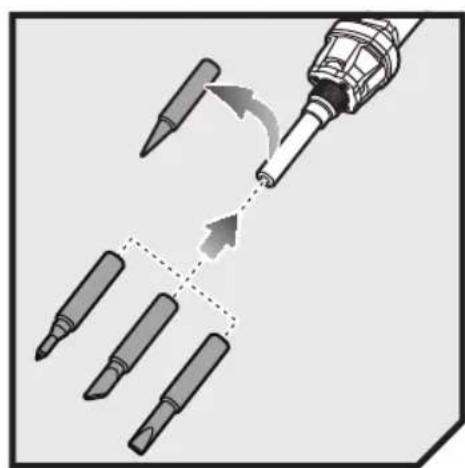
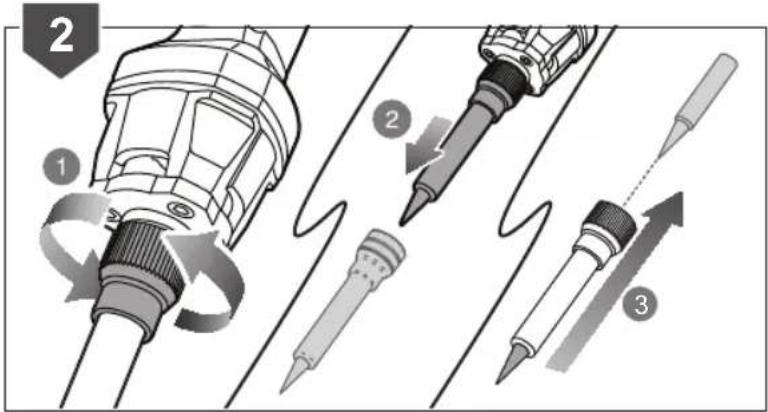
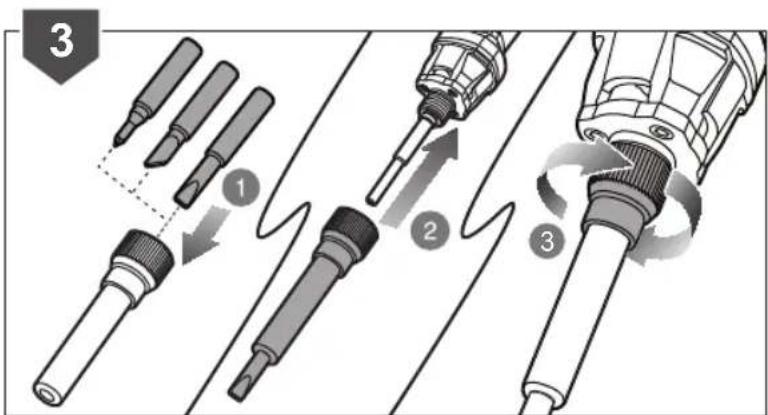
■ Always remove the battery pack and allow the soldering tip to cool for a minimum of 30 minutes before removing the tip. Touching a hot soldering tip can result in serious personal injury.
■ Always remove the battery pack and allow the product to cool before leaving, transporting or storing. Storing a soldering iron with a hot tip can cause serious burns and/or ignite combustible objects.
■ Remove the battery pack from the product and ensure the unit has cooled down before making any adjustments changing accessories, or storing the product. Such preventive safety measures reduce the risk of starting the product accidentally..
- Do not allow children to use the soldering station. It is not a toy.
■ Do not solder live circuits.
■ Do not disassemble the product.
■ The soldering iron tip is sharp. Do not touch the tip or allow it to come in contact with anything other than soldering wire and the workpiece material.
■ Do not expose battery products to rain or wet conditions. Water entering a battery product will increase the risk
of electric shock.
■ Use the product only for its intended use as described in this manual.
If the product is not working properly, has been dropped, damaged, left outdoors or dropped into water, return to your nearest service centre.
■ Do not handle the product or charger with wet hands.
BATTERY AND CHARGER SAFETY WARNINGS
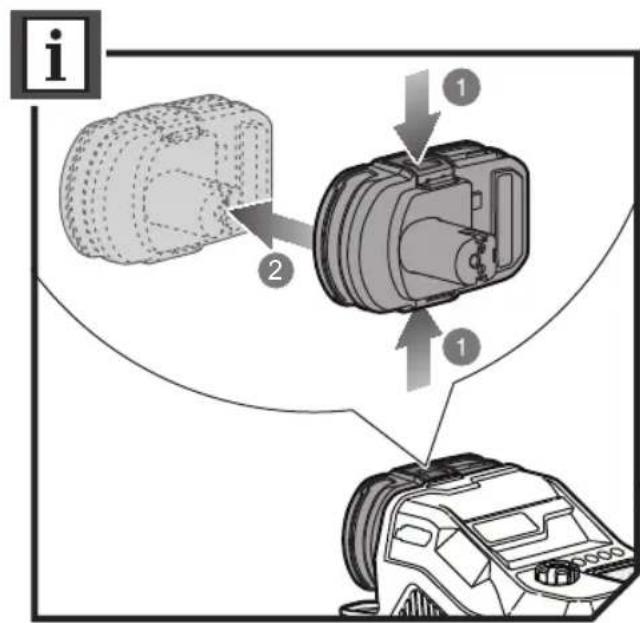
■ Connect and disconnect the battery pack properly.
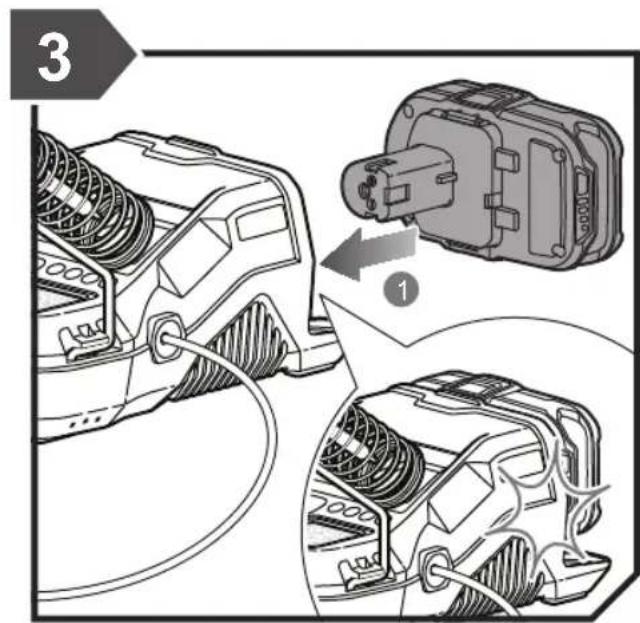
• To install battery pack:
- Place the battery pack on the product.
- Make sure the latches on each side of the battery pack snap into place and the battery pack is secured on the product before beginning operation.
• To remove battery pack:
- Depress the latches on the side of the battery pack.
- Remove the battery pack from the product.
■ Remove battery when the product is not in use and before servicing.
- Do not place batteries near fire or heat. They may explode.
■ Rechargeable batteries are to be removed from the product before being charged.
■ Different types of batteries or new and used batteries are not to be mixed.
■ Batteries are to be inserted with the correct polarity.
■ Exhausted batteries are to be removed from the product and safely disposed of.
If the product is to be stored unused for a long period, the batteries should be removed.
■ The supply terminals are not to be short-circuited.
■ Under extreme usage or temperature conditions, battery leakage may occur. If liquid comes in contact with skin, wash at least 10 minutes then seek immediate medical attention.
■ Batteries vent hydrogen gas and can explode in the presence of a source of ignition, such as a pilot light. To reduce the risk of serious personal in jury, never use any cordless product in the presence of an open flame. An exploded battery can propel debris and chemicals. If exposed, flush with water immediately.
■ Electric shock could occur if the battery is charged outdoors or on wet surfaces.
■ Do not expose charger to wet or damp conditions.
■ Use of an attachment not recommended or sold by the battery charger manufacturer may result in a risk of fire, electric shock, or injuries to person.
■ To reduce risk of damage to charger body and cord, pull by charger plug rather than cord when disconnecting charger.
■ Make sure cord is located so that it will not be stepped on, tripped over, or otherwise subjected to damage and stress.
■ An extension cord should not be used unless absolutely
necessary. Use of improper extension cord could result in a risk of fire and electric shock. If extension cord must be used, make sure:
a) That pins on plug of extension cord are the same number, size and shape as those of plug on charger.
b) That extension cord is properly wired and in good electrical condition.
- Do not operate charger with a damaged cord or plug. If damaged, have it replaced immediately by a qualified serviceman.
■ Do not operate charger if it has received a sharp blow, been dropped, or otherwise damaged in any way; take it to a qualified serviceman. - Do not disassemble charger; take it to a qualified serviceman when service or repair is required. Incorrect reassembly may result in a risk of electric shock or fire.
■ To reduce risk of electric shock, unplug the charger from outlet before attempting any maintenance or cleaning. Turning off controls will not reduce this risk.
■ Disconnect charger from power supply when not in use.
■ Risk of electric shock. Do not touch uninsulated portion of output connector or uninsulated battery terminal.
■ The battery pack should be charged in a location where the temperature is more than 10^ C but less than 38^ C.
ADDITIONAL SAFETY WARNINGS
WARNING
The product is not intended for use by persons (including children) with reduced physical, sensory or mental capabilities, or lack of experience and knowledge, unless they have been given supervision or instruction concerning use of the product by a person responsible for their safety.
Children should be supervised to ensure that they do not play with the product.
ADDITIONAL BATTERY SAFETY WARNINGS
WARNING
To reduce the risk of fire, personal injury, and product damage due to a short circuit, never immerse your tool, battery pack or charger in fluid or allow a fluid flow inside them. Corrosive or conductive fluids, such as seawater, certain industrial chemicals, and bleach or bleach-containing products, etc., can cause a short circuit.
TRANSPORTING LITHIUM BATTERIES
Transport the battery in accordance with local and national provisions and regulations.
Follow all special requirements on packaging and labelling when transporting batteries by a third party. Ensure that no batteries can come in contact with other batteries or conductive materials while in transport by protecting exposed connectors with insulating, non-conductive caps or tape. Do not transport batteries that are cracked or leaking. Check with the forwarding company for further advice.
RESIDUAL RISKS
Even when the product is used as prescribed, it is still impossible to completely eliminate certain residual risk factors. The operator should pay particular and additional attention to these points in order to reduce the risk of serious personal injury.
■ Injury caused by hot surface
—Never touch the solder tip when it is hot.
■ Injury caused by fume
–Fume will be created by the soldering operation which can cause respiratory and eye injury. Wear appropriate mask suitable for protecting against fume from the materials being worked on. Work on area with good ventilation.
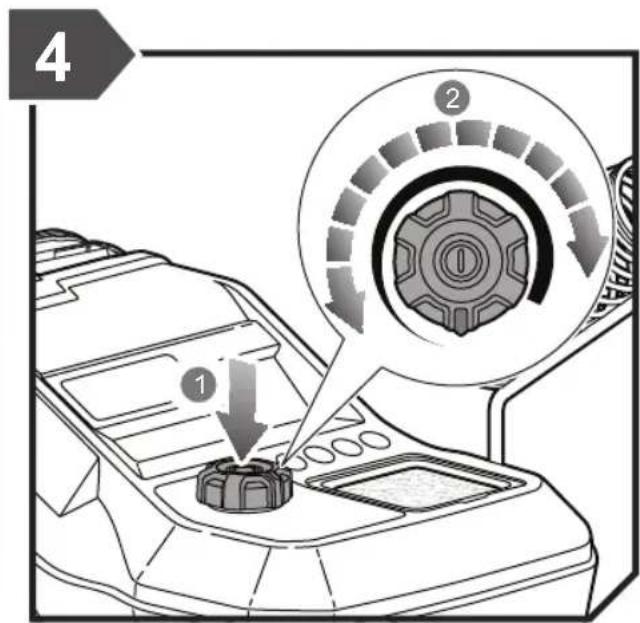
LED INDICATOR
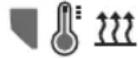 | Solid red Tip | heating up |
| 200°C - 480°C | Solid green | Tip reached set temperature |
| Pulse green | Temperature decreasing to desired heat setting on temperature dial |
MAINTENANCE
WARNING
The product should never be connected to a power supply when assembling parts, making adjustments, cleaning, performing maintenance, or when the product is not in use. Disconnecting the product will prevent accidental starting that could cause serious injury. Let iron cool down completely before performing maintenance.
■ When servicing, use only identical replacement parts. Use of any other parts may create a hazard or cause product damage.
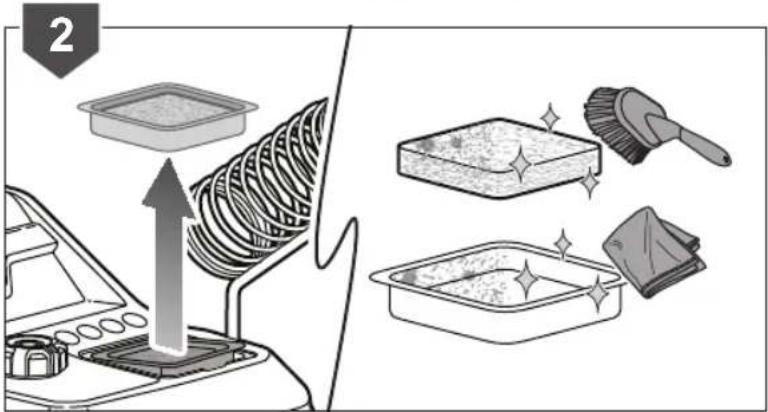
■ Avoid using solvents when cleaning plastic parts. Most plastics are susceptible to various types of commercial solvents and may be damaged by their use. Use clean cloths to remove dirt and carbon dust.
- Do not, at any time, let brake fluids, gasoline, petroleum-based products, penetrating oils, etc., come in contact with plastic parts. They contain chemicals that can damage, weaken, or destroy plastic.
■ Cleaning and user maintenance shall not be made by children without supervision.
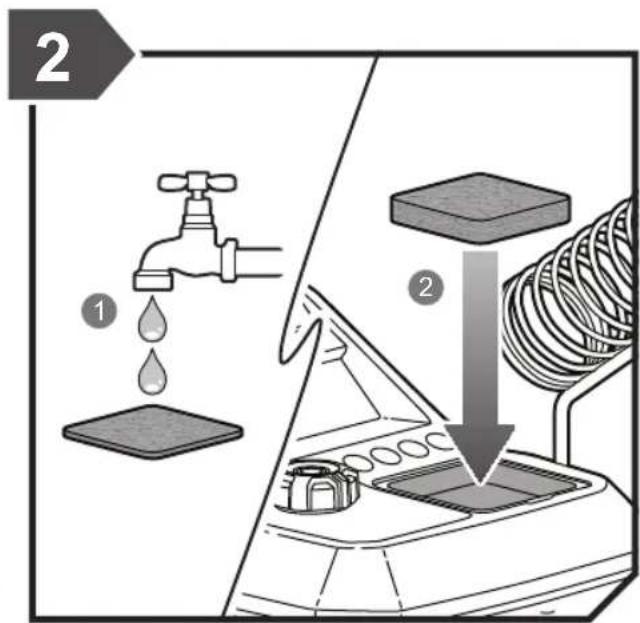
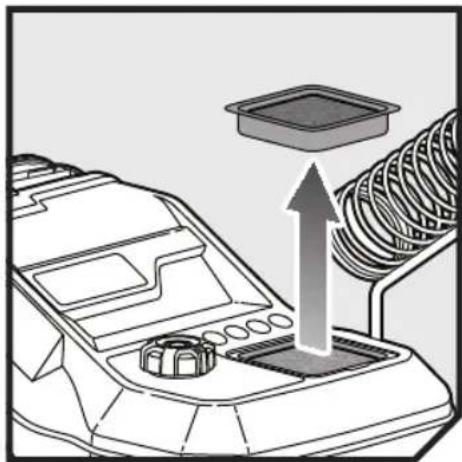
■ While the soldering iron tip is hot, wipe the tip against a damp sponge or a metallic wool pad to remove debris. Keeping a clean tip is important to extend the life of the tip and will improve solder melting and flow during use.
■ For greater safety and reliability, all repairs should be performed by an authorised service centre.
ENVIRONMENTAL PROTECTION
Recycle raw materials instead of disposing of as waste. The machine, accessories and packaging should be sorted for environment-friendly recycling.
SYMBOLS ON THE PRODUCT

Safety alert
V Volts

Direct current

Please read the instructions carefully before starting the machine.

Regulatory Compliance Mark (RCM). Product meets applicable regulatory requirements.

Hot surface

Hot surface! Do not touch!
Waste electrical products should not be disposed of with household waste. Please recycle where facilities exist. Check with your local authority or retailer for recycling advice.
SYMBOLS IN THIS MANUAL

Note

Parts or accessories sold separately

Waiting time for iron to cool down
The following signal words and meanings are intended to explain the levels of risk associated with this product:
DANGER
Indicates an imminently hazardous situation, which, if not avoided, will result in death or serious injury.
WARNING
Indicates a potentially hazardous situation, which, if not avoided, could result in death or serious injury.
CAUTION
Indicates a potentially hazardous situation, which, if not avoided, may result in minor or moderate injury.
CAUTION
(Without Safety Alert Symbol) Indicates a situation that may result in property damage.
natural_image
Line drawing of a soldering iron with various components including a power supply, test probes, and coiled wire (no text or symbols present)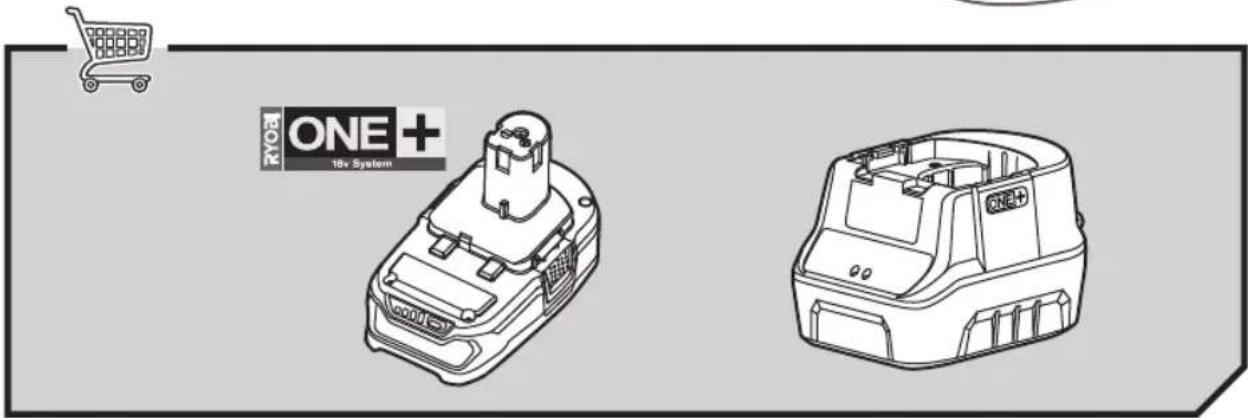
natural_image
Technical line drawing of two battery modules with one labeled 'ONE + 18v System' (no other text or symbols)KNOW YOUR PRODUCT
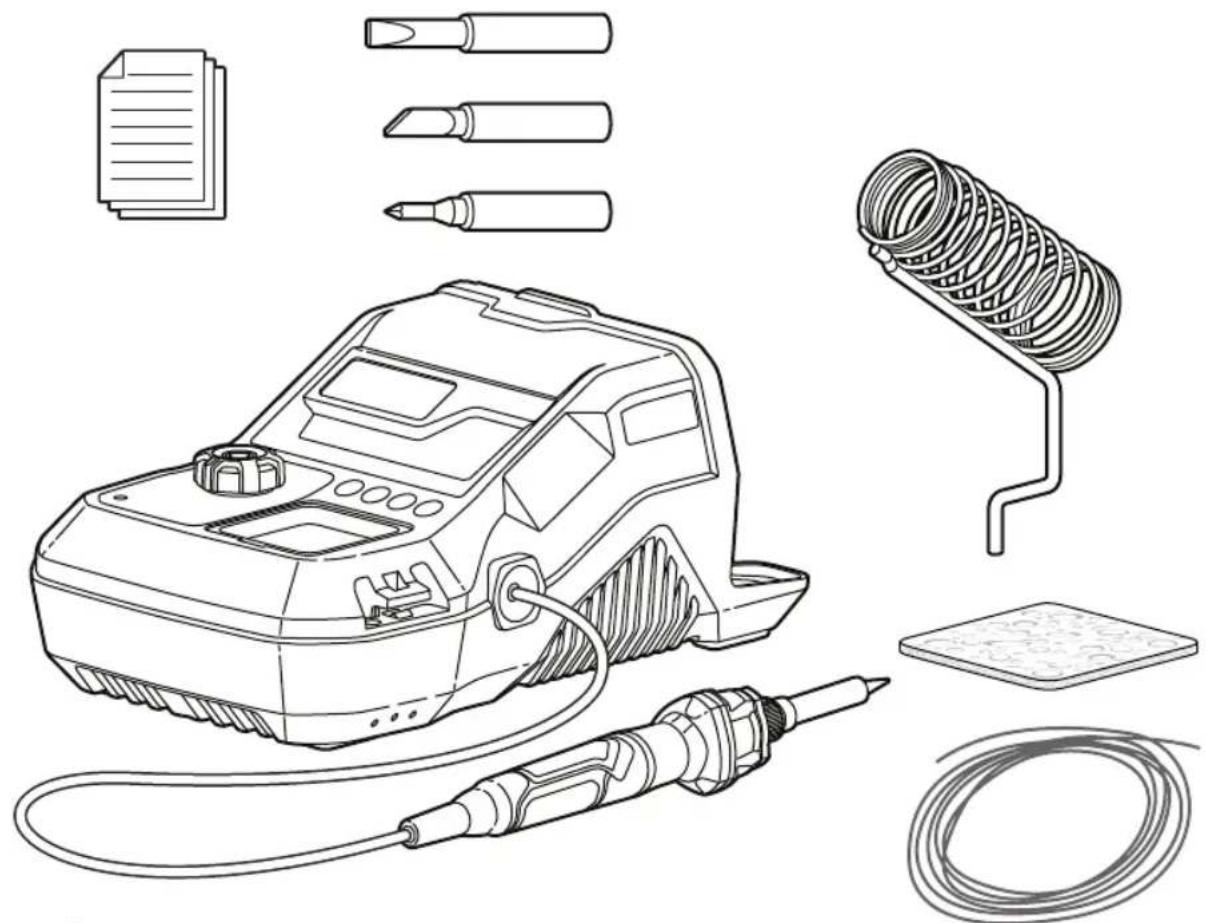
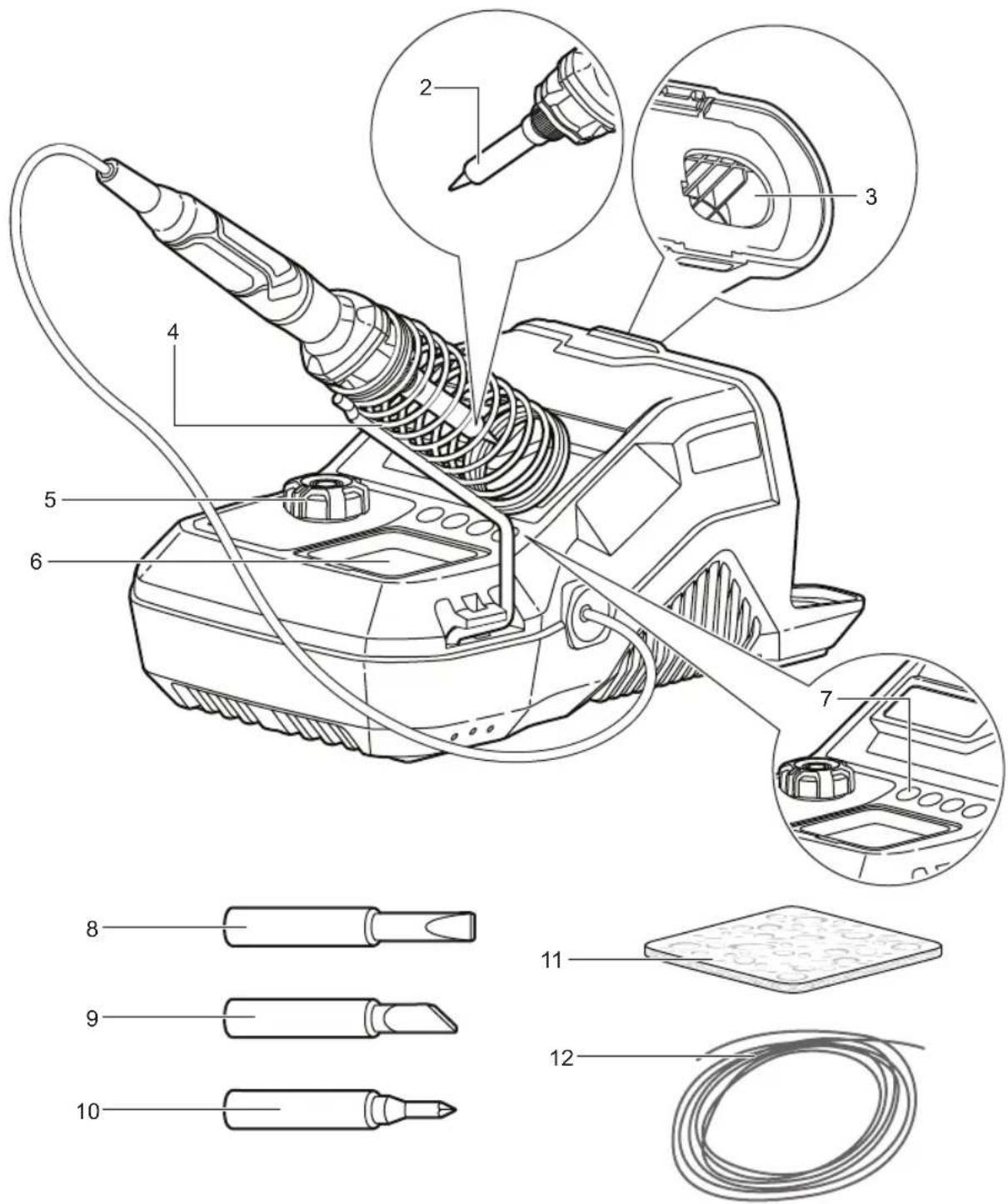
- Soldering iron
- Soldering tip
- Battery port
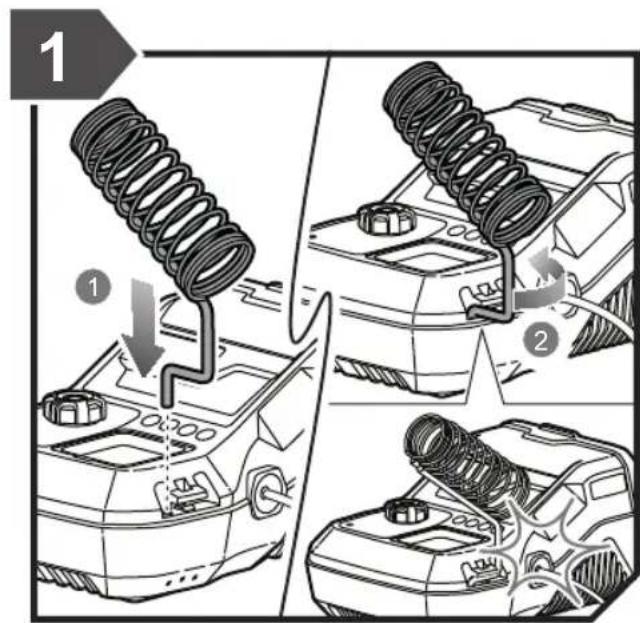
- Iron holder
- ON/OFF button / Temperature dial
-
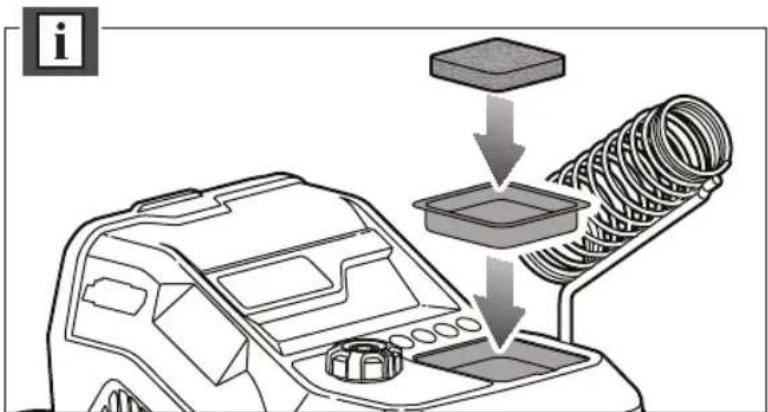
Sponge tray
-
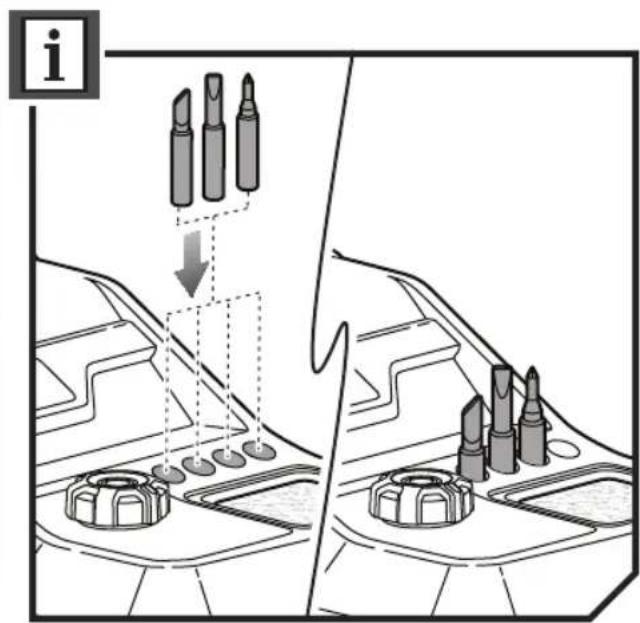
Tip holder x 4
- Chisel tip
- Hot cutting knife tip
- Drawing tip
- Sponge
- Solder reel
natural_image
Diagram showing a screwdriver being inserted into multiple test tubes, with arrows indicating the process (no text or symbols present)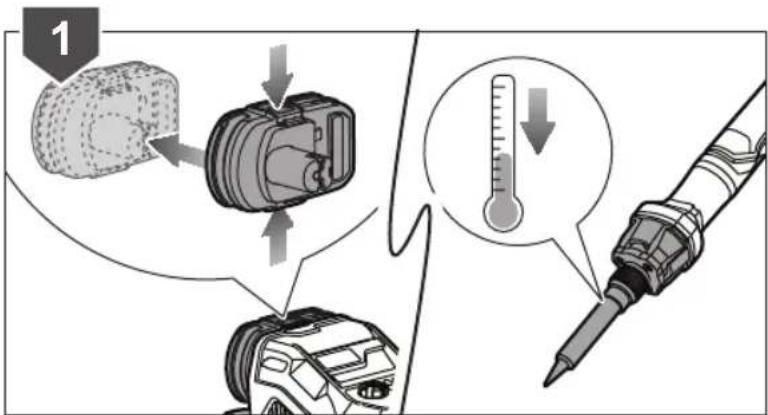
natural_image
Diagram of a vehicle dashboard with a tray and coiled spring, showing no text or symbols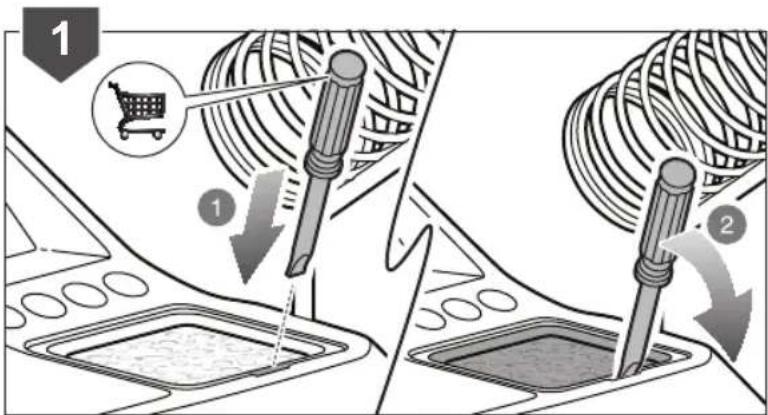
PRODUCT SPECIFICATIONS
| Soldering station | |
| Model R18SO | |
| Voltage 18 V | --- |
| Power consumption 40 W | |
| Working temperature 200 - 480 +/- 30 °C | |
Weight - not incl. battery pack 0.91 kg
REPLACEMENT PARTS
Soldering tip
Chisel tip
5131042131
BATTERY AND CHARGER
| Model | Compatible battery pack (not included) | Compatible charger (not included) |
| Lithium-Ion | BCS618G | |
| RB18L13 | BCL14181H | |
| RB18L15 | BCL14183H | |
| RB18L20 | BCL1418IV* | |
| RB18L25 | RC18150 | |
| RB18L40 | RC18150U | |
| RB18L50 | RC18627U | |
| RB18L90A | RC18115 | |
| RC18120 |
* for vehicles with 12V DC outlets
RYOBI®
RYOBI is a trademark of Ryobi Limited, and is used under license.
Imported by:
Techtronic Industries Australia Pty Ltd
31 Gilby Road, Mount Waverley, VIC 3149
Melbourne, Australia
Techtronic Industries N.Z. Limited
2 Landing Drive, Mangere
Auckland, 2022, New Zealand
- Important!
- INTENDED USE
- SOLDERING STATION SAFETY WARNINGS
- BATTERY AND CHARGER SAFETY WARNINGS
- ADDITIONAL SAFETY WARNINGS
- WARNING
- ADDITIONAL BATTERY SAFETY WARNINGS
- TRANSPORTING LITHIUM BATTERIES
- RESIDUAL RISKS
- MAINTENANCE
- ENVIRONMENTAL PROTECTION
- SYMBOLS ON THE PRODUCT
- SYMBOLS IN THIS MANUAL
- DANGER
- CAUTION
- KNOW YOUR PRODUCT
Brand : RYOBI
Model : One+ R18SO
Category : Soldering iron