
ACPHP09K - Air conditioner Defy - Free user manual and instructions
Find the device manual for free ACPHP09K Defy in PDF.


| Product Type | Portable Air Conditioner |
| Model | ACPHP09K |
| Brand | Defy |
| Cooling Capacity | 9000 BTU/h |
| Power Supply | 220-240 V ~ 50 Hz |
| Dimensions (H x W x D) | 70.5 cm x 45.6 cm x 36.5 cm |
| Weight | 28.5 kg |
| Refrigerant | R290 |
| Energy Efficiency Class | A |
| Noise Level (Low/High) | 52 / 56 dB(A) |
| Airflow Volume | 350 m³/h |
| Operating Modes | Cooling, Fan, Dehumidification |
| Thermostat Range | 16°C - 30°C |
| Remote Control | Yes, included |
| Timer | Yes, 0-24 hours |
| Auto Swing | Yes, horizontal louvres |
| Filter Type | Washable mesh filter |
| Filter Cleaning | Every 2 weeks, wash with water |
| Condensate Drainage | Continuous drain or manual bucket |
| Exhaust Hose Length | 1.5 m |
| Spare Parts Availability | Remote, filter, hose, drain plug |
| Safety Features | Overheat protection, auto shut-off |
| Warranty | 2 years |
Frequently Asked Questions - ACPHP09K Defy
User questions about ACPHP09K Defy
0 question about this device. Answer the ones you know or ask your own.
Ask a new question about this device
Download the instructions for your Air conditioner in PDF format for free! Find your manual ACPHP09K - Defy and take your electronic device back in hand. On this page are published all the documents necessary for the use of your device. ACPHP09K by Defy.
USER MANUAL ACPHP09K Defy
natural_image
Abstract geometric pattern with four empty circles and a diagonal line (no text or symbols)
natural_image
Simple line drawing of a kitchen range hood (no text or symbols)
natural_image
Simple line drawing of a oven with three handles (no text or symbols)
natural_image
Blank white image with no visible text, symbols, or discernible features
natural_image
Simple line drawing of a washing machine with no text or symbols
natural_image
Simple line drawing of a kitchen appliance outline (no text or symbols)
Customer Care Line
(after sales service)
086 100 3339
Air Conditioner
Remote control manual

Read this manual before initial installation and operation of the appliance!
Dear Customer, Your new Defy appliance was manufactured in a state of the art facility and has passed the strictest quality control procedures. Please read this manual carefully before using your appliance for the first time and then store it within easy reach for future reference. We trust you will enjoy years of trouble free use.
The user manual:
- This manual will provide you with information on how to safely operate and care for your appliance in order that you gain the maximum benefit from it.
- Pay particular attention to safety instructions.
- Read all additional documents supplied with your appliance.
- This manual may be used for several similar but different models. Please check for relevance regarding your particular model.
Explanation of symbols used in this manual

Important safety information. Warning for hazardous situations with regard to life and property.

Caution; Warning for supply voltage.

Caution; Warning for fire hazard.

Read the instructions.

Useful information. Important information or useful hints about usage.
Unpacking
Remove all packaging. Ensure that packing material is disposed of in a responsible manner and that any plastic bags are cut up to prevent children playing with them and accidentally suffocating. If the appliance is damaged in any way do not use it. Report the damage to your dealer who will take the necessary corrective action.
Contents
- Your Air Conditioner 4
- Important Safety Information 5
Warnings 5 - Parts list 7
-
Placement 8
Installation 8 -
Control panel 10
Remote control 11
Water drainage 12 - Maintenance and cleaning 14
- Trouble shooting 16
- Branches 19
- Warranty 20
ACPHP 09 K

natural_image
White industrial air conditioner unit with black top and 'DEFY' logo, no visible text or symbols on body | This appliance is not intended for use by persons (including children) with reduced physical, sensory or mental capabilities or lack of experience and knowledge, unless they have been given supervision or instruction concerning the use of the appliance by a person responsible for their safety. |
| Children should be supervised to ensure that they do not play with the appliance. | |
 | The manufacturer strives for continuous improvement. Thus technical specifications, text and illustrations in this manual are subject to change without notice. |
| Figures represented in this instruction manual are schematic and may not correspond exactly with your appliance. If the parts are not included in the unit you have purchased, they may be model specific and only valid for some models. | |
| Values stated on the labels or in the documentation accompanying it are obtained in laboratory conditions in accordance with the relevant standards. Depending on operational and environmental conditions of the unit, these values may vary. | |
| Check the accessories of the appliance. Read the user manual before using the accessories. |
2 Important safety information
Please review and observe the following information. Failure to do so may result in injuries or material damage and will render any warranty and reliability commitments void.

Warnings
- Hand this owners manual over to the new owner should ownership change.
- The appliance must only be used for its intended purpose: Room temperature regulation.
- The air conditioner is intended for domestic use only.
- Consult with your authorised DEFY service centre for all questions and problems relating to the appliance. Only authorised agents are to carry out repairs.
 | Place the appliance in a dry environment. Do not spatter water or oil into the appliance. Use indoors only. Do not use outdoors. |
 | Do not unplug the power cord during operation. Doing so could cause a fire. To unplug the appliance, switch off the unit and remove the plug by pulling on the plug and not the cord! |
 | Do not attempt to extend the power cord by joining it to another cord, or by using an extension cord. Do not put any other loads on the power supply socket. Extension cables and multiway plugs must not be used for connection. |
 | Do not damage the power cord. Placing heavy objects on the power cord, having the power cord near objects that operate at high temperatures may cause electric shock and fire. |
 | Unplug the power plug or switch off the power supply when not using the appliance for a long time. (Accumulated dirt might cause fire). |
 | Ensure the supply voltage meet the requirements as per the specification table. Damages caused by incompatible connections are not covered by the warranty |
 | An earth leakage breaker with rated capacity must be installed to avoid possible electric shocks. |
 | Do not place burner type appliances where they will be exposed to the airflow of the air conditioner as this may cause incomplete combustion. |
 | Do not use the following for cleaning: Chemical solvents, insecticide or inflammable spraying materials. These will damage the appearance of the appliance. Do not spray or sprinkle water directly onto the appliance. |
 | Vapour and vaporized cleaning materials must never be used in cleaning the appliance. The vapour may come into contact with the electrical parts and cause a short circuit or electric shock. |
 | Close doors and windows while operating the appliance for a long time, if room air is quite turbid, open the door and window for a short period of time to allow for some fresh air circulation. |
 | If anything abnormal such as a burning smell occurs, stop the operation immediately and unplug the appliance. |
 | Do not place the appliance at locations where flammable gas may leak. If there is an electrical leakage from the appliance, it may cause a fire or explosion. |
 | Do not use the appliance other than for its intended purpose. Do not use your appliance for cooling medicine or academic research samples which require strict temperature control. |
 | Do not insert a finger, a rod or any other objects into the air outlet/inlet grille. The fan runs at a high speed and it will cause an injury if touched. |
 | Do not dispose of the appliance along with regular household waste. Contact your local authority for disposal information and facilities available. Never dispose of the appliance in a fire. |
 | Do not allow children to climb on the appliance. Never use the parts of your appliance as a means of a support or step. |
 | Young children or infirm persons are not to use the appliance without supervision. |
 | Keep ventilation openings clear of obstructions. |
 | Unplug the appliance when cleaning, during routine maintenance or if it will not be used for an extended period. |
 | Should the mains lead of the appliance become damaged or should it need replacing at any time, it must be replaced by a special purpose made mains lead which can only be obtained from a DEFY Authorised Service Agent. |
 | Never connect your appliance to electricity saving systems as they may damage the appliance. Do not pull the batteries apart or throw them into a fire, they will explode. |
 | Do not use explosive substances such as aerosol cans with a flammable propellant near the appliance. Do not use flammable gas, benzene, petrol or volatile substances near the appliance. |
 | In the event of a malfunction, disconnect the appliance from the power supply. Do not operate a damaged appliance. Consult with your nearest DEFY service centre should you have any concerns |
 | Never place objects on top of the appliance. |
 | Keep the appliance away from heat sources and out of direct sunlight. |
 | The electrical safety of the appliance is only guaranteed if the earth system of your home is compliant with national standards. |
 | Do not expose your body directly to the cool (or hot) air of the appliance for prolonged periods; do not cool (or heat) the room too much. This could effect your physical condition and cause health problems. |
 | Do not leave the appliance to run when there is no one around. If you are going to be away even for a short period turn the appliance off. |
 | The appliance must NOT be installed in the laundry. The appliance must be positioned so that the plug is accessible. Keep the appliance in the upright position, having it in any other position will compromise the compressor performance. Ensure the wall socket can be easily reached from the appliance location. Keep the appliance on flat level ground with a clearance of at least 50 cm from any objects. Ensure air inlet and air outlet are not obstructed. Ensure no damage to the plug. Insert plug into wall socket first, switch on at wall outlet and then press the “Power” button to run the appliance. |

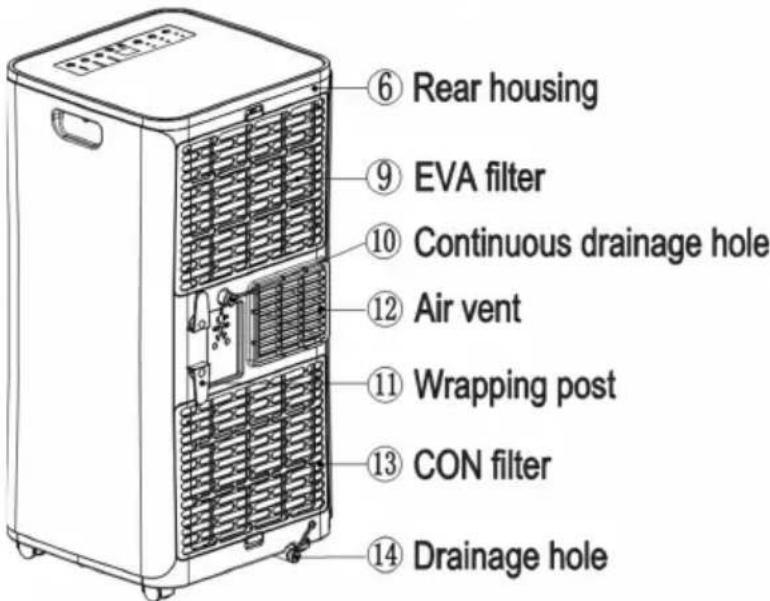

Exhaust Pipe Assembly


The manufacturer strives for continuous improvement. For this reason, the text and illustrations in this manual are subject to change without notice.
4 Placement
Place the appliance on a flat dry area, and keep it at least 50cm away from other objects.
Warning: before using the mobile air conditioning, keep it upright for at least two hours.
The air conditioning can be easily moved in the room. In the moving process, ensure that the air conditioning is in the upright position and the air conditioning should be placed on a flat surface. Do not install and use the air conditioning in the bathroom or other humid environments.
Installation
Install the heat pipe assembly (as shown in Fig.1): screw the heat pipe assembly (exhaust fitting end) into the exhaust port on the rear panel.

Fig.1

Fig.2
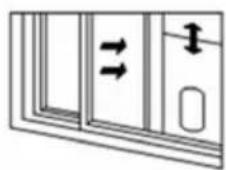
Fig.3
Install the window sealing plate assembly
1) Half open the window, and mount the window sealing plate assembly to the window (as shown in Fig.2 and Fig.3); the assembly can be placed in a horizontal or vertical direction.
2) Pull the window sealing plate assembly open, adjust the opening distance to bring both ends of the assembly into contact with the window frame, and fix the assembly to the frame. Install the window sealing plate assembly
Install the body
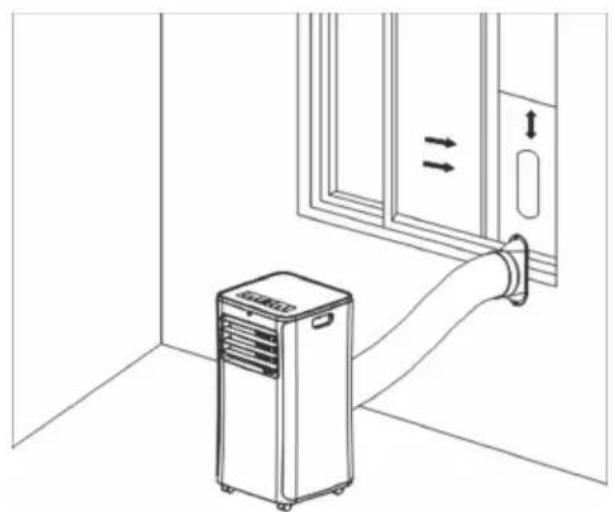
1) Move the machine with installed heat pipe and fittings to the window, the distance between the body and walls or other objects must be least 50 cm (as shown in Fig.4).

The manufacturer strives for continuous improvement. For this reason, the text and illustrations in this manual are subject to change without notice.
Fig.4

2) Elongate the exhaust pipe and snap the flat end of the exhaust pipe joints into the hole of the window sealing plate assembly (as shown in Fig.5 and Fig.6).

Note: The flat end of the exhaust pipe joints must be snapped into place. The pipe must not be distorted or have substantial bends (greater than 45°). Keep the ventilation of the exhaust pipe open without any obstructions.
natural_image
Line drawing of an air conditioner unit connected to a door, showing airflow direction (no text or symbols)
natural_image
Line drawing of a portable air conditioner unit connected to a wall-mounted hose, with no text or symbols present.
Warning: The length of the exhaust pipe has been calculated to suit the appliance, do not replace or lengthen the exhaust pipe as this will adversely affect the performance of the appliance.

Note: The maximum length of the exhaust pipe is 280 -1500mm. Keep the length as short as possible. Keep the exhaust pipe as level as possible so as not to restrict air flow. Do not use extension tubes or replace with different pipes, this may lead to a malfunction. Exhaust pipe must not be blocked; this may cause overheating.

- Power Key 2. Mode Selection Key 3. Sleep Key 4. Down Key 5. Up Key 6. Fan Speed Selection Key 7. Timer Key
1: When the machine is powered on for the first time, the buzzer will sound, the machine will go into standby status.
2: Power Key: Press this key to switch the machine on and off.
3: Mode Selection Key: In the case of power on, press the key to switch between cooling → dehumidification → fan → heating → cooling → mode.
4: Up Key and Down Key: Press these keys to change the temperature setting or setting time, operate as follows:
While setting temperature, press the up or down key to select the required temperature (not available in fan or dehumidifying mode).
While setting time, press the up or down key to select the required time.
5: Fan Speed Selection Key:
In cooling and fan mode, press this key to select high or low fan speed. Under anti freeze conditions, the unit may not run according to the set fan speed.
In the dehumidifying mode, this key is non functional and the fan will default to low fan speed operation.
6: Timing Key:
In the case of power on, press the key to end timing; in the case of power off, press the key to start timing. When the timing symbol flashes, press the up and down key to select the required timing value.
Timing values can be set from 1-24 hours. The timing value is adjusted in hourly increments.
7: Sleep Mode:
In the cooling Mode, Press the UP and Fan Key to switch on sleep mode, the unit will then operate in energy saving and quiet mode.

Sleep mode cannot be activated in the dehumidifying or fan mode.
The compressor will switch off when the inner unit chassis is full of water. The water full Lamp will turn on and buzzer will alarm for several second,

- Power: Press key to switch the machine on or off.
- Timer: Press key to set timing.
- Down: Press key to reduce temperature and timing set value.
- Mode: Press key to switch between cooling, dehumidifying, fan or heating mode.
- Up: press key to increase temperature and timing set value.
- Fan: press key to select high, low wind speed.
- Sleep Mode: Press key to turn on the sleep mode.
Protection Functions
Frost Protection Function
In cooling, dehumidifying or economic power saving mode, if the temperature of the exhaust pipe is too low, the machine will automatically enter protection status; if the temperature of the exhaust pipe reaches a certain temperature, it automatically reverts to normal operation.
Overflow Protection Function
When water in the water pan exceeds the warning level, the machine will automatically sound an alarm, and the "FULL" indicator light will flash. At this point, you need to move the drainage pipe connecting the machine or the water outlet to sewer or other drainage area to empty the water (See drainage instructions). After the water is emptied, the machine will automatically return to the original setting.
Automatic Defrosting ( Only cooling models have this function)
The machine has automatic defrosting function.
Protection Function of the Compressor
To increase the service life of the compressor, it has a 3-minute delay booting protection function after the compressor is turned off
Water drainage
Manual drainage:
1) When the machine stops after the water is full, turn off the machine power and unplug the power plug. Note: Please move the machine carefully, so as not to spill the water in the water pan at the bottom of the body.
2) Place the water container below the side water outlet behind the body. 3) Unscrew the drainage cover and unplug the water plug, the water will automatically flow into the water container.
- Keep the drainage cover and the water plug in a safe place.
- During drainage, the body can be tilted backwards slightly.
- If the water container gets too full, plug the water outlet with the water plug as soon as possible to prevent water from flowing onto the floor or the carpet.
4 When the water has completely drained refit the water plug, and tighten the drainage cover. Note. Restart the machine only after the water plug and drainage cover are installed, or condensate water from the machine will flow onto the floor or the carpet.

natural_image
Line drawing of a multi-tiered industrial air purifier unit with cooling fans and wheels (no text or symbols)Water drainage
Continuous drainage (Optional) (only applicable to dehumidifying mode), as shown in figure:
1) Unscrew the drainage cover, and unplug the water plug.
2) Fit the drainage pipe into the water outlet.
3) Connect the drainage pipe to the bucket.

natural_image
Line drawings of two industrial air purifiers with cooling fans and a bucket, no text or symbols present
Warning: In order to avoid an electric shock, always power off the air conditioner and pull out the plug from the wall socket before cleaning, maintenance or repairs.
Warning: Do not attempt to maintain or repair the appliance yourself. Only authorised agents are to carry out repairs.
Cleaning the appliance
- Wipe the surface of the appliance with a soft moist cloth and then wipe it again with a soft dry cloth. (Do not use benzene, solvent or any other chemical products).
- Don't spatter water into the appliance.
Cleaning the air filters
- Clean the air filters at least once in every two weeks. Before cleaning, be sure to stop the operation of the appliance and pull out the plug from the wall socket.
- If the filters are blocked and are not cleaned then the efficiency of the air conditioner will be reduced.
- Wash the filters in clean water and leave them to dry in the shade.
Note: Do not run the appliance without filters.
Clean the filter screen
If the filter screen is clogged with dust, and the effectiveness of the air conditioning is reduced, be sure to clean the filter screen once every two weeks.
Clean the upper filter screen frame
1) Clasp the wedging block of the EVA filter screen frame with hands. Push down from the outside to remove the EVA filter screen frame. Unscrew four screws fixing the EVA filter screen and the rear housing to remove the EVA filter screen (as shown in the above figure).
2) Put the EVA filter screen into warm water with neutral detergent (about 40°C) and dry it in the shade after rinsing clean.

Page 14
If you will not be using the appliance for a long period of time
1: Unscrew the drainage cover, unplug the water plug, and discharge the water in the water pan into other water containers or directly tilt the body to discharge the water into other containers.
2: Turn on the machine, adjust it to low-wind ventilation mode, and maintain this state until the drainage pipe becomes dry, so as to keep the inside of the body in a dry state and prevent it from mildewing.
3: Turn off the machine, unplug the power plug, and wrap the power cord around the wrapping post; install the water plug and the drainage cover.
4: Remove the exhaust pipe and keep it properly.
5: Cover the air conditioning with a plastic bag. Put the air conditioning in a dry place, keep it out of the reach of children, and take dust control measures.
6: Remove batteries of the remote control and keep them properly.
Note: ensure that the body is placed in a dry place and keep all machine components properly.
If you have not used the air conditioner for a long period of time
- Clean the filters and refit them to their original position. Clean the appliance with a piece of soft cloth.
- Insert the power plug (ensure the earth wire is not loose).
- Refit the batteries into the remote controller.
7 Trouble shooting
Please review this list before calling a service centre. It could save you time and money. This list includes frequent complaints that do not arise from defective workmanship or material usage. Some of the features described here may not apply to your model.
| Problem Reason Solution | ||
| The air conditioning does not work. | There is no electricity. | Turn it on after connecting it to a socket with electricity. |
| The overflow indicator displays "FL". | Discharge the water inside. | |
| The ambient temperature is too low or too high | Recommend to use the machine in at the temperature of 7-35 °C | |
| In cooling mode, the room temperature is lower than the set temperature; in heating mode, the room temperature is higher than the set temperature. | Change the set temperature. | |
| In dehumidification mode, the ambient temperature is low. | The machine is placed in a room with an ambient temperature of greater than 17°C | |
| The cooling effect is not good | There is direct sunlight. Pull the Curtain. | |
| Doors or windows are open; there are a lot of people; or in cooling mode, there are other sources of heat. | Close doors and windows, and add new air conditioning. | |
| The filter screen is dirty. Clean or replace the filter screen. | ||
| The air inlet or outlet is blocked. Clear obstructions. | ||
| Big Noise | The air conditioning is not placed on a flat surface. | Put the air conditioning on a flat and hard place (to reduce noise). |
| compressor does not work. | Overheat protection starts. | Wait for 3 minutes until the temperature is lowered, and then restart the machine. |
| The remote control does not work. | The distance between the machine and the remote control is too far. | Let the remote control get close to the air conditioning, and make sure that the remote control directly faces to the direction of the remote control receiver. |
| The remote control is not aligned with the direction of the remote control receiver. | ||
| Batteries are dead. Replace batteries. | ||
| Displays 'E1'. The pipe temperature sensor is abnormal. | Check the pipe temperature sensor and related circuitry. | |
| Displays 'E2' The room temperature sensor is abnormal. | Check the room temperature sensor and related circuitry. | |
If an abnormal operating condition occurs, switch off the air conditioner and unplug the plug from the wall socket. Contact the customer care line on 086 100 3339 for all questions and problems relating to the air conditioner. Only authorised agents are to carry out repairs.
Since the following are not factory faults they are the owners responsibility:
- Damage to the exterior finish and breakage of components.
- Damage caused through improper use of the appliance.
- Damage caused by moving the appliance.
If you find one of the following symptoms, please switch the circuit breaker off immediately and call the nearest authorised Defy service centre for help.
- The power cord has overheated or is damaged.
- An abnormal sound is heard during operation.
- The circuit breaker, fuse or the earth leakage breaker often cuts off the operation.
- One of the switches or buttons often fails to work normally.
- The air conditioner emits a burning smell during operation.
• Water leaks from the unit.
| Warning: If the supply cord is damaged, it must be replaced by the manufacturer, its service agent or similarly qualified persons in order to avoid a hazard. | |
| Note: Due to a policy of continuous improvement, we reserve the right to modify technical data without notice. While errors and omissions are a possibility, every reasonable effort has been made to ensure that the information in this manual is correct. |
Schematic Diagram for Cooling & Heating model

flowchart
graph TD
    A["Condenser"] --> B["Capillary"]
    B --> C["Compressor Evaporator"]
    C --> A
South African Branches:
BLOEMFONTEIN
Unit Number 5
Monument Business Park
50 Monument Road
Oranjesig, Bloemfontein
Bloemfontein.Service@defy.co.za
CAPE TOWN
5A Marconi Rd. Montague Gardens, 7441
CapeTown.Service@defy.co.za
DURBAN
135 Teakwood Road, Jacobs,
Durban, 4052
Durban.Service@defy.co.za
EAST LONDON
Robbie de Lange Road, Wilsonia,
East London, 5201
EastLondon.Service@defy.co.za
GAUTENG, MIDRAND
127 15th Road, Cnr Pharmaceutical & 15th Rd,
Midrand, Gauteng
Gauteng.Service@defy.co.za
POLOKWANE
87 Nelson Mandela Drive, Superbia 0699
Polokwane.Service@defy.co.za
PORT ELIZABETH
112 Patterson Road, North End, Port Elizabeth 6001
PortElizabeth.Service@defy.co.za
ZAMBIA: SOUTHGATE INVESTMENTS LTD
Plot 1606, Sheki Sheki Road
P.O. Box 33681
Lusaka, 10101, Zambia
Tel: +260 0211 242332/3
Fax: +260 0211 242933
sgiservicecentre@microlink.zm
NAMIBIA: ATLANTIC DISTRIBUTORS (PTY) LTD
10 Tienie Louw Street, Northern Industrial Area
P.O. Box 21158, Windhoek, Namibia
Tel: (061) 216162
Fax: (061) 216134
atlantic@mweb.com.na
ZIMBABWE: TRADECOMAFRICA
Trade Com Africa, 183 Loreley Crescent
Msasa, Harare, Zimbabwe
Tel: +263 4 486165/6
Cell: +263 772 469010
Cell: +263 772 469011
BOTSWANA: RAY MORGAN AGENCIES
RMA Service Centre, Plot 48, East Gate
Gaborone International Commerce Park
Kgale View, Gaborone
Botswana
Tel: +267 390 3996 / 390 3912
Fax: +267 318 7376
Cell: +267 7134 6539
service@rma.co.bw; raja@rma.co.bw
SWAZILAND: LYNDS DISTRIBUTORS
P.O Box 716, Mbabane, Swaziland, H100
Tel: (00268) 2515 4310/8
Fax: (00268) 2518 4318
MOZAMBIQUE: COOL WORLD. LDA
Please register your product at
www.defy.co.za
DEFY APPLIANCES (PTY) LTD
P.O.BOX 12004
JACOBS
DURBAN
4026
SOUTH AFRICA
This certificate is issued by DEFY APPLIANCES (PTY) LIMITED manufacturers of Defy and Ocean products, hereinafter the Company, to the original purchaser only, of the appliance described on the certificate and shall constitute the only warranty given in respect of this appliance.
The Company warrants to the original purchaser that for a period of TWO YEARS from date of purchase the appliance is free from defect under normal domestic use, both in workmanship and material, subject to the following conditions.
- Repair or replacement of any part of this appliance, found by the Company to be defective, shall be at the election of the Company. The Company reserves the right to effect such service through any of its Service Divisions or Authorised Service Dealers. The cost of such service shall be borne by the Company in full, provided that the appliance is located no further than 50km from a Company Service Centre or an Authorised Service Dealer. Where the appliance is located beyond the 50km radius, the purchaser shall be liable for the standard travelling charges, as determined by the Company.
- Vitreous enamelware, fuses and lamps are specifically excluded from these warranties. It is an express condition of these warranties that the purchaser takes due care and attention in the use and maintenance of the appliance. Abuse, misuse in conflict with operating instructions, connection to incorrect voltages and subjection to commercial use shall release the Company from its obligations.
- This warranty shall become void and cease to operate if the appliance is dismantled by, or any repairs to the appliance are effected by any persons not duly authorised by the Company, or if substitute parts not approved by the Company are used in the appliance, or if the serial number of the appliance is removed.
- The Company shall not be responsible for damages resulting from fire, flood, civil disturbances or any Act of God. The Company shall not, in terms of these warranties be responsible nor held liable for any consequential loss or damage of any kind caused by or due to the failure or malfunction of the appliance.
- The Company shall not be responsible for transportation or other costs other than those incurred within the provisions of Point 1 of this Certificate.
- These warranties shall not apply to the appliance if it is purchased or used beyond the borders of the Republic of South Africa, Namibia, Botswana, Swaziland and Lesotho.
- Where service is requested under warranty and no fault or defect can be found by the Company, all costs incurred will be for the purchaser's account.
- This Certificate as well as your invoice will serve as proof of purchase. For the purpose of warranty, it will be essential to produce this Certificate and invoice. Failure to do so, will render the purchaser liable for service costs.
KEEP THIS CERTIFICATE AND SALES INVOICE AS PROOF OF PURCHASE FOR WARRANTY PURPOSES.


- Read this manual before initial installation and operation of the appliance!
- The user manual:
- Explanation of symbols used in this manual
- Unpacking
- Contents
- ACPHP 09 K
- Important safety information
- Warnings
- Placement
- Installation
- Install the window sealing plate assembly
- Install the body
- 5: Fan Speed Selection Key:
- 6: Timing Key:
- 7: Sleep Mode:
- Protection Functions
- Frost Protection Function
- Overflow Protection Function
- Automatic Defrosting ( Only cooling models have this function)
- Protection Function of the Compressor
- Water drainage
- Manual drainage:
- Cleaning the appliance
- Cleaning the air filters
- Clean the filter screen
- Clean the upper filter screen frame
- If you will not be using the appliance for a long period of time
- If you have not used the air conditioner for a long period of time
- Trouble shooting
- Since the following are not factory faults they are the owners responsibility:
- If you find one of the following symptoms, please switch the circuit breaker off immediately and call the nearest authorised Defy service centre for help.
- Schematic Diagram for Cooling & Heating model
- South African Branches:
- BLOEMFONTEIN
- CAPE TOWN
- DURBAN
- EAST LONDON
- GAUTENG, MIDRAND
- POLOKWANE
- PORT ELIZABETH
- ZAMBIA: SOUTHGATE INVESTMENTS LTD
- NAMIBIA: ATLANTIC DISTRIBUTORS (PTY) LTD
- ZIMBABWE: TRADECOMAFRICA
- BOTSWANA: RAY MORGAN AGENCIES
- SWAZILAND: LYNDS DISTRIBUTORS
- MOZAMBIQUE: COOL WORLD. LDA
- KEEP THIS CERTIFICATE AND SALES INVOICE AS PROOF OF PURCHASE FOR WARRANTY PURPOSES.
Brand : Defy
Model : ACPHP09K
Category : Air conditioner