
PMW 1212 - Sound system Pure Acoustics - Free user manual and instructions
Find the device manual for free PMW 1212 Pure Acoustics in PDF.


| Product Type | Portable PA Speaker System with Amplifier |
| Brand | Pure Acoustics |
| Model | PMW 1212 |
| Audio Inputs | MIC1/LINE1 (6.3mm jack), MIC2/GUITAR/LINE2 (6.3mm jack), LINE IN (RCA), USB, SD card |
| Playback Sources | USB flash drive, SD card, FM radio, Bluetooth |
| Bluetooth Version | Built-in (version not specified) |
| FM Radio | Yes, with automatic scan and save |
| Controls | MASTER volume, MIC1/LINE1 level, MIC2/LINE2 level, ECHO (reverb), Play/Pause, MODE, Cycle (single/all/random), Up/Down selection |
| Built-in Battery | 7Ah rechargeable lead-acid battery |
| Battery Life | Approximately 3.5 hours continuous use at normal levels |
| Power Supply | AC 110V/220V switchable, DC 12V external battery input |
| Voltage Selector | Switchable between 110V and 220V |
| Indicators | Blue LED (power on), battery charge indicator |
| Construction | Black cabinet with red mesh grille |
| Included Accessories | Power cord |
| Dimensions (Approx.) | 48 x 30 x 28 cm (estimated) |
| Weight (Approx.) | 8 kg (estimated) |
| Safety Features | Polarized power cord, caution against feedback echo |
| Compliance | CE, RoHS (assumed) |
Frequently Asked Questions - PMW 1212 Pure Acoustics
User questions about PMW 1212 Pure Acoustics
0 question about this device. Answer the ones you know or ask your own.
Ask a new question about this device
Download the instructions for your Sound system in PDF format for free! Find your manual PMW 1212 - Pure Acoustics and take your electronic device back in hand. On this page are published all the documents necessary for the use of your device. PMW 1212 by Pure Acoustics.
USER MANUAL PMW 1212 Pure Acoustics
natural_image
Top-down view of a black speaker with red mesh grille (no visible text or symbols)Before using your new Speaker Box with amplifier, please read this instruction manual to prevent any damage. Put it away in a safe place for future references.
INSTRUCTIONS
Before connecting the speaker, make sure the system is off and the controls on the minimum level. On the contrary the system Could damage
1.- Plug the polarized cable to electric power and to the speaker
2.- Plug the Microphone on the "MIC" input with a 6.3 connector
Or Canon
3.- Plug an auxiliary system (CD, DECK, MP3, DVD, etc) on
"LINE IN" input
4.- Turn on the systems. A blue LED light up on the speaker to
Caution
Do not close the microphone to the speaker, it can cause feedback echo and it damage the system
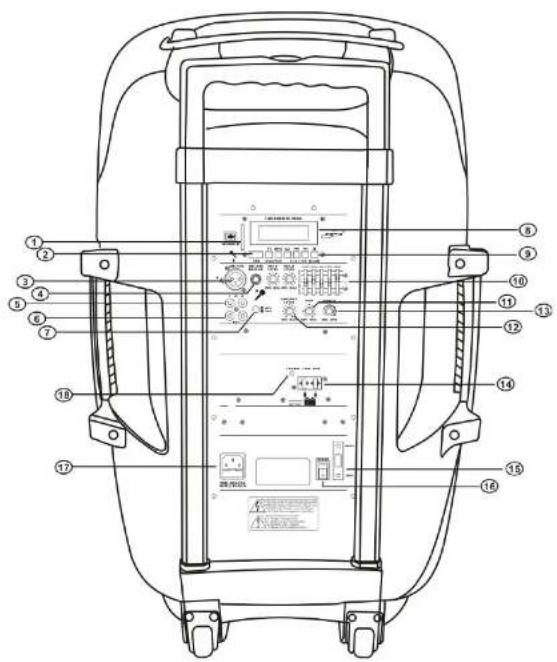
CONTROLS
- SD Port
- USB Port
-
MIC1/LINE1 LEVEL
MIC1/LINE1 signals (unbalanced signal) input and signal level control -
MIC2 (GUTAR) /LINE2 LEVEL
MIC2 (GUTAR)/ LINE2 signals (unbalanced signal) input and a signal level control.
- LINE IN
(Unbalanced signal) the RCA line input and MP3 signal input of
USB / SD / FM / BULETOOTH player control keys.
A. Play / Pause:
a. short press for Play / Pause function
b. Hold for 3 seconds to enter the folder mode, radio working condition
c. FM, Scan function automatically search for channels and automatically saved.
B. MODE
USB / SD / FM / BULETDOOTH function of conversion, and the folder exit.
C. circulatory function keys
Single cycle, all cycle, random play three playback mode to switch between
D. upward selection keys
ECHO effect controller (reverb)
-
LINE IN and MP3 signal input level control
-
MASTER
Control the speaker output power
-
12V external battery connection terminals.
-
Voltage Selector
Change AC Power between 110V and 220V
-
Power Supply Switch.
-
Power Supply Input Connector: Use with power cord
-
The battery charge indicator
Fitted with a 7AH rechargeable battery ,can work about 3.5 hours continuously in normal use.
Make sure all of your euipment is completely OFF and
Brand : Pure Acoustics
Model : PMW 1212
Category : Sound system