
ANX44 - Network card / adapter Audac - Free user manual and instructions
Find the device manual for free ANX44 Audac in PDF.


| Product Type | Dante Network Audio Interface Module |
| Model | ANX44 |
| Number of Inputs | 4 |
| Number of Outputs | 4 |
| Communication Protocol | Audinate Dante |
| Sampling Frequency | 48 kHz |
| Bit Depth | 24-bit |
| Latency | 2 to 5 ms (max 5 ms) |
| Connector Type | RJ45 (on XMP44) |
| Network Standard | 100 Mbit or 1 Gbit Ethernet |
| Power Consumption | 1.5 W |
| Weight | 0.045 kg |
| Compatible Chassis | Audac XMP44 Professional Modular Audio System |
| Installation Requirements | Qualified technician only; requires opening XMP44 chassis |
| Included Accessories | M3 spacers, screws, installation kit |
| ESD Precautions | Touch grounded metal before handling; avoid touching circuit board components |
| Firmware Update | Check audac.eu/software for latest version |
| Audio Streaming | Bidirectional, simultaneous on all channels |
| Configuration | Plug & play with DHCP; self-configuring |
Frequently Asked Questions - ANX44 Audac
User questions about ANX44 Audac
0 question about this device. Answer the ones you know or ask your own.
Ask a new question about this device
Download the instructions for your Network card / adapter in PDF format for free! Find your manual ANX44 - Audac and take your electronic device back in hand. On this page are published all the documents necessary for the use of your device. ANX44 by Audac.
USER MANUAL ANX44 Audac
natural_image
Abstract gray arrow graphic pointing right, no text or symbols presentIntroduction
Dante audio network interface
The ANX44 is a Dante audio network interface for installation in the XMP44 professional modular audio system, featuring four input and four output channels. The installation of this optional module allows the XMP44 to be integrated into any DANTE enabled AV network and flawlessly transfer digital audio with any compatible product on the market.
The bidirectional audio exchange with the 4 SourceCon™ interface card slots allows distribution of the audio stream from the installed modules, allowing any radio tuner, media player, internet radio or other audio source distribution throughout your Dante network.
A truly plug & play solution is created when linking multiple DANTE enabled devices with each other on a standard IP network. It offers self-configuring solutions by using DHCP configuration, while the connection can be made to any existing 100 Mbit or 1 Gbit network infrastructure.
Bidirectional signal transmissions with a sampling frequency of 48 kHz and a bit depth of 24 bit are simultaneously possible on all in and output channels, while guaranteeing an incredibly low latency with a maximum up to 5 ms. (depending of the network occupation).
The ANX44 comes delivered as an installation kit, including all required accessories for integration into the XMP44 chassis. Installation shall be performed by qualified technicians.
INSTALLATION PRECAUTIONS

The installation of the ANX44 module may only be performed by qualified technicians.
Incorrect installation can lead to permanent damage or incorrect functioning of the equipment.
Instructions
Mounting and connecting
Step 1:
ATTENTION

Make sure the audio system is powered off and the power inlet is disconnected from the mains power before the enclosure is opened.
Before removing the network interface card from its protective bag, we recommend touching the grounded metal chassis of the XMP44 (or any other grounded point) to prevent electrostatic discharges affecting the sensitive electronic components. It is recommended to avoid touching of the components on the circuit board directly.
Step 2:
Open the audio systems' enclosure by carefully removing the screws from the top panel of the device. A total of 8 screws shall be removed, two screws on top, two screws on rear and two screws on each side. Once these screws have been removed, you should be able to lift the top panel of the device.

natural_image
Pure technical line drawing of a mechanical bracket or frame structure without any text, numbers, or symbols
natural_image
Technical line drawing of an internal server rack with ports, connectors, and memory modules (no text or labels)Step 3:
Remove all the jumpers (6x) on the main board of the XMP44, located besides the USB connector at the center position of the board.
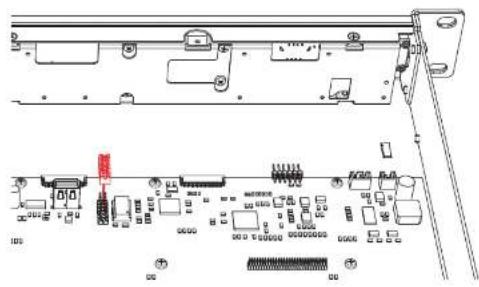
Step 4: Remove the 4 screws located around the pin header 'P9' on the main board of the XMP44, and replace them with the supplied M3 spacers as indicated in the image below.

Step 5:
Insert the ANX44 network interface card to the audio system by placing the female pin-header on bottom of the ANX44 on the matching counterpart on the XMP44 main board. Make sure both male and female parts are well matching and the screw holes on ANX44 are perfectly aligned with the inserted spacers.

Once inserted and positioned correctly, the ANX44 can be secured to the XMP44 by inserting the 4 original screws (removed in step 3) to the M3 spacers.
Step 6:
Double check whether the connection between ANX44 network interface card and the XMP44 main board is well positioned and connected. If everything successful, the top cover of the audio system can be re-fitted by using the original screws (removed in step 2)

natural_image
Front view of a server rack unit with ports and connectors (no visible text or labels)Step 7:
To guarantee the correct functioning of the system with the installed ANX44 dante network audio interface, verify whether the current running software version is up-to-date and fully supporting the interfaces functions.
The running software version is indicated on the front display of the unit during power-up. The latest available software versions and updates can always be found on: http://www.audac.eu/software.
Result:
Your modular audio system is now equipped with a Dante network audio interface, allowing now networked audio possibilities.
For more information about the functions, the connections or Dante in general, refer to the quick start guide or Dante controller user guide.
Additional information
Technical specifications
| Number of inputs | 4 | ||||
| Number of outputs | 4 | ||||
| Communication Protocol Audinate DANTESampling frequency 48 kHzSampling bit depthLatency 2 -- 24-bit msConnection RJ45 connector (on XMP44-Network specification Standard 100 Mbit or 1 Gbit networkMounting Integration in XMP44Power consumption 1.5 WattWeight 0.045 Kg | |||||
Compatible devices (Implementation) XMP44 Professional modular audio system
Protocol (DANTE) compatible devices https://www.audinate.com/products/dante-enabled
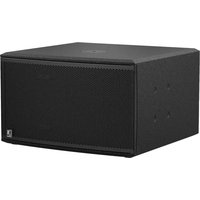
Brand : Audac
Model : ANX44
Category : Network card / adapter