
ER6000 - Uncategorized SEIKO - Free user manual and instructions
Find the device manual for free ER6000 SEIKO in PDF.


| Product Type | Electronic Dictionary & Thesaurus |
| Brand | Seiko |
| Model | ER6000 |
| Display | 27 characters x 4 lines LCD |
| Dimensions (without case) | 148 mm (W) x 100 mm (H) x 27.5 mm (D) |
| Weight (including batteries) | Approx. 250 g |
| Power Supply | 4 x AAA batteries (manganese or alkaline) |
| Battery Life (continuous use) | Approx. 100 hours (manganese), 200 hours (alkaline) |
| Auto Power Off | After approx. 3 minutes of inactivity |
| Operating Temperature | 0°C to +40°C (32°F to 104°F) |
| Dictionary | Concise Oxford Dictionary (10th Edition) with over 240,000 words, phrases, and definitions |
| Thesaurus | Over 4 million synonym links |
| Spellchecker | Up to 260,000 words with three selectable levels (Beginner, Intermediate, Advanced) |
| Word Games | 10 vocabulary-building games: Hangman, User Hangman, Anagrams, User Anagrams, Beat the Clock, Jumble, Mumbo-Jumbo, Memory, Minefield, Hide & Seek |
| Solver Functions | Crossword Solver (wildcard input) and Anagram Solver |
| Calculator | Full function with memory and percentage |
| Converters | Currency, Metric/Imperial (length, weight, volume, temperature), Clothing Size (men, women, children) |
| Additional Features | Phrase Search, Pick Function, Help, Demo, Contrast Adjustment, Wildcard (?) |
| Reset Button | Located on bottom; press after battery replacement or malfunction |
| Warranty | One year limited warranty covering defects in material/workmanship |
| Maintenance & Care | Avoid extreme heat/cold, water/liquids, and pressure; remove batteries if not used for extended periods |
| Spare Parts / Repairability | No user-serviceable parts; refer to authorized service for repair |
Frequently Asked Questions - ER6000 SEIKO
User questions about ER6000 SEIKO
0 question about this device. Answer the ones you know or ask your own.
Ask a new question about this device
Download the instructions for your Uncategorized in PDF format for free! Find your manual ER6000 - SEIKO and take your electronic device back in hand. On this page are published all the documents necessary for the use of your device. ER6000 by SEIKO.
USER MANUAL ER6000 SEIKO
SEIKO
ALWAYS press the "RESET" button on the bottom of the unit after battery replacement or if the unit fails to operate properly.
SII ● Seiko Instruments Inc.
Thank you for purchasing the ER6000.
Please read this operation manual carefully before using the product.
This unit is an Electronic Concise Oxford Dictionary (Tenth Edition), with Thesaurus and English Spellchecker, using data from Oxford University Press.
The Concise Oxford Dictionary, the Thesaurus, the Spellchecker, the Crossword/Anagram Solver and 10 Word Games enable you to effortlessly enhance your knowledge of English vocabulary.
The Concise Oxford Dictionary - (Tenth Edition) © Oxford University Press 1999, The Concise Oxford Thesaurus © Oxford University Press 1997, The Oxford English Spellehecker © Oxford University Press 1998
"SEIKO" is a trademark of Seiko Corporation.
"SII" is a trademark of Seiko Instruments Inc. © 2003 Seiko Instruments Inc.
CONTENTS
Functions and Features 2
The Keys and their Functions ....4
Preparation for using the Unit 6
- Installing Batteries 6
Resetting:
Changing Batteries:
Removing and Setting up the Case Cover ..8
-
Contrast Adjustment 9
-
Selecting the Spellchecker level .....10
Demo Function 11
Dictionary 12
Basic Procedure 12
Phrase Search....17
Thesaurus 20
Spellchecker....25
Word Games / Solver 31
Crossword Solver 32
Anagram Solver....33
Selecting the Game and Setting the Level .... 34
Hangman....35
User Hangman 38
Anagrams 39
User Anagrams 40
Beat the Clock 42
Jumble 43
Mumbo-Jumbo 44
Memory 45
Minefield 46
Hide & Seek 48
alculator 49
converters 50
Currency Conversion......51
Metric/Imperial Conversion.... 52
Clothing Size Chart 53
eip Function 55
obreviations used in the dictionary .....56
ronunciations 59
rener Use / Specification 62
Open Use / Specification 68 VE YEAR LIMITED/WARDANTLY 64
METARELLIMITED WARRANTY 04

Functions and Features
1 Dictionary
High speed search of over 240,000 words, phrases and definitions covering current and historical English, as well as countless specialist and technical subjects.
2 Thesaurus
With a high speed search of over 4 million synonym links, you will never be lost for words again.
3 Spellchecker
Instant phonetic spelling correction for over 260,000 words ensures you will always have the answer at your fingertips.
4 Solver
Crossword Solver – Simply fill in the letters you know and put question marks (?) for the ones you don't, to complete those hard-to-finish crosswords.
Anagram Solver - Simply type a word and the solver will build a list of as many anagram words as possible.

5 Word Games
10 great vocabulary-building word games to challenge your command of the English language.
6 Calculator
A full function calculator with memory and % is included.
7 Converters
The conversion function enables you to convert foreign currencies and metric/imperial units of length, weight, liquid measure and temperature. In foreign countries you can easily check clothing sizes for: shirts, shoes, hats etc. for men, women and children.
8 Help Function
An explanation of how to operate the various functions is simply explained on the screen at each operational stage in each mode.
9 Demo Function
A demonstration display explains the contents of the unit.
The Keys and their Functions
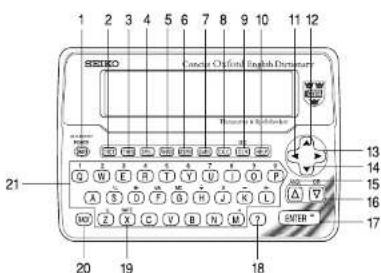
- When the power is turned back on, the unit will show the display used before the power was last turned off.
- The unit will automatically TURN OFF when not used for approximately 3 minutes.
1 Turns power ON and OFF.
2 Selects Dictionary mode.
3 Selects Thesaurus mode.
4 Selects Spellchecker mode.
5 Selects Phrase Search function.
6 Selects Solver mode.
7 Selects Word Game mode.
8 Selects Calculator mode, Currency, Metric/Imperial and Clothing Size Converters.
9 Clears all the input characters.
10 Activates Help function.
11 For deleting the last input character.
12 For scrolling back through the lists in memory.
13 Enters a single blank space when pressed once.
A hyphen can be entered by pressing
▲ or ▼ after entering a space. 14 For scrolling down through the lists in memory.
15 For scrolling back through the lists in memory.
Used to insert of "AND" in the Phrase Search function.
16 For scrolling down through the lists in memory.
Used to insert of "OR" in the Phrase Search function.
17 Executes the functions.
18 Used in place of letter(s) you are unsure of, when the correct spelling of a word is unknown.
19 For entering the new rate in the
conversion mode.
20 Returns the display to the previous state.
21 Letter and numeral input keys.
* 11\~16 For selecting the menu in the conversion mode.
Preparation for using the Unit
1. Installing Batteries
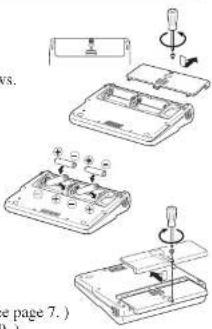
The unit is powered by four (4) "AAA" size batteries. Before using the unit, please install the batteries as follows.
- Turn the unit over.
- Remove the screw and the battery cover.
- Insert four (4) new "AAA" batteries according to the polarity (+, -) marks inside the battery compartment.
- Replace the battery cover and the screw.
- Press the "RESET" button on the bottom of the unit. (See page 7.) The contrast adjustment display will appear. (See page 9.)
- Resetting:
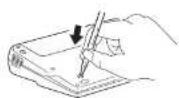
If the unit does not operate properly after the battery has been replaced, or if at any time the unit fails to operate properly, gently press the "RESET" button on the bottom of the unit.
- Changing Batteries:
The batteries need to be changed as soon as display becomes dim.
- Make sure that power is switched off before replacing batteries.
- Do not use a previously used battery together with a new battery.

CAUTION
• The battery may pose a choking hazard to small children.
- Keep the battery and product away from small children.
- Do not expose the battery to open flame or intense heat.
- Never use batteries other than those specified.
- Rechargeable batteries cannot be used
- Remove the batteries from the unit if you do not intend to use it for a long duration.
- Removing and Setting up the Case Cover
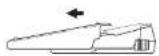
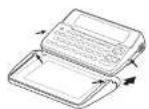
- Initially, the case cover is closed. Remove the case cover by sliding it in the direction of the arrow.
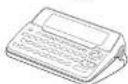
- Turn the case cover over and align the rails on the inside of the cover with the guide slots on the unit. Then slide the device into the cover until it clicks into place.
- The case cover then holds the device at the ideal angle for viewing the LCD screen.
2. Contrast Adjustment
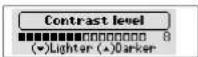
- After resetting, the contrast adjustment display will appear.
- You can use either ▼ or ▲ to adjust the contrast of the display Level 1 to Level 16. (Initial setting=8)
3 Press ENTER to finish.
The screen from which you can select the
Spellechecker level will appear.
( See page 10.)
* If you want to adjust the contrast of the display again, turn off the power and then press and release ONOFF while holding down C.

3. Selecting the Spellchecker level
Due to the extensive coverage of the Oxford English Source Lexicon, you can select a level for the spellchecker to more closely match your needs.
- After you've adjusted the contrast, the screen from which you can select the Spellchecker level will appear.
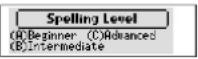
There are three levels available for you to select from: (A) Beginner, (B) Intermediate, and (C) Advanced.
(A) Beginner: Approximately 63,000 words (student level)
(B) Intermediate: Approximately 128,000 words (general and business use)
(C) Advanced: Approximately 260,000 words (specialist use)
- Select the level you require by pressing the corresponding key. For example, press A if you wish to select the “(A) Beginner” level.
A demonstration display will appear once you've selected the level.
10
* If you want to reset the level, turn on the power by pressing ON/OFFE while holding down L. The screen from which you can select the Spellchecker level will appear.
- Demo Function
After you've selected the Spellchecker level, a demonstration display will begin to explain the contents of the unit.
You can stop the demonstration by pressing any of the keys.
* The next time you turn on the power, the demonstration display will not appear if you press ON/OFF while holding down D.
* If you want to see the demonstration display again, turn on the power by pressing ON/OFF while holding down D.
Dictionary
Basic Procedure
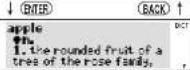
1 Press DICT.
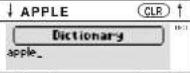
2 Type a word.
Example: apple
3 Press ENTER.
The unit shows headwords, parts of speech, inflected forms and definitions.
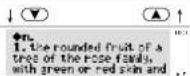
- The mark will appear on the display if there is insufficient space to display the whole definition.
4 Press ▼ to see the rest of a definition.
Press ▲ to scroll up.
DICT
12
- When there are phrases, phrasal verbs, derivatives or origins, they will be recorded after the last definition.
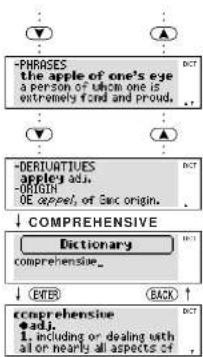
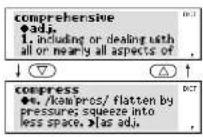
5 To clear the display and search for another word, simply enter your new word.
Example: comprehensive
Pressing or will also clear the display.
13
- Searching for Words
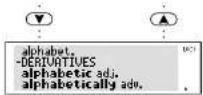
- T o scroll alphabetically up or down through the Dictionary's headword list, press ▼ or △.
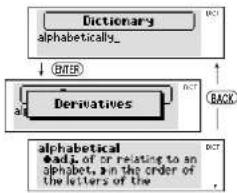
- Derivatives
If the word entered is a derivative, the definitions of the base form will be displayed.
Example: alphabetically
flowchart
graph TD
    A["Dictionary\nalphabetically_"] -->|ENTER| B["Derivatives"]
    B -->|BACK| A
    C["alphabetical\nadj. of or relating to an alphabet, in the order of the letters of the"] -->|DCT| A
14
- Entering and Correcting Letters
* Up to 30 letters can be entered.
* Use ▶ to enter a space.
* Corrections can be made by using
* T he entire display can be cleared by pressing CLR DICTC
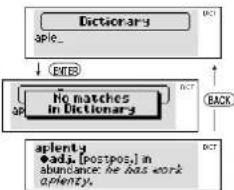
- Misspelled Words or Words not in the Dictionary
If the word entered is not contained in the dictionary, pressing ENTER will display the word whose spelling comes closest to that of the word originally entered. Example: aple
flowchart
graph TD
    A["Dictionary\napple_"] -->|EXIT| B["HTML matches in Dictionary\napple"]
    B -->|BACK| C["aplenty\nadj. [postpos,"] in abundance\napple has work aplenty]
    C -->|DCT| A
15
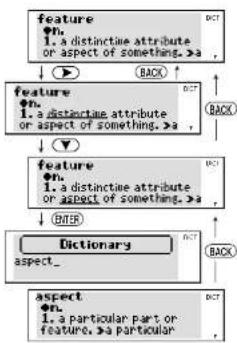
- Pick Function
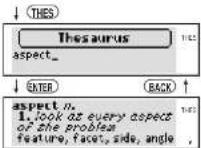
You can select a word in an entry and look the definition up in the Dictionary, or consult the Thesaurus to find the synonyms for that word. Example: feature
1 Press ▶ to select the first word you can pick. Selected word will begin to flash on and off. (Press ◀ to select the last word.)
2 Use arrow keys to select another word.
3 Press ENTER or DICT The definition for "aspect" will be presented.
flowchart
graph TD
    A["feature\n1. a distinctive attribute or aspect of something. >a"] --> B["feature\n2. a distinctive attribute or aspect of something. >a"]
    B --> C["feature\n3. a distinctive attribute or aspect of something. >a"]
    C --> D["Dictionary\naspect..."]
    D --> E["aspect\n4. a particular part or feature. >a particular"]
    style A fill:#f9f,stroke:#333
    style B fill:#ccf,stroke:#333
    style C fill:#cfc,stroke:#333
    style D fill:#fcc,stroke:#333
    style E fill:#cff,stroke:#333
16
4 Press (THES) and then (ENTER).
The synonyms for "aspect" will be displayed.
Phrase Search
Unlike a print dictionary, you can use the phrase search to search for phrases and phrasal verbs, using only part of the phrase (keyword).
1 Press (PHRSRCH)
2 Enter the specific keyword. Example: advantage
3 Press ENTER
The first phrase in the Dictionary containing your keyword will be displayed, along with its definition.
17
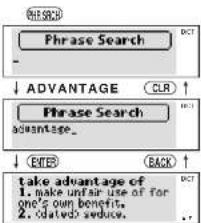
4 Pressing ▽ will start the search again to find other dictionary phrases containing your keyword.
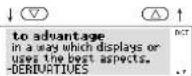
- Entering Multiple Keywords
You can search for up to four keywords in an entry. You can construct your search by linking your keywords in two ways.
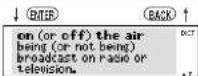
Keywords with AND
"▲" represents "and"
This method will search for phrases which include all keywords.
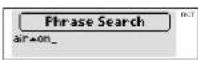
1 Use △ to enter "▲".
Example: air ▲ on
2 Press ENTER.
18
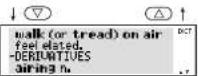
Keywords with OR
"▼" represents "or"
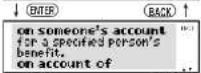
This method will search for phrases which contain any or all of the entered keywords.
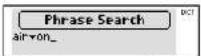
1 Use ▽ to enter "▼".
Example:air ▼ on
2 Press ENTER.
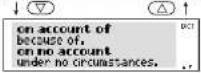
- Words Not in the Dictionary
If no dictionary phrases contain the word (s) entered, the message "No matches found" will be displayed for about one second. The display will then return to the word originally entered.
19
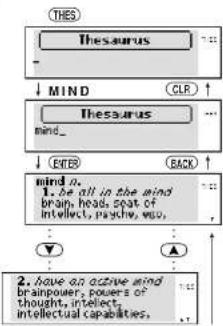
Thesaurus
You can investigate the synonyms (and opposites) for a word you enter.
1 Press THES.
2 Type a word.
Example: mind
3 Press ENTER.
The example phrase using the meaning of the first group and synonyms will be displayed.
4 Press ▼ to see other synonyms.
Press ▲ to scroll up.
flowchart
graph TD
    A["Thesaurus"] --> B["MIND"]
    B --> C["Mind_"]
    C --> D["ENTER"]
    D --> E["BACK"]
    E --> F["Mind 0."]
    F --> G["1. be all in the mind brain, head, seat of intellect, psycho, echo, etc."]
    G --> H["2. have an active mind brainpower, powers of thought, intellect, intellectual capabilities."]
20
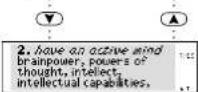
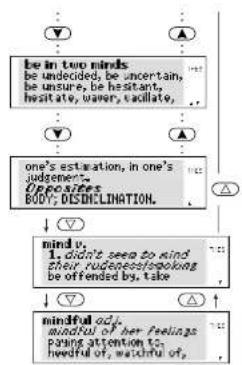
- When there are phrases or opposites, they will be recorded after the last synonyms.
5 To scroll alphabetically up or down through the headword list, press ▼ or △.
flowchart
graph TD
    A["be in two minds\nbe undecided, be uncertain,\nbe unsure, be hesitant,\nhesitate, under, tollate"] --> B["one's estimation, in one's judgement.\nopposites\nBODY, DISCHLINATION."]
    B --> C["mind y:\n1. didn't seem to mind\ntheir rudgesesspiking\nbe offended by, take"]
    C --> D["nindful adj.\nmindful of her feelings\npicking attention to\nheeful of, watchful of,"]
- Words not in the Thesaurus
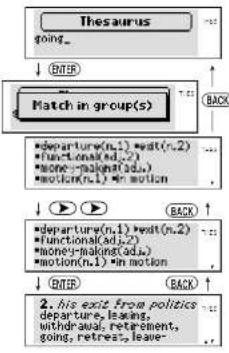
If the word entered is not a Thesaurus headword but is contained in the synonyms or opposites data, the unit will find and display the group(s) of synonym or opposite.
Example: going
1 Press ▶ to select the first group.
2 Use arrow keys to select another group.
3 Press ENTER.
The example phrase using the meaning of the selected group and synonyms will be displayed.
flowchart
graph TD
    A["Thesaurus"] --> B["GOING..."]
    B --> C["MATCH in group(s)"]
    C --> D["departure(n,1) * wait(n,2) ..."]
    D --> E["Functional(ad,2) ..."]
    E --> F["money-making(ad,a) ..."]
    F --> G["motion(n,1) * in motion"]
    G --> H["departure(n,1) * wait(n,2) ..."]
    H --> I["Functional(ad,2) ..."]
    I --> J["money-making(ad,a) ..."]
    J --> K["motion(n,1) * in motion"]
    K --> L["departure(n,1) * wait(n,2) ..."]
    L --> M["Functional(ad,2) ..."]
    M --> N["money-making(ad,a) ..."]
    N --> O["motion(n,1) * in motion"]
    O --> P["departure(n,1) * wait(n,2) ..."]
    P --> Q["Functional(ad,2) ..."]
    Q --> R["money-making(ad,a) ..."]
    R --> S["motion(n,1) * in motion"]
    S --> T["departure(n,1) * wait(n,2) ..."]
    T --> U["Functional(ad,2) ..."]
    U --> V["money-making(ad,a) ..."]
    V --> W["motion(n,1) * in motion"]
    W --> X["departure(n,1) * wait(n,2) ..."]
    X --> Y["Functional(ad,2) ..."]
    Y --> Z["money-making(ad,a) ..."]
    Z --> AA["motion(n,1) * in motion"]
    AA --> AB["departure(n,1) * wait(n,2) ..."]
    AB --> AC["Functional(ad,2) ..."]
    AC --> AD["money-making(ad,a) ..."]
    AD --> AE["motion(n,1) * in motion"]
    AE --> AF["departure(n,1) * wait(n,2) ..."]
    AF --> AG["Functional(ad,2) ..."]
    AG --> AH["money-making(ad,a) ..."]
    AH --> AI["motion(n,1) * in motion"]
    AI --> AJ["departure(n,1) * wait(n,2) ..."]
    AJ --> AK["Functional(ad,2) ..."]
    AK --> AL["money-making(ad,a) ..."]
    AL --> AM["motion(n,1) * in motion"]
    AM --> AN["departure(n,1) * wait(n,2) ..."]
    AN --> AO["Functional(ad,2) ..."]
    AO --> AP["money-making(ad,a) ..."]
    AP --> AQ["motion(n,1) * in motion"]
    AQ --> AR["departure(n,1) * wait(n,2) ..."]
    AR --> AS["Functional(ad,2) ..."]
    AS --> AT["money-making(ad,a) ..."]
    AT --> AU["motion(n,1) * in motion"]
    AU --> AV["departure(n,1) * wait(n,2) ..."]
    AV --> AW["Functional(ad,2) ..."]
    AW --> AX["money-making(ad,a) ..."]
    AX --> AY["motion(n,1) * in motion"]
    AY --> AZ["departure(n,1) * wait(n,2) ..."]
    AZ --> BA["Functional(ad,2) ..."]
    BA --> BB["money-making(ad,a) ..."]
    BB --> BC["motion(n,1) * in motion"]
    BC --> BD["departure(n,1) * wait(n,2) ..."]
    BD --> BE["Functional(ad,2) ..."]
    BE --> BF["money-making(ad,a) ..."]
    BF --> BG["motion(n,1) * in motion"]
    BG --> BH["departure(n,1) * wait(n,2) ..."]
    BH --> BI["Functional(ad,2) ..."]
    BI --> BJ["money-making(ad,a) ..."]
    BJ --> BK["motion(n,1) * in motion"]
    BK --> BL["departure(n,1) * wait(n,2) ..."]
    BL --> BM["Functional(ad,2) ..."]
    BM --> BN["money-making(ad,a) ..."]
    BN --> BO["motion(n,1) * in motion"]
    BO --> BP["departure(n,1) * wait(n,2) ..."]
    BP --> BQ["Functional(ad,2) ..."]
    BQ --> BR["money-making(ad,a) ..."]
    BR --> BS["motion(n,1) * in motion"]
    BS --> BT["departure(n,1) * wait(n,2) ..."]
    BT --> BU["Functional(ad,2) ..."]
    BU --> BV["money-making(ad,a) ..."]
    BV --> BW["motion(n,1) * in motion"]
    BW --> BX["departure(n,1) * wait(n,2) ..."]
    BX --> BY["Functional(ad,2) ..."]
    BY --> BZ["money-making(ad,a) ..."]
    BZ --> CA["motion(n,1) * in motion"]
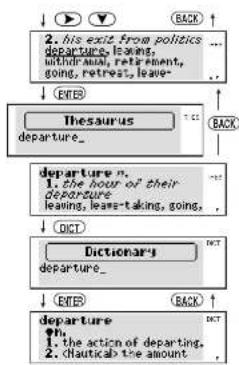
- Pick Function
1 Press ▶ to select the first word.
2 Use arrow keys to select another word.
3 Press ENTER or THES.
The synonyms for "departure" will be displayed.
4 Press DICT and then ENTER.
The definition for "departure" will be presented.
flowchart
graph TD
    A["2. his exit from politics departure, leaving, without moral retirement, going, retreat, leave"] --> B["ETER"]
    B --> C["Thesaurus departure"]
    C --> D["departure n. 1. the hour of their departure leaving, lease-taking, going,"]
    D --> E["DET"]
    E --> F["Dictionary departure"]
    F --> G["ETER"]
    G --> H["departure"]
    H --> I["1. the action of departing. 2. <Nautical> the amount"]
    I --> J["DET"]
- Words not in Memory
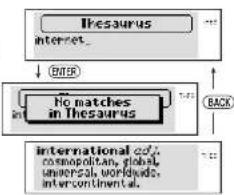
If you press ENTER and the word you have entered is not contained in the unit's list of entries, or if the word you entered is misspelled, the unit will find and display a word which is spelled most closely to your entered word.
This happens even if the found word has no linguistic relationship to your entered word.
Example: internet
flowchart
graph TD
    A["Ithesaurus\ninternet."] --> B["No matches\nin Ithesaurus"]
    B --> C["INTERNATIONAL COY.\ncosmopolitan, global,\nuniversal worldwide,\ntercontinental."]
    B --> D["BACK"]
Spellchecker
- Selecting the Spellchecker level
- If you want to reset the level, turn on the power by pressing ON/OFF while holding down L. The screen from which you can select the Spellchecker level will appear. (See page 10.)
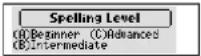
(A) Beginner: Approximately 63,000 words (student level)
(B) Intermediate: Approximately 128,000 words (general and business use)
(C) Advanced: Approximately 260,000 words (specialist use)
- Select the level you require by pressing the corresponding key. For example, press A if you wish to select the “(A) Beginner” level.
* If the spelling of an input word tallies with that of a word in the full vocabulary list of 260,000 words, the message "Correct!" will appear regardless of the level you've selected.
* Examples at the “Intermediate” level are used in the explanation.
- If the spelling of a word you enter is correct:
1 Press SPELL.
2 Type a word.
Example: colour
3 Press ENTER.
The message "Correct!" will appear and the arrow mark will begin to flash on and off.
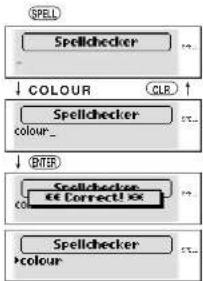
flowchart
graph TD
    A["Spell"] --> B["Spellchecker"]
    B --> C["COLOUR"]
    C --> D["ORER"]
    D --> E["Spellchecker"]
    E --> F["Correct"]
    F --> G["ORER"]
    G --> H["Spellchecker"]
26
4 To scroll alphabetically up or down through the Spellchecker's word list, press ▽ (▼) or △ (▲).
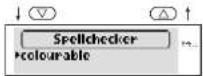
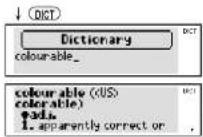
- Pick Function
A word in the spell checker can be picked and used as the entry word for other modes.
Press DICT.
The definition for "colourable" will be presented.
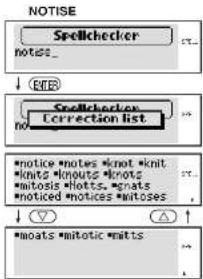
- If the spelling of the word you enter is incorrect:
1 Press SPELL.
2 Type a word.
Example: notice
3 Press ENTER.
The corresponding word list will be displayed.
4 Press ▽(▼) or △(▲).
You may scroll through the corresponding word list.
28
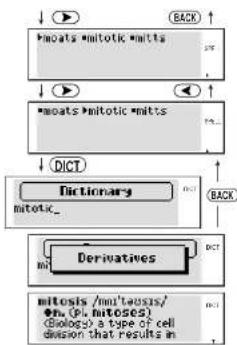
- Pick Function
1 Press ▶ to select the first word.
2 Use arrow keys to select another word.
3 Press DICT.
The definition for "mitotic" will be presented.
flowchart
graph TD
    A["•mitotic mitotic"] --> B["•mitotic"]
    B --> C["•mitotic"]
    C --> D["•mitotic"]
    D --> E["•mitotic"]
    E --> F["•mitotic"]
    F --> G["•mitotic"]
    G --> H["•mitotic"]
    H --> I["•mitotic"]
    I --> J["•mitotic"]
    J --> K["•mitotic"]
    K --> L["•mitotic"]
    L --> M["•mitotic"]
    M --> N["•mitotic"]
    N --> O["•mitotic"]
    O --> P["•mitotic"]
    P --> Q["•mitotic"]
    Q --> R["•mitotic"]
    R --> S["•mitotic"]
    S --> T["•mitotic"]
    T --> U["•mitotic"]
    U --> V["•mitotic"]
    V --> W["•mitotic"]
    W --> X["•mitotic"]
    X --> Y["•mitotic"]
    Y --> Z["•mitotic"]
    Z --> AA["•mitotic"]
    AA --> AB["•mitotic"]
    AB --> AC["•mitotic"]
    AC --> AD["•mitotic"]
    AD --> AE["•mitotic"]
    AE --> AF["•mitotic"]
    AF --> AG["•mitotic"]
    AG --> AH["•mitotic"]
    AH --> AI["•mitotic"]
    AI --> AJ["•mitotic"]
    AJ --> AK["•mitotic"]
    AK --> AL["•mitotic"]
    AL --> AM["•mitotic"]
    AM --> AN["•mitotic"]
    AN --> AO["•mitotic"]
    AO --> AP["•mitotic"]
    AP --> AQ["•mitotic"]
    AQ --> AR["•mitotic"]
    AR --> AS["•mitotic"]
    AS --> AT["•mitotic"]
    AT --> AU["•mitotic"]
    AU --> AV["•mitotic"]
    AV --> AW["•mitotic"]
    AW --> AX["•mitotic"]
    AX --> AY["•mitotic"]
29
• Using the Wildcard Function
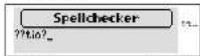
If you are unsure of part of the spelling of a word, enter the word using question mark(s) for the letter(s) of which you are unsure.
1 Press SPELL.
2 Type a word.
Example: ??tio?
Use ? to enter question marks.
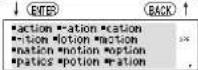
3 Press ENTER.
The corresponding word list will be displayed.
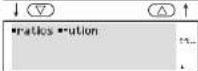
4 Press ▽(▼) or △(▲).
You may scroll through the corresponding word list.
??TIO?
Word Games / Solver
The database for the word games is drawn from the British English Source Lexicon. This is one of the highest capacity databases of modern English available and has been exclusively produced by Oxford University Press. It covers an extensive range of subject material including references to technical, scientific, historical and many other terms.
The word games have therefore been developed to provide a stimulating challenge to help you to discover new words and broaden your vocabulary.
You can take on the challenge of 10 different word games set to any one of three levels of difficulty.
• The skill levels work as follows:
(A) Beginner: Approximately 63,000 words (student level)
(B) Intermediate: Approximately 128,000 words (general and business use)
(C) Advanced: Approximately 260,000 words (specialist use)
• 10 word games:
Hangman, User Hangman, Anagrams, User Anagrams, Beat the Clock, Jumble, Mumbo-Jumbo, Memory, Minefield and Hide & Seek
31
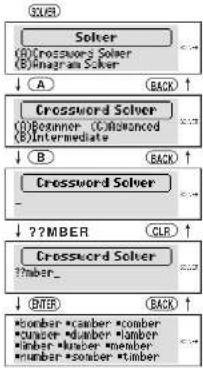
Crossword Solver
Look for the right word by entering letters you know along with question marks for any letters you don't know.
1 Press SOLVER
2 Select "Crossword Solver" by pressing A.
3 Select "Intermediate" by pressing Ⓑ.
4 Type a word. Example: ??mber Use ? to enter question marks.
5 Press ENTER. The corresponding word list will be displayed.
flowchart
graph TD
    A["SOLVER"] --> B["SOLO"]
    B --> C["SOVER"]
    C --> D["SOVER"]
    D --> E["SOVER"]
    E --> F["SOVER"]
    F --> G["SOVER"]
    G --> H["SOVER"]
    H --> I["SOVER"]
    I --> J["SOVER"]
    J --> K["SOVER"]
    K --> L["SOVER"]
    L --> M["SOVER"]
    M --> N["SOVER"]
    N --> O["SOVER"]
    O --> P["SOVER"]
    P --> Q["SOVER"]
    Q --> R["SOVER"]
    R --> S["SOVER"]
    S --> T["SOVER"]
    T --> U["SOVER"]
    U --> V["SOVER"]
    V --> W["SOVER"]
    W --> X["SOVER"]
    X --> Y["SOVER"]
    Y --> Z["SOVER"]
    Z --> AA["SOVER"]
    AA --> AB["SOVER"]
    AB --> AC["SOVER"]
    AC --> AD["SOVER"]
    AD --> AE["SOVER"]
    AE --> AF["SOVER"]
    AF --> AG["SOVER"]
    AG --> AH["SOVER"]
    AH --> AI["SOVER"]
    AI --> AJ["SOVER"]
    AJ --> AK["SOVER"]
    AK --> AL["SOVER"]
    AL --> AM["SOVER"]
    AM --> AN["SOVER"]
    AN --> AO["SOVER"]
    AO --> AP["SOVER"]
    AP --> AQ["SOVER"]
    AQ --> AR["SOVER"]
    AR --> AS["SOVER"]
    AS --> AT["SOVER"]
    AT --> AU["SOVER"]
    AU --> AV["SOVER"]
    AV --> AW["SOVER"]
    AW --> AX["SOVER"]
    AX --> AY["SOVER"]
    AY --> AZ["SOVER"]
    AZ --> BA["SOVER"]
    BA --> BB["SOVER"]
    BB --> BC["SOVER"]
    BC --> BD["SOVER"]
    BD --> BE["SOVER"]
    BE --> BF["SOVER"]
    BF --> BG["SOVER"]
    BG --> BH["SOVER"]
    BH --> BI["SOVER"]
    BI --> BJ["SOVER"]
    BJ --> BK["SOVER"]
    BK --> BL["SOVER"]
    BL --> BM["SOVER"]
    BM --> BN["SOVER"]
    BN --> BO["SOVER"]
    BO --> BP["SOVER"]
    BP --> BQ["SOVER"]
    BQ --> BR["SOVER"]
    BR --> BS["SOVER"]
    BS --> BT["SOVER"]
    BT --> BU["SOVER"]
    BU --> BV["SOVER"]
    BV --> BW["SOVER"]
    BW --> BX["SOVER"]
    BX --> BY["SOVER"]
    BY --> BZ["SOVER"]
    BZ --> CA["SOVER"]
    CA --> CB["SOVER"]
    CB --> CC["SOVER"]
    CC --> CD["SOVER"]
    CD --> CE["SOVER"]
    CE --> CF["SOVER"]
    CF --> CG["SOVER"]
    CG --> CH["SOVER"]
    CH --> CI["SOVER"]
    CI --> CJ["SOVER"]
    CJ --> CK["SOVER"]
32
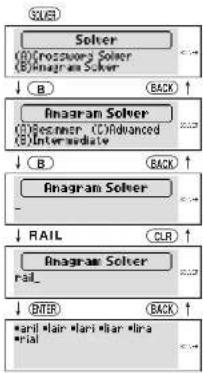
Anagram Solver
Look for the right word using the same letters as the word you have entered.
1 Press SOLVER.
2 Select "Anagram Solver" by pressing Ⓑ.
3 Select "Intermediate" by pressing B.
4 Type a word.
Example: rail
5 Press ENTER.
The corresponding word list will be displayed.
* If the word or letters entered do not have any anagrams, the message "No anagrams!" will be displayed.
33
flowchart
graph TD
    A["SOLER"] --> B["SOLO"]
    B --> C["B"]
    C --> D["A"]
    D --> E["Anagram Solver"]
    E --> F["B"]
    F --> G["R"]
    G --> H["RAIL"]
    H --> I["Anagram Solver"]
    I --> J["R"]
    J --> K["ENTER"]
    K --> L["*aril klair *laril *lira *rial"]
    style A fill:#f9f,stroke:#333
    style B fill:#ccf,stroke:#333
    style C fill:#cfc,stroke:#333
    style D fill:#fcc,stroke:#333
    style E fill:#cff,stroke:#333
    style F fill:#ffc,stroke:#333
    style G fill:#cfc,stroke:#333
    style H fill:#fcc,stroke:#333
    style I fill:#cfc,stroke:#333
    style J fill:#fcc,stroke:#333
    style K fill:#ffc,stroke:#333
    style L fill:#fcc,stroke:#333
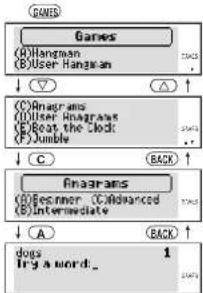
Selecting the Game and Setting the Level
Examples are based on “(A) Beginner” level.
1 Press GAMES.
2 Select the game you wish to play by pressing ▽ (▼) or △ (▲).
3 Select the game by pressing the alphabet key.
Example: Select "Anagrams" by pressing C.
4 Set the level and start the game.
Example: Set the Beginner level by pressing A.
flowchart
graph TD
    A["Games"] --> B["(A) Hangman\n(B) User Hangman"]
    B --> C["↓"]
    C --> D["(C) Diagrams\n(II) User Diagrams\n(E) Boat the Clock\n(F) Jumble"]
    D --> E["↓"]
    E --> F["C"]
    F --> G["Back"]
    G --> H["Anagrams\n(O) Beginner\n(C) Advanced\n(E) Intermediate"]
    H --> I["↓"]
    I --> J["A"]
    J --> K["Back"]
    K --> L["dogs\nTry a word..."]
34
flowchart
graph TD
    A["Games"] --> B["(A) Hangman\n(B) User Hangman"]
    B --> C["↓"]
    C --> D["(C) Diagrams\n(II) User Diagrams\n(E) Boat the Clock\n(F) Jumble"]
    D --> E["↓"]
    E --> F["C"]
    F --> G["Back"]
    G --> H["Anagrams\n(O) Beginner\n(C) Advanced\n(E) Intermediate"]
    H --> I["↓"]
    I --> J["A"]
    J --> K["Back"]
    K --> L["dogs\nTry a word..."]
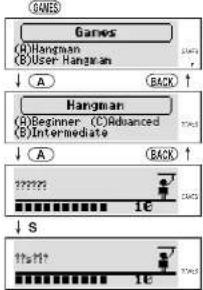
Hangman
This is a game in which you have to find a mystery word whose spelling is unknown to you with a limited number of allowed tries.
1 Press GAMES.
2 Select "Hangman" by pressing A.
3 Set the level and start the game.
The number of letters in the mystery word is indicated by question marks. The number of times you can try is shown at the right of the screen. (Beginner-10/Intermediate-8/Advanced-6)
4 When you enter one of the letters used in the mystery word, the question mark will be replaced by the letter.
Example: Enter "s".
flowchart
graph TD
    A["Games"] --> B["Hangman"]
    B --> C["User Hangman"]
    C --> D["Back"]
    E["Hangman"] --> F["Beginner (C) Advanced"]
    F --> G["Intermediate"]
    G --> H["Back"]
    I["S"] --> J["1e"]
    J --> K["1e"]
35
flowchart
graph TD
    A["Games"] --> B["Hangman"]
    B --> C["User Hangman"]
    C --> D["Back"]
    E["Hangman"] --> F["Beginner (C) Advanced"]
    F --> G["Intermediate"]
    G --> H["Back"]
    I["S"] --> J["1e"]
    J --> K["1e"]
* In case the same letter is used two or more times in the same word:
If you enter the letter, all the corresponding question marks will be replaced by the letter simultaneously. Example: Enter "i".
* The number of trics you are allowed will decrease progressively every time you enter an incorrect letter.
5 If all the letters in the word are displayed before you have used up all the tries, "You win!" will be displayed and counted in the "Won" column.
Then the next mystery word will be displayed.
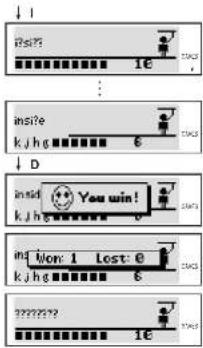
* One letter will be displayed in turn as a "Tip" every time you press ENTER.
* All the letters will be displayed if you press ⑦
* If you fail to find the word before you have used up all the tries you are allowed, or if you use ENTER for "Tips" or ? half way through a game, "Sorry, you lost." will be displayed and counted in the "Lost" column.
Then the answer will be displayed.
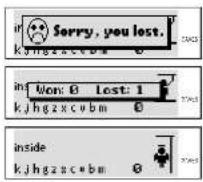
User Hangman
This is a Hangman Game using words that you can select.
1 Press GAMES.
2 Select "User Hangman" by pressing Ⓑ.
3 Set the level and start the game.
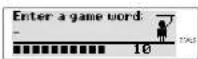
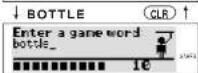
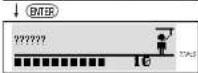
4 Enter a word. You can use up to 13 letters. Example: bottle
5 Press ENTER.
* The ensuing procedure is the same as that used in the Hangman Game.
\*\*\* Tip for Parents \*\*\*
This game is a fun way for you to help your children to learn new words from a list or as part of their homework. Select a suitable level, secretly enter your chosen word and then work with them to correctly spell the mystery word.
Anagrams
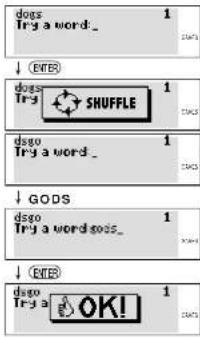
Using all the letters of the displayed word, you attempt to find a specified number of other words. (Beginner-1 word / Intermediate-Up to 2 words / Advanced-No limit)
1 Press GAMES and then C to select "Anagram".
2 Set the level and start the game.
The selected word and the number of other words will be displayed. Example: dogs
3 If you press ENTER, the order of the letters in the displayed word will change at random.
4 Enter the word using all the letters of the selected word.
5 Press ENTER.
If your answer is correct, "OK!" will be displayed. If you enter all the answers, "You win!" will be displayed and counted in the "Won" column.
* If you press ☐, "Sorry, you lost." will be displayed and counted in the "Lost" column.
Then the answer will be displayed.

User Anagrams
This is an anagram game using words that you can select.
1 Press GAMES and then D to select "User Anagram". There is no need to set the level.
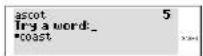
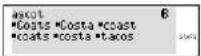
2 Enter a word or jumble of letters. You can use up to 11 letters. Example: ascot
3 Press ENTER. The selected word and the number of other words will be displayed.
4 Enter the word using all the letters and press ENTER. Example: coast If your answer is correct, "OK!" will be displayed.
| Enter a game word: | |
| CNC3 | |
| Enter a game word: ascot. |
| ascot | 6 |
| Try a word_ |
| ascot Try a | OK! | 6 |
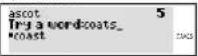
5 Enter the next word using all the letters and press ENTER.
Example: coats
If your answer is incorrect, the message "Try Again." will appear.
If you enter all the answers, "You win!" will be displayed and counted in the "Won" column.
* If you press ☐, "Sorry, you lost." will be displayed and counted in the "Lost" column.
↓ COATS
\*\*\* Tip for Parents \*\*\*
This game is a fun way for you to help your children to learn new words. Simply enter your chosen word and then work with them to correctly find the anagrams.
Beat the Clock
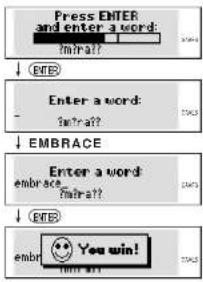
The letters of a mystery word are displayed one at a time at regular intervals. (Beginner-3 seconds / Intermediate-2 seconds / Advanced-1 second) Enter the mystery word before they are all displayed.
1 Press GAMES and then E to select "Beat the Clock".
2 Set the level and start the game. The hidden letters will be displayed one by one.
3 Press ENTER to stop the appearance of letters.
4 Enter the mystery word.
5 Press ENTER. If your answer is correct, "You win!" will be displayed and counted in the "Won" column.
* If your answer is incorrect, or if you press ☐ "Sorry, you lost." will be displayed and counted in the "Lost" column. Then the answer and the next mystery word will be displayed.
flowchart
graph TD
    A["Press ENTER and enter a word:"] --> B["Enter a word: twra??"]
    B --> C["EMBRACE"]
    C --> D["Enter a word: embrace twra??"]
    D --> E["embri 😂 You win!"]
Jumble
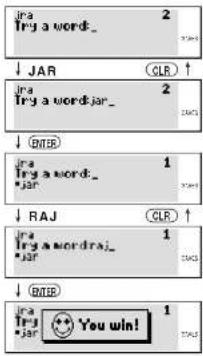
Using letters displayed at random, you attempt to find a specified number of words. (Beginner-2 words / Intermediate-Up to 3 words / Advanced-No limit)
1 Press GAMES and then F to select "Jumble".
2 Set the level and start the game. The selected letters and the number of answers will be displayed. Example: jra
* When you press ENTER, the order of the letters in the displayed word will change at random.
3 Enter the word using all the selected letters and press ENTER.
If your answer is correct, "OK!" will be displayed.
4 Enter the next word using all the selected letters and press ENTER. If you enter all the answers, "You win!" will be displayed and counted in the "Won" column.
* If you press ☐, "Sorry, you lost." will be displayed and counted in the "Lost" column. Then the answer will be displayed.
Mumbo-Jumbo
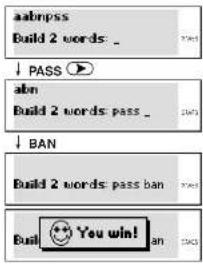
Try to find two or more specified words using the randomly displayed letters. (Beginner - 2 words / Intermediate - 3 words / Advanced - 4 words)
1 Press GAMES and then G to select "Mumbo-Jumbo".
2 Set the level and start the game.
3 Enter specified words divided by spaces, using all letters.
If your answer is correct, "You win!" will be displayed and counted in the "Won" column.
* If your answer is incorrect, or if you press ☐, "Sorry, you lost." will be displayed and counted in the "Lost" column.
Memory
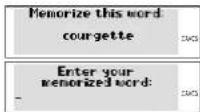
Correctly enter the spellings of words momentarily displayed.
1 Press GAMES and then H to select "Memory".
2 Set the level and start the game.
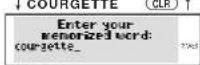
The words will be displayed for about one second. Example: courgette
3 Enter the spelling of the word which has just disappeared from the screen.
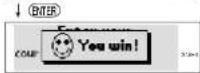
4 Press ENTER.
If your answer is correct, "You win!" will be
displayed and counted in the "Won" column.
If your answer is incorrect, or if you press ⑦,
"Sorry, you lost." will be displayed and counted in the "Lost" column.
Then the next word will be displayed.
Minefield
The idea of this game is to find pairs of words hidden by the alphabet keys.
It's rather like the card game known as "Pelmanism" or "Concentration."
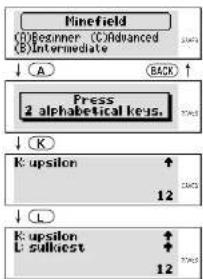
1 Press GAMES and then ① to select "Minefield".
2 Set the level and start the game.
There are two examples of the same word.
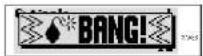
3 Start by pressing one of the alphabet keys. The word hidden by the alphabet key will be displayed.
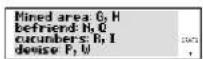
* Depending on the level of the game, there are a number of "minced" areas lurking in the alphabet keys. (Beginner - 2 keys / Intermediate - 4 keys / Advanced - 6 keys)
The direction of the arrow on the right will tell you whether the "mined" area is hidden by alphabet keys before or after in alphabetical order.
4 Press the alphabet key that you think is right. If you press the wrong alphabet key, "Try Again," will be displayed.
flowchart
graph TD
    A["Minefield (1) Beazerer (2) Advanced (3) Intermediate"] --> B["CA"]
    B --> C["Press 2 alphabetical keys."]
    C --> D["K"]
    D --> E["K upsilon ↑ 12"]
    E --> F["L"]
    F --> G["K upsilon ↓ 12 Sullkest ↑"]

"OK!" will display if you select the correct pair, and the remaining number of pairs will be shown.
If you press one of the mined keys, the game will end there and then.
If you give up the game. press ?
"Sorry, you lost." will be displayed and counted in the "Lost" column.
* If you select all the pairs without touching the "mined" area, "You win!" will be displayed and counted in the "Won" column.
Then all the pairs will be displayed.
5 Press ENTER.
You can proceed to the next game.
47
Hide & Seek
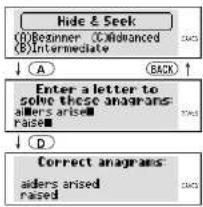
The idea of this game is to enter a letter common to missing parts of the words displayed. (Beginner-3 words / Intermediate-Up to 4 words / Advanced-Up to 4 words)
1 Press GAMES and then J to select "Tide & Seek".
2 Set the level and start the game. At the advanced level, there is no indication of where the letters are missing.
3 Type a letter. If your answer is correct, "You win!" will be displayed and counted in the "Wor" column. If your answer is incorrect, or if you press ? , "Sorry, you lost," will be displayed and counted in the "Lost" column.
4 Press ENTER. You can proceed to the next game.
flowchart
graph TD
    A["Hide & Seek\n(1)Beginner  (2)Advanced\n(3)Intermediate"] --> B["A"]
    B --> C["Enter a letter to solve these anagrams\n: allers arise\n: raise"]
    C --> D["D"]
    D --> E["Correct anagrams\n: aiders ared raised"]
Calculator
- Keys and their Functions
CALC – Selects Calculator mode, Currency, Metric/Imperial and Clothing Size Converters. CE/C – Clears last entry with one press, clears all with two presses.
1 \~ 0 - Number input keys. +, -, x, | - Mathematical function keys.
MC – Clears memory. MR – Recalls number from memory. M+ – Enters number into memory.
+/- - Changes sign of number. % - Percentage key.
* The number stored in the memory is held when the calculation is changed, the mode is switched or the power is turned off.
- Correcting and Clearing Entries
If you enter an incorrect number, press CLR (CE/C) to clear the entire displayed number, then re-enter the correct number. If you press an incorrect mathematical function key, simply press the correct function key afterwards.
If "E" appears in display:
The answer to a calculation is more than 12 digits, the memory is full, or 0 has been used as a divisor.
Press CLR (CE/C) to remove the "E" and continue.
49
Converters
- Selecting the Conversion Menu
1 Press CALC.
2 Press ▼ or ▲ ( ◀ or ▶ ) ( ▽ or △ ) to select the conversion menu.
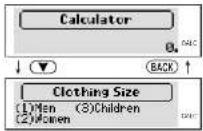
The menu is displayed in the following order.
→ ▼ (or ◀) →
(Temperature: °F → °C)
CM → Inch
Metre → Yard
Gram → Ounce
ML → Ounce (BR)
Litre → Gallon (BR)
Litre → Quarter (AM)
Temperature: °C → °F
Clothing Size
Inch → CM
Yard → Metre
Ounce → Gram
Ounce (BR) → ML
Gallon (BR) → Litre
Temperature: °F → °C
→ Local Curr.
Metre → Feel
Kilometre → Mile
Kilogram → Pound
- Entering or Changing a Conversion Rate
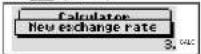
You must enter a currency exchange rate before you can do a currency conversion.
Example: If the exchange rate is £1 = 3 German Mark
1 Press CALC and then enter the new rate. (=3)
2 Press X (RATE).
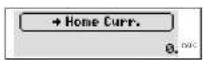
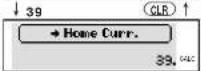
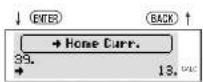
■ Currency Conversion
Example: German Mark to British Pound (£) = 3
German Mark)
1 Press CALC and then select the conversion menu using ▼ or ▲.
2 Enter the number you wish to convert.
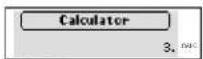
↓ (X) (RATE)
51
3 Press ENTER. (39 Mark = £13)
■ Metric / Imperial Conversion
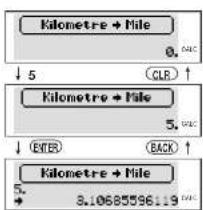
Example: Kilometres to Miles
1 Press CALC and then select the conversion menu using ▼ or ▲.
2 Enter the number you wish to convert.
3 Press ENTER. (5 kilometres = 3.10685596119 miles.)
flowchart
graph TD
    A["Kilometre + Mile"] --> B["0. CALC"]
    B --> C["5"]
    C --> D["CLR ↑"]
    E["Kilometre + Mile"] --> F["5. CALC"]
    F --> G["ENTER"]
    G --> H["BACK ↑"]
    I["Kilometre + Mile"] --> J["5. + 3.10685596119 CALC"]
52
■ Clothing Size Chart
In foreign countries you can easily check clothing sizes for: shirts, shoes, hats etc. for men, women and children.
1 Press CALC and then select the conversion menu using ▼ or ▲.
2 Select a category from Men. Women or Children. Example: Press Ⓦ (2) to select a category "Women".
3 Select a sub-category using ▼ or ▲. Example: Press ▼ once.
4 Press ENTER. The conversion chart is displayed.
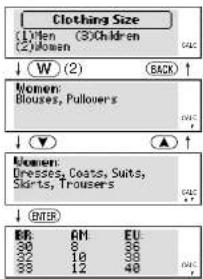


to see more sizes.
| BR | AM | EU |
| 32 | 18 | 38 |
| 33 | 12 | 40 |
| 35 | 14 | 42 |
- Categories of the Clothing Size Chart
Men: (Suits, Trousers, Overcoats, Pullovers)
(Socks)
(Shoes)
(Shirts)
(Hats)
Women: (Blouses, Pullovers)
(Dresses, Coats, Suits, Skirts, Trousers)
(Shoes)
(Stockings)
Children: (Dresses, Coats, Suits, Skirts, Trousers - Girls and Boys)
(Shoes - Girls and Boys)
(Most Clothing - Girls and Boys)

Help Function
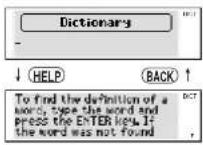
An explanation of how to operate the various functions is simply explained on the screen at each operational stage in each mode.
Example:
1 Press DICT.
2 Press HELP.
3 Press ▼ to see the rest of the explanation. Press ▲ to scroll up.
55
Abbreviations used in the dictionary
Abbreviations in general use, such as 'etc.', 'i.e.', and 'p.m.', are listed and explained as entries in the dictionary itself.
abbrev. abbreviation
Aborig. Aboriginal
adj. adjective
adv. adverb
Afr. African
Afrik. Afrikaans
alt. alteration, altered
Amer. American
appar. apparently
Arab. Arabic
assoc. associated, association
aux. auxiliary
b. born
back-form. back-formation
C century
(as in C18, C19, etc.)
Canad. Canadian
cent. century
cf. compare with
Chin. Chinese
colloq. colloquial
comb. form combining form
compar. comparative
conj. conjunction
contr. contraction
corresp. corresponding
Dan. Danish
det. determiner
dial. dialect
dimin. diminutive
Du. Dutch
E. East
56
Latin Amer. Sp. Latin American Spanish
lit. literally
masc.
MDu.
ME
med. medieval
Mex. Sp.
Mid. High Ger
Mid. Low Ger.
mod.
n.
2
naut. nautical
neg. negative
neul, neuter
north. Engl.
Norw.
obs.
OE
OFr. Old French
57
| ON | Old Norse | rel. related, relative |
| ONorth. Fr. | Old Northern French | Russ. Russian |
| orig. | originally | S. South |
| parl. | participle | Sc. Scottish |
| perh. | perhaps | Scand. Scandinavian |
| Pers. | Persian | sing. singular |
| phr. | phrase | sl. slang |
| phrs | phrases | Sp. Spanish |
| pl. | plural | Swcd. Swedish |
| pop. | popular | symb. symbol |
| Port. Portuguese | Turk. Turkish | |
| posscss. | possessive | ult. ultimately |
| postpos. | postpositive | usu. usually |
| predet. | predeterminer | v. verb |
| prep. | preposition | var. variant |
| pres. prescent | vars variants | |
| prob. | probably | W. West |
| pron. | pronoun | |
| pronunc. | pronunciation | |
| ref. | reference | |
Pronunciations
Pronunciations are not given for ordinary, everyday words such as bake, baby, beach, bewilder, boastful, or budget, since it is assumed that native speakers of English do not, as a rule, have problems with the pronunciation of such words.
In the Concise Oxford Dictionary, the principle followed is that pronunciations are given only where they are likely to cause problems for the native speaker of English, in particular for foreign words, scientific and other technical terms, rare words, words with unusual stress patterns, and words in which the standard pronunciation is disputed. For example, full pronunciations are given for the following words: baba ganoush, baccalaureate, beatific, bijouterie, bucolic, and buddleia.
The International Phonetic Alphabet (IPA) is used in representing the standard accent of English as spoken in the south of England (sometimes called Received Pronunciation or RP). It is recognized that, although the English of southern England is the pronunciation given, many variations are heard in standard speech in other parts of the English-speaking world.
The symbols used for English words, with their values, are given below.
Consonants
The following have their usual English values: b, d, f, h, k, l, m, n, p, r, s, t, v, w, and z.
Other symbols are used as follows:
| g | gel | x | loch | ð | this | j | yes |
| tʃ | chip | ŋ | ring | ʃ | she | ||
| dʒ | jar | θ | thin | ʒ | decision |
Vowels
| SHORT VOWELS | LONG VOWELS(: indicates length) | DIPHTHONGS | TRIPHTHONGS |
| a cat | ɔ: arm | ΔI my | ΔIə fire |
| ε bod | ɛ: hair | au how | auə sour |
| ə ago | ə: her | ei day | |
| i sit | i: see | əʊ no | |
| i cosy | ɔ: saw | ɪə near | |
| ɒ hot | u: too | ɔɪ boy | |
| ʌ run | ʊə poor | ||
| ʊ put |
60
(a) before /l/, /m/, or /n/ indicates that the syllable may be realized with a syllabic l, m,
or n, rather than with a vowel and a consonant, e.g. /'bʌt(ə)n/ rather than /'bʌtan/.
(r) indicates an r that is sometimes sounded when a vowel follows, as in drawer, cha-chaing.
Foreign pronunciations
Foreign words and phrases, whether naturalized or not, are always given an anglicized pronunciation. The anglicized pronunciation represents the normal pronunciation used by native speakers of standard English when using the word in an English context. A foreign pronunciation is also given for words taken from other languages (principally French, Dutch, German, Italian, Russian, and Spanish) where this is appreciably different from the anglicized form and where the other language is familiar to a reasonable number of English speakers.
Foreign-language transcriptions are based on current national standards. Regional variations have not been given, except in the case of Spanish transcriptions, where both Castilian and American Spanish variants are given. Transcriptions are broad, and many symbols, identical to those used for transcribing English, have similar values to those of RP. In a few cases, where there is no English equivalent to a foreign sound, a symbol has been added to the inventory. The additional symbols used to represent foreign pronunciations are given below.
Consonants
| C | gemütlich | |
| J | Monseigneur | |
| β | bolivar | |
| Y | alguacil | |
| R | French 'r' | auberge |
Vowels
| SHORT VOWELS | LONG VOWELS(: indicates length) | NASALIZED VOWELS(- indicates nasality) | DIPHITHONGS |
| e Abitur | a: Autobahn | ä pincetteb cordon bleu | ar Gleichschaftung |
| e abé | e: Wehrmacht | ä chanson£ coup de malon | |
| o cabilde | o: verbalen | db vingt-et-um£ arrendissement | |
| o durchkomponent | |||
| oe douceur | |||
| ø vieux jeu | e: Gasthåle | ||
| u. curandero | |||
| y cu | y: gemällich | ||
| ? Dall | |||
| * hauleur |
Proper Use
To ensure a long and useful life from this precision electronic instrument, do not expose the unit to extreme heat or cold, water or other liquids (including spray cleaners) or extreme pressure (such as carrying in a back pocket). Doing any or all of these things may render the unit inoperable and invalidate the warranty.
Specification
Display: 27 characters x 4 lines
Temperature range: 0°C to +40°C (32°F to 104°F)
Battery: AAA × 4 pcs.
Battery life: approx. 100 hours (Manganese Batteries)
(continuous use) approx. 200 hours (Alkaline Batteries)
Automatic power off: approx. 3 minutes
Size: 148 (W) x 100 (H) x 27.5 (D) mm (without case cover)
154 (W) x 102 (H) x 31.1 (D) mm (with case cover)
Weight: approx. 250g (including batteries)
* Specifications may change without notice due to our policy of continual product improvement.
* The life of the battery will vary depending on how the unit is used.
63
ONE YEAR LIMITED WARRANTY
- This product is warranted to be free from defects in material or workmanship for one year from date of purchase.
- Repair (or at our discretion, replacement) will be made on any unit which proves to be defective during this period. Carefully pack the unit along with proof of purchase and a completed copy of the Warranty Record which you will find in this manual. Postage, insurance and shipping costs incurred in returning the product for warranty service are your responsibility.
- This warranty does not extend to units which have been subjected to misuse, abuse, neglect, accidents or to units that have been used in violation of the operation instructions. If in our judgement, the unit shows evidence of having been altered, modified or serviced without our authorisation, it will be ineligible for service under this warranty.
- In Europe, this warranty does not affect your statutory rights.
- Battery replacement and broken Liquid Crystal Displays are not covered under this warranty.
Seiko Instruments Inc. shall not be liable for any direct, consequential or incidental damages arising out of use of this product. Seiko Instruments Inc. shall not be responsible for damages to this unit as a result of a natural or unnatural disaster, except to the extent prohibited by applicable law. Any implied warranty of merchantability or fitness for a particular purpose on this product is limited in duration to the duration of the warranty.
CE CN148
EC DECLARATION OF CONFORMITY
This is to certify that this equipment fully conforms to the protection requirements of the following EC Council Directives on the approximation of the laws of the member states relating to:-
Directives Title
89/336/EEC Electromagnetic Compatibility
Applicable Standards
EN50081-1 Electromagnetic Compatibility - Generic Emission
EN50082-2 Electromagnetic Compatibility - Generic Immunity
SEIKO UK Limited SC House. Vanwall Road, Maidenhead, Berks. SL6 4UW U.K.
This device complies with part 15 of the FCC Rules.
Operation is subject to the following two conditions:
(1) This device may not cause harmful interference, and
(2) This device must accept any interference received, including interference that may
cause undesired operation.
- SEIKO
- CONTENTS
- Functions and Features
- Dictionary
- Thesaurus
- Spellchecker
- Solver
- Word Games
- Calculator
- Converters
- Help Function
- Demo Function
- The Keys and their Functions
- Preparation for using the Unit
- Installing Batteries
- - Resetting:
- - Changing Batteries:
- CAUTION
- - Removing and Setting up the Case Cover
- Contrast Adjustment
- Selecting the Spellchecker level
- - Demo Function
- Dictionary
- Basic Procedure
- - Searching for Words
- - Derivatives
- - Entering and Correcting Letters
- - Misspelled Words or Words not in the Dictionary
- - Pick Function
- Phrase Search
- - Entering Multiple Keywords
- Keywords with AND
- Keywords with OR
- - Words Not in the Dictionary
- Thesaurus
- - Words not in the Thesaurus
- - Words not in Memory
- Spellchecker
- - Selecting the Spellchecker level
- • Using the Wildcard Function
- Word Games / Solver
- Crossword Solver
- Anagram Solver
- Selecting the Game and Setting the Level
- Hangman
- User Hangman
- \*\*\* Tip for Parents \*\*\*
- Anagrams
- User Anagrams
- Beat the Clock
- Jumble
- Mumbo-Jumbo
- Memory
- Minefield
- Hide & Seek
- Calculator
- - Keys and their Functions
- - Correcting and Clearing Entries
- Converters
- - Selecting the Conversion Menu
- - Entering or Changing a Conversion Rate
- ■ Currency Conversion
- ■ Metric / Imperial Conversion
- ■ Clothing Size Chart
- - Categories of the Clothing Size Chart
- Help Function
- Abbreviations used in the dictionary
- Pronunciations
- Consonants
- Foreign pronunciations
- Proper Use
- Specification
- ONE YEAR LIMITED WARRANTY
- CE CN148
- EC DECLARATION OF CONFORMITY
Brand : SEIKO
Model : ER6000
Category : Uncategorized