
3000 Series - Humidifier EBAC - Free user manual and instructions
Find the device manual for free 3000 Series EBAC in PDF.


| Type | Dehumidifier |
| Brand | Ebac |
| Model | 3000 Series |
| Country of Manufacture | United Kingdom (UK) |
| Modes | SMART, MAX, Laundry Dry, Air Purifying |
| Fan Speeds | 2 (Slow/Normal and High) |
| Control Type | Electronic with digital display |
| Water Collection Method | Refrigerant compressor (cold surface) |
| Water Tank Capacity | Internal container (exact capacity not specified) |
| Filter Type | Washable dust filter (standard or activated carbon optional) |
| Filter Cleaning | Monthly with vacuum cleaner |
| Filter Replacement | Every 4 months |
| Minimum Operating Temperature | 3°C (37°F) |
| Standing Time Before First Use | 2 hours upright after unpacking |
| Auto Defrost | Yes |
| Warranty | 1 year from date of purchase |
| Accessories Included | Optional: Permanent drainage kit, castor kit, filter packs |
| Power Cord | Standard plug (UK) |
| Noise Level | Similar to a fridge freezer (quiet operation) |
| Safety Features | Auto shut-off when tank full, thermal overload protection |
| Weight | Not specified; lightweight and portable |
Frequently Asked Questions - 3000 Series EBAC
User questions about 3000 Series EBAC
0 question about this device. Answer the ones you know or ask your own.
Ask a new question about this device
Download the instructions for your Humidifier in PDF format for free! Find your manual 3000 Series - EBAC and take your electronic device back in hand. On this page are published all the documents necessary for the use of your device. 3000 Series by EBAC.
USER MANUAL 3000 Series EBAC
UK Manual Accessories Warranty Registration
Contents
Introduction 4
Unpacking your dehumidifier 4
Setting up your dehumidifier 5
SMART Control ^TM 5
3000 Series Parts 6
Settings & Controls 7
Emptying the water container 9
Cleaning the filter 9
Troubleshooting 10
Technical and Safety Information 13
Accessories 14
Warranty Registration 17
Useful Contacts 19
Introduction
At Ebac we pride ourselves on being the dehumidifier experts. With over 30 years experience we have helped over 1 million customers remove excess moisture from their homes. Our range of products (all designed and manufactured in the UK) reflects our years of expertise and provides an option for every home.
The first time you plug in your new Ebac dehumidifier you'll begin to realise the difference it will make to your home. You'll be amazed at just how much water this quiet, yet powerful unit extracts and stores in its container. It's sure to get you thinking where it all comes from and where it's been going all those years.
Incredibly, the average family produces 20 pints/12 litres of moisture a day. However, that's one fact you needn't worry about now. Your Ebac dehumidifier is designed to cope with everything you do that adds even more moisture to the British climate. Everything from showering to washing up, boiling a kettle to breathing; they all add moisture to the air.
This manual will help you get the very best out of your Ebac and not only protect your home from the damaging effects of condensation and damp, but also improve the quality of your air.
Unpacking you dehumidifier
Please ensure that all packaging is disposed of or stored safely where it will not be a danger to children or pets. In the unlikely event of having to return your dehumidifier for repair, cardboard packaging will be required. You may wish to consider this before disposing of the packaging. Stand your dehumidifier upright for a minimum of 2 hours before switching on.
Technical and Safety information
Setting up your dehumidifier for maximum performance
Location
Unless you have a particular area in need, we suggest that you place your dehumidifier in the coldest, dampest part of the home or alternatively in a central location ensuring that safety is paramount.
Since moisture rises, first floor location is preferable.
Place the dehumidifier away from direct heat source. As the unit uses a cold surface to collect moisture, direct heat will reduce its ability to do so. Doors should be kept ajar to ensure good air flow throughout the home.
Your dehumidifier will not operate should the temperature drop below 3^ c.
Operation
Unless you have a severe problem with excess moisture or damp, we recommend plugging in the dehumidifier and running on SMART Control (see Switching on your Dehumidifier, page 7) Your dehumidifier should run on this setting continuously for 24-48 hours when switching on for the first time. It will then switch on and off automatically at the most economical times to keep the humidity at the correct level.
In the event of needing to increase air flow and water collection, the dehumidifier can be run on MAX for a set period of Time or Continuously.
Comfort
The compressor will make a humming noise similar to that of your fridge freezer. We recommend that the dehumidifier is not placed directly onto a hard floor as this will increase and amplify the sound.
3000 Series Parts
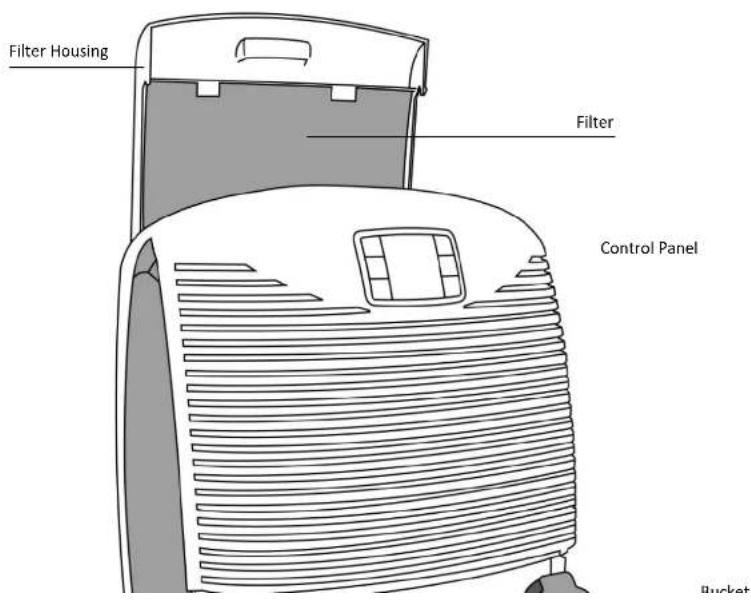
Settings & Controls

Please refer to the image above when numbers are indicated within the instructions
Switching on your dehumidifier
Selecting different Modes
| Press the MODE button (1) and MAX will illuminate on the display | The unit is now running at MAX capacity on a fan speed setting of 2 (high). The unit will now run continuously. |
| Press the MODE button (1) again and SMART will illuminate on the display | This unit is operating in SMART mode and the fan speed will decrease to 1 (slow/normal). |
| Changing the Fan Speed | |
| Press the FAN button (5) to cycle through the fan speeds | The FAN symbol (12) will illuminate showing either a number 1 (slow/normal) or number 2 (high) depending on the speed selected.Fan speed can only be changed in SMART, MAX or AIR PURIFYING Mode. |
| Using the Laundry Drying Function | |
| Press the LAUNDRY button (4) and the laundry symbol (9) will illuminate | The unit is now set to operate at the highest fan speed at maximum capacity.The unit will run for the highlighted time (10) before reverting to SMART Mode. |
| Press the TIMER button (2) to change the length of time LAUNDRY mode will operate | The order the times will cycle through is as follows: 2hrs – 4hrs – 8hrs – 2hrs |
| Using the Air Purifying Mode | |
| Press the AIR PURIFYING button (6) and symbol (11) will illuminate | The unit is now in Air Purifying mode. The dehumidifier will now stop extracting moisture from the air and simply null |
Emptying the water container
The Status symbol on the control panel will illuminate red when the container is full. When this occurs, water collection stops.

natural_image
Line drawing of a hand cleaning a surface with a cloth (no text or symbols)To Empty, Open the water container access door

natural_image
Line drawing of a hand holding a small object, possibly a tool or device, with no visible text or symbols.The container can then be removed and emptied as shown.
Replace the container back into the dehumidifier with the outlet on the left hand side and gently close the door.
Cleaning the filter
Your Ebac 3000 has a filter to remove dust from the air.
This filter should be cleaned every month and replaced every 4 months. Failure to do this will reduce the performance of your dehumidifier and may over time lead to a permanent reduction in performance.
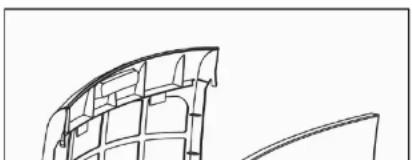
natural_image
Pure architectural line drawing of a curved structural element (no text or symbols)Remove the filter from the rear of the unit by sliding the filter housing upwards
Take the filter out of the housing and clean the filter using a vacuum
Troubleshooting
| The unit has no powerAre there any signs of power to the unit, is the display illuminated, is the fan blowing or Compressor running? | • Is the unit plugged into a power supply? | – Check someone hasn't disconnected the unit. |
| • Is the mains supply working? | – Try another appliance in the socket, there may be no power from the socket. | |
| • Has the fuse been replaced? | – We suggest that you replace the fuse with the correct type for this model, if it continues to blow the fuse the unit is faulty | |
| There is a constant red light on the unitIs the display showing a red light constantly as if the water container is not present or is full? | • Is the water container inserted and empty? | – Remove and replace the water container, ensuring it is inserted correctly – See Emptying the Water Container, pg6. |
| • Does the float inside the water container move freely? | – Remove and empty any water from the water container. Now turn the container upside down and visually check that the float moves freely. | |
 | • Is the micro-switch present? | – Check the micro-switch lever (plastic lever located behind the bucket – See Diagram A) is present and working correctly. When you press this lever the fan should start up and the display should illuminate |
Troubleshooting Cont...
| The unit has a low water collectionThe unit is operating as normal but appears to be collecting less water. | Is the unit being run on economy setting?Have you had the unit for a sufficient length of time?Have the weather conditions changed recently? | The economy setting is not suitable for all conditions try running the unit on AUTO and see if the collection increases.As a new customer, you may feel that the collection of water has reduced after the initial installation, this is normal.If the weather is very cold / freezing there is less moisture in the air and the unit will collect less water. |
| The unit is not collecting any waterThe unit is operating as normal but is collecting NO water. | Is the unit on the correct setting?Has the unit been running for a reasonable period of time?Is the unit being operated close to a heat source? | Ensure it is not being run on a Fan only setting.24 hours should be sufficient time for you dehumidifier to collect water however we also suggest running the unit on the Maximum setting for 24 hours.Ensure the unit is placed in a suitable location – See Placing you dehumidifier for maximum performance |
Troubleshooting Cont...
The unit is icing up
The unit is operating as normal but is creating a lot of ice at the rear of the unit.

Diagram C
• Is there thick ice on the coil which does not disappear?
- Is the unit being run in the correct environment?
- It is normal for a thin layer of ice or frost to form on the coil - See Diagram C, but this will disappear when the unit defrosts.
- The unit should be run in a domestic environment with an ambient temperature of 3^ or above?
The unit is leaking
The unit is operating as normal but is leaking water.
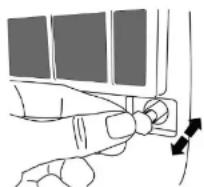
Diagram D
• Is the back of the unit leaking?
• Is the container leaking?
• Is the unit on a level surface?
- Ensure that the drainage bung is inserted correctly in the rear of the unit – See Diagram D.
- Check that the container has no leaks by filling it with water over a sink.
- The unit may leak if it is not placed on a level surface. Your dehumidifier should always be placed on a level surface for this reason.
There is a problem with the display
The unit appears to be operating as normal but the
- Have you tried resetting the unit?
- Unplug the unit and plug it back in. This will reset the unit and may resolve the problem.
Accessories
Some or all of the following accessories may have been included with your Ebac Dehumidifier. Those that are not included can be purchased for an additional charge from your local retailer or www.ebacdirect.com
Permanent Drainage Kit (optional extra)
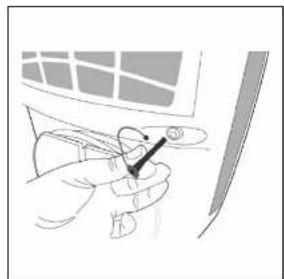
natural_image
Illustration of a hand holding a small object with a black arrow pointing to it, against a wall and window (no text or symbols)
natural_image
Illustration of a hand holding a cable with a small object above, next to a screen (no text or symbols visible)Castors (optional extra)

natural_image
Technical line drawing of a mechanical component with mounting holes and mounting points (no text or symbols)Accessories
| Annual Standard Filter Pack | Part no. DIA023 |
| Contains 3 standard filters. The standard filter will remove dust particles as air is passed over the filter. | £18.99 |
| Annual Activated Carbon Filter Pack | Part no. DIA021 |
| Contains 3 Activated Carbon Filters. Carbon filters are ideal for homes with pets or smokers as they remove odours from the air creating a more pleasant atmosphere. | £19.99 |
| Castor Kit | Part no. DIA020 |
| Although lightweight and portable adding a castor kit to your dehumidifier makes it easier to move as it can be simply wheeled to a desired location. | £14.99 |
| Drainage Kit | Part no. DDA110 |
| The permanent drainage kit allows your dehumidifier to be used in unoccupied situations such as holiday homes, cellars etc without the need for the water container to be emptied | £12.49 |
| Replacement Filter Housing | Part no. DIC007 |
| The filter housing is specific to the 3000 series dehumidifiers. | £4.99 |
How to purchase
- Online
Log on to www.ebacdirect.com
- Post
Complete and send the attached form to:
Ebac Ltd, Ketton Way, Aycliffe Industrial Park, Newton
Aycliffe, County Durham, DL5 6SQ
Accessory Details
| Part No. | Accessory | Price | Total |
Your Details
Title: .... Initials: .... Surname: ....
Address:
[EMPTY]
Warranty Registration
Thank you for purchasing an Ebac Dehumidifier. Your dehumidifier is covered by a standard one year warranty from the date of purchase*. Registration of your unit ensures you can take full advantage of your warranty so don't hesitate and register today.
How to Register
There are two simple methods of registering your Ebac Dehumidifier Warranty
- Online
Log on to www.ebacdirect.com/warranty
- Post
Complete and send the attached form to:
Ebac Ltd, Ketton Way, Aycliffe Industrial Park, Newton Aycliffe, County Durham, DL5 6SQ
Why Register?
There are three Reasons to register your Ebac Dehumidifier:
- You can take full advantage of your Ebac warranty.
- Fast repair service carried out by Ebac with the unit collected and delivered from and to the place most convenient to you.
- All parts and labour included.
- Your details are on record which enables us to help you much faster.
- You can receive the latest product information and up to date offers.
About You
Title: .... Initials: .... Surname: ....
Address: ....
Postcode: ....
Model No.* Serial No.*
*Located behind the water container or on the rear panel
Date of Purchase: ....../....../....Purchase Price (£):.....
Where did you buy your unit: ....
Useful Contacts
- Online
Log on to www.ebacdirect.com
Sales Enquiries : direct.sales@ebac.com
After Sales Enquiries : customer.services@ebac.com
- Telephone
Sales Enquiries : 0845 634 1392
Support and Repair Enquiries : 0845 634 9899


- Contents
- Introduction
- Unpacking you dehumidifier
- Technical and Safety information
- Setting up your dehumidifier for maximum performance
- Location
- Operation
- Comfort
- Series Parts
- Settings & Controls
- Emptying the water container
- Cleaning the filter
- Troubleshooting Cont...
- The unit is icing up
- The unit is leaking
- There is a problem with the display
- Accessories
- How to purchase
- Your Details
- Warranty Registration
- How to Register
- Why Register?
- About You
- Useful Contacts
Brand : EBAC
Model : 3000 Series
Category : Humidifier